remote start DODGE CHALLENGER 2020 User Guide
[x] Cancel search | Manufacturer: DODGE, Model Year: 2020, Model line: CHALLENGER, Model: DODGE CHALLENGER 2020Pages: 396, PDF Size: 16.64 MB
Page 215 of 396
IN CASE OF EMERGENCY213
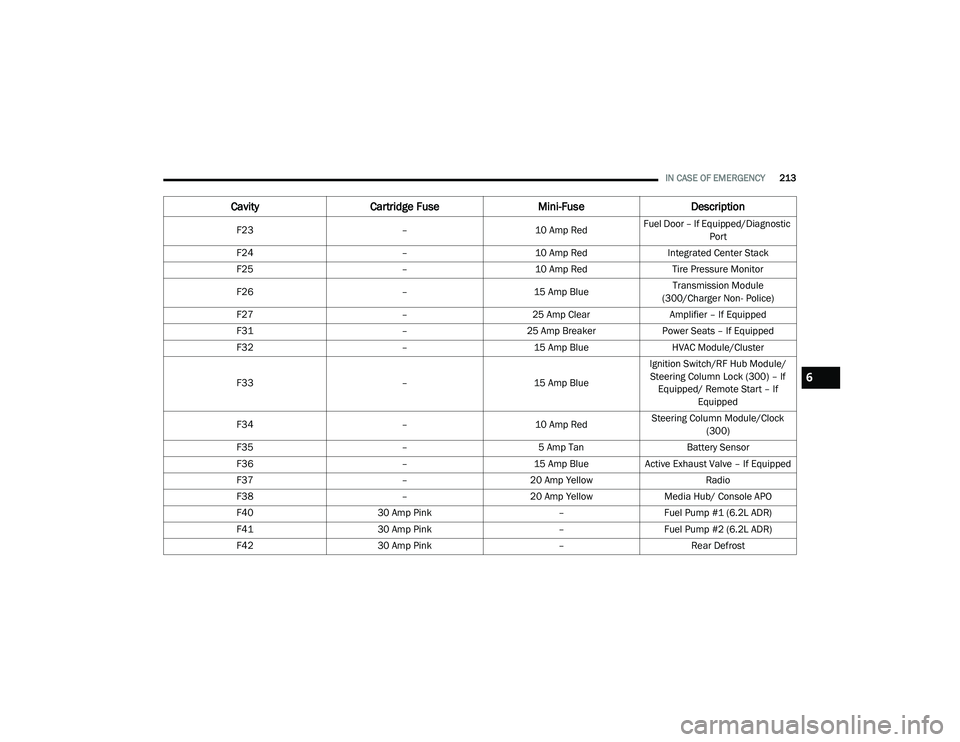
F23 –10 Amp RedFuel Door – If Equipped/Diagnostic
Port
F24 –10 Amp RedIntegrated Center Stack
F25 –10 Amp Red Tire Pressure Monitor
F26 –15 Amp Blue Transmission Module
(300/Charger Non- Police)
F27 –25 Amp Clear Amplifier – If Equipped
F31 –25 Amp Breaker Power Seats – If Equipped
F32 –15 Amp Blue HVAC Module/Cluster
F33 –15 Amp BlueIgnition Switch/RF Hub Module/
Steering Column Lock (300) – If Equipped/ Remote Start – If Equipped
F34 –10 Amp RedSteering Column Module/Clock
(300)
F35 –5 Amp Tan Battery Sensor
F36 –15 Amp BlueActive Exhaust Valve – If Equipped
F37 –20 Amp Yellow Radio
F38 –20 Amp Yellow Media Hub/ Console APO
F40 30 Amp Pink –Fuel Pump #1 (6.2L ADR)
F41 30 Amp Pink –Fuel Pump #2 (6.2L ADR)
F42 30 Amp Pink –Rear Defrost
CavityCartridge Fuse Mini-FuseDescription
6
20_LA_OM_EN_USC_t.book Page 213
Page 229 of 396
IN CASE OF EMERGENCY227
PREPARATIONS FOR JUMP START
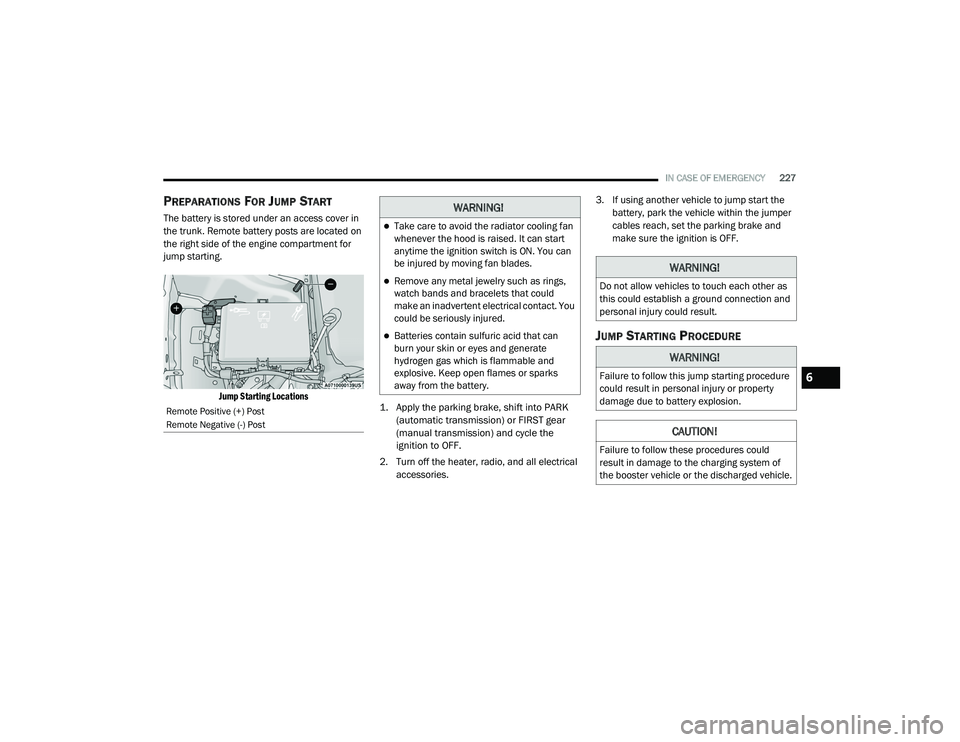
The battery is stored under an access cover in
the trunk. Remote battery posts are located on
the right side of the engine compartment for
jump starting.
Jump Starting Locations
1. Apply the parking brake, shift into PARK
(automatic transmission) or FIRST gear
(manual transmission) and cycle the
ignition to OFF.
2. Turn off the heater, radio, and all electrical accessories. 3. If using another vehicle to jump start the
battery, park the vehicle within the jumper
cables reach, set the parking brake and
make sure the ignition is OFF.
JUMP STARTING PROCEDURE
Remote Positive (+) Post
Remote Negative (-) Post
WARNING!
Take care to avoid the radiator cooling fan
whenever the hood is raised. It can start
anytime the ignition switch is ON. You can
be injured by moving fan blades.
Remove any metal jewelry such as rings,
watch bands and bracelets that could
make an inadvertent electrical contact. You
could be seriously injured.
Batteries contain sulfuric acid that can
burn your skin or eyes and generate
hydrogen gas which is flammable and
explosive. Keep open flames or sparks
away from the battery.
WARNING!
Do not allow vehicles to touch each other as
this could establish a ground connection and
personal injury could result.
WARNING!
Failure to follow this jump starting procedure
could result in personal injury or property
damage due to battery explosion.
CAUTION!
Failure to follow these procedures could
result in damage to the charging system of
the booster vehicle or the discharged vehicle.
6
20_LA_OM_EN_USC_t.book Page 227
Page 230 of 396
228IN CASE OF EMERGENCY
Connecting The Jumper Cables
1. Connect the positive
(+) end of the jumper
cable to the remote positive (+)
post of the
vehicle with the discharged battery.
2. Connect the opposite end of the positive (+)
jumper cable to the positive (+) post of the
booster battery.
3. Connect the negative (-) end of the jumper
cable to the negative (-) post of the booster
battery.
4. Connect the opposite end of the negative (-)
jumper cable to the remote negative (-) post
(exposed metallic/unpainted post of the
discharge vehicle) located directly behind
the under-hood fuse box. 5. Start the engine in the vehicle that has the
booster battery, let the engine idle a few
minutes, and then start the engine in the
vehicle with the discharged battery.
6. Once the engine is started, remove the jumper cables in the reverse sequence.
Disconnecting The Jumper Cables
1. Disconnect the negative
(-) end of the
jumper cable from the remote negative (-)
post of the vehicle with the discharged
battery.
2. Disconnect the opposite end of the negative (-) jumper cable from the negative (-) post of
the booster battery. 3. Disconnect the positive
(+) end of the
jumper cable from the positive (+) post of
the booster battery.
4. Disconnect the opposite end of the positive (+) jumper cable from the remote positive
(+) post of the vehicle with the discharged
battery.
If frequent jump starting is required to start your
vehicle you should have the battery and
charging system inspected at an authorized
dealer.
WARNING!
Do not connect the jumper cable to the
negative (-) post of the discharged battery.
The resulting electrical spark could cause the
battery to explode and could result in
personal injury.
CAUTION!
Do not run the booster vehicle engine above
2,000 rpm since it provides no charging
benefit, wastes fuel, and can damage booster
vehicle engine.
CAUTION!
Accessories plugged into the vehicle power
outlets draw power from the vehicle’s battery,
even when not in use (i.e., cellular devices,
etc.). Eventually, if plugged in long enough
without engine operation, the vehicle’s
battery will discharge sufficiently to degrade
battery life and/or prevent the engine from
starting.
20_LA_OM_EN_USC_t.book Page 228
Page 253 of 396
SERVICING AND MAINTENANCE251
(Continued)
(Continued)
MAINTENANCE-FREE BATTERY
The vehicle is equipped with a
maintenance-free battery. You will never have
to add water, nor is periodic maintenance
required.
NOTE:
The battery is stored under an access cover in
the trunk. Remote battery terminals are located
in the engine compartment for jump starting.
Refer to “Jump Starting Procedure” in “In Case
Of Emergency” for further information.
PRESSURE WASHING
WARNING!
Battery fluid is a corrosive acid solution and
can burn or even blind you. Do not allow
battery fluid to contact your eyes, skin, or
clothing. Do not lean over a battery when
attaching clamps. If acid splashes in eyes
or on skin, flush the area immediately with
large amounts of water. Refer to “Jump
Starting Procedure” in “In Case Of Emer
-
gency” for further information.
Battery gas is flammable and explosive.
Keep flame or sparks away from the
battery. Do not use a booster battery or any
other booster source with an output greater
than 12 Volts. Do not allow cable clamps to
touch each other.
Battery posts, terminals, and related acces -
sories contain lead and lead compounds.
Wash hands after handling.
The battery in this vehicle has a vent hose
that should not be disconnected and
should only be replaced with a battery of
the same type (vented).
CAUTION!
It is essential when replacing the cables on
the battery that the positive cable is
attached to the positive post and the nega -
tive cable is attached to the negative post.
Battery posts are marked positive (+) and
negative (-) and are identified on the battery
case. Cable clamps should be tight on the
terminal posts and free of corrosion.
WARNING! (Continued)
If a “fast charger” is used while the battery
is in the vehicle, disconnect both vehicle
battery cables before connecting the
charger to the battery. Do not use a “fast
charger” to provide starting voltage.
CAUTION!
Cleaning the engine compartment with a high
pressure washer is not recommended.
Precautions have been taken to safeguard all
parts and connections however, the
pressures generated by these machines is
such that complete protection against water
ingress cannot be guaranteed.
CAUTION! (Continued)
7
20_LA_OM_EN_USC_t.book Page 251
Page 318 of 396
316MULTIMEDIA
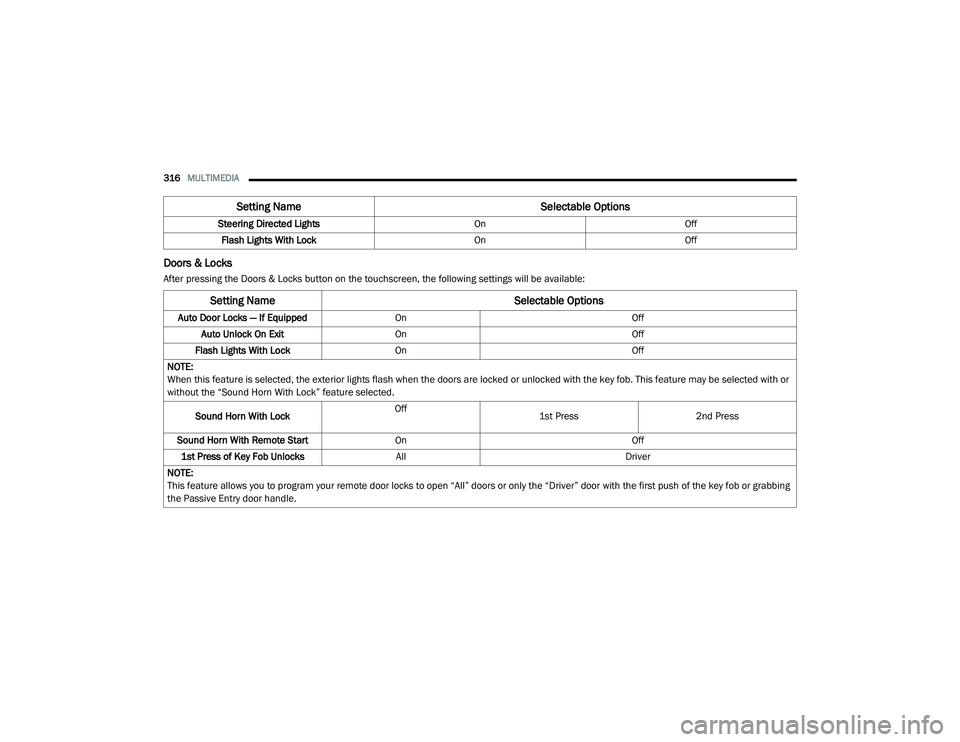
Doors & Locks
After pressing the Doors & Locks button on the touchscreen, the following settings will be available:Steering Directed Lights
OnOff
Flash Lights With Lock OnOff
Setting Name Selectable Options
Setting NameSelectable Options
Auto Door Locks — If EquippedOn Off
Auto Unlock On Exit On Off
Flash Lights With Lock On Off
NOTE:
When this feature is selected, the exterior lights flash when the doors are locked or unlocked with the key fob. This feature may be selected with or
without the “Sound Horn With Lock” feature selected.
Sound Horn With Lock Off
1st Press
2nd Press
Sound Horn With Remote Start On Off
1st Press of Key Fob Unlocks All Driver
NOTE:
This feature allows you to program your remote door locks to open “All” doors or only the “Driver” door with the first push of the key fob or grabbing
the Passive Entry door handle.
20_LA_OM_EN_USC_t.book Page 316
Page 319 of 396
MULTIMEDIA317
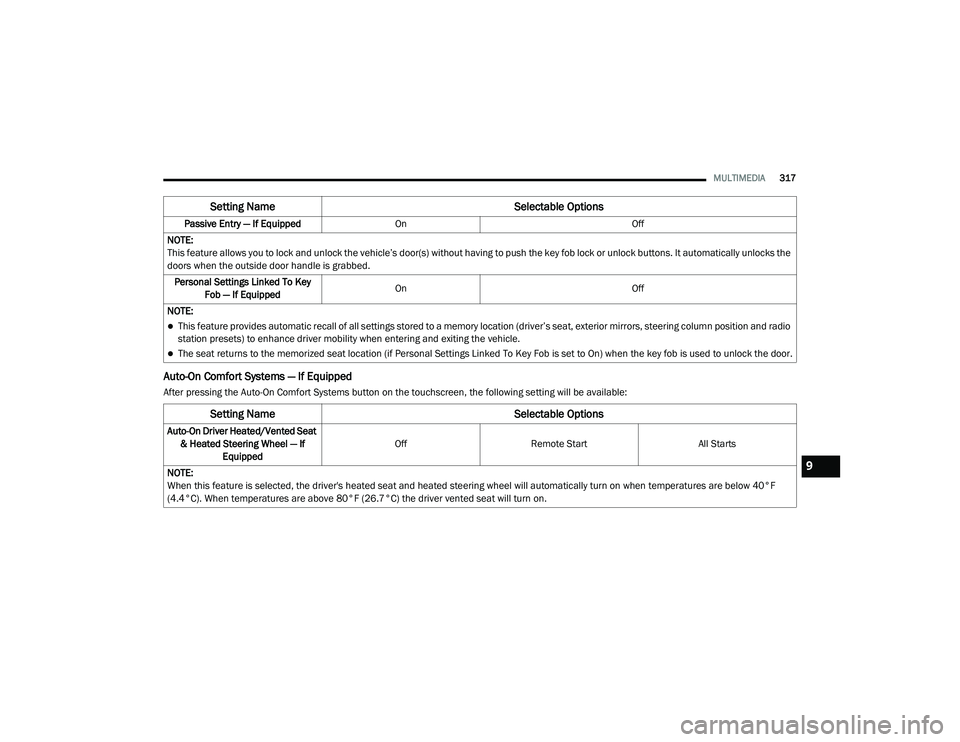
Auto-On Comfort Systems — If Equipped
After pressing the Auto-On Comfort Systems button on the touchscreen, the following setting will be available:Passive Entry — If Equipped
On Off
NOTE:
This feature allows you to lock and unlock the vehicle’s door(s) without having to push the key fob lock or unlock buttons. It automatically unlocks the
doors when the outside door handle is grabbed. Personal Settings Linked To Key Fob — If Equipped On
Off
NOTE:
This feature provides automatic recall of all settings stored to a memory location (driver’s seat, exterior mirrors, steering column position and radio
station presets) to enhance driver mobility when entering and exiting the vehicle.
The seat returns to the memorized seat location (if Personal Settings Linked To Key Fob is set to On) when the key fob is used to unlock the door.
Setting Name Selectable Options
Setting NameSelectable Options
Auto-On Driver Heated/Vented Seat
& Heated Steering Wheel — If Equipped Off
Remote Start All Starts
NOTE:
When this feature is selected, the driver's heated seat and heated steering wheel will automatically turn on when temperatures are below 40°F
(4.4°C). When temperatures are above 80°F (26.7°C) the driver vented seat will turn on.
9
20_LA_OM_EN_USC_t.book Page 317
Page 334 of 396
332MULTIMEDIA
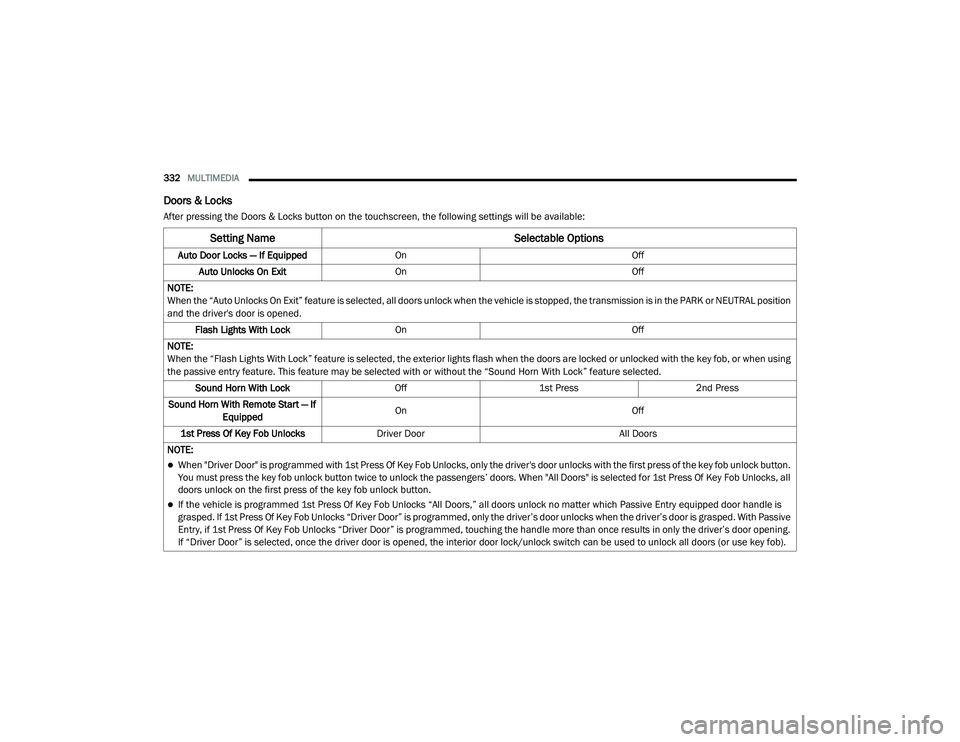
Doors & Locks
After pressing the Doors & Locks button on the touchscreen, the following settings will be available:
Setting Name Selectable Options
Auto Door Locks — If EquippedOn Off
Auto Unlocks On Exit On Off
NOTE:
When the “Auto Unlocks On Exit” feature is selected, all doors unlock when the vehicle is stopped, the transmission is in the PARK or NEUTRAL position
and the driver's door is opened. Flash Lights With Lock On Off
NOTE:
When the “Flash Lights With Lock” feature is selected, the exterior lights flash when the doors are locked or unlocked with the key fob, or when using
the passive entry feature. This feature may be selected with or without the “Sound Horn With Lock” feature selected. Sound Horn With Lock Off1st Press 2nd Press
Sound Horn With Remote Start — If Equipped On
Off
1st Press Of Key Fob Unlocks Driver Door All Doors
NOTE:
When "Driver Door" is programmed with 1st Press Of Key Fob Unlocks, only the driver's door unlocks with the first press of the key fob unlock button.
You must press the key fob unlock button twice to unlock the passengers’ doors. When "All Doors" is selected for 1st Press Of Key Fob Unlocks, all
doors unlock on the first press of the key fob unlock button.
If the vehicle is programmed 1st Press Of Key Fob Unlocks “All Doors,” all doors unlock no matter which Passive Entry equipped door handle is
grasped. If 1st Press Of Key Fob Unlocks “Driver Door” is programmed, only the driver’s door unlocks when the driver’s door is grasped. With Passive
Entry, if 1st Press Of Key Fob Unlocks “Driver Door” is programmed, touching the handle more than once results in only the driver’s door opening.
If “Driver Door” is selected, once the driver door is opened, the interior door lock/unlock switch can be used to unlock all doors (or use key fob).
20_LA_OM_EN_USC_t.book Page 332
Page 384 of 396
382 Drain, Flush, And Refill
.............................. 263Inspection................................................. 265Points To Remember................................. 265Pressure Cap............................................. 264Radiator Cap............................................. 264Selection Of Coolant (Antifreeze)......263, 297, 298, 299, 302Corrosion Protection...................................... 287Cruise Control (Speed Control)............ 166, 169Cruise Light.............................................. 89, 90Customer Assistance..................................... 376Customer Programmable Features................306Cybersecurity................................................. 305
D
Daytime Running Lights................................... 41Dealer Service............................................... 252Deck LidPower Release............................................ 58Defroster, Windshield.................................... 146Delay (Intermittent) Wipers.............................. 45Diagnostic System, Onboard........................... 91Dimmer SwitchHeadlight..................................................... 41DipsticksOil (Engine)................................................ 250Disabled Vehicle Towing................................ 232
DisposalAntifreeze (Engine Coolant)...................... 265Disturb.......................................................... 365Do Not Disturb.............................................. 373Door Ajar.......................................................... 86Door Ajar Light................................................. 86Door LocksAutomatic.................................................... 28Door Opener, Garage....................................... 59Doors............................................................... 24Driver’s Seat Back Tilt...................................... 29DrivingThrough Flowing, Rising, Or Shallow Standing Water
.................................... 197
E
Electric Brake Control System.......................... 94Anti-Lock Brake System............................... 93Electronic Roll Mitigation....................95, 100Electric Remote Mirrors................................... 39Electrical Power Outlets................................... 65Electronic Power Distribution Center
(Fuses).......................................................... 208Electronic Speed Control (Cruise Control)..... 167Electronic Stability Control (ESC)..................... 95Electronic Throttle Control Warning Light......... 85
Emergency, In Case OfFreeing Vehicle When Stuck..................... 231Jacking............................................. 216, 269Jump Starting.................................. 226, 227Towing...................................................... 232Emission Control System Maintenance............92Engine............................... 246, 247, 248, 249Air Cleaner................................................ 255Block Heater............................................. 152Break-In Recommendations............ 152, 153Checking Oil Level.................................... 250Compartment......................... 246, 247, 249Compartment Identification............. 246, 248Coolant (Antifreeze)................ 262, 299, 302Cooling...................................................... 262Exhaust Gas Caution....................... 145, 296Fails To Start............................................. 152Flooded, Starting...................................... 152Fuel Requirements................................... 293Jump Starting.................................. 226, 227Oil........................ 252, 297, 298, 299, 302Oil Filler Cap.................................... 246, 254Oil Filter.................................................... 255Oil Selection............................ 252, 297, 298Oil Synthetic.............................................. 254Overheating.............................................. 229Starting............................................ 148, 149
20_LA_OM_EN_USC_t.book Page 382
Page 386 of 396
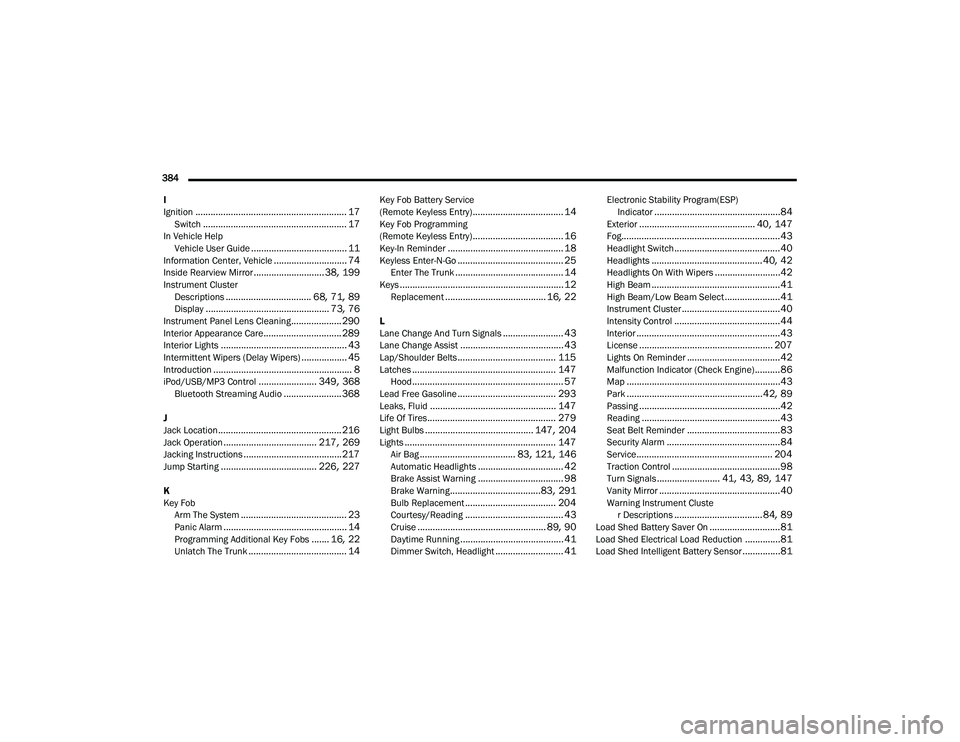
384 I
Ignition
............................................................ 17Switch......................................................... 17In Vehicle Help Vehicle User Guide...................................... 11Information Center, Vehicle............................. 74Inside Rearview Mirror............................ 38, 199Instrument ClusterDescriptions.................................. 68, 71, 89Display................................................. 73, 76Instrument Panel Lens Cleaning.................... 290Interior Appearance Care............................... 289Interior Lights.................................................. 43Intermittent Wipers (Delay Wipers).................. 45Introduction....................................................... 8iPod/USB/MP3 Control....................... 349, 368Bluetooth Streaming Audio....................... 368
J
Jack Location................................................. 216Jack Operation..................................... 217, 269Jacking Instructions....................................... 217Jump Starting...................................... 226, 227
K
Key FobArm The System
.......................................... 23Panic Alarm................................................. 14Programming Additional Key Fobs....... 16, 22Unlatch The Trunk....................................... 14
Key Fob Battery Service
(Remote Keyless Entry).................................... 14Key Fob Programming
(Remote Keyless Entry).................................... 16Key-In Reminder.............................................. 18Keyless Enter-N-Go.......................................... 25Enter The Trunk........................................... 14Keys................................................................. 12Replacement........................................ 16, 22
L
Lane Change And Turn Signals........................ 43Lane Change Assist......................................... 43Lap/Shoulder Belts....................................... 115Latches......................................................... 147Hood............................................................ 57Lead Free Gasoline....................................... 293Leaks, Fluid.................................................. 147Life Of Tires................................................... 279Light Bulbs........................................... 147, 204Lights............................................................ 147Air Bag...................................... 83, 121, 146Automatic Headlights.................................. 42Brake Assist Warning.................................. 98Brake Warning....................................83, 291Bulb Replacement.................................... 204Courtesy/Reading....................................... 43Cruise................................................... 89, 90Daytime Running......................................... 41Dimmer Switch, Headlight........................... 41
Electronic Stability Program(ESP)Indicator..................................................84Exterior.............................................. 40, 147Fog...............................................................43Headlight Switch..........................................40Headlights............................................ 40, 42Headlights On With Wipers..........................42High Beam...................................................41High Beam/Low Beam Select......................41Instrument Cluster.......................................40Intensity Control..........................................44Interior.........................................................43License..................................................... 207Lights On Reminder.....................................42Malfunction Indicator (Check Engine)..........86Map.............................................................43Park......................................................42, 89Passing........................................................42Reading.......................................................43Seat Belt Reminder.....................................83Security Alarm.............................................84Service...................................................... 204Traction Control...........................................98Turn Signals......................... 41, 43, 89, 147Vanity Mirror................................................40Warning Instrument Cluster Descriptions................................... 84, 89Load Shed Battery Saver On............................81Load Shed Electrical Load Reduction..............81Load Shed Intelligent Battery Sensor...............81
20_LA_OM_EN_USC_t.book Page 384
Page 388 of 396
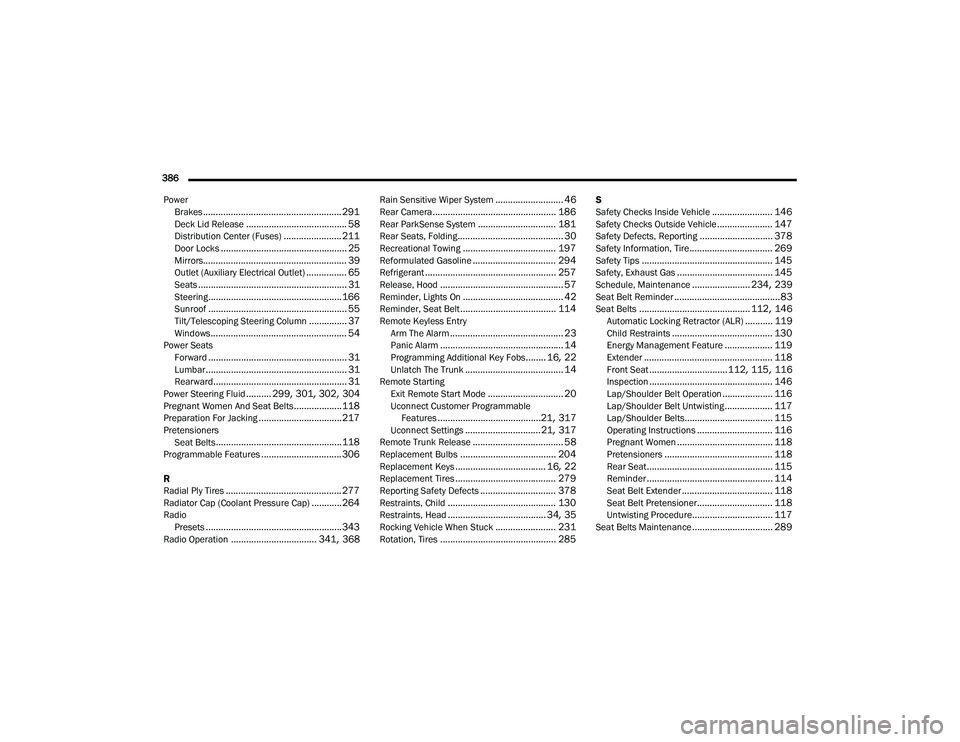
386 Power Brakes
....................................................... 291Deck Lid Release........................................ 58Distribution Center (Fuses)....................... 211Door Locks.................................................. 25Mirrors......................................................... 39Outlet (Auxiliary Electrical Outlet)................ 65Seats........................................................... 31Steering..................................................... 166Sunroof....................................................... 55Tilt/Telescoping Steering Column............... 37Windows...................................................... 54Power SeatsForward....................................................... 31Lumbar........................................................ 31Rearward..................................................... 31Power Steering Fluid.......... 299, 301, 302, 304Pregnant Women And Seat Belts...................118Preparation For Jacking................................. 217PretensionersSeat Belts.................................................. 118Programmable Features................................ 306
R
Radial Ply Tires.............................................. 277Radiator Cap (Coolant Pressure Cap)............ 264RadioPresets...................................................... 343Radio Operation.................................. 341, 368
Rain Sensitive Wiper System........................... 46Rear Camera................................................. 186Rear ParkSense System............................... 181Rear Seats, Folding.......................................... 30Recreational Towing..................................... 197Reformulated Gasoline................................. 294Refrigerant.................................................... 257Release, Hood................................................. 57Reminder, Lights On........................................ 42Reminder, Seat Belt...................................... 114Remote Keyless EntryArm The Alarm............................................. 23Panic Alarm................................................. 14Programming Additional Key Fobs........ 16, 22Unlatch The Trunk....................................... 14Remote StartingExit Remote Start Mode.............................. 20Uconnect Customer ProgrammableFeatures.........................................21, 317Uconnect Settings..............................21, 317Remote Trunk Release.................................... 58Replacement Bulbs...................................... 204Replacement Keys.................................... 16, 22Replacement Tires........................................ 279Reporting Safety Defects.............................. 378Restraints, Child........................................... 130Restraints, Head....................................... 34, 35Rocking Vehicle When Stuck........................ 231Rotation, Tires.............................................. 285
S
Safety Checks Inside Vehicle........................ 146Safety Checks Outside Vehicle...................... 147Safety Defects, Reporting............................. 378Safety Information, Tire................................. 269Safety Tips.................................................... 145Safety, Exhaust Gas...................................... 145Schedule, Maintenance....................... 234, 239Seat Belt Reminder..........................................83Seat Belts............................................ 112, 146Automatic Locking Retractor (ALR)........... 119Child Restraints........................................ 130Energy Management Feature................... 119Extender................................................... 118Front Seat............................... 112, 115, 116Inspection................................................. 146Lap/Shoulder Belt Operation.................... 116Lap/Shoulder Belt Untwisting................... 117Lap/Shoulder Belts................................... 115Operating Instructions.............................. 116Pregnant Women...................................... 118Pretensioners........................................... 118Rear Seat.................................................. 115Reminder.................................................. 114Seat Belt Extender.................................... 118Seat Belt Pretensioner.............................. 118Untwisting Procedure................................ 117Seat Belts Maintenance................................ 289
20_LA_OM_EN_USC_t.book Page 386