tow DODGE CHALLENGER 2020 Workshop Manual
[x] Cancel search | Manufacturer: DODGE, Model Year: 2020, Model line: CHALLENGER, Model: DODGE CHALLENGER 2020Pages: 396, PDF Size: 16.64 MB
Page 260 of 396
258SERVICING AND MAINTENANCE
A/C Air Filter
The filter is located in the fresh air inlet under
the hood, behind a removable panel in the cowl
on the passenger side of the vehicle, next to the
windshield wipers. When installing a new filter,
ensure its proper orientation.
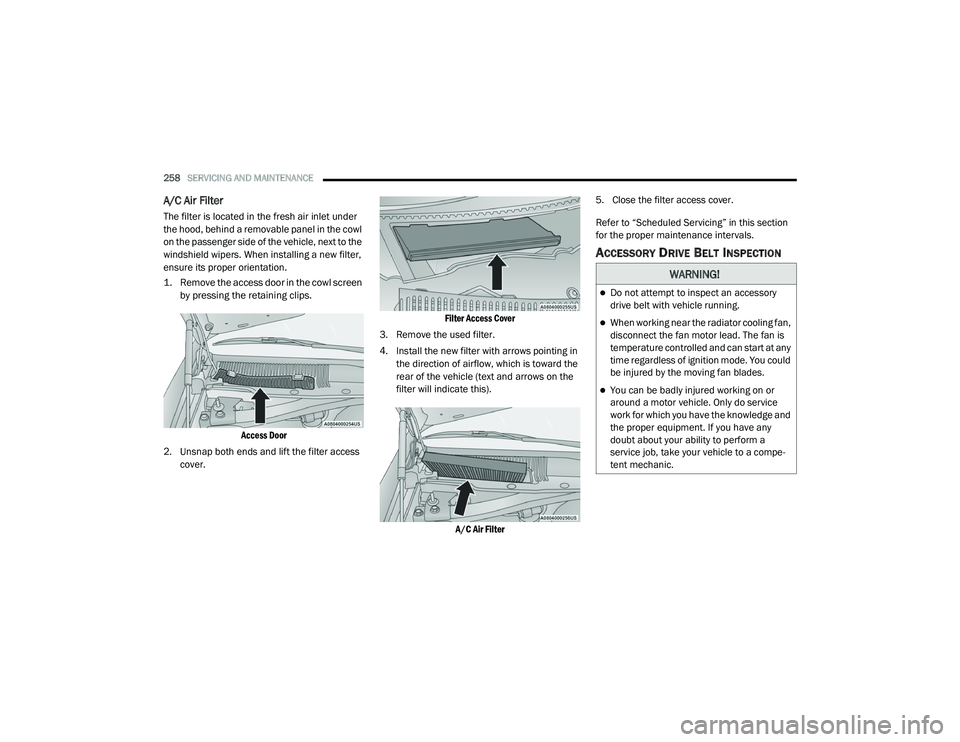
1. Remove the access door in the cowl screen
by pressing the retaining clips.
Access Door
2. Unsnap both ends and lift the filter access cover.
Filter Access Cover
3. Remove the used filter.
4. Install the new filter with arrows pointing in the direction of airflow, which is toward the
rear of the vehicle (text and arrows on the
filter will indicate this).
A/C Air Filter
5. Close the filter access cover.
Refer to “Scheduled Servicing” in this section
for the proper maintenance intervals.
ACCESSORY DRIVE BELT INSPECTION
WARNING!
Do not attempt to inspect an accessory
drive belt with vehicle running.
When working near the radiator cooling fan,
disconnect the fan motor lead. The fan is
temperature controlled and can start at any
time regardless of ignition mode. You could
be injured by the moving fan blades.
You can be badly injured working on or
around a motor vehicle. Only do service
work for which you have the knowledge and
the proper equipment. If you have any
doubt about your ability to perform a
service job, take your vehicle to a compe
-
tent mechanic.
20_LA_OM_EN_USC_t.book Page 258
Page 262 of 396
260SERVICING AND MAINTENANCE
Avoid using the wiper blades to remove frost or
ice from the windshield. Keep the blade rubber
out of contact with petroleum products such as
engine oil, gasoline, etc.
NOTE:
Life expectancy of wiper blades varies
depending on geographical area and frequency
of use. Poor performance of blades may be
present with chattering, marks, water lines or
wet spots. If any of these conditions are
present, clean the wiper blades or replace as
necessary.
Wiper Blade Removal/Installation
1. Lift the wiper arm to raise the wiper blade
off of the glass, until the wiper arm is in the
full up position.
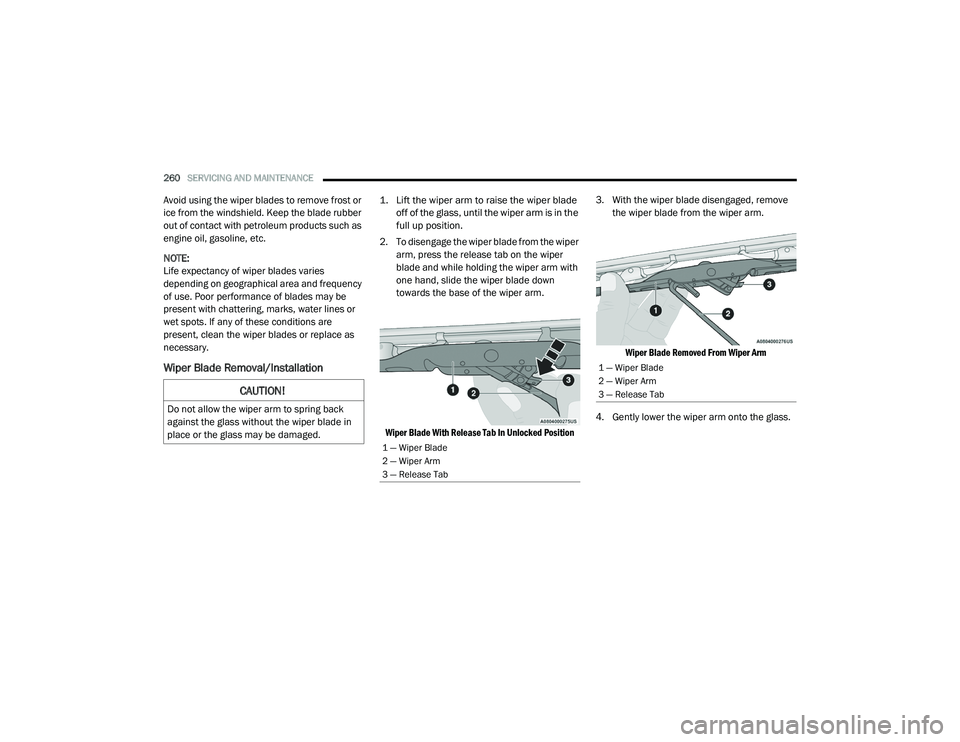
2. To disengage the wiper blade from the wiper arm, press the release tab on the wiper
blade and while holding the wiper arm with
one hand, slide the wiper blade down
towards the base of the wiper arm.
Wiper Blade With Release Tab In Unlocked Position
3. With the wiper blade disengaged, remove
the wiper blade from the wiper arm.
Wiper Blade Removed From Wiper Arm
4. Gently lower the wiper arm onto the glass.
CAUTION!
Do not allow the wiper arm to spring back
against the glass without the wiper blade in
place or the glass may be damaged.
1 — Wiper Blade
2 — Wiper Arm
3 — Release Tab
1 — Wiper Blade
2 — Wiper Arm
3 — Release Tab
20_LA_OM_EN_USC_t.book Page 260
Page 264 of 396
262SERVICING AND MAINTENANCE
(Continued)
Under normal operating conditions, the
catalytic converter will not require
maintenance. However, it is important to keep
the engine properly tuned to ensure proper
catalyst operation and prevent possible catalyst
damage.
NOTE:
Intentional tampering with emissions control
systems can result in civil penalties being
assessed against you.
In unusual situations involving grossly
malfunctioning engine operation, a scorching
odor may suggest severe and abnormal catalyst
overheating. If this occurs, stop the vehicle, turn
off the engine and allow it to cool. Service,
including a tune-up to manufacturer's
specifications, should be obtained immediately.
To minimize the possibility of catalytic converter
damage:
Do not shut off the engine or interrupt the
ignition when the transmission is in gear and
the vehicle is in motion.
Do not try to start the engine by pushing or
towing the vehicle.
Do not idle the engine with any spark plug
wires disconnected or removed, such as
when diagnostic testing, or for prolonged
periods during very rough idle or malfunc-
tioning operating conditions.
NOTE:
The vehicle exhaust system may be equipped
with an Electronic Exhaust Valve (EEV) system,
if the exhaust system is replaced with after -
market products a Malfunction Indicator Lamp
(MIL) will illuminate.
COOLING SYSTEM
Coolant Checks
Check engine coolant (antifreeze) protection
every 12 months (before the onset of freezing
weather, where applicable). If coolant is dirty or
rusty in appearance, the system should be
drained, flushed, and refilled with fresh coolant.
Check the front of the radiator for any
accumulation of bugs, leaves, etc. If dirty, clean
by gently spraying water from a garden hose
vertically down the face of the condenser.
Check the coolant recovery bottle tubing for
brittle rubber, cracking, tears, cuts, and
tightness of the connection at the bottle and
radiator. Inspect the entire system for leaks. DO
NOT REMOVE THE COOLANT PRESSURE CAP
WHEN THE COOLING SYSTEM IS HOT.
WARNING!
You or others can be badly burned by hot
engine coolant (antifreeze) or steam from
your radiator. If you see or hear steam
coming from under the hood, do not open
the hood until the radiator has had time to
cool. Never open a cooling system pressure
cap when the radiator or coolant bottle is
hot.
Keep hands, tools, clothing, and jewelry
away from the radiator cooling fan when
the hood is raised. The fan starts automati -
cally and may start at any time, whether the
engine is running or not.
When working near the radiator cooling fan,
disconnect the fan motor lead or turn the
ignition to the OFF mode. The fan is
temperature controlled and can start at any
time the ignition is in the ON mode.
WARNING! (Continued)
20_LA_OM_EN_USC_t.book Page 262
Page 276 of 396
274SERVICING AND MAINTENANCE
For further information on GAWRs, vehicle
loading, and trailer towing, refer to “Vehicle
Loading” in the “Starting And Operating”
section of this manual.
To determine the maximum loading conditions
of your vehicle, locate the statement “The
combined weight of occupants and cargo
should never exceed XXX kg or XXX lbs” on the
Tire and Loading Information placard. The
combined weight of occupants, cargo/luggage
and trailer tongue weight (if applicable) should
never exceed the weight referenced here.
Steps For Determining Correct Load
Limit—
(1) Locate the statement “The combined
weight of occupants and cargo should
never exceed XXX kg or XXX lbs.” on your
vehicle's placard.
(2) Determine the combined weight of
the driver and passengers that will be
riding in your vehicle.
(3) Subtract the combined weight of the
driver and passengers from XXX kg or
XXX lbs. (4) The resulting figure equals the
available amount of cargo and luggage
load capacity. For example, if “XXX”
amount equals 1400 lbs. and there will
be five 150 lb passengers in your
vehicle, the amount of available cargo
and luggage load capacity is 650 lbs.
(1400-750 (5x150) = 650 lbs.)
(5) Determine the combined weight of
luggage and cargo being loaded on the
vehicle. That weight may not safely
exceed the available cargo and luggage
load capacity calculated in Step 4.
(6) If your vehicle will be towing a trailer,
load from your trailer will be transferred
to your vehicle. Consult this manual to
determine how this reduces the
available cargo and luggage load
capacity of your vehicle.
Metric Example For Load Limit
For example, if “XXX” amount equals 635 kg
and there will be five 68 kg passengers in
your vehicle, the amount of available cargo
and luggage load capacity is 295 kg
(635-340 (5x68) = 295 kg) as shown in step 4.
NOTE:
If your vehicle will be towing a trailer, load
from your trailer will be transferred to your
vehicle. The following table shows examples
on how to calculate total load, cargo/
luggage, and towing capacities of your
vehicle with varying seating configurations
and number and size of occupants. This table
is for illustration purposes only and may not
be accurate for the seating and load carry
capacity of your vehicle.
For the following example, the combined
weight of occupants and cargo should never
exceed 865 lbs (392 kg).
20_LA_OM_EN_USC_t.book Page 274
Page 280 of 396
278SERVICING AND MAINTENANCE
Tire Repair
If your tire becomes damaged, it may be
repaired if it meets the following criteria:
The tire has not been driven on when flat.
The damage is only on the tread section of
your tire (sidewall damage is not repairable).
The puncture is no greater than a ¼ of an
inch (6 mm).
Consult an authorized tire dealer for tire repairs
and additional information.
Damaged Run Flat tires, or Run Flat tires that
have experienced a loss of pressure should be
replaced immediately with another Run Flat tire
of identical size and service description (Load
Index and Speed Symbol). Replace the tire
pressure sensor as well as it is not designed to
be reused.
Run Flat Tires — If Equipped
Run Flat tires allow you the capability to drive
50 miles (80 km) at 50 mph (80 km/h) after a
rapid loss of inflation pressure. This rapid loss
of inflation is referred to as the Run Flat mode.
A Run Flat mode occurs when the tire inflation
pressure is of/or below 14 psi (96 kPa). Once a
Run Flat tire reaches the run flat mode it has
limited driving capabilities and needs to be
replaced immediately. A Run Flat tire is not
repairable. When a run flat tire is changed after
driving with underinflated tire condition, please
replace the TPM sensor as it is not designed to
be reused when driven under run flat mode
14 psi (96 kPa) condition.
NOTE:
TPM Sensor must be replaced after driving the
vehicle on a flat tire condition.
It is not recommended driving a vehicle loaded
at full capacity or to tow a trailer while a tire is in
the run flat mode.
See the tire pressure monitoring section for
more information.
Tire Spinning
When stuck in mud, sand, snow, or ice
conditions, do not spin your vehicle's wheels
above 30 mph (48 km/h) or for longer than
30 seconds continuously without stopping.
Refer to “Freeing A Stuck Vehicle” in “In Case Of
Emergency” for further information.
Tread Wear Indicators
Tread wear indicators are in the original
equipment tires to help you in determining
when your tires should be replaced.
WARNING!
Fast spinning tires can be dangerous. Forces
generated by excessive wheel speeds may
cause tire damage or failure. A tire could
explode and injure someone. Do not spin your
vehicle's wheels faster than 30 mph
(48 km/h) for more than 30 seconds
continuously when you are stuck, and do not
let anyone near a spinning wheel, no matter
what the speed.
20_LA_OM_EN_USC_t.book Page 278
Page 283 of 396
SERVICING AND MAINTENANCE281
Snow Tires
Some areas of the country require the use of
snow tires during the Winter. Snow tires can be
identified by a “mountain/snowflake” symbol
on the tire sidewall.
If you need snow tires, select tires
equivalent in size and type to the
original equipment tires. Use snow
tires only in sets of four; failure to do
so may adversely affect the safety and handling
of your vehicle.
Snow tires generally have lower speed ratings
than what was originally equipped with your
vehicle and should not be operated at
sustained speeds over 75 mph (120 km/h). For
speeds above 75 mph (120 km/h) refer to
original equipment or an authorized tire dealer
for recommended safe operating speeds,
loading and cold tire inflation pressures.
While studded tires improve performance on
ice, skid and traction capability on wet or dry
surfaces may be poorer than that of
non-studded tires. Some states prohibit
studded tires; therefore, local laws should be
checked before using these tire types.
SPARE TIRES — IF EQUIPPED
NOTE:
For vehicles equipped with Tire Service Kit
instead of a spare tire, please refer to “Tire
Service Kit” in “In Case Of Emergency” for
further information.
Refer to the “Towing Requirements - Tires” in
“Starting And Operating” for restrictions when
towing with a spare tire designated for
temporary emergency use.
Spare Tire Matching Original Equipped Tire
And Wheel — If Equipped
Your vehicle may be equipped with a spare tire
and wheel equivalent in look and function to the
original equipment tire and wheel found on the
front or rear axle of your vehicle. This spare tire
may be used in the tire rotation for your vehicle. If your vehicle has this option, refer to an
authorized tire dealer for the recommended tire
rotation pattern.
Compact Spare Tire — If Equipped
The compact spare is for temporary emergency
use only. You can identify if your vehicle is
equipped with a compact spare by looking at
the spare tire description on the Tire and
Loading Information Placard located on the
driver’s side door opening or on the sidewall of
the tire. Compact spare tire descriptions begin
with the letter “T” or “S” preceding the size
designation. Example: T145/80D18 103M.
T, S = Temporary Spare Tire
Since this tire has limited tread life, the original
equipment tire should be repaired (or replaced)
and reinstalled on your vehicle at the first
opportunity.
Do not install a wheel cover or attempt to mount
a conventional tire on the compact spare wheel,
since the wheel is designed specifically for the
compact spare tire. Do not install more than
one compact spare tire and wheel on the
vehicle at any given time.
CAUTION!
Because of the reduced ground clearance, do
not take your vehicle through an automatic
car wash with a compact or limited use
temporary spare installed. Damage to the
vehicle may result.
7
20_LA_OM_EN_USC_t.book Page 281
Page 292 of 396
290SERVICING AND MAINTENANCE
PLASTIC AND COATED PARTS
Use Mopar Total Clean to clean vinyl upholstery.
Cleaning Plastic Instrument Cluster
Lenses
The lenses in front of the instruments in this
vehicle are molded in clear plastic. When
cleaning the lenses, care must be taken to
avoid scratching the plastic.
1. Clean with a wet soft cloth. A mild soap
solution may be used, but do not use high
alcohol content or abrasive cleaners. If
soap is used, wipe clean with a clean damp
cloth.
2. Dry with a soft cloth.
LEATHER PARTS
Mopar Total Clean is specifically recommended
for leather upholstery.
Your leather upholstery can be best preserved
by regular cleaning with a damp soft cloth.
Small particles of dirt can act as an abrasive
and damage the leather upholstery and should
be removed promptly with a damp cloth.
Stubborn soils can be removed easily with a soft
cloth and Mopar Total Clean. Care should be
taken to avoid soaking your leather upholstery
with any liquid. Please do not use polishes, oils,
cleaning fluids, solvents, detergents, or
ammonia-based cleaners to clean your leather
upholstery. Application of a leather conditioner
is not required to maintain the original
condition.
NOTE:
If equipped with light colored leather, it tends to
show any foreign material, dirt, and fabric dye
transfer more so than darker colors. The leather
is designed for easy cleaning, and FCA recom -
mends Mopar total care leather cleaner applied
on a cloth to clean the leather seats as needed.
GLASS SURFACES
All glass surfaces should be cleaned on a
regular basis with Mopar Glass Cleaner, or any
commercial household-type glass cleaner.
Never use an abrasive type cleaner. Use caution
when cleaning the inside rear window equipped
with electric defrosters or windows equipped
with radio antennas. Do not use scrapers or
other sharp instruments that may scratch the
elements.
When cleaning the rear view mirror, spray
cleaner on the towel or cloth that you are using.
Do not spray cleaner directly on the mirror.
CAUTION!
Direct contact of air fresheners, insect
repellents, suntan lotions, or hand sani -
tizers to the plastic, painted, or decorated
surfaces of the interior may cause perma -
nent damage. Wipe away immediately.
Damage caused by these type of products
may not be covered by your New Vehicle
Limited Warranty.
CAUTION!
Do not use Alcohol and Alcohol-based and/or
Ketone based cleaning products to clean
leather upholstery, as damage to the
upholstery may result.
20_LA_OM_EN_USC_t.book Page 290
Page 360 of 396

358MULTIMEDIA
The Uconnect Phone is driven through your
Bluetooth® “Hands-Free Profile” mobile phone.
Uconnect features Bluetooth® technology — the
global standard that enables different
electronic devices to connect to each other
without wires or a docking station, so Uconnect
Phone works no matter where you stow your
mobile phone (be it your purse, pocket, or
briefcase), as long as your phone is turned on
and has been paired to the vehicle's Uconnect
Phone. The Uconnect Phone allows up to
10 mobile phones or audio devices to be linked
to the system. Only one linked (or paired) mobile
phone and one audio device can be used with
the system at a time.
Uconnect Phone Button
The Uconnect Phone button on your steering
wheel is used to get into the phone mode and
make calls, show recent, incoming, outgoing
calls, view phonebook etc.
Uconnect Voice Command Button
The Uconnect Voice Command button on your
steering wheel is only used for “barge in” and
when you are already in a call and you want to
send tones or make another call. The button on your steering wheel is also used
to access the Voice Commands for the
Uconnect Voice Command features if your
vehicle is equipped. Please see the Uconnect
Voice Command section for direction on how to
use the button.
The Uconnect Phone is fully integrated with the
vehicle's audio system. The volume of the
Uconnect Phone can be adjusted either from
the radio volume control knob or from the
steering wheel radio control.
Phone Operation
Operation
Voice commands can be used to operate the
Uconnect Phone and to navigate through the
Uconnect Phone menu structure. Voice
commands are required after most Uconnect
Phone prompts. There are two general methods
for how Voice Command works:
1. Say compound commands like “Call John
Smith mobile”.
2. Say the individual commands and allow the system to guide you to complete the task. You will be prompted for a specific command
and then guided through the available options.
Prior to giving a voice command, one must
wait for the beep, which follows the “Listen”
prompt or another prompt.
For certain operations, compound
commands can be used. For example,
instead of saying “Call” and then “John
Smith” and then “mobile”, the following
compound command can be said: “Call John
Smith mobile.”
For each feature explanation in this section,
only the compound command form of the
voice command is given. You can also break
the commands into parts and say each part
of the command when you are asked for it.
For example, you can use the compound
command form voice command “Search for
John Smith,” or you can break the compound
command form into two voice commands:
“Search Contact” and when asked “John
Smith.” Please remember, the Uconnect
Phone works best when you talk in a normal
conversational tone, as if speaking to
someone sitting a few feet/meters away from
you.
20_LA_OM_EN_USC_t.book Page 358
Page 383 of 396
381
Automatic Transmission Limp
Home Mode
............................................ 28, 163AutoPark........................................................ 150Autostick Operation.................................................. 164Aux Mode....................................................... 350Axle Fluid........................... 299, 301, 302, 304Axle Lubrication................. 299, 301, 302, 304
B
Back-Up......................................................... 186Battery.................................................... 84, 251Charging System Light................................. 84Keyless Key Fob Replacement.................... 14Location.................................................... 251Belts, Seat..................................................... 146Blind Spot Monitoring.................................... 100BluetoothConnect Or Disconnect Link Betweenthe Uconnect Phone And Mobile
Phone
................................................... 366Connecting To A Particular Mobile PhoneOr Audio Device After Pairing................361Bluetooth Mode............................................. 351Body Mechanism Lubrication........................ 259B-Pillar Location............................................. 273Brake Assist System........................................ 94Brake Control System...................................... 94Brake Fluid...............266, 299, 301, 302, 304
Brake System...................................... 266, 291Fluid Check.......... 266, 299, 301, 302, 304Master Cylinder........................................ 266Parking..................................................... 154Warning Light.....................................83, 291Brake/Transmission Interlock...................... 160Break-In Recommendations, New Vehicle.... 152Brightness, Interior Lights................................ 44Bulb Replacement........................................ 204Bulbs, Light.......................................... 147, 204
C
Camera, Rear................................................ 186Capacities, Fluid.................................. 297, 298Caps, FillerFuel.......................................................... 188Oil (Engine)...................................... 246, 254Radiator (Coolant Pressure)..................... 264Car Washes................................................... 288Carbon Monoxide Warning................... 145, 296CargoVehicle Loading........................................ 189Cellular Phone.............................................. 368Certification Label......................................... 189Chains, Tire.......................................... 284, 285Changing A Flat Tire...................................... 269Chart, Tire Sizing........................................... 270
Check Engine Light
(Malfunction Indicator Light)............................92Checking Your Vehicle For Safety.................. 145Checks, Safety.............................................. 145Child Restraint.............................................. 130Child RestraintsBooster Seats........................................... 133Child Seat Installation............................... 142How To Stow An unused ALR Seat Belt..... 139Infant And Child Restraints....................... 132Lower Anchors And Tethers For Children................................................ 135Older Children And Child Restraints.......... 132Seating Positions...................................... 134Clean Air Gasoline......................................... 294CleaningWheels...................................................... 283Climate Control................................................47Cold Weather Operation................................ 151Compact Spare Tire...................................... 281Contract, Service........................................... 377Cooling Pressure Cap (Radiator Cap)............ 264Cooling System............................................. 262Adding Coolant (Antifreeze)...................... 263Coolant Level................................... 262, 265Cooling Capacity.............................. 297, 298Disposal Of Used Coolant......................... 26511
20_LA_OM_EN_USC_t.book Page 381
Page 384 of 396
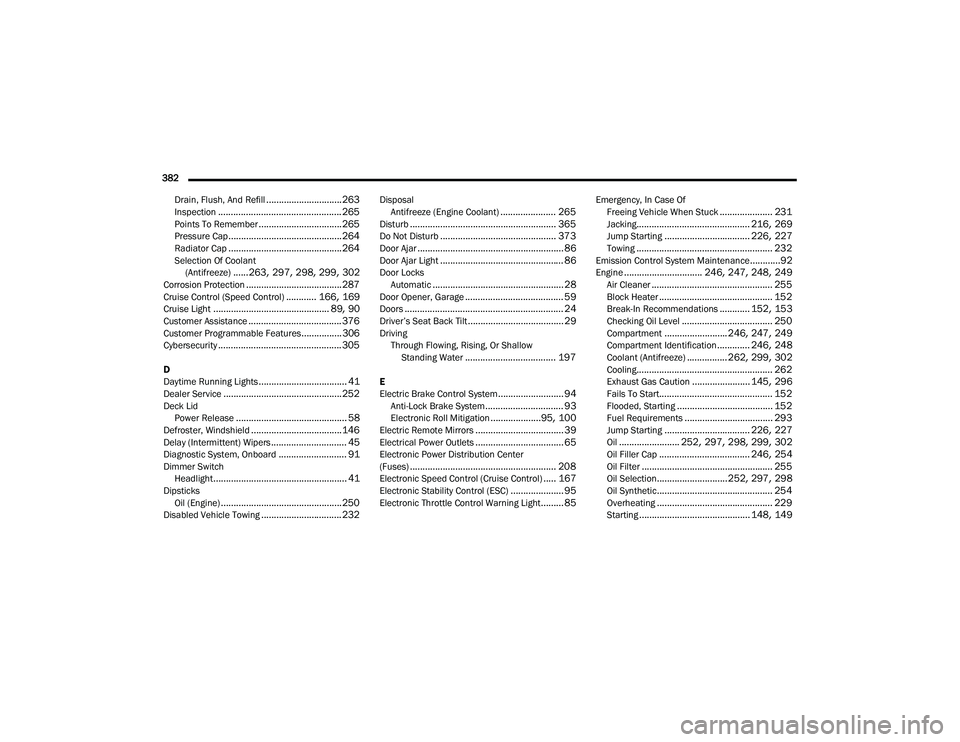
382 Drain, Flush, And Refill
.............................. 263Inspection................................................. 265Points To Remember................................. 265Pressure Cap............................................. 264Radiator Cap............................................. 264Selection Of Coolant (Antifreeze)......263, 297, 298, 299, 302Corrosion Protection...................................... 287Cruise Control (Speed Control)............ 166, 169Cruise Light.............................................. 89, 90Customer Assistance..................................... 376Customer Programmable Features................306Cybersecurity................................................. 305
D
Daytime Running Lights................................... 41Dealer Service............................................... 252Deck LidPower Release............................................ 58Defroster, Windshield.................................... 146Delay (Intermittent) Wipers.............................. 45Diagnostic System, Onboard........................... 91Dimmer SwitchHeadlight..................................................... 41DipsticksOil (Engine)................................................ 250Disabled Vehicle Towing................................ 232
DisposalAntifreeze (Engine Coolant)...................... 265Disturb.......................................................... 365Do Not Disturb.............................................. 373Door Ajar.......................................................... 86Door Ajar Light................................................. 86Door LocksAutomatic.................................................... 28Door Opener, Garage....................................... 59Doors............................................................... 24Driver’s Seat Back Tilt...................................... 29DrivingThrough Flowing, Rising, Or Shallow Standing Water
.................................... 197
E
Electric Brake Control System.......................... 94Anti-Lock Brake System............................... 93Electronic Roll Mitigation....................95, 100Electric Remote Mirrors................................... 39Electrical Power Outlets................................... 65Electronic Power Distribution Center
(Fuses).......................................................... 208Electronic Speed Control (Cruise Control)..... 167Electronic Stability Control (ESC)..................... 95Electronic Throttle Control Warning Light......... 85
Emergency, In Case OfFreeing Vehicle When Stuck..................... 231Jacking............................................. 216, 269Jump Starting.................................. 226, 227Towing...................................................... 232Emission Control System Maintenance............92Engine............................... 246, 247, 248, 249Air Cleaner................................................ 255Block Heater............................................. 152Break-In Recommendations............ 152, 153Checking Oil Level.................................... 250Compartment......................... 246, 247, 249Compartment Identification............. 246, 248Coolant (Antifreeze)................ 262, 299, 302Cooling...................................................... 262Exhaust Gas Caution....................... 145, 296Fails To Start............................................. 152Flooded, Starting...................................... 152Fuel Requirements................................... 293Jump Starting.................................. 226, 227Oil........................ 252, 297, 298, 299, 302Oil Filler Cap.................................... 246, 254Oil Filter.................................................... 255Oil Selection............................ 252, 297, 298Oil Synthetic.............................................. 254Overheating.............................................. 229Starting............................................ 148, 149
20_LA_OM_EN_USC_t.book Page 382