wiring DODGE CHALLENGER 2020 Owners Manual
[x] Cancel search | Manufacturer: DODGE, Model Year: 2020, Model line: CHALLENGER, Model: DODGE CHALLENGER 2020Pages: 396, PDF Size: 16.64 MB
Page 123 of 396
SAFETY121
The air bag system must be ready to protect you
in a collision. The Occupant Restraint Controller
(ORC) monitors the internal circuits and
interconnecting wiring associated with the
electrical Air Bag System Components. Your
vehicle may be equipped with the following Air
Bag System Components:
Air Bag System Components
Occupant Restraint Controller (ORC)
Air Bag Warning Light
Steering Wheel and Column
Instrument Panel
Knee Impact Bolsters
Driver and Front Passenger Air Bags
Seat Belt Buckle Switch
Supplemental Side Air Bags
Front and Side Impact Sensors
Seat Belt Pretensioners
Seat Track Position Sensors
NOTE:
Vehicles with front passenger seat deleted will
not be equipped with the Seat Belt Buckle
Switch, Seat Belt Pretensioner, Supplemental
Seat Mounted Side Airbag, and Seat Track Posi -
tion Sensors for the front passenger. If the front passenger and/or rear seats have
been removed do not ride in those areas.
All passenger occupants within the vehicle must
be in a seat equipped with a Seat Belt System
and Head Restraint for the safety of the
passenger.
Air Bag Warning Light
The Occupant Restraint Controller
(ORC) monitors the readiness of the
electronic parts of the air bag system
whenever the ignition switch is in the
START or ON/RUN position. If the ignition switch
is in the OFF position or in the ACC position, the
air bag system is not on and the air bags will not
inflate.
The ORC contains a backup power supply
system that may deploy the air bag system even
if the battery loses power or it becomes
disconnected prior to deployment.
The ORC turns on the Air Bag Warning Light in
the instrument panel for approximately four to
eight seconds for a self-check when the ignition
switch is first in the ON/RUN position. After the
self-check, the Air Bag Warning Light will turn
off. If the ORC detects a malfunction in any part
of the system, it turns on the Air Bag Warning Light, either momentarily or continuously. A
single chime will sound to alert you if the light
comes on again after initial startup.
The ORC also includes diagnostics that will
illuminate the instrument panel Air Bag Warning
Light if a malfunction is detected that could
affect the air bag system. The diagnostics also
record the nature of the malfunction. While the
air bag system is designed to be maintenance
free, if any of the following occurs, have an
authorized dealer service the air bag system
immediately.
The Air Bag Warning Light does not come on
during the four to eight seconds when the
ignition switch is first in the ON/RUN position.
The Air Bag Warning Light remains on after
the four to eight-second interval.
The Air Bag Warning Light comes on intermit
-
tently or remains on while driving.
NOTE:
If the speedometer, tachometer, or any engine
related gauges are not working, the Occupant
Restraint Controller (ORC) may also be
disabled. In this condition the air bags may not
be ready to inflate for your protection. Have an
authorized dealer service the air bag system
immediately.
4
20_LA_OM_EN_USC_t.book Page 121
Page 128 of 396
126SAFETY
(Continued)
NOTE:
Air bag covers may not be obvious in the interior
trim, but they will open during air bag deploy -
ment.
Rollover Events
Side Air Bags and seat belt pretensioners are
designed to activate in certain rollover events.
The Occupant Restraint Controller (ORC)
determines whether deployment in a particular
rollover event is appropriate, based on the
severity and type of collision. Vehicle damage by
itself is not a good indicator of whether or not
Side Air Bags and seat belt pretensioners
should have deployed. The Side Air Bags and seat belt pretensioners
will not deploy in all rollover events. The rollover
sensing system determines if a rollover event
may be in progress and whether deployment is
appropriate. In the event the vehicle
experiences a rollover or near rollover event,
and deployment is appropriate, the rollover
sensing system will deploy the side air bags and
seat belt pretensioners on both sides of the
vehicle.
The SABICs may help reduce the risk of partial
or complete ejection of vehicle occupants
through side windows in certain rollover or side
impact events.
Air Bag System Components
NOTE:
The Occupant Restraint Controller (ORC) moni
-
tors the internal circuits and interconnecting
wiring associated with electrical Air Bag System
Components listed below:
Occupant Restraint Controller (ORC)
Air Bag Warning Light
Steering Wheel and Column
Instrument Panel
Knee Impact Bolsters
WARNING!
Occupants, including children, who are up
against or very close to Side Air Bags can be
seriously injured or killed. Occupants,
including children, should never lean on or
sleep against the door, side windows, or
area where the side air bags inflate, even if
they are in an infant or child restraint.
Seat belts (and child restraints where
appropriate) are necessary for your protec -
tion in all collisions. They also help keep
you in position, away from an inflating Side
Air Bag. To get the best protection from the
Side Air Bags, occupants must wear their
seat belts properly and sit upright with their
backs against the seats. Children must be
properly restrained in a child restraint or
booster seat that is appropriate for the size
of the child.
WARNING!
Side Air Bags need room to inflate. Do not
lean against the door or window. Sit upright
in the center of the seat.
Being too close to the Side Air Bags during
deployment could cause you to be severely
injured or killed.
Relying on the Side Air Bags alone could
lead to more severe injuries in a collision.
The Side Air Bags work with your seat belt
to restrain you properly. In some collisions,
Side Air Bags won’t deploy at all. Always
wear your seat belt even though you have
Side Air Bags.
WARNING! (Continued)
20_LA_OM_EN_USC_t.book Page 126
Page 130 of 396
128SAFETY
(Continued)
Enhanced Accident Response System
In the event of an impact, if the communication
network remains intact, and the power remains
intact, depending on the nature of the event,
the ORC will determine whether to have the
Enhanced Accident Response System perform
the following functions:
Cut off fuel to the engine (if equipped).
Cut off battery power to the electric motor
(if equipped).
Flash hazard lights as long as the battery has
power.
Turn on the interior lights, which remain on
as long as the battery has power or for
15 minutes from the intervention of the
Enhanced Accident Response System.
Unlock the power door locks.
Your vehicle may also be designed to perform
any of these other functions in response to the
Enhanced Accident Response System:
Turn off the Fuel Filter Heater, Turn off the
HVAC Blower Motor, Close the HVAC Circula -
tion Door
Cut off battery power to the:
Engine
Electric Motor (if equipped)
Electric power steering
Brake booster
Electric park brake
Automatic transmission gear selector
Horn
Front wiper
Headlamp washer pump
NOTE:
After an accident, remember to cycle the igni -
tion to the STOP (OFF/LOCK) position and
remove the key from the ignition switch to avoid
draining the battery. Carefully check the vehicle
for fuel leaks in the engine compartment and on
the ground near the engine compartment and
fuel tank before resetting the system and
starting the engine. If there are no fuel leaks or
damage to the vehicle electrical devices (e.g.
headlights) after an accident, reset the system
by following the procedure described below. If
you have any doubt, contact an authorized
dealer.
Enhanced Accident Response System
Reset Procedure
In order to reset the Enhanced Accident
Response System functions after an event, the
ignition switch must be changed from ignition
START or ON/RUN to ignition OFF. Carefully
check the vehicle for fuel leaks in the engine
compartment and on the ground near the
engine compartment and fuel tank before
resetting the system and starting the engine.
Maintaining Your Air Bag System
WARNING!
Modifications to any part of the air bag
system could cause it to fail when you need
it. You could be injured if the air bag system
is not there to protect you. Do not modify
the components or wiring, including adding
any kind of badges or stickers to the
steering wheel hub trim cover or the upper
passenger side of the instrument panel. Do
not modify the front bumper, vehicle body
structure, or add aftermarket side steps or
running boards.
20_LA_OM_EN_USC_t.book Page 128
Page 197 of 396
STARTING AND OPERATING195
Towing Requirements — Trailer Lights And
Wiring
Whenever you pull a trailer, regardless of the
trailer size, stoplights and turn signals on the
trailer are required for motoring safety.
The Trailer Tow Package may include a four- and
seven-pin wiring harness. Use a factory
approved trailer harness and connector.
NOTE:
Do not cut or splice wiring into the vehicle’s
wiring harness.
The electrical connections are all complete to
the vehicle but you must mate the harness to a
trailer connector. Refer to the following
illustrations.
NOTE:
Disconnect trailer wiring connector from the
vehicle before launching a boat (or any other
device plugged into vehicle’s electrical
connect) into water.
Be sure to reconnect after clear from water
area.
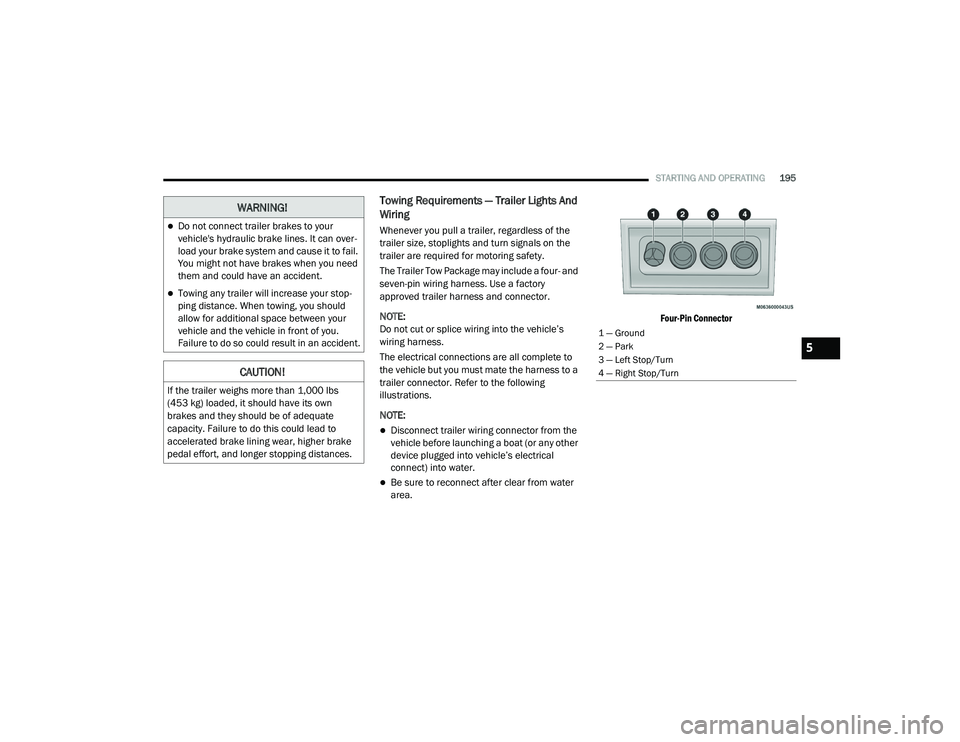
Four-Pin Connector
WARNING!
Do not connect trailer brakes to your
vehicle's hydraulic brake lines. It can over
-
load your brake system and cause it to fail.
You might not have brakes when you need
them and could have an accident.
Towing any trailer will increase your stop -
ping distance. When towing, you should
allow for additional space between your
vehicle and the vehicle in front of you.
Failure to do so could result in an accident.
CAUTION!
If the trailer weighs more than 1,000 lbs
(453 kg) loaded, it should have its own
brakes and they should be of adequate
capacity. Failure to do this could lead to
accelerated brake lining wear, higher brake
pedal effort, and longer stopping distances.
1 — Ground
2 — Park
3 — Left Stop/Turn
4 — Right Stop/Turn
5
20_LA_OM_EN_USC_t.book Page 195
Page 390 of 396
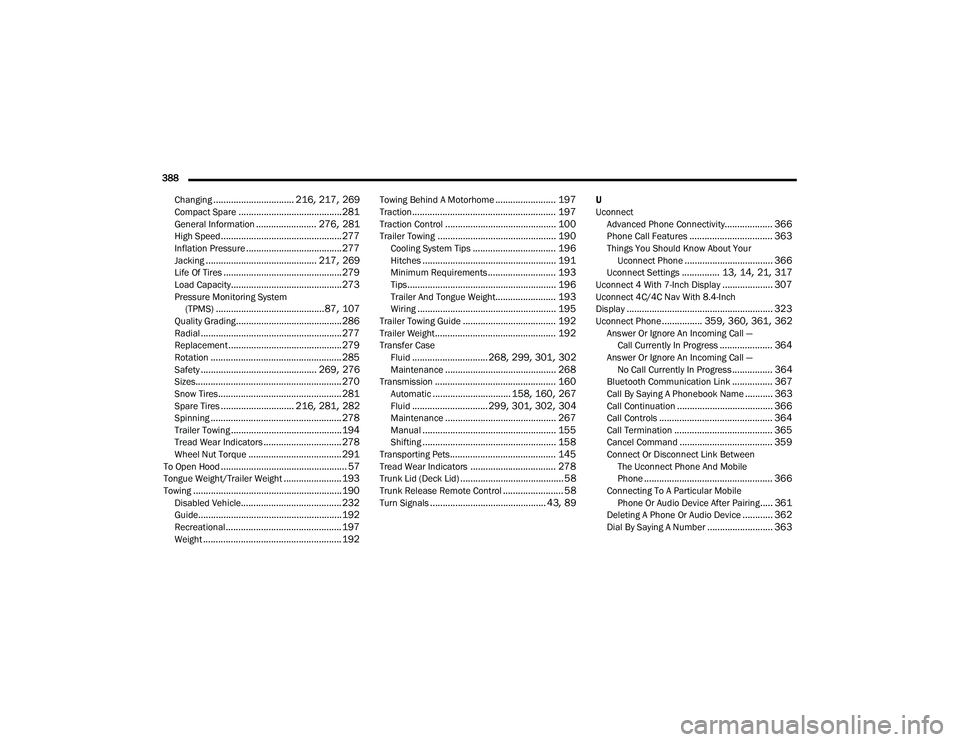
388 Changing
................................ 216, 217, 269Compact Spare......................................... 281General Information........................ 276, 281High Speed................................................ 277Inflation Pressure...................................... 277Jacking............................................ 217, 269Life Of Tires............................................... 279Load Capacity............................................ 273Pressure Monitoring System(TPMS)........................................... 87, 107Quality Grading.......................................... 286Radial........................................................ 277Replacement............................................. 279Rotation.................................................... 285Safety.............................................. 269, 276Sizes.......................................................... 270Snow Tires................................................. 281Spare Tires............................. 216, 281, 282Spinning.................................................... 278Trailer Towing............................................ 194Tread Wear Indicators............................... 278Wheel Nut Torque..................................... 291To Open Hood.................................................. 57Tongue Weight/Trailer Weight....................... 193Towing........................................................... 190Disabled Vehicle........................................ 232Guide......................................................... 192Recreational.............................................. 197Weight....................................................... 192
Towing Behind A Motorhome........................ 197Traction......................................................... 197Traction Control............................................ 100Trailer Towing............................................... 190Cooling System Tips................................. 196Hitches..................................................... 191Minimum Requirements........................... 193Tips........................................................... 196Trailer And Tongue Weight........................ 193Wiring....................................................... 195Trailer Towing Guide..................................... 192Trailer Weight................................................ 192Transfer CaseFluid.............................. 268, 299, 301, 302Maintenance............................................ 268Transmission................................................ 160Automatic............................... 158, 160, 267Fluid.............................. 299, 301, 302, 304Maintenance............................................ 267Manual..................................................... 155Shifting..................................................... 158Transporting Pets.......................................... 145Tread Wear Indicators.................................. 278Trunk Lid (Deck Lid)......................................... 58Trunk Release Remote Control........................ 58Turn Signals.............................................. 43, 89
U
UconnectAdvanced Phone Connectivity
................... 366Phone Call Features................................. 363Things You Should Know About YourUconnect Phone................................... 366Uconnect Settings............... 13, 14, 21, 317Uconnect 4 With 7-Inch Display.................... 307Uconnect 4C/4C Nav With 8.4-Inch
Display.......................................................... 323Uconnect Phone................ 359, 360, 361, 362Answer Or Ignore An Incoming Call — Call Currently In Progress..................... 364Answer Or Ignore An Incoming Call — No Call Currently In Progress................ 364Bluetooth Communication Link................ 367Call By Saying A Phonebook Name........... 363Call Continuation...................................... 366Call Controls............................................. 364Call Termination....................................... 365Cancel Command..................................... 359Connect Or Disconnect Link Between The Uconnect Phone And Mobile
Phone
................................................... 366Connecting To A Particular Mobile Phone Or Audio Device After Pairing..... 361Deleting A Phone Or Audio Device............ 362Dial By Saying A Number.......................... 363
20_LA_OM_EN_USC_t.book Page 388