mirror DODGE CHALLENGER 2020 Owners Manual
[x] Cancel search | Manufacturer: DODGE, Model Year: 2020, Model line: CHALLENGER, Model: DODGE CHALLENGER 2020Pages: 396, PDF Size: 16.64 MB
Page 4 of 396
2
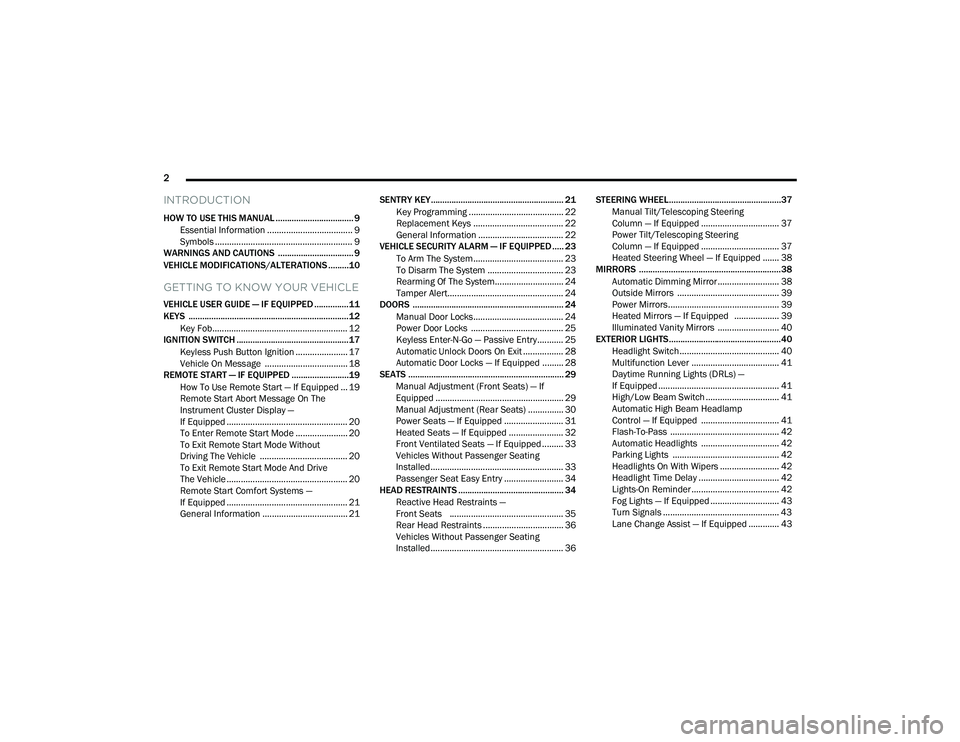
INTRODUCTION
HOW TO USE THIS MANUAL .................................. 9
Essential Information .................................... 9
Symbols .......................................................... 9
WARNINGS AND CAUTIONS ................................. 9
VEHICLE MODIFICATIONS/ALTERATIONS .........10
GETTING TO KNOW YOUR VEHICLE
VEHICLE USER GUIDE — IF EQUIPPED ...............11
KEYS ......................................................................12
Key Fob......................................................... 12
IGNITION SWITCH .................................................17
Keyless Push Button Ignition ...................... 17
Vehicle On Message ................................... 18
REMOTE START — IF EQUIPPED .........................19
How To Use Remote Start — If Equipped ... 19
Remote Start Abort Message On The
Instrument Cluster Display —
If Equipped ................................................... 20 To Enter Remote Start Mode ...................... 20
To Exit Remote Start Mode Without
Driving The Vehicle ..................................... 20 To Exit Remote Start Mode And Drive
The Vehicle ................................................... 20 Remote Start Comfort Systems —
If Equipped ................................................... 21 General Information .................................... 21 SENTRY KEY.......................................................... 21
Key Programming ........................................ 22
Replacement Keys ...................................... 22
General Information .................................... 22
VEHICLE SECURITY ALARM — IF EQUIPPED ..... 23
To Arm The System ...................................... 23
To Disarm The System ................................ 23
Rearming Of The System............................. 24
Tamper Alert................................................. 24
DOORS .................................................................. 24
Manual Door Locks...................................... 24
Power Door Locks ....................................... 25
Keyless Enter-N-Go — Passive Entry........... 25
Automatic Unlock Doors On Exit ................. 28
Automatic Door Locks — If Equipped ......... 28
SEATS .................................................................... 29
Manual Adjustment (Front Seats) — If
Equipped ...................................................... 29 Manual Adjustment (Rear Seats) ............... 30
Power Seats — If Equipped ......................... 31
Heated Seats — If Equipped ....................... 32
Front Ventilated Seats — If Equipped ......... 33
Vehicles Without Passenger Seating
Installed........................................................ 33 Passenger Seat Easy Entry ......................... 34
HEAD RESTRAINTS .............................................. 34
Reactive Head Restraints —
Front Seats ................................................ 35 Rear Head Restraints .................................. 36
Vehicles Without Passenger Seating
Installed........................................................ 36 STEERING WHEEL.................................................37
Manual Tilt/Telescoping Steering
Column — If Equipped ................................. 37 Power Tilt/Telescoping Steering
Column — If Equipped ................................. 37 Heated Steering Wheel — If Equipped ....... 38
MIRRORS ..............................................................38
Automatic Dimming Mirror .......................... 38
Outside Mirrors ........................................... 39
Power Mirrors............................................... 39
Heated Mirrors — If Equipped ................... 39
Illuminated Vanity Mirrors .......................... 40
EXTERIOR LIGHTS.................................................40
Headlight Switch.......................................... 40
Multifunction Lever ..................................... 41
Daytime Running Lights (DRLs) —
If Equipped ................................................... 41 High/Low Beam Switch ............................... 41
Automatic High Beam Headlamp
Control — If Equipped ................................. 41 Flash-To-Pass .............................................. 42
Automatic Headlights ................................. 42
Parking Lights ............................................. 42
Headlights On With Wipers ......................... 42
Headlight Time Delay .................................. 42
Lights-On Reminder ..................................... 42
Fog Lights — If Equipped ............................. 43
Turn Signals ................................................. 43
Lane Change Assist — If Equipped ............. 43
20_LA_OM_EN_USC_t.book Page 2
Page 7 of 396
5
PARKVIEW REAR BACK UP CAMERA ............. 186
REFUELING THE VEHICLE ................................. 188 Loose Fuel Filler Cap Message ................. 188
VEHICLE LOADING .......................................... 189
Vehicle Certification Label .......................189
Gross Vehicle Weight Rating (GVWR) ......189Gross Axle Weight Rating (GAWR) ........... 189Overloading ................................................189
Loading ....................................................190
TRAILER TOWING ............................................. 190
Common Towing Definitions .....................190Trailer Hitch Classification ........................ 191Trailer Towing Weights (Maximum
Trailer Weight Ratings) ............................192 Trailer And Tongue Weight .......................193
Towing Requirements ................................193Towing Tips ................................................196
RECREATIONAL TOWING
(BEHIND MOTORHOME, ETC.) .......................... 197
DRIVING TIPS ..................................................... 197
Driving On Slippery Surfaces.....................197Driving Through Water .............................. 197
IN CASE OF EMERGENCY
HAZARD WARNING FLASHERS ..................... 199
ASSIST AND SOS MIRROR — IF EQUIPPED.... 199
General Information ..................................203 BULB REPLACEMENT ........................................ 204
Replacement Bulbs ................................... 204
Replacing Exterior Bulbs ........................... 206
FUSES ..................................................................207
General Information .................................. 208Underhood Fuses ...................................... 208
Rear Interior Fuses .................................... 211
JACKING AND TIRE CHANGING ........................216
Jack Location/Spare Tire Stowage .......... 216Preparations For Jacking........................... 217
Jacking And Changing A Tire .................... 217
TIRE SERVICE KIT — IF EQUIPPED ................... 220
Tire Service Kit Storage ............................. 220Tire Service Kit Components And
Operation.................................................... 221 Tire Service Kit Usage Precautions .......... 221Sealing A Tire With Tire Service Kit .......... 223
JUMP STARTING ................................................. 226
Preparations For Jump Start ..................... 227Jump Starting Procedure .......................... 227
IF YOUR ENGINE OVERHEATS .......................... 229
MANUAL PARK RELEASE — 8 – SPEED
TRANSMISSION ................................................. 229
FREEING A STUCK VEHICLE ..............................231
TOWING A DISABLED VEHICLE ........................232 Rear-Wheel Drive (RWD) Models .............. 233 ENHANCED ACCIDENT RESPONSE SYSTEM
(EARS) ................................................................ 233
EVENT DATA RECORDER (EDR) ....................... 233
SERVICING AND MAINTENANCE
SCHEDULED SERVICING .................................. 234
3.6L And 5.7L Engines ............................. 234
6.2L Supercharged And 6.4L Engines ..... 239
ENGINE COMPARTMENT .................................. 246
3.6L Engine ............................................... 246
5.7L Engine ............................................... 247
6.2L Supercharged Engine ...................... 248
6.4L Engine ............................................... 249
Checking Oil Level — 3.6L And 5.7L
Engine ........................................................ 250 Checking Oil Level — 6.2L Supercharged
Engine And 6.4L Engine ........................... 250 Adding Washer Fluid ................................. 250Maintenance-Free Battery ....................... 251Pressure Washing...................................... 251
20_LA_OM_EN_USC_t.book Page 5
Page 15 of 396
GETTING TO KNOW YOUR VEHICLE13
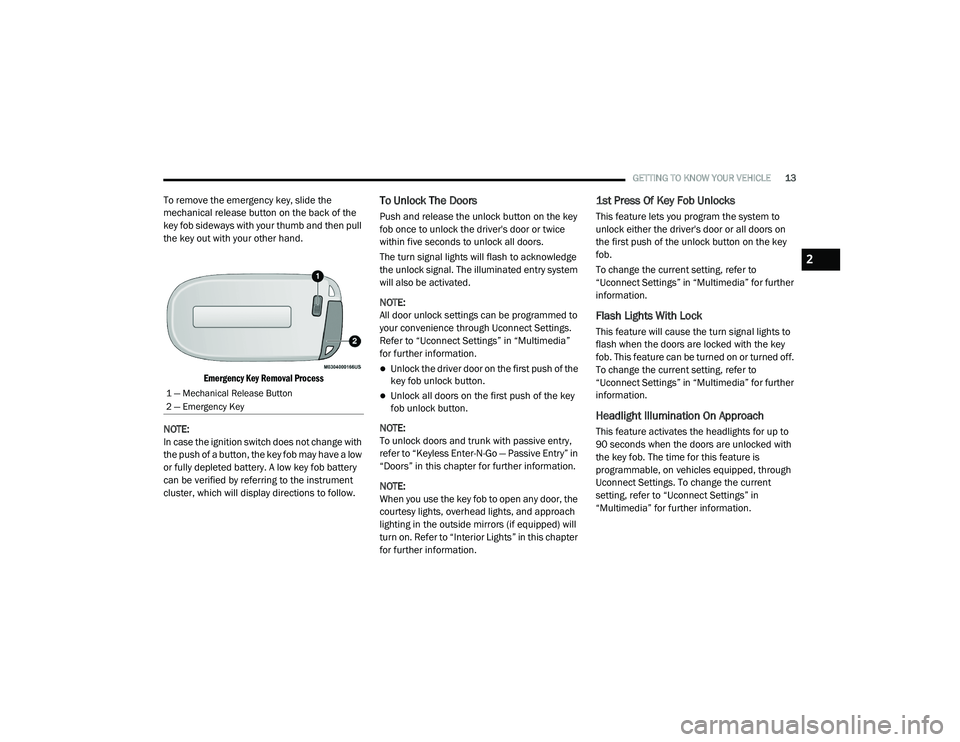
To remove the emergency key, slide the
mechanical release button on the back of the
key fob sideways with your thumb and then pull
the key out with your other hand.
Emergency Key Removal Process
NOTE:
In case the ignition switch does not change with
the push of a button, the key fob may have a low
or fully depleted battery. A low key fob battery
can be verified by referring to the instrument
cluster, which will display directions to follow.To Unlock The Doors
Push and release the unlock button on the key
fob once to unlock the driver's door or twice
within five seconds to unlock all doors.
The turn signal lights will flash to acknowledge
the unlock signal. The illuminated entry system
will also be activated.
NOTE:
All door unlock settings can be programmed to
your convenience through Uconnect Settings.
Refer to “Uconnect Settings” in “Multimedia”
for further information.
Unlock the driver door on the first push of the
key fob unlock button.
Unlock all doors on the first push of the key
fob unlock button.
NOTE:
To unlock doors and trunk with passive entry,
refer to “Keyless Enter-N-Go — Passive Entry” in
“Doors” in this chapter for further information.
NOTE:
When you use the key fob to open any door, the
courtesy lights, overhead lights, and approach
lighting in the outside mirrors (if equipped) will
turn on. Refer to “Interior Lights” in this chapter
for further information.
1st Press Of Key Fob Unlocks
This feature lets you program the system to
unlock either the driver's door or all doors on
the first push of the unlock button on the key
fob.
To change the current setting, refer to
“Uconnect Settings” in “Multimedia” for further
information.
Flash Lights With Lock
This feature will cause the turn signal lights to
flash when the doors are locked with the key
fob. This feature can be turned on or turned off.
To change the current setting, refer to
“Uconnect Settings” in “Multimedia” for further
information.
Headlight Illumination On Approach
This feature activates the headlights for up to
90 seconds when the doors are unlocked with
the key fob. The time for this feature is
programmable, on vehicles equipped, through
Uconnect Settings. To change the current
setting, refer to “Uconnect Settings” in
“Multimedia” for further information.
1 — Mechanical Release Button
2 — Emergency Key
2
20_LA_OM_EN_USC_t.book Page 13
Page 40 of 396
38GETTING TO KNOW YOUR VEHICLE
HEATED STEERING WHEEL — IF
E
QUIPPED
The steering wheel contains a heating element
that helps warm your hands in cold weather.
The heated steering wheel has only one
temperature setting. Once the heated steering
wheel has been turned on, it will stay on for an
average of 80 minutes before automatically
shutting off. This time will vary based on
environmental temperatures. The heated
steering wheel can shut off early or may not turn
on when the steering wheel is already warm.
The heated steering wheel control button is
located within the Uconnect system. You can
gain access to the control button through the
climate screen or the controls screen.
Press the heated steering wheel button
once to turn the heating element on.
Press the heated steering wheel button a
second time to turn the heating element off. NOTE:
The engine must be running for the heated
steering wheel to operate.
Vehicles Equipped With Remote Start
On models that are equipped with remote start,
the heated steering wheel can be programmed
to come on during a remote start through the
Uconnect system. Refer to “Uconnect Settings”
in “Multimedia” for further information.
MIRRORS
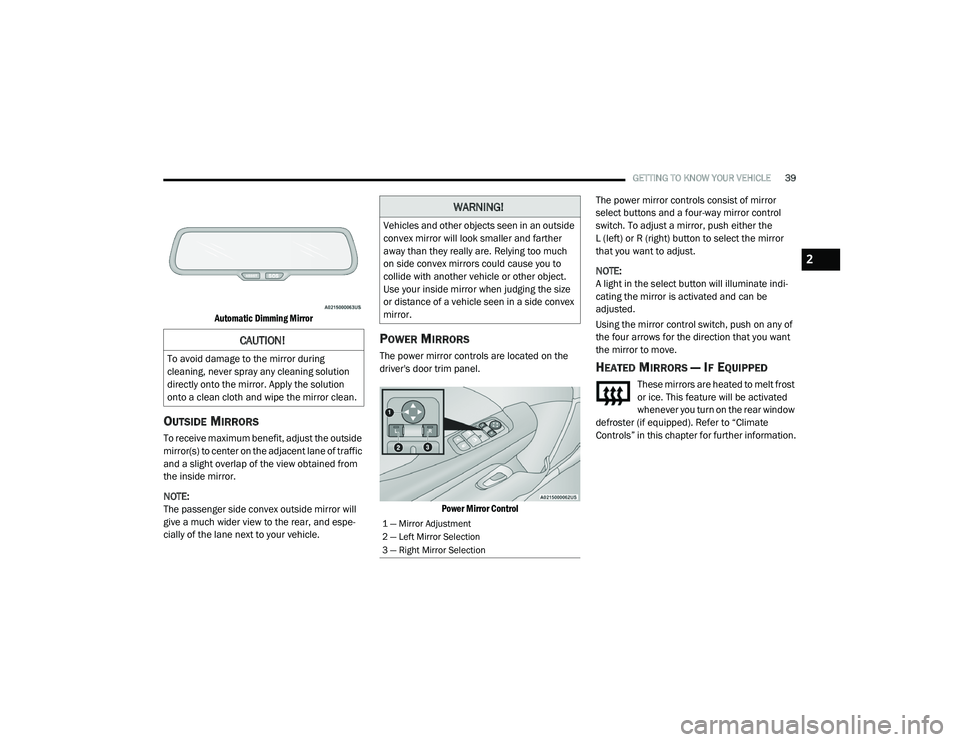
AUTOMATIC DIMMING MIRROR
The mirror head can be adjusted up, down, left,
and right for various drivers. The mirror should
be adjusted to center on the view through the
rear window.
This mirror automatically adjusts for headlight
glare from vehicles behind you.
NOTE:
The Automatic Dimming feature is disabled
when the vehicle is in REVERSE to improve rear
view viewing.
The Automatic Dimming feature can be turned
on or off through the touchscreen.
Press the mirror dimmer button once to turn
the feature on. The soft key button will illumi
-
nate when activated.
Press the mirror dimmer button a second
time to turn the feature off, and the soft key
button will no longer be illuminated.
WARNING!
Persons who are unable to feel pain to the
skin because of advanced age, chronic
illness, diabetes, spinal cord injury, medica -
tion, alcohol use, exhaustion, or other phys -
ical conditions must exercise care when
using the steering wheel heater. It may
cause burns even at low temperatures,
especially if used for long periods.
Do not place anything on the steering wheel
that insulates against heat, such as a
blanket or steering wheel covers of any type
and material. This may cause the steering
wheel heater to overheat.
20_LA_OM_EN_USC_t.book Page 38
Page 41 of 396
GETTING TO KNOW YOUR VEHICLE39
Automatic Dimming Mirror
OUTSIDE MIRRORS
To receive maximum benefit, adjust the outside
mirror(s) to center on the adjacent lane of traffic
and a slight overlap of the view obtained from
the inside mirror.
NOTE:
The passenger side convex outside mirror will
give a much wider view to the rear, and espe -
cially of the lane next to your vehicle.
POWER MIRRORS
The power mirror controls are located on the
driver's door trim panel.
Power Mirror Control
The power mirror controls consist of mirror
select buttons and a four-way mirror control
switch. To adjust a mirror, push either the
L (left) or R (right) button to select the mirror
that you want to adjust.
NOTE:
A light in the select button will illuminate indi
-
cating the mirror is activated and can be
adjusted.
Using the mirror control switch, push on any of
the four arrows for the direction that you want
the mirror to move.
HEATED MIRRORS — IF EQUIPPED
These mirrors are heated to melt frost
or ice. This feature will be activated
whenever you turn on the rear window
defroster (if equipped). Refer to “Climate
Controls” in this chapter for further information.
CAUTION!
To avoid damage to the mirror during
cleaning, never spray any cleaning solution
directly onto the mirror. Apply the solution
onto a clean cloth and wipe the mirror clean.
WARNING!
Vehicles and other objects seen in an outside
convex mirror will look smaller and farther
away than they really are. Relying too much
on side convex mirrors could cause you to
collide with another vehicle or other object.
Use your inside mirror when judging the size
or distance of a vehicle seen in a side convex
mirror.
1 — Mirror Adjustment
2 — Left Mirror Selection
3 — Right Mirror Selection
2
20_LA_OM_EN_USC_t.book Page 39
Page 42 of 396
40GETTING TO KNOW YOUR VEHICLE
ILLUMINATED VANITY MIRRORS
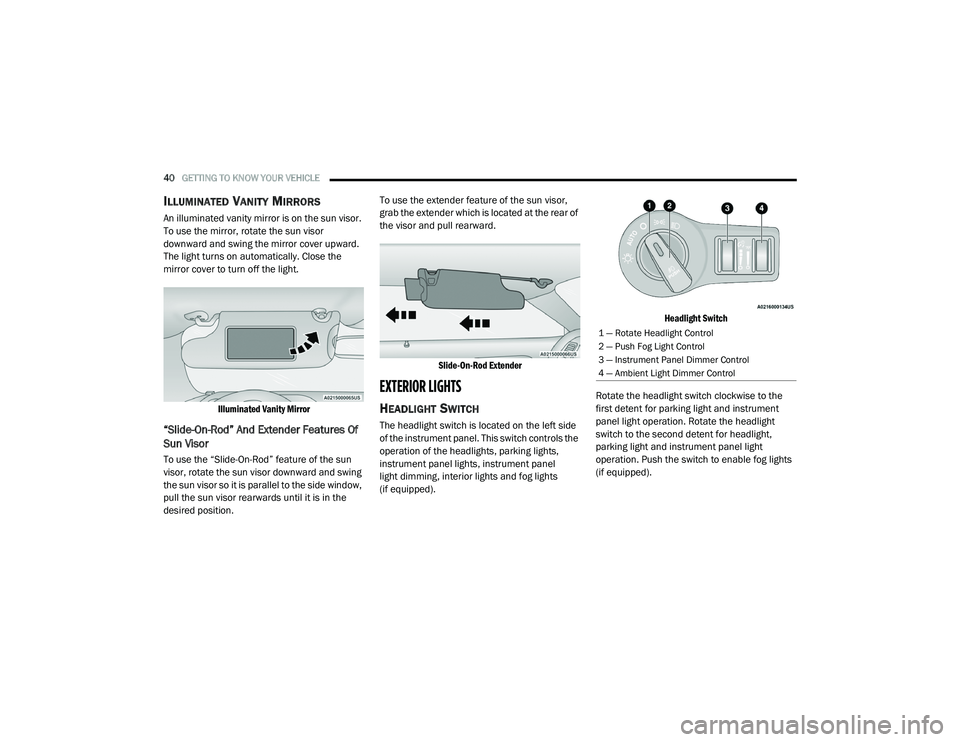
An illuminated vanity mirror is on the sun visor.
To use the mirror, rotate the sun visor
downward and swing the mirror cover upward.
The light turns on automatically. Close the
mirror cover to turn off the light.
Illuminated Vanity Mirror
“Slide-On-Rod” And Extender Features Of
Sun Visor
To use the “Slide-On-Rod” feature of the sun
visor, rotate the sun visor downward and swing
the sun visor so it is parallel to the side window,
pull the sun visor rearwards until it is in the
desired position. To use the extender feature of the sun visor,
grab the extender which is located at the rear of
the visor and pull rearward.
Slide-On-Rod Extender
EXTERIOR LIGHTS
HEADLIGHT SWITCH
The headlight switch is located on the left side
of the instrument panel. This switch controls the
operation of the headlights, parking lights,
instrument panel lights, instrument panel
light dimming, interior lights and fog lights
(if equipped).
Headlight Switch
Rotate the headlight switch clockwise to the
first detent for parking light and instrument
panel light operation. Rotate the headlight
switch to the second detent for headlight,
parking light and instrument panel light
operation. Push the switch to enable fog lights
(if equipped).
1 — Rotate Headlight Control
2 — Push Fog Light Control
3 — Instrument Panel Dimmer Control
4 — Ambient Light Dimmer Control
20_LA_OM_EN_USC_t.book Page 40
Page 43 of 396
GETTING TO KNOW YOUR VEHICLE41
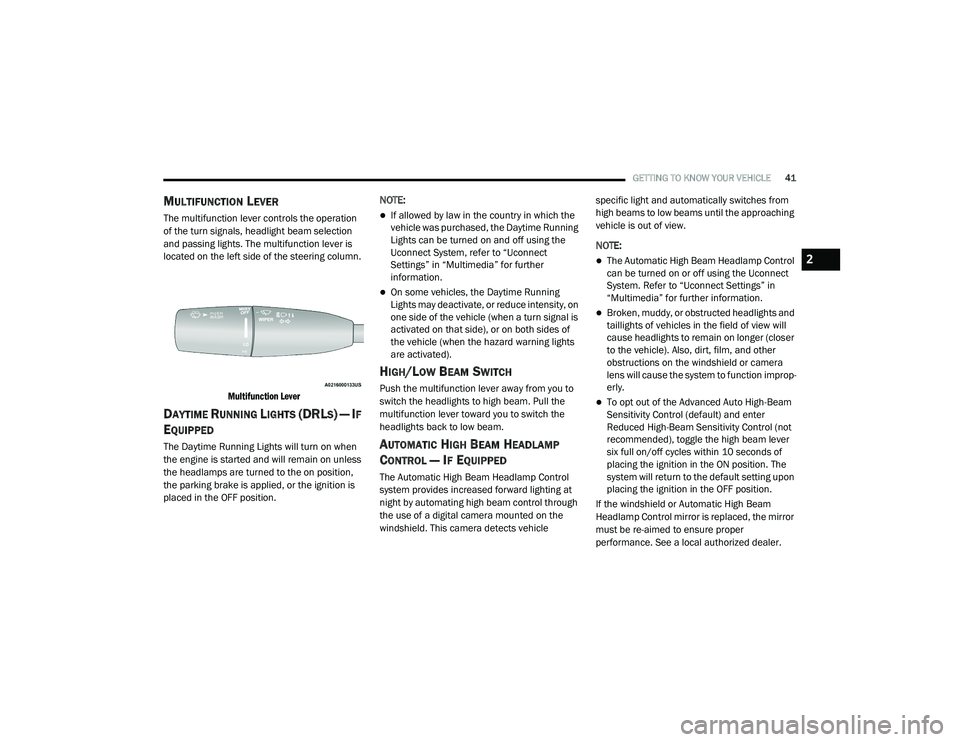
MULTIFUNCTION LEVER
The multifunction lever controls the operation
of the turn signals, headlight beam selection
and passing lights. The multifunction lever is
located on the left side of the steering column.
Multifunction Lever
DAYTIME RUNNING LIGHTS (DRLS) — IF
E
QUIPPED
The Daytime Running Lights will turn on when
the engine is started and will remain on unless
the headlamps are turned to the on position,
the parking brake is applied, or the ignition is
placed in the OFF position. NOTE:
If allowed by law in the country in which the
vehicle was purchased, the Daytime Running
Lights can be turned on and off using the
Uconnect System, refer to “Uconnect
Settings” in “Multimedia” for further
information.
On some vehicles, the Daytime Running
Lights may deactivate, or reduce intensity, on
one side of the vehicle (when a turn signal is
activated on that side), or on both sides of
the vehicle (when the hazard warning lights
are activated).
HIGH/LOW BEAM SWITCH
Push the multifunction lever away from you to
switch the headlights to high beam. Pull the
multifunction lever toward you to switch the
headlights back to low beam.
AUTOMATIC HIGH BEAM HEADLAMP
C
ONTROL — IF EQUIPPED
The Automatic High Beam Headlamp Control
system provides increased forward lighting at
night by automating high beam control through
the use of a digital camera mounted on the
windshield. This camera detects vehicle specific light and automatically switches from
high beams to low beams until the approaching
vehicle is out of view.
NOTE:
The Automatic High Beam Headlamp Control
can be turned on or off using the Uconnect
System. Refer to “Uconnect Settings” in
“Multimedia” for further information.
Broken, muddy, or obstructed headlights and
taillights of vehicles in the field of view will
cause headlights to remain on longer (closer
to the vehicle). Also, dirt, film, and other
obstructions on the windshield or camera
lens will cause the system to function improp
-
erly.
To opt out of the Advanced Auto High-Beam
Sensitivity Control (default) and enter
Reduced High-Beam Sensitivity Control (not
recommended), toggle the high beam lever
six full on/off cycles within 10 seconds of
placing the ignition in the ON position. The
system will return to the default setting upon
placing the ignition in the OFF position.
If the windshield or Automatic High Beam
Headlamp Control mirror is replaced, the mirror
must be re-aimed to ensure proper
performance. See a local authorized dealer.
2
20_LA_OM_EN_USC_t.book Page 41
Page 51 of 396
GETTING TO KNOW YOUR VEHICLE49
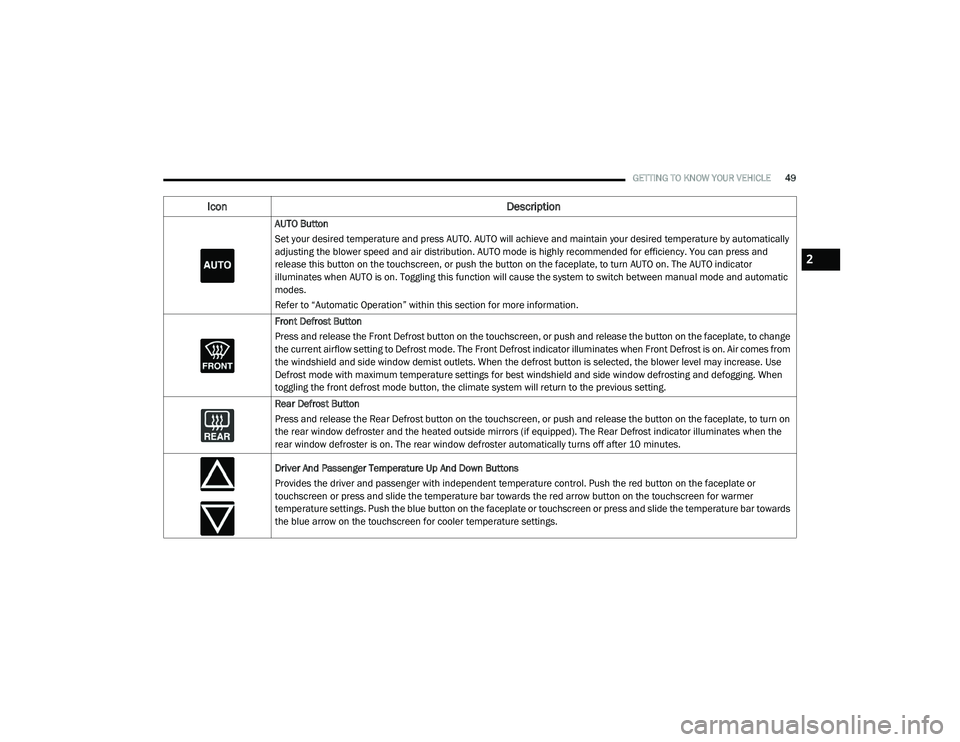
AUTO Button
Set your desired temperature and press AUTO. AUTO will achieve and maintain your desired temperature by automatically
adjusting the blower speed and air distribution. AUTO mode is highly recommended for efficiency. You can press and
release this button on the touchscreen, or push the button on the faceplate, to turn AUTO on. The AUTO indicator
illuminates when AUTO is on. Toggling this function will cause the system to switch between manual mode and automatic
modes.
Refer to “Automatic Operation” within this section for more information.
Front Defrost Button
Press and release the Front Defrost button on the touchscreen, or push and release the button on the faceplate, to change
the current airflow setting to Defrost mode. The Front Defrost indicator illuminates when Front Defrost is on. Air comes from
the windshield and side window demist outlets. When the defrost button is selected, the blower level may increase. Use
Defrost mode with maximum temperature settings for best windshield and side window defrosting and defogging. When
toggling the front defrost mode button, the climate system will return to the previous setting.
Rear Defrost Button
Press and release the Rear Defrost button on the touchscreen, or push and release the button on the faceplate, to turn on
the rear window defroster and the heated outside mirrors (if equipped). The Rear Defrost indicator illuminates when the
rear window defroster is on. The rear window defroster automatically turns off after 10 minutes.
Driver And Passenger Temperature Up And Down Buttons
Provides the driver and passenger with independent temperature control. Push the red button on the faceplate or
touchscreen or press and slide the temperature bar towards the red arrow button on the touchscreen for warmer
temperature settings. Push the blue button on the faceplate or touchscreen or press and slide the temperature bar towards
the blue arrow on the touchscreen for cooler temperature settings.
Icon Description
2
20_LA_OM_EN_USC_t.book Page 49
Page 83 of 396
GETTING TO KNOW YOUR INSTRUMENT PANEL81
Speed Warning — If Equipped
Push and release the up or down arrow button
until the Speed Warning Menu icon/title is
displayed in the instrument cluster display.
Push and release OK to enter speed warning.
Use the up or down arrow button to select a
desired speed, then push and release OK to set
the speed. The white passive speed limiter
telltale will light up with a notification text
message (Speed Warning Set to XX), followed by
the selected unit. When the set speed is
exceeded, an audible chime will sound for up to
10 seconds or until the speed is no longer
exceeded. The white passive speed limiter
telltale will turn yellow and will flash, and a pop
up message of “Speed Warning Exceeded” will
display.
NOTE:
You can turn the Speed Warning off by using the
up or down arrows to scroll through speed list
and select OFF at the bottom of the list.
BATTERY SAVER ON/BATTERY SAVER
M
ODE MESSAGE — ELECTRICAL LOAD
R
EDUCTION ACTIONS — IF EQUIPPED
This vehicle is equipped with an Intelligent
Battery Sensor (IBS) to perform additional
monitoring of the electrical system and status
of the vehicle battery.
In cases when the IBS detects charging system
failure, or the vehicle battery conditions are
deteriorating, electrical load reduction actions
will take place to extend the driving time and
distance of the vehicle. This is done by reducing
power to or turning off non-essential electrical
loads.
Load reduction is only active when the engine is
running. It will display a message if there is a
risk of battery depletion to the point where the
vehicle may stall due to lack of electrical supply,
or will not restart after the current drive cycle.
When load reduction is activated, the message
“Battery Saver On” or “Battery Saver Mode” will
appear in the instrument cluster.
These messages indicate the vehicle battery
has a low state of charge and continues to lose
electrical charge at a rate that the charging
system cannot sustain. NOTE:
The charging system is independent from
load reduction. The charging system
performs a diagnostic on the charging
system continuously.
If the Battery Charge Warning Light is on it
may indicate a problem with the charging
system. Refer to “Battery Charge Warning
Light” in “Getting To Know Your Instrument
Panel” for further information.
The electrical loads that may be switched off
(if equipped), and vehicle functions which can
be affected by load reduction:
Heated Seat/Vented Seats/Heated Wheel
Heated/Cooled Cup Holders — If Equipped
Rear Defroster And Heated Mirrors
HVAC System
115 Volts AC Power Inverter System
Audio and Telematics System
Loss of the battery charge may indicate one or
more of the following conditions:
The charging system cannot deliver enough
electrical power to the vehicle system
because the electrical loads are larger than
the capability of the charging system. The
charging system is still functioning properly.
3
20_LA_OM_EN_USC_t.book Page 81
Page 102 of 396
100SAFETY
7. Rotate the steering wheel back to center
and then an additional slightly more than
one-half turn to the right.
8. Place the ignition to the OFF mode and then back to ON. If the sequence was completed
properly, the “ESC OFF Indicator Light” will
blink several times to confirm HSA is
disabled.
9. Repeat these steps if you want to return this feature to its previous setting.
Rain Brake Support (RBS)
Rain Brake Support (RBS) may improve braking
performance in wet conditions. It will
periodically apply a small amount of brake
pressure to remove any water buildup on the
front brake rotors. It functions when the
windshield wipers are in LO or HI speed. When
RBS is active, there is no notification to the
driver and no driver interaction is required.
Ready Alert Braking (RAB)
Ready Alert Braking (RAB) may reduce the time
required to reach full braking during emergency
braking situations. It anticipates when an
emergency braking situation may occur by monitoring how fast the throttle is released by
the driver. The Electronic Brake Controller (EBC)
will prepare the brake system for a panic stop.
Traction Control System (TCS)
The Traction Control System (TCS) monitors the
amount of wheel spin of each of the driven
wheels. If wheel spin is detected, the TCS may
apply brake pressure to the spinning wheel(s)
and/or reduce engine power to provide
enhanced acceleration and stability. A feature
of the TCS, Brake Limited Differential (BLD),
functions similar to a limited slip differential
and controls the wheel spin across a driven
axle. If one wheel on a driven axle is spinning
faster than the other, the system will apply the
brake of the spinning wheel. This will allow more
engine power to be applied to the wheel that is
not spinning. BLD may remain enabled even if
TCS and ESC are in reduced modes.
AUXILIARY DRIVING SYSTEMS
BLIND SPOT MONITORING (BS M) — IF
E
QUIPPED
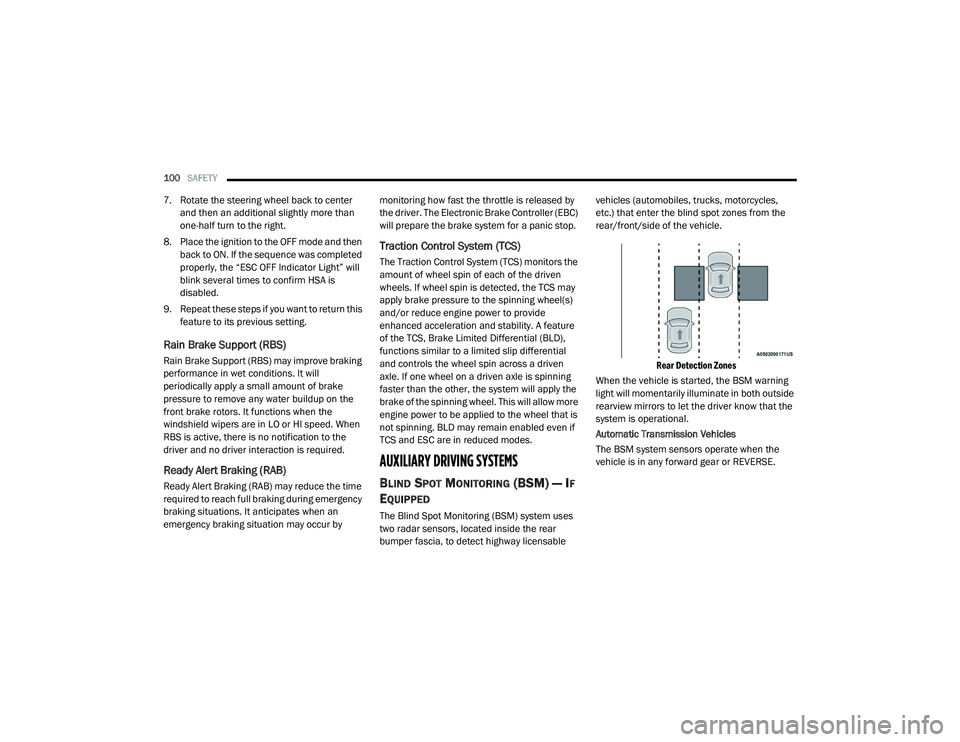
The Blind Spot Monitoring (BSM) system uses
two radar sensors, located inside the rear
bumper fascia, to detect highway licensable vehicles (automobiles, trucks, motorcycles,
etc.) that enter the blind spot zones from the
rear/front/side of the vehicle.
Rear Detection Zones
When the vehicle is started, the BSM warning
light will momentarily illuminate in both outside
rearview mirrors to let the driver know that the
system is operational.
Automatic Transmission Vehicles
The BSM system sensors operate when the
vehicle is in any forward gear or REVERSE.
20_LA_OM_EN_USC_t.book Page 100