sport mode DODGE CHALLENGER 2021 Owners Manual
[x] Cancel search | Manufacturer: DODGE, Model Year: 2021, Model line: CHALLENGER, Model: DODGE CHALLENGER 2021Pages: 328, PDF Size: 15 MB
Page 6 of 328

4
WARNING LIGHTS AND MESSAGES ................... 69 Red Warning Lights ..........................................69
Yellow Warning Lights ......................................72
Yellow Indicator Lights .....................................75
Green Indicator Lights......................................75
White Indicator Lights ......................................76
Blue Indicator Lights ........................................76
ONBOARD DIAGNOSTIC SYSTEM — OBD II ....... 76
Onboard Diagnostic System
(OBD II) Cybersecurity ......................................76
EMISSIONS INSPECTION AND MAINTENANCE
PROGRAMS ............................................................ 77
STARTING AND OPERATING
STARTING THE ENGINE ........................................ 78
Manual Transmission — If Equipped ...............78
Automatic Transmission —
If Equipped........................................................78
Normal Starting ................................................79
AutoPark ...........................................................80
Cold Weather Operation (Below –22°F
Or −30°C) ........................................................81
If Engine Fails To Start .....................................81
After Starting.....................................................81 ENGINE BLOCK HEATER — IF EQUIPPED ...........81
ENGINE BREAK-IN RECOMMENDATIONS —
3.6L & 5.7L ............................................................82
PARKING BRAKE ....................................................82
MANUAL TRANSMISSION — IF EQUIPPED ..........83
Six-Speed Manual Transmission .....................83
Shifting ..............................................................84
Recommended Shift Speeds...........................85
1–4 Skip Shift .................................................86
Downshifting.....................................................86
AUTOMATIC TRANSMISSION —
IF EQUIPPED .......................................................... 86
Ignition Park Interlock ......................................87
Brake Transmission Shift Interlock (BTSI)
System .............................................................87
Eight-Speed Automatic Transmission .............87
SPORT MODE — WITHOUT PERFORMANCE
CONTROL................................................................. 92
FUEL SAVER TECHNOLOGY 5.7L —
IF EQUIPPED ...........................................................93
ELECTRIC POWER STEERING ...............................93
CRUISE CONTROL SYSTEMS — IF EQUIPPED .....93
Cruise Control ..................................................94
Adaptive Cruise Control (ACC) .........................95 PARKSENSE REAR PARK ASSIST —
IF EQUIPPED ......................................................... 103
ParkSense Sensors ....................................... 104
ParkSense Display ........................................ 104
ParkSense Warning Display ......................... 107
Enabling And Disabling ParkSense.............. 107
Service The ParkSense Rear Park
Assist System ................................................ 107
Cleaning The ParkSense System ................. 107
ParkSense System Usage Precautions........ 107
PARKVIEW REAR BACK UP CAMERA ............... 108
REFUELING THE VEHICLE ................................... 109 Loose Fuel Filler Cap Message .................... 110
VEHICLE LOADING .............................................. 110
Vehicle Certification Label............................ 110
Gross Vehicle Weight Rating (GVWR) .......... 110
Gross Axle Weight Rating (GAWR) ............... 111
Overloading ................................................... 111
Loading ......................................................... 111
21_LA_OM_EN_USC_t.book Page 4
Page 7 of 328

5
TRAILER TOWING ............................................... 111 Common Towing Definitions ......................... 111Trailer Hitch Classification ............................ 113
Trailer Towing Weights (Maximum Trailer
Weight Ratings) ............................................. 113
Trailer And Tongue Weight ........................... 114
Towing Requirements ................................... 114Towing Tips ................................................... 116
RECREATIONAL TOWING
(BEHIND MOTORHOME) ..................................... 117
DRIVING TIPS ....................................................... 117
Driving On Slippery Surfaces ........................ 117
Driving Through Water ................................. 118
MULTIMEDIA
UCONNECT SYSTEMS ......................................... 119
CYBERSECURITY ................................................. 119
UCONNECT SETTINGS ........................................ 120Customer Programmable Features .............. 120
UCONNECT INTRODUCTION................................ 135
System Overview .......................................... 135
Drag & Drop Menu Bar ................................. 138Safety And General Information ................... 138
UCONNECT MODES ............................................. 139
Steering Wheel Audio Controls ..................... 139
Radio Mode .................................................. 140
Media Mode .................................................. 148
Phone Mode ................................................. 150 ANDROID AUTO™ & APPLE CARPLAY® —
IF EQUIPPED ........................................................ 161
Android Auto™ .............................................. 161
Apple CarPlay® ............................................. 163Android Auto™ And Apple CarPlay®
Tips And Tricks .............................................. 165
PERFORMANCE PAGES...................................... 165
Home.............................................................. 166
Timers ............................................................ 168
Gauges ........................................................... 170
G-Force........................................................... 171
Engine ............................................................ 172
Dynamometer (Dyno) .................................... 172
DODGE DRIVE MODES — IF EQUIPPED ............ 173
Performance Control — If Equipped ............. 173
RADIO OPERATION AND MOBILE PHONES ..... 177
Regulatory And Safety Information .............. 177
SAFETY
SAFETY FEATURES .............................................. 178 Anti-Lock Brake System (ABS) ..................... 178
Electronic Brake Control (EBC) System ...... 179
AUXILIARY DRIVING SYSTEMS.......................... 184
Blind Spot Monitoring (BSM) —
If Equipped..................................................... 184Forward Collision Warning (FCW) Operation —
If Equipped..................................................... 187Tire Pressure Monitoring System (TPMS) .... 189 OCCUPANT RESTRAINT SYSTEMS ................... 192
Occupant Restraint Systems Features ....... 192
Important Safety Precautions ...................... 192
Seat Belt Systems ........................................ 193
Supplemental Restraint Systems (SRS) ...... 199Child Restraints ............................................ 208
SAFETY TIPS ........................................................ 223
Transporting Passengers.............................. 223
Transporting Pets ......................................... 223
Safety Checks You Should Make Inside
The Vehicle ................................................... 223
Periodic Safety Checks You Should Make
Outside The Vehicle ...................................... 225
Exhaust Gas................................................... 225
Carbon Monoxide Warnings ......................... 225
IN CASE OF EMERGENCY
HAZARD WARNING FLASHERS ......................... 226
ASSIST AND SOS MIRROR — IF EQUIPPED...... 226
JACKING AND TIRE CHANGING ......................... 229 Preparations For Jacking .............................. 230
Jack Location/Spare Tire Stowage ............. 230
Jacking And Changing A Tire ....................... 231
TIRE SERVICE KIT — IF EQUIPPED ..................... 234
Tire Service Kit Storage ................................ 234
Tire Service Kit Components And Operation ...234
Tire Service Kit Usage Precautions .............. 235
Sealing A Tire With Tire Service Kit .............. 236
21_LA_OM_EN_USC_t.book Page 5
Page 8 of 328

6
JUMP STARTING .................................................. 238 Preparations For Jump Start......................... 239Jump Starting Procedure .............................. 240
IF YOUR ENGINE OVERHEATS ........................... 241
MANUAL PARK RELEASE — 8 – SPEED
TRANSMISSION .................................................. 241
FREEING A STUCK VEHICLE ............................... 243
TOWING A DISABLED VEHICLE .......................... 244 Rear-Wheel Drive (RWD) Models.................. 245
ENHANCED ACCIDENT RESPONSE SYSTEM
(EARS) .................................................................. 245
EVENT DATA RECORDER (EDR) ......................... 245
SERVICING AND MAINTENANCE
SCHEDULED SERVICING .................................... 246
3.6L And 5.7L Engines ................................. 246
ENGINE COMPARTMENT .................................... 251
3.6L Engine ................................................... 2515.7L Engine ................................................... 252Checking Oil Level ......................................... 253
Adding Washer Fluid ..................................... 253
Maintenance-Free Battery ............................ 254
Pressure Washing ......................................... 254 VEHICLE MAINTENANCE..................................... 254
Engine Oil ...................................................... 255
Engine Oil Filter ............................................. 256Engine Air Cleaner Filter .............................. 256Air Conditioner Maintenance ....................... 257
Accessory Drive Belt Inspection ................... 259Body Lubrication ........................................... 260Windshield Wiper Blades.............................. 260Exhaust System ............................................. 261Cooling System .............................................. 262
Brake System ............................................... 265
Clutch Hydraulic System — Manual
Transmission (If Equipped)........................... 266Manual Transmission — If Equipped............ 266
Automatic Transmission — If Equipped ....... 266
All Wheel Drive (AWD) — If Equipped .......... 267
Rear Axle ........................................................ 267Fuses.............................................................. 267
Bulb Replacement ........................................ 276 TIRES ..................................................................... 279
Tire Safety Information ................................ 279Tires — General Information ........................ 288Tire Types....................................................... 291Spare Tires — If Equipped ............................ 292
Wheel And Wheel Trim Care ........................ 294Snow Traction Devices.................................. 295Tire Rotation Recommendations ................. 296
DEPARTMENT OF TRANSPORTATION UNIFORM
TIRE QUALITY GRADES ...................................... 296
Treadwear...................................................... 297
Traction Grades ............................................. 297Temperature Grades..................................... 297
VEHICLE STORAGE .............................................. 298
BODYWORK .......................................................... 298 Protection From Atmospheric Agents .......... 298
Body And Underbody Maintenance ............. 298
Preserving The Bodywork ............................. 298
INTERIORS ........................................................... 299
Seats And Fabric Parts ................................. 299
Plastic And Coated Parts .............................. 299
Leather Surfaces........................................... 300
Glass Surfaces ............................................. 300
21_LA_OM_EN_USC_t.book Page 6
Page 14 of 328
12
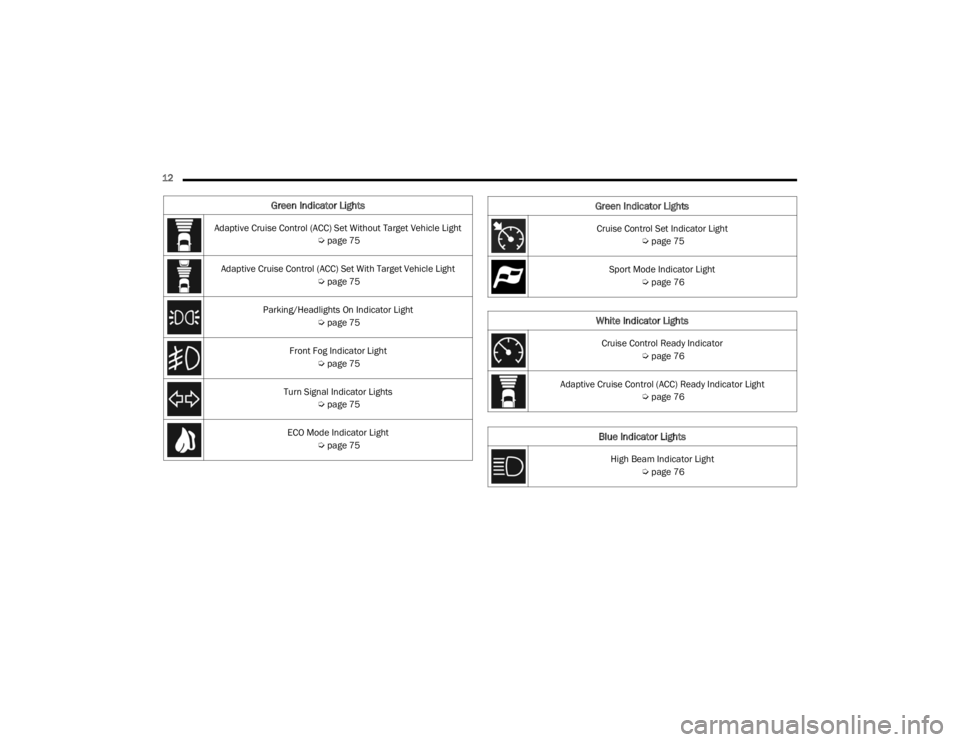
Green Indicator Lights
Adaptive Cruise Control (ACC) Set Without Target Vehicle Light Úpage 75
Adaptive Cruise Control (ACC) Set With Target Vehicle Light Úpage 75
Parking/Headlights On Indicator Light Úpage 75
Front Fog Indicator Light Úpage 75
Turn Signal Indicator Lights Úpage 75
ECO Mode Indicator Light Úpage 75Cruise Control Set Indicator Light
Úpage 75
Sport Mode Indicator Light Úpage 76
White Indicator Lights
Cruise Control Ready Indicator
Úpage 76
Adaptive Cruise Control (ACC) Ready Indicator Light Úpage 76
Blue Indicator Lights
High Beam Indicator Light
Úpage 76
Green Indicator Lights
21_LA_OM_EN_USC_t.book Page 12
Page 78 of 328
76GETTING TO KNOW YOUR INSTRUMENT PANEL
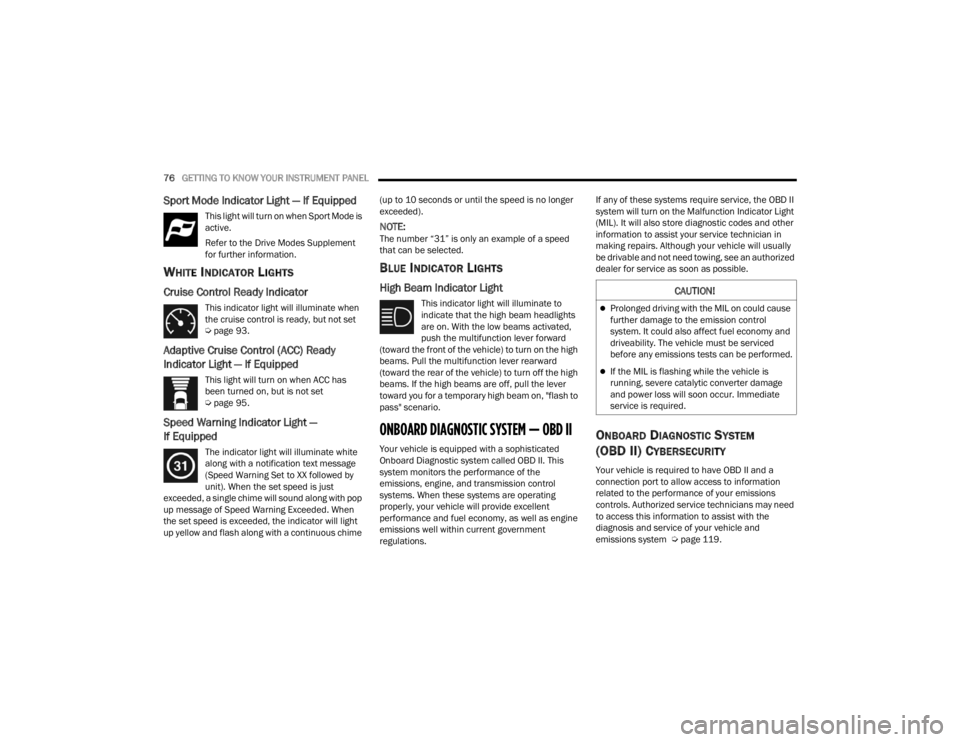
Sport Mode Indicator Light — If Equipped
This light will turn on when Sport Mode is
active.
Refer to the Drive Modes Supplement
for further information.
WHITE INDICATOR LIGHTS
Cruise Control Ready Indicator
This indicator light will illuminate when
the cruise control is ready, but not set
Úpage 93.
Adaptive Cruise Control (ACC) Ready
Indicator Light — If Equipped
This light will turn on when ACC has
been turned on, but is not set
Úpage 95.
Speed Warning Indicator Light —
If Equipped
The indicator light will illuminate white
along with a notification text message
(Speed Warning Set to XX followed by
unit). When the set speed is just
exceeded, a single chime will sound along with pop
up message of Speed Warning Exceeded. When
the set speed is exceeded, the indicator will light
up yellow and flash along with a continuous chime (up to 10 seconds or until the speed is no longer
exceeded).
NOTE:The number “31” is only an example of a speed
that can be selected.
BLUE INDICATOR LIGHTS
High Beam Indicator Light
This indicator light will illuminate to
indicate that the high beam headlights
are on. With the low beams activated,
push the multifunction lever forward
(toward the front of the vehicle) to turn on the high
beams. Pull the multifunction lever rearward
(toward the rear of the vehicle) to turn off the high
beams. If the high beams are off, pull the lever
toward you for a temporary high beam on, "flash to
pass" scenario.
ONBOARD DIAGNOSTIC SYSTEM — OBD II
Your vehicle is equipped with a sophisticated
Onboard Diagnostic system called OBD II. This
system monitors the performance of the
emissions, engine, and transmission control
systems. When these systems are operating
properly, your vehicle will provide excellent
performance and fuel economy, as well as engine
emissions well within current government
regulations. If any of these systems require service, the OBD II
system will turn on the Malfunction Indicator Light
(MIL). It will also store diagnostic codes and other
information to assist your service technician in
making repairs. Although your vehicle will usually
be drivable and not need towing, see an authorized
dealer for service as soon as possible.
ONBOARD DIAGNOSTIC SYSTEM
(OBD II) C
YBERSECURITY
Your vehicle is required to have OBD II and a
connection port to allow access to information
related to the performance of your emissions
controls. Authorized service technicians may need
to access this information to assist with the
diagnosis and service of your vehicle and
emissions system Ú page 119.
CAUTION!
Prolonged driving with the MIL on could cause
further damage to the emission control
system. It could also affect fuel economy and
driveability. The vehicle must be serviced
before any emissions tests can be performed.
If the MIL is flashing while the vehicle is
running, severe catalytic converter damage
and power loss will soon occur. Immediate
service is required.
21_LA_OM_EN_USC_t.book Page 76
Page 94 of 328

92STARTING AND OPERATING
In some models, the shift paddles may be
disabled (or re-enabled, as desired) using Drive
Mode Set-Up, accessed by selecting Perfor -
mance Control.
In AutoStick mode, the transmission will shift up or
down when (+/-) is manually selected by the driver
(using the gear selector, or the shift paddles [if
equipped]), unless an engine lugging or overspeed
condition would result. It will remain in the selected
gear until another upshift or downshift is chosen,
except as described below.
In temporary AutoStick mode (gear selector in
DRIVE), the transmission will automatically shift
up when maximum engine speed is reached. If
the accelerator is fully pressed, the transmis -
sion will downshift when possible. Lack of accel -
erator pedal activity will cause the transmission
to revert to automatic operation.
If normal AutoStick mode is engaged (gear
selector in MANUAL position), manual gear
selection will be maintained until the gear
selector is returned to DRIVE, or as described
below. The transmission will not upshift auto -
matically at redline in this mode, nor will down -
shifts be obtained if the accelerator pedal is
pressed to the floor.
The transmission will automatically downshift
as the vehicle slows (to prevent engine lugging)
and will display the current gear.
The transmission will automatically downshift to
FIRST gear when coming to a stop. After a stop,
the driver should manually upshift (+) the trans -
mission as the vehicle is accelerated.
You can start out, from a stop, in FIRST or
SECOND gear. Tapping (+) (at a stop) will allow
starting in SECOND gear. Starting out in
SECOND gear can be helpful in snowy or icy
conditions.
If a requested downshift would cause the
engine to over-speed, that shift will not occur
and an indication will display.
The system will ignore attempts to upshift at too
low of a vehicle speed and an indication will
display.
Holding the (-) paddle pressed (if equipped), or
holding the gear selector in the (-) position, will
downshift the transmission to the lowest gear
possible at the current speed.
Transmission shifting will be more noticeable
when AutoStick is enabled.
The system may revert to automatic shift mode
if a fault or overheat condition is detected. To disengage AutoStick mode, return the gear
selector to the DRIVE position, or press and hold
the (+) shift paddle (if equipped, and the gear
selector is already in DRIVE) until “D” is once again
indicated in the instrument cluster. You can shift in
or out of the AutoStick mode at any time without
taking your foot off the accelerator pedal.
SPORT MODE — WITHOUT PERFORMANCE
CONTROL
Your vehicle is equipped with a SPORT Mode
feature. This mode is a configuration set up for
typical enthusiast driving. The engine,
transmission (when equipped with automatic
transmission), and steering systems are all set to
their SPORT settings. SPORT Mode will provide
improved throttle response and modified shifting
for an enhanced driving experience, as well the
greatest amount of steering feel. This mode may
be activated and deactivated by pushing the
SPORT button on the instrument panel switch
bank.
WARNING!
Do not downshift for additional engine braking
on a slippery surface. The drive wheels could
lose their grip and the vehicle could skid,
causing a collision or personal injury.
21_LA_OM_EN_USC_t.book Page 92
Page 95 of 328

STARTING AND OPERATING93
NOTE:If equipped with a manual transmission, the 1 - 4
Skip Shift Feature is disabled in SPORT Mode.
FUEL SAVER TECHNOLOGY 5.7L —
IF EQUIPPED
This feature offers improved fuel economy by
shutting off four of the engine's eight cylinders
during light load and cruise conditions. The system
is automatic with no driver inputs or additional
driving skills required. When the system is active,
an indication will display within the instrument
cluster “Fuel Economy” main menu screen.
NOTE:This system may take some time to return to full
functionality after a battery disconnect.
ELECTRIC POWER STEERING
The Electric Power Steering system will give you
good vehicle response and increased ease of
maneuverability in tight spaces. The system will
vary its assist to provide light efforts while parking
and good feel while driving. If the electric steering
system experiences a fault that prevents it from
providing assist, you will still have the ability to
steer the vehicle manually. Alternate electric power steering efforts can be
selected through the Uconnect System
Ú
page 120.
If the Electric Power Steering warning icon is
displayed and the “SERVICE POWER STEERING” or
the “POWER STEERING ASSIST OFF – SERVICE
SYSTEM” message is displayed within the
instrument cluster display, this indicates the
vehicle needs to be taken to the dealer for service
Ú page 69.
NOTE:
Even if the power steering assistance is no
longer operational, it is still possible to steer the
vehicle. Under these conditions there will be a
substantial increase in steering effort, espe -
cially at low speeds and during parking maneu -
vers.
If the condition persists, see an authorized
dealer for service. If the Steering icon is displayed and the “POWER
STEERING SYSTEM OVER TEMP” message is
displayed on the instrument cluster screen, they
indicate that extreme steering maneuvers may
have occurred which caused an over temperature
condition in the power steering system. Once
driving conditions are safe, pull over and let the
vehicle idle for a few moments until the icon and
message turn off.
CRUISE CONTROL SYSTEMS — IF EQUIPPED
Your vehicle may be equipped with the Cruise
Control system, or the Adaptive Cruise Control
(ACC) system:
Cruise Control will keep your vehicle at a
constant preset speed.
Adaptive Cruise Control (ACC) will adjust the
vehicle speed up to the preset speed to main
-
tain a distance with the vehicle ahead.
NOTE:
In vehicles equipped with ACC, if ACC is not
enabled, Fixed Speed Cruise Control will not
detect vehicles directly ahead of you. Always be
aware of the feature selected.
Only one Cruise Control feature can operate at a
time. For example, if Fixed Speed Cruise Control
is enabled, Adaptive Cruise Control will be
unavailable, and vice versa.
WARNING!
Continued operation with reduced assist could
pose a safety risk to yourself and others. Service
should be obtained as soon as possible.
4
21_LA_OM_EN_USC_t.book Page 93
Page 128 of 328

126MULTIMEDIA
Mirrors & Wipers — If Equipped
Electric Power Steering This setting will adjust the electric power steering modes. Setting options are
“Normal”, “Sport”, and “Comfort”.
Hill Start Assist This setting will turn the Hill Start Assist system on or off.
ParkView Backup Camera Active Guidelines This setting will turn the ParkView Backup Camera Active Guidelines on or off.
ParkView Backup Camera Delay — If Equipped This setting will add a delay to the ParkView Backup Camera when shifting out
of REVERSE.
Rain Sensing Auto Wipers This setting will turn the Rain Sensing Auto Wipers on or off.
Tilt Mirrors In Reverse This setting will tilt the mirrors when the vehicle is placed in REVERSE.
Setting Name Description
When the Mirrors & Wipers button is pressed on the touchscreen, the system displays the options related to the vehicle’s mirrors and wipers.
NOTE:Depending on the vehicle’s options, feature settings may vary.
Setting NameDescription
Tilt Side Mirrors in ReverseThis Setting will tilt the mirrors when the vehicle is placed in REVERSE. Setting
options are “On” and “Off”.
Rain Sensing Auto Wipers This setting will turn the Rain Sensing Auto Wipers on or off.
Headlights with Wipers This setting will turn the headlights on when the wipers are activated. Setting
options are “On” and “Off”.
21_LA_OM_EN_USC_t.book Page 126
Page 171 of 328
MULTIMEDIA169
When the Timers Page is selected, you will be able
to select the Drag or Accel & Braking tabs. The
following will be displayed:
Recent
The most recent successful run of performance
timers. If a run does not complete within the
timers limit, or is aborted, the values shown will
revert to the most recent valid run.
Last
The last recorded successful run of perfor -
mance timers.
Best
The best recorded run of performance timers,
except for braking data.
Save
Pressing the Save button will let you save the
visible page, Recent/Last/Best. Any saved run
over 10 will overwrite the last saved run for
Uconnect system storage. The operation of the
Save feature is listed below:
NOTE:Pressing the Camera icon in the upper right corner
of the screen at any time will save a screenshot of
the screen currently being viewed to the connected
USB device.
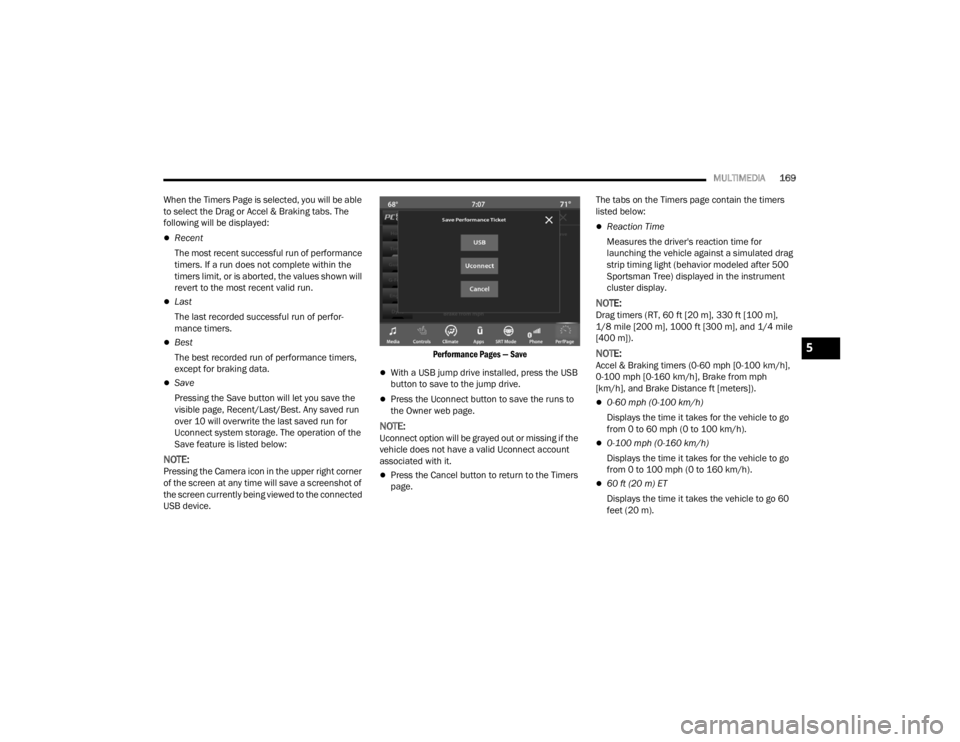
Performance Pages — Save
With a USB jump drive installed, press the USB
button to save to the jump drive.
Press the Uconnect button to save the runs to
the Owner web page.
NOTE:Uconnect option will be grayed out or missing if the
vehicle does not have a valid Uconnect account
associated with it.
Press the Cancel button to return to the Timers
page.The tabs on the Timers page contain the timers
listed below:
Reaction Time
Measures the driver's reaction time for
launching the vehicle against a simulated drag
strip timing light (behavior modeled after 500
Sportsman Tree) displayed in the instrument
cluster display.
NOTE:Drag timers (RT, 60 ft [20 m], 330 ft [100 m],
1/8 mile [200 m], 1000 ft [300 m], and 1/4 mile
[400 m]).
NOTE:Accel & Braking timers (0-60 mph [0-100 km/h],
0-100 mph [0-160 km/h], Brake from mph
[km/h], and Brake Distance ft [meters]).
0-60 mph (0-100 km/h)
Displays the time it takes for the vehicle to go
from 0 to 60 mph (0 to 100 km/h).
0-100 mph (0-160 km/h)
Displays the time it takes for the vehicle to go
from 0 to 100 mph (0 to 160 km/h).
60 ft (20 m) ET
Displays the time it takes the vehicle to go 60
feet (20 m).
5
21_LA_OM_EN_USC_t.book Page 169
Page 175 of 328
MULTIMEDIA173
DODGE DRIVE MODES — IF EQUIPPED
PERFORMANCE CONTROL — IF
E
QUIPPED
Your vehicle may be equipped with a Performance
Control feature which allows for coordinating the
operation of various vehicle systems depending
upon the type of driving behavior desired. The
Performance Control feature is controlled through
the Uconnect system and may be accessed by
performing any of the following:
Pushing the Super Track Pack button on the
instrument panel switch bank.
Selecting “Performance Control” from the
“Apps” menu.
Selecting “Performance Control” from within the
Performance Pages menu.
You will be able to enable, disable, and customize
the functionality of the Launch Control and
Performance Control Set-Up features within
Performance Control. Descriptions of these features are provided below.
To access information about the functionality of
these features through the Uconnect system,
press the Info button on the touchscreen.
NOTE:Dodge vehicles equipped with a 6.4L engine,
except for R/T Scat Pack 1320 6.4L non-widebody
vehicles, will use SRT Drive Modes rather than the
Dodge Performance Control Pages. Please refer to
the following sections for further information on
the SRT Drive Modes.
Drive Mode Set-Up
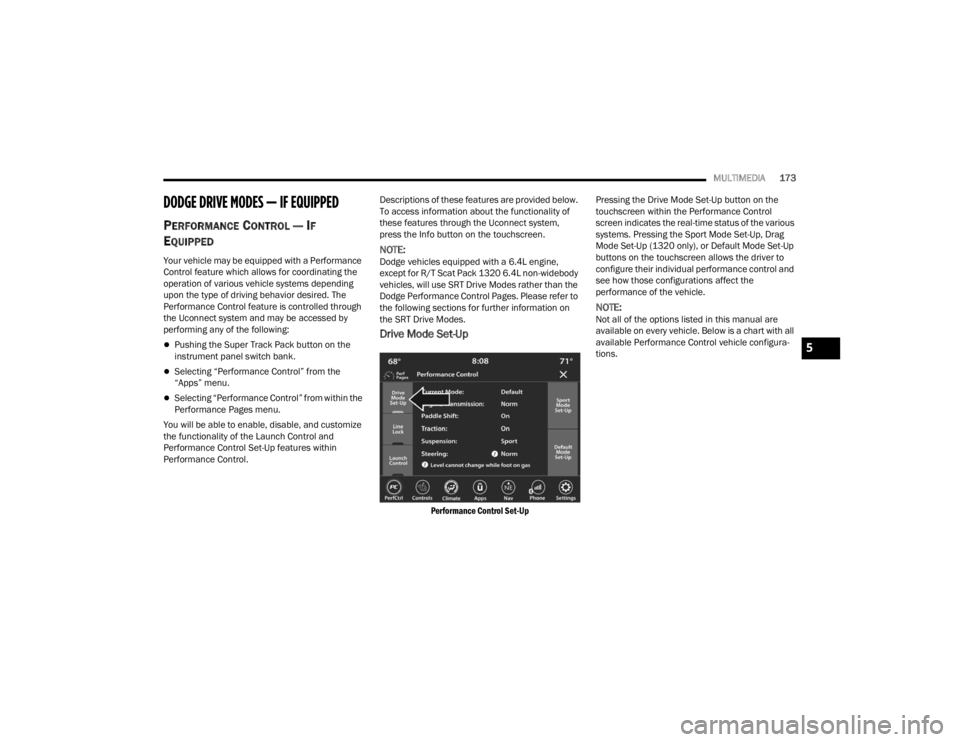
Performance Control Set-Up
Pressing the Drive Mode Set-Up button on the
touchscreen within the Performance Control
screen indicates the real-time status of the various
systems. Pressing the Sport Mode Set-Up, Drag
Mode Set-Up (1320 only), or Default Mode Set-Up
buttons on the touchscreen allows the driver to
configure their individual performance control and
see how those configurations affect the
performance of the vehicle.
NOTE:Not all of the options listed in this manual are
available on every vehicle. Below is a chart with all
available Performance Control vehicle configura
-
tions.
5
21_LA_OM_EN_USC_t.book Page 173