Sport DODGE CHALLENGER 2022 User Guide
[x] Cancel search | Manufacturer: DODGE, Model Year: 2022, Model line: CHALLENGER, Model: DODGE CHALLENGER 2022Pages: 336, PDF Size: 16.47 MB
Page 177 of 336
MULTIMEDIA175
With a USB jump drive installed, press the USB
button to save to the jump drive.
Press the Uconnect button to save the runs to
the Owner’s web page.
NOTE:Uconnect option will be grayed out or missing if the
vehicle does not have a valid Uconnect account
associated with it.
Press the Cancel button to return to the Timers
page.
The tabs on the Timers page contain the timers
listed below:
Reaction Time
Measures the driver's reaction time for
launching the vehicle against a simulated drag
strip timing light (behavior modeled after 500
Sportsman Tree) displayed in the instrument
cluster display.
NOTE:Drag timers (RT, 60 ft [20 m], 330 ft [100 m],
1/8 mile [200 m], 1000 ft [300 m], and 1/4 mile
[400 m]).
NOTE:Accel & Braking timers (0-60 mph [0-100 km/h],
0-100 mph [0-160 km/h], Brake from mph
[km/h], and Brake Distance ft [meters]).
0-60 mph (0-100 km/h)
Displays the time it takes for the vehicle to go
from 0 to 60 mph (0 to 100 km/h).
0-100 mph (0-160 km/h)
Displays the time it takes for the vehicle to go
from 0 to 100 mph (0 to 160 km/h).
60 ft (20 m) ET
Displays the time it takes the vehicle to go
60 feet (20 m).
330 ft (100 m) ET
Displays the time it takes the vehicle to go
330 feet (100 m).
⅛ Mile (200 m) ET
Displays the time it takes for the vehicle to
go ⅛ mile (200 m).
⅛ Mile (200 m) mph
Displays the vehicle speed at the time ⅛ mile
(200 m) was reached.
1000 ft (300 m) ET
Displays the time it takes the vehicle to go
1000 ft (300 m).
¼ Mile (400 m) ET
Displays the time it takes for the vehicle to
go ¼ mile (400 m).
¼ Mile (400 m) mph
Displays the speed the vehicle was at
when ¼ mile (400 m) was reached.
Brake Distance ft (meters)
Displays the distance it takes the vehicle to
make a complete stop.
NOTE:The distance measurement will be aborted if the
brake pedal is released or the parking brake is
engaged, before the vehicle comes to a complete
stop.
Brake from mph (km/h)
Displays the speed the vehicle is traveling when
the brake pedal is pressed.
NOTE:Brake Distance and Speed timers only display
"ready" when the vehicle is traveling at greater
than 30 mph (48 km/h).
5
22_LA_OM_EN_USC_t.book Page 175
Page 181 of 336
MULTIMEDIA179
DODGE DRIVE MODES — IF EQUIPPED
PERFORMANCE CONTROL —
I
F EQUIPPED
Your vehicle may be equipped with a Performance
Control feature which allows for coordinating the
operation of various vehicle systems depending
upon the type of driving behavior desired. The
Performance Control feature is controlled through
the Uconnect system and may be accessed by
performing any of the following:
Pushing the Super Track Pack button on the
instrument panel switch bank.
Selecting “Performance Control” from the Apps
menu.
Selecting “Performance Control” from within the
Performance Pages menu.
You will be able to enable, disable, and customize
the functionality of the Launch Control and
Performance Control Set-Up features within
Performance Control.
Descriptions of these features are provided below.
To access information about the functionality of
these features through the Uconnect system,
press the Info button on the touchscreen.
NOTE:Dodge vehicles equipped with a 6.4L engine,
except for R/T Scat Pack 1320 6.4L non-widebody
vehicles, will use SRT Drive Modes rather than the
Dodge Performance Control Pages. Please refer to
the following sections for further information on
the SRT Drive Modes.
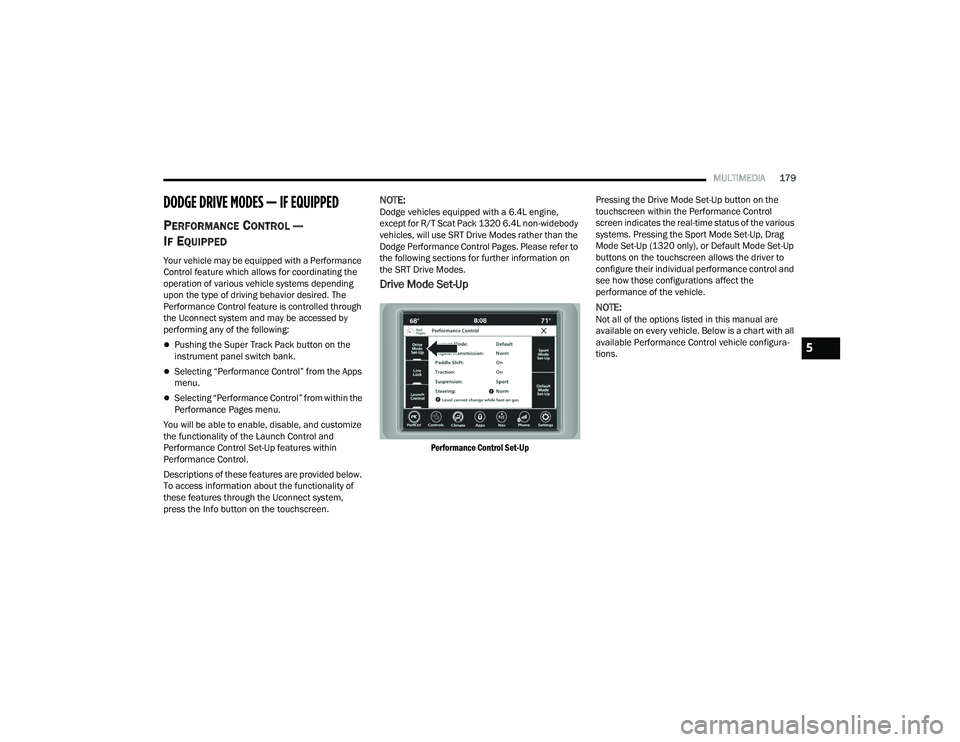
Drive Mode Set-Up
Performance Control Set-Up
Pressing the Drive Mode Set-Up button on the
touchscreen within the Performance Control
screen indicates the real-time status of the various
systems. Pressing the Sport Mode Set-Up, Drag
Mode Set-Up (1320 only), or Default Mode Set-Up
buttons on the touchscreen allows the driver to
configure their individual performance control and
see how those configurations affect the
performance of the vehicle.
NOTE:Not all of the options listed in this manual are
available on every vehicle. Below is a chart with all
available Performance Control vehicle configura
-
tions.
5
22_LA_OM_EN_USC_t.book Page 179
Page 182 of 336
180MULTIMEDIA
Available Mode Configurations
Refer to the Sport and Default Modes for their
detailed operation.
NOTE:These settings will remain in effect when using the
Launch Control feature.
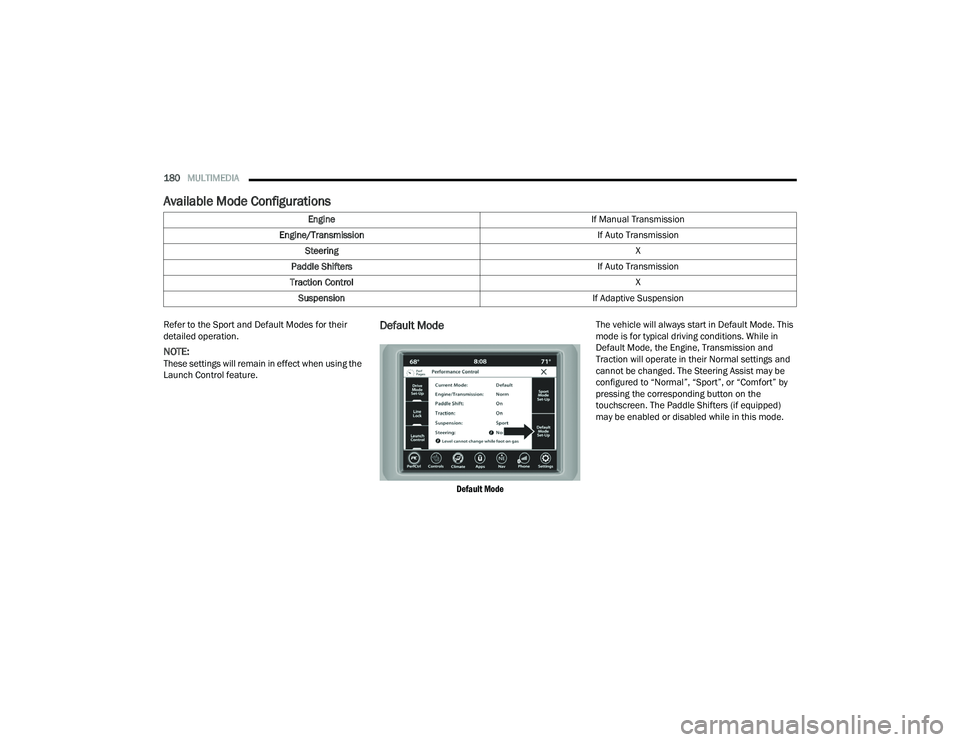
Default Mode
Default Mode
The vehicle will always start in Default Mode. This
mode is for typical driving conditions. While in
Default Mode, the Engine, Transmission and
Traction will operate in their Normal settings and
cannot be changed. The Steering Assist may be
configured to “Normal”, “Sport”, or “Comfort” by
pressing the corresponding button on the
touchscreen. The Paddle Shifters (if equipped)
may be enabled or disabled while in this mode.
Engine
If Manual Transmission
Engine/Transmission If Auto Transmission
Steering X
Paddle Shifters If Auto Transmission
Traction Control X
Suspension If Adaptive Suspension
22_LA_OM_EN_USC_t.book Page 180
Page 184 of 336
182MULTIMEDIA
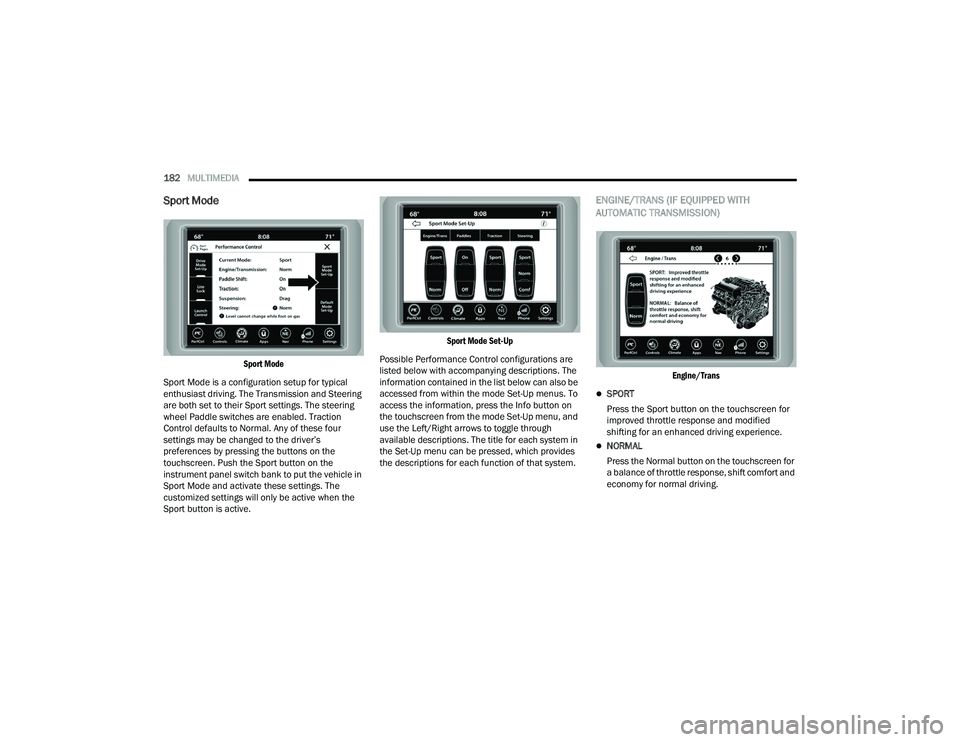
Sport Mode
Sport Mode
Sport Mode is a configuration setup for typical
enthusiast driving. The Transmission and Steering
are both set to their Sport settings. The steering
wheel Paddle switches are enabled. Traction
Control defaults to Normal. Any of these four
settings may be changed to the driver’s
preferences by pressing the buttons on the
touchscreen. Push the Sport button on the
instrument panel switch bank to put the vehicle in
Sport Mode and activate these settings. The
customized settings will only be active when the
Sport button is active.
Sport Mode Set-Up
Possible Performance Control configurations are
listed below with accompanying descriptions. The
information contained in the list below can also be
accessed from within the mode Set-Up menus. To
access the information, press the Info button on
the touchscreen from the mode Set-Up menu, and
use the Left/Right arrows to toggle through
available descriptions. The title for each system in
the Set-Up menu can be pressed, which provides
the descriptions for each function of that system.
ENGINE/TRANS (IF EQUIPPED WITH
AUTOMATIC TRANSMISSION)
Engine/Trans
SPORT
Press the Sport button on the touchscreen for
improved throttle response and modified
shifting for an enhanced driving experience.
NORMAL
Press the Normal button on the touchscreen for
a balance of throttle response, shift comfort and
economy for normal driving.
22_LA_OM_EN_USC_t.book Page 182
Page 185 of 336
MULTIMEDIA183
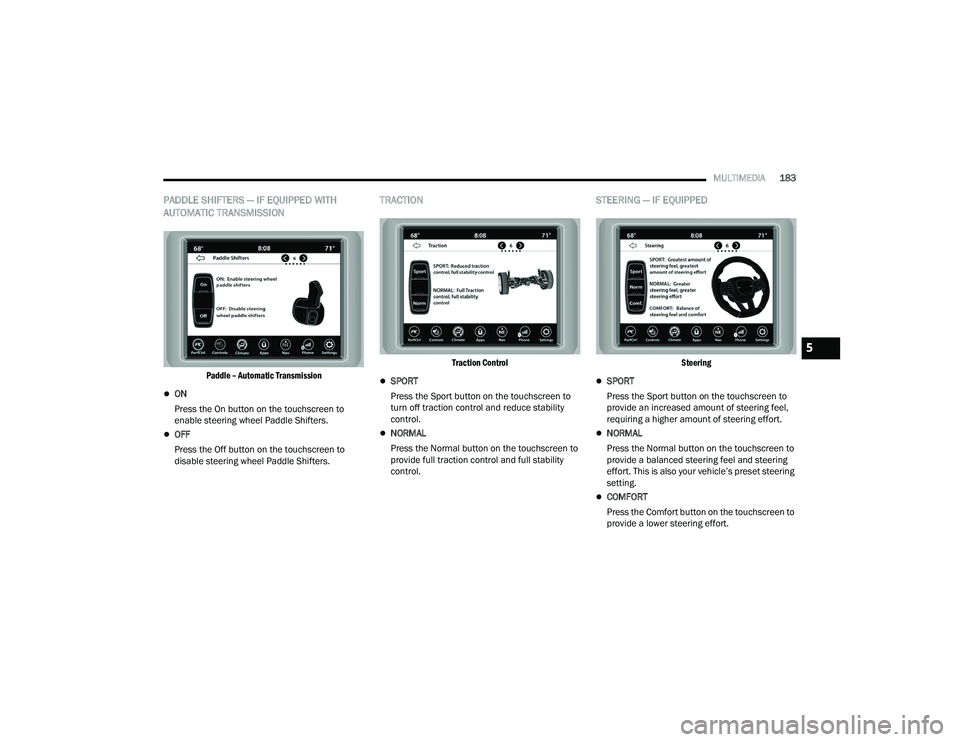
PADDLE SHIFTERS — IF EQUIPPED WITH
AUTOMATIC TRANSMISSION
Paddle – Automatic Transmission
ON
Press the On button on the touchscreen to
enable steering wheel Paddle Shifters.
OFF
Press the Off button on the touchscreen to
disable steering wheel Paddle Shifters.
TRACTION
Traction Control
SPORT
Press the Sport button on the touchscreen to
turn off traction control and reduce stability
control.
NORMAL
Press the Normal button on the touchscreen to
provide full traction control and full stability
control.
STEERING — IF EQUIPPED
Steering
SPORT
Press the Sport button on the touchscreen to
provide an increased amount of steering feel,
requiring a higher amount of steering effort.
NORMAL
Press the Normal button on the touchscreen to
provide a balanced steering feel and steering
effort. This is also your vehicle’s preset steering
setting.
COMFORT
Press the Comfort button on the touchscreen to
provide a lower steering effort.
5
22_LA_OM_EN_USC_t.book Page 183
Page 190 of 336
188SAFETY
(Continued)
ESC Operating Modes
Depending upon model and mode of operation, the
ESC system may have multiple operating modes.
ESC On
This is the normal operating mode for the ESC.
Whenever the vehicle is started, the ESC system
will be in this mode. This mode should be used for
most driving conditions. Alternate ESC modes
should only be used for specific reasons as noted
in the following paragraphs.Partial Off
This mode may be useful if the vehicle becomes
stuck. This mode may modify TCS and ESC
thresholds for activation, which allows for more
wheel spin than normally allowed.
To enter the “Partial Off” mode, momentarily push
the ESC OFF button and the ESC OFF Indicator
Light will illuminate. To turn the ESC on again,
momentarily push the ESC OFF button and the ESC
OFF Indicator Light will turn off.
NOTE:
For vehicles with multiple partial ESC modes,
the push and release of the switch will toggle
the ESC modes. Multiple attempts may be
required to return to "ESC On" mode.
Trailer Sway Control (TSC) is disabled when the
ESC system is in the “Partial Off” mode.
If Equipped — "ESC Sport" and "ESC Track" are
ESC “Partial Off” mode(s).
Full Off – If Equipped
This mode is intended for off-highway or off-road
use only and should not be used on any public
roadways. In this mode, TCS and ESC features are
turned off. To enter the “Full Off” mode, push and
hold the ESC OFF button for five seconds while the
vehicle is stopped with the engine running. After
five seconds, a chime will sound, the ESC OFF
Indicator Light will illuminate, and the “ESC OFF”
message will display in the instrument cluster. To
turn ESC on again, momentarily push the ESC OFF
button.
Vehicle modifications, or failure to properly
maintain your vehicle, may change the
handling characteristics of your vehicle, and
may negatively affect the performance of the
ESC system. Changes to the steering system,
suspension, braking system, tire type and size
or wheel size may adversely affect ESC perfor -
mance. Improperly inflated and unevenly worn
tires may also degrade ESC performance. Any
vehicle modification or poor vehicle mainte -
nance that reduces the effectiveness of the
ESC system can increase the risk of loss of
vehicle control, vehicle rollover, personal
injury and death.
WARNING!
WARNING!
When in “Partial Off” mode, the TCS functionality
of ESC (except for the limited slip feature
described in the TCS section) has been disabled
and the ESC OFF Indicator Light will be
illuminated. When in “Partial Off” mode, the
engine power reduction feature of TCS is
disabled, and the enhanced vehicle stability
offered by the ESC system is reduced.
WARNING!
In the ESC “Full Off” mode, the engine torque
reduction and stability features are disabled.
Therefore, enhanced vehicle stability offered
by the ESC system is unavailable. In an emer -
gency evasive maneuver, the ESC system will
not engage to assist in maintaining stability.
ESC “Full Off” mode is intended for
off-highway or off-road use only.
22_LA_OM_EN_USC_t.book Page 188
Page 193 of 336
SAFETY191
AUXILIARY DRIVING SYSTEMS
BLIND SPOT MONITORING (BSM) —
I
F EQUIPPED
BSM uses two radar sensors, located inside the
rear fascia/bumper, to detect highway licensable
vehicles (automobiles, trucks, motorcycles, etc.)
that enter the blind spot zones from the rear/front/
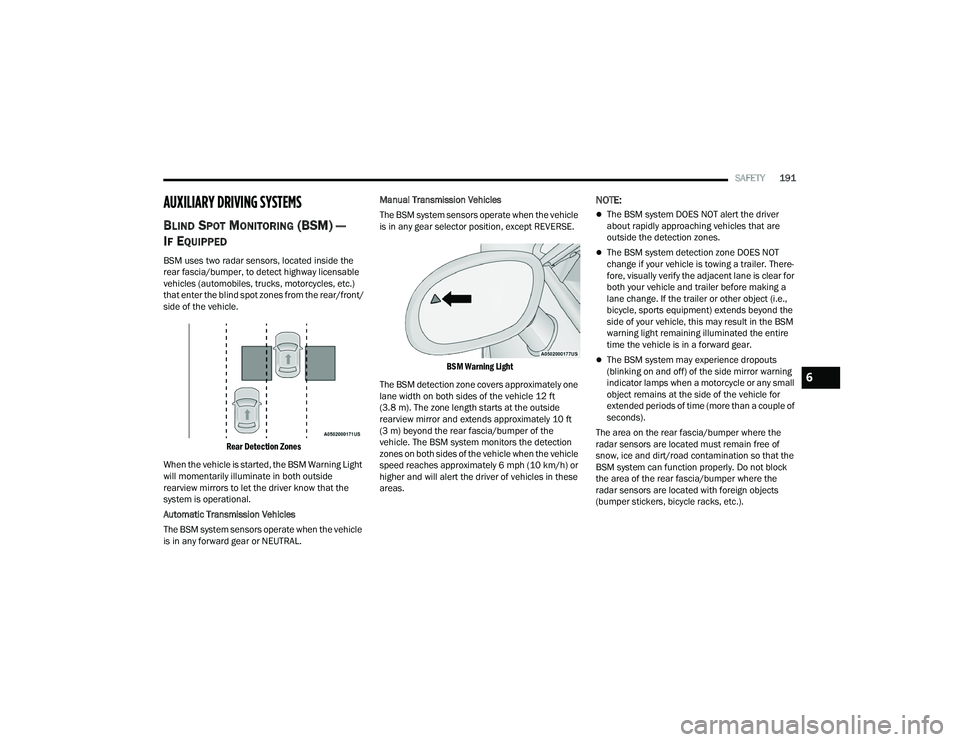
side of the vehicle.
Rear Detection Zones
When the vehicle is started, the BSM Warning Light
will momentarily illuminate in both outside
rearview mirrors to let the driver know that the
system is operational.
Automatic Transmission Vehicles
The BSM system sensors operate when the vehicle
is in any forward gear or NEUTRAL. Manual Transmission Vehicles
The BSM system sensors operate when the vehicle
is in any gear selector position, except REVERSE.
BSM Warning Light
The BSM detection zone covers approximately one
lane width on both sides of the vehicle 12 ft
(3.8 m). The zone length starts at the outside
rearview mirror and extends approximately 10 ft
(3 m) beyond the rear fascia/bumper of the
vehicle. The BSM system monitors the detection
zones on both sides of the vehicle when the vehicle
speed reaches approximately 6 mph (10 km/h) or
higher and will alert the driver of vehicles in these
areas.
NOTE:
The BSM system DOES NOT alert the driver
about rapidly approaching vehicles that are
outside the detection zones.
The BSM system detection zone DOES NOT
change if your vehicle is towing a trailer. There -
fore, visually verify the adjacent lane is clear for
both your vehicle and trailer before making a
lane change. If the trailer or other object (i.e.,
bicycle, sports equipment) extends beyond the
side of your vehicle, this may result in the BSM
warning light remaining illuminated the entire
time the vehicle is in a forward gear.
The BSM system may experience dropouts
(blinking on and off) of the side mirror warning
indicator lamps when a motorcycle or any small
object remains at the side of the vehicle for
extended periods of time (more than a couple of
seconds).
The area on the rear fascia/bumper where the
radar sensors are located must remain free of
snow, ice and dirt/road contamination so that the
BSM system can function properly. Do not block
the area of the rear fascia/bumper where the
radar sensors are located with foreign objects
(bumper stickers, bicycle racks, etc.).
6
22_LA_OM_EN_USC_t.book Page 191
Page 202 of 336
200SAFETY
OCCUPANT RESTRAINT SYSTEMS
Some of the most important safety features in your
vehicle are the restraint systems:
OCCUPANT RESTRAINT SYSTEMS
F
EATURES
Seat Belt Systems
Supplemental Restraint Systems (SRS) Air Bags
Child Restraints
Some of the safety features described in this
section may be standard equipment on some
models, or may be optional equipment on others. If
you are not sure, ask an authorized dealer.
IMPORTANT SAFETY PRECAUTIONS
Please pay close attention to the information in
this section. It tells you how to use your restraint
system properly, to keep you and your passengers
as safe as possible. Here are some simple steps you can take to
minimize the risk of harm from a deploying air bag:
1. Children 12 years old and under should
always ride buckled up in the rear seat of a
vehicle with a rear seat.
If your vehicle is not equipped with a rear seat,
FCA US LLC recommends that you do not allow
children 12 years old and under to ride in your
vehicle.
2. A child who is not big enough to wear the vehicle seat belt properly must be secured in
the appropriate child restraint or
belt-positioning booster seat in a rear seating
position Ú page 216.
3. If a child from 2 to 12 years old (not in a rear-facing child restraint) must ride in the
front passenger seat, move the seat as far
back as possible and use the proper child
restraint Ú page 216.
4. Never allow children to slide the shoulder belt behind them or under their arm.
5. You should read the instructions provided with your child restraint to make sure that you are
using it properly.
6. All occupants should always wear their lap and shoulder belts properly. 7. The driver and front passenger seats should
be moved back as far as practical to allow the
front air bags room to inflate.
8. Do not lean against the door or window. If your vehicle has side air bags, and deployment
occurs, the side air bags will inflate forcefully
into the space between occupants and the
door and occupants could be injured.
9. If the air bag system in this vehicle needs to be modified to accommodate a disabled person,
see Úpage 319 for customer service contact
information.
WARNING!
Never place a rear-facing child restraint in
front of an air bag. A deploying passenger
front air bag can cause death or serious injury
to a child 12 years or younger, including a
child in a rear-facing child restraint.
Never install a rear-facing child restraint in the
front seat of a vehicle. Only use a rear-facing
child restraint in the rear seat. If the vehicle
does not have a rear seat, do not transport a
rear-facing child restraint in that vehicle.
22_LA_OM_EN_USC_t.book Page 200
Page 208 of 336
206SAFETY
Switchable Automatic Locking Retractors
(ALR)
The seat belts in the passenger seating positions
are equipped with a Switchable Automatic Locking
Retractor (ALR) which is used to secure a child
restraint system Ú page 226.
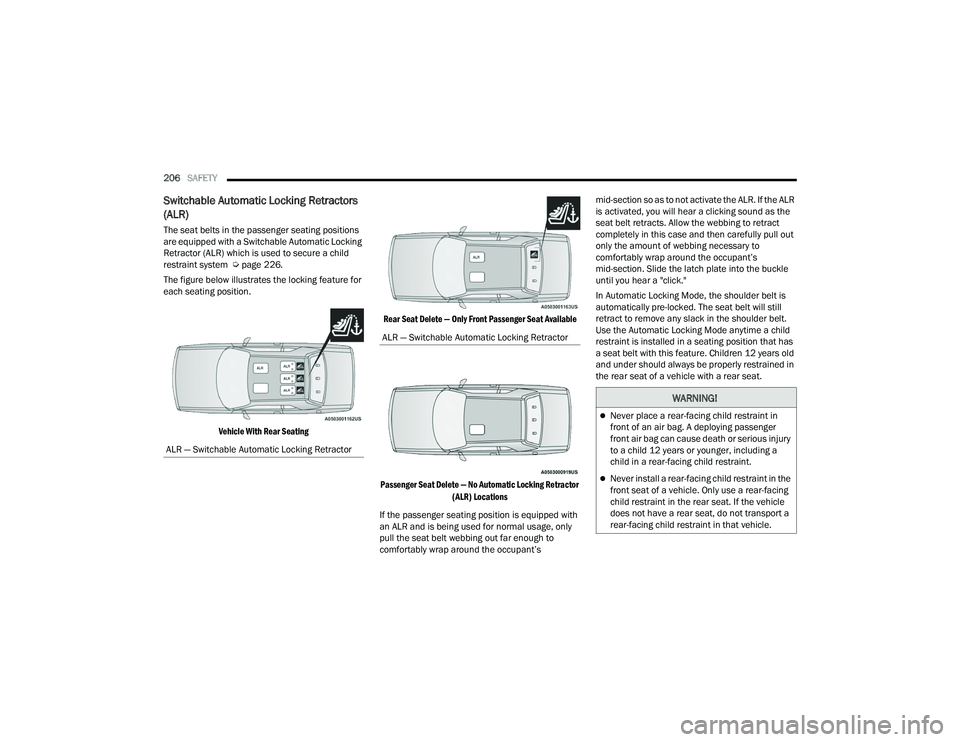
The figure below illustrates the locking feature for
each seating position.
Vehicle With Rear Seating Rear Seat Delete — Only Front Passenger Seat Available
Passenger Seat Delete — No Automatic Locking Retractor (ALR) Locations
If the passenger seating position is equipped with
an ALR and is being used for normal usage, only
pull the seat belt webbing out far enough to
comfortably wrap around the occupant’s mid-section so as to not activate the ALR. If the ALR
is activated, you will hear a clicking sound as the
seat belt retracts. Allow the webbing to retract
completely in this case and then carefully pull out
only the amount of webbing necessary to
comfortably wrap around the occupant’s
mid-section. Slide the latch plate into the buckle
until you hear a "click."
In Automatic Locking Mode, the shoulder belt is
automatically pre-locked. The seat belt will still
retract to remove any slack in the shoulder belt.
Use the Automatic Locking Mode anytime a child
restraint is installed in a seating position that has
a seat belt with this feature. Children 12 years old
and under should always be properly restrained in
the rear seat of a vehicle with a rear seat.
ALR — Switchable Automatic Locking Retractor
ALR — Switchable Automatic Locking Retractor
WARNING!
Never place a rear-facing child restraint in
front of an air bag. A deploying passenger
front air bag can cause death or serious injury
to a child 12 years or younger, including a
child in a rear-facing child restraint.
Never install a rear-facing child restraint in the
front seat of a vehicle. Only use a rear-facing
child restraint in the rear seat. If the vehicle
does not have a rear seat, do not transport a
rear-facing child restraint in that vehicle.
22_LA_OM_EN_USC_t.book Page 206
Page 211 of 336
SAFETY209
(Continued)
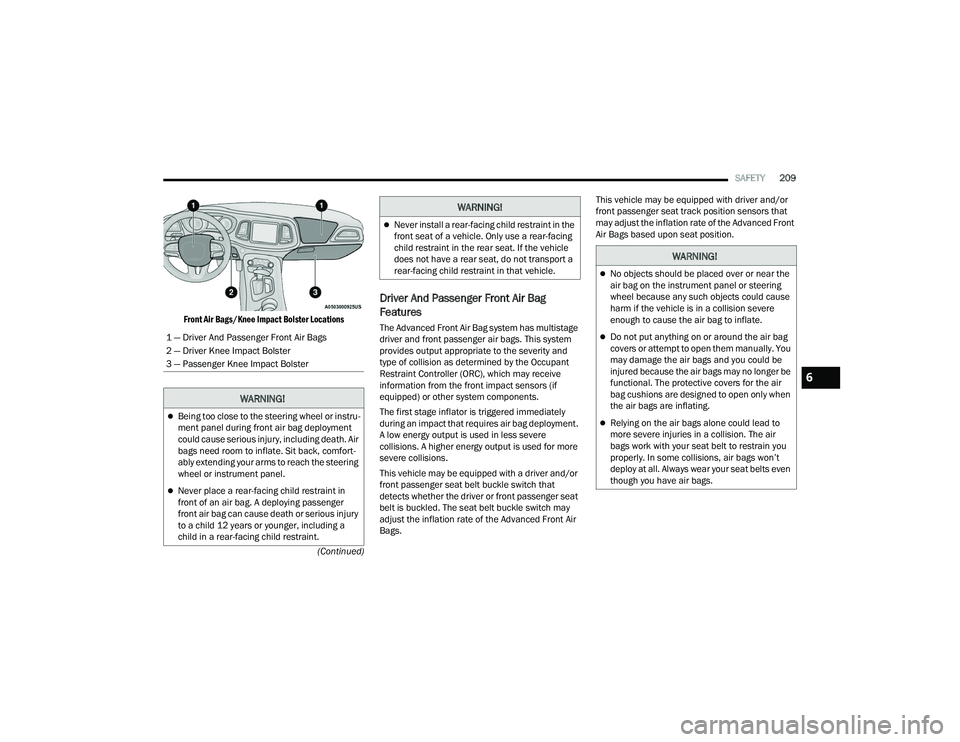
Front Air Bags/Knee Impact Bolster Locations
Driver And Passenger Front Air Bag
Features
The Advanced Front Air Bag system has multistage
driver and front passenger air bags. This system
provides output appropriate to the severity and
type of collision as determined by the Occupant
Restraint Controller (ORC), which may receive
information from the front impact sensors (if
equipped) or other system components.
The first stage inflator is triggered immediately
during an impact that requires air bag deployment.
A low energy output is used in less severe
collisions. A higher energy output is used for more
severe collisions.
This vehicle may be equipped with a driver and/or
front passenger seat belt buckle switch that
detects whether the driver or front passenger seat
belt is buckled. The seat belt buckle switch may
adjust the inflation rate of the Advanced Front Air
Bags. This vehicle may be equipped with driver and/or
front passenger seat track position sensors that
may adjust the inflation rate of the Advanced Front
Air Bags based upon seat position.
1 — Driver And Passenger Front Air Bags
2 — Driver Knee Impact Bolster
3 — Passenger Knee Impact Bolster
WARNING!
Being too close to the steering wheel or instru -
ment panel during front air bag deployment
could cause serious injury, including death. Air
bags need room to inflate. Sit back, comfort -
ably extending your arms to reach the steering
wheel or instrument panel.
Never place a rear-facing child restraint in
front of an air bag. A deploying passenger
front air bag can cause death or serious injury
to a child 12 years or younger, including a
child in a rear-facing child restraint.
Never install a rear-facing child restraint in the
front seat of a vehicle. Only use a rear-facing
child restraint in the rear seat. If the vehicle
does not have a rear seat, do not transport a
rear-facing child restraint in that vehicle.
WARNING!
WARNING!
No objects should be placed over or near the
air bag on the instrument panel or steering
wheel because any such objects could cause
harm if the vehicle is in a collision severe
enough to cause the air bag to inflate.
Do not put anything on or around the air bag
covers or attempt to open them manually. You
may damage the air bags and you could be
injured because the air bags may no longer be
functional. The protective covers for the air
bag cushions are designed to open only when
the air bags are inflating.
Relying on the air bags alone could lead to
more severe injuries in a collision. The air
bags work with your seat belt to restrain you
properly. In some collisions, air bags won’t
deploy at all. Always wear your seat belts even
though you have air bags.
6
22_LA_OM_EN_USC_t.book Page 209