Back DODGE CHALLENGER 2022 Owners Manual
[x] Cancel search | Manufacturer: DODGE, Model Year: 2022, Model line: CHALLENGER, Model: DODGE CHALLENGER 2022Pages: 336, PDF Size: 16.47 MB
Page 2 of 336

The driver’s primary responsibility is the safe operation of the vehicle. Driving w\
hile distracted can result in loss of vehicle control, resulting in an accident
and personal injury. FCA US LLC strongly recommends that the driver use extreme caution whe\
n using any device or feature that may take their attention
off the road. Use of any electrical devices, such as cellular telephones\
, computers, portable radios, vehicle navigation or other devices, by the driver while
the vehicle is moving is dangerous and could lead to a serious accident.\
Texting while driving is also dangerous and should never be done while th\
e vehicle
is moving. If you find yourself unable to devote your full attention t\
o vehicle operation, pull off the road to a safe location and stop your vehicle. Some states
or provinces prohibit the use of cellular telephones or texting while dr\
iving. It is always the driver’s responsibility to comply with all local laws.
This Owner’s Manual has been prepared to help you get acquainted with your new Dodg\
e brand vehicle and to provide a convenient reference source for
common questions.
Not all features shown in this manual may apply to your vehicle. For add\
itional information, visit mopar.com/om (U.S.), owners.mopar.ca (Canada) or your
local Dodge brand dealer.
DRIVING AND ALCOHOL
Drunk driving is one of the most frequent causes of accidents. Your driving ability can be seriously impaired with blood alcohol levels far
below the legal minimum. If you are drinking, don’t drive. Ride with \
a designated non-drinking driver, call a cab, a rideshare, a friend, or use public
transportation.
WARNING
Driving after drinking can lead to an accident. Your perceptions are less sharp, your reflexes are slower and your judg\
ment is impaired when you have
been drinking. Never drink and then drive.
WARNING: Operating, servicing and maintaining a passenger vehicle or off-highway \
motor vehicle can expose you to
chemicals including engine exhaust, carbon monoxide, phthalates, and lea\
d, which are known to the State of California to
cause cancer and birth defects or other reproductive harm. To minimize exposure, avoid breathing exhaust, do not idle the
engine except as necessary, service your vehicle in a well-ventilated area and wear gloves or wash\
your hands frequently
when servicing your vehicle. For more information go to www.P65Warnings.ca.gov/passenger-vehicle.
This Owner’s Manual illustrates and describes the operation of features and equipme\
nt that are either standard or optional on this vehicle. This manual
may also include a description of features and equipment that are no lon\
ger available or were not ordered on this vehicle. Please disregard any features and
equipment described in this manual that are not on this vehicle. FCA US \
LLC reserves the right to make changes in design and specifications, and/or make
additions to or improvements to its products without imposing any obliga\
tion upon itself to install them on products previously manufactured.
With respect to any vehicles sold in Canada, the name FCA US LLC shall b\
e deemed to be deleted and the name FCA Canada Inc. used in substitution there-
fore.
This Owner’s Manual is intended to familiarize you with the important features of y\
our vehicle. Your most up-to-date Owner’s Manual, Navigation/Uconnect
manuals and Warranty Booklet can be found by visiting the website on the back cover.
U.S. Residents: If you are the first registered retail owner of your vehicle, you ma\
y obtain a complimentary printed copy of the Warranty Booklet by calling
1-800-423-6343 or by contacting your dealer. Replacement kits can be purchased by visiting www.techauthority.com.
Canadian Residents: If you are the first registered retail owner of your vehicle, you ma\
y obtain a complimentary printed copy of the Warranty Booklet or
purchase a replacement kit by calling 1-800-387-1143 or by contacting your dealer.
Page 6 of 336
4
STARTING AND OPERATING
STARTING THE ENGINE ......................................... 82
Manual Transmission — If Equipped ...............82
Automatic Transmission — If Equipped...........82
Normal Starting ................................................83
AutoPark ...........................................................84
Extended Park Starting ....................................85
If Engine Fails To Start .....................................85
Cold Weather Operation
(Below –22°F Or −30°C) ...............................86
After Starting.....................................................86
ENGINE BLOCK HEATER — IF EQUIPPED ............ 86
ENGINE BREAK-IN RECOMMENDATIONS —
3.6L & 5.7L ........................................................... 86
PARKING BRAKE ................................................... 86
MANUAL TRANSMISSION — IF EQUIPPED ......... 88 6-Speed Manual Transmission........................88
Shifting ..............................................................88
Recommended Shift Speeds...........................89
1–4 Skip Shift ..................................................89
Downshifting .....................................................90 AUTOMATIC TRANSMISSION —
IF EQUIPPED .......................................................... 90
Ignition Park Interlock ......................................91
Brake Transmission Shift Interlock (BTSI)
System .............................................................91
8-Speed Automatic Transmission ...................91
SPORT MODE — WITHOUT PERFORMANCE
CONTROL................................................................. 96
FUEL SAVER TECHNOLOGY 5.7L —
IF EQUIPPED ...........................................................97
ELECTRIC POWER STEERING ...............................97
CRUISE CONTROL SYSTEMS — IF EQUIPPED .....97
Cruise Control ..................................................97
Adaptive Cruise Control (ACC) .........................99
PARKSENSE REAR PARK ASSIST —
IF EQUIPPED ....................................................... 107
ParkSense Sensors ....................................... 107
ParkSense Display ........................................ 107ParkSense Warning Display ......................... 109
Enabling And Disabling ParkSense .............. 109Service The ParkSense Rear Park
Assist System ................................................ 110Cleaning The ParkSense System ................. 110
ParkSense System Usage Precautions........ 110
PARKVIEW REAR BACK UP CAMERA............... 111 REFUELING THE VEHICLE .................................. 112
Loose Fuel Filler Cap Message .................... 113
VEHICLE LOADING .............................................. 113
Vehicle Certification Label ........................... 113
Gross Vehicle Weight Rating (GVWR) .......... 113
Gross Axle Weight Rating (GAWR) ............... 114
Overloading ................................................... 114
Loading .......................................................... 114
TRAILER TOWING ............................................... 114
Common Towing Definitions......................... 114
Trailer Hitch Classification............................ 116
Trailer Towing Weights
(Maximum Trailer Weight Ratings)............... 116
Trailer And Tongue Weight .......................... 117
Towing Requirements ................................... 117
Towing Tips ................................................... 119
RECREATIONAL TOWING
(BEHIND MOTORHOME) ..................................... 120
DRIVING TIPS ....................................................... 120
Driving On Slippery Surfaces ........................ 120Driving Through Water ................................. 121
22_LA_OM_EN_USC_t.book Page 4
Page 16 of 336
14GETTING TO KNOW YOUR VEHICLE
NOTE:
If the vehicle is unlocked with the key fob, and
no door is opened within 60 seconds, the
vehicle will relock and the Vehicle Security
system (if equipped) will arm.
If one or more doors are open, or the trunk is
open, the doors will lock. The doors will unlock
again automatically if the key is left inside the
passenger compartment, otherwise the doors
will stay locked.
All doors can be programmed to unlock on the first
push of the unlock button through Uconnect
Settings Ú page 123.
NOTE:When you use the key fob to open any door, the
courtesy lights, overhead lights, and approach
lighting in the outside mirrors (if equipped) will turn
on.
Key Left Vehicle Feature
If a valid key fob is no longer detected inside the
vehicle while the vehicle’s ignition system is in the
ON/RUN or START position, the message “Key Left
Vehicle” will be shown in the instrument cluster
display along with an interior chime. An exterior
audible and visual alert will also be activated to
warn the driver. The vehicle’s horn will rapidly chirp three times
along with a single flash of the vehicle’s exterior
lights.
NOTE:
The doors have to be open and then closed in
order for the vehicle to check for the presence of
a key fob; the Key Left Vehicle feature will not
activate until all of the doors are closed.
These alerts will not be activated in situations
where the vehicle’s engine is left running with
the key fob inside.
To Unlatch The Trunk
Push the trunk button on the key fob two times
within five seconds to unlatch the trunk.
Replacing The Battery In The Key Fob
The recommended replacement battery is one
CR2032 battery.
NOTE:
Customers are recommended to use a battery
obtained from Mopar®. Aftermarket coin
battery dimensions may not meet the original
OEM coin battery dimensions.
Perchlorate Material — special handling may
apply. See www.dtsc.ca.gov/hazard
-
ouswaste/perchlorate for further information.
Do not touch the battery terminals that are on
the back housing or the printed circuit board.
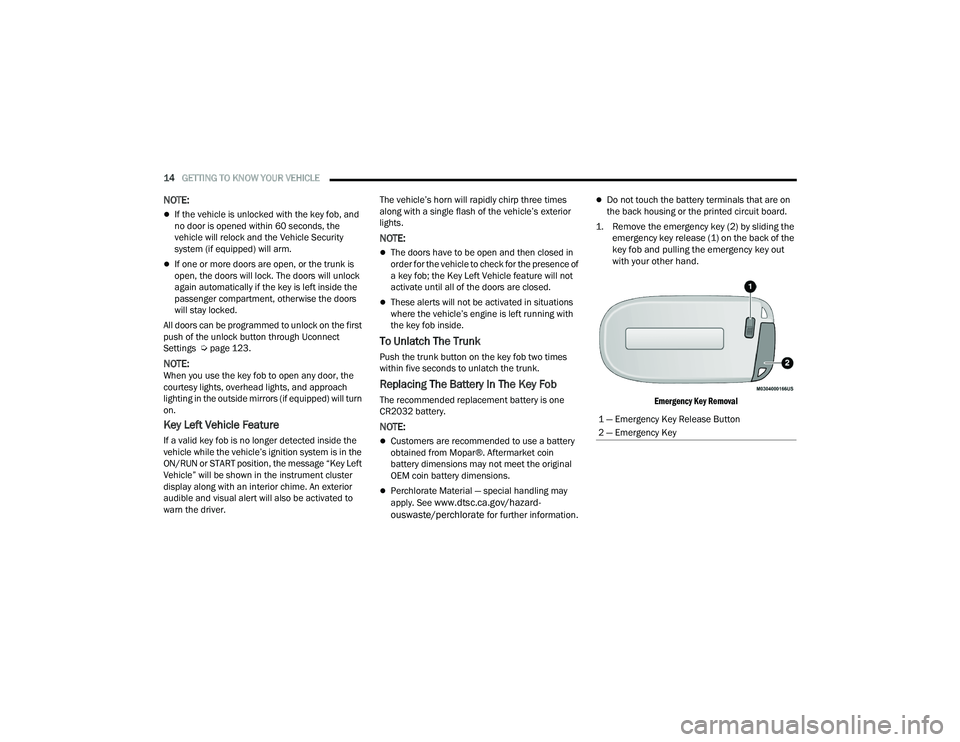
1. Remove the emergency key (2) by sliding the emergency key release (1) on the back of the
key fob and pulling the emergency key out
with your other hand.
Emergency Key Removal
1 — Emergency Key Release Button
2 — Emergency Key
22_LA_OM_EN_USC_t.book Page 14
Page 17 of 336
GETTING TO KNOW YOUR VEHICLE15
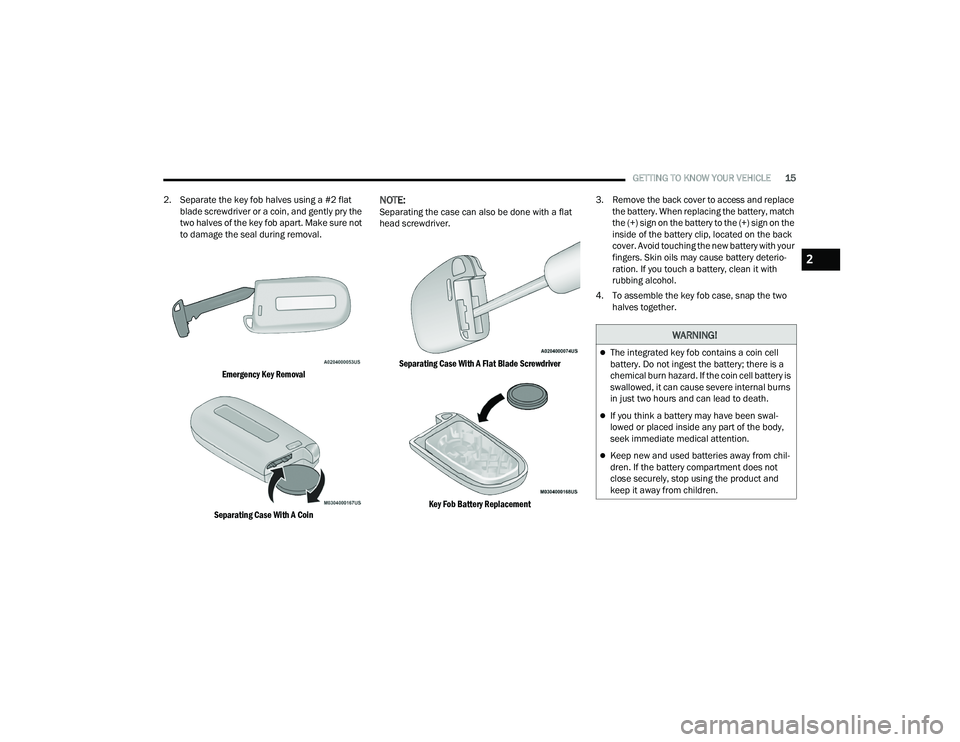
2. Separate the key fob halves using a #2 flat blade screwdriver or a coin, and gently pry the
two halves of the key fob apart. Make sure not
to damage the seal during removal.
Emergency Key Removal
Separating Case With A Coin
NOTE:Separating the case can also be done with a flat
head screwdriver.
Separating Case With A Flat Blade Screwdriver
Key Fob Battery Replacement
3. Remove the back cover to access and replace
the battery. When replacing the battery, match
the (+) sign on the battery to the (+) sign on the
inside of the battery clip, located on the back
cover. Avoid touching the new battery with your
fingers. Skin oils may cause battery deterio -
ration. If you touch a battery, clean it with
rubbing alcohol.
4. To assemble the key fob case, snap the two halves together.
WARNING!
The integrated key fob contains a coin cell
battery. Do not ingest the battery; there is a
chemical burn hazard. If the coin cell battery is
swallowed, it can cause severe internal burns
in just two hours and can lead to death.
If you think a battery may have been swal-
lowed or placed inside any part of the body,
seek immediate medical attention.
Keep new and used batteries away from chil -
dren. If the battery compartment does not
close securely, stop using the product and
keep it away from children.
2
22_LA_OM_EN_USC_t.book Page 15
Page 19 of 336
GETTING TO KNOW YOUR VEHICLE17
(Continued)
IGNITION SWITCH
KEYLESS ENTER ‘N GO™ IGNITION
This feature allows the driver to operate the
ignition switch with the push of a button as long as
the key fob is in the passenger compartment.
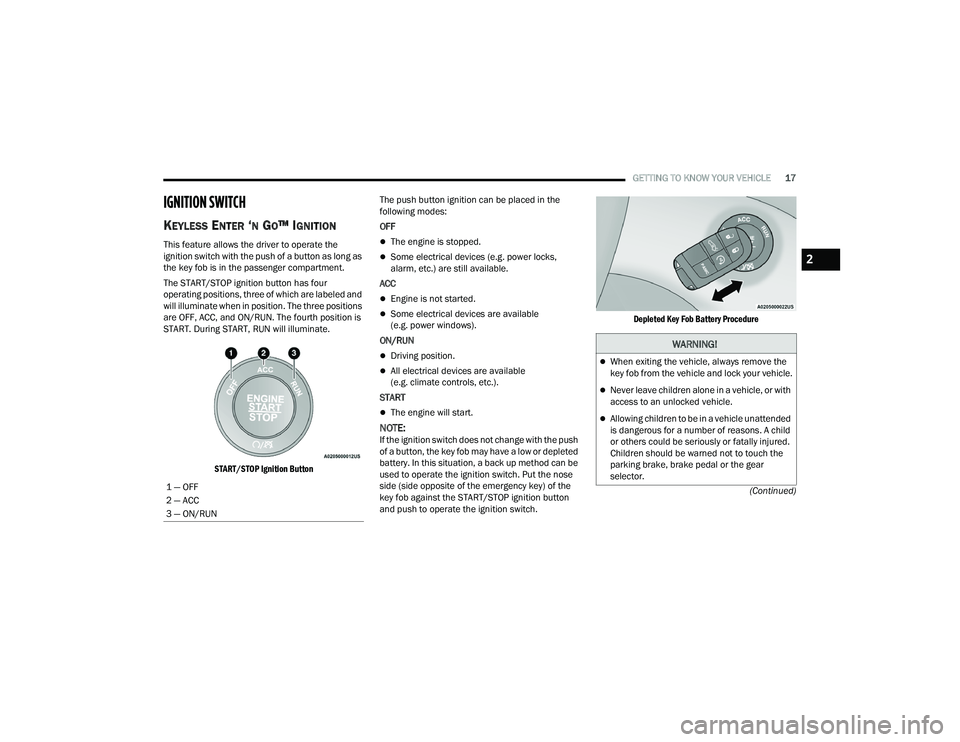
The START/STOP ignition button has four
operating positions, three of which are labeled and
will illuminate when in position. The three positions
are OFF, ACC, and ON/RUN. The fourth position is
START. During START, RUN will illuminate.
START/STOP Ignition Button
The push button ignition can be placed in the
following modes:
OFF
The engine is stopped.
Some electrical devices (e.g. power locks,
alarm, etc.) are still available.
ACC
Engine is not started.
Some electrical devices are available
(e.g. power windows).
ON/RUN
Driving position.
All electrical devices are available
(e.g. climate controls, etc.).
START
The engine will start.
NOTE:If the ignition switch does not change with the push
of a button, the key fob may have a low or depleted
battery. In this situation, a back up method can be
used to operate the ignition switch. Put the nose
side (side opposite of the emergency key) of the
key fob against the START/STOP ignition button
and push to operate the ignition switch.
Depleted Key Fob Battery Procedure
1 — OFF
2 — ACC
3 — ON/RUN
WARNING!
When exiting the vehicle, always remove the
key fob from the vehicle and lock your vehicle.
Never leave children alone in a vehicle, or with
access to an unlocked vehicle.
Allowing children to be in a vehicle unattended
is dangerous for a number of reasons. A child
or others could be seriously or fatally injured.
Children should be warned not to touch the
parking brake, brake pedal or the gear
selector.
2
22_LA_OM_EN_USC_t.book Page 17
Page 31 of 336
GETTING TO KNOW YOUR VEHICLE29
UCONNECT VOICE RECOGNITION
INTRODUCING VOICE RECOGNITION
Start using Uconnect Voice Recognition with these
helpful quick tips. It provides the key Voice
Commands and tips you need to know to control
your vehicle’s Voice Recognition (VR) system.
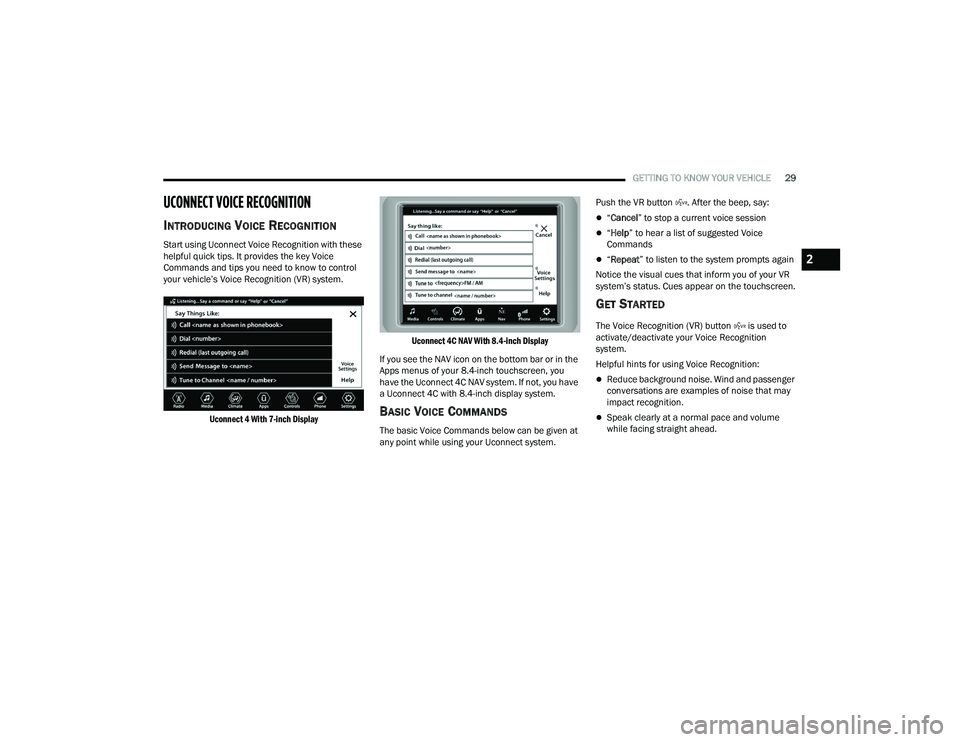
Uconnect 4 With 7-inch Display Uconnect 4C NAV With 8.4-inch Display
If you see the NAV icon on the bottom bar or in the
Apps menus of your 8.4-inch touchscreen, you
have the Uconnect 4C NAV system. If not, you have
a Uconnect 4C with 8.4-inch display system.
BASIC VOICE COMMANDS
The basic Voice Commands below can be given at
any point while using your Uconnect system. Push the VR button . After the beep, say:
“
Cancel ” to stop a current voice session
“Help ” to hear a list of suggested Voice
Commands
“ Repeat ” to listen to the system prompts again
Notice the visual cues that inform you of your VR
system’s status. Cues appear on the touchscreen.
GET STARTED
The Voice Recognition (VR) button is used to
activate/deactivate your Voice Recognition
system.
Helpful hints for using Voice Recognition:
Reduce background noise. Wind and passenger
conversations are examples of noise that may
impact recognition.
Speak clearly at a normal pace and volume
while facing straight ahead.
2
22_LA_OM_EN_USC_t.book Page 29
Page 34 of 336
32GETTING TO KNOW YOUR VEHICLE
(Continued)
SEATS
Seats are a part of the Occupant Restraint system of
the vehicle.
MANUAL ADJUSTMENT (FRONT SEATS) —
I
F EQUIPPED
Manual Front Seat Forward/Rearward
Adjustment
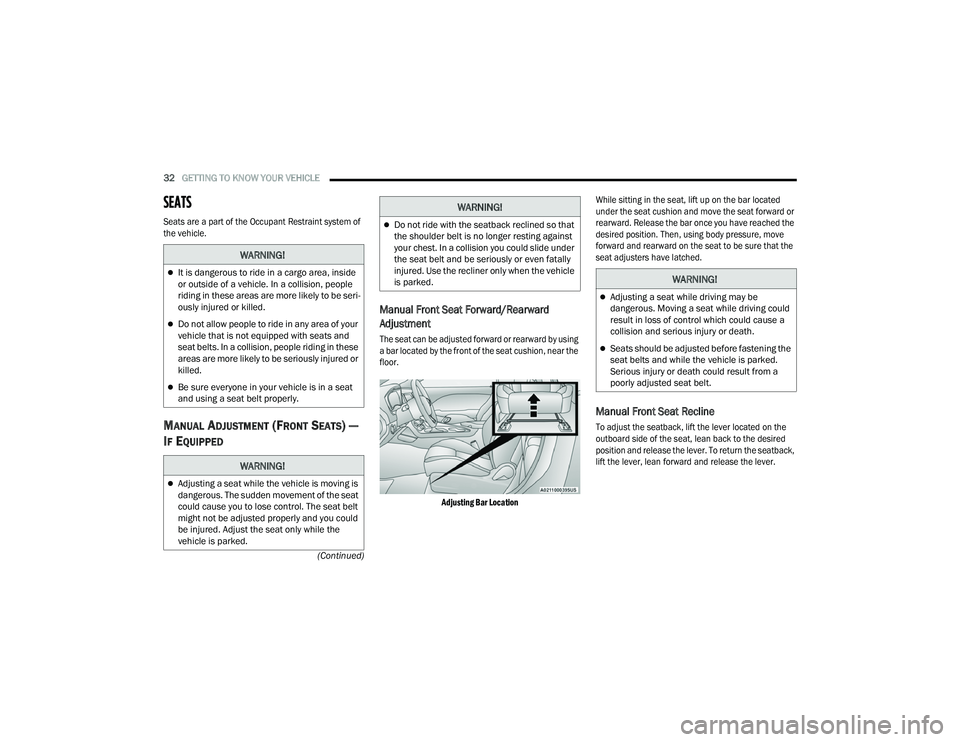
The seat can be adjusted forward or rearward by using
a bar located by the front of the seat cushion, near the
floor.
Adjusting Bar Location While sitting in the seat, lift up on the bar located
under the seat cushion and move the seat forward or
rearward. Release the bar once you have reached the
desired position. Then, using body pressure, move
forward and rearward on the seat to be sure that the
seat adjusters have latched.
Manual Front Seat Recline
To adjust the seatback, lift the lever located on the
outboard side of the seat, lean back to the desired
position and release the lever. To return the seatback,
lift the lever, lean forward and release the lever.
WARNING!
It is dangerous to ride in a cargo area, inside
or outside of a vehicle. In a collision, people
riding in these areas are more likely to be seri
-
ously injured or killed.
Do not allow people to ride in any area of your
vehicle that is not equipped with seats and
seat belts. In a collision, people riding in these
areas are more likely to be seriously injured or
killed.
Be sure everyone in your vehicle is in a seat
and using a seat belt properly.
WARNING!
Adjusting a seat while the vehicle is moving is
dangerous. The sudden movement of the seat
could cause you to lose control. The seat belt
might not be adjusted properly and you could
be injured. Adjust the seat only while the
vehicle is parked.
Do not ride with the seatback reclined so that
the shoulder belt is no longer resting against
your chest. In a collision you could slide under
the seat belt and be seriously or even fatally
injured. Use the recliner only when the vehicle
is parked.
WARNING!
WARNING!
Adjusting a seat while driving may be
dangerous. Moving a seat while driving could
result in loss of control which could cause a
collision and serious injury or death.
Seats should be adjusted before fastening the
seat belts and while the vehicle is parked.
Serious injury or death could result from a
poorly adjusted seat belt.
22_LA_OM_EN_USC_t.book Page 32
Page 35 of 336
GETTING TO KNOW YOUR VEHICLE33
Recline Lever
MANUAL ADJUSTMENT (REAR SEATS)
Folding Rear Seat
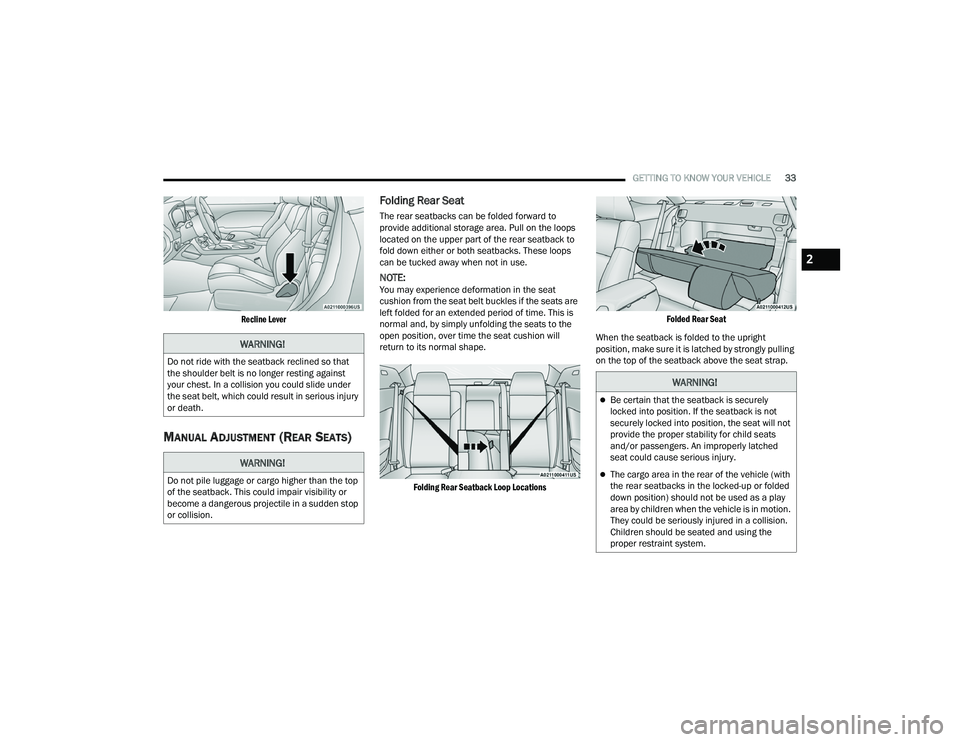
The rear seatbacks can be folded forward to
provide additional storage area. Pull on the loops
located on the upper part of the rear seatback to
fold down either or both seatbacks. These loops
can be tucked away when not in use.
NOTE:You may experience deformation in the seat
cushion from the seat belt buckles if the seats are
left folded for an extended period of time. This is
normal and, by simply unfolding the seats to the
open position, over time the seat cushion will
return to its normal shape.
Folding Rear Seatback Loop Locations Folded Rear Seat
When the seatback is folded to the upright
position, make sure it is latched by strongly pulling
on the top of the seatback above the seat strap.
WARNING!
Do not ride with the seatback reclined so that
the shoulder belt is no longer resting against
your chest. In a collision you could slide under
the seat belt, which could result in serious injury
or death.
WARNING!
Do not pile luggage or cargo higher than the top
of the seatback. This could impair visibility or
become a dangerous projectile in a sudden stop
or collision.
WARNING!
Be certain that the seatback is securely
locked into position. If the seatback is not
securely locked into position, the seat will not
provide the proper stability for child seats
and/or passengers. An improperly latched
seat could cause serious injury.
The cargo area in the rear of the vehicle (with
the rear seatbacks in the locked-up or folded
down position) should not be used as a play
area by children when the vehicle is in motion.
They could be seriously injured in a collision.
Children should be seated and using the
proper restraint system.
2
22_LA_OM_EN_USC_t.book Page 33
Page 37 of 336
GETTING TO KNOW YOUR VEHICLE35
HEATED SEATS — IF EQUIPPED
On some models, the front seats may be equipped
with heaters located in the seat cushions and
seatbacks.
Front Heated Seats
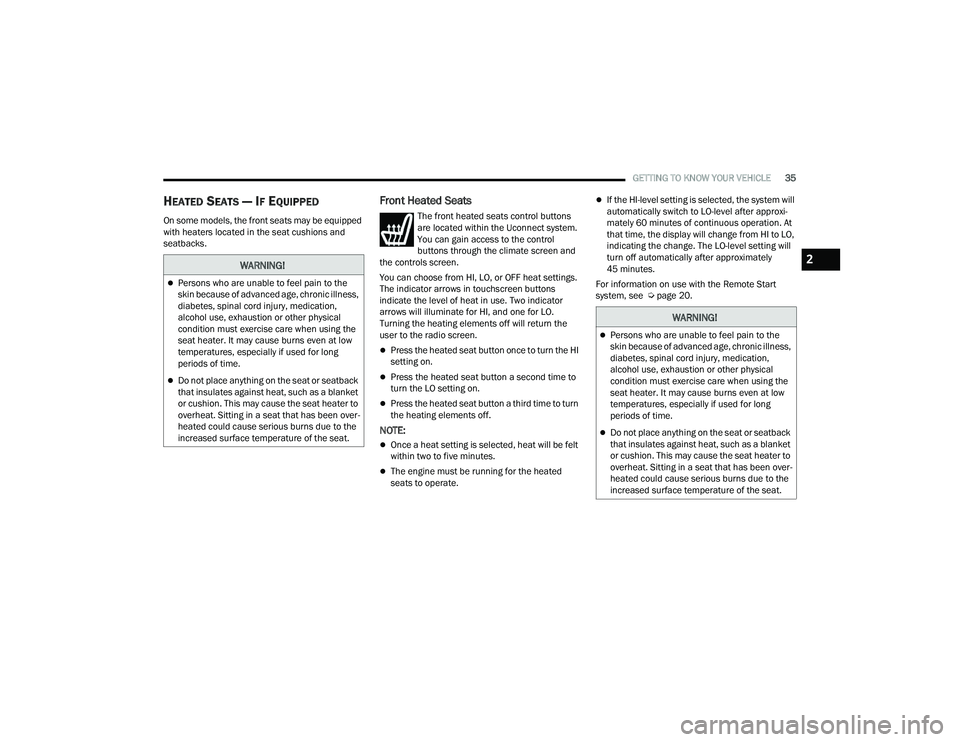
The front heated seats control buttons
are located within the Uconnect system.
You can gain access to the control
buttons through the climate screen and
the controls screen.
You can choose from HI, LO, or OFF heat settings.
The indicator arrows in touchscreen buttons
indicate the level of heat in use. Two indicator
arrows will illuminate for HI, and one for LO.
Turning the heating elements off will return the
user to the radio screen.
Press the heated seat button once to turn the HI
setting on.
Press the heated seat button a second time to
turn the LO setting on.
Press the heated seat button a third time to turn
the heating elements off.
NOTE:
Once a heat setting is selected, heat will be felt
within two to five minutes.
The engine must be running for the heated
seats to operate.
If the HI-level setting is selected, the system will
automatically switch to LO-level after approxi-
mately 60 minutes of continuous operation. At
that time, the display will change from HI to LO,
indicating the change. The LO-level setting will
turn off automatically after approximately
45 minutes.
For information on use with the Remote Start
system, see Ú page 20.
WARNING!
Persons who are unable to feel pain to the
skin because of advanced age, chronic illness,
diabetes, spinal cord injury, medication,
alcohol use, exhaustion or other physical
condition must exercise care when using the
seat heater. It may cause burns even at low
temperatures, especially if used for long
periods of time.
Do not place anything on the seat or seatback
that insulates against heat, such as a blanket
or cushion. This may cause the seat heater to
overheat. Sitting in a seat that has been over -
heated could cause serious burns due to the
increased surface temperature of the seat.
WARNING!
Persons who are unable to feel pain to the
skin because of advanced age, chronic illness,
diabetes, spinal cord injury, medication,
alcohol use, exhaustion or other physical
condition must exercise care when using the
seat heater. It may cause burns even at low
temperatures, especially if used for long
periods of time.
Do not place anything on the seat or seatback
that insulates against heat, such as a blanket
or cushion. This may cause the seat heater to
overheat. Sitting in a seat that has been over -
heated could cause serious burns due to the
increased surface temperature of the seat.
2
22_LA_OM_EN_USC_t.book Page 35
Page 39 of 336
GETTING TO KNOW YOUR VEHICLE37
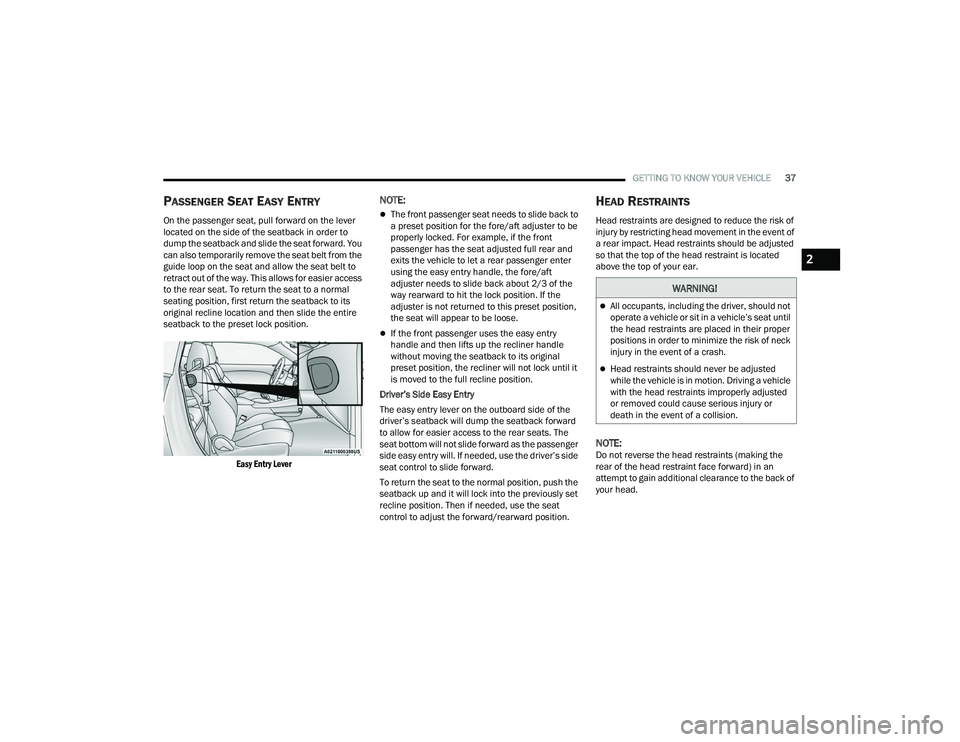
PASSENGER SEAT EASY ENTRY
On the passenger seat, pull forward on the lever
located on the side of the seatback in order to
dump the seatback and slide the seat forward. You
can also temporarily remove the seat belt from the
guide loop on the seat and allow the seat belt to
retract out of the way. This allows for easier access
to the rear seat. To return the seat to a normal
seating position, first return the seatback to its
original recline location and then slide the entire
seatback to the preset lock position.
Easy Entry Lever
NOTE:
The front passenger seat needs to slide back to
a preset position for the fore/aft adjuster to be
properly locked. For example, if the front
passenger has the seat adjusted full rear and
exits the vehicle to let a rear passenger enter
using the easy entry handle, the fore/aft
adjuster needs to slide back about 2/3 of the
way rearward to hit the lock position. If the
adjuster is not returned to this preset position,
the seat will appear to be loose.
If the front passenger uses the easy entry
handle and then lifts up the recliner handle
without moving the seatback to its original
preset position, the recliner will not lock until it
is moved to the full recline position.
Driver’s Side Easy Entry
The easy entry lever on the outboard side of the
driver’s seatback will dump the seatback forward
to allow for easier access to the rear seats. The
seat bottom will not slide forward as the passenger
side easy entry will. If needed, use the driver’s side
seat control to slide forward.
To return the seat to the normal position, push the
seatback up and it will lock into the previously set
recline position. Then if needed, use the seat
control to adjust the forward/rearward position.
HEAD RESTRAINTS
Head restraints are designed to reduce the risk of
injury by restricting head movement in the event of
a rear impact. Head restraints should be adjusted
so that the top of the head restraint is located
above the top of your ear.
NOTE:Do not reverse the head restraints (making the
rear of the head restraint face forward) in an
attempt to gain additional clearance to the back of
your head.
WARNING!
All occupants, including the driver, should not
operate a vehicle or sit in a vehicle’s seat until
the head restraints are placed in their proper
positions in order to minimize the risk of neck
injury in the event of a crash.
Head restraints should never be adjusted
while the vehicle is in motion. Driving a vehicle
with the head restraints improperly adjusted
or removed could cause serious injury or
death in the event of a collision.
2
22_LA_OM_EN_USC_t.book Page 37