ECO mode DODGE CHALLENGER 2022 Owners Manual
[x] Cancel search | Manufacturer: DODGE, Model Year: 2022, Model line: CHALLENGER, Model: DODGE CHALLENGER 2022Pages: 336, PDF Size: 16.47 MB
Page 4 of 336
2
INTRODUCTION
SYMBOLS KEY ...........................................................9
VEHICLE MODIFICATIONS/ALTERATIONS .............9
SYMBOL GLOSSARY.............................................. 10
GETTING TO KNOW YOUR VEHICLE
KEYS ....................................................................... 13 Key Fob .............................................................13
SENTRY KEY ........................................................... 16
IGNITION SWITCH .................................................. 17
Keyless Enter ‘n Go™ Ignition .........................17
REMOTE START — IF EQUIPPED .......................... 18
How To Use Remote Start ................................18
To Exit Remote Start Mode ..............................19
Remote Start Front Defrost Activation —
If Equipped........................................................20
Remote Start Comfort Systems —
If Equipped........................................................20
Remote Start Windshield Wiper De–Icer
Activation — If Equipped ..................................20
Remote Start Cancel Message —
If Equipped........................................................20
VEHICLE SECURITY SYSTEM — IF EQUIPPED ..... 21
To Arm The System ..........................................21
To Disarm The System .....................................21
Rearming The System ......................................21
Security System Manual Override ...................21
Tamper Alert .....................................................21 DELUXE VEHICLE SECURITY SYSTEM —
IF EQUIPPED ...........................................................22
To Arm The System ..........................................22
To Disarm The System .....................................22
Security System Manual Override ...................23
DOORS ....................................................................23
Manual Door Locks ..........................................23
Power Door Locks ...........................................24
Keyless Enter ‘n Go™ — Passive Entry............24
Automatic Unlock Doors On Exit......................27
Automatic Door Locks — If Equipped ..............27
STEERING WHEEL ..................................................27
Manual Tilt/Telescoping Steering
Column — If Equipped ...................................27
Power Tilt/Telescoping Steering
Column — If Equipped .....................................28
Heated Steering Wheel — If Equipped ............28
UCONNECT VOICE RECOGNITION ........................29
Introducing Voice Recognition.........................29
Basic Voice Commands ...................................29
Get Started .......................................................29
Additional Information .....................................30
DRIVER MEMORY SETTINGS — IF EQUIPPED .....30
Programming The Memory Feature ................31
Linking And Unlinking The Key Fob
To Memory ........................................................31
Memory Position Recall ...................................31 SEATS ..................................................................... 32
Manual Adjustment (Front Seats) —
If Equipped .......................................................32
Manual Adjustment (Rear Seats).................... 33
Power Adjustment (Front Seats) —
If Equipped .......................................................34
Heated Seats — If Equipped ........................... 35
Front Ventilated Seats — If Equipped ............. 36
Vehicles Without Passenger Seating
Installed ............................................................ 36
Passenger Seat Easy Entry.............................. 37
Head Restraints ............................................... 37
MIRRORS ............................................................... 39
Inside Rearview Mirror..................................... 39
Illuminated Vanity Mirrors .............................. 39
Outside Mirrors ................................................ 40
Power Mirrors .................................................. 40
Heated Mirrors — If Equipped ......................... 40
UNIVERSAL GARAGE DOOR OPENER
(HOMELINK®) ....................................................... 40
Before You Begin Programming
HomeLink® ...................................................... 41
Erasing All The HomeLink® Channels ............ 41
Identifying Whether You Have A Rolling
Code Or Non-Rolling Code Device ................... 41
Programming HomeLink® To A Garage
Door Opener ..................................................... 42
22_LA_OM_EN_USC_t.book Page 2
Page 6 of 336
4
STARTING AND OPERATING
STARTING THE ENGINE ......................................... 82
Manual Transmission — If Equipped ...............82
Automatic Transmission — If Equipped...........82
Normal Starting ................................................83
AutoPark ...........................................................84
Extended Park Starting ....................................85
If Engine Fails To Start .....................................85
Cold Weather Operation
(Below –22°F Or −30°C) ...............................86
After Starting.....................................................86
ENGINE BLOCK HEATER — IF EQUIPPED ............ 86
ENGINE BREAK-IN RECOMMENDATIONS —
3.6L & 5.7L ........................................................... 86
PARKING BRAKE ................................................... 86
MANUAL TRANSMISSION — IF EQUIPPED ......... 88 6-Speed Manual Transmission........................88
Shifting ..............................................................88
Recommended Shift Speeds...........................89
1–4 Skip Shift ..................................................89
Downshifting .....................................................90 AUTOMATIC TRANSMISSION —
IF EQUIPPED .......................................................... 90
Ignition Park Interlock ......................................91
Brake Transmission Shift Interlock (BTSI)
System .............................................................91
8-Speed Automatic Transmission ...................91
SPORT MODE — WITHOUT PERFORMANCE
CONTROL................................................................. 96
FUEL SAVER TECHNOLOGY 5.7L —
IF EQUIPPED ...........................................................97
ELECTRIC POWER STEERING ...............................97
CRUISE CONTROL SYSTEMS — IF EQUIPPED .....97
Cruise Control ..................................................97
Adaptive Cruise Control (ACC) .........................99
PARKSENSE REAR PARK ASSIST —
IF EQUIPPED ....................................................... 107
ParkSense Sensors ....................................... 107
ParkSense Display ........................................ 107ParkSense Warning Display ......................... 109
Enabling And Disabling ParkSense .............. 109Service The ParkSense Rear Park
Assist System ................................................ 110Cleaning The ParkSense System ................. 110
ParkSense System Usage Precautions........ 110
PARKVIEW REAR BACK UP CAMERA............... 111 REFUELING THE VEHICLE .................................. 112
Loose Fuel Filler Cap Message .................... 113
VEHICLE LOADING .............................................. 113
Vehicle Certification Label ........................... 113
Gross Vehicle Weight Rating (GVWR) .......... 113
Gross Axle Weight Rating (GAWR) ............... 114
Overloading ................................................... 114
Loading .......................................................... 114
TRAILER TOWING ............................................... 114
Common Towing Definitions......................... 114
Trailer Hitch Classification............................ 116
Trailer Towing Weights
(Maximum Trailer Weight Ratings)............... 116
Trailer And Tongue Weight .......................... 117
Towing Requirements ................................... 117
Towing Tips ................................................... 119
RECREATIONAL TOWING
(BEHIND MOTORHOME) ..................................... 120
DRIVING TIPS ....................................................... 120
Driving On Slippery Surfaces ........................ 120Driving Through Water ................................. 121
22_LA_OM_EN_USC_t.book Page 4
Page 8 of 336
6
JUMP STARTING .................................................. 246 Preparations For Jump Start......................... 247Jump Starting Procedure .............................. 247
IF YOUR ENGINE OVERHEATS ........................... 248
MANUAL PARK RELEASE — 8–SPEED
TRANSMISSION .................................................. 249
FREEING A STUCK VEHICLE .............................. 250
TOWING A DISABLED VEHICLE .......................... 252 Rear-Wheel Drive (RWD) Models.................. 253
ENHANCED ACCIDENT RESPONSE SYSTEM
(EARS) .................................................................. 253
EVENT DATA RECORDER (EDR) ......................... 253
SERVICING AND MAINTENANCE
SCHEDULED SERVICING .................................... 254
3.6L And 5.7L Engines ................................. 254
ENGINE COMPARTMENT .................................... 259
3.6L Engine ................................................... 2595.7L Engine ................................................... 260Checking Oil Level ......................................... 261
Adding Washer Fluid ................................... 261Maintenance-Free Battery ........................... 262
Pressure Washing ......................................... 262 VEHICLE MAINTENANCE..................................... 263
Engine Oil ...................................................... 263
Engine Oil Filter ........................................... 265Engine Air Cleaner Filter ............................ 265
Air Conditioner Maintenance ..................... 266
Accessory Drive Belt Inspection ................... 267Body Lubrication ......................................... 268
Windshield Wiper Blades ............................ 268
Exhaust System ............................................. 270Cooling System ............................................ 271
Brake System ............................................... 274
Clutch Hydraulic System — Manual
Transmission (If Equipped)........................... 275Manual Transmission — If Equipped............ 275
Automatic Transmission — If Equipped ....... 275
All-Wheel Drive (AWD) — If Equipped .......... 276
Rear Axle ........................................................ 276Fuses.............................................................. 277
Bulb Replacement ........................................ 286
TIRES..................................................................... 290
Tire Safety Information ................................ 290Tires — General Information ........................ 297
Tire Types....................................................... 301
Spare Tires — If Equipped ............................ 301
Wheel And Wheel Trim Care ........................ 303
Snow Traction Devices ................................. 304
Tire Rotation Recommendations ................. 306 DEPARTMENT OF TRANSPORTATION
UNIFORM TIRE QUALITY GRADES .................... 306
Treadwear...................................................... 307
Traction Grades ............................................. 307Temperature Grades..................................... 307
VEHICLE STORAGE ............................................ 307
BODYWORK .......................................................... 308
Protection From Atmospheric Agents ........ 308Body And Underbody Maintenance ............. 308
Preserving The Bodywork ............................. 308
INTERIORS ........................................................... 309
Seats And Fabric Parts ................................. 309
Plastic And Coated Parts .............................. 309
Leather Surfaces........................................... 310
Glass Surfaces ............................................. 310
TECHNICAL SPECIFICATIONS
VEHICLE IDENTIFICATION NUMBER (VIN) ........ 311
BRAKE SYSTEM .................................................. 311
WHEEL AND TIRE TORQUE
SPECIFICATIONS ................................................. 311Torque Specifications ................................... 311
22_LA_OM_EN_USC_t.book Page 6
Page 10 of 336
8
INTRODUCTION
Dear Customer,
Congratulations on the purchase of your new Dodge vehicle. Be assured that it represents precision workmanship, distinctive styling, and high quality. This
Owner's Manual has been prepared with the assistance of service and engineering specialists to acquaint you with the operation and maintenance of your
vehicle. It is supplemented by customer-oriented documents. Within this information, you will find a description of the services that FCA US LLC offers to its
customers as well as the details of the terms and conditions for maintaining its validity. Please take the time to read all of these publications carefully before
driving your vehicle for the first time. Following the instructions, recommendations, tips, and important warnings in this manual will help ensure safe and
enjoyable operation of your vehicle.
This Owner’s Manual describes all versions of this vehicle. Options and equipment dedicated to specific markets or versions are not expressly indicated in the
text. Therefore, you should only consider the information that is related to the trim level, engine, and version that you have purchased. Any content introduced
throughout the Owner’s Information, which may or may not be applicable to your vehicle, will be identified with the wording “If Equipped”. All data contained in
this publication are intended to help you use your vehicle in the best possible way. FCA US LLC aims at a constant improvement of the vehicles produced. For
this reason, it reserves the right to make changes to the model described for technical and/or commercial reasons. For further information, contact an authorized
dealer.
When it comes to service, remember that authorized dealers know your Dodge best, have factory-trained technicians, genuine Mopar® parts, and care about
your satisfaction.
22_LA_OM_EN_USC_t.book Page 8
Page 14 of 336
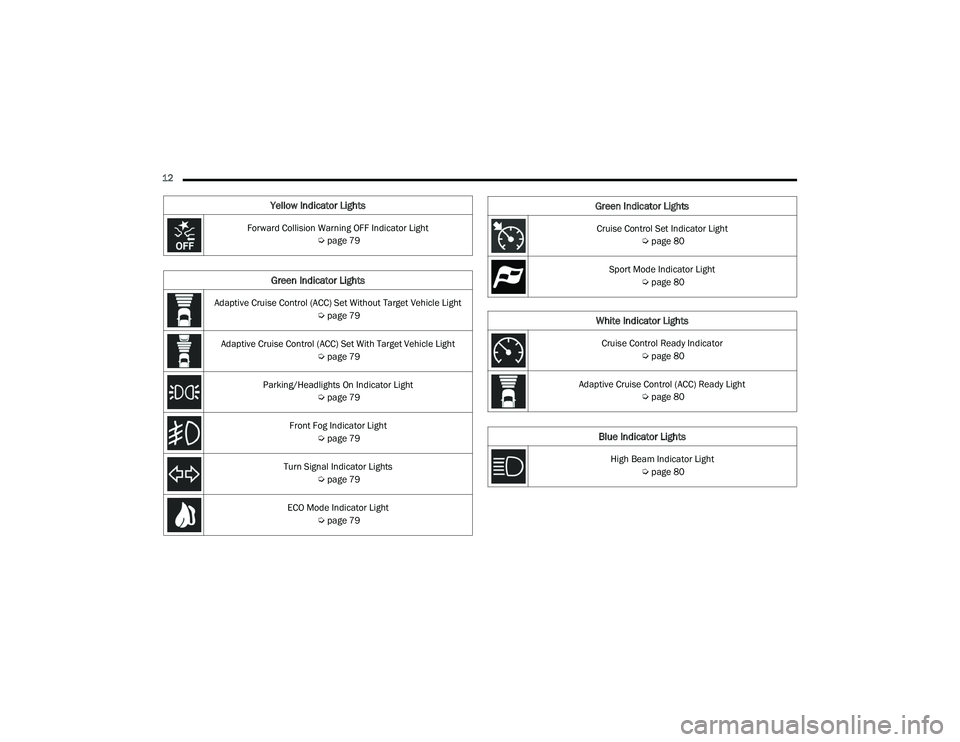
12
Yellow Indicator Lights
Forward Collision Warning OFF Indicator Light Úpage 79
Green Indicator Lights
Adaptive Cruise Control (ACC) Set Without Target Vehicle Light
Úpage 79
Adaptive Cruise Control (ACC) Set With Target Vehicle Light Úpage 79
Parking/Headlights On Indicator Light Úpage 79
Front Fog Indicator Light Úpage 79
Turn Signal Indicator Lights Úpage 79
ECO Mode Indicator Light Úpage 79
Cruise Control Set Indicator Light
Úpage 80
Sport Mode Indicator Light Úpage 80
White Indicator Lights
Cruise Control Ready Indicator
Úpage 80
Adaptive Cruise Control (ACC) Ready Light Úpage 80
Blue Indicator Lights
High Beam Indicator Light
Úpage 80
Green Indicator Lights
22_LA_OM_EN_USC_t.book Page 12
Page 20 of 336
18GETTING TO KNOW YOUR VEHICLE
NOTE:
When opening the driver's door with the ignition
in ON/RUN (engine not running), a chime will
sound to remind you to place the ignition in the
OFF position. In addition to the chime, the
message will display “Ignition Or Accessory On”
in the cluster.
For more information on proper engine starting
procedures, see Úpage 82.
REMOTE START — IF EQUIPPED
This system uses the key fob to start the
engine conveniently from outside the
vehicle while still maintaining security.
The system has a range of 328 ft
(100 m).
Remote Start is used to defrost windows in cold
weather, and to reach a comfortable climate in all
ambient conditions before the driver enters the
vehicle.
NOTE:Obstructions between the vehicle and key fob may
reduce this range Ú page 322.
HOW TO USE REMOTE START
Push and release the remote start button on the
key fob twice within five seconds. The vehicle
doors will lock, the parking lights will flash, and the
horn will chirp twice (if programmed). Then, the
engine will start, and the vehicle will remain in the
Remote Start mode for a 15 minute cycle. Pushing
the remote start button a third time shuts the
engine off.
To drive the vehicle, push the unlock button, and
place the ignition in the ON/RUN position.
NOTE:
With Remote Start, the engine will only run for
15 minutes.
Remote Start can only be used twice.
If an engine fault is present or fuel level is low,
the vehicle will start and then shut down in 10
seconds.
The parking lights will turn on and remain on
during Remote Start mode.
For security, power window and power sunroof
operation (if equipped) are disabled when the
vehicle is in the Remote Start mode.
The ignition must be placed in the ON/RUN posi -
tion before the Remote Start sequence can be
repeated for a third cycle.
Do not leave the key fob in or near the vehicle,
or in a location accessible to children, and do
not leave the ignition of a vehicle equipped
with Keyless Enter ‘n Go™ in the ON/RUN
position. A child could operate power
windows, other controls, or move the vehicle.
Do not leave children or animals inside parked
vehicles in hot weather. Interior heat buildup
may cause serious injury or death.
CAUTION!
An unlocked vehicle is an invitation for thieves.
Always remove key fob from the vehicle and lock
all doors when leaving the vehicle unattended.
WARNING!
WARNING!
Do not start or run an engine in a closed
garage or confined area. Exhaust gas contains
Carbon Monoxide (CO) which is odorless and
colorless. Carbon Monoxide is poisonous and
can cause serious injury or death when
inhaled.
Keep key fobs away from children. Operation
of the Remote Start system, windows, door
locks or other controls could cause serious
injury or death.
22_LA_OM_EN_USC_t.book Page 18
Page 21 of 336
GETTING TO KNOW YOUR VEHICLE19
All of the following conditions must be met before
the engine will remote start:
Gear selector in PARK
Doors closed
Hood closed
Trunk closed
Hazard switch off
Brake switch inactive (brake pedal not pressed)
Battery at an acceptable charge level
PANIC button not pushed
System not disabled from previous remote start
event
Vehicle Security system indicator flashing
Ignition in the OFF position
Fuel level meets minimum requirement
Vehicle Security system is not signaling an
intrusion
Malfunction Indicator Light (MIL) is not
illuminated
TO EXIT REMOTE START MODE
To drive the vehicle after starting the Remote Start
system, either push and release the unlock button
on the key fob to unlock the doors, or unlock the
vehicle using Keyless Enter ‘n Go™ — Passive Entry
via the door handles, and disarm the Vehicle
Security system (if equipped). Then, prior to the
end of the 15 minute cycle, push and release the
START/STOP ignition button.
The Remote Start system will turn the engine off if
the Remote Start button on the key fob is pushed
again, or if the engine is allowed to run for the
entire 15 minute cycle. Once the ignition is placed
in the ON/RUN position, the climate controls will
resume the previously set operations
(temperature, blower control, etc.).
NOTE:
To avoid unintentional shutdowns, the system
will disable for two seconds after receiving a
valid Remote Start request.
For vehicles equipped with the Keyless
Enter ‘n Go™ — Passive Entry feature, the
message “Remote Start Active — Push Start
Button” will show in the instrument cluster
display until you push the START/STOP ignition
button.
Remote Start will also cancel if any of the following
occur:
The engine stalls or engine speed exceeds
2500 RPM.
Any engine warning lights come on.
The Low Fuel Light turns on.
The hood is opened.
The hazard switch is pushed.
The gear selector is moved out of PARK.
The brake pedal is pressed.
WARNING!
Do not start or run an engine in a closed
garage or confined area. Exhaust gas contains
Carbon Monoxide (CO) which is odorless and
colorless. Carbon Monoxide is poisonous and
can cause serious injury or death when
inhaled.
Keep key fobs away from children. Operation
of the Remote Start system, windows, door
locks or other controls could cause serious
injury or death.
2
22_LA_OM_EN_USC_t.book Page 19
Page 37 of 336
GETTING TO KNOW YOUR VEHICLE35
HEATED SEATS — IF EQUIPPED
On some models, the front seats may be equipped
with heaters located in the seat cushions and
seatbacks.
Front Heated Seats
The front heated seats control buttons
are located within the Uconnect system.
You can gain access to the control
buttons through the climate screen and
the controls screen.
You can choose from HI, LO, or OFF heat settings.
The indicator arrows in touchscreen buttons
indicate the level of heat in use. Two indicator
arrows will illuminate for HI, and one for LO.
Turning the heating elements off will return the
user to the radio screen.
Press the heated seat button once to turn the HI
setting on.
Press the heated seat button a second time to
turn the LO setting on.
Press the heated seat button a third time to turn
the heating elements off.
NOTE:
Once a heat setting is selected, heat will be felt
within two to five minutes.
The engine must be running for the heated
seats to operate.
If the HI-level setting is selected, the system will
automatically switch to LO-level after approxi-
mately 60 minutes of continuous operation. At
that time, the display will change from HI to LO,
indicating the change. The LO-level setting will
turn off automatically after approximately
45 minutes.
For information on use with the Remote Start
system, see Ú page 20.
WARNING!
Persons who are unable to feel pain to the
skin because of advanced age, chronic illness,
diabetes, spinal cord injury, medication,
alcohol use, exhaustion or other physical
condition must exercise care when using the
seat heater. It may cause burns even at low
temperatures, especially if used for long
periods of time.
Do not place anything on the seat or seatback
that insulates against heat, such as a blanket
or cushion. This may cause the seat heater to
overheat. Sitting in a seat that has been over -
heated could cause serious burns due to the
increased surface temperature of the seat.
WARNING!
Persons who are unable to feel pain to the
skin because of advanced age, chronic illness,
diabetes, spinal cord injury, medication,
alcohol use, exhaustion or other physical
condition must exercise care when using the
seat heater. It may cause burns even at low
temperatures, especially if used for long
periods of time.
Do not place anything on the seat or seatback
that insulates against heat, such as a blanket
or cushion. This may cause the seat heater to
overheat. Sitting in a seat that has been over -
heated could cause serious burns due to the
increased surface temperature of the seat.
2
22_LA_OM_EN_USC_t.book Page 35
Page 46 of 336
44GETTING TO KNOW YOUR VEHICLE
Reprogramming A Single HomeLink® Button
(Canadian/Gate Operator)
To reprogram a channel that has been previously
trained, follow these steps:
1. Place the ignition in the ON/RUN position.
2. Press and hold the desired HomeLink® button until the indicator light begins to flash after
20 seconds. Do not release the button.
3. Without releasing the button, proceed with “Canadian/Gate Operator Programming”
Step 2 and follow all remaining steps.
SECURITY
It is advised to erase all channels before you sell or
turn in your vehicle.
To do this, push and hold the two outside buttons
for 20 seconds until the indicator flashes. Note
that all channels will be erased. Individual
channels cannot be erased.
The HomeLink® Universal Transceiver is disabled
when the Vehicle Security system is active.
TROUBLESHOOTING TIPS
If you are having trouble programming
HomeLink®, here are some of the most common
solutions:
Replace the battery in the garage door opener
hand-held transmitter.
Push the LEARN button on the garage door
opener to complete the training for a rolling
code.
Did you unplug the device for programming and
remember to plug it back in?
If you have any problems, or require assistance,
please call toll-free 1-800-355-3515 or, on the
Internet at
HomeLink.com for information or
assistance.
EXTERIOR LIGHTS
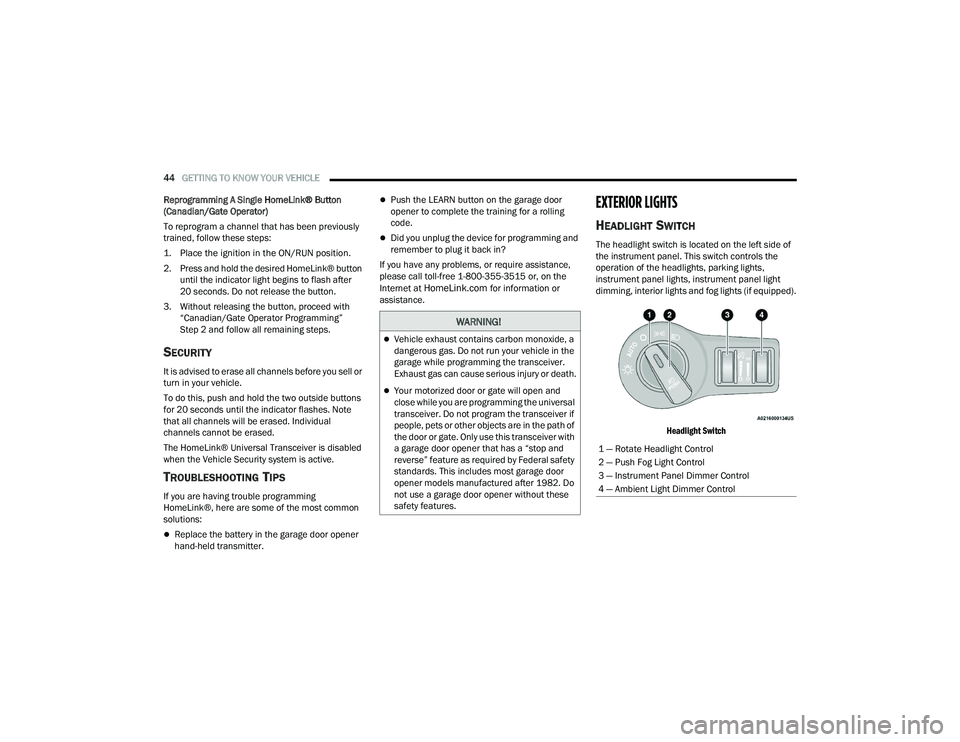
HEADLIGHT SWITCH
The headlight switch is located on the left side of
the instrument panel. This switch controls the
operation of the headlights, parking lights,
instrument panel lights, instrument panel light
dimming, interior lights and fog lights (if equipped).
Headlight Switch
WARNING!
Vehicle exhaust contains carbon monoxide, a
dangerous gas. Do not run your vehicle in the
garage while programming the transceiver.
Exhaust gas can cause serious injury or death.
Your motorized door or gate will open and
close while you are programming the universal
transceiver. Do not program the transceiver if
people, pets or other objects are in the path of
the door or gate. Only use this transceiver with
a garage door opener that has a “stop and
reverse” feature as required by Federal safety
standards. This includes most garage door
opener models manufactured after 1982. Do
not use a garage door opener without these
safety features.
1 — Rotate Headlight Control
2 — Push Fog Light Control
3 — Instrument Panel Dimmer Control
4 — Ambient Light Dimmer Control
22_LA_OM_EN_USC_t.book Page 44
Page 48 of 336
46GETTING TO KNOW YOUR VEHICLE
NOTE:
The Automatic High Beam Headlamp Control
can be turned on or off using the Uconnect
system Úpage 123.
Broken, muddy, or obstructed headlights and
taillights of vehicles in the field of view will
cause headlights to remain on longer (closer to
the vehicle). Also, dirt, film, and other obstruc -
tions on the windshield or camera lens will
cause the system to function improperly.
To opt out of the Advanced Auto High-Beam
Sensitivity Control and enter Reduced
High-Beam Sensitivity Control (not recom -
mended), toggle the high beam lever six full
on/off cycles within 10 seconds of placing the
ignition in the ON position. The system will
return to the default setting upon placing the
ignition in the OFF position.
If the windshield or Automatic High Beam Head -
lamp Control mirror is replaced, the mirror must
be re-aimed to ensure proper performance. See
a local authorized dealer.
FLASH-TO-PASS
You can signal another vehicle with your headlights
by lightly pulling the multifunction lever toward you.
This will cause the high beam headlights to turn on,
and remain on, until the lever is released.
NOTE:If the multifunction lever is held in the flash-to pass
position for more than 20 seconds, the high beams
will shut off.
AUTOMATIC HEADLIGHTS
This system automatically turns the headlights on
or off according to ambient light levels. To turn the
system on, rotate the headlight switch
counterclockwise to the AUTO position.
When the system is on, the Headlight Delay feature
is also on. This means the headlights will stay on
for up to 90 seconds after you place the ignition
into the OFF position. To turn the automatic
headlights off, turn the headlight switch out of the
AUTO position.
NOTE:The engine must be running before the headlights
will come on in the automatic mode.
PARKING LIGHTS
To turn on the parking lights and instrument panel
lights, rotate the headlight switch clockwise. To
turn off the parking lights, rotate the headlight
switch back to the O (off) position.
NOTE:For vehicles sold in Canada, rotate the headlight
switch to the AUTO position to turn off the parking
lights.
AUTOMATIC HEADLIGHTS WITH WIPERS
If your vehicle is equipped with Automatic
Headlights, it also has this
customer-programmable feature. When your
headlights are in the automatic mode and the
engine is running, they will automatically turn on
when the wiper system is on. This feature is
programmable through the Uconnect system
Ú page 123.
In addition, the headlights will turn off when the
wipers are turned off if they were turned on by this
feature.
22_LA_OM_EN_USC_t.book Page 46