fuel pressure DODGE CHALLENGER 2022 Owners Manual
[x] Cancel search | Manufacturer: DODGE, Model Year: 2022, Model line: CHALLENGER, Model: DODGE CHALLENGER 2022Pages: 336, PDF Size: 16.47 MB
Page 13 of 336
11
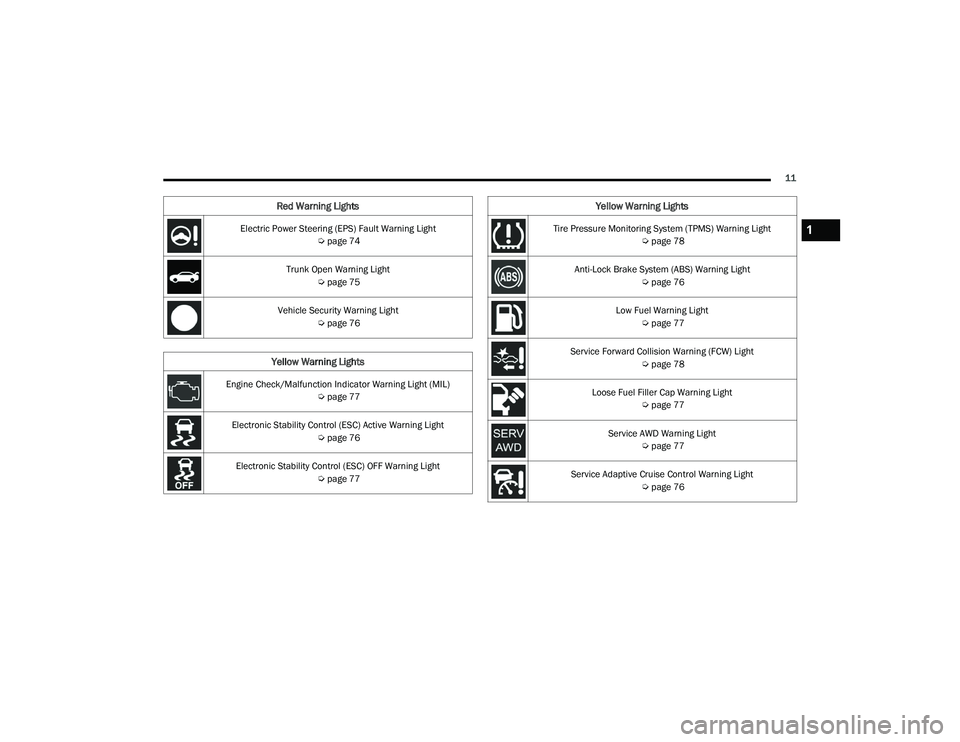
Electric Power Steering (EPS) Fault Warning Light Úpage 74
Trunk Open Warning Light Úpage 75
Vehicle Security Warning Light Úpage 76
Yellow Warning Lights
Engine Check/Malfunction Indicator Warning Light (MIL)
Úpage 77
Electronic Stability Control (ESC) Active Warning Light Úpage 76
Electronic Stability Control (ESC) OFF Warning Light Úpage 77
Red Warning Lights
Tire Pressure Monitoring System (TPMS) Warning Light
Úpage 78
Anti-Lock Brake System (ABS) Warning Light Úpage 76
Low Fuel Warning Light Úpage 77
Service Forward Collision Warning (FCW) Light Úpage 78
Loose Fuel Filler Cap Warning Light Úpage 77
Service AWD Warning Light Úpage 77
Service Adaptive Cruise Control Warning Light Úpage 76
Yellow Warning Lights
1
22_LA_OM_EN_USC_t.book Page 11
Page 80 of 336
78GETTING TO KNOW YOUR INSTRUMENT PANEL
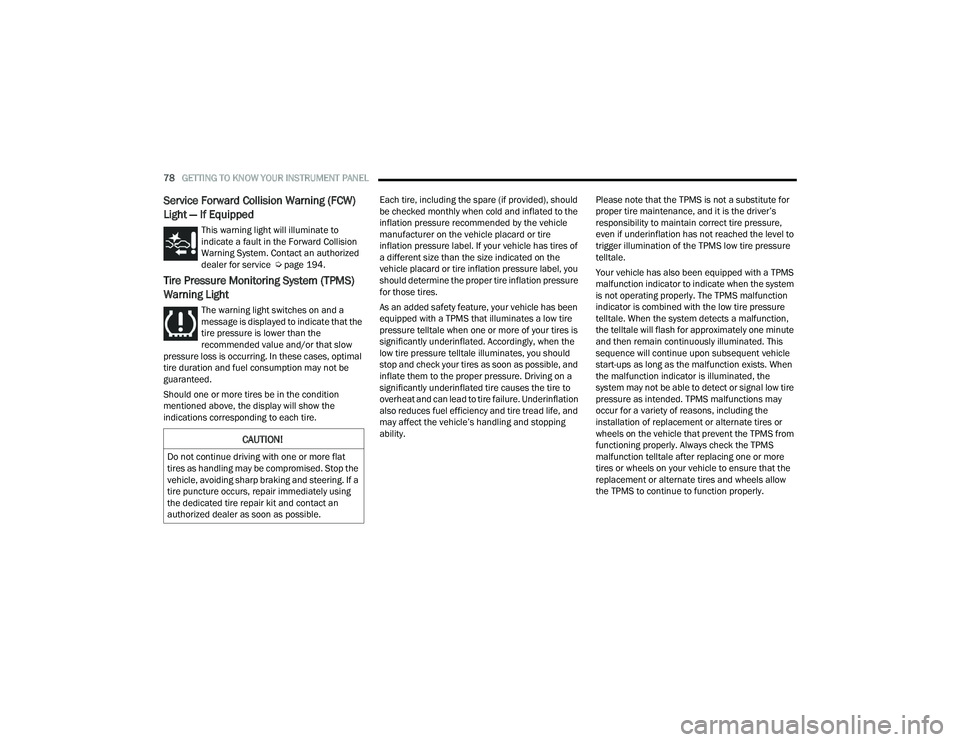
Service Forward Collision Warning (FCW)
Light — If Equipped
This warning light will illuminate to
indicate a fault in the Forward Collision
Warning System. Contact an authorized
dealer for service Úpage 194.
Tire Pressure Monitoring System (TPMS)
Warning Light
The warning light switches on and a
message is displayed to indicate that the
tire pressure is lower than the
recommended value and/or that slow
pressure loss is occurring. In these cases, optimal
tire duration and fuel consumption may not be
guaranteed.
Should one or more tires be in the condition
mentioned above, the display will show the
indications corresponding to each tire. Each tire, including the spare (if provided), should
be checked monthly when cold and inflated to the
inflation pressure recommended by the vehicle
manufacturer on the vehicle placard or tire
inflation pressure label. If your vehicle has tires of
a different size than the size indicated on the
vehicle placard or tire inflation pressure label, you
should determine the proper tire inflation pressure
for those tires.
As an added safety feature, your vehicle has been
equipped with a TPMS that illuminates a low tire
pressure telltale when one or more of your tires is
significantly underinflated. Accordingly, when the
low tire pressure telltale illuminates, you should
stop and check your tires as soon as possible, and
inflate them to the proper pressure. Driving on a
significantly underinflated tire causes the tire to
overheat and can lead to tire failure. Underinflation
also reduces fuel efficiency and tire tread life, and
may affect the vehicle’s handling and stopping
ability.Please note that the TPMS is not a substitute for
proper tire maintenance, and it is the driver’s
responsibility to maintain correct tire pressure,
even if underinflation has not reached the level to
trigger illumination of the TPMS low tire pressure
telltale.
Your vehicle has also been equipped with a TPMS
malfunction indicator to indicate when the system
is not operating properly. The TPMS malfunction
indicator is combined with the low tire pressure
telltale. When the system detects a malfunction,
the telltale will flash for approximately one minute
and then remain continuously illuminated. This
sequence will continue upon subsequent vehicle
start-ups as long as the malfunction exists. When
the malfunction indicator is illuminated, the
system may not be able to detect or signal low tire
pressure as intended. TPMS malfunctions may
occur for a variety of reasons, including the
installation of replacement or alternate tires or
wheels on the vehicle that prevent the TPMS from
functioning properly. Always check the TPMS
malfunction telltale after replacing one or more
tires or wheels on your vehicle to ensure that the
replacement or alternate tires and wheels allow
the TPMS to continue to function properly.
CAUTION!
Do not continue driving with one or more flat
tires as handling may be compromised. Stop the
vehicle, avoiding sharp braking and steering. If a
tire puncture occurs, repair immediately using
the dedicated tire repair kit and contact an
authorized dealer as soon as possible.
22_LA_OM_EN_USC_t.book Page 78
Page 127 of 336
MULTIMEDIA125
Units
Display Brightness With Headlights OFF This setting will allow you to set the brightness when the headlights are off. To
access this setting, Display Mode must be set to Manual. The “+” setting will increase the brightness; the “-” will decrease the brightness.
Set Theme This setting will allow you to change the display theme.
Touchscreen Beep This setting will allow you to turn the touchscreen beep on or off.
Control Screen Timeout This setting will allow you to set the Control Screen to turn off automatically
after five seconds or stay open until manually closed.
Navigation Next Turn Pop-ups Displayed in Cluster This setting will display navigation prompts in the Instrument Cluster Display.
Setting Name Description
When the Units button is pressed on the touchscreen, the system displays the different measurement options. The selected unit of measurement will display
in the instrument cluster display and Navigation system (if equipped). The available settings are:
NOTE:Depending on the vehicle’s options, feature settings may vary.
Setting NameDescription
USThis setting will change the unit of measurement on the display to US.
Metric This setting will change the unit of measurement on the display to Metric.
Custom This setting changes the “Speed” (MPH or km/h), “Distance” (mi or km), “Fuel
Consumption” (MPG [US], MPG [UK], L/100 km, or km/L), “Pressure” (psi, kPa, or bar), and “Temperature” (°C or °F) units of measurement independently.
5
22_LA_OM_EN_USC_t.book Page 125
Page 174 of 336
172MULTIMEDIA
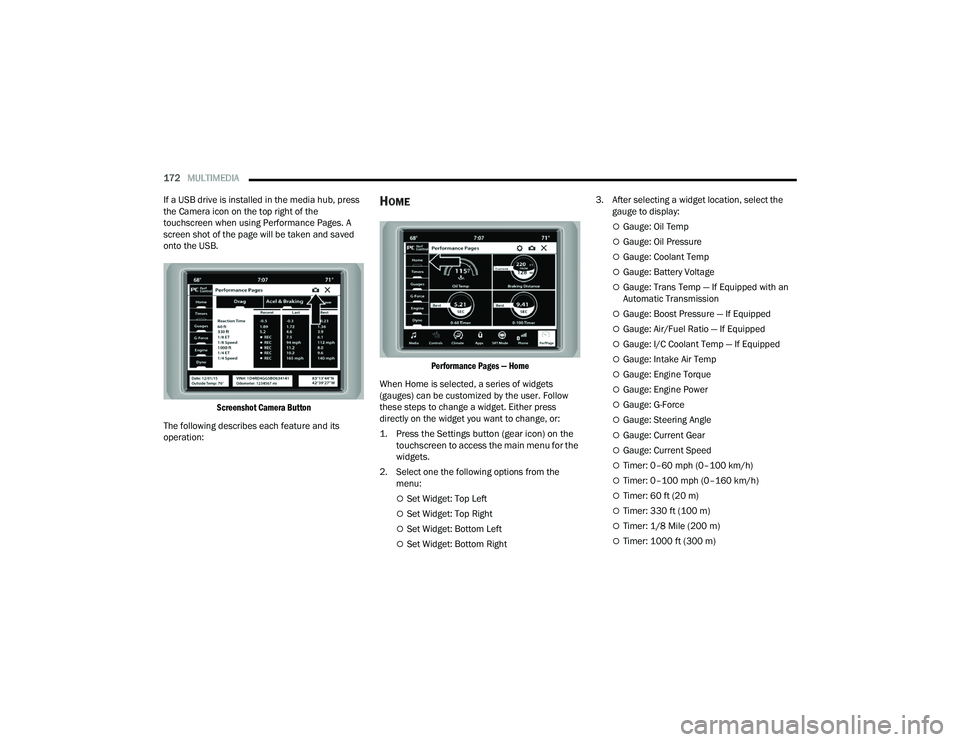
If a USB drive is installed in the media hub, press
the Camera icon on the top right of the
touchscreen when using Performance Pages. A
screen shot of the page will be taken and saved
onto the USB.
Screenshot Camera Button
The following describes each feature and its
operation:
HOME
Performance Pages — Home
When Home is selected, a series of widgets
(gauges) can be customized by the user. Follow
these steps to change a widget. Either press
directly on the widget you want to change, or:
1. Press the Settings button (gear icon) on the touchscreen to access the main menu for the
widgets.
2. Select one the following options from the menu:
Set Widget: Top Left
Set Widget: Top Right
Set Widget: Bottom Left
Set Widget: Bottom Right 3. After selecting a widget location, select the
gauge to display:
Gauge: Oil Temp
Gauge: Oil Pressure
Gauge: Coolant Temp
Gauge: Battery Voltage
Gauge: Trans Temp — If Equipped with an
Automatic Transmission
Gauge: Boost Pressure — If Equipped
Gauge: Air/Fuel Ratio — If Equipped
Gauge: I/C Coolant Temp — If Equipped
Gauge: Intake Air Temp
Gauge: Engine Torque
Gauge: Engine Power
Gauge: G-Force
Gauge: Steering Angle
Gauge: Current Gear
Gauge: Current Speed
Timer: 0–60 mph (0–100 km/h)
Timer: 0–100 mph (0–160 km/h)
Timer: 60 ft (20 m)
Timer: 330 ft (100 m)
Timer: 1/8 Mile (200 m)
Timer: 1000 ft (300 m)
22_LA_OM_EN_USC_t.book Page 172
Page 178 of 336
176MULTIMEDIA
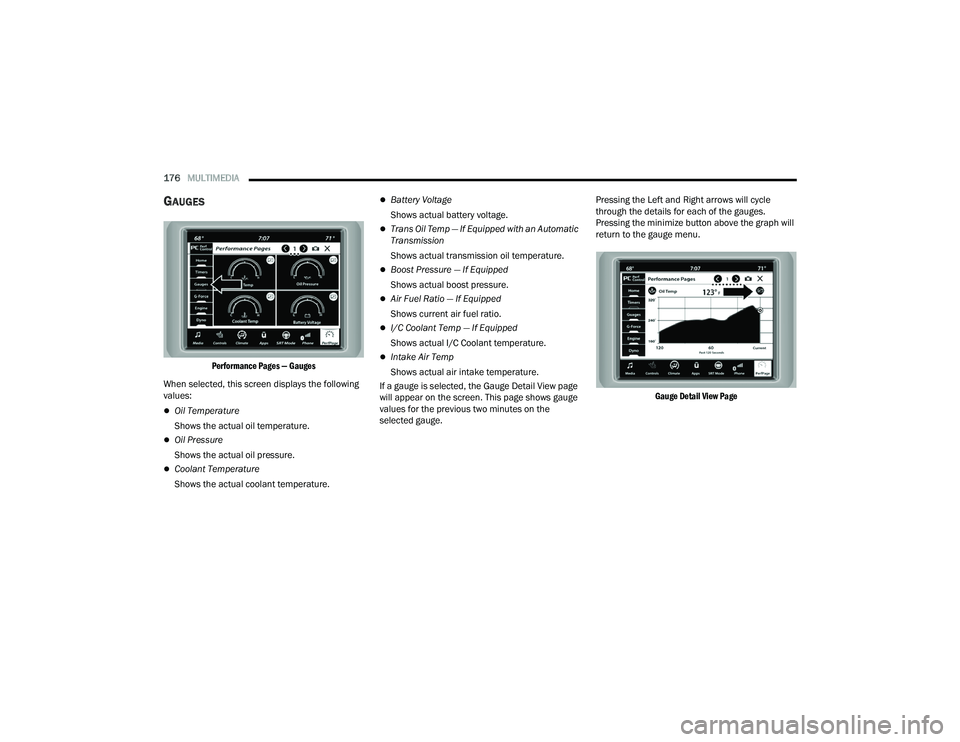
GAUGES
Performance Pages — Gauges
When selected, this screen displays the following
values:
Oil Temperature
Shows the actual oil temperature.
Oil Pressure
Shows the actual oil pressure.
Coolant Temperature
Shows the actual coolant temperature.
Battery Voltage
Shows actual battery voltage.
Trans Oil Temp — If Equipped with an Automatic
Transmission
Shows actual transmission oil temperature.
Boost Pressure — If Equipped
Shows actual boost pressure.
Air Fuel Ratio — If Equipped
Shows current air fuel ratio.
I/C Coolant Temp — If Equipped
Shows actual I/C Coolant temperature.
Intake Air Temp
Shows actual air intake temperature.
If a gauge is selected, the Gauge Detail View page
will appear on the screen. This page shows gauge
values for the previous two minutes on the
selected gauge. Pressing the Left and Right arrows will cycle
through the details for each of the gauges.
Pressing the minimize button above the graph will
return to the gauge menu.
Gauge Detail View Page
22_LA_OM_EN_USC_t.book Page 176
Page 199 of 336
SAFETY197
NOTE:
The TPMS is not intended to replace normal tire
care and maintenance or to provide warning of
a tire failure or condition.
The TPMS should not be used as a tire pressure
gauge while adjusting your tire pressure, unless
your vehicle is equipped with a Tire Fill Alert
(TFA) system.
Driving on a significantly underinflated tire
causes the tire to overheat and can lead to tire
failure. Underinflation also reduces fuel effi -
ciency and tire tread life, and may affect the
vehicle’s handling and stopping ability.
The TPMS is not a substitute for proper tire
maintenance, and it is the driver’s responsibility
to maintain correct tire pressure using an accu -
rate tire pressure gauge, even if underinflation
has not reached the level to trigger illumination
of the TPMS Warning Light.
Seasonal temperature changes will affect tire
pressure, and the TPMS will monitor the actual
tire pressure in the tire.
Premium System
The Tire Pressure Monitoring System (TPMS) uses
wireless technology with wheel rim mounted
electronic sensors to monitor tire pressure levels.
Sensors, mounted to each wheel as part of the
valve stem, transmit tire pressure readings to the
receiver module.
NOTE:It is particularly important for you to check the tire
pressure in all of the tires on your vehicle monthly
and to maintain the proper pressure.
The TPMS consists of the following components:
Receiver module
Four Tire Pressure Monitoring System sensors
Various Tire Pressure Monitoring System
messages, which display in the instrument
cluster
Tire Pressure Monitoring System Warning Light
CAUTION!
The TPMS has been optimized for the original
equipment tires and wheels. TPMS pressures
and warning have been established for the tire
size equipped on your vehicle. Undesirable
system operation or sensor damage may
result when using replacement equipment
that is not of the same size, type, and/or style.
The TPMS sensor is not designed for use on
aftermarket wheels and may contribute to a
poor overall system performance or sensor
damage. Customers are encouraged to use
OEM wheels to ensure proper TPMS feature
operation.
Using aftermarket tire sealants may cause the
Tire Pressure Monitoring System (TPMS)
sensor to become inoperable. After using an
aftermarket tire sealant it is recommended
that you take your vehicle to an authorized
dealer to have your sensor function checked.
After inspecting or adjusting the tire pressure
always reinstall the valve stem cap. This will
prevent moisture and dirt from entering the
valve stem, which could damage the TPMS
sensor.
6
22_LA_OM_EN_USC_t.book Page 197
Page 263 of 336
SERVICING AND MAINTENANCE261
(Continued)
CHECKING OIL LEVEL
To ensure proper engine lubrication, the engine oil
must be maintained at the correct level. Check the
oil level at regular intervals, such as every fuel
stop. The best time to check the engine oil level is
about ten minutes after a fully warmed up engine
is shut off.
Checking the oil while the vehicle is on level ground
will improve the accuracy of the oil level readings.
There are four possible dipstick types:
Crosshatched zone.
Crosshatched zone marked SAFE.
Crosshatched zone marked with MIN at the low
end of the range and MAX at the high end of the
range.
Crosshatched zone marked with dimples at the
MIN and the MAX ends of the range.
NOTE:Always maintain the oil level within the crosshatch
markings on the dipstick.
Adding 1 quart (1 liter) of oil when the reading is at
the low end of the dipstick range will raise the oil
level to the high end of the range marking.
ADDING WASHER FLUID
The windshield washer fluid reservoir is located in
the front of the engine compartment. Be sure to
check the fluid level at regular intervals. Fill the
reservoir with windshield washer solvent (not
radiator antifreeze) and operate the system for a
few seconds to flush out the residual water.
When refilling the washer fluid reservoir, apply
some washer fluid to a cloth or towel and wipe the
wiper blades clean. This will help blade
performance.
WARNING!
Never smoke while working in the engine
compartment: gas and inflammable vapors
may be present, with the risk of fire.
Be very careful when working in the engine
compartment when the engine is hot: you may
get burned. Do not get too close to the radiator
cooling fan: the electric fan may start; danger
of injury. Scarves, ties and other loose clothing
might be pulled by moving parts.
CAUTION!
Be careful not to confuse the various types of
fluids while topping up: they are not compat-
ible with each other! Topping up with an
unsuitable fluid could severely damage your
car.
The oil level must never exceed the MAX mark.
Always top up using engine oil of the same
specifications as what is already in the engine.
If the engine oil is being topped up, wait for the
engine to cool down before loosening the filler
cap, particularly for vehicles with aluminum
cap (if equipped). WARNING: risk of burns!
Overfilling or underfilling the crankcase will
cause aeration or loss of oil pressure. This
could damage your engine.
CAUTION!
CAUTION!
Overfilling or underfilling the crankcase will
cause aeration or loss of oil pressure. This could
damage your engine.
8
22_LA_OM_EN_USC_t.book Page 261
Page 285 of 336
SERVICING AND MAINTENANCE283
F12 –20 Amp YellowCigar Lighter / IP APO / RR USB
(Selectable Fuse) *
F15 40 Amp Green –HVAC Blower
F16 20 Amp Blue –Left Spot Lamp – Police
F17 20 Amp Blue –Right Spot Lamp – Police
F18 30 Amp Pink –VISM Mod (Police)
F19 ––Spare
F20 ––Spare
F21 30 Amp Pink –Fuel Pump (Non 6.2L ADR)
F22 –5 Amp TanCyber Gateway Module
F23 –10 Amp RedFuel Door SW * / Diagnostic Port
F24 –10 Amp RedIntegrated Center Stack
F25 –10 Amp RedTire Pressure Monitor System
F26 –15 Amp BlueTrans Mod (Charger / 300)
F27 –25 Amp ClearAmplifier *
F31 –25 Amp BreakerPower Seats *
F32 –15 Amp BlueHVAC Module / Cluster
F33 –15 Amp BlueIGN SW / Wireless Mod / Steer Clmn
Lock Mod / Remote Start *
F34 –10 Amp RedSteering Column Module / Clock
(300)
Cavity
Cartridge Fuse Mini-FuseDescription
* If Equipped
8
22_LA_OM_EN_USC_t.book Page 283
Page 299 of 336
SERVICING AND MAINTENANCE297
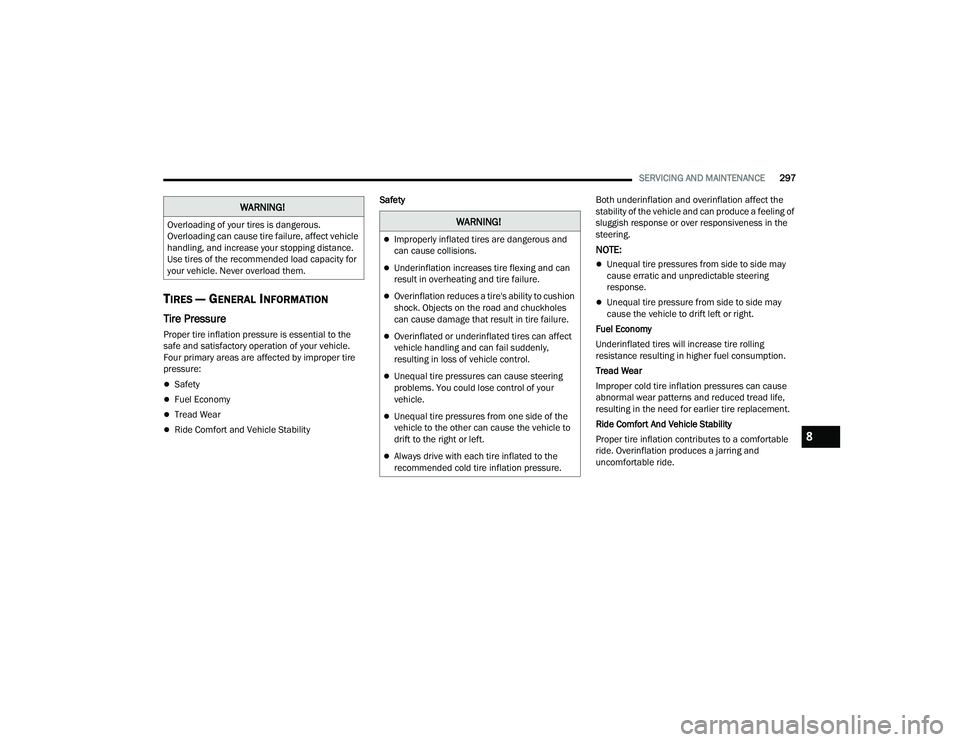
TIRES — GENERAL INFORMATION
Tire Pressure
Proper tire inflation pressure is essential to the
safe and satisfactory operation of your vehicle.
Four primary areas are affected by improper tire
pressure:
Safety
Fuel Economy
Tread Wear
Ride Comfort and Vehicle Stability Safety
Both underinflation and overinflation affect the
stability of the vehicle and can produce a feeling of
sluggish response or over responsiveness in the
steering.
NOTE:
Unequal tire pressures from side to side may
cause erratic and unpredictable steering
response.
Unequal tire pressure from side to side may
cause the vehicle to drift left or right.
Fuel Economy
Underinflated tires will increase tire rolling
resistance resulting in higher fuel consumption.
Tread Wear
Improper cold tire inflation pressures can cause
abnormal wear patterns and reduced tread life,
resulting in the need for earlier tire replacement.
Ride Comfort And Vehicle Stability
Proper tire inflation contributes to a comfortable
ride. Overinflation produces a jarring and
uncomfortable ride.
WARNING!
Overloading of your tires is dangerous.
Overloading can cause tire failure, affect vehicle
handling, and increase your stopping distance.
Use tires of the recommended load capacity for
your vehicle. Never overload them.WARNING!
Improperly inflated tires are dangerous and
can cause collisions.
Underinflation increases tire flexing and can
result in overheating and tire failure.
Overinflation reduces a tire's ability to cushion
shock. Objects on the road and chuckholes
can cause damage that result in tire failure.
Overinflated or underinflated tires can affect
vehicle handling and can fail suddenly,
resulting in loss of vehicle control.
Unequal tire pressures can cause steering
problems. You could lose control of your
vehicle.
Unequal tire pressures from one side of the
vehicle to the other can cause the vehicle to
drift to the right or left.
Always drive with each tire inflated to the
recommended cold tire inflation pressure.
8
22_LA_OM_EN_USC_t.book Page 297
Page 325 of 336
323
INDEX
A
About Your Brakes.................................. 86, 311ACC (Adaptive Cruise Control........................... 97Adaptive Cruise Control (ACC).......................... 97Adding Engine Coolant (Antifreeze)............... 272Adding Washing Fluid.................................... 261Additives, Fuel............................................... 313AdjustForward................................................ 32, 34Rearward.............................................. 32, 34Advance Phone Connectivity......................... 165Air Bag........................................................... 208Advance Front Air Bag............................... 208Air Bag Operation...................................... 210Air Bag Warning Light................................ 208Enhanced Accident Response......... 214, 253Event Data Recorder (EDR)....................... 253Front Air Bag............................................. 208If Deployment Occurs................................ 213Knee Impact Bolsters................................ 210Maintaining Your Air Bag System.............. 215Maintenance............................................. 215Redundant Air Bag Warning Light.............208Side Air Bags............................................. 210Transporting Pets...................................... 230
Air Bag Light.................................. 73, 208, 230Air Cleaner, Engine
(Engine Air Cleaner Filter)............................. 265Air Conditioner Maintenance........................ 266Air Conditioner Refrigerant........................... 266Air Conditioner System................................. 266Air Conditioning................................................ 51Air Conditioning Filter..............................55, 266Air Conditioning System................................... 51Air Conditioning, Operating Tips....................... 55Air Filter........................................................ 265Air PressureTires......................................................... 298AlarmArm The System.......................................... 21Rearm The System...................................... 21Security Alarm...................................... 21, 76Alarm SystemSecurity Alarm............................................. 21All Wheel Drive (AWD)................................... 276Alterations/ModificationsVehicle........................................................... 9Android Auto........................................ 167, 168Android Auto™
b
....................................... 167
Antifreeze (Engine Coolant).................. 272, 315Disposal.................................................... 273Anti-Lock Brake System (ABS)....................... 185Anti-Lock Warning Light...................................76Apple CarPlay....................................... 167, 170Apple CarPlay®
b
...................................... 169Arming SystemSecurity Alarm.............................................21Assist, Hill Start............................................. 189Audio Settings............................................... 152Audio Systems (Radio).................................. 122Auto Down Power Windows..............................60Automatic Door Locks......................................27Automatic Headlights.......................................46Automatic High Beams.....................................45Automatic Temperature Control (ATC)..............54Automatic Transmission...................................91Adding Fluid..................................... 276, 318Fluid And Filter Change............................. 276Fluid Change............................................. 276Fluid Level Check...................................... 275Fluid Type........................................ 276, 318Special Additives...................................... 275Automatic Transmission Limp
Home Mode..............................................27, 9411
22_LA_OM_EN_USC_t.book Page 323