door lock DODGE CHALLENGER 2023 User Guide
[x] Cancel search | Manufacturer: DODGE, Model Year: 2023, Model line: CHALLENGER, Model: DODGE CHALLENGER 2023Pages: 300, PDF Size: 12.82 MB
Page 24 of 300
22GETTING TO KNOW YOUR VEHICLE
POWER DOOR LOCKS
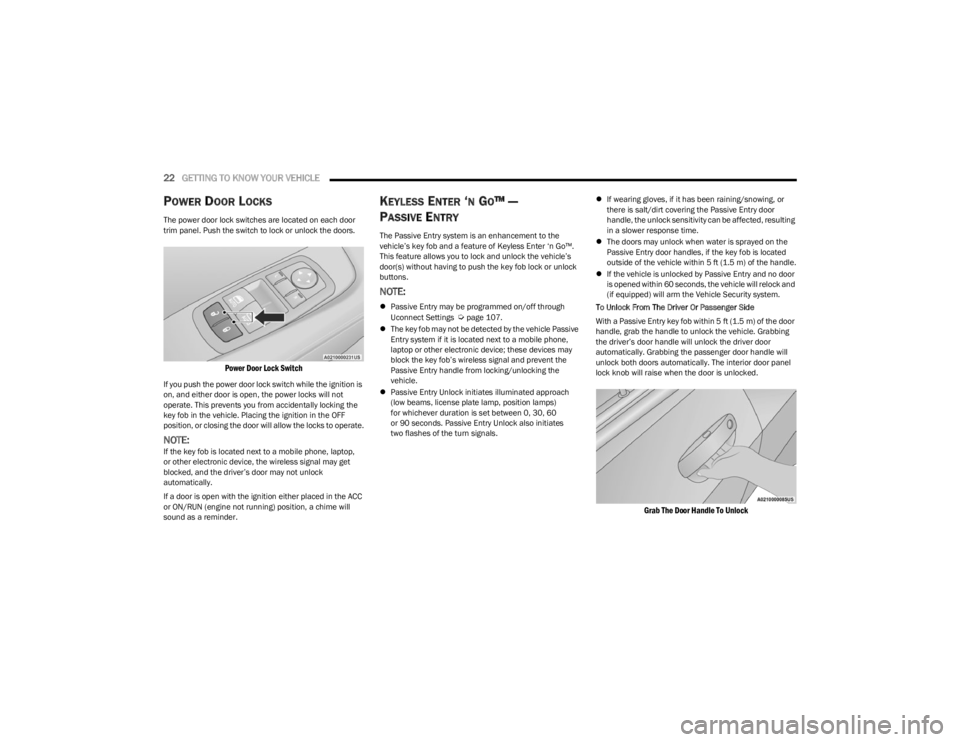
The power door lock switches are located on each door
trim panel. Push the switch to lock or unlock the doors.
Power Door Lock Switch
If you push the power door lock switch while the ignition is
on, and either door is open, the power locks will not
operate. This prevents you from accidentally locking the
key fob in the vehicle. Placing the ignition in the OFF
position, or closing the door will allow the locks to operate.
NOTE:If the key fob is located next to a mobile phone, laptop,
or other electronic device, the wireless signal may get
blocked, and the driver’s door may not unlock
automatically.
If a door is open with the ignition either placed in the ACC
or ON/RUN (engine not running) position, a chime will
sound as a reminder.
KEYLESS ENTER ‘N GO™ —
P
ASSIVE ENTRY
The Passive Entry system is an enhancement to the
vehicle’s key fob and a feature of Keyless Enter ‘n Go™.
This feature allows you to lock and unlock the vehicle’s
door(s) without having to push the key fob lock or unlock
buttons.
NOTE:
Passive Entry may be programmed on/off through
Uconnect Settings Úpage 107.
The key fob may not be detected by the vehicle Passive
Entry system if it is located next to a mobile phone,
laptop or other electronic device; these devices may
block the key fob’s wireless signal and prevent the
Passive Entry handle from locking/unlocking the
vehicle.
Passive Entry Unlock initiates illuminated approach
(low beams, license plate lamp, position lamps)
for whichever duration is set between 0, 30, 60
or 90 seconds. Passive Entry Unlock also initiates
two flashes of the turn signals.
If wearing gloves, if it has been raining/snowing, or
there is salt/dirt covering the Passive Entry door
handle, the unlock sensitivity can be affected, resulting
in a slower response time.
The doors may unlock when water is sprayed on the
Passive Entry door handles, if the key fob is located
outside of the vehicle within 5 ft (1.5 m) of the handle.
If the vehicle is unlocked by Passive Entry and no door
is opened within 60 seconds, the vehicle will relock and
(if equipped) will arm the Vehicle Security system.
To Unlock From The Driver Or Passenger Side
With a Passive Entry key fob within 5 ft (1.5 m) of the door
handle, grab the handle to unlock the vehicle. Grabbing
the driver’s door handle will unlock the driver door
automatically. Grabbing the passenger door handle will
unlock both doors automatically. The interior door panel
lock knob will raise when the door is unlocked.
Grab The Door Handle To Unlock
23_LA_OM_EN_USC_t.book Page 22
Page 25 of 300
GETTING TO KNOW YOUR VEHICLE23
NOTE:
Either the driver door only or all doors will unlock when
you grab hold of the front driver’s door handle,
depending on the selected setting in the Uconnect
system
Úpage 107.
All doors will unlock when the front passenger door
handle is grabbed regardless of the driver’s door
unlock preference setting.
Frequency Operated Button Integrated Key (FOBIK-Safe)
To minimize the possibility of unintentionally locking a
Passive Entry key fob inside your vehicle, the Passive Entry
system is equipped with an automatic door unlock feature
which will function if the ignition is in the OFF position.
There are three situations that trigger a FOBIK-Safe search
in any Passive Entry vehicle.
1. A lock request is made by a valid Passive Entry key fob while a door is open.
2. A lock request is made by the Passive Entry door handle while a door is open.
3. A lock request is made by the door panel switch while the door is open.
When any of these situations occur, after all open doors
are shut, the FOBIK-Safe search will be executed. If it
detects a Passive Entry key fob inside the car, and it does
not detect any Passive Entry key fobs outside the car, the
car will unlock and alert the customer.
NOTE:The vehicle will only unlock the doors when a valid Passive
Entry key fob is detected inside the vehicle, and no valid
Passive Entry key fob is detected outside the vehicle. The
vehicle will not unlock the doors when any of the following
conditions are true:
The doors are manually locked using the door lock
knobs.
Three attempts are made to lock the doors using the
door panel switch and then the doors are closed.
There is a valid Passive Entry key fob outside the
vehicle and within 5 ft (1.5 m) of either Passive Entry
door handle.
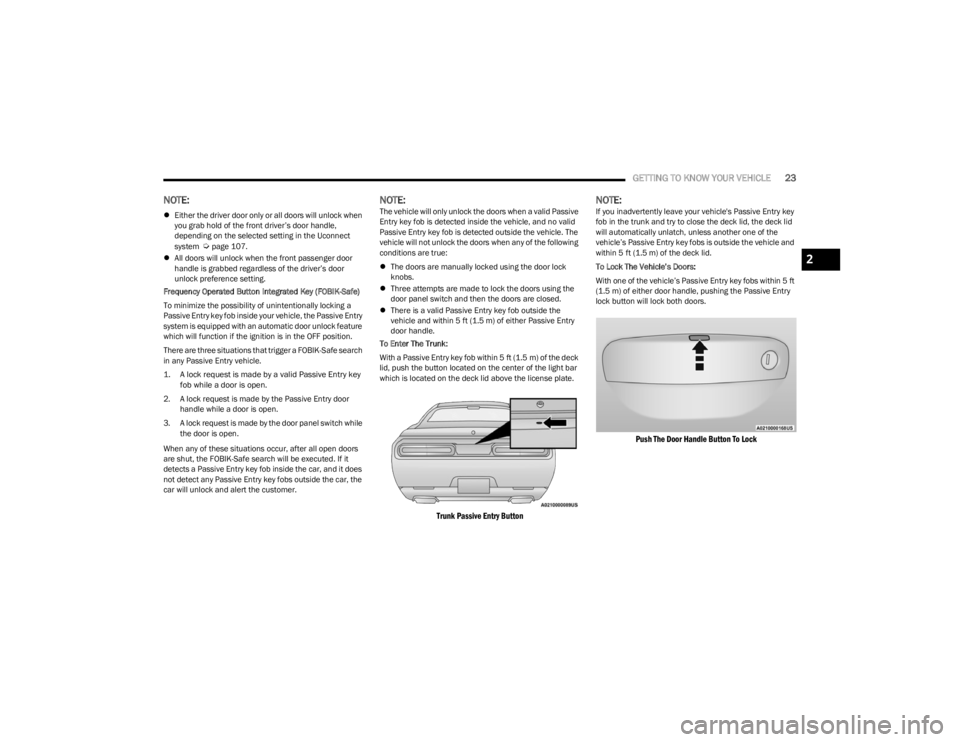
To Enter The Trunk:
With a Passive Entry key fob within 5 ft (1.5 m) of the deck lid, push the button located on the center of the light bar
which is located on the deck lid above the license plate.
Trunk Passive Entry Button
NOTE:If you inadvertently leave your vehicle's Passive Entry key
fob in the trunk and try to close the deck lid, the deck lid
will automatically unlatch, unless another one of the
vehicle’s Passive Entry key fobs is outside the vehicle and
within 5 ft (1.5 m) of the deck lid.
To Lock The Vehicle’s Doors:
With one of the vehicle’s Passive Entry key fobs within 5 ft
(1.5 m) of either door handle, pushing the Passive Entry
lock button will lock both doors.
Push The Door Handle Button To Lock
2
23_LA_OM_EN_USC_t.book Page 23
Page 26 of 300
24GETTING TO KNOW YOUR VEHICLE
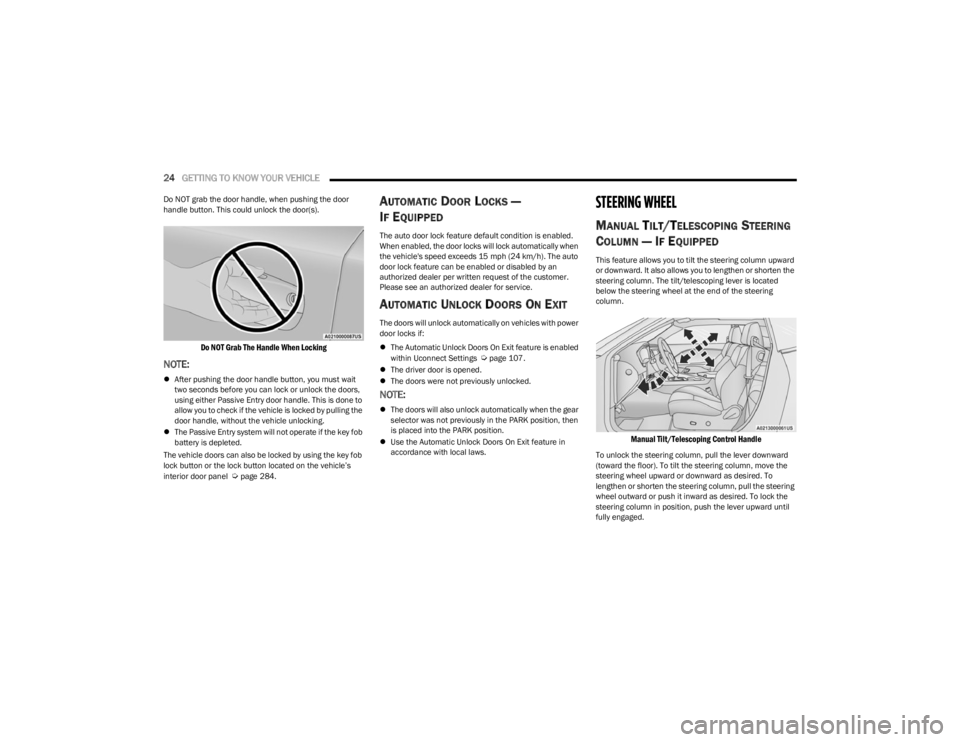
Do NOT grab the door handle, when pushing the door
handle button. This could unlock the door(s).
Do NOT Grab The Handle When Locking
NOTE:
After pushing the door handle button, you must wait
two seconds before you can lock or unlock the doors,
using either Passive Entry door handle. This is done to
allow you to check if the vehicle is locked by pulling the
door handle, without the vehicle unlocking.
The Passive Entry system will not operate if the key fob
battery is depleted.
The vehicle doors can also be locked by using the key fob
lock button or the lock button located on the vehicle’s
interior door panel
Úpage 284.
AUTOMATIC DOOR LOCKS —
I
F EQUIPPED
The auto door lock feature default condition is enabled.
When enabled, the door locks will lock automatically when
the vehicle's speed exceeds 15 mph (24 km/h). The auto
door lock feature can be enabled or disabled by an
authorized dealer per written request of the customer.
Please see an authorized dealer for service.
AUTOMATIC UNLOCK DOORS ON EXIT
The doors will unlock automatically on vehicles with power
door locks if:
The Automatic Unlock Doors On Exit feature is enabled
within Uconnect Settings
Úpage 107.
The driver door is opened.
The doors were not previously unlocked.
NOTE:
The doors will also unlock automatically when the gear
selector was not previously in the PARK position, then
is placed into the PARK position.
Use the Automatic Unlock Doors On Exit feature in
accordance with local laws.
STEERING WHEEL
MANUAL TILT/TELESCOPING STEERING
C
OLUMN — IF EQUIPPED
This feature allows you to tilt the steering column upward
or downward. It also allows you to lengthen or shorten the
steering column. The tilt/telescoping lever is located
below the steering wheel at the end of the steering
column.
Manual Tilt/Telescoping Control Handle
To unlock the steering column, pull the lever downward
(toward the floor). To tilt the steering column, move the
steering wheel upward or downward as desired. To
lengthen or shorten the steering column, pull the steering
wheel outward or push it inward as desired. To lock the
steering column in position, push the lever upward until
fully engaged.
23_LA_OM_EN_USC_t.book Page 24
Page 27 of 300
GETTING TO KNOW YOUR VEHICLE25
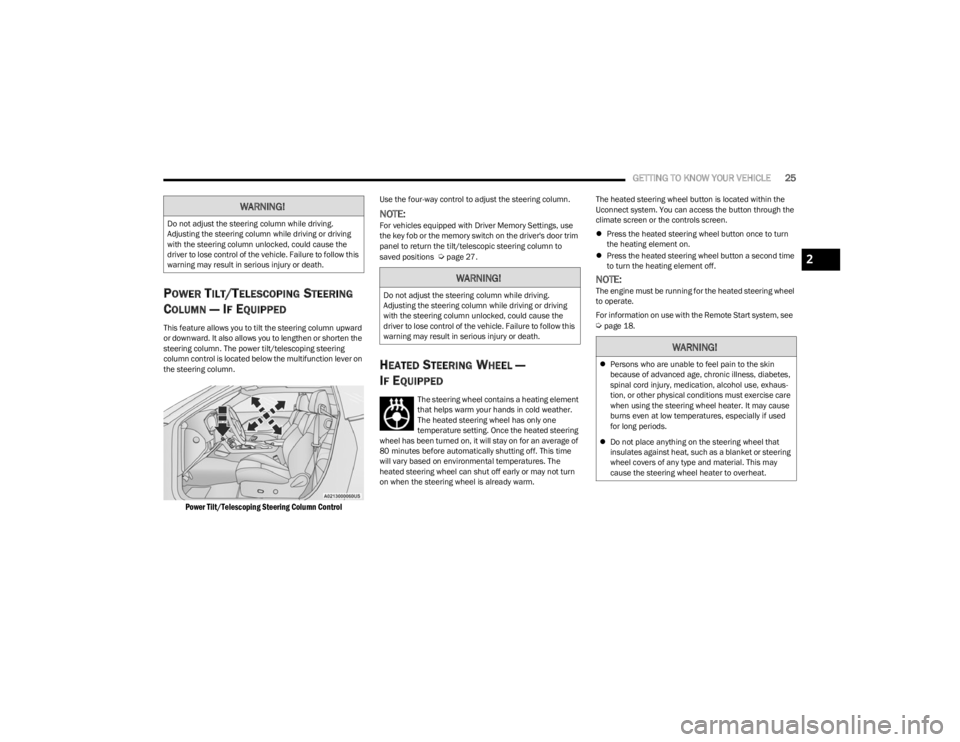
POWER TILT/TELESCOPING STEERING
C
OLUMN — IF EQUIPPED
This feature allows you to tilt the steering column upward
or downward. It also allows you to lengthen or shorten the
steering column. The power tilt/telescoping steering
column control is located below the multifunction lever on
the steering column.
Power Tilt/Telescoping Steering Column Control
Use the four-way control to adjust the steering column.
NOTE:For vehicles equipped with Driver Memory Settings, use
the key fob or the memory switch on the driver's door trim
panel to return the tilt/telescopic steering column to
saved positions
Úpage 27.
HEATED STEERING WHEEL —
I
F EQUIPPED
The steering wheel contains a heating element
that helps warm your hands in cold weather.
The heated steering wheel has only one
temperature setting. Once the heated steering
wheel has been turned on, it will stay on for an average of
80 minutes before automatically shutting off. This time
will vary based on environmental temperatures. The
heated steering wheel can shut off early or may not turn
on when the steering wheel is already warm. The heated steering wheel button is located within the
Uconnect system. You can access the button through the
climate screen or the controls screen.
Press the heated steering wheel button once to turn
the heating element on.
Press the heated steering wheel button a second time
to turn the heating element off.
NOTE:The engine must be running for the heated steering wheel
to operate.
For information on use with the Remote Start system, see
Úpage 18.
WARNING!
Do not adjust the steering column while driving.
Adjusting the steering column while driving or driving
with the steering column unlocked, could cause the
driver to lose control of the vehicle. Failure to follow this
warning may result in serious injury or death.
WARNING!
Do not adjust the steering column while driving.
Adjusting the steering column while driving or driving
with the steering column unlocked, could cause the
driver to lose control of the vehicle. Failure to follow this
warning may result in serious injury or death.
WARNING!
Persons who are unable to feel pain to the skin
because of advanced age, chronic illness, diabetes,
spinal cord injury, medication, alcohol use, exhaus -
tion, or other physical conditions must exercise care
when using the steering wheel heater. It may cause
burns even at low temperatures, especially if used
for long periods.
Do not place anything on the steering wheel that
insulates against heat, such as a blanket or steering
wheel covers of any type and material. This may
cause the steering wheel heater to overheat.
2
23_LA_OM_EN_USC_t.book Page 25
Page 30 of 300

28GETTING TO KNOW YOUR VEHICLE
PROGRAMMING THE MEMORY FEATURE
To create a new memory profile, perform the following:
NOTE:Saving a new memory profile will erase the selected profile
from memory.
1. Place the vehicle’s ignition in the ON/RUN position
(do not start the engine).
2. Adjust all memory profile settings to desired preferences (i.e., seat, side mirror, power tilt and
telescopic steering column [if equipped], and radio
station presets).
3. Push and release the set (S) button on the memory switch, and then push the desired memory button
(1 or 2) within five seconds. The instrument cluster
display will display which memory position has been
set.
NOTE:Memory profiles can be set without the vehicle in PARK,
but the vehicle must be in PARK to recall a memory profile.
LINKING AND UNLINKING THE KEY FOB
T
O MEMORY
Your key fobs can be programmed to recall one of two
saved memory profiles.
NOTE:Before programming your key fobs you must select the
“Personal Settings Linked To Key Fob” feature through the
Uconnect system
Úpage 107. To program your key fobs, perform the following:
1. Place the vehicle’s ignition in the OFF position.
2. Select a desired memory profile, 1 or 2.
3. Once the profile has been recalled, push and release
the set (S) button on the memory switch.
4. Within five seconds, push and release button (1) or (2) accordingly. “Memory Profile Set” (1 or 2) will
display in the instrument cluster.
5. Push and release the lock button on the key fob within 10 seconds.
NOTE:Your key fob can be unlinked from your memory settings
by pushing the set (S) button, followed by pushing the
unlock button on the key fob within 10 seconds.
MEMORY POSITION RECALL
NOTE:If a recall is attempted when the vehicle is not in PARK, a
message will be displayed in the instrument cluster
display.
To recall the memory settings for driver one or two, push
the desired memory button number (1 or 2) or the unlock
button on the key fob linked to the desired memory
position.
A recall can be canceled by pushing any of the memory
buttons (S, 1, or 2) during a recall. When a recall is
canceled, the driver seat will stop moving. A delay of one
second will occur before another recall can be selected.
NOTE:If the vehicle is equipped with Passive Entry, the memory
settings are recalled when using Passive Entry to unlock
the driver's door with a linked key fob.
SEATS
Seats are a part of the Occupant Restraint system of the
vehicle.
WARNING!
It is dangerous to ride in a cargo area, inside or
outside of a vehicle. In a collision, people riding in
these areas are more likely to be seriously injured or
killed.
Do not allow people to ride in any area of your vehicle
that is not equipped with seats and seat belts. In a
collision, people riding in these areas are more likely
to be seriously injured or killed.
Be sure everyone in your vehicle is in a seat and
using a seat belt properly.
23_LA_OM_EN_USC_t.book Page 28
Page 43 of 300

GETTING TO KNOW YOUR VEHICLE41
If the windshield or Automatic High Beam Headlamp
Control mirror is replaced, the mirror must be re-aimed
to ensure proper performance. See a local authorized
dealer.
FLASH-TO-PASS
You can signal another vehicle with your headlights by
lightly pulling the multifunction lever toward you. This will
cause the high beam headlights to turn on, and remain on,
until the lever is released.
NOTE:If the multifunction lever is held in the flash-to pass
position for more than 20 seconds, the high beams will
shut off.
AUTOMATIC HEADLIGHTS
This system automatically turns the headlights on or off
according to ambient light levels. To turn the system on,
rotate the headlight switch counterclockwise to the AUTO
position.
When the system is on, the Headlight Delay feature is
also on. This means the headlights will stay on for up to
90 seconds after you place the ignition into the OFF
position. To turn the automatic headlights off, turn the
headlight switch out of the AUTO position.
NOTE:The engine must be running before the headlights will
come on in the automatic mode.
PARKING LIGHTS
To turn on the parking lights and instrument panel lights,
rotate the headlight switch clockwise. To turn off the
parking lights, rotate the headlight switch back to the O
(off) position.
NOTE:Vehicles sold in Canada are equipped with a headlight
switch with an AUTO and ON detent but without an OFF
detent. Headlights will be deactivated when the headlight
switch is placed in the parking lights position. However,
the Daytime Running Lights (DRLs) will be activated along
with the front and rear marker lights. The DRLs may be
deactivated when the parking brake is engaged.
AUTOMATIC HEADLIGHTS WITH WIPERS
If your vehicle is equipped with Automatic Headlights, it
also has this customer-programmable feature. When your
headlights are in the automatic mode and the engine is
running, they will automatically turn on when the wiper
system is on. This feature is programmable through the
Uconnect system
Úpage 107.
In addition, the headlights will turn off when the wipers are
turned off if they were turned on by this feature.
HEADLIGHT TIME DELAY
To assist when exiting the vehicle, the headlight delay
feature will leave the headlights on for up to 90 seconds.
This delay is initiated when the ignition is placed in the OFF
position while the headlight switch is on, and then the
headlight switch is cycled off within 45 seconds.
Headlight delay can be canceled by either turning the
headlight switch on then off, or by placing the ignition in
the ON position.
NOTE:
This feature can be programmed through the Uconnect
system Úpage 107.
If you turn the headlights off before the ignition, they
will turn off in the normal manner.
LIGHTS-ON REMINDER
If the headlights or parking lights are on after the ignition
is placed in the OFF position, the vehicle will chime when
the driver's door is opened.
2
23_LA_OM_EN_USC_t.book Page 41
Page 44 of 300
42GETTING TO KNOW YOUR VEHICLE
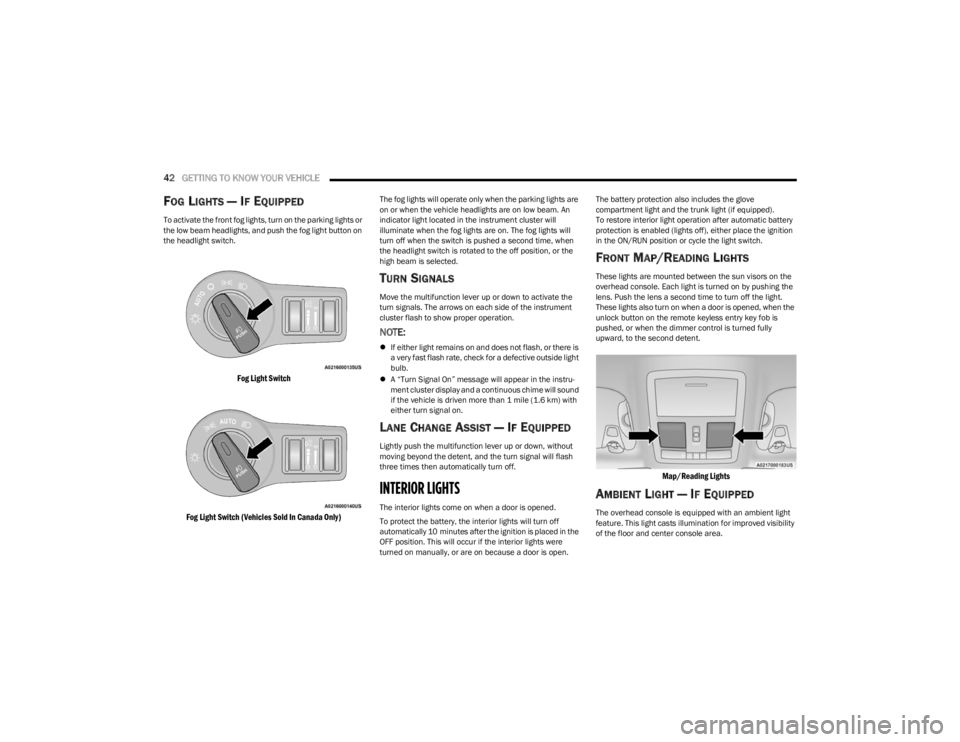
FOG LIGHTS — IF EQUIPPED
To activate the front fog lights, turn on the parking lights or
the low beam headlights, and push the fog light button on
the headlight switch.
Fog Light Switch
Fog Light Switch (Vehicles Sold In Canada Only)
The fog lights will operate only when the parking lights are
on or when the vehicle headlights are on low beam. An
indicator light located in the instrument cluster will
illuminate when the fog lights are on. The fog lights will
turn off when the switch is pushed a second time, when
the headlight switch is rotated to the off position, or the
high beam is selected.
TURN SIGNALS
Move the multifunction lever up or down to activate the
turn signals. The arrows on each side of the instrument
cluster flash to show proper operation.
NOTE:
If either light remains on and does not flash, or there is
a very fast flash rate, check for a defective outside light
bulb.
A “Turn Signal On” message will appear in the instru -
ment cluster display and a continuous chime will sound
if the vehicle is driven more than 1 mile (1.6 km) with
either turn signal on.
LANE CHANGE ASSIST — IF EQUIPPED
Lightly push the multifunction lever up or down, without
moving beyond the detent, and the turn signal will flash
three times then automatically turn off.
INTERIOR LIGHTS
The interior lights come on when a door is opened.
To protect the battery, the interior lights will turn off
automatically 10 minutes after the ignition is placed in the
OFF position. This will occur if the interior lights were
turned on manually, or are on because a door is open. The battery protection also includes the glove
compartment light and the trunk light (if equipped).
To restore interior light operation after automatic battery
protection is enabled (lights off), either place the ignition
in the ON/RUN position or cycle the light switch.
FRONT MAP/READING LIGHTS
These lights are mounted between the sun visors on the
overhead console. Each light is turned on by pushing the
lens. Push the lens a second time to turn off the light.
These lights also turn on when a door is opened, when the
unlock button on the remote keyless entry key fob is
pushed, or when the dimmer control is turned fully
upward, to the second detent.
Map/Reading Lights
AMBIENT LIGHT — IF EQUIPPED
The overhead console is equipped with an ambient light
feature. This light casts illumination for improved visibility
of the floor and center console area.
23_LA_OM_EN_USC_t.book Page 42
Page 45 of 300
GETTING TO KNOW YOUR VEHICLE43
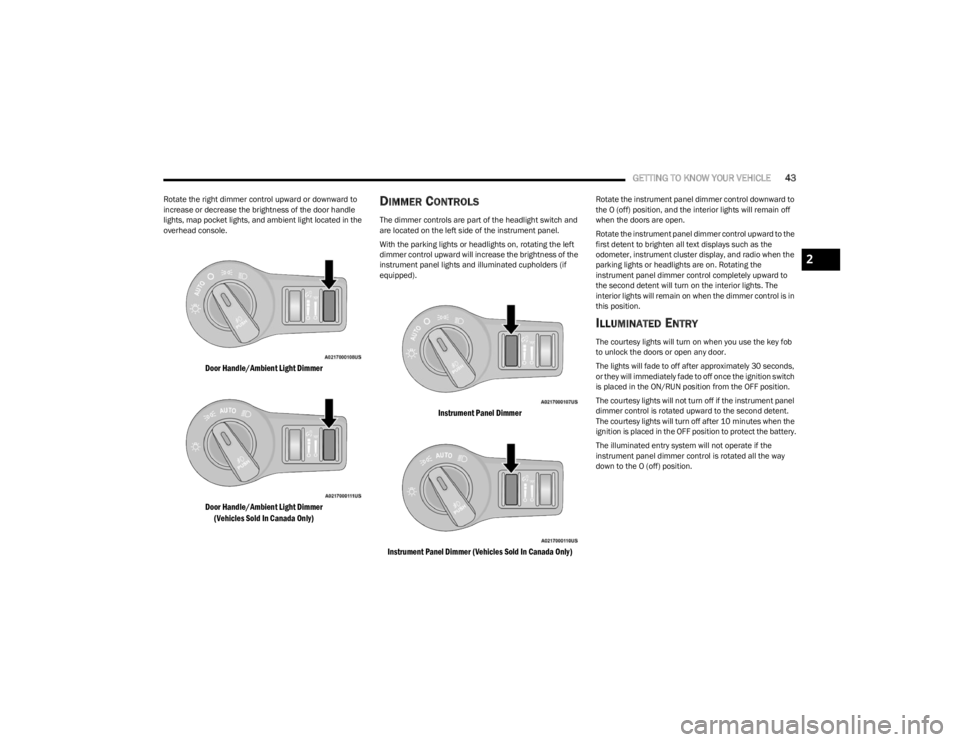
Rotate the right dimmer control upward or downward to
increase or decrease the brightness of the door handle
lights, map pocket lights, and ambient light located in the
overhead console.
Door Handle/Ambient Light Dimmer
Door Handle/Ambient Light Dimmer
(Vehicles Sold In Canada Only)
DIMMER CONTROLS
The dimmer controls are part of the headlight switch and
are located on the left side of the instrument panel.
With the parking lights or headlights on, rotating the left
dimmer control upward will increase the brightness of the
instrument panel lights and illuminated cupholders (if
equipped).
Instrument Panel Dimmer
Instrument Panel Dimmer (Vehicles Sold In Canada Only)
Rotate the instrument panel dimmer control downward to
the O (off) position, and the interior lights will remain off
when the doors are open.
Rotate the instrument panel dimmer control upward to the
first detent to brighten all text displays such as the
odometer, instrument cluster display, and radio when the
parking lights or headlights are on. Rotating the
instrument panel dimmer control completely upward to
the second detent will turn on the interior lights. The
interior lights will remain on when the dimmer control is in
this position.
ILLUMINATED ENTRY
The courtesy lights will turn on when you use the key fob
to unlock the doors or open any door.
The lights will fade to off after approximately 30 seconds,
or they will immediately fade to off once the ignition switch
is placed in the ON/RUN position from the OFF position.
The courtesy lights will not turn off if the instrument panel
dimmer control is rotated upward to the second detent.
The courtesy lights will turn off after 10 minutes when the
ignition is placed in the OFF position to protect the battery.
The illuminated entry system will not operate if the
instrument panel dimmer control is rotated all the way
down to the O (off) position.
2
23_LA_OM_EN_USC_t.book Page 43
Page 55 of 300

GETTING TO KNOW YOUR VEHICLE53
OPENING AND CLOSING THE SUNROOF
Express Open/Close
Push the switch rearward and release it within one
second, the sunroof and sunshade will open automatically
and stop at full open position. Push the switch forward and release it within one second
and the sunroof will close automatically from any position.
During Express Open or Express Close operation, any
other movement of the sunroof switch will stop the
sunroof.
Manual Open/Close
Push and hold the switch rearward, the sunroof and
sunshade will open and automatically stop at full open
position.
Push and hold the switch forward and the sunroof will
close from any position and stop at a full closed position.
Any release of the switch during open or close operation
will stop the sunroof movement. The sunroof will remain in
a partially opened position until the switch is operated and
held again.
Venting The Sunroof
Push and release the Vent switch within one second and
the sunroof will open to the vent position. During Express
Vent operation, any other actuation of the sunroof
switches will stop the sunroof operation.
PINCH PROTECT FEATURE —
I
F EQUIPPED
This feature will detect an obstruction in the closing of the
sunroof during the Express Close operation. If an
obstruction in the path of the sunroof is detected, the
sunroof will automatically retract. Remove the obstruction
if this occurs.
NOTE:If three consecutive sunroof close attempts result in Pinch
Protect reversals, Pinch Protect will disable and the
sunroof must be closed in Manual Mode.
SUNSHADE OPERATION
The sunshade can be opened manually. However, the
sunshade will open automatically as the sunroof opens.
NOTE:The sunshade cannot be closed if the sunroof is open.
SUNROOF MAINTENANCE
Use only a non-abrasive cleaner and a soft cloth to clean
the glass panel. Periodically check for and clear out any
debris that may have collected in the tracks.
IGNITION OFF OPERATION
The power sunroof switch can remain active in Accessory
Delay for up to approximately 10 minutes after the
vehicle’s ignition is placed in the OFF position. Opening
either front door will cancel this feature.
NOTE:This feature is programmable using the Uconnect system Úpage 107.
WARNING!
Never leave children unattended in a vehicle, or with
access to an unlocked vehicle. Never leave the key
fob in or near the vehicle, or in a location accessible
to children. Do not leave the ignition of a vehicle
equipped with Keyless Enter ‘n Go™ in the ACC or
ON/RUN position. Occupants, particularly unat -
tended children, can become entrapped by the
power sunroof while operating the power sunroof
switch. Such entrapment may result in serious injury
or death.
In a collision, there is a greater risk of being thrown
from a vehicle with an open sunroof. You could also
be seriously injured or killed. Always fasten your seat
belt properly and make sure all passengers are also
properly secured.
Do not allow small children to operate the sunroof.
Never allow your fingers, other body parts, or any
object, to project through the sunroof opening. Injury
may result.
2
23_LA_OM_EN_USC_t.book Page 53
Page 66 of 300
64GETTING TO KNOW YOUR INSTRUMENT PANEL
Brake Warning Light
This warning light monitors various brake
functions, including brake fluid level and
parking brake application. If the brake light
turns on it may indicate that the parking brake
is applied, that the brake fluid level is low, or that there is
a problem with the Anti-Lock Brake System reservoir.
If the light remains on when the parking brake has been
disengaged, and the fluid level is at the full mark on the
master cylinder reservoir, it indicates a possible brake
hydraulic system malfunction or that a problem with the
Brake Booster has been detected by the Anti-Lock Brake
System (ABS) / Electronic Stability Control (ESC) system.
In this case, the light will remain on until the condition has
been corrected. If the problem is related to the brake
booster, the ABS pump will run when applying the brake,
and a brake pedal pulsation may be felt during each stop.
The dual brake system provides a reserve braking capacity
in the event of a failure to a portion of the hydraulic
system. A leak in either half of the dual brake system is
indicated by the Brake Warning Light, which will turn on
when the brake fluid level in the master cylinder has
dropped below a specified level.
The light will remain on until the cause is corrected.
NOTE:The light may flash momentarily during sharp cornering
maneuvers, which change fluid level conditions. The
vehicle should have service performed, and the brake
fluid level checked.
If brake failure is indicated, immediate repair is necessary. Vehicles equipped with the Anti-Lock Brake System (ABS)
are also equipped with Electronic Brake Force Distribution
(EBD). In the event of an EBD failure, the Brake Warning
Light will turn on along with the ABS Light. Immediate
repair to the ABS system is required.
Operation of the Brake Warning Light can be checked by
turning the ignition switch from the OFF position to the
ON/RUN position. The light should illuminate for
approximately two seconds. The light should then turn off
unless the parking brake is applied or a brake fault is
detected. If the light does not illuminate, have the light
inspected by an authorized dealer.
The light also will turn on when the parking brake is
applied with the ignition switch in the ON/RUN position.
NOTE:This light shows only that the parking brake is applied. It
does not show the degree of brake application.
Seat Belt Reminder Warning Light
This warning light indicates when the driver or
passenger seat belt is unbuckled. When the
ignition is first placed in the ON/RUN or ACC/
ON/RUN position and if the driver’s seat belt is
unbuckled, a chime will sound and the light will turn on.
When driving, if the driver or front passenger seat belt
remains unbuckled, the Seat Belt Reminder Light will flash
or remain on continuously and a chime will sound
Úpage 172.
Battery Charge Warning Light
This warning light will illuminate when the
battery is not charging properly. If it stays on
while the engine is running, there may be a
malfunction with the charging system. Contact
an authorized dealer as soon as possible.
This indicates a possible problem with the electrical
system or a related component.
Door Open Warning Light
This indicator will illuminate when a door is
ajar/open and not fully closed.
NOTE:If the vehicle is moving, there will also be a single chime.
WARNING!
Driving a vehicle with the red brake light on is
dangerous. Part of the brake system may have failed. It
will take longer to stop the vehicle. You could have a
collision. Have the vehicle checked immediately.
23_LA_OM_EN_USC_t.book Page 64