ECO mode DODGE CHALLENGER SRT 2016 3.G Owner's Manual
[x] Cancel search | Manufacturer: DODGE, Model Year: 2016, Model line: CHALLENGER SRT, Model: DODGE CHALLENGER SRT 2016 3.GPages: 616, PDF Size: 4.45 MB
Page 289 of 616
active guidelines over the ParkView Back up camera
display whenever the shift lever is put into REVERSE.
The image will be displayed on the radio touchscreen
display along with a caution note to “check entire sur-
roundings” across the top of the screen. After five sec-
onds, this note will disappear. To make your selection,
press the “ParkView Backup Camera Active Guidelines”
button on the touchscreen, until a check-mark appears
next to setting, indicating that the setting had been
selected.
•ParkView Backup Camera Delay
When the vehicle is shifted out of REVERSE (with camera
delay turned OFF), the rear camera mode is exited and
the navigation or audio screen appears again. When the
vehicle is shifted out of REVERSE (with camera delay
turned ON), the rear view image with dynamic grid lines
will be displayed for up to 10 seconds after shifting out of
“REVERSE” unless the forward vehicle speed exceeds 8 mph (12 km/h), the transmission is shifted into
“PARK” or the ignition is switched to the OFF position.
To set the ParkView Backup Camera Delay press the
“Controls” button on the touchscreen, the “settings”
button on the touchscreen, then the “Safety & Driving
Assistance” button on the touchscreen. Press the
“Parkview Backup Camera Delay” button on the touch-
screen to turn the ParkView Delay ON or OFF.
•
Rain Sensing Auto Wipers
When this feature is selected and the wipers are on, the
system will automatically activate the windshield wipers
if it senses moisture on the windshield. To make your
selection, press the “Rain Sensing Auto Wipers” button
on the touchscreen, until a check-mark appears next to
setting, indicating that the setting had been selected.
• Hill Start Assist — If Equipped
When this feature is selected, the Hill Start Assist (HSA)
system is active. Refer to “Electronic Brake Control
4
UNDERSTANDING YOUR INSTRUMENT PANEL 287
Page 295 of 616
•Headlight Off Delay
When this feature is selected, the driver can choose to
have the headlights remain on for 0, 30, 60, or 90 seconds
when exiting the vehicle. To change the Headlight Off
Delay status press the “+” or “–” button on the touch-
screen to select your desired time interval.
Audio
After pressing the “Audio” button on the touchscreen the
following settings will be available.
• Balance/Fade
This feature allows you to adjust the Balance and Fade
settings. Press and drag the speaker icon, use the arrows
to adjust, or tap the ‘C’ icon to readjust to the center.
• Equalizer
This feature allows you to adjust the Bass, Mid and Treble
settings. Adjust the settings with the “+” and “–” setting buttons on the touchscreen or by selecting any point on
the scale between the “+” and “–” buttons on the
touchscreen.
NOTE:
Bass/Mid/Treble allow you to simply slide your
finger up or down to change the setting as well as press
directly on the desired setting.
• Speed Adjusted Volume
This feature increases or decreases volume relative to
vehicle speed. To change the Speed Adjusted Volume
press the “Off,” “1,” “2” or “3” button on the touchscreen.
• Surround Sound — If Equipped
This feature provides simulated surround sound mode.
To make your selection, press the “Surround Sound”
button on the touchscreen, select “On” or “Off.”
4
UNDERSTANDING YOUR INSTRUMENT PANEL 293
Page 299 of 616
situations. It is recommended that your vehicle operates
in SPORT or TRACK modes during the track event.
Prior to each track event/day:
•Verify allfluids are at the correct levels. Refer to
“Maintaining Your Vehicle” for fluid levels & specifi-
cations.
• Verify the front and rear brake pads have more than ½
the original pad thickness remaining. If the brake pads
require changing, please burnish prior to track outing
at full pace. Refer to “Track Burnishing Your Brakes.”
At the conclusion of each track event, it is recommended
that a brake bleed procedure be performed to maintain
the pedal feel and stopping capability of your Brembo
High Performance brake system.
It is recommended that each track outing end with a
minimum of one cool down lap using minimal braking. Change the differential and manual transmission fluid
after every five hours of track use. Refer to “Maintaining
Your Vehicle” for fluid levels & specifications.
If equipped with a removable lower front fascia grille, it
is recommended to remove it for track use during
warm/hot weather to improve cooling airflow to critical
powertrain and cooling system components.
All SRT vehicles are track tested for 24 hours of endur-
ance, however, it is recommended that the suspension
system, brake system, prop shaft, and half shaft boots
should be inspected for wear or damage after every track
event.
Track usage results in increased operating temperatures
of the engine, transmission, clutch, driveline and brake
system. This increased operating temperature may affect
4
UNDERSTANDING YOUR INSTRUMENT PANEL 297
Page 301 of 616
6. Sometimes, a second burnish session is required. If thebrake pads start smelling in the next track session,
reduce speed and braking deceleration to burnish
targets and follow steps 2 through 4.
7. New brake pads installed on old rotors still need to be burnished. New rotors installed with old pads should
be burnished at the track, or street driven for 300 city
miles, to develop an adequate lining transfer layer on
the rotor surface prior to track use.
8. Rotors that pulsate during track use should be re- placed. Resurfacing of the rotors is not recommended,
as it removes mass from the rotor, reducing its thermal
capacity. Resurfacing also thins the rotor cheek, mak-
ing it less robust and increasing the likelihood of
pulsation in further track use.SRT PERFORMANCE PAGES
Performance Pages is an application that provides a
display for performance indicators, as received from the
Instrument Cluster, that will help you gain familiarity
with the capabilities of your SRT vehicle in real-time.
To access the SRT Performance Pages, press the “Apps”
button on the touchscreen, then press the “SRT Perfor-
mance” button on the touchscreen, or press “SRT Pages”
in the top left of the touchscreen while in Drive Modes.
Press the desired button on the touchscreen to access that
specific Performance Page.
WARNING!
Measurement of vehicle statistics with the SRT Per-
formance Pages is intended for off-highway or off-
road use only and should not be done on any public
(Continued)
4
UNDERSTANDING YOUR INSTRUMENT PANEL 299
Page 316 of 616
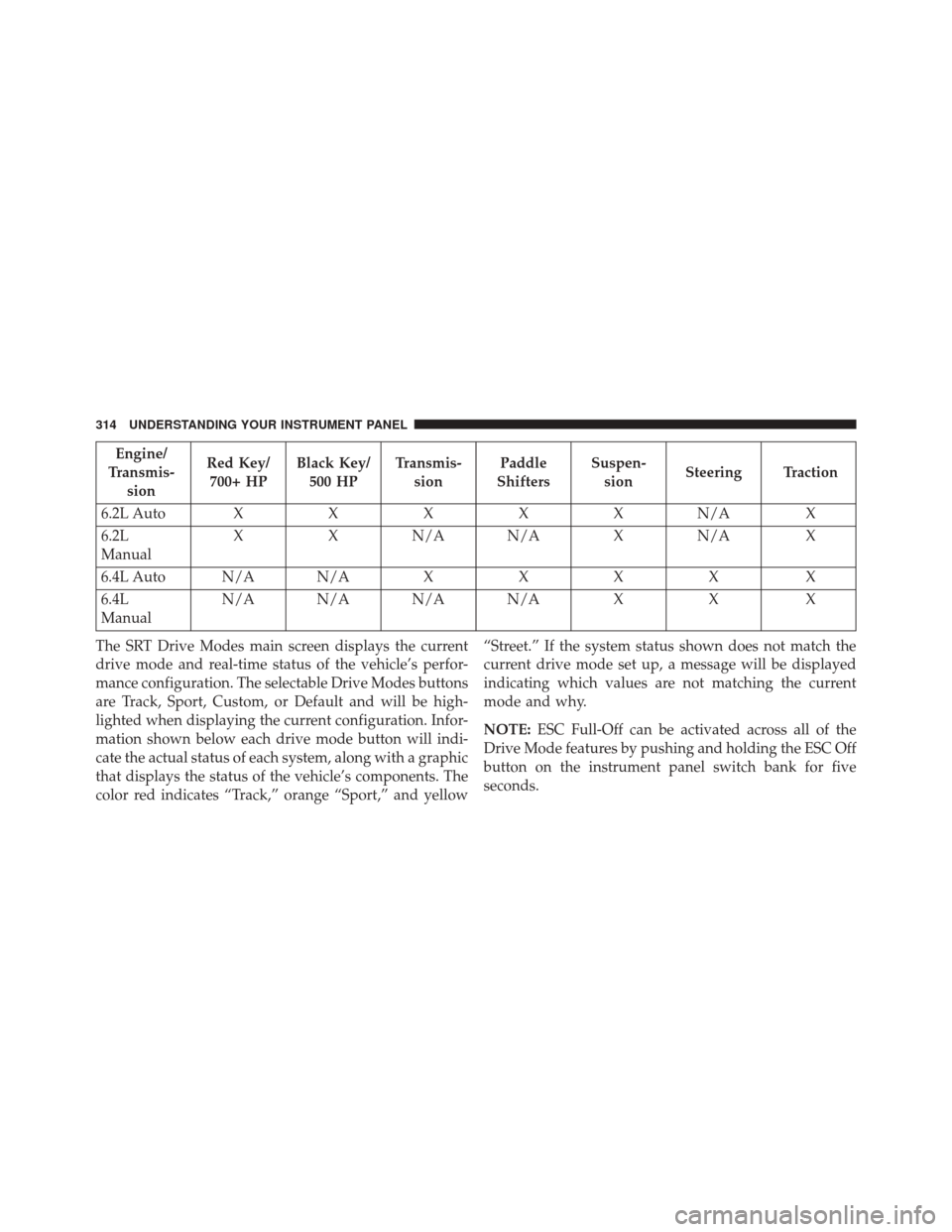
Engine/
Transmis- sion Red Key/
700+ HP Black Key/
500 HP Transmis-
sion Paddle
Shifters Suspen-
sion Steering Traction
6.2L Auto XXXXXN /AX
6.2L
Manual X
XN/A N/A XN/A X
6.4L Auto N/A N/A XXXX X
6.4L
Manual N/A N/A N/A N/A
XX X
The SRT Drive Modes main screen displays the current
drive mode and real-time status of the vehicle’s perfor-
mance configuration. The selectable Drive Modes buttons
are Track, Sport, Custom, or Default and will be high-
lighted when displaying the current configuration. Infor-
mation shown below each drive mode button will indi-
cate the actual status of each system, along with a graphic
that displays the status of the vehicle’s components. The
color red indicates “Track,” orange “Sport,” and yellow “Street.” If the system status shown does not match the
current drive mode set up, a message will be displayed
indicating which values are not matching the current
mode and why.
NOTE:
ESC Full-Off can be activated across all of the
Drive Mode features by pushing and holding the ESC Off
button on the instrument panel switch bank for five
seconds.
314 UNDERSTANDING YOUR INSTRUMENT PANEL
Page 319 of 616
Default Mode
The vehicle will start in Default Mode unless Valet or
ECO mode (if equipped) is active. This mode is for
typical driving conditions where the Traction and Trans-
mission will be operating in their Street settings, whichcannot be changed while in this mode. The Steering and
Suspension can be configured in either the “Street,”
“Sport,” or “Track” modes and the Paddle Shifters may
be enabled or disabled while in this mode.
Drive Modes (Default)
4
UNDERSTANDING YOUR INSTRUMENT PANEL 317
Page 322 of 616
NOTE:This selection is only available with the RED RKE
Key Fob.
• 500
Press the “500” button on the touchscreen to modify the
output power of the engine to 500.
NOTE: This selection is available with the RED or
BLACK RKE Key Fob and will limit the transmission to
the “Street” setting but Eco and Valet modes are still
available. Transmission — If Equipped With 8 Speed
Transmission
Transmission
320 UNDERSTANDING YOUR INSTRUMENT PANEL
Page 328 of 616
Launch Control screen. Within Race Options, you can
activate, deactivate, and adjust the RPM values for the
Launch Control and Shift Light features.
Launch Control
WARNING!
Launch Mode is intended for off-highway or off-road
use only and should not be used on any public
roadways. It is recommended that this feature be
used in a controlled environment, and within the
limits of the law. The capabilities of the vehicle as
measured by the performance pages must never be
exploited in a reckless or dangerous manner, which
can jeopardize the user ’s safety or the safety of
others. Only a safe, attentive, and skillful driver can
prevent accidents.Launch Control can be accessed by pushing the Launch
Control button on the instrument panel switch bank or
pushing the SRT button on the instrument panel switch
bank then selecting the “Race Options” button on the
touchscreen. Press the “Activate Launch Control” button
on the touchscreen to activate the feature. Press the
Activate Launch Control
326 UNDERSTANDING YOUR INSTRUMENT PANEL
Page 334 of 616
NOTE:If your 4 digit PIN is lost or forgotten, the vehicle
will exit Valet Mode after a battery disconnect for ap-
proximately one minute. Reconnect the battery and cycle
the ignition to the RUN position, the vehicle will be in
Default Mode.ECO MODE — IF EQUIPPED WITH AUTOMATIC
TRANSMISSION
Eco Mode
332 UNDERSTANDING YOUR INSTRUMENT PANEL
Page 335 of 616
Press the “Eco” button on the touchscreen on the SRT
Drive Modes main menu. Eco mode modifies the vehi-
cle’s engine and transmission settings to provide im-
proved fuel economy at a trade-off with acceleration
performance. Increased engine exhaust noise and/or
vibration may be noticed while Eco is active. This is
normal and a result of the increased amount of operating
conditions where the vehicle is allowed to operate in four
cylinder shutoff mode (6.4L Only).
The Paddle Shifters will be disabled while in Eco mode.
•Changing the Drive Mode will deactivate Eco.
• Eco will be disabled when another Drive Mode is
selected or “Eco” button is pressed.UCONNECT RADIOS — IF EQUIPPED
For detailed information about your Uconnect radio,
refer to your Uconnect Supplement Manual.
iPod/USB/MP3 CONTROL — IF EQUIPPED
This feature allows an iPod or external USB device to be
plugged into the USB port.
Located in the front storage area of the center console,
this feature allows an iPod/MP3 player, or an external
USB device, to be connected to the audio system.4
UNDERSTANDING YOUR INSTRUMENT PANEL 333