Condi DODGE CHALLENGER SRT 2019 Owners Manual
[x] Cancel search | Manufacturer: DODGE, Model Year: 2019, Model line: CHALLENGER SRT, Model: DODGE CHALLENGER SRT 2019Pages: 500, PDF Size: 4.73 MB
Page 442 of 500
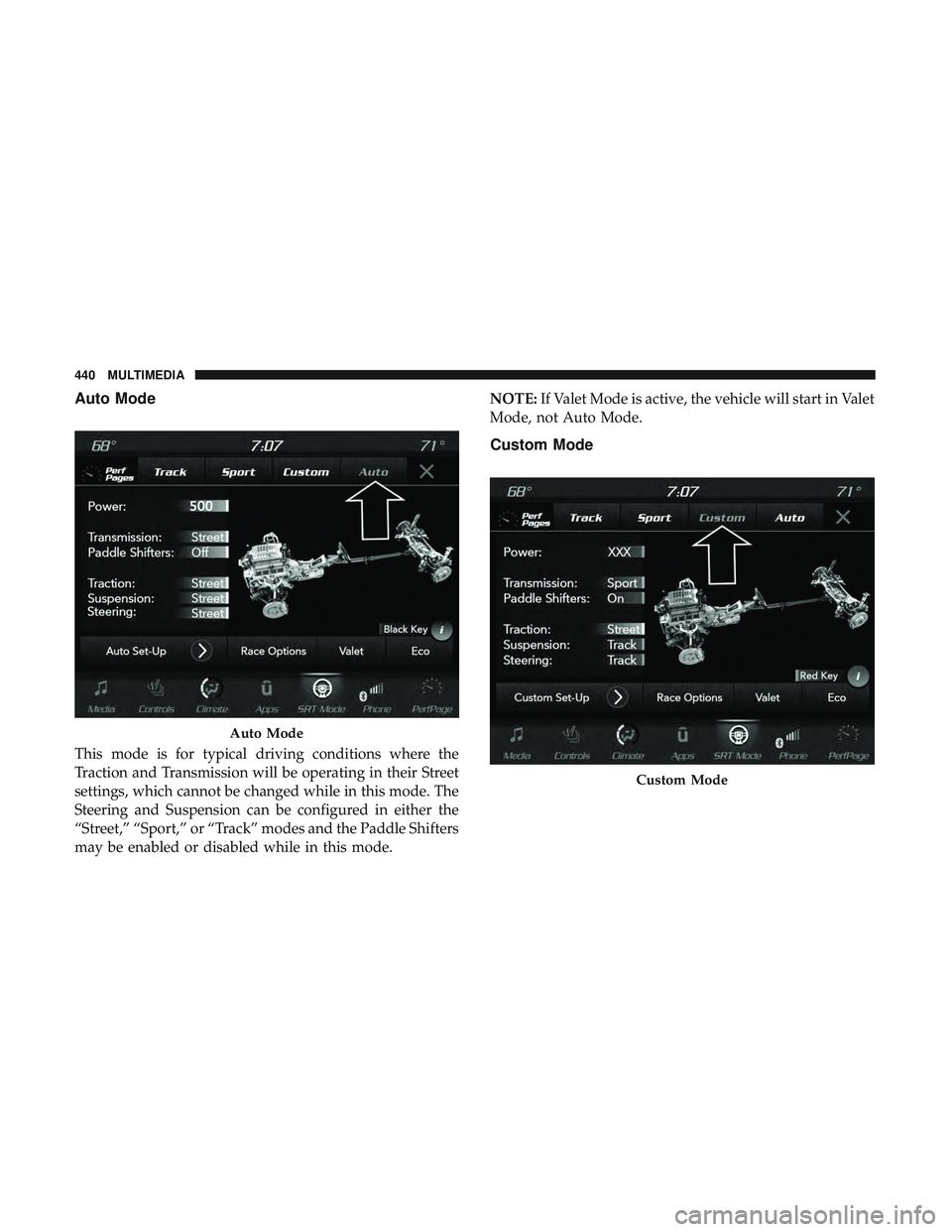
Auto Mode
This mode is for typical driving conditions where the
Traction and Transmission will be operating in their Street
settings, which cannot be changed while in this mode. The
Steering and Suspension can be configured in either the
“Street,” “Sport,” or “Track” modes and the Paddle Shifters
may be enabled or disabled while in this mode.NOTE:
If Valet Mode is active, the vehicle will start in Valet
Mode, not Auto Mode.
Custom Mode
Auto Mode
Custom Mode
440 MULTIMEDIA
Page 454 of 500
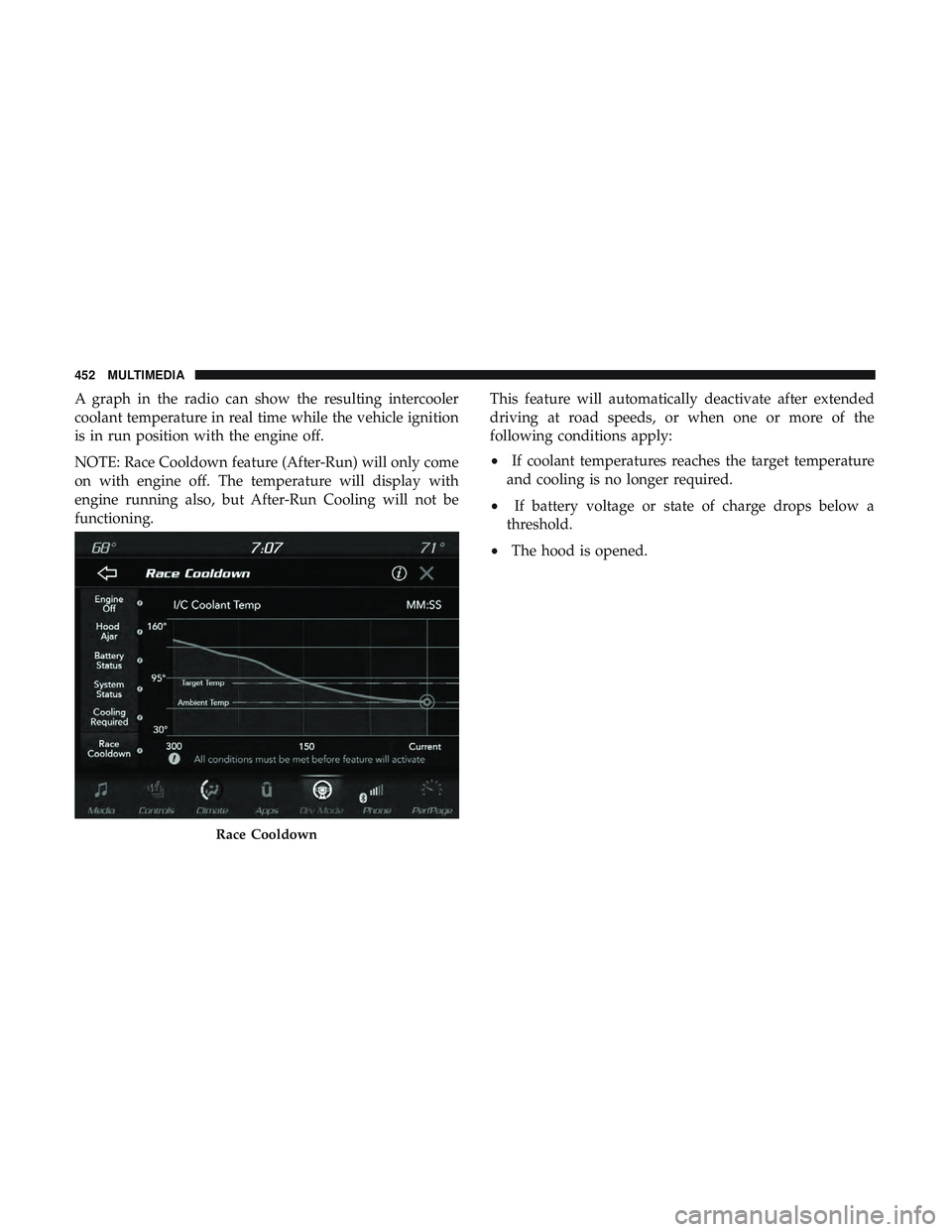
A graph in the radio can show the resulting intercooler
coolant temperature in real time while the vehicle ignition
is in run position with the engine off.
NOTE: Race Cooldown feature (After-Run) will only come
on with engine off. The temperature will display with
engine running also, but After-Run Cooling will not be
functioning.This feature will automatically deactivate after extended
driving at road speeds, or when one or more of the
following conditions apply:
•
If coolant temperatures reaches the target temperature
and cooling is no longer required.
• If battery voltage or state of charge drops below a
threshold.
• The hood is opened.
Race Cooldown
452 MULTIMEDIA
Page 459 of 500
IPOD/USB/MP3 CONTROL — IF EQUIPPED
This feature allows an iPod or external USB device to be
plugged into the USB port.
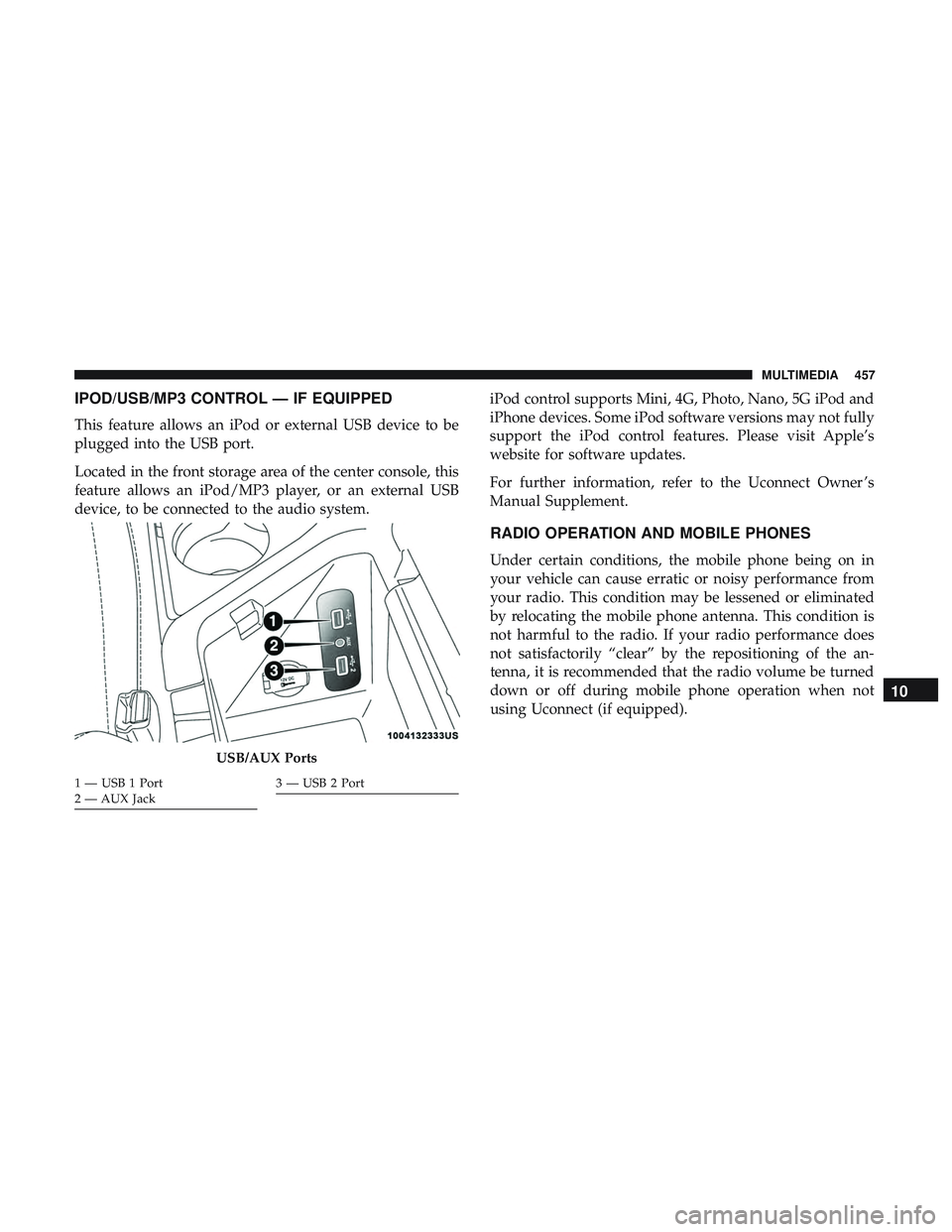
Located in the front storage area of the center console, this
feature allows an iPod/MP3 player, or an external USB
device, to be connected to the audio system.iPod control supports Mini, 4G, Photo, Nano, 5G iPod and
iPhone devices. Some iPod software versions may not fully
support the iPod control features. Please visit Apple’s
website for software updates.
For further information, refer to the Uconnect Owner ’s
Manual Supplement.
RADIO OPERATION AND MOBILE PHONES
Under certain conditions, the mobile phone being on in
your vehicle can cause erratic or noisy performance from
your radio. This condition may be lessened or eliminated
by relocating the mobile phone antenna. This condition is
not harmful to the radio. If your radio performance does
not satisfactorily “clear” by the repositioning of the an-
tenna, it is recommended that the radio volume be turned
down or off during mobile phone operation when not
using Uconnect (if equipped).
USB/AUX Ports
1 — USB 1 Port
2 — AUX Jack3 — USB 2 Port
10
MULTIMEDIA 457
Page 460 of 500
Regulatory And Safety Information
USA/CANADA
Exposure to Radio Frequency Radiation
The radiated output power of the internal wireless radio is
far below the FCC and IC radio frequency exposure limits.
Nevertheless, the wireless radio will be used in such a
manner that the radio is 8 in (20 cm) or further from the
human body.
The internal wireless radio operates within guidelines
found in radio frequency safety standards and recommen-
dations, which reflect the consensus of the scientific com-
munity.
The radio manufacturer believes the internal wireless radio
is safe for use by consumers. The level of energy emitted is
far less than the electromagnetic energy emitted by wire-
less devices such as mobile phones. However, the use of
wireless radios may be restricted in some situations or
environments, such as aboard airplanes. If you are unsure
of restrictions, you are encouraged to ask for authorization
before turning on the wireless radio.The following regulatory statement applies to all Radio
Frequency (RF) devices equipped in this vehicle:
This device complies with Part 15 of the FCC Rules and
with Industry Canada license-exempt RSS standard(s).
Operation is subject to the following two conditions:
1. This device may not cause harmful interference, and
2. This device must accept any interference received, in-
cluding interference that may cause undesired opera-
tion.
NOTE: Changes or modifications not expressly approved
by the party responsible for compliance could void the
user ’s authority to operate the equipment.
458 MULTIMEDIA
Page 475 of 500
NOTE:Requires compatible iPhone. See dealer for phone
compatibility. Data plan rates apply. Vehicle user interface
is a product of Apple. Apple CarPlay is a trademark of
Apple Inc. iPhone is a trademark of Apple Inc., registered
in the US and other countries. Apple terms of use and
privacy statements apply.
General Information
The following regulatory statement applies to all Radio
Frequency (RF) devices equipped in this vehicle:
This device complies with Part 15 of the FCC Rules and
with Industry Canada license-exempt RSS standard(s).
Operation is subject to the following two conditions:
1. This device may not cause harmful interference, and
2. This device must accept any interference received, in- cluding interference that may cause undesired opera-
tion.
NOTE: Changes or modifications not expressly approved
by the party responsible for compliance could void the
user ’s authority to operate the equipment. Additional
Information
© 2021 FCA US LLC. All rights reserved. Mopar and
Uconnect are registered trademarks and Mopar Owner
Connect is a trademark of FCA US LLC. Android is a
trademark of Google Inc. SiriusXM and all related marks
and logos are trademarks of SiriusXM Radio Inc.
Uconnect System Support:
•U.S. residents visit www.DriveUconnect.com or call:
1-877-855-8400(24 hours a day 7 days a week)
• Canadian residents visit www.DriveUconnect.ca or call:
1-800-465-2001(English) or 1-800-387-9983(French)
SiriusXM Guardian services support:
• U.S. residents visit www.siriusxm.com/guardian or call:
1-844-796-4827
• Canadian residents visit www.siriusxm.ca/guardian or
call: 1-877-324-9091
10
MULTIMEDIA 473
Page 484 of 500
About Your Brakes..................... .221, 390
Adaptive Cruise Control (ACC) (Cruise Control) . . . .247
Adding Engine Coolant (Antifreeze) .............353
Adding Washing Fluid .......................338
Additives, Fuel ............................393
Adjust Forward ............................ .44, 47
Rearward ............................44, 47
AirBag ................................ .173
Advance Front Air Bag ....................173
Air Bag Operation ........................175
Air Bag Warning Light .....................172
Enhanced Accident Response .............182, 329
Event Data Recorder (EDR) .................329
FrontAirBag .......................... .173
If Deployment Occurs .....................180
Knee Impact Bolsters ..................... .176
Maintaining Your Air Bag System .............183
Maintenance ............................183
Redundant Air Bag Warning Light ............173
Side Air Bags .......................... .176
Transporting Pets ........................205
Air Bag Light .......................118, 172, 206
Air Cleaner, Engine (Engine Air Cleaner Filter) ......342
Air Conditioner Maintenance ..................343 Air Conditioner Refrigerant
................343, 344
Air Conditioner System ..................... .343
Air Conditioning ........................ .70, 75
Air Conditioning Filter ....................77, 344
Air Conditioning, Operating Tips ................76
Air Conditioning System ......................70
Air Filter ............................... .342
Air Pressure Tires................................. .371
Alarm Arm The System .......................36, 37
Panic ..................................23
Rearm The System ........................37
Security Alarm ........................35, 1
19
Alarm System Security Alarm ...........................35
Alterations/Modifications Vehicle .................................5
Android Auto ............................ .471
Antifreeze (Engine Coolant) ................352, 397
Disposal ...............................354
Anti-Lock Brake System (ABS) .................134
Anti-Lock Warning Light .....................125
Apple CarPlay ............................472
482 INDEX
Page 488 of 500
Compartment Identification.................337
Coolant (Antifreeze) ...................351, 398
Cooling ...............................351
Exhaust Gas Caution ...................205, 396
Fails To Start ............................218
Flooded, Starting ........................ .218
Fuel Requirements ........................392
Jump Starting ....................319, 320, 321
Oil ............................340, 397, 398
Oil Filler Cap ........................337, 341
Oil Filter ...............................342
Oil Selection ............................397
Oil Synthetic ............................341
Overheating ............................322
Starting ............................214, 215
Engine Oil Viscosity ........................ .341
Enhanced Accident Response Feature .........182, 329
Ethanol ................................. .393
Exhaust Gas Cautions ....................205, 396
Exhaust System ........................205, 349
Exterior Lighting ............................61
Exterior Lights ..........................61, 208
Filler Location Fuel ........................ .274Filters
Air Cleaner ............................ .342
Air Conditioning ..................... .77, 344
Engine Oil ..........................342, 398
Engine Oil Disposal .......................342
Flashers .................................283
Hazard Warning ........................ .283
Turn Signals ..................... .64, 126, 208
Flash-To-Pass ..............................62
Flooded Engine Starting ..................... .218
Fluid, Brake .......................... .398, 400
Fluid Capacities ............................397
Fluid Leaks ...............................209
Fluid Level
Checks
Brake .................................356
Cooling System ..........................351
Engine Oil ............................ .338
Fluids And Lubricants .......................398
Fog Lights ................................64
Fold-Flat Seats .......................... .44, 45
Forward Collision Warning ....................151
Freeing A Stuck Vehicle ..................... .325
Fuel ................................... .392
Additives ............................. .393
486 INDEX