change time DODGE CHALLENGER SRT 2019 Service Manual
[x] Cancel search | Manufacturer: DODGE, Model Year: 2019, Model line: CHALLENGER SRT, Model: DODGE CHALLENGER SRT 2019Pages: 500, PDF Size: 4.73 MB
Page 453 of 500
NOTE:The only time the shift light comes on, is when the
shifter is placed into Sport Mode. It will not work with
paddle shifters.
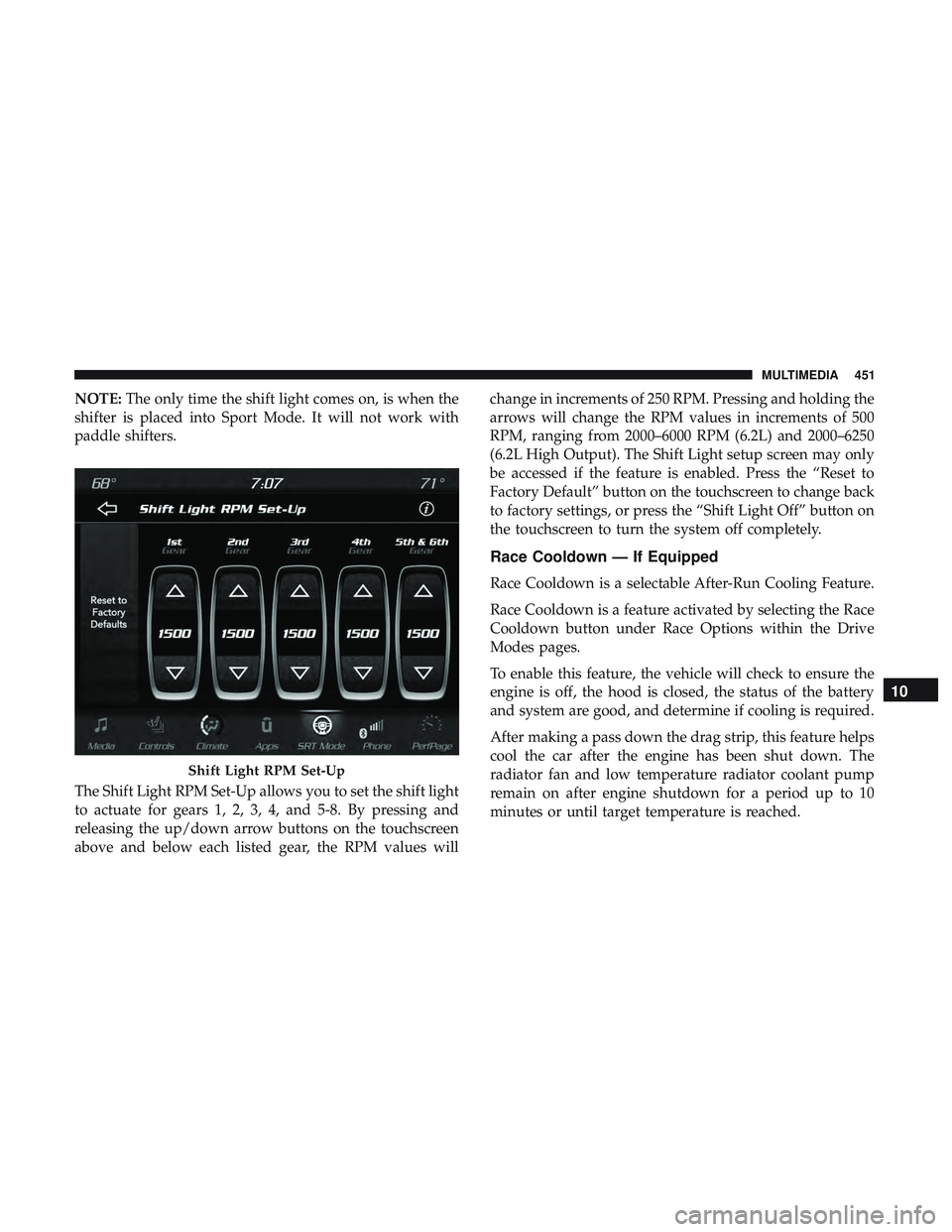
The Shift Light RPM Set-Up allows you to set the shift light
to actuate for gears 1, 2, 3, 4, and 5-8. By pressing and
releasing the up/down arrow buttons on the touchscreen
above and below each listed gear, the RPM values will change in increments of 250 RPM. Pressing and holding the
arrows will change the RPM values in increments of 500
RPM, ranging from 2000–6000 RPM (6.2L) and 2000–6250
(6.2L High Output). The Shift Light setup screen may only
be accessed if the feature is enabled. Press the “Reset to
Factory Default” button on the touchscreen to change back
to factory settings, or press the “Shift Light Off” button on
the touchscreen to turn the system off completely.
Race Cooldown — If Equipped
Race Cooldown is a selectable After-Run Cooling Feature.
Race Cooldown is a feature activated by selecting the Race
Cooldown button under Race Options within the Drive
Modes pages.
To enable this feature, the vehicle will check to ensure the
engine is off, the hood is closed, the status of the battery
and system are good, and determine if cooling is required.
After making a pass down the drag strip, this feature helps
cool the car after the engine has been shut down. The
radiator fan and low temperature radiator coolant pump
remain on after engine shutdown for a period up to 10
minutes or until target temperature is reached.
Shift Light RPM Set-Up
10
MULTIMEDIA 451
Page 460 of 500
Regulatory And Safety Information
USA/CANADA
Exposure to Radio Frequency Radiation
The radiated output power of the internal wireless radio is
far below the FCC and IC radio frequency exposure limits.
Nevertheless, the wireless radio will be used in such a
manner that the radio is 8 in (20 cm) or further from the
human body.
The internal wireless radio operates within guidelines
found in radio frequency safety standards and recommen-
dations, which reflect the consensus of the scientific com-
munity.
The radio manufacturer believes the internal wireless radio
is safe for use by consumers. The level of energy emitted is
far less than the electromagnetic energy emitted by wire-
less devices such as mobile phones. However, the use of
wireless radios may be restricted in some situations or
environments, such as aboard airplanes. If you are unsure
of restrictions, you are encouraged to ask for authorization
before turning on the wireless radio.The following regulatory statement applies to all Radio
Frequency (RF) devices equipped in this vehicle:
This device complies with Part 15 of the FCC Rules and
with Industry Canada license-exempt RSS standard(s).
Operation is subject to the following two conditions:
1. This device may not cause harmful interference, and
2. This device must accept any interference received, in-
cluding interference that may cause undesired opera-
tion.
NOTE: Changes or modifications not expressly approved
by the party responsible for compliance could void the
user ’s authority to operate the equipment.
458 MULTIMEDIA
Page 464 of 500
Media
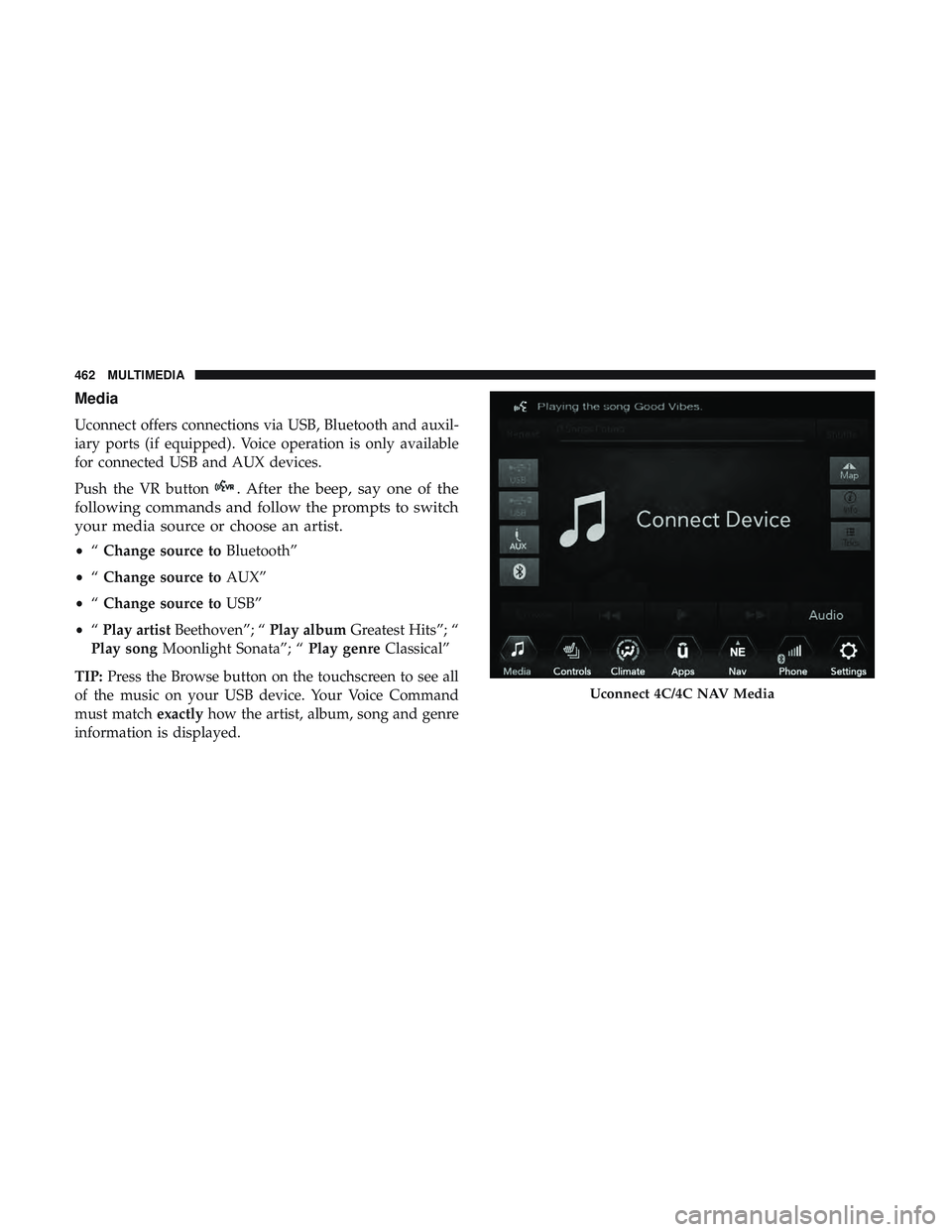
Uconnect offers connections via USB, Bluetooth and auxil-
iary ports (if equipped). Voice operation is only available
for connected USB and AUX devices.
Push the VR button
. After the beep, say one of the
following commands and follow the prompts to switch
your media source or choose an artist.
• “Change source to Bluetooth”
• “Change source to AUX”
• “Change source to USB”
• “Play artist Beethoven”; “ Play albumGreatest Hits”; “
Play song Moonlight Sonata”; “ Play genreClassical”
TIP: Press the Browse button on the touchscreen to see all
of the music on your USB device. Your Voice Command
must match exactlyhow the artist, album, song and genre
information is displayed.
Uconnect 4C/4C NAV Media
462 MULTIMEDIA
Page 475 of 500
NOTE:Requires compatible iPhone. See dealer for phone
compatibility. Data plan rates apply. Vehicle user interface
is a product of Apple. Apple CarPlay is a trademark of
Apple Inc. iPhone is a trademark of Apple Inc., registered
in the US and other countries. Apple terms of use and
privacy statements apply.
General Information
The following regulatory statement applies to all Radio
Frequency (RF) devices equipped in this vehicle:
This device complies with Part 15 of the FCC Rules and
with Industry Canada license-exempt RSS standard(s).
Operation is subject to the following two conditions:
1. This device may not cause harmful interference, and
2. This device must accept any interference received, in- cluding interference that may cause undesired opera-
tion.
NOTE: Changes or modifications not expressly approved
by the party responsible for compliance could void the
user ’s authority to operate the equipment. Additional
Information
© 2021 FCA US LLC. All rights reserved. Mopar and
Uconnect are registered trademarks and Mopar Owner
Connect is a trademark of FCA US LLC. Android is a
trademark of Google Inc. SiriusXM and all related marks
and logos are trademarks of SiriusXM Radio Inc.
Uconnect System Support:
•U.S. residents visit www.DriveUconnect.com or call:
1-877-855-8400(24 hours a day 7 days a week)
• Canadian residents visit www.DriveUconnect.ca or call:
1-800-465-2001(English) or 1-800-387-9983(French)
SiriusXM Guardian services support:
• U.S. residents visit www.siriusxm.com/guardian or call:
1-844-796-4827
• Canadian residents visit www.siriusxm.ca/guardian or
call: 1-877-324-9091
10
MULTIMEDIA 473