warning DODGE CHARGER 2011 7.G User Guide
[x] Cancel search | Manufacturer: DODGE, Model Year: 2011, Model line: CHARGER, Model: DODGE CHARGER 2011 7.GPages: 104, PDF Size: 4.53 MB
Page 21 of 104
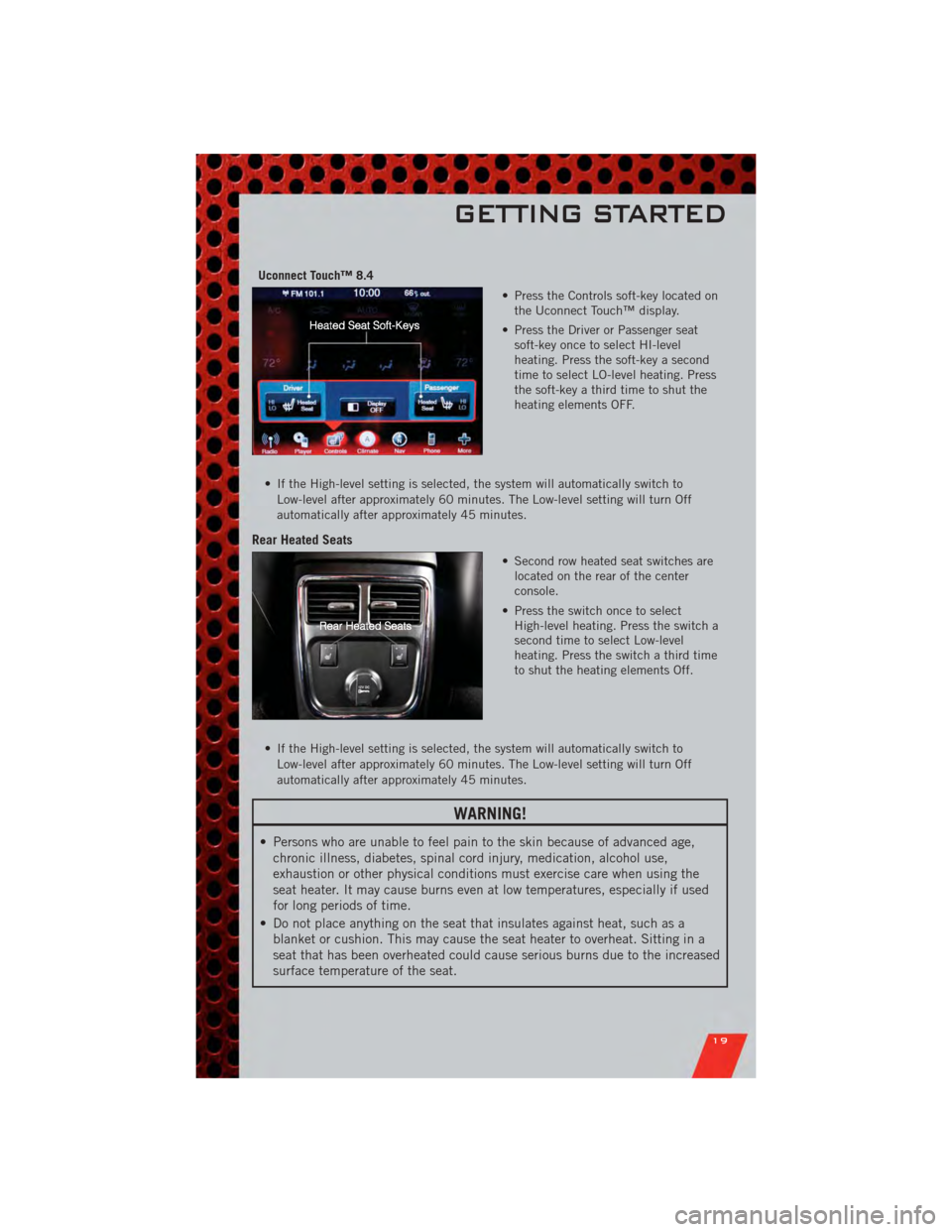
Uconnect Touch™ 8.4• Press the Controls soft-key located onthe Uconnect Touch™ display.
• Press the Driver or Passenger seat soft-key once to select HI-level
heating. Press the soft-key a second
time to select LO-level heating. Press
the soft-key a third time to shut the
heating elements OFF.
• If the High-level setting is selected, the system will automatically switch to Low-level after approximately 60 minutes. The Low-level setting will turn Off
automatically after approximately 45 minutes.
Rear Heated Seats
• Second row heated seat switches arelocated on the rear of the center
console.
• Press the switch once to select High-level heating. Press the switch a
second time to select Low-level
heating. Press the switch a third time
to shut the heating elements Off.
• If the High-level setting is selected, the system will automatically switch to Low-level after approximately 60 minutes. The Low-level setting will turn Off
automatically after approximately 45 minutes.
WARNING!
• Persons who are unable to feel pain to the skin because of advanced age,chronic illness, diabetes, spinal cord injury, medication, alcohol use,
exhaustion or other physical conditions must exercise care when using the
seat heater. It may cause burns even at low temperatures, especially if used
for long periods of time.
• Do not place anything on the seat that insulates against heat, such as a blanket or cushion. This may cause the seat heater to overheat. Sitting in a
seat that has been overheated could cause serious burns due to the increased
surface temperature of the seat.
GETTING STARTED
19
Page 22 of 104
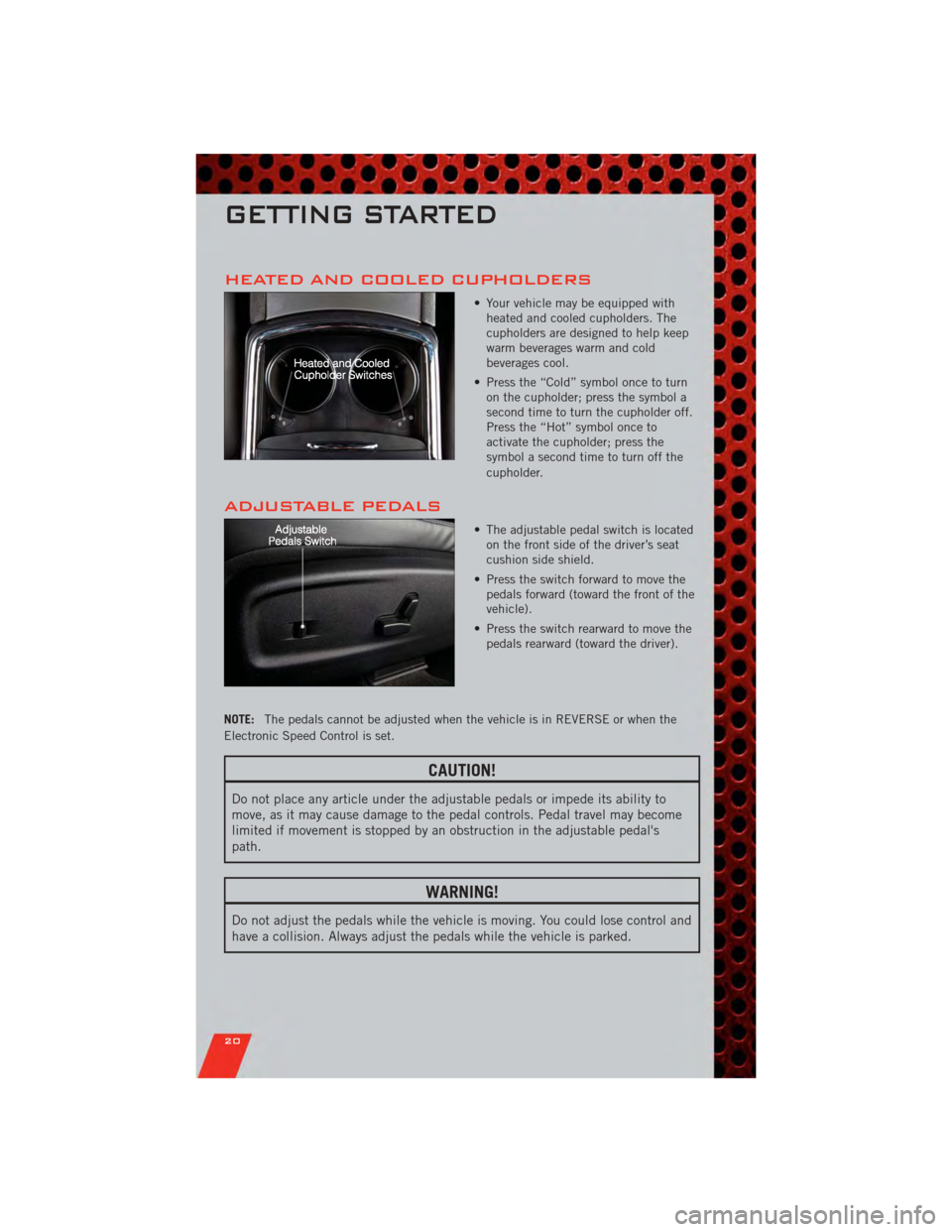
HEATED AND COOLED CUPHOLDERS
• Your vehicle may be equipped withheated and cooled cupholders. The
cupholders are designed to help keep
warm beverages warm and cold
beverages cool.
• Press the “Cold” symbol once to turn on the cupholder; press the symbol a
second time to turn the cupholder off.
Press the “Hot” symbol once to
activate the cupholder; press the
symbol a second time to turn off the
cupholder.
ADJUSTABLE PEDALS
• The adjustable pedal switch is locatedon the front side of the driver’s seat
cushion side shield.
• Press the switch forward to move the pedals forward (toward the front of the
vehicle).
• Press the switch rearward to move the pedals rearward (toward the driver).
NOTE: The pedals cannot be adjusted when the vehicle is in REVERSE or when the
Electronic Speed Control is set.
CAUTION!
Do not place any article under the adjustable pedals or impede its ability to
move, as it may cause damage to the pedal controls. Pedal travel may become
limited if movement is stopped by an obstruction in the adjustable pedal's
path.
WARNING!
Do not adjust the pedals while the vehicle is moving. You could lose control and
have a collision. Always adjust the pedals while the vehicle is parked.
GETTING STARTED
20
Page 23 of 104
TILT/TELESCOPING STEERING COLUMN
Manual - Tilt/Telescoping Steering Column
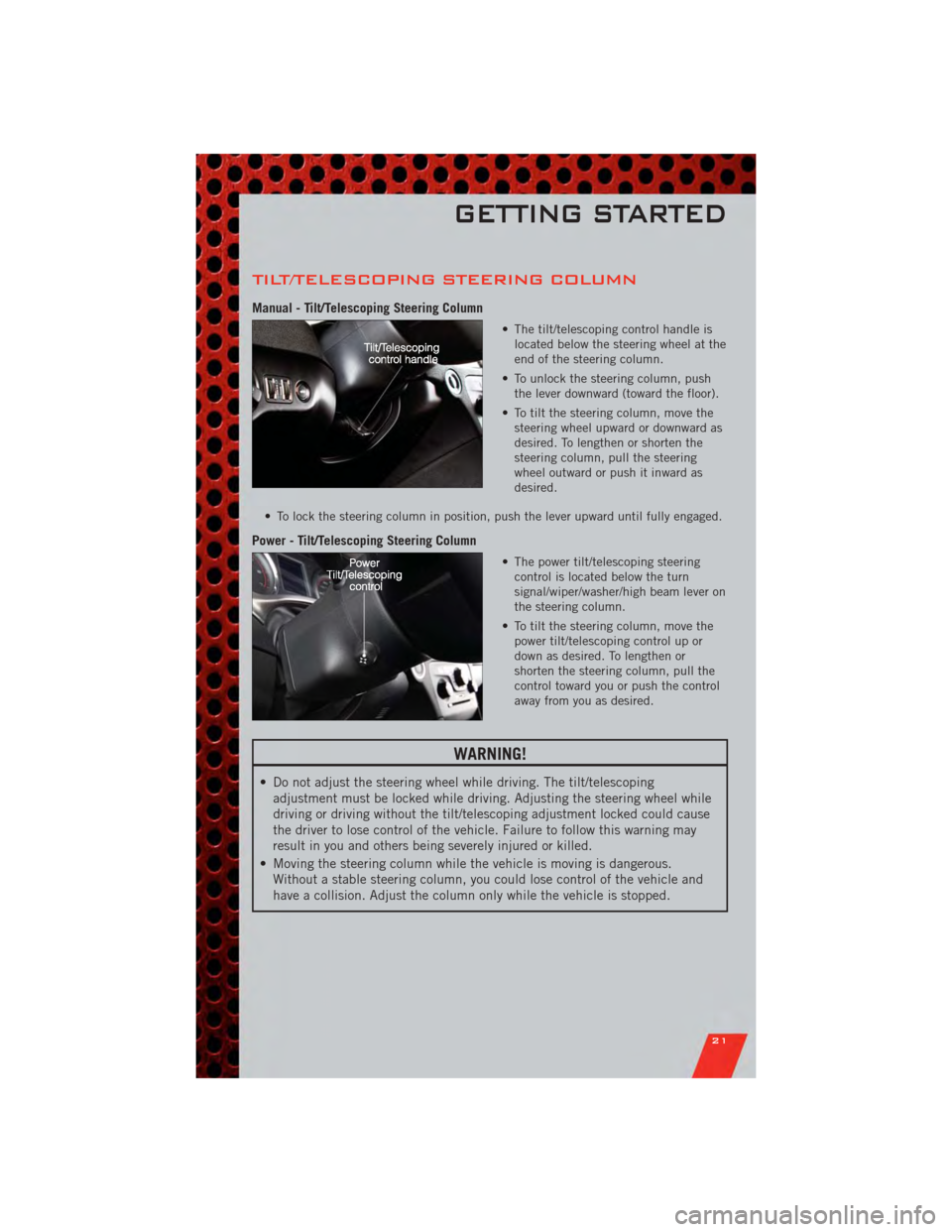
• The tilt/telescoping control handle islocated below the steering wheel at the
end of the steering column.
• To unlock the steering column, push the lever downward (toward the floor).
• To tilt the steering column, move the steering wheel upward or downward as
desired. To lengthen or shorten the
steering column, pull the steering
wheel outward or push it inward as
desired.
• To lock the steering column in position, push the lever upward until fully engaged.
Power - Tilt/Telescoping Steering Column
• The power tilt/telescoping steering control is located below the turn
signal/wiper/washer/high beam lever on
the steering column.
• To tilt the steering column, move the power tilt/telescoping control up or
down as desired. To lengthen or
shorten the steering column, pull the
control toward you or push the control
away from you as desired.
WARNING!
• Do not adjust the steering wheel while driving. The tilt/telescopingadjustment must be locked while driving. Adjusting the steering wheel while
driving or driving without the tilt/telescoping adjustment locked could cause
the driver to lose control of the vehicle. Failure to follow this warning may
result in you and others being severely injured or killed.
• Moving the steering column while the vehicle is moving is dangerous. Without a stable steering column, you could lose control of the vehicle and
have a collision. Adjust the column only while the vehicle is stopped.
GETTING STARTED
21
Page 27 of 104
Distance Setting (ACC Only)
• To set or change the distance setting, press the Distance button and release. Eachtime the button is pressed, the distance setting adjusts between long (3), medium
(2), and short (1). The distance setting will default to the last set mode the next
time the vehicle is restarted and the ACC system is turned on.
• The specified following distance for ACC can be set by varying the distance setting between 3 (long), 2 (medium), and 1 (short). Using this distance setting and the
vehicle speed, ACC calculates and sets the distance to the vehicle ahead. This
distance setting displays in the EVIC.
Mode (ACC Only)
• If desired, the Adaptive Cruise Control mode can be turned off and the system canbe operated as a standard (fixed speed) Cruise Control. When in the standard
(fixed speed) Cruise Control mode the distance setting feature will be disabled and
the system will maintain the speed you set.
• To change modes, press the MODE button when the system is in either the OFF, READY, or SET position. Cruise Ready will be displayed if the system was in ACC
READY or ACC SET position. Cruise Off will be displayed if the system was in the
ACC OFF position. To switch back to Adaptive Cruise Control mode, press the
MODE button a second time.
• Refer to your Owner's Manual on the DVD for further information.
Forward Collision Warning
• Forward Collision Warning (FCW) warns the driver of a potential collision with the vehicle in front of you and prompts the driver to take action in order to avoid the
collision. A warning message (both audible and visual) will be displayed on the
EVIC.
• Refer to your Owner's Manual on the DVD for further information.
WARNING!
• Leaving the Electronic or Adaptive Speed Control system on when not in use is dangerous. You could accidentally set the system or cause it to go faster
than you want. You could lose control and have a collision. Always leave the
Electronic or Adaptive Speed Control system off when you are not using it.
• Electronic Speed Control can be dangerous where the system cannot maintain a constant speed. Your vehicle could go too fast for the conditions,
and you could lose control. A collision could be the result. Do not use
Electronic Speed Control in heavy traffic or on roads that are winding, icy,
snow-covered or slippery.
(Continued)
OPERATING YOUR VEHICLE
25
Page 28 of 104
WARNING!(Continued)
• Adaptive Cruise Control (ACC) is a convenience system. It is not a substitutefor active driving involvement. Pay attention to road, traffic, and weather
conditions, vehicle speed, distance to the vehicle ahead; and, brake
operation to ensure safe operation of the vehicle under all road conditions.
Your attention is always required while driving to maintain safe control of
your vehicle. Failure to follow these warnings can result in a collision or
serious personal injury.
The ACC system:
• Does not react to pedestrians, oncoming vehicles, and stationary objects (i.e., a stopped vehicle in a traffic jam or a disabled vehicle).
• Cannot take street, traffic, and weather conditions into account, and may be limited upon adverse sight distance conditions.
• Does not predict the lane curvature or the movement of preceding vehicles and will not compensate for such changes.
• Does not always fully recognize complex driving conditions, which can result in wrong or missing distance warnings.
• May not detect a vehicle ahead when strong light (for example, sunrise or sunset) is directly shining on the front of the vehicle.
• Can only apply a maximum of 25% of the vehicle’s braking capability, and will not bring the vehicle to a complete stop.
You should switch off the ACC system:
• When driving in fog, heavy rain, heavy snow, sleet, heavy traffic, and complex driving situations (i.e., in highway construction zones).
• When entering a turn lane or highway off ramp; when driving on roads that are winding, icy, snow-covered, slippery, or have steep uphill or downhill
slopes; and when towing a trailer.
• When circumstances do not allow safe driving at a constant speed.
• Failure to follow these warnings can result in a collision.
• Forward Collision Warning (FCW) is not intended to avoid a collision on its own. The driver has the responsibility to avoid a collision by controlling the
vehicle via braking and steering. Failure to follow this warning could lead to
serious injury or death.
OPERATING YOUR VEHICLE
26
Page 32 of 104
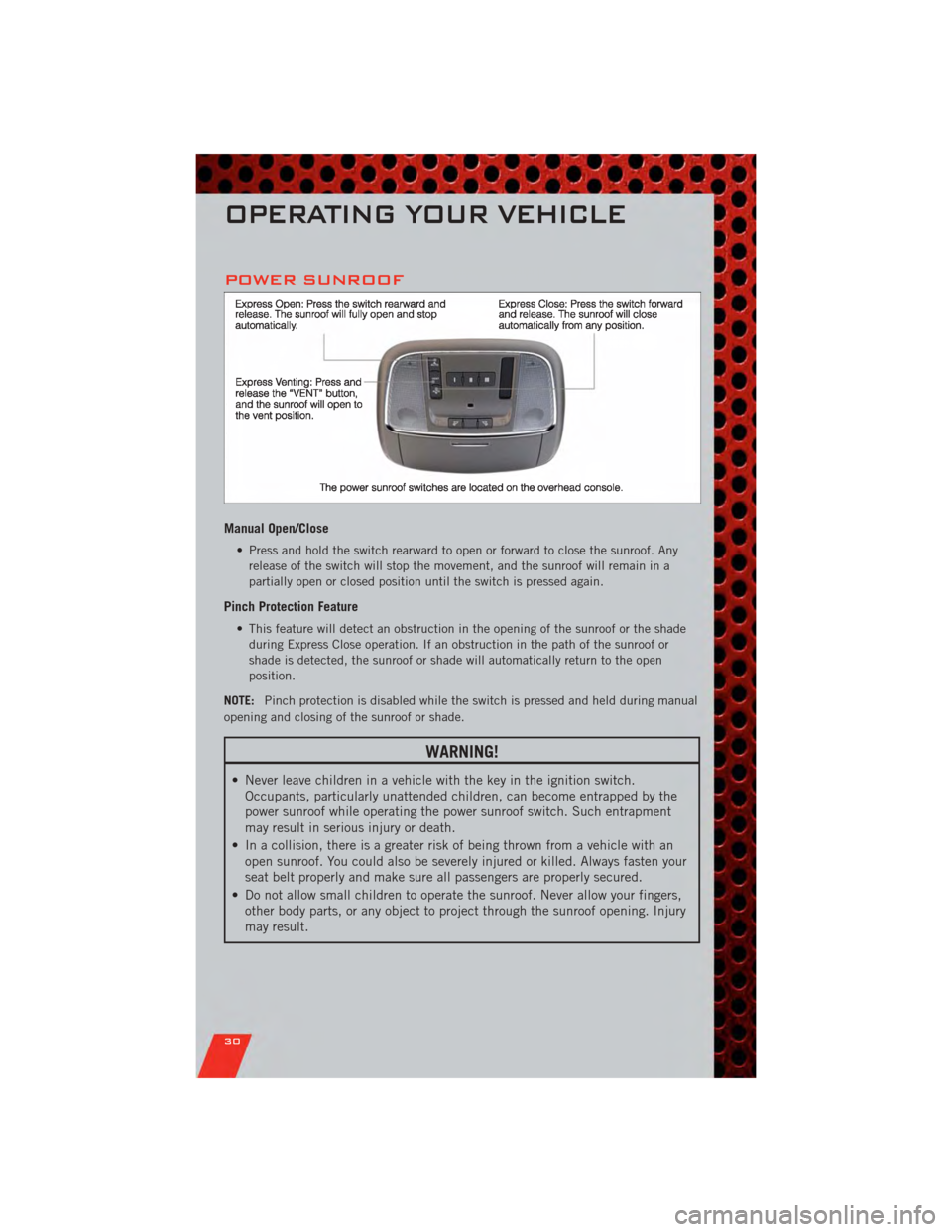
POWER SUNROOF
Manual Open/Close
• Press and hold the switch rearward to open or forward to close the sunroof. Anyrelease of the switch will stop the movement, and the sunroof will remain in a
partially open or closed position until the switch is pressed again.
Pinch Protection Feature
• This feature will detect an obstruction in the opening of the sunroof or the shadeduring Express Close operation. If an obstruction in the path of the sunroof or
shade is detected, the sunroof or shade will automatically return to the open
position.
NOTE: Pinch protection is disabled while the switch is pressed and held during manual
opening and closing of the sunroof or shade.
WARNING!
• Never leave children in a vehicle with the key in the ignition switch. Occupants, particularly unattended children, can become entrapped by the
power sunroof while operating the power sunroof switch. Such entrapment
may result in serious injury or death.
• In a collision, there is a greater risk of being thrown from a vehicle with an open sunroof. You could also be severely injured or killed. Always fasten your
seat belt properly and make sure all passengers are properly secured.
• Do not allow small children to operate the sunroof. Never allow your fingers, other body parts, or any object to project through the sunroof opening. Injury
may result.
OPERATING YOUR VEHICLE
30
Page 56 of 104
• You can “barge in” while the system is talking to you, enabling you to enter yourresponse without waiting. Just press the Voice Command button on the steering
wheel to barge in.
Changing The Volume
• Start a dialogue by pressing the Phone button, then say a command for
example - "Help".
• Use the radio ON/OFF VOLUME rotary knob to adjust the volume to a comfortable level while the Uconnect™ system is speaking. Please note the volume setting for
Uconnect™ is different than the audio system.
NOTE: To access help, press the Uconnect™ Phone
button on the steering wheel
and say "help." Touch the display or push either
orbutton and say
"cancel" to cancel the help session.
WARNING!
• Any voice commanded system should be used only in safe driving conditions following local laws and phone use. All attention should be kept on the
roadway ahead. Failure to do so may result in a collision causing you and
others to be severely injured or killed.
• In an emergency, to use Uconnect™ Phone, your mobile phone must be: • turned on,
• paired to Uconnect™ Phone,
• and have network coverage.
Uconnect™ Voice Command (8.4 & 8.4N ONLY)
• If the Uconnect™ Voice Commandbutton exists on your steering wheel,
then you have the Voice Command feature.
• The Voice Command feature lets you keep your hands on the steering wheel, and your eyes on the road.
• When you press the Voice Command button
located on the radio faceplate
or steering wheel, you will hear a beep. The beep is your signal to give a command.
If you do not know what commands to say, you can say "help" and the system will
provide options to you. If you ever wish to interrupt the system while it lists
options, press the Voice Command button
, listen for the BEEP, and say
your command.
• You can “chain” commands together for faster results. Say “Call John Doe, mobile”, for example.
ELECTRONICS
54
Page 57 of 104
Changing The Volume
• Start a dialogue by pressing the Voice Command button, then say a
command (for example, “help”).
• Use the radio ON/OFF VOLUME rotary knob to adjust the volume to a comfortable level while the Voice Command system is speaking. The volume setting for Voice
Command is different than the audio system.
• Refer to the Understand The Features Of Your Vehicle section of your vehicle's Owner's Manual on the DVD for further details.
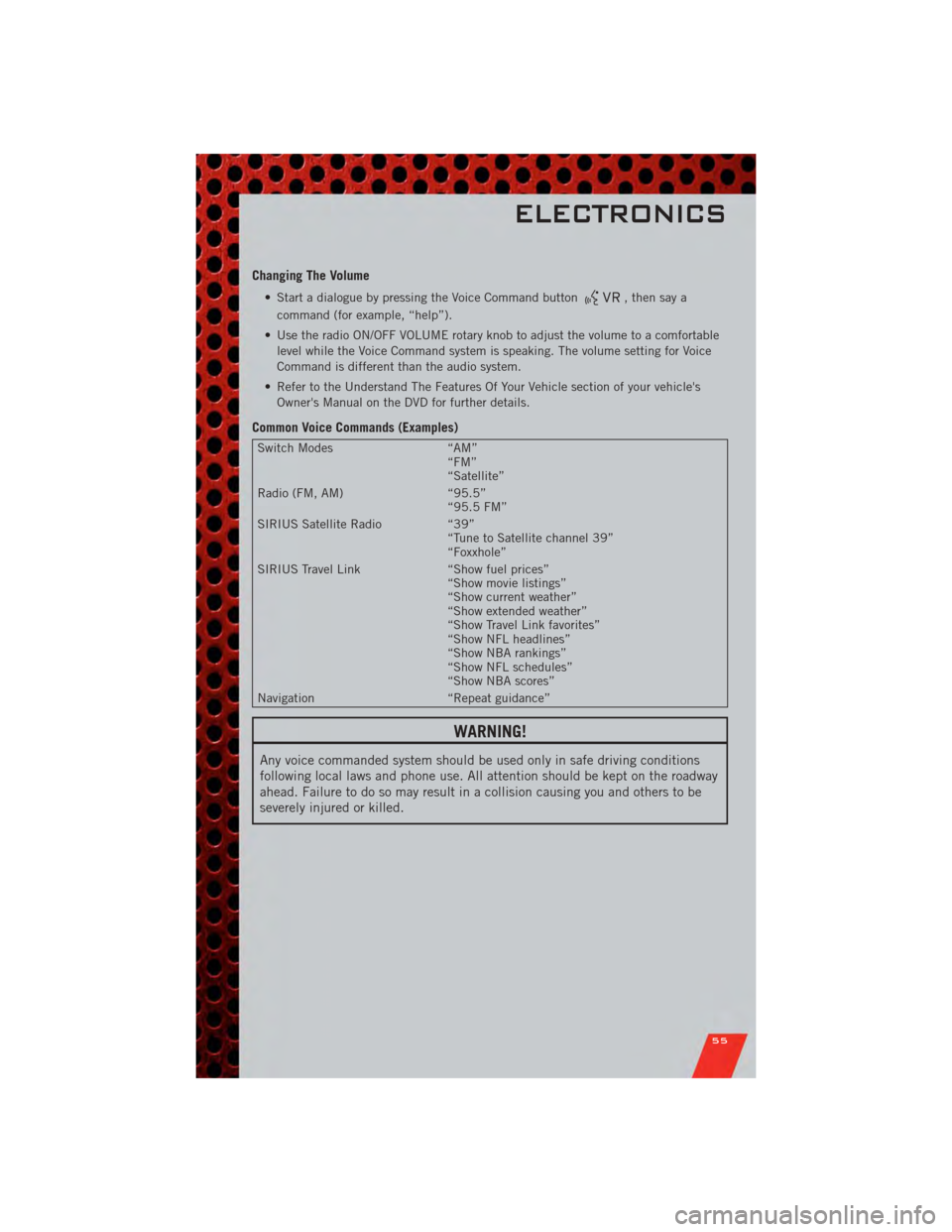
Common Voice Commands (Examples)
Switch Modes “AM”
“FM”
“Satellite”
Radio (FM, AM) “95.5”
“95.5 FM”
SIRIUS Satellite Radio “39”
“Tune to Satellite channel 39”
“Foxxhole”
SIRIUS Travel Link “Show fuel prices”
“Show movie listings”
“Show current weather”
“Show extended weather”
“Show Travel Link favorites”
“Show NFL headlines”
“Show NBA rankings”
“Show NFL schedules”
“Show NBA scores”
Navigation “Repeat guidance”
WARNING!
Any voice commanded system should be used only in safe driving conditions
following local laws and phone use. All attention should be kept on the roadway
ahead. Failure to do so may result in a collision causing you and others to be
severely injured or killed.
ELECTRONICS
55
Page 61 of 104
NOTE:
• Only use this transceiver with a garage door opener that has a “stop and reverse”feature as required by Federal safety standards. This includes most garage door
opener models manufactured after 1982. Do not use a garage door opener without
these safety features. Call toll-free 1–800–355–3515 or, on the Internet, at
www.HomeLink.com for safety information or assistance.
• If you are having difficulty programming your HomeLink
®and your garage door
opener was manufactured after 1995, you may have a rolling code. Follow the steps
below for Programming A Rolling Code System.
Programming A Rolling Code System • At the garage door opener motor (in the garage), locate the “learn” or “programming” button. This can usually be found where the hanging antenna wire
is attached to the garage door opener motor (it is NOT the button normally used to
open and close the door).
• Firmly press and release the “learn” or “programming” button. The name and color of the button may vary by manufacturer. Within 30 seconds, return to the vehicle
and press the programmed HomeLink
®button twice (holding the button for two
seconds each time). If the device is plugged in and activates, programming is
complete.
• If the device does not activate, press the button a third time (for two seconds) to complete the programming.
Using HomeLink
®
• To operate, simply press and release the programmed HomeLink®button and the
programmed device will operate.
• Refer to your Owner’s Manual on the DVD for further details. If you have any problems programming HomeLink
®, or require assistance, please call toll-free
1–800–355–3515 or, on the Internet, at www.HomeLink.com.
WARNING!
• Your motorized door or gate will open and close while you are programming the universal transceiver. Do not program the transceiver if people or pets are
in the path of the door or gate.
• Do not run your vehicle in a closed garage or confined area while programming the transceiver. Exhaust gas from your vehicle contains Carbon
Monoxide (CO) which is odorless and colorless. Carbon Monoxide is
poisonous when inhaled and can cause you and others to be severely injured
or killed.
ELECTRONICS
59
Page 65 of 104
24-HOUR TOWING ASSISTANCE
• Dial toll-free 1-800-521-2779 or 1-800-363-4869 for Canadian residents.
• Provide your name, vehicle identification number and license plate number.
• Provide your location, including telephone number, from which you are calling.
• Briefly describe the nature of the problem and answer a few simple questions.
• You will be given the name of the service provider and an estimated time of arrival.If you feel you are in an “unsafe situation”, please let us know. With your consent,
we will contact local police or safety authorities.
INSTRUMENT CLUSTER WARNING LIGHTS
- Electronic Stability Control (ESC) Activation/Malfunction Indicator Light
• The “ESC Activation/Malfunction Indicator Light” in the instrument cluster willcome on when the ignition switch is turned to the ON/RUN position. It should go
out with the engine running. If the “ESC Activation/Malfunction Indicator Light”
comes on continuously with the engine running, a malfunction has been detected
in the ESC system.
• If this light remains on after several ignition cycles, and the vehicle has been driven several miles (kilometers) at speeds greater than 30 mph (48 km/h), we
recommend you drive to the nearest service center and have the vehicle serviced
immediately.
- Tire Pressure Monitoring System (TPMS) Light
• Each tire, including the spare (if provided), should be checked monthly, when coldand inflated to the inflation pressure recommended by the vehicle manufacturer on
the vehicle placard or tire inflation pressure label. (If your vehicle has tires of a
different size than the size indicated on the vehicle placard or tire inflation
pressure label, you should determine the proper tire inflation pressure for those
tires.)
• As an added safety feature, your vehicle has been equipped with a Tire Pressure Monitoring System (TPMS) that illuminates a low tire pressure telltale when one or
more of your tires is significantly under-inflated. Accordingly, when the low tire
pressure telltale illuminates, you should stop and check your tires as soon as
possible, and inflate them to the proper pressure. Driving on a significantly
under-inflated tire causes the tire to overheat and can lead to tire failure.
Under-inflation also reduces fuel efficiency and tire tread life, and may affect the
vehicle’s handling and stopping ability.
• IF THE LIGHT STARTS FLASHING INDICATING A LOW TIRE PRESSURE, ADJUST THE AIR
PRESSURE IN THE LOW TIRE TO THE AIR PRESSURE SHOWN ON THE VEHICLE PLACARD
OR TIRE INFLATION PRESSURE LABEL LOCATED ON THE DRIVER'S DOOR. NOTE: AFTER
INFLATION, THE VEHICLE MAY NEED TO BE DRIVEN FOR 20 MINUTES BEFORE THE
FLASHING LIGHT WILL TURN OFF.
• Please note that the TPMS is not a substitute for proper tire maintenance, and it is the driver’s responsibility to maintain correct tire pressure, even if under-inflation
has not reached the level to trigger illumination of the TPMS low tire pressure
telltale.
WHAT TO DO IN EMERGENCIES
63