maintenance DODGE CHARGER 2011 7.G Owners Manual
[x] Cancel search | Manufacturer: DODGE, Model Year: 2011, Model line: CHARGER, Model: DODGE CHARGER 2011 7.GPages: 104, PDF Size: 4.53 MB
Page 3 of 104
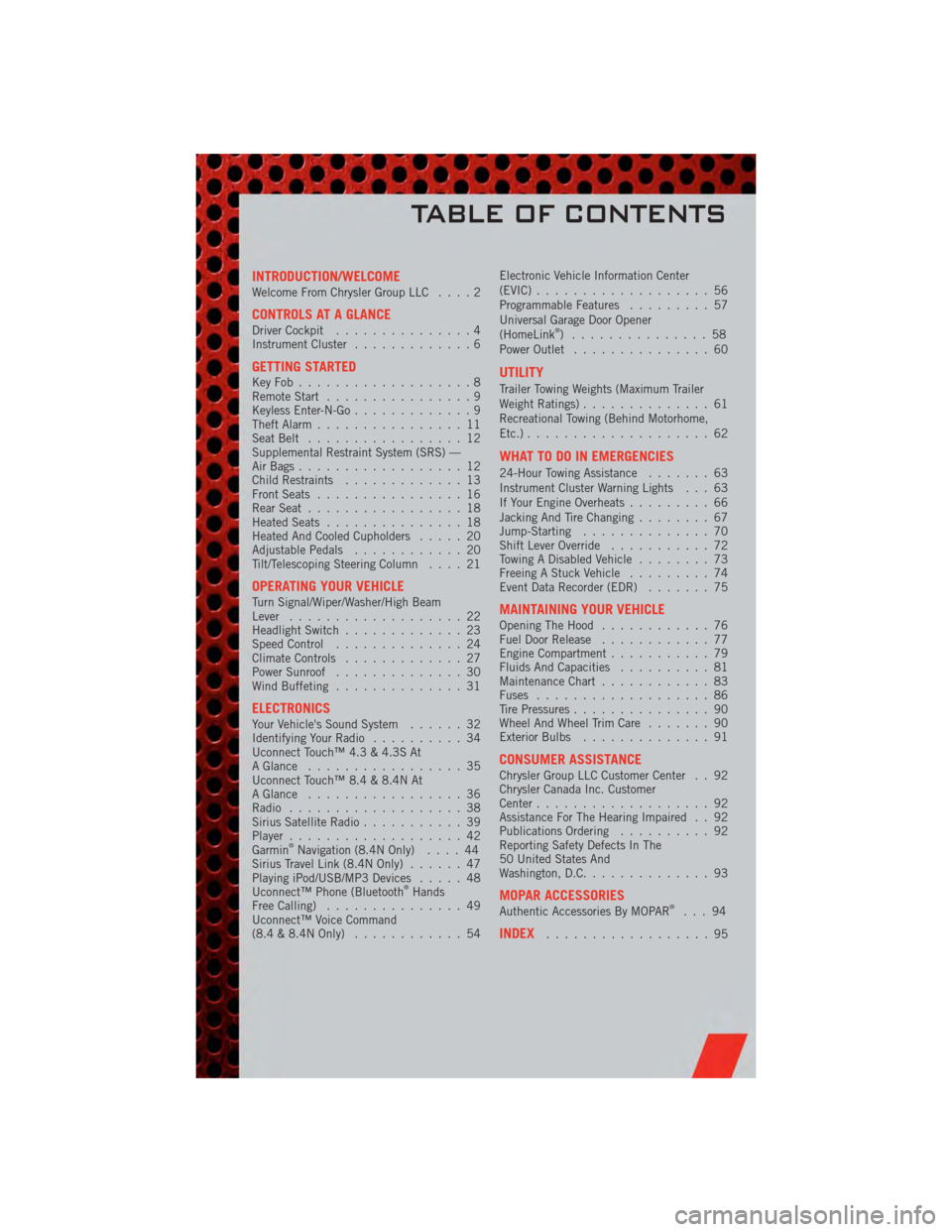
INTRODUCTION/WELCOMEWelcome From Chrysler Group LLC....2
CONTROLS AT A GLANCEDriver Cockpit...............4
Instrument Cluster .............6
GETTING STARTEDKeyFob...................8
Remote Start................9
Keyless Enter-N-Go .............9
Theft Alarm ................11
Seat Belt .................12
Supplemental Restraint System (SRS) —
Air Bags ..................12
Child Restraints .............13
Front Seats ................16
Rear Seat .................18
Heated Seats ...............18
Heated And Cooled Cupholders .....20
Adjustable Pedals ............20
Tilt/Telescoping Steering Column ....21
OPERATING YOUR VEHICLETurn Signal/Wiper/Washer/High Beam
Lever...................22
Headlight Switch .............23
Speed Control ..............24
Climate Controls .............27
Power Sunroof ..............30
Wind Buffeting ..............31
ELECTRONICSYour Vehicle's Sound System ......32
Identifying Your Radio ..........34
Uconnect Touch™ 4.3 & 4.3S At
A Glance .................35
Uconnect Touch™ 8.4 & 8.4N At
A Glance .................36
Radio ...................38
Sirius Satellite Radio ...........39
Player ...................42
Garmin
®Navigation (8.4N Only) ....44
Sirius Travel Link (8.4N Only) ......47
Playing iPod/USB/MP3 Devices .....48
Uconnect™ Phone (Bluetooth
®Hands
Free Calling) ...............49
Uconnect™ Voice Command
(8.4 & 8.4N Only) ............54 Electronic Vehicle Information Center
(EVIC)
...................56
Programmable Features .........57
Universal Garage Door Opener
(HomeLink
®) ...............58
Power Outlet ...............60
UTILITY
Trailer Towing Weights (Maximum Trailer
Weight Ratings) ..............61
Recreational Towing (Behind Motorhome,
Etc.) ....................62
WHAT TO DO IN EMERGENCIES
24-Hour Towing Assistance .......63
Instrument Cluster Warning Lights . . . 63
If Your Engine Overheats .........66
Jacking And Tire Changing ........67
Jump-Starting ..............70
Shift Lever Override ...........72
Towing A Disabled Vehicle ........73
Freeing A Stuck Vehicle .........74
Event Data Recorder (EDR) .......75
MAINTAINING YOUR VEHICLEOpening The Hood............76
Fuel Door Release ............77
Engine Compartment ...........79
Fluids And Capacities ..........81
Maintenance Chart ............83
Fuses ...................86
Tire Pressures ...............90
Wheel And Wheel Trim Care .......90
Exterior Bulbs ..............91
CONSUMER ASSISTANCEChrysler Group LLC Customer Center . . 92
Chrysler Canada Inc. Customer
Center...................92
Assistance For The Hearing Impaired . . 92
Publications Ordering ..........92
Reporting Safety Defects In The
50 United States And
Washington, D.C. .............93
MOPAR ACCESSORIESAuthentic Accessories By MOPAR®...94
INDEX..................95
TABLE OF CONTENTS
Page 65 of 104
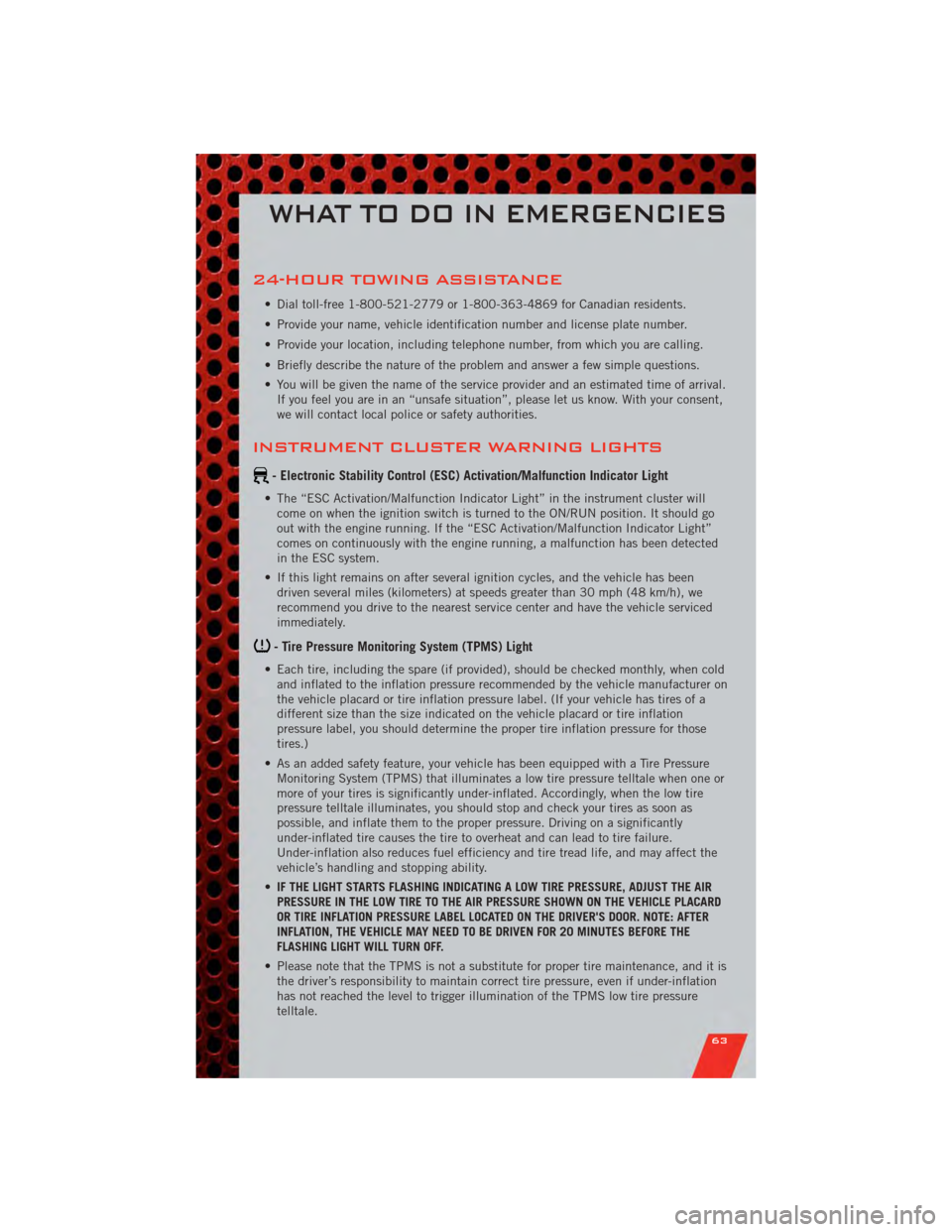
24-HOUR TOWING ASSISTANCE
• Dial toll-free 1-800-521-2779 or 1-800-363-4869 for Canadian residents.
• Provide your name, vehicle identification number and license plate number.
• Provide your location, including telephone number, from which you are calling.
• Briefly describe the nature of the problem and answer a few simple questions.
• You will be given the name of the service provider and an estimated time of arrival.If you feel you are in an “unsafe situation”, please let us know. With your consent,
we will contact local police or safety authorities.
INSTRUMENT CLUSTER WARNING LIGHTS
- Electronic Stability Control (ESC) Activation/Malfunction Indicator Light
• The “ESC Activation/Malfunction Indicator Light” in the instrument cluster willcome on when the ignition switch is turned to the ON/RUN position. It should go
out with the engine running. If the “ESC Activation/Malfunction Indicator Light”
comes on continuously with the engine running, a malfunction has been detected
in the ESC system.
• If this light remains on after several ignition cycles, and the vehicle has been driven several miles (kilometers) at speeds greater than 30 mph (48 km/h), we
recommend you drive to the nearest service center and have the vehicle serviced
immediately.
- Tire Pressure Monitoring System (TPMS) Light
• Each tire, including the spare (if provided), should be checked monthly, when coldand inflated to the inflation pressure recommended by the vehicle manufacturer on
the vehicle placard or tire inflation pressure label. (If your vehicle has tires of a
different size than the size indicated on the vehicle placard or tire inflation
pressure label, you should determine the proper tire inflation pressure for those
tires.)
• As an added safety feature, your vehicle has been equipped with a Tire Pressure Monitoring System (TPMS) that illuminates a low tire pressure telltale when one or
more of your tires is significantly under-inflated. Accordingly, when the low tire
pressure telltale illuminates, you should stop and check your tires as soon as
possible, and inflate them to the proper pressure. Driving on a significantly
under-inflated tire causes the tire to overheat and can lead to tire failure.
Under-inflation also reduces fuel efficiency and tire tread life, and may affect the
vehicle’s handling and stopping ability.
• IF THE LIGHT STARTS FLASHING INDICATING A LOW TIRE PRESSURE, ADJUST THE AIR
PRESSURE IN THE LOW TIRE TO THE AIR PRESSURE SHOWN ON THE VEHICLE PLACARD
OR TIRE INFLATION PRESSURE LABEL LOCATED ON THE DRIVER'S DOOR. NOTE: AFTER
INFLATION, THE VEHICLE MAY NEED TO BE DRIVEN FOR 20 MINUTES BEFORE THE
FLASHING LIGHT WILL TURN OFF.
• Please note that the TPMS is not a substitute for proper tire maintenance, and it is the driver’s responsibility to maintain correct tire pressure, even if under-inflation
has not reached the level to trigger illumination of the TPMS low tire pressure
telltale.
WHAT TO DO IN EMERGENCIES
63
Page 85 of 104
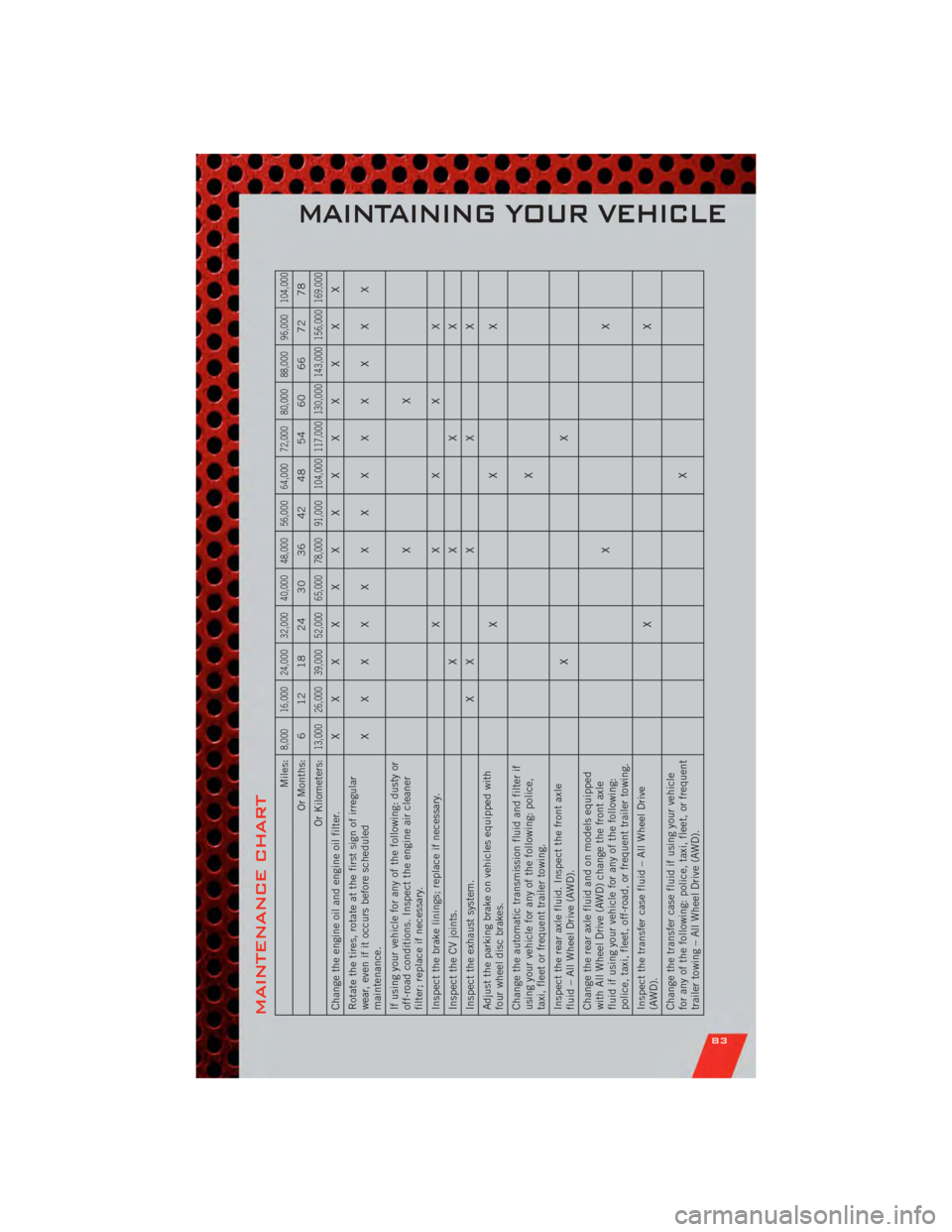
MAINTENANCE CHART
Miles:
8,000 16,000 24,000 32,000 40,000 48,000 56,000 64,000 72,000 80,000 88,000 96,000 104,000
Or Months: 6 12 18 24 30 36 42 48 54 60 66 72 78
Or Kilometers:
13,000 26,000 39,000 52,000 65,000 78,000 91,000 104,000 117,000 130,000 143,000 156,000 169,000
Change the engine oil and engine oil filter. XXXXXXXXXXXXX
Rotate the tires, rotate at the first sign of irregular
wear, even if it occurs before scheduled
maintenance. XXXXXXXXXXXXX
If using your vehicle for any of the following: dusty or
off-road conditions. Inspect the engine air cleaner
filter; replace if necessary. XX
Inspect the brake linings; replace if necessary. X XXXX
Inspect the CV joints. XXXX
Inspect the exhaust system. X XXXX
Adjust the parking brake on vehicles equipped with
four wheel disc brakes. XXX
Change the automatic transmission fluid and filter if
using your vehicle for any of the following: police,
taxi, fleet or frequent trailer towing. X
Inspect the rear axle fluid. Inspect the front axle
fluid – All Wheel Drive (AWD). XX
Change the rear axle fluid and on models equipped
with All Wheel Drive (AWD) change the front axle
fluid if using your vehicle for any of the following:
police, taxi, fleet, off-road, or frequent trailer towing. XX
Inspect the transfer case fluid – All Wheel Drive
(AWD). XX
Change the transfer case fluid if using your vehicle
for any of the following: police, taxi, fleet, or frequent
trailer towing – All Wheel Drive (AWD). X
MAINTAINING YOUR VEHICLE
83
Page 86 of 104
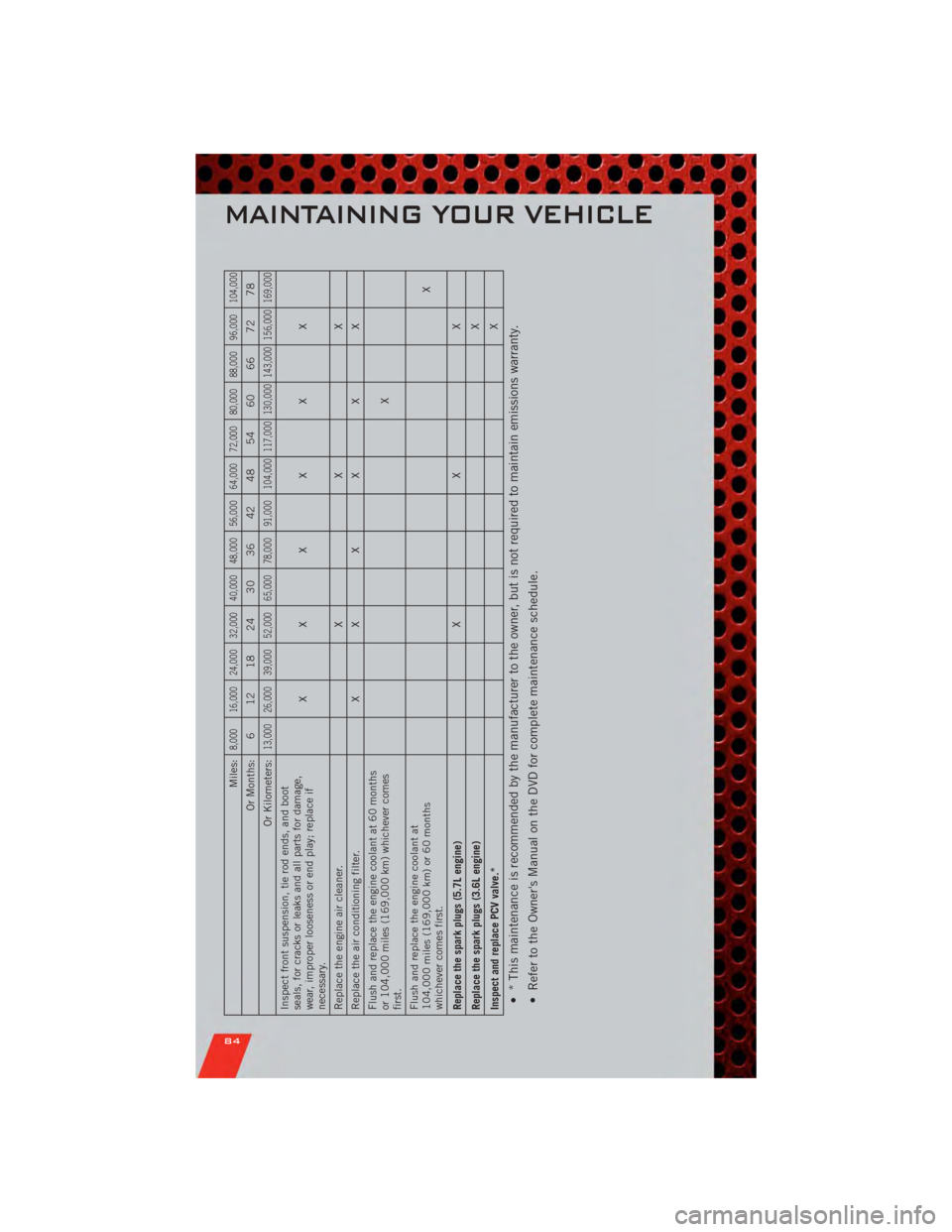
Miles:
8,000 16,000 24,000 32,000 40,000 48,000 56,000 64,000 72,000 80,000 88,000 96,000 104,000
Or Months: 6 12 18 24 30 36 42 48 54 60 66 72 78
Or Kilometers:
13,000 26,000 39,000 52,000 65,000 78,000 91,000 104,000 117,000 130,000 143,000 156,000 169,000
Inspect front suspension, tie rod ends, and boot
seals, for cracks or leaks and all parts for damage,
wear, improper looseness or end play; replace if
necessary. XXXXXX
Replace the engine air cleaner. XXX
Replace the air conditioning filter. XXXXXX
Flush and replace the engine coolant at 60 months
or 104,000 miles (169,000 km) whichever comes
first. X
Flush and replace the engine coolant at
104,000 miles (169,000 km) or 60 months
whichever comes first. X
Replace the spark plugs (5.7L engine) XXX
Replace the spark plugs (3.6L engine) X
Inspect and replace PCV valve.* X• * This maintenance is recommended by the manufacturer to the owner, but is not required to maintain emissions warranty.
• Refer to the Owner's Manual on the DVD for complete maintenance schedule.
MAINTAINING YOUR VEHICLE
84
Page 87 of 104
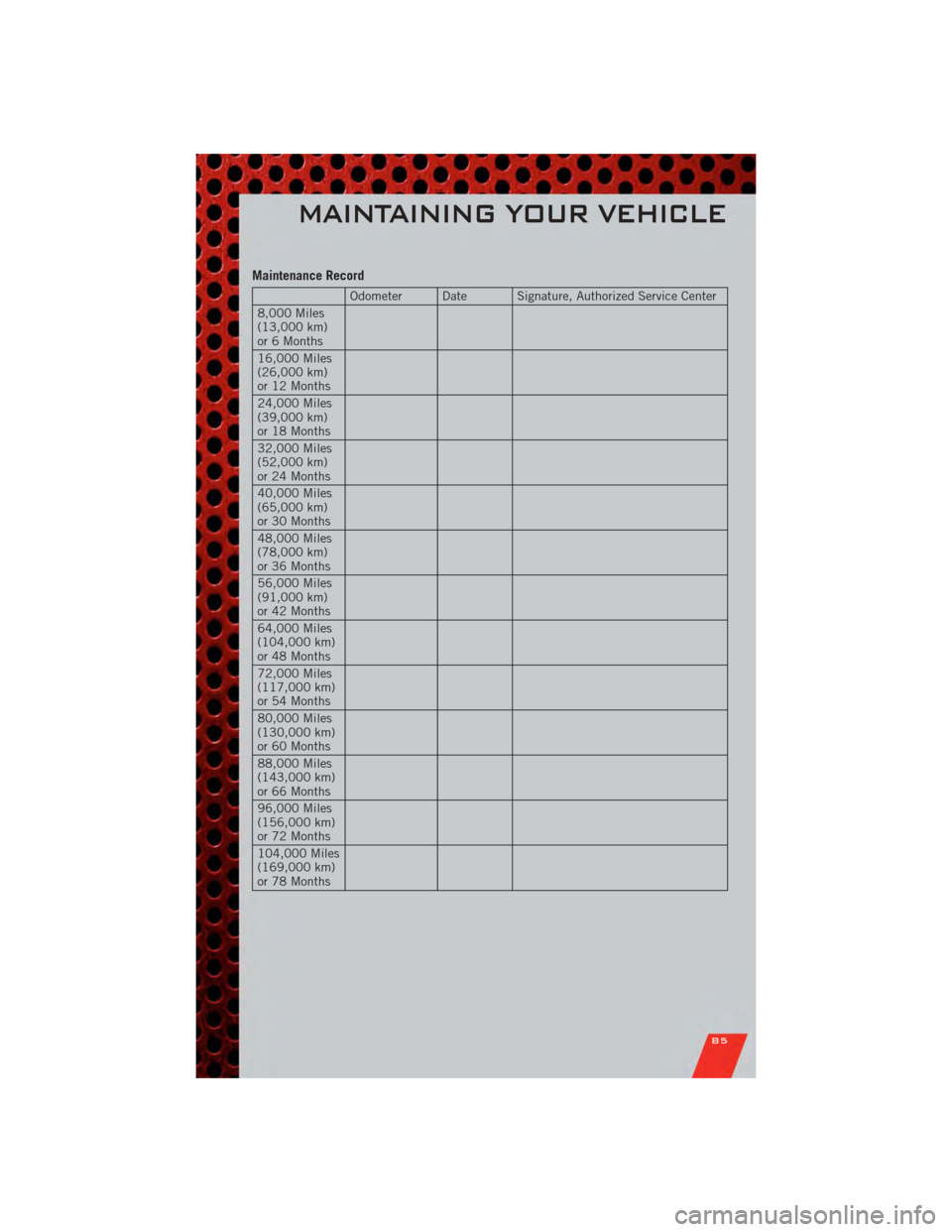
Maintenance Record
Odometer Date Signature, Authorized Service Center
8,000 Miles
(13,000 km)
or 6 Months
16,000 Miles
(26,000 km)
or 12 Months
24,000 Miles
(39,000 km)
or 18 Months
32,000 Miles
(52,000 km)
or 24 Months
40,000 Miles
(65,000 km)
or 30 Months
48,000 Miles
(78,000 km)
or 36 Months
56,000 Miles
(91,000 km)
or 42 Months
64,000 Miles
(104,000 km)
or 48 Months
72,000 Miles
(117,000 km)
or 54 Months
80,000 Miles
(130,000 km)
or 60 Months
88,000 Miles
(143,000 km)
or 66 Months
96,000 Miles
(156,000 km)
or 72 Months
104,000 Miles
(169,000 km)
or 78 Months
MAINTAINING YOUR VEHICLE
85
Page 98 of 104
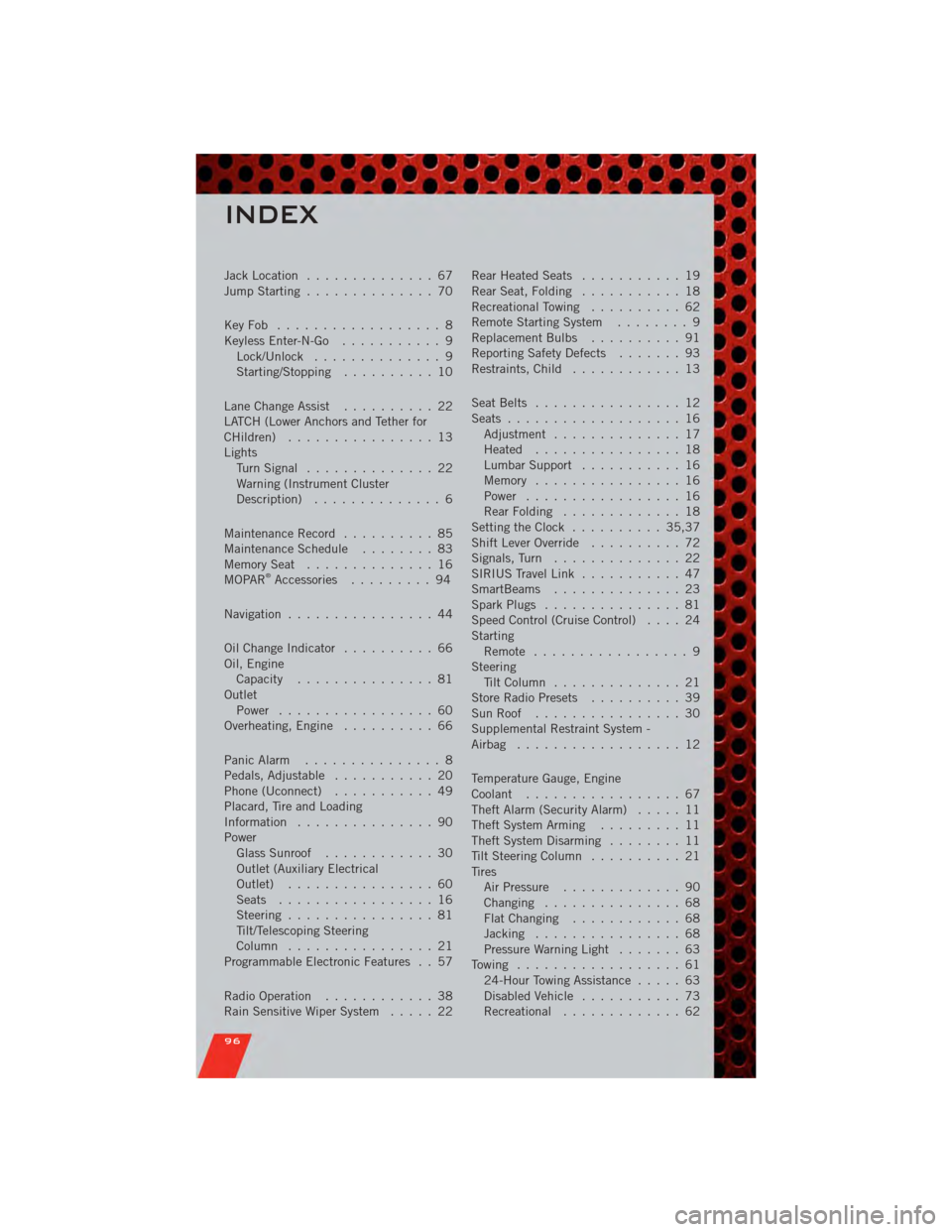
Jack Location.............. 67
Jump Starting .............. 70
KeyFob .................. 8
Keyless Enter-N-Go ........... 9
Lock/Unlock .............. 9
Starting/Stopping .......... 10
Lane Change Assist .......... 22
LATCH (Lower Anchors and Tether for
CHildren) ................ 13
Lights TurnSignal .............. 22
Warning (Instrument Cluster
Description) .............. 6
Maintenance Record .......... 85
MaintenanceSchedule ........ 83
MemorySeat .............. 16
MOPAR
®Accessories ......... 94
Navigation ................ 44
Oil Change Indicator .......... 66
Oil, Engine Capacity ............... 81
Outlet Power ................. 60
Overheating, Engine .......... 66
Panic Alarm ............... 8
Pedals, Adjustable ........... 20
Phone (Uconnect) ........... 49
Placard, Tire and Loading
Information ............... 90
Power Glass Sunroof ............ 30
Outlet (Auxiliary Electrical
Outlet) ................ 60
Seats ................. 16
Steering ................ 81
Tilt/Telescoping Steering
Column ................ 21
Programmable Electronic Features . . 57
Radio Operation ............ 38
Rain Sensitive Wiper System ..... 22Rear Heated Seats
........... 19
Rear Seat, Folding ........... 18
Recreational Towing .......... 62
Remote Starting System ........ 9
Replacement Bulbs .......... 91
Reporting Safety Defects ....... 93
Restraints, Child ............ 13
Seat Belts ................ 12
Seats ................... 16
Adjustment .............. 17
Heated ................ 18
Lumbar Support ........... 16
Memory ................ 16
Power ................. 16
RearFolding ............. 18
Setting the Clock .......... 35,37
Shift Lever Override .......... 72
Signals, Turn .............. 22
SIRIUS Travel Link ........... 47
SmartBeams .............. 23
Spark Plugs ............... 81
Speed Control (Cruise Control) .... 24
Starting Remote ................. 9
Steering Tilt Column .............. 21
Store Radio Presets .......... 39
SunRoof ................ 30
Supplemental Restraint System -
Airbag .................. 12
Temperature Gauge, Engine
Coolant ................. 67
Theft Alarm (Security Alarm) ..... 11
Theft System Arming ......... 11
Theft System Disarming ........ 11
Tilt Steering Column .......... 21
Tires AirPressure ............. 90
Changing ............... 68
FlatChanging ............ 68
Jacking ................ 68
Pressure Warning Light ....... 63
Towing .................. 61 24-Hour Towing Assistance ..... 63
Disabled Vehicle ........... 73
Recreational ............. 6
2
INDEX
96
Page 104 of 104

This guide has been prepared to help you get quickly acquainted with you\
r
new Dodge and to provide a convenient reference source for common
questions. However, it is not a substitute for your Owner’s Manual.
For complete operational instructions, maintenance procedures and
important safety messages, please consult your Owner’s Manual,
Navigation/Media Center Manuals, Multimedia User Manual and other
Warning Labels in your vehicle.
Not all features shown in this guide may apply to your vehicle. For
additional information on accessories to help personalize your vehicle,
visit www.mopar.com or your local Dodge dealer.
11D481-926-AA
Charger
Fourth Edition
User Guide