air condition DODGE CHARGER 2011 7.G Owners Manual
[x] Cancel search | Manufacturer: DODGE, Model Year: 2011, Model line: CHARGER, Model: DODGE CHARGER 2011 7.GPages: 104, PDF Size: 4.53 MB
Page 31 of 104
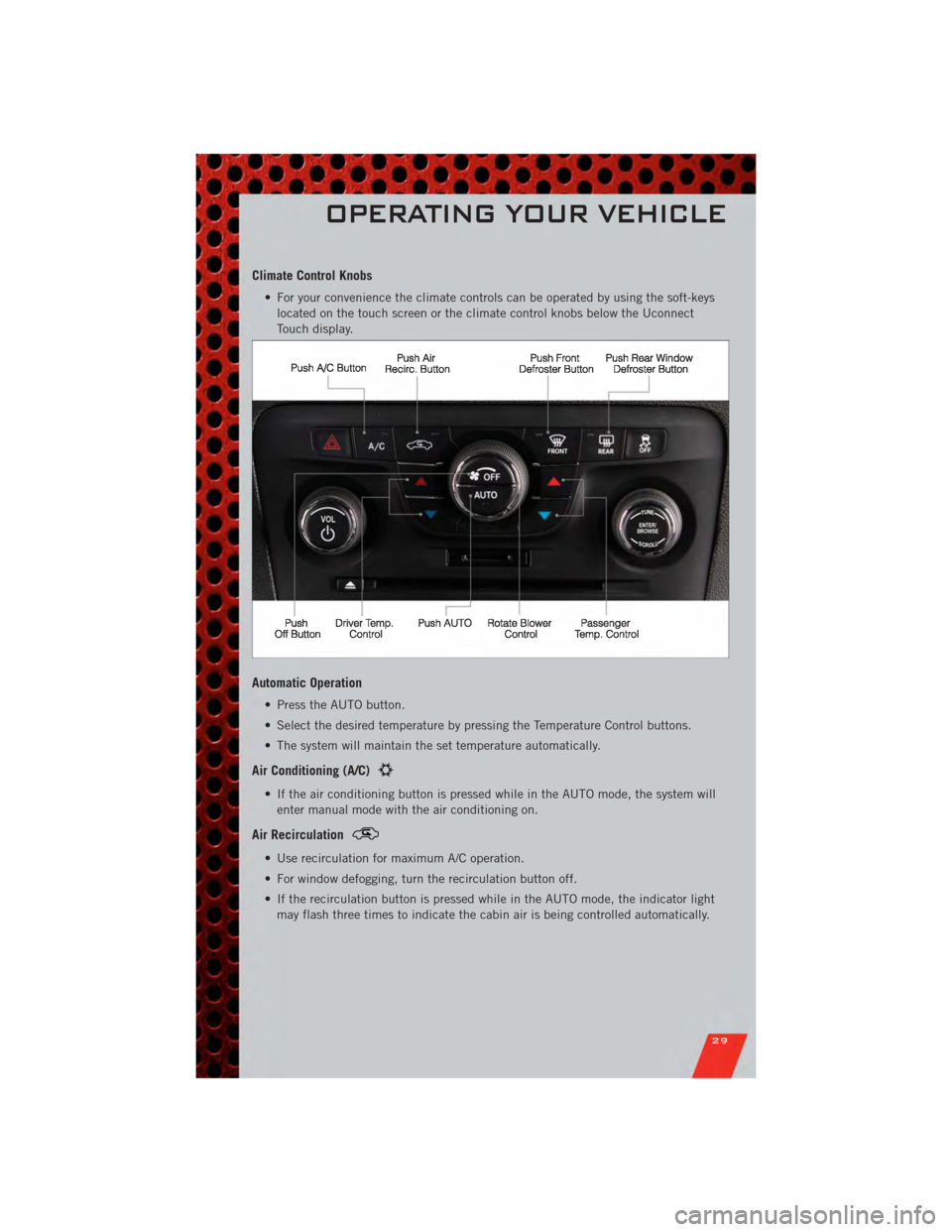
Climate Control Knobs
• For your convenience the climate controls can be operated by using the soft-keyslocated on the touch screen or the climate control knobs below the Uconnect
Touch display.
Automatic Operation
• Press the AUTO button.
• Select the desired temperature by pressing the Temperature Control buttons.
• The system will maintain the set temperature automatically.
Air Conditioning (A/C)
• If the air conditioning button is pressed while in the AUTO mode, the system willenter manual mode with the air conditioning on.
Air Recirculation
• Use recirculation for maximum A/C operation.
• For window defogging, turn the recirculation button off.
• If the recirculation button is pressed while in the AUTO mode, the indicator lightmay flash three times to indicate the cabin air is being controlled automatically.
OPERATING YOUR VEHICLE
29
Page 56 of 104
• You can “barge in” while the system is talking to you, enabling you to enter yourresponse without waiting. Just press the Voice Command button on the steering
wheel to barge in.
Changing The Volume
• Start a dialogue by pressing the Phone button, then say a command for
example - "Help".
• Use the radio ON/OFF VOLUME rotary knob to adjust the volume to a comfortable level while the Uconnect™ system is speaking. Please note the volume setting for
Uconnect™ is different than the audio system.
NOTE: To access help, press the Uconnect™ Phone
button on the steering wheel
and say "help." Touch the display or push either
orbutton and say
"cancel" to cancel the help session.
WARNING!
• Any voice commanded system should be used only in safe driving conditions following local laws and phone use. All attention should be kept on the
roadway ahead. Failure to do so may result in a collision causing you and
others to be severely injured or killed.
• In an emergency, to use Uconnect™ Phone, your mobile phone must be: • turned on,
• paired to Uconnect™ Phone,
• and have network coverage.
Uconnect™ Voice Command (8.4 & 8.4N ONLY)
• If the Uconnect™ Voice Commandbutton exists on your steering wheel,
then you have the Voice Command feature.
• The Voice Command feature lets you keep your hands on the steering wheel, and your eyes on the road.
• When you press the Voice Command button
located on the radio faceplate
or steering wheel, you will hear a beep. The beep is your signal to give a command.
If you do not know what commands to say, you can say "help" and the system will
provide options to you. If you ever wish to interrupt the system while it lists
options, press the Voice Command button
, listen for the BEEP, and say
your command.
• You can “chain” commands together for faster results. Say “Call John Doe, mobile”, for example.
ELECTRONICS
54
Page 68 of 104
• If the light remains lit with the engine running, your vehicle will usually bedrivable; however, see an authorized service center immediately. If the light is
flashing when the engine is running, immediate service is required and you may
experience reduced performance, an elevated/rough idle or engine stall and your
vehicle may require towing.
- Air Bag Warning Light
• If the light is not on during starting, stays on, or turns on while driving, have thevehicle serviced by an authorized service center immediately.
SERVICE AWD SYSTEM Message
• If the SERVICE AWD SYSTEM warning message appears after engine start up, orduring driving, it means the AWD system is not functioning properly. We
recommend you do not operate the vehicle. Have the vehicle serviced immediately.
Oil Change Indicator
Message
• If an “oil change” message (shown as Oil Change Required) appears and a single chime sounds, it is time for your next required oil change.
Resetting The Light After Servicing
• Without pressing the brake pedal, push the ENGINE START/STOP button and cycle the ignition to the ON/RUN position (Do not start the engine.)
• Fully depress the accelerator pedal three times within 10 seconds.
• Without pressing the brake pedal, push the ENGINE START/STOP button once to return the ignition to the OFF/LOCK position.
IF YOUR ENGINE OVERHEATS
• In any of the following situations, you can reduce the potential for overheating bytaking the appropriate action.
• On the highways — slow down.
• In city traffic — while stopped, place the transmission in NEUTRAL, but do not increase engine idle speed.
NOTE: There are steps that you can take to slow down an impending overheat
condition:
• If your air conditioner (A/C) is on, turn it off. The A/C system adds heat to the engine cooling system and turning the A/C off can help remove this heat.
• You can also turn the temperature control to maximum heat, the mode control to floor and the blower control to high. This allows the heater core to act as a
supplement to the radiator and aids in removing heat from the engine cooling
system.
WHAT TO DO IN EMERGENCIES
66
Page 69 of 104
CAUTION!
Driving with a hot cooling system could damage your vehicle. If the temperature
gauge reads 240°F (116 °C) or greater pull over and stop the vehicle. Idle the
vehicle with the air conditioner turned off until the pointer drops back into the
normal range 200–230°F (93–110°C). If the pointer remains at 240°F (116°C)
or greater and you hear a chime, turn the engine off immediately and call for
service.
WARNING!
You or others can be badly burned by hot engine coolant (antifreeze) or steam
from your radiator. If you see or hear steam coming from under the hood, do not
open the hood until the radiator has had time to cool. Never try to open a
cooling system pressure cap when the radiator or coolant bottle is hot.
JACKING AND TIRE CHANGING
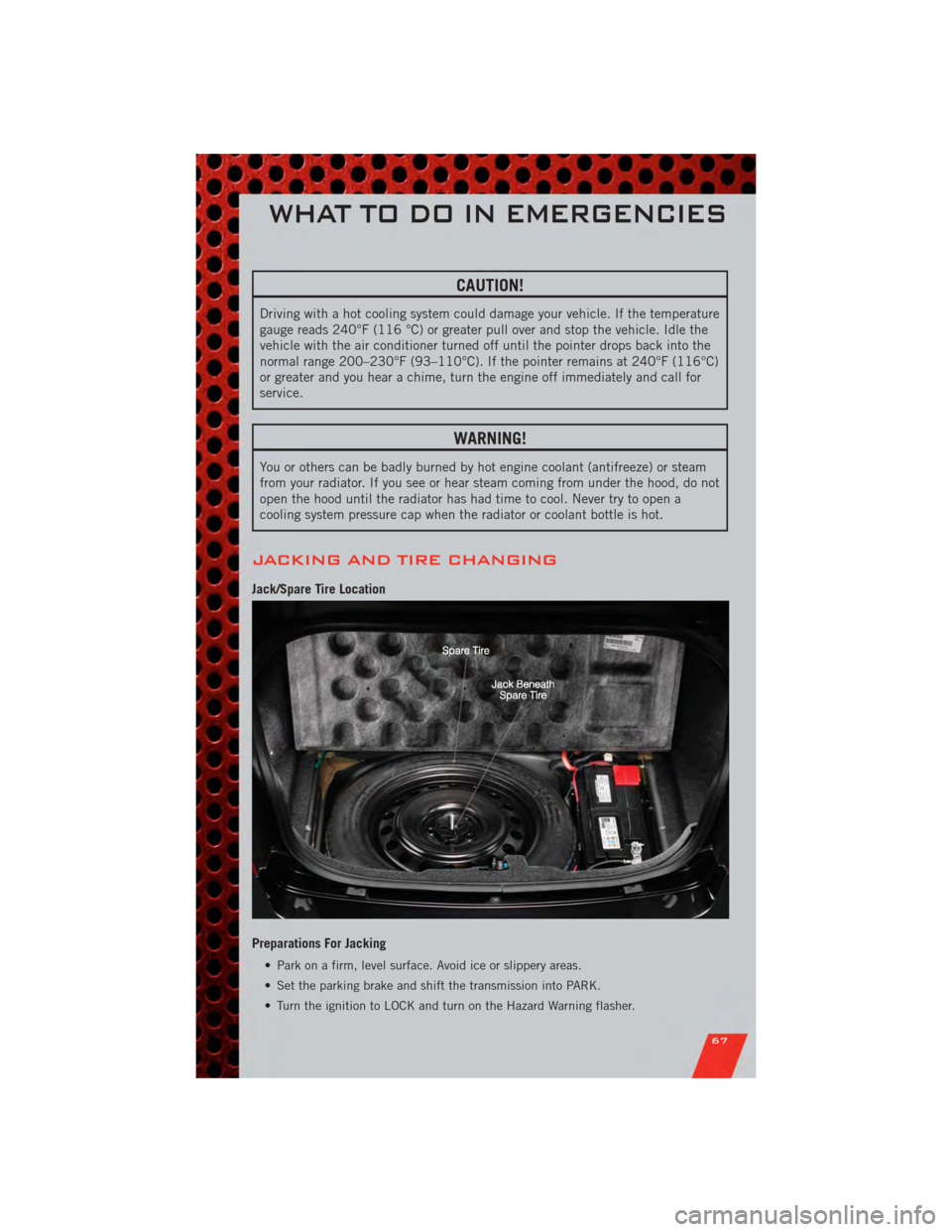
Jack/Spare Tire Location
Preparations For Jacking
• Park on a firm, level surface. Avoid ice or slippery areas.
• Set the parking brake and shift the transmission into PARK.
• Turn the ignition to LOCK and turn on the Hazard Warning flasher.
WHAT TO DO IN EMERGENCIES
67
Page 77 of 104
EVENT DATA RECORDER (EDR)
• This vehicle is equipped with an event data recorder (EDR). The main purpose ofan EDR is to record, in certain crash or near crash-like situations, such as an air
bag deployment or hitting a road obstacle, data that will assist in understanding
how a vehicle’s systems performed. The EDR is designed to record data related to
vehicle dynamics and safety systems for a short period of time, typically
30 seconds or less. The EDR in this vehicle is designed to record such data as:
• How various systems in your vehicle were operating;
• Whether or not the driver and passenger safety belts were buckled/fastened;
• How far (if at all) the driver was depressing the accelerator and/or brake pedal;
and,
• How fast the vehicle was traveling.
• These data can help provide a better understanding of the circumstances in which crashes and injuries occur.
NOTE: EDR data are recorded by your vehicle only if a non-trivial crash situation
occurs; no data are recorded by the EDR under normal driving conditions and no
personal data (e.g. name, gender, age, and crash location) are recorded. However, other
parties, such as law enforcement, could combine the EDR data with the type of
personally identifying data routinely acquired during a crash investigation.
• To read data recorded by an EDR, special equipment is required, and access to thevehicle or the EDR is needed. In addition to the vehicle manufacturer, other
parties such as law enforcement, that have the special equipment, can read the
information if they have access to the vehicle or the EDR.
WHAT TO DO IN EMERGENCIES
75
Page 85 of 104
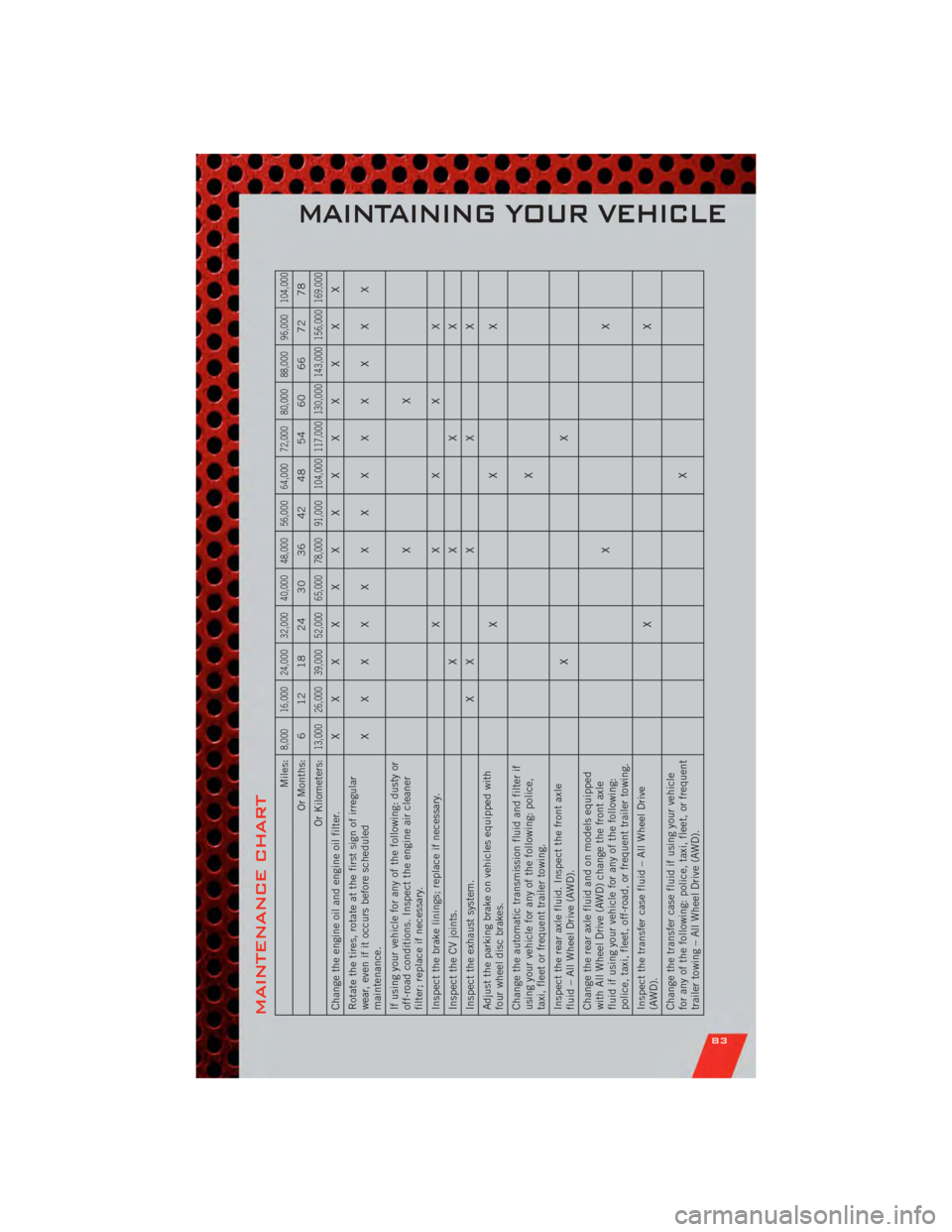
MAINTENANCE CHART
Miles:
8,000 16,000 24,000 32,000 40,000 48,000 56,000 64,000 72,000 80,000 88,000 96,000 104,000
Or Months: 6 12 18 24 30 36 42 48 54 60 66 72 78
Or Kilometers:
13,000 26,000 39,000 52,000 65,000 78,000 91,000 104,000 117,000 130,000 143,000 156,000 169,000
Change the engine oil and engine oil filter. XXXXXXXXXXXXX
Rotate the tires, rotate at the first sign of irregular
wear, even if it occurs before scheduled
maintenance. XXXXXXXXXXXXX
If using your vehicle for any of the following: dusty or
off-road conditions. Inspect the engine air cleaner
filter; replace if necessary. XX
Inspect the brake linings; replace if necessary. X XXXX
Inspect the CV joints. XXXX
Inspect the exhaust system. X XXXX
Adjust the parking brake on vehicles equipped with
four wheel disc brakes. XXX
Change the automatic transmission fluid and filter if
using your vehicle for any of the following: police,
taxi, fleet or frequent trailer towing. X
Inspect the rear axle fluid. Inspect the front axle
fluid – All Wheel Drive (AWD). XX
Change the rear axle fluid and on models equipped
with All Wheel Drive (AWD) change the front axle
fluid if using your vehicle for any of the following:
police, taxi, fleet, off-road, or frequent trailer towing. XX
Inspect the transfer case fluid – All Wheel Drive
(AWD). XX
Change the transfer case fluid if using your vehicle
for any of the following: police, taxi, fleet, or frequent
trailer towing – All Wheel Drive (AWD). X
MAINTAINING YOUR VEHICLE
83
Page 86 of 104
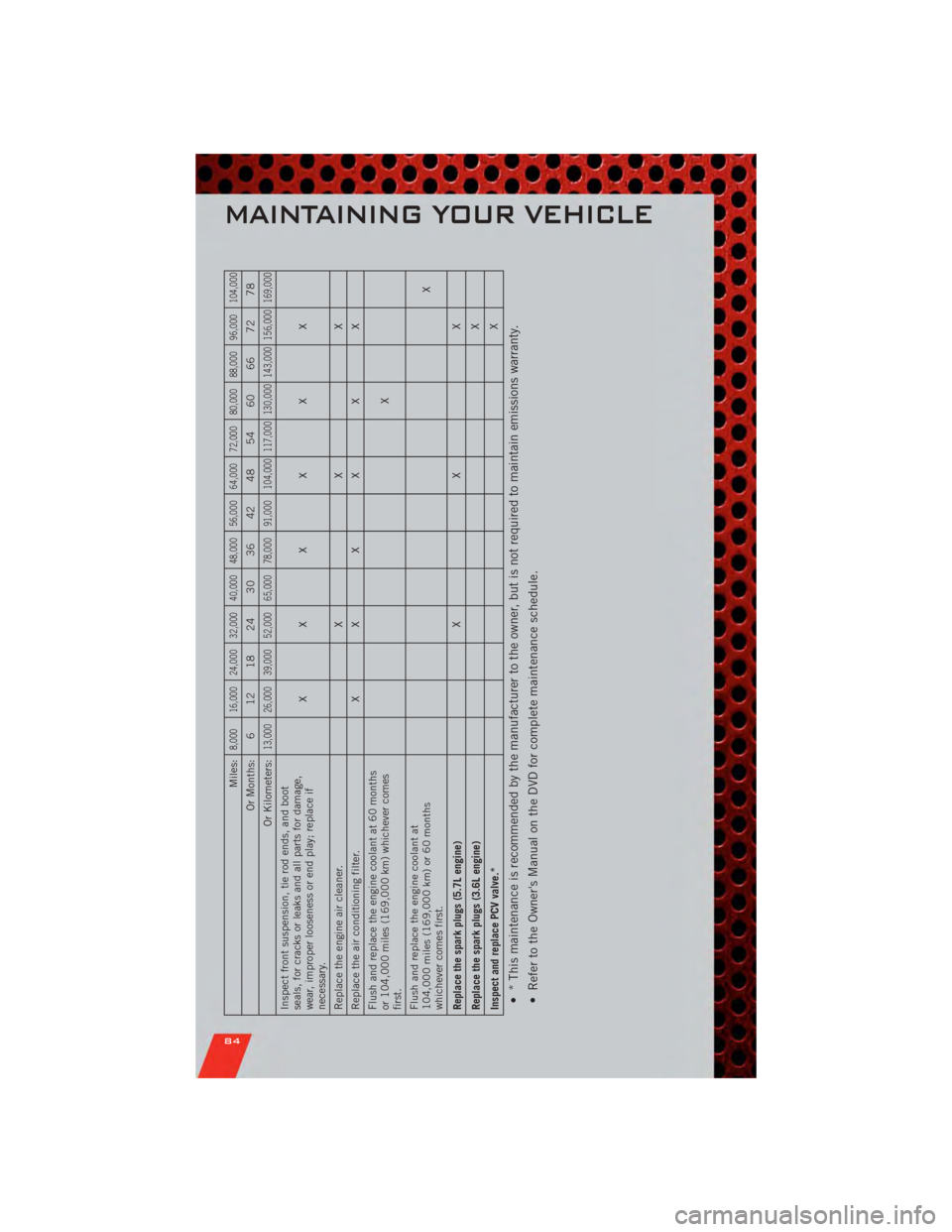
Miles:
8,000 16,000 24,000 32,000 40,000 48,000 56,000 64,000 72,000 80,000 88,000 96,000 104,000
Or Months: 6 12 18 24 30 36 42 48 54 60 66 72 78
Or Kilometers:
13,000 26,000 39,000 52,000 65,000 78,000 91,000 104,000 117,000 130,000 143,000 156,000 169,000
Inspect front suspension, tie rod ends, and boot
seals, for cracks or leaks and all parts for damage,
wear, improper looseness or end play; replace if
necessary. XXXXXX
Replace the engine air cleaner. XXX
Replace the air conditioning filter. XXXXXX
Flush and replace the engine coolant at 60 months
or 104,000 miles (169,000 km) whichever comes
first. X
Flush and replace the engine coolant at
104,000 miles (169,000 km) or 60 months
whichever comes first. X
Replace the spark plugs (5.7L engine) XXX
Replace the spark plugs (3.6L engine) X
Inspect and replace PCV valve.* X• * This maintenance is recommended by the manufacturer to the owner, but is not required to maintain emissions warranty.
• Refer to the Owner's Manual on the DVD for complete maintenance schedule.
MAINTAINING YOUR VEHICLE
84
Page 88 of 104
FUSES
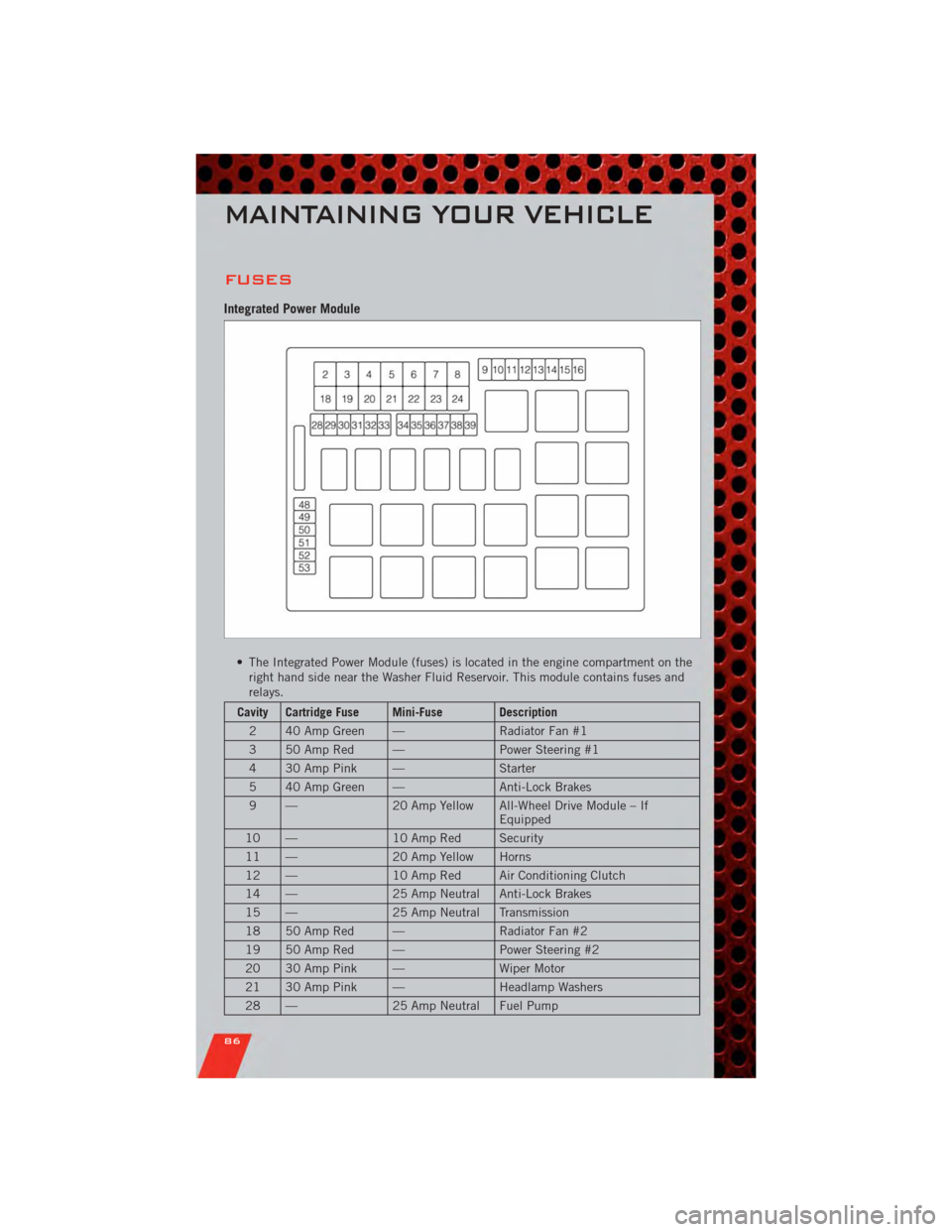
Integrated Power Module
• The Integrated Power Module (fuses) is located in the engine compartment on theright hand side near the Washer Fluid Reservoir. This module contains fuses and
relays.
Cavity Cartridge Fuse Mini-Fuse Description
2 40 Amp Green — Radiator Fan #1
3 50 Amp Red — Power Steering #1
4 30 Amp Pink — Starter
5 40 Amp Green — Anti-Lock Brakes
9 — 20 Amp Yellow All-Wheel Drive Module – If
Equipped
10 — 10 Amp Red Security
11 — 20 Amp Yellow Horns
12 — 10 Amp Red Air Conditioning Clutch
14 — 25 Amp Neutral Anti-Lock Brakes
15 — 25 Amp Neutral Transmission
18 50 Amp Red — Radiator Fan #2
19 50 Amp Red — Power Steering #2
20 30 Amp Pink — Wiper Motor
21 30 Amp Pink — Headlamp Washers
28 — 25 Amp Neutral Fuel Pump
MAINTAINING YOUR VEHICLE
86