lane assist DODGE CHARGER 2011 7.G Owners Manual
[x] Cancel search | Manufacturer: DODGE, Model Year: 2011, Model line: CHARGER, Model: DODGE CHARGER 2011 7.GPages: 104, PDF Size: 4.53 MB
Page 24 of 104
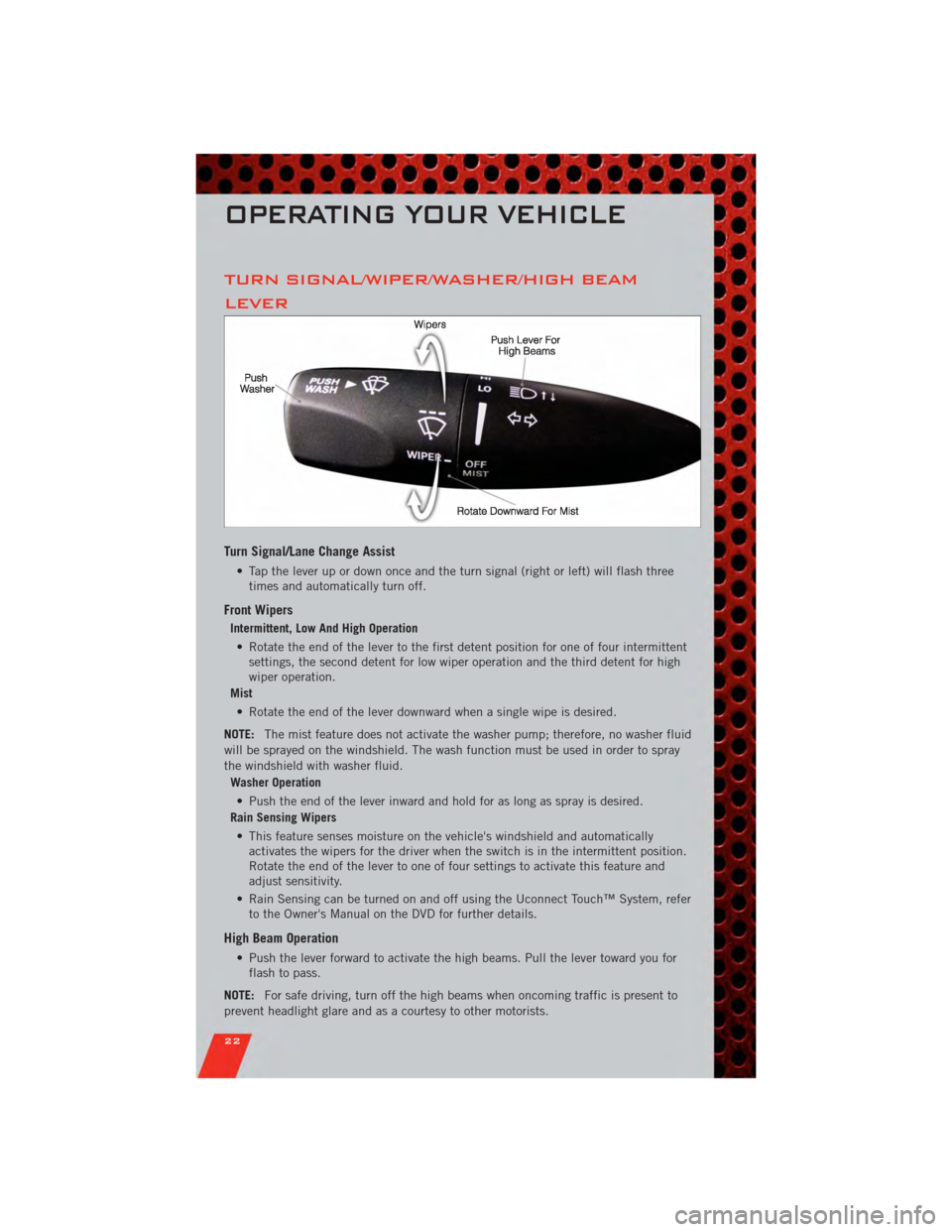
TURN SIGNAL/WIPER/WASHER/HIGH BEAM
LEVER
Turn Signal/Lane Change Assist
• Tap the lever up or down once and the turn signal (right or left) will flash threetimes and automatically turn off.
Front Wipers
Intermittent, Low And High Operation
• Rotate the end of the lever to the first detent position for one of four intermittent settings, the second detent for low wiper operation and the third detent for high
wiper operation.
Mist
• Rotate the end of the lever downward when a single wipe is desired.
NOTE: The mist feature does not activate the washer pump; therefore, no washer fluid
will be sprayed on the windshield. The wash function must be used in order to spray
the windshield with washer fluid.
Washer Operation
• Push the end of the lever inward and hold for as long as spray is desired.
Rain Sensing Wipers
• This feature senses moisture on the vehicle's windshield and automatically activates the wipers for the driver when the switch is in the intermittent position.
Rotate the end of the lever to one of four settings to activate this feature and
adjust sensitivity.
• Rain Sensing can be turned on and off using the Uconnect Touch™ System, refer to the Owner's Manual on the DVD for further details.
High Beam Operation
• Push the lever forward to activate the high beams. Pull the lever toward you forflash to pass.
NOTE: For safe driving, turn off the high beams when oncoming traffic is present to
prevent headlight glare and as a courtesy to other motorists.
OPERATING YOUR VEHICLE
22
Page 46 of 104
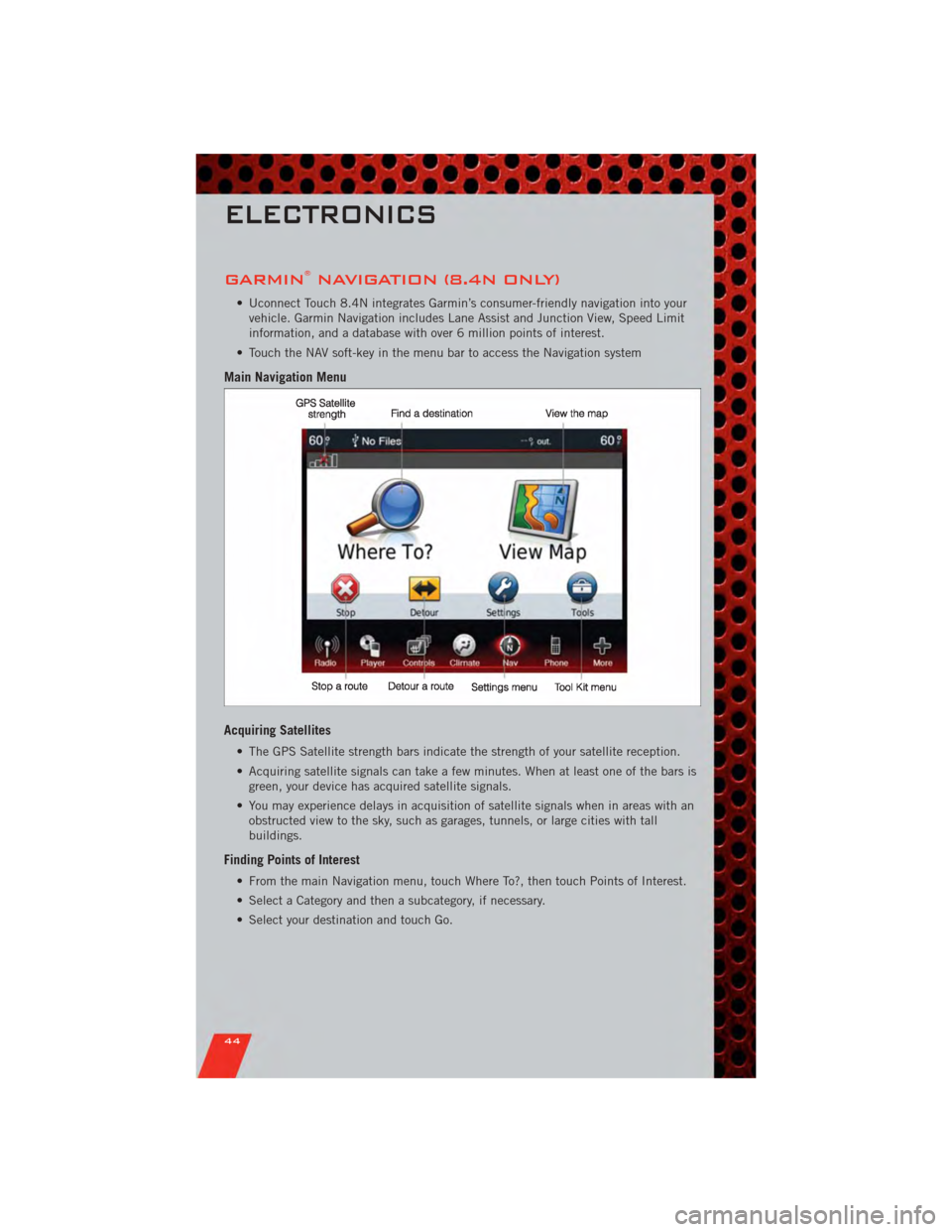
GARMIN®NAVIGATION (8.4N ONLY)
• Uconnect Touch 8.4N integrates Garmin’s consumer-friendly navigation into yourvehicle. Garmin Navigation includes Lane Assist and Junction View, Speed Limit
information, and a database with over 6 million points of interest.
• Touch the NAV soft-key in the menu bar to access the Navigation system
Main Navigation Menu
Acquiring Satellites
• The GPS Satellite strength bars indicate the strength of your satellite reception.
• Acquiring satellite signals can take a few minutes. When at least one of the bars is green, your device has acquired satellite signals.
• You may experience delays in acquisition of satellite signals when in areas with an obstructed view to the sky, such as garages, tunnels, or large cities with tall
buildings.
Finding Points of Interest
• From the main Navigation menu, touch Where To?, then touch Points of Interest.
• Select a Category and then a subcategory, if necessary.
• Select your destination and touch Go.
ELECTRONICS
44
Page 47 of 104
Finding a Place by Spelling the Name
• From the Main Navigation Menu, touch Where to?, then touch Points of Interestand then touch Spell Name.
• Enter the name of your destination.
• Touch Done.
• Select your destination and touch Go.
Entering a Destination Address
• From the main Navigation menu, touch Where To?, then touch Address.
• Follow the on-screen prompts to enter the address and touch Go.
Searching Near Another Location
• From the main Navigation menu, touch Where To?, then touch a destination and then touch Near.
• Select an option from the available choices.
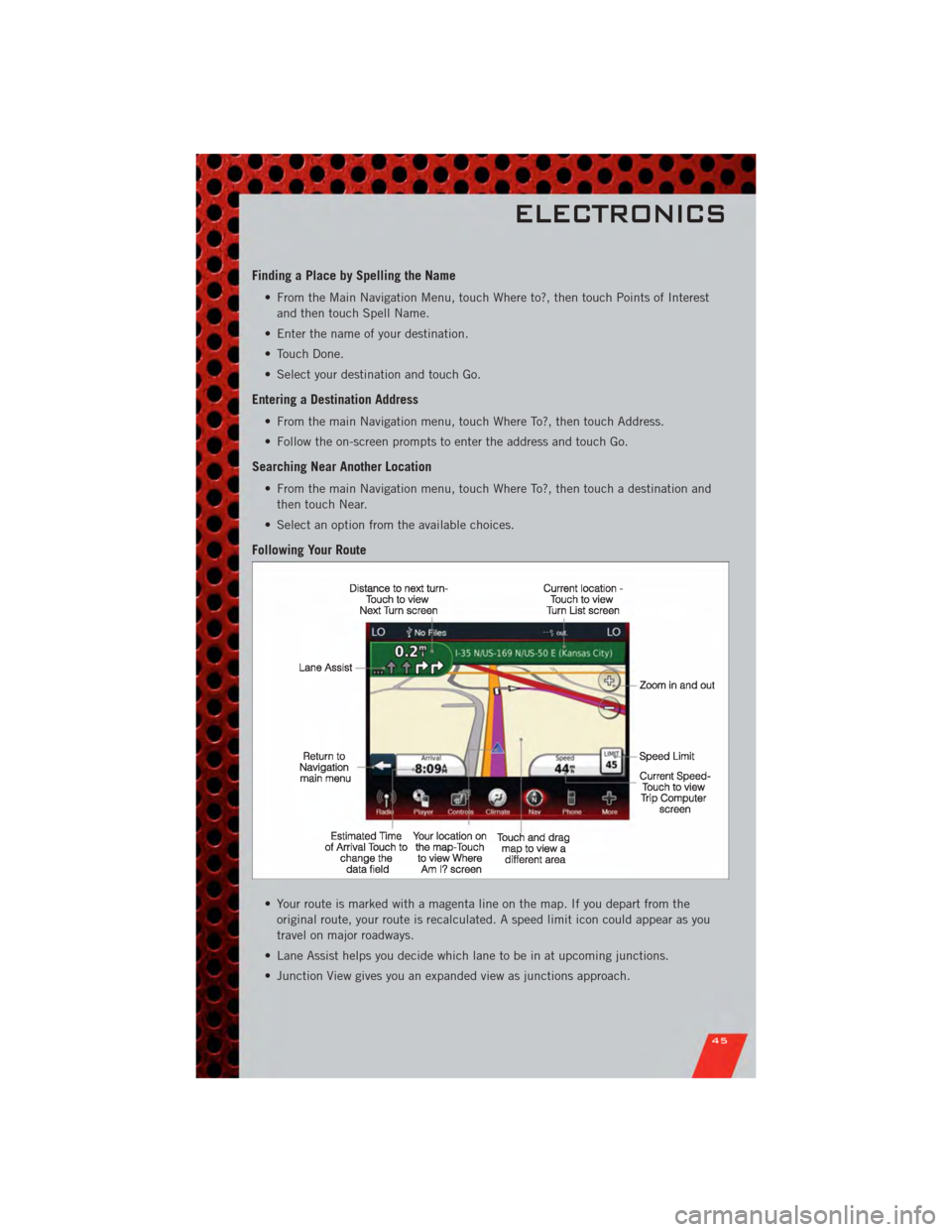
Following Your Route
• Your route is marked with a magenta line on the map. If you depart from the original route, your route is recalculated. A speed limit icon could appear as you
travel on major roadways.
• Lane Assist helps you decide which lane to be in at upcoming junctions.
• Junction View gives you an expanded view as junctions approach.
ELECTRONICS
45
Page 98 of 104
Jack Location.............. 67
Jump Starting .............. 70
KeyFob .................. 8
Keyless Enter-N-Go ........... 9
Lock/Unlock .............. 9
Starting/Stopping .......... 10
Lane Change Assist .......... 22
LATCH (Lower Anchors and Tether for
CHildren) ................ 13
Lights TurnSignal .............. 22
Warning (Instrument Cluster
Description) .............. 6
Maintenance Record .......... 85
MaintenanceSchedule ........ 83
MemorySeat .............. 16
MOPAR
®Accessories ......... 94
Navigation ................ 44
Oil Change Indicator .......... 66
Oil, Engine Capacity ............... 81
Outlet Power ................. 60
Overheating, Engine .......... 66
Panic Alarm ............... 8
Pedals, Adjustable ........... 20
Phone (Uconnect) ........... 49
Placard, Tire and Loading
Information ............... 90
Power Glass Sunroof ............ 30
Outlet (Auxiliary Electrical
Outlet) ................ 60
Seats ................. 16
Steering ................ 81
Tilt/Telescoping Steering
Column ................ 21
Programmable Electronic Features . . 57
Radio Operation ............ 38
Rain Sensitive Wiper System ..... 22Rear Heated Seats
........... 19
Rear Seat, Folding ........... 18
Recreational Towing .......... 62
Remote Starting System ........ 9
Replacement Bulbs .......... 91
Reporting Safety Defects ....... 93
Restraints, Child ............ 13
Seat Belts ................ 12
Seats ................... 16
Adjustment .............. 17
Heated ................ 18
Lumbar Support ........... 16
Memory ................ 16
Power ................. 16
RearFolding ............. 18
Setting the Clock .......... 35,37
Shift Lever Override .......... 72
Signals, Turn .............. 22
SIRIUS Travel Link ........... 47
SmartBeams .............. 23
Spark Plugs ............... 81
Speed Control (Cruise Control) .... 24
Starting Remote ................. 9
Steering Tilt Column .............. 21
Store Radio Presets .......... 39
SunRoof ................ 30
Supplemental Restraint System -
Airbag .................. 12
Temperature Gauge, Engine
Coolant ................. 67
Theft Alarm (Security Alarm) ..... 11
Theft System Arming ......... 11
Theft System Disarming ........ 11
Tilt Steering Column .......... 21
Tires AirPressure ............. 90
Changing ............... 68
FlatChanging ............ 68
Jacking ................ 68
Pressure Warning Light ....... 63
Towing .................. 61 24-Hour Towing Assistance ..... 63
Disabled Vehicle ........... 73
Recreational ............. 6
2
INDEX
96