display DODGE CHARGER 2011 7.G Owners Manual
[x] Cancel search | Manufacturer: DODGE, Model Year: 2011, Model line: CHARGER, Model: DODGE CHARGER 2011 7.GPages: 104, PDF Size: 4.53 MB
Page 9 of 104
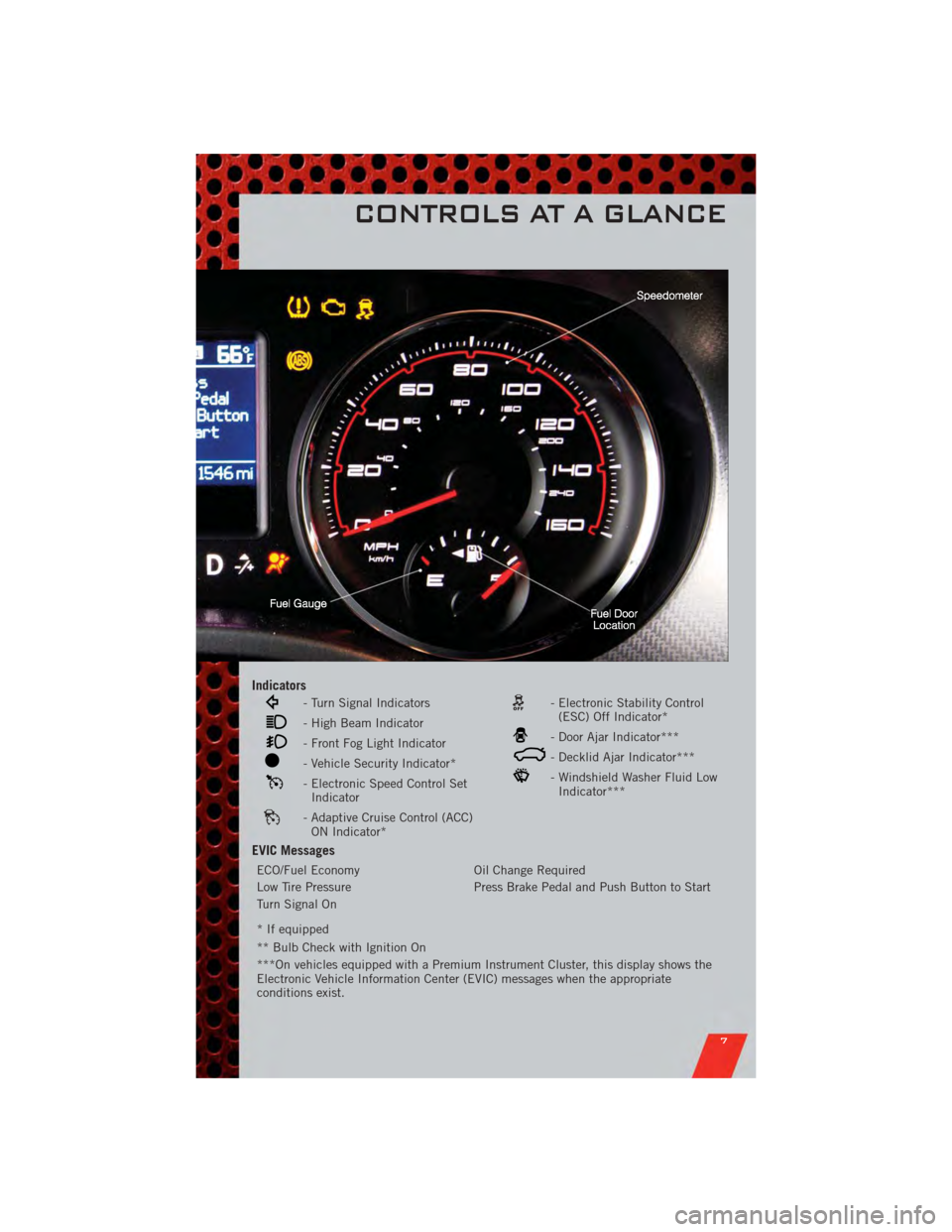
Indicators
- Turn Signal Indicators
- High Beam Indicator
- Front Fog Light Indicator
- Vehicle Security Indicator*
- Electronic Speed Control SetIndicator
- Adaptive Cruise Control (ACC)ON Indicator*
- Electronic Stability Control(ESC) Off Indicator*
- Door Ajar Indicator***
- Decklid Ajar Indicator***
- Windshield Washer Fluid LowIndicator***
EVIC Messages
ECO/Fuel Economy Oil Change Required
Low Tire Pressure Press Brake Pedal and Push Button to Start
Turn Signal On
* If equipped
** Bulb Check with Ignition On
***On vehicles equipped with a Premium Instrument Cluster, this display shows the
Electronic Vehicle Information Center (EVIC) messages when the appropriate
conditions exist.
CONTROLS AT A GLANCE
7
Page 19 of 104
• To program your Key Fobs, perform the following:• Change the ignition to OFF.
• Select desired memory profile 1 or 2.
• Once the profile has been recalled, press and release the SET (S) button on thememory switch, then press and release the side of the rocker switch labeled 1 or
2 accordingly.
• (1 or 2) will display in the instrument cluster if the vehicle is equipped with the EVIC.
• Press and release the LOCK button on the Key Fob within 10 seconds.
NOTE: Your Key Fob can be unlinked to your memory settings by pressing the SET (S)
button followed by the UNLOCK button on the Key Fob in the fourth step.
• Press 1 or 2 to recall the saved positions, or press UNLOCK on the programmedKey Fob.
• Refer to the Owner's Manual on the DVD for further details.
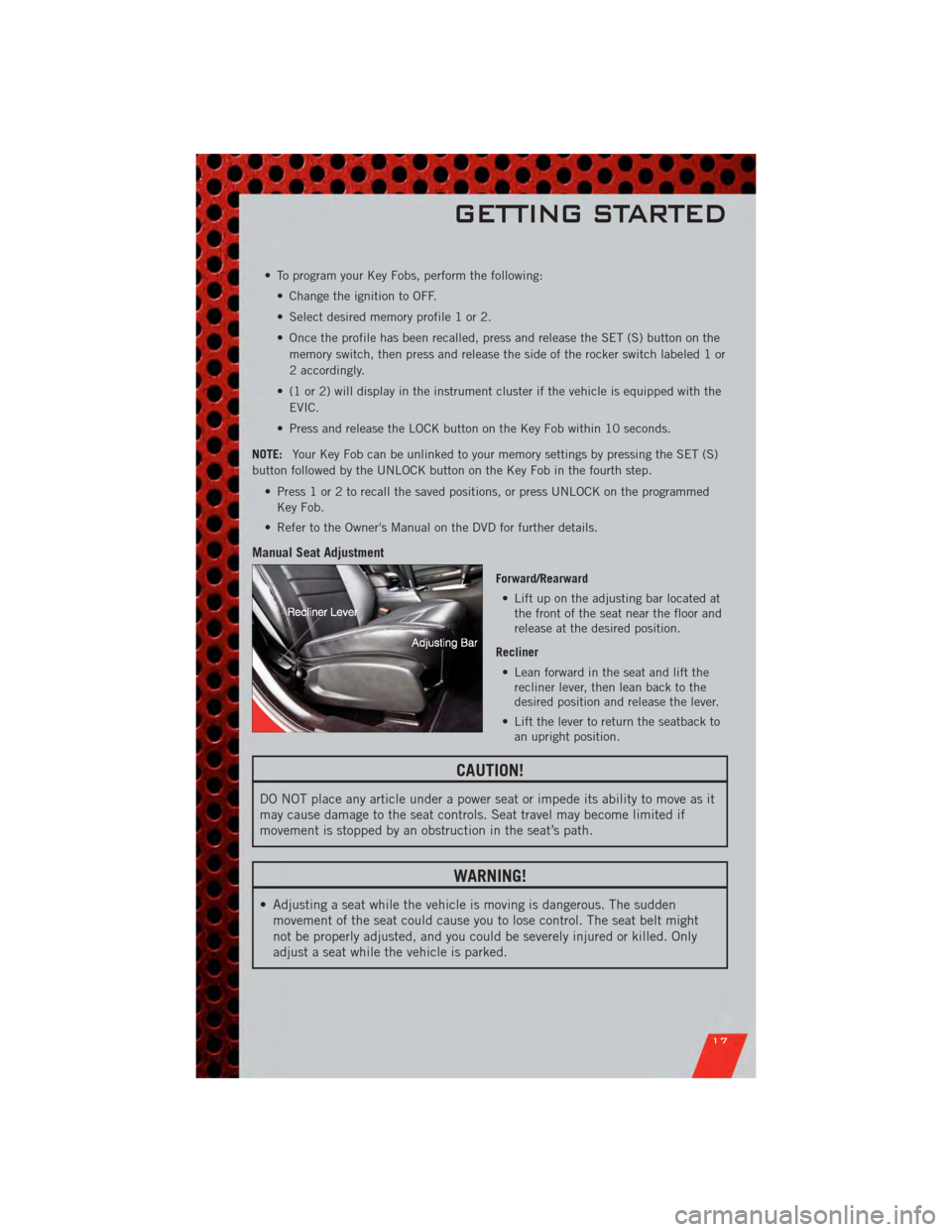
Manual Seat Adjustment
Forward/Rearward • Lift up on the adjusting bar located at the front of the seat near the floor and
release at the desired position.
Recliner • Lean forward in the seat and lift the recliner lever, then lean back to the
desired position and release the lever.
• Lift the lever to return the seatback to an upright position.
CAUTION!
DO NOT place any article under a power seat or impede its ability to move as it
may cause damage to the seat controls. Seat travel may become limited if
movement is stopped by an obstruction in the seat’s path.
WARNING!
• Adjusting a seat while the vehicle is moving is dangerous. The suddenmovement of the seat could cause you to lose control. The seat belt might
not be properly adjusted, and you could be severely injured or killed. Only
adjust a seat while the vehicle is parked.
GETTING STARTED
17
Page 21 of 104
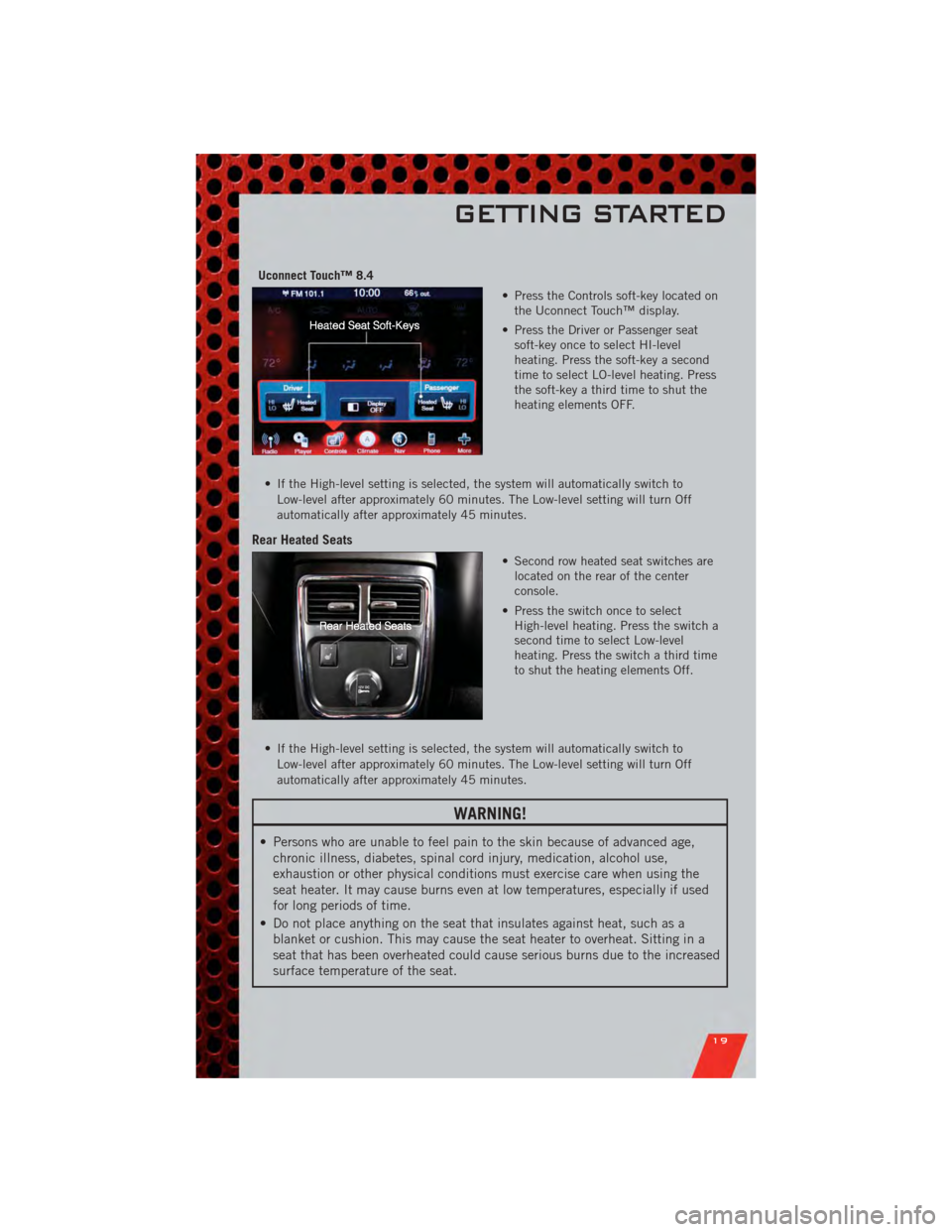
Uconnect Touch™ 8.4• Press the Controls soft-key located onthe Uconnect Touch™ display.
• Press the Driver or Passenger seat soft-key once to select HI-level
heating. Press the soft-key a second
time to select LO-level heating. Press
the soft-key a third time to shut the
heating elements OFF.
• If the High-level setting is selected, the system will automatically switch to Low-level after approximately 60 minutes. The Low-level setting will turn Off
automatically after approximately 45 minutes.
Rear Heated Seats
• Second row heated seat switches arelocated on the rear of the center
console.
• Press the switch once to select High-level heating. Press the switch a
second time to select Low-level
heating. Press the switch a third time
to shut the heating elements Off.
• If the High-level setting is selected, the system will automatically switch to Low-level after approximately 60 minutes. The Low-level setting will turn Off
automatically after approximately 45 minutes.
WARNING!
• Persons who are unable to feel pain to the skin because of advanced age,chronic illness, diabetes, spinal cord injury, medication, alcohol use,
exhaustion or other physical conditions must exercise care when using the
seat heater. It may cause burns even at low temperatures, especially if used
for long periods of time.
• Do not place anything on the seat that insulates against heat, such as a blanket or cushion. This may cause the seat heater to overheat. Sitting in a
seat that has been overheated could cause serious burns due to the increased
surface temperature of the seat.
GETTING STARTED
19
Page 25 of 104
HEADLIGHT SWITCH
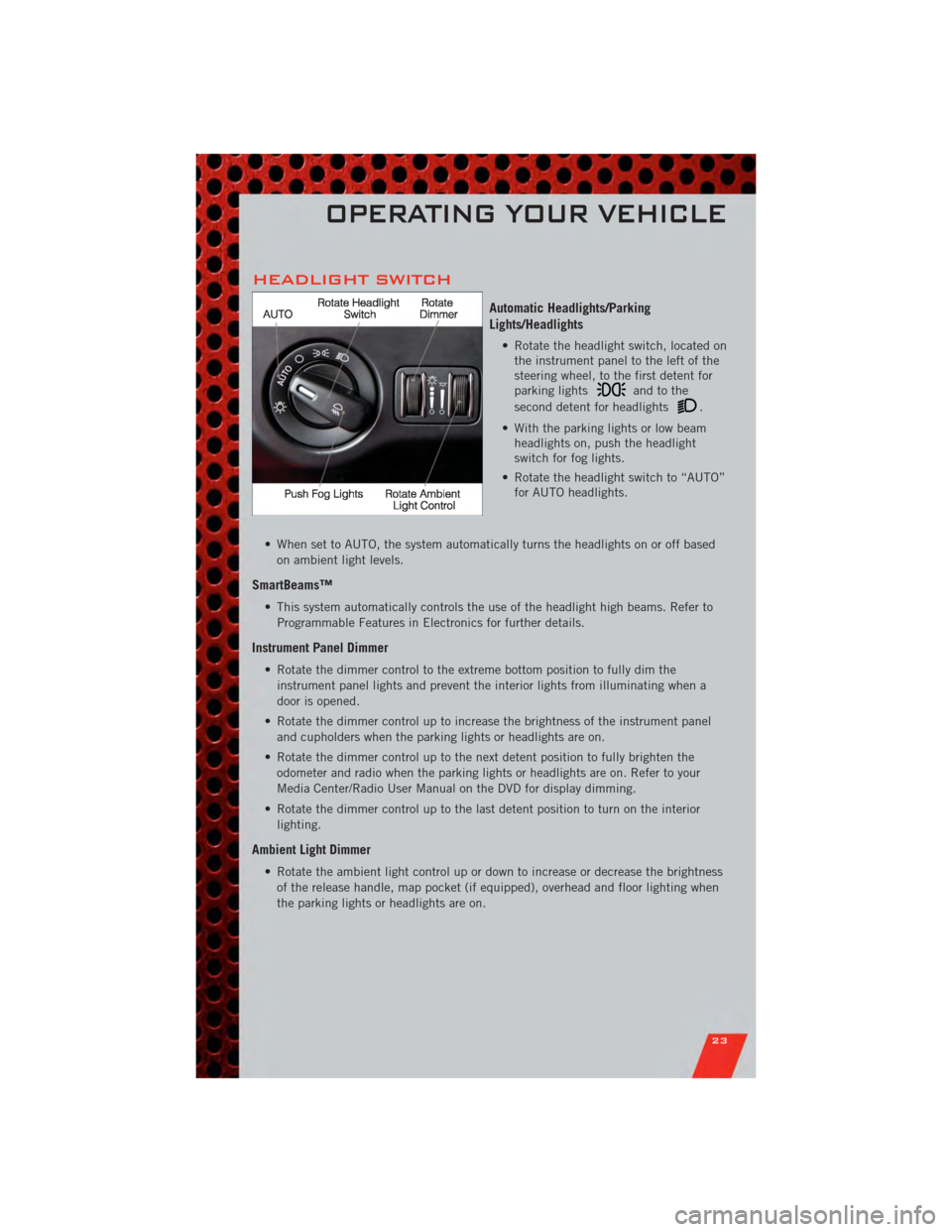
Automatic Headlights/Parking
Lights/Headlights
• Rotate the headlight switch, located onthe instrument panel to the left of the
steering wheel, to the first detent for
parking lights
andtothe
second detent for headlights
.
• With the parking lights or low beam headlights on, push the headlight
switch for fog lights.
• Rotate the headlight switch to “AUTO” for AUTO headlights.
• When set to AUTO, the system automatically turns the headlights on or off based on ambient light levels.
SmartBeams™
• This system automatically controls the use of the headlight high beams. Refer toProgrammable Features in Electronics for further details.
Instrument Panel Dimmer
• Rotate the dimmer control to the extreme bottom position to fully dim theinstrument panel lights and prevent the interior lights from illuminating when a
door is opened.
• Rotate the dimmer control up to increase the brightness of the instrument panel and cupholders when the parking lights or headlights are on.
• Rotate the dimmer control up to the next detent position to fully brighten the odometer and radio when the parking lights or headlights are on. Refer to your
Media Center/Radio User Manual on the DVD for display dimming.
• Rotate the dimmer control up to the last detent position to turn on the interior lighting.
Ambient Light Dimmer
• Rotate the ambient light control up or down to increase or decrease the brightnessof the release handle, map pocket (if equipped), overhead and floor lighting when
the parking lights or headlights are on.
OPERATING YOUR VEHICLE
23
Page 27 of 104
Distance Setting (ACC Only)
• To set or change the distance setting, press the Distance button and release. Eachtime the button is pressed, the distance setting adjusts between long (3), medium
(2), and short (1). The distance setting will default to the last set mode the next
time the vehicle is restarted and the ACC system is turned on.
• The specified following distance for ACC can be set by varying the distance setting between 3 (long), 2 (medium), and 1 (short). Using this distance setting and the
vehicle speed, ACC calculates and sets the distance to the vehicle ahead. This
distance setting displays in the EVIC.
Mode (ACC Only)
• If desired, the Adaptive Cruise Control mode can be turned off and the system canbe operated as a standard (fixed speed) Cruise Control. When in the standard
(fixed speed) Cruise Control mode the distance setting feature will be disabled and
the system will maintain the speed you set.
• To change modes, press the MODE button when the system is in either the OFF, READY, or SET position. Cruise Ready will be displayed if the system was in ACC
READY or ACC SET position. Cruise Off will be displayed if the system was in the
ACC OFF position. To switch back to Adaptive Cruise Control mode, press the
MODE button a second time.
• Refer to your Owner's Manual on the DVD for further information.
Forward Collision Warning
• Forward Collision Warning (FCW) warns the driver of a potential collision with the vehicle in front of you and prompts the driver to take action in order to avoid the
collision. A warning message (both audible and visual) will be displayed on the
EVIC.
• Refer to your Owner's Manual on the DVD for further information.
WARNING!
• Leaving the Electronic or Adaptive Speed Control system on when not in use is dangerous. You could accidentally set the system or cause it to go faster
than you want. You could lose control and have a collision. Always leave the
Electronic or Adaptive Speed Control system off when you are not using it.
• Electronic Speed Control can be dangerous where the system cannot maintain a constant speed. Your vehicle could go too fast for the conditions,
and you could lose control. A collision could be the result. Do not use
Electronic Speed Control in heavy traffic or on roads that are winding, icy,
snow-covered or slippery.
(Continued)
OPERATING YOUR VEHICLE
25
Page 31 of 104
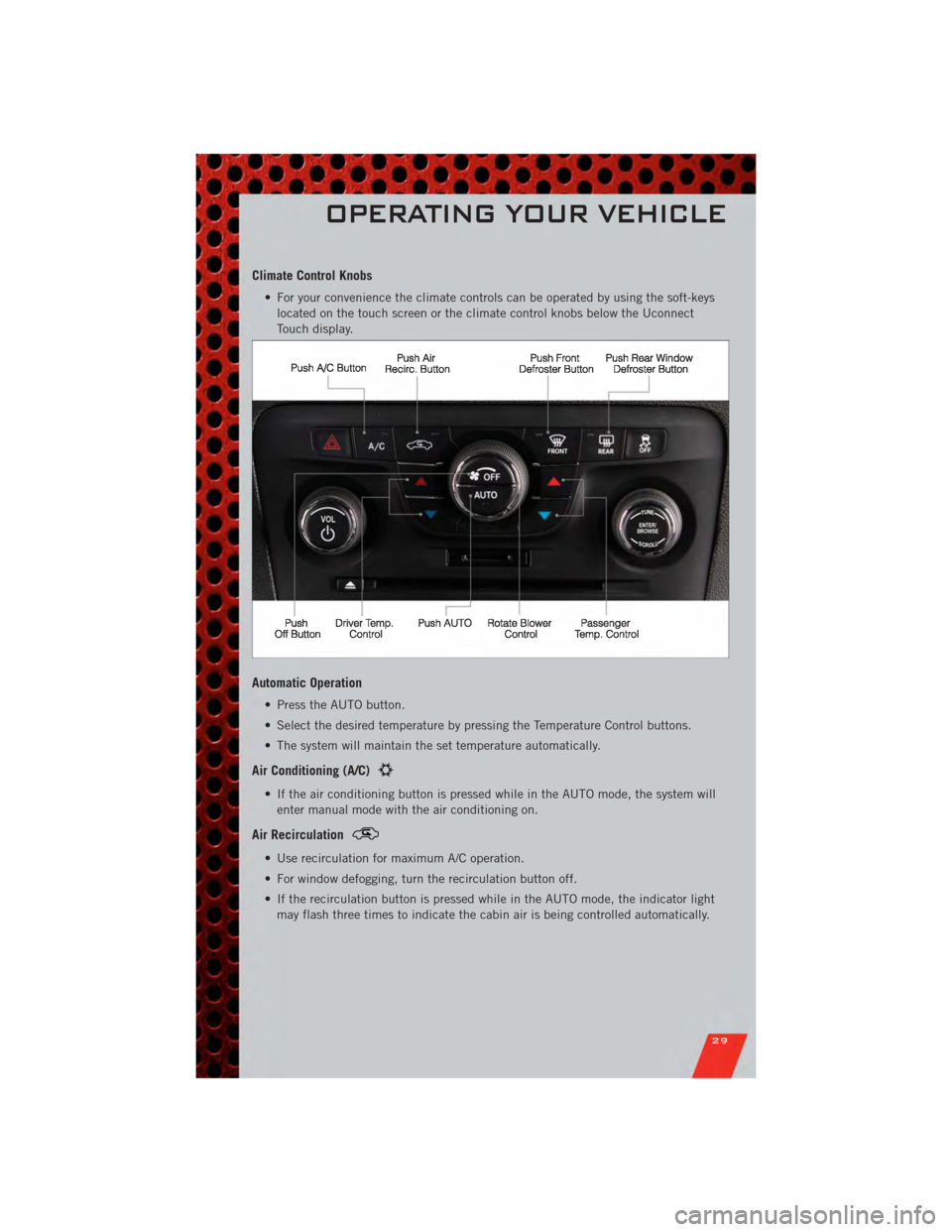
Climate Control Knobs
• For your convenience the climate controls can be operated by using the soft-keyslocated on the touch screen or the climate control knobs below the Uconnect
Touch display.
Automatic Operation
• Press the AUTO button.
• Select the desired temperature by pressing the Temperature Control buttons.
• The system will maintain the set temperature automatically.
Air Conditioning (A/C)
• If the air conditioning button is pressed while in the AUTO mode, the system willenter manual mode with the air conditioning on.
Air Recirculation
• Use recirculation for maximum A/C operation.
• For window defogging, turn the recirculation button off.
• If the recirculation button is pressed while in the AUTO mode, the indicator lightmay flash three times to indicate the cabin air is being controlled automatically.
OPERATING YOUR VEHICLE
29
Page 37 of 104
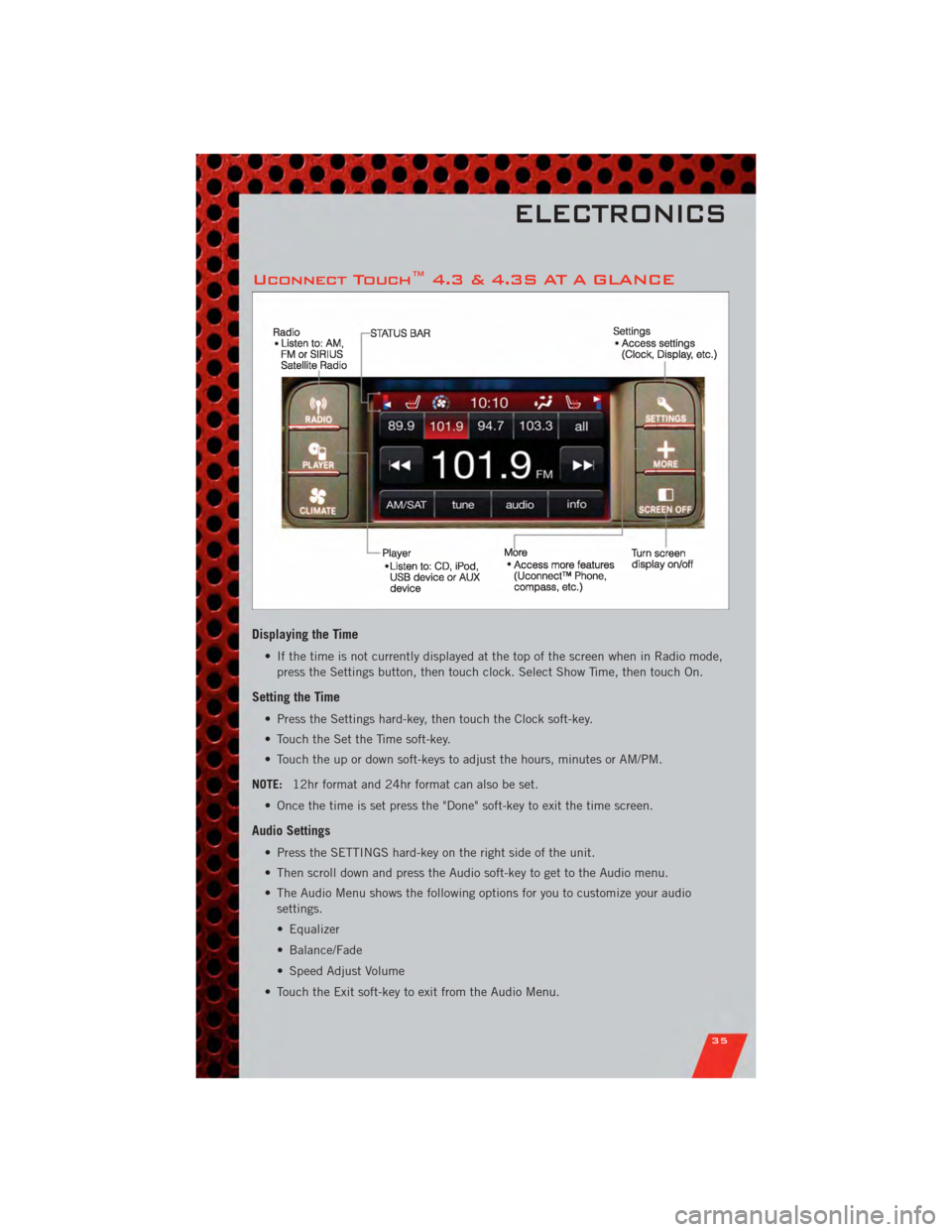
Uconnect Touch™ 4.3 & 4.3S AT A GLANCE
Displaying the Time
• If the time is not currently displayed at the top of the screen when in Radio mode,press the Settings button, then touch clock. Select Show Time, then touch On.
Setting the Time
• Press the Settings hard-key, then touch the Clock soft-key.
• Touch the Set the Time soft-key.
• Touch the up or down soft-keys to adjust the hours, minutes or AM/PM.
NOTE: 12hr format and 24hr format can also be set.
• Once the time is set press the "Done" soft-key to exit the time screen.
Audio Settings
• Press the SETTINGS hard-key on the right side of the unit.
• Then scroll down and press the Audio soft-key to get to the Audio menu.
• The Audio Menu shows the following options for you to customize your audio settings.
• Equalizer
• Balance/Fade
• Speed Adjust Volume
• Touch the Exit soft-key to exit from the Audio Menu.
ELECTRONICS
35
Page 38 of 104
Equalizer• Touch the Equalizer soft-key to adjust the Bass, Mid and Treble. Use the + or - soft-key to adjust the equalizer to your desired settings. Press the back arrow
soft-key when done.
Balance/Fade • Touch the Balance/Fade soft-key to adjust the sound from the speakers. Use the arrow soft-key to adjust the sound level from the front and rear or right and left
side speakers. Touch the Center "C" soft-key to reset the balance and fade to the
factory setting. Press the back arrow soft-key when done.
Speed Adjust Volume • Touch the Speed Adjust Volume soft-key to select between OFF, 1, 2 or 3. This will decrease the radio volume relative to a decrease in vehicle speed. Press the back
arrow soft-key when done.
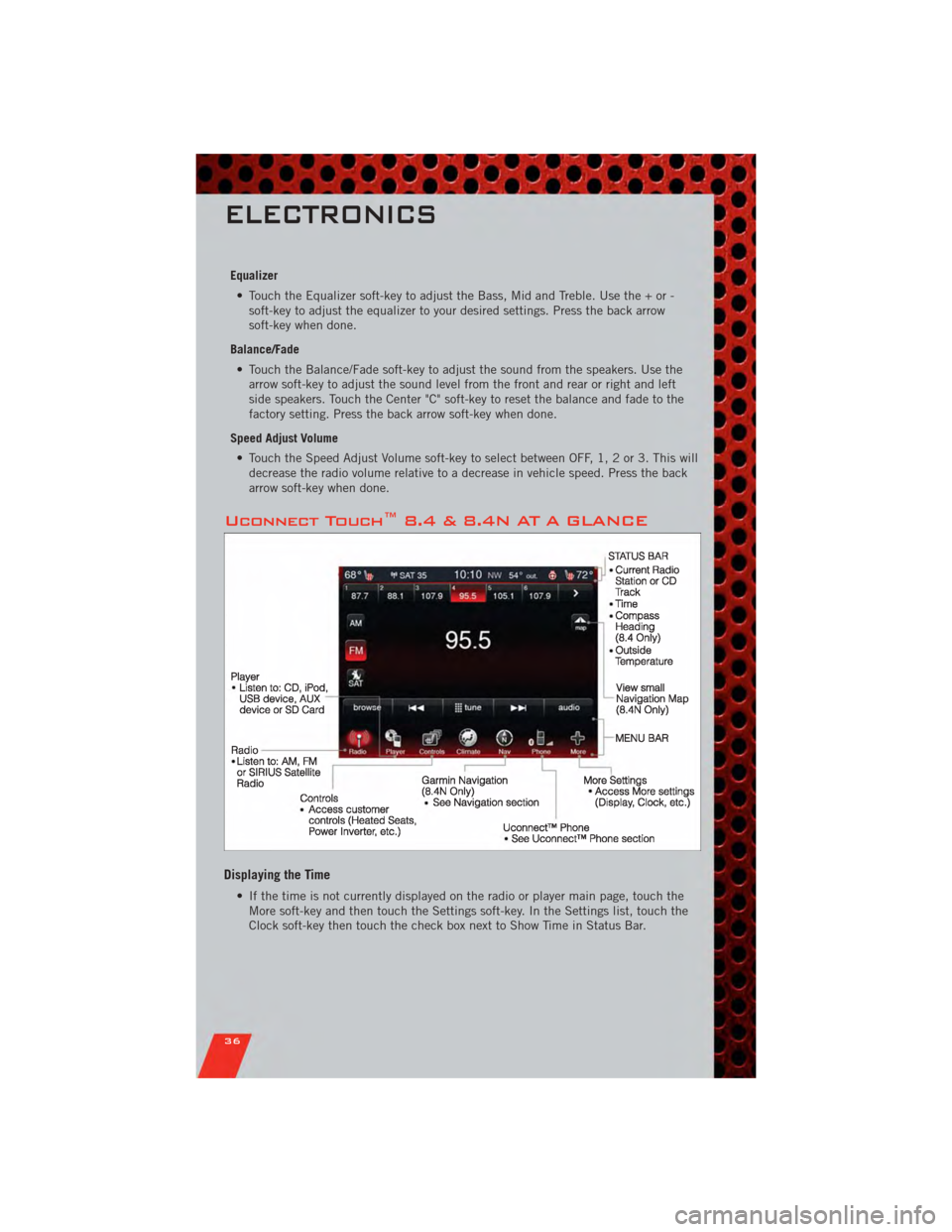
Uconnect Touch™ 8.4 & 8.4N AT A GLANCE
Displaying the Time
• If the time is not currently displayed on the radio or player main page, touch theMore soft-key and then touch the Settings soft-key. In the Settings list, touch the
Clock soft-key then touch the check box next to Show Time in Status Bar.
ELECTRONICS
36
Page 39 of 104
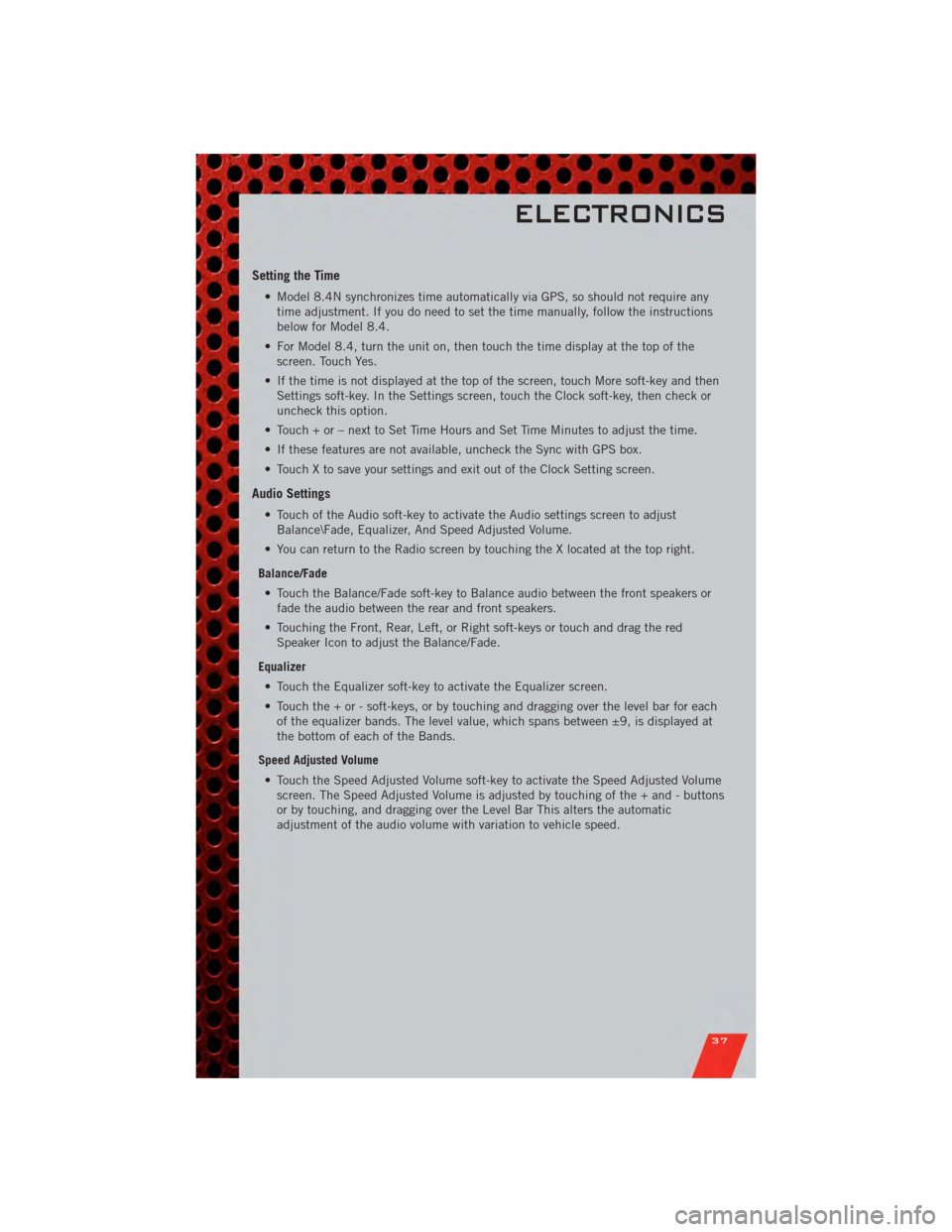
Setting the Time
• Model 8.4N synchronizes time automatically via GPS, so should not require anytime adjustment. If you do need to set the time manually, follow the instructions
below for Model 8.4.
• For Model 8.4, turn the unit on, then touch the time display at the top of the screen. Touch Yes.
• If the time is not displayed at the top of the screen, touch More soft-key and then Settings soft-key. In the Settings screen, touch the Clock soft-key, then check or
uncheck this option.
• Touch + or – next to Set Time Hours and Set Time Minutes to adjust the time.
• If these features are not available, uncheck the Sync with GPS box.
• Touch X to save your settings and exit out of the Clock Setting screen.
Audio Settings
• Touch of the Audio soft-key to activate the Audio settings screen to adjust Balance\Fade, Equalizer, And Speed Adjusted Volume.
• You can return to the Radio screen by touching the X located at the top right.
Balance/Fade • Touch the Balance/Fade soft-key to Balance audio between the front speakers or fade the audio between the rear and front speakers.
• Touching the Front, Rear, Left, or Right soft-keys or touch and drag the red Speaker Icon to adjust the Balance/Fade.
Equalizer • Touch the Equalizer soft-key to activate the Equalizer screen.
• Touch the + or - soft-keys, or by touching and dragging over the level bar for each of the equalizer bands. The level value, which spans between ±9, is displayed at
the bottom of each of the Bands.
Speed Adjusted Volume • Touch the Speed Adjusted Volume soft-key to activate the Speed Adjusted Volume screen. The Speed Adjusted Volume is adjusted by touching of the + and - buttons
or by touching, and dragging over the Level Bar This alters the automatic
adjustment of the audio volume with variation to vehicle speed.
ELECTRONICS
37
Page 43 of 104
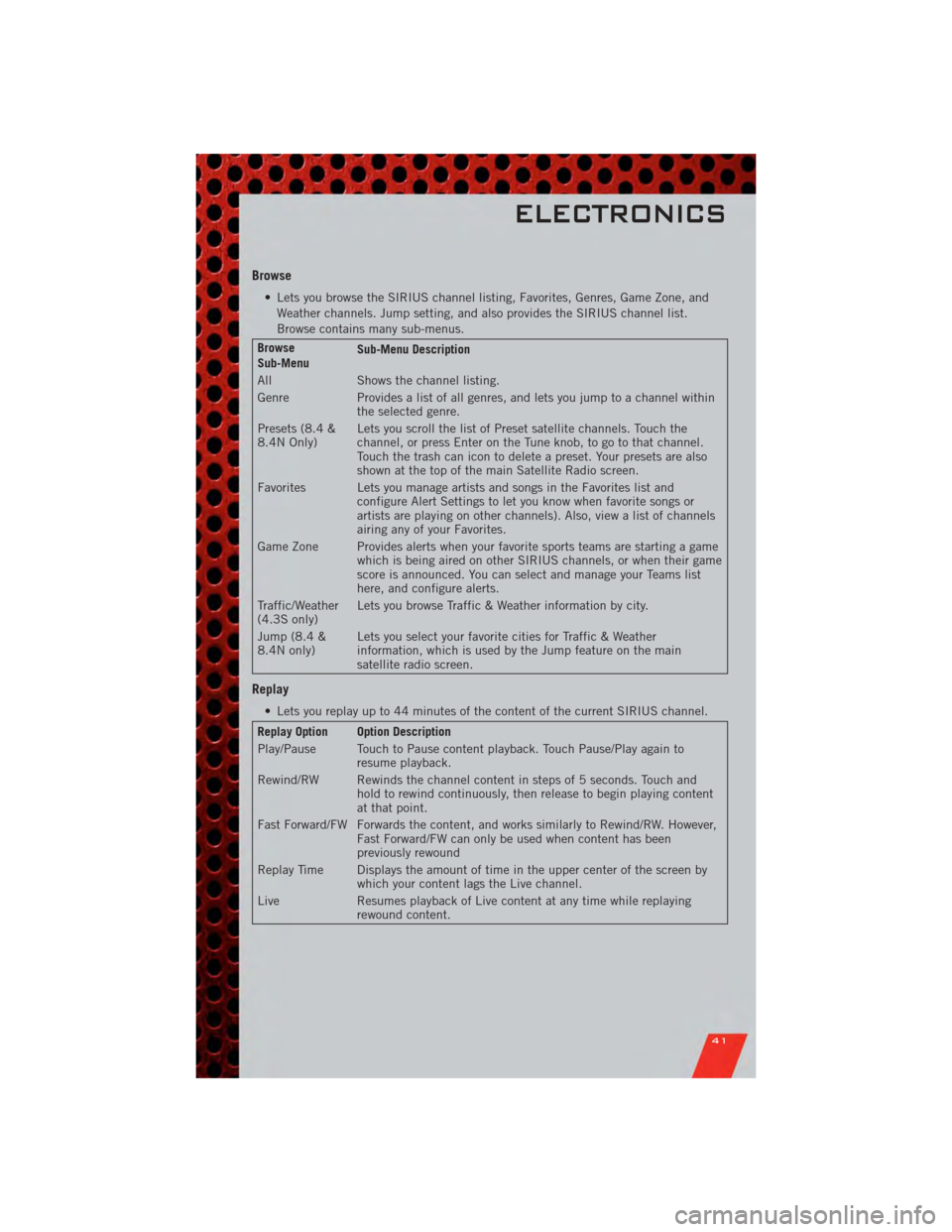
Browse
• Lets you browse the SIRIUS channel listing, Favorites, Genres, Game Zone, andWeather channels. Jump setting, and also provides the SIRIUS channel list.
Browse contains many sub-menus.
Browse
Sub-Menu Sub-Menu Description
All Shows the channel listing.
Genre Provides a list of all genres, and lets you jump to a channel within the selected genre.
Presets (8.4 &
8.4N Only) Lets you scroll the list of Preset satellite channels. Touch the
channel, or press Enter on the Tune knob, to go to that channel.
Touch the trash can icon to delete a preset. Your presets are also
shown at the top of the main Satellite Radio screen.
Favorites Lets you manage artists and songs in the Favorites list and configure Alert Settings to let you know when favorite songs or
artists are playing on other channels). Also, view a list of channels
airing any of your Favorites.
Game Zone Provides alerts when your favorite sports teams are starting a game which is being aired on other SIRIUS channels, or when their game
score is announced. You can select and manage your Teams list
here, and configure alerts.
Traffic/Weather
(4.3S only) Lets you browse Traffic & Weather information by city.
Jump (8.4 &
8.4N only) Lets you select your favorite cities for Traffic & Weather
information, which is used by the Jump feature on the main
satellite radio screen.
Replay
• Lets you replay up to 44 minutes of the content of the current SIRIUS channel.
Replay Option Option Description
Play/Pause Touch to Pause content playback. Touch Pause/Play again to
resume playback.
Rewind/RW Rewinds the channel content in steps of 5 seconds. Touch and hold to rewind continuously, then release to begin playing content
at that point.
Fast Forward/FW Forwards the content, and works similarly to Rewind/RW. However, Fast Forward/FW can only be used when content has been
previously rewound
Replay Time Displays the amount of time in the upper center of the screen by which your content lags the Live channel.
Live Resumes playback of Live content at any time while replaying rewound content.
ELECTRONICS
41