fog light DODGE CHARGER 2011 7.G Owners Manual
[x] Cancel search | Manufacturer: DODGE, Model Year: 2011, Model line: CHARGER, Model: DODGE CHARGER 2011 7.GPages: 104, PDF Size: 4.53 MB
Page 9 of 104
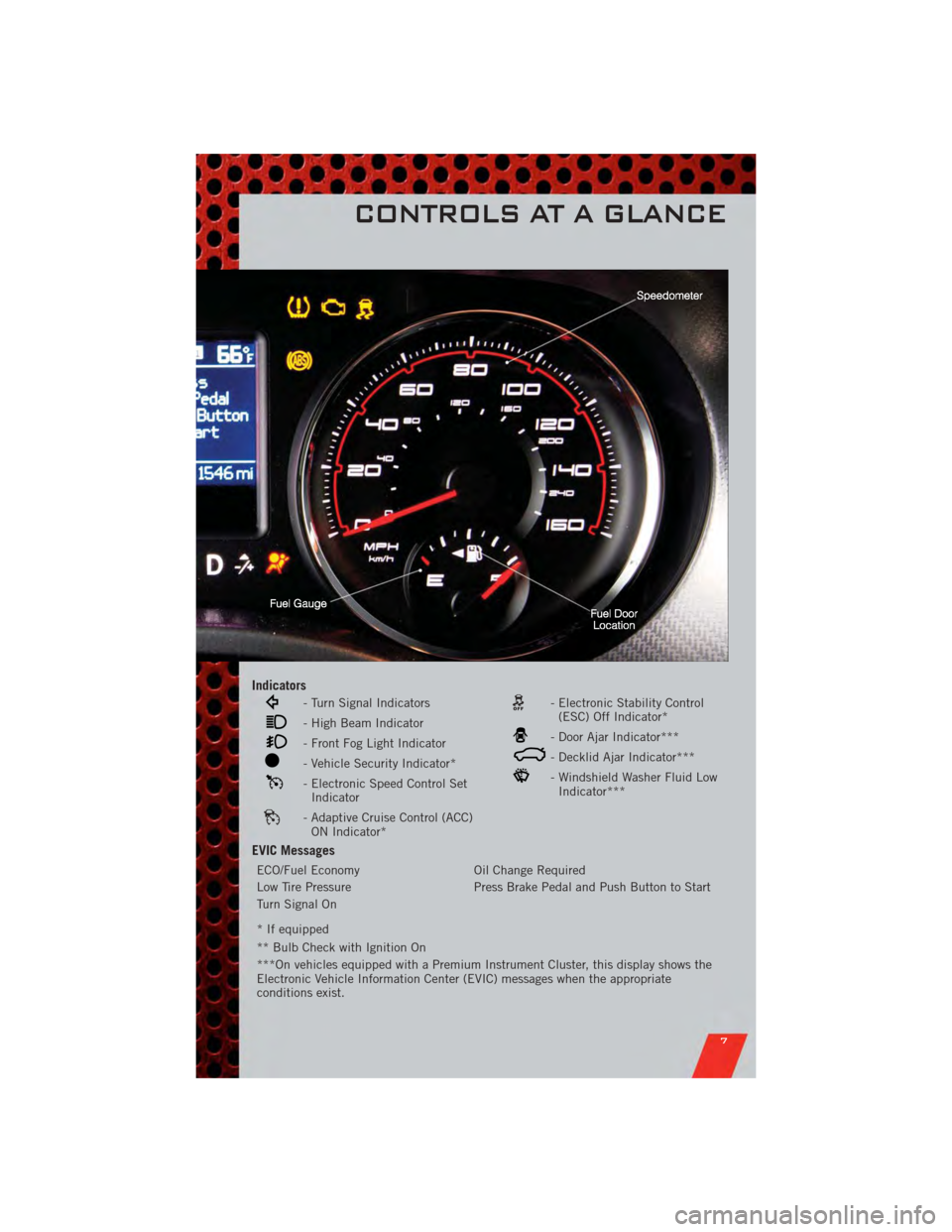
Indicators
- Turn Signal Indicators
- High Beam Indicator
- Front Fog Light Indicator
- Vehicle Security Indicator*
- Electronic Speed Control SetIndicator
- Adaptive Cruise Control (ACC)ON Indicator*
- Electronic Stability Control(ESC) Off Indicator*
- Door Ajar Indicator***
- Decklid Ajar Indicator***
- Windshield Washer Fluid LowIndicator***
EVIC Messages
ECO/Fuel Economy Oil Change Required
Low Tire Pressure Press Brake Pedal and Push Button to Start
Turn Signal On
* If equipped
** Bulb Check with Ignition On
***On vehicles equipped with a Premium Instrument Cluster, this display shows the
Electronic Vehicle Information Center (EVIC) messages when the appropriate
conditions exist.
CONTROLS AT A GLANCE
7
Page 25 of 104
HEADLIGHT SWITCH
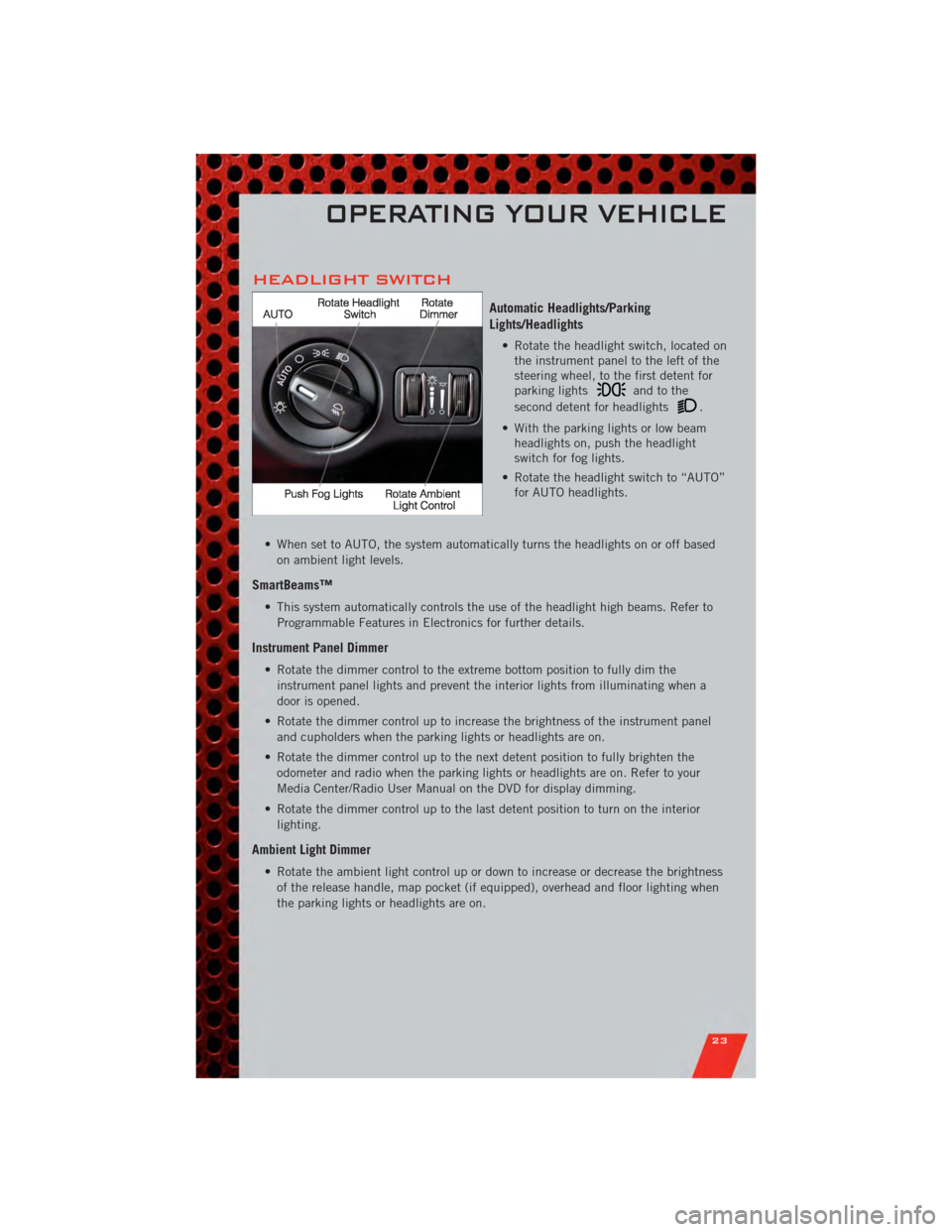
Automatic Headlights/Parking
Lights/Headlights
• Rotate the headlight switch, located onthe instrument panel to the left of the
steering wheel, to the first detent for
parking lights
andtothe
second detent for headlights
.
• With the parking lights or low beam headlights on, push the headlight
switch for fog lights.
• Rotate the headlight switch to “AUTO” for AUTO headlights.
• When set to AUTO, the system automatically turns the headlights on or off based on ambient light levels.
SmartBeams™
• This system automatically controls the use of the headlight high beams. Refer toProgrammable Features in Electronics for further details.
Instrument Panel Dimmer
• Rotate the dimmer control to the extreme bottom position to fully dim theinstrument panel lights and prevent the interior lights from illuminating when a
door is opened.
• Rotate the dimmer control up to increase the brightness of the instrument panel and cupholders when the parking lights or headlights are on.
• Rotate the dimmer control up to the next detent position to fully brighten the odometer and radio when the parking lights or headlights are on. Refer to your
Media Center/Radio User Manual on the DVD for display dimming.
• Rotate the dimmer control up to the last detent position to turn on the interior lighting.
Ambient Light Dimmer
• Rotate the ambient light control up or down to increase or decrease the brightnessof the release handle, map pocket (if equipped), overhead and floor lighting when
the parking lights or headlights are on.
OPERATING YOUR VEHICLE
23
Page 28 of 104
WARNING!(Continued)
• Adaptive Cruise Control (ACC) is a convenience system. It is not a substitutefor active driving involvement. Pay attention to road, traffic, and weather
conditions, vehicle speed, distance to the vehicle ahead; and, brake
operation to ensure safe operation of the vehicle under all road conditions.
Your attention is always required while driving to maintain safe control of
your vehicle. Failure to follow these warnings can result in a collision or
serious personal injury.
The ACC system:
• Does not react to pedestrians, oncoming vehicles, and stationary objects (i.e., a stopped vehicle in a traffic jam or a disabled vehicle).
• Cannot take street, traffic, and weather conditions into account, and may be limited upon adverse sight distance conditions.
• Does not predict the lane curvature or the movement of preceding vehicles and will not compensate for such changes.
• Does not always fully recognize complex driving conditions, which can result in wrong or missing distance warnings.
• May not detect a vehicle ahead when strong light (for example, sunrise or sunset) is directly shining on the front of the vehicle.
• Can only apply a maximum of 25% of the vehicle’s braking capability, and will not bring the vehicle to a complete stop.
You should switch off the ACC system:
• When driving in fog, heavy rain, heavy snow, sleet, heavy traffic, and complex driving situations (i.e., in highway construction zones).
• When entering a turn lane or highway off ramp; when driving on roads that are winding, icy, snow-covered, slippery, or have steep uphill or downhill
slopes; and when towing a trailer.
• When circumstances do not allow safe driving at a constant speed.
• Failure to follow these warnings can result in a collision.
• Forward Collision Warning (FCW) is not intended to avoid a collision on its own. The driver has the responsibility to avoid a collision by controlling the
vehicle via braking and steering. Failure to follow this warning could lead to
serious injury or death.
OPERATING YOUR VEHICLE
26
Page 31 of 104
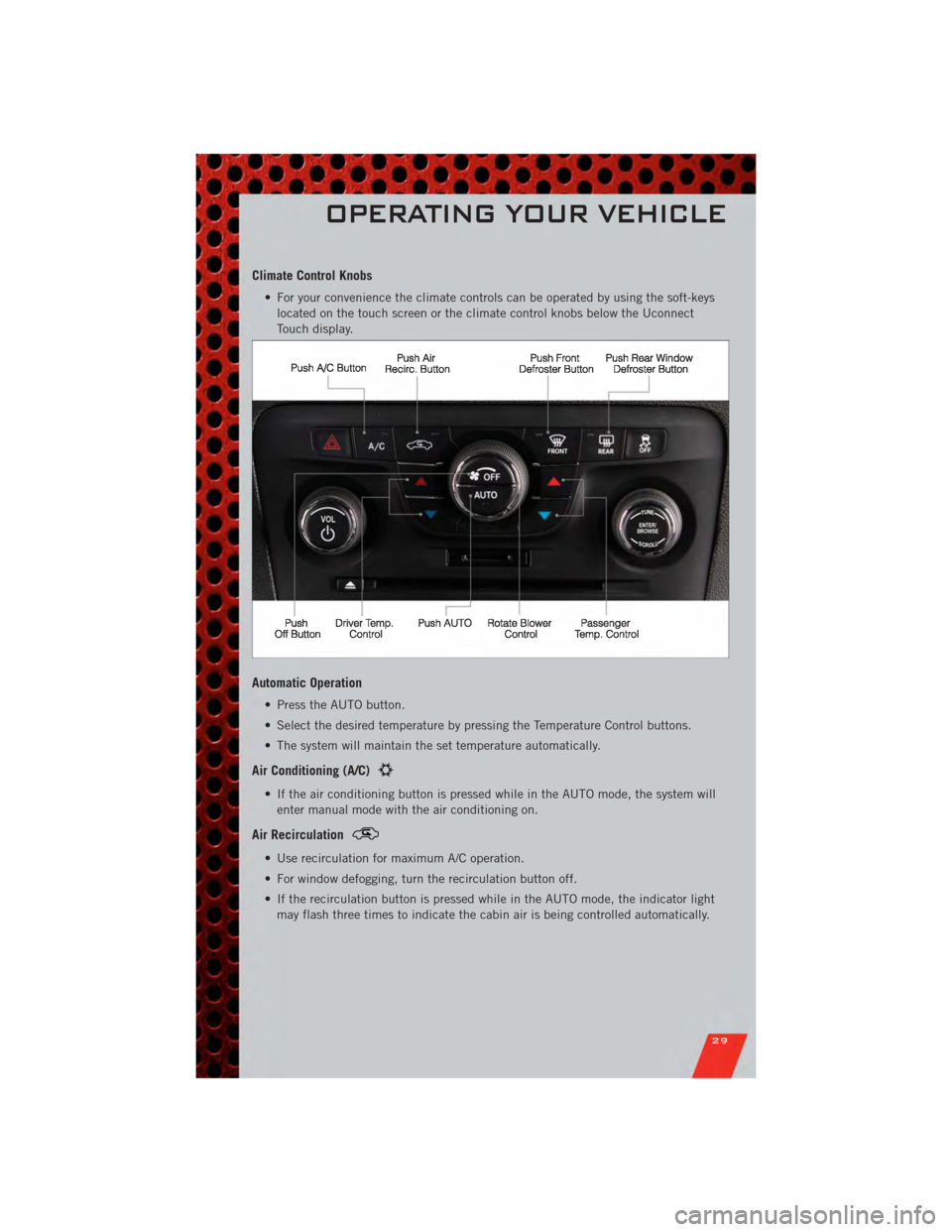
Climate Control Knobs
• For your convenience the climate controls can be operated by using the soft-keyslocated on the touch screen or the climate control knobs below the Uconnect
Touch display.
Automatic Operation
• Press the AUTO button.
• Select the desired temperature by pressing the Temperature Control buttons.
• The system will maintain the set temperature automatically.
Air Conditioning (A/C)
• If the air conditioning button is pressed while in the AUTO mode, the system willenter manual mode with the air conditioning on.
Air Recirculation
• Use recirculation for maximum A/C operation.
• For window defogging, turn the recirculation button off.
• If the recirculation button is pressed while in the AUTO mode, the indicator lightmay flash three times to indicate the cabin air is being controlled automatically.
OPERATING YOUR VEHICLE
29
Page 93 of 104
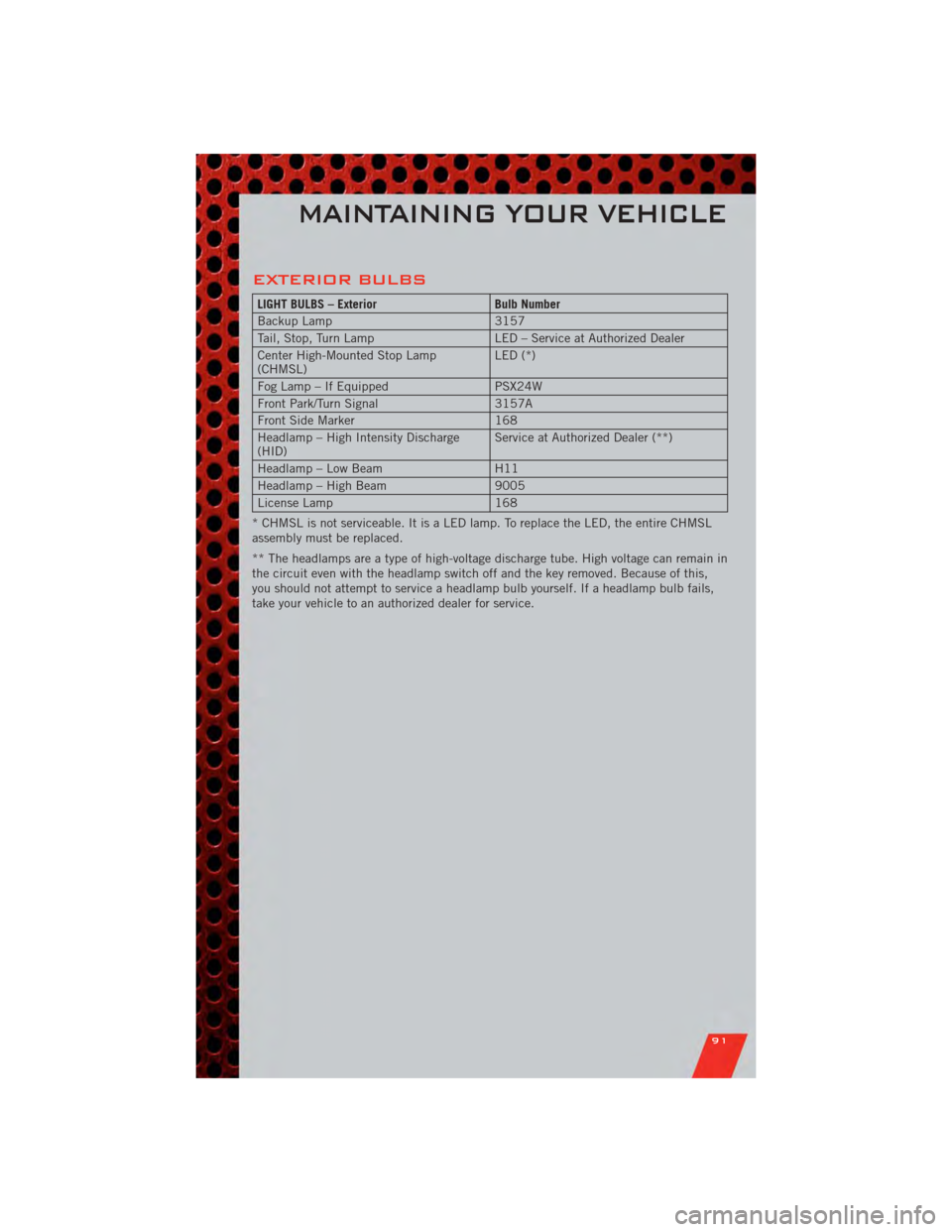
EXTERIOR BULBS
LIGHT BULBS – ExteriorBulb Number
Backup Lamp 3157
Tail, Stop, Turn Lamp LED – Service at Authorized Dealer
Center High-Mounted Stop Lamp
(CHMSL) LED (*)
Fog Lamp – If Equipped PSX24W
Front Park/Turn Signal 3157A
Front Side Marker 168
Headlamp – High Intensity Discharge
(HID) Service at Authorized Dealer (**)
Headlamp – Low Beam H11
Headlamp – High Beam 9005
License Lamp 168
* CHMSL is not serviceable. It is a LED lamp. To replace the LED, the entire CHMSL
assembly must be replaced.
** The headlamps are a type of high-voltage discharge tube. High voltage can remain in
the circuit even with the headlamp switch off and the key removed. Because of this,
you should not attempt to service a headlamp bulb yourself. If a headlamp bulb fails,
take your vehicle to an authorized dealer for service.
MAINTAINING YOUR VEHICLE
91
Page 96 of 104
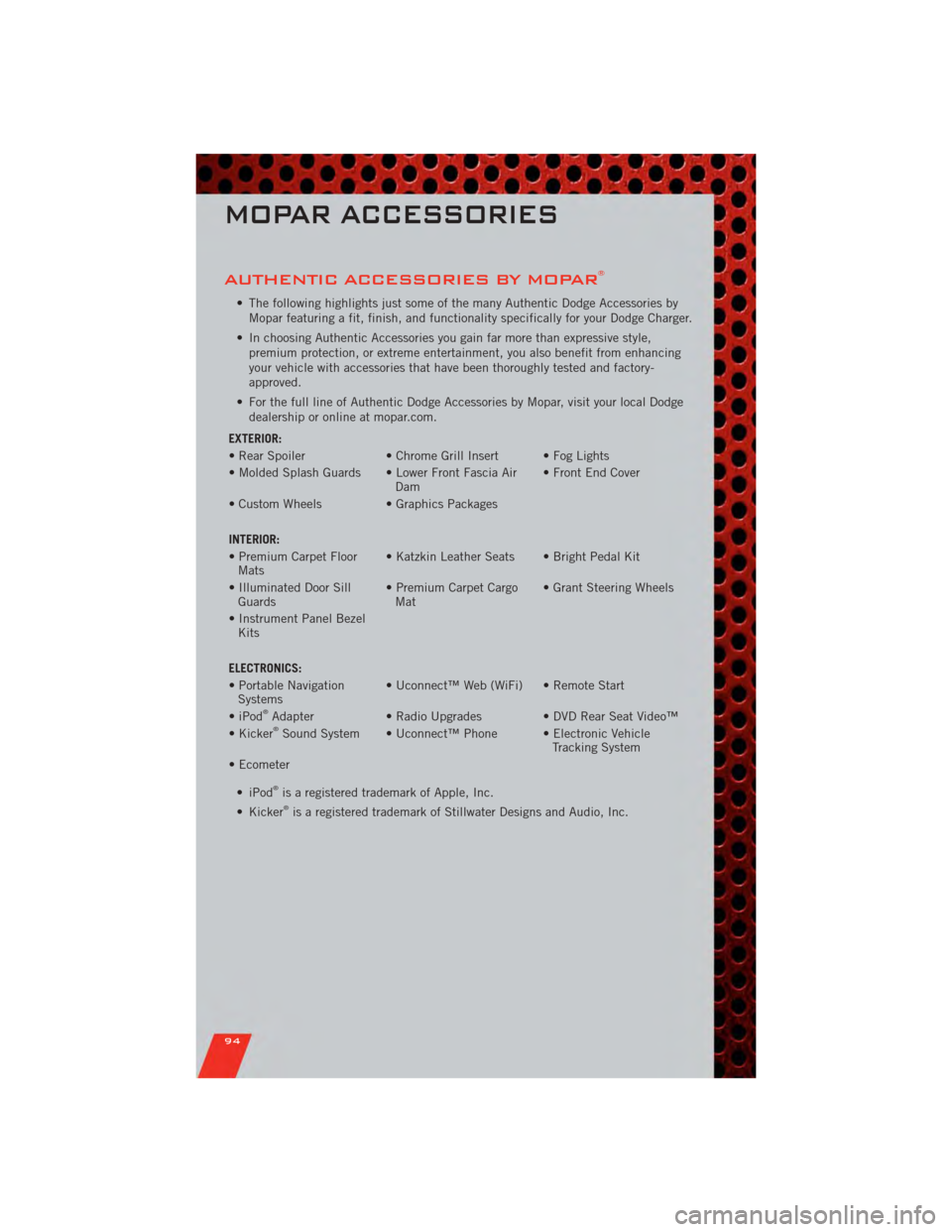
AUTHENTIC ACCESSORIES BY MOPAR®
• The following highlights just some of the many Authentic Dodge Accessories byMopar featuring a fit, finish, and functionality specifically for your Dodge Charger.
• In choosing Authentic Accessories you gain far more than expressive style, premium protection, or extreme entertainment, you also benefit from enhancing
your vehicle with accessories that have been thoroughly tested and factory-
approved.
• For the full line of Authentic Dodge Accessories by Mopar, visit your local Dodge dealership or online at mopar.com.
EXTERIOR:
• Rear Spoiler • Chrome Grill Insert • Fog Lights
• Molded Splash Guards • Lower Front Fascia Air Dam• Front End Cover
• Custom Wheels • Graphics Packages
INTERIOR:
• Premium Carpet Floor Mats • Katzkin Leather Seats • Bright Pedal Kit
• Illuminated Door Sill Guards • Premium Carpet Cargo
Mat • Grant Steering Wheels
• Instrument Panel Bezel Kits
ELECTRONICS:
• Portable Navigation Systems • Uconnect™ Web (WiFi) • Remote Start
• iPod
®Adapter • Radio Upgrades • DVD Rear Seat Video™
• Kicker®Sound System • Uconnect™ Phone • Electronic Vehicle Tracking System
• Ecometer
•iPod
®is a registered trademark of Apple, Inc.
• Kicker®is a registered trademark of Stillwater Designs and Audio, Inc.
MOPAR ACCESSORIES
94
Page 97 of 104
Adaptive Cruise Control (ACC) (Cruise
Control)................. 24
AdjustablePedals ........... 20
Airbag .................. 12
Alarm,Panic ............... 8
Arming Theft System
(Security Alarm) ............ 11
Audio Settings ........... 35,37
Automatic Headlights ......... 23
Automatic Temperature Control
(ATC) ................... 27
Automatic Transmission FluidType .............. 81
AxleFluid ................ 81
Belts, Seat ............... 12
Brake Fluid ............... 81
BulbReplacement ........... 91
Calibration,Compass ......... 56
ChangeOilIndicator .......... 66
Child Restraint ............. 13
Child Restraint Tether Anchors .... 13
Clock Setting ............ 35,37
Compass Calibration .......... 56
Cooling System Coolant Capacity ........... 81
Cruise Control (Speed Control) .... 24
CruiseLight ............... 24
Cupholders
Heated/Cooled (Beverage
Holder) ................ 20
Customer Assistance .......... 92
Customer Programmable
Features ............... 57,58
Defects, Reporting ........... 93
Dimmer Control ............. 23
Dimmer Switch, Headlight ...... 23
Disarming, Theft System ....... 11
Driver Cockpit .............. 4
ECO ................... 56
Electronic Speed Control
(Cruise Control) ............. 24
Electronic Vehicle Information Center
(EVIC) ................ 56,57 Electronics
Your Vehicle's Sound System .... 32
Emergency Key .............. 8
Emergency, In Case of Overheating ............. 66
Engine Compartment ............. 79
Oil Selection ............. 81
Overheating ............. 66
Starting ................ 10
Stopping ............... 10
Event Data Recorder .......... 75
Exterior Lights ............. 91
Fluid Capacities ............ 81
Fluids .................. 81
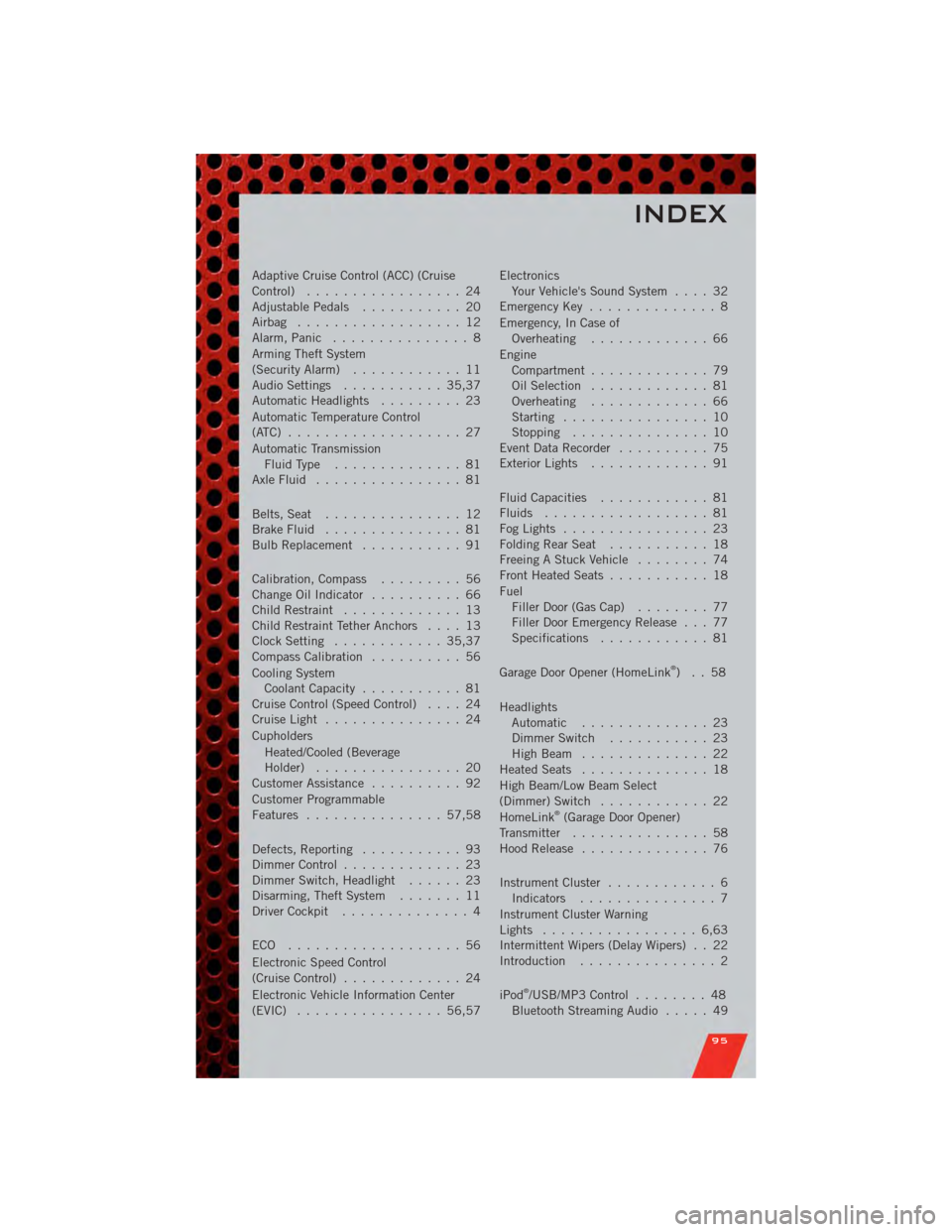
FogLights ................ 23
FoldingRearSeat ........... 18
Freeing A Stuck Vehicle ........ 74
Front Heated Seats ........... 18
Fuel Filler Door (Gas Cap) ........ 77
Filler Door Emergency Release . . . 77
Specifications ............ 81
Garage Door Opener (HomeLink
®)..58
Headlights Automatic .............. 23
Dimmer Switch ........... 23
HighBeam .............. 22
Heated Seats .............. 18
High Beam/Low Beam Select
(Dimmer) Switch ............ 22
HomeLink
®(Garage Door Opener)
Transmitter ............... 58
Hood Release .............. 76
Instrument Cluster ............ 6
Indicators ............... 7
Instrument Cluster Warning
Lights ................. 6,63
Intermittent Wipers (Delay Wipers) . . 22
Introduction ............... 2
iPod
®/USB/MP3 Control ........ 48
Bluetooth Streaming Audio ..... 49
INDEX
95