phone DODGE CHARGER 2011 7.G Owners Manual
[x] Cancel search | Manufacturer: DODGE, Model Year: 2011, Model line: CHARGER, Model: DODGE CHARGER 2011 7.GPages: 104, PDF Size: 4.53 MB
Page 2 of 104

The driver
distracted can result in loss of vehicle control, resulting in a collisi\
on and personal injury
Chrysler Group LLC strongly recommends that the driver use extreme cauti\
on when using
any device or feature that may take their attention off the road. Use of\
any electrical
devices such as cell phones, computers, portable radios, vehicle navigat\
ion or other
devices by the driver while the vehicle is moving is dangerous and could\
lead to a serious
collision. T
vehicle is moving. If you \037nd yourself unable to devote your full att\
ention to vehicle
operation, pull off the road to a safe location and stop your vehicle. S\
ome States or
Provinces prohibit the use of cellular telephones or texting w
driver
IMPORT This User Guide is intended to familiarize you with the important featu\
res of
your vehicle. The DVD enclosed contains your Owner
Manuals, W
purchased in the U.S.\) or Roadside Assistance \(new vehicles purchased \
in Canada\) in
electronic format. W
visiting www
If you are the \037rst registered owner of your vehicle,
you may obtain a complimentary printed copy of the
Owner
W1-800-423-6343 \(U.S.\) or
1-800-387-1143 \(Canada\) or by contacting your dealer
Page 3 of 104
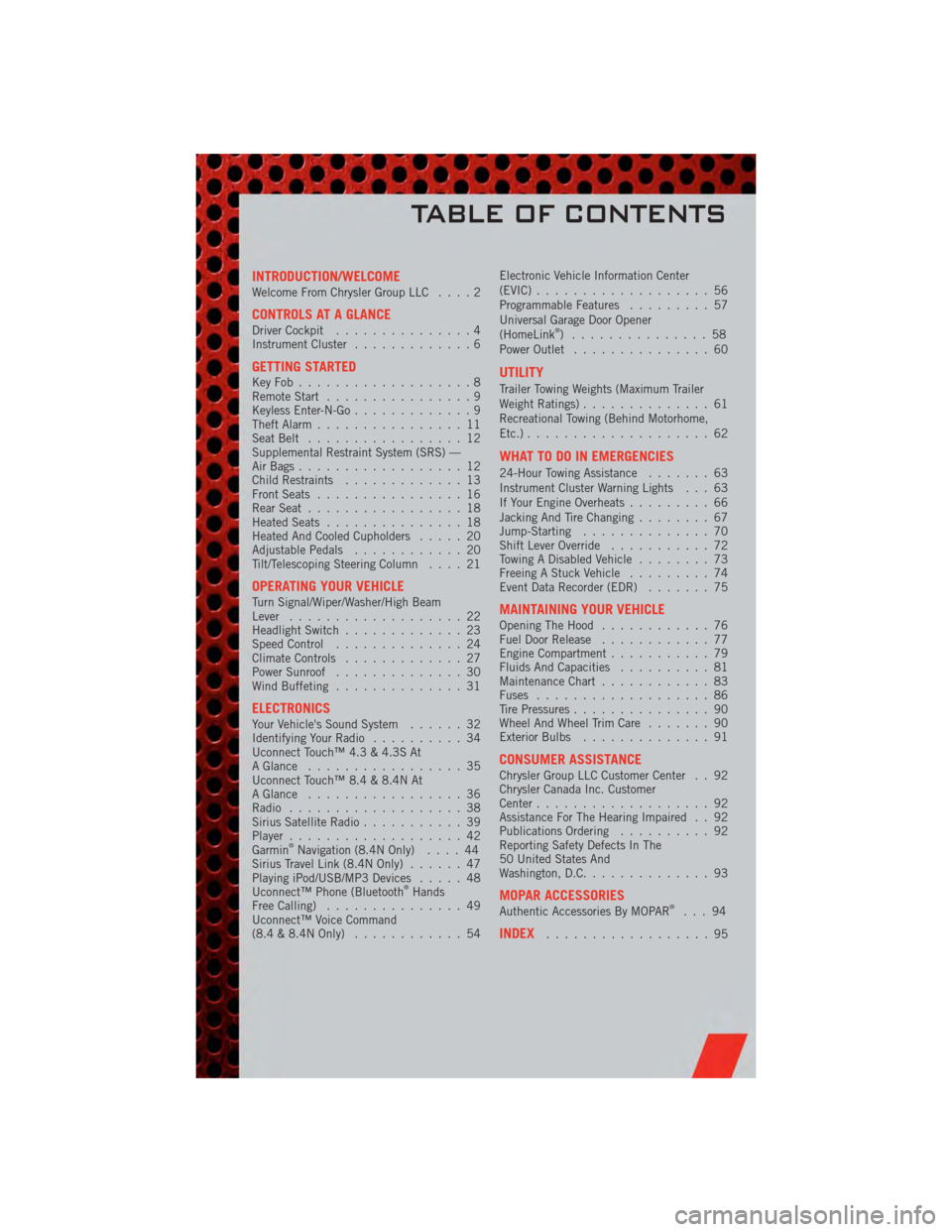
INTRODUCTION/WELCOMEWelcome From Chrysler Group LLC....2
CONTROLS AT A GLANCEDriver Cockpit...............4
Instrument Cluster .............6
GETTING STARTEDKeyFob...................8
Remote Start................9
Keyless Enter-N-Go .............9
Theft Alarm ................11
Seat Belt .................12
Supplemental Restraint System (SRS) —
Air Bags ..................12
Child Restraints .............13
Front Seats ................16
Rear Seat .................18
Heated Seats ...............18
Heated And Cooled Cupholders .....20
Adjustable Pedals ............20
Tilt/Telescoping Steering Column ....21
OPERATING YOUR VEHICLETurn Signal/Wiper/Washer/High Beam
Lever...................22
Headlight Switch .............23
Speed Control ..............24
Climate Controls .............27
Power Sunroof ..............30
Wind Buffeting ..............31
ELECTRONICSYour Vehicle's Sound System ......32
Identifying Your Radio ..........34
Uconnect Touch™ 4.3 & 4.3S At
A Glance .................35
Uconnect Touch™ 8.4 & 8.4N At
A Glance .................36
Radio ...................38
Sirius Satellite Radio ...........39
Player ...................42
Garmin
®Navigation (8.4N Only) ....44
Sirius Travel Link (8.4N Only) ......47
Playing iPod/USB/MP3 Devices .....48
Uconnect™ Phone (Bluetooth
®Hands
Free Calling) ...............49
Uconnect™ Voice Command
(8.4 & 8.4N Only) ............54 Electronic Vehicle Information Center
(EVIC)
...................56
Programmable Features .........57
Universal Garage Door Opener
(HomeLink
®) ...............58
Power Outlet ...............60
UTILITY
Trailer Towing Weights (Maximum Trailer
Weight Ratings) ..............61
Recreational Towing (Behind Motorhome,
Etc.) ....................62
WHAT TO DO IN EMERGENCIES
24-Hour Towing Assistance .......63
Instrument Cluster Warning Lights . . . 63
If Your Engine Overheats .........66
Jacking And Tire Changing ........67
Jump-Starting ..............70
Shift Lever Override ...........72
Towing A Disabled Vehicle ........73
Freeing A Stuck Vehicle .........74
Event Data Recorder (EDR) .......75
MAINTAINING YOUR VEHICLEOpening The Hood............76
Fuel Door Release ............77
Engine Compartment ...........79
Fluids And Capacities ..........81
Maintenance Chart ............83
Fuses ...................86
Tire Pressures ...............90
Wheel And Wheel Trim Care .......90
Exterior Bulbs ..............91
CONSUMER ASSISTANCEChrysler Group LLC Customer Center . . 92
Chrysler Canada Inc. Customer
Center...................92
Assistance For The Hearing Impaired . . 92
Publications Ordering ..........92
Reporting Safety Defects In The
50 United States And
Washington, D.C. .............93
MOPAR ACCESSORIESAuthentic Accessories By MOPAR®...94
INDEX..................95
TABLE OF CONTENTS
Page 5 of 104
Vehicles Sold In Canada
With respect to any vehicles sold in Canada, the name Chrysler Group LLC shall be
deemed to be deleted and the name Chrysler Canada Inc. used in substitution
therefore.
WARNING!
• Pedals that cannot move freely can cause loss of vehicle control and increasethe risk of serious personal injury.
• Always make sure that objects cannot fall into the driver foot well while the vehicle is moving. Objects can become trapped under the brake pedal and
accelerator pedal causing a loss of vehicle control.
• Failure to properly follow floor mat installation or mounting can cause interference with the brake pedal and accelerator pedal operation causing
loss of control of the vehicle.
• Never use the ‘PARK’ position as a substitute for the parking brake. Always apply the parking brake fully when parked to guard against vehicle movement
and possible injury or damage.
• Refer to your Owner's Manual on the DVD for further details.
USE OF AFTERMARKET PRODUCTS (ELECTRONICS)
The use of aftermarket devices including cell phones, MP3 players, GPS systems, or
chargers may affect the performance of on-board wireless features including Keyless
Enter-N-Go and Remote Start range. If you are experiencing difficulties with any of your
wireless features, try disconnecting your aftermarket devices to see if the situation
improves. If your symptoms persist, please see an authorized dealer.
CHRYSLER, DODGE, JEEP, RAM TRUCK, ATF+4, MOPAR and Uconnect are registered
trademarks of Chrysler Group LLC. COPYRIGHT ©2011 CHRYSLER GROUP LLC
INTRODUCTION/WELCOME
3
Page 51 of 104
NOTE:
• When connecting your iPod®device for the first time, the system may take several
minutes to read your music, depending on the number of files. For example, the
system will take approximately 5 minutes for every 1000 songs loaded on the device.
Also during the reading process, the Shuffle and Browse functions will be disabled.
This process is needed to ensure the full use of your iPod
®features and only
happens the first time it is connected. After the first time, the reading process of
your iPod
®will take considerably less time unless changes are made or new songs
are added to the playlist.
• The USB port supports certain Mini, Classic, Nano, Touch, and iPhone
®devices. The
USB port also supports playing music from compatible external USB Mass Storage
Class memory devices. Some iPod
®software versions may not fully support the USB
port features. Please visit Apple’s website for iPod®software updates.
3. SD Card (8.4 & 8.4N Only)
• Play songs stored on an SD card inserted into the SD card slot.
• Song playback can be controlled using the radio or Steering Wheel Audio Controls to play, skip to the next or previous track, browse, and list the contents.
4. Bluetooth®Streaming Audio
• If equipped with Uconnect™ Voice Command, your Bluetooth-equipped iPod®
devices, cell phones or other media players, may also be able to stream music to
your vehicle's sound system. Your connected device must be Bluetooth-compatible,
and paired with your Uconnect Touch
®system (see Uconnect™ Phone for pairing
instructions). You can access the music from your connected Bluetooth®device by
touching the Source soft-key while in Player mode.
Uconnect™ Phone (Bluetooth®HANDS FREE
CALLING)
• If the Uconnect™ PhoneButton exists on your steering wheel, then you have
the Uconnect™ Phone features.
• The Uconnect™ Phone is a voice-activated, hands-free, in-vehicle communications system with Voice Command Capability (see Voice Command section).
• The Uconnect™ Phone allows you to dial a phone number with your mobile phone using simple voice commands or using screen soft-keys.
• Refer to the Understand The Features Of Your Vehicle section of your vehicle's Owner's Manual on the DVD for further details.
NOTE: The Uconnect™ Phone requires a mobile phone equipped with the Bluetooth
®
Hands-Free Profile, Version 1.0 or higher. For Uconnect™ customer support, call
1–877–855–8400 or visit www.dodge.com/uconnect.
Pairing a Phone
• To use the Uconnect™ Phone feature, you must first pair your bluetooth phone
with the Uconnect™ system.
ELECTRONICS
49
Page 52 of 104
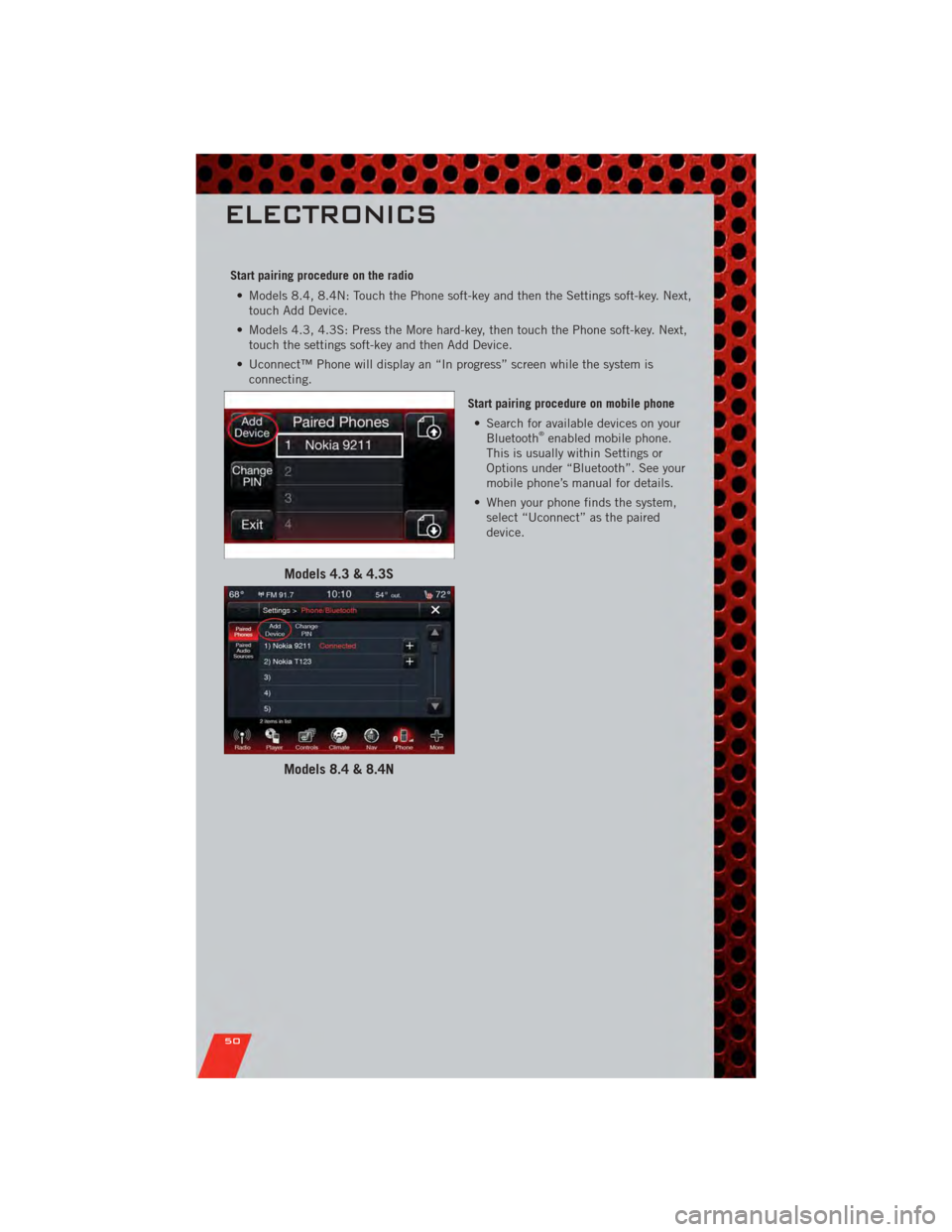
Start pairing procedure on the radio• Models 8.4, 8.4N: Touch the Phone soft-key and then the Settings soft-key. Next, touch Add Device.
• Models 4.3, 4.3S: Press the More hard-key, then touch the Phone soft-key. Next, touch the settings soft-key and then Add Device.
• Uconnect™ Phone will display an “In progress” screen while the system is connecting.
Start pairing procedure on mobile phone• Search for available devices on your Bluetooth
®enabled mobile phone.
This is usually within Settings or
Options under “Bluetooth”. See your
mobile phone’s manual for details.
• When your phone finds the system, select “Uconnect” as the paired
device.
Models 4.3 & 4.3S
Models 8.4 & 8.4N
ELECTRONICS
50
Page 53 of 104
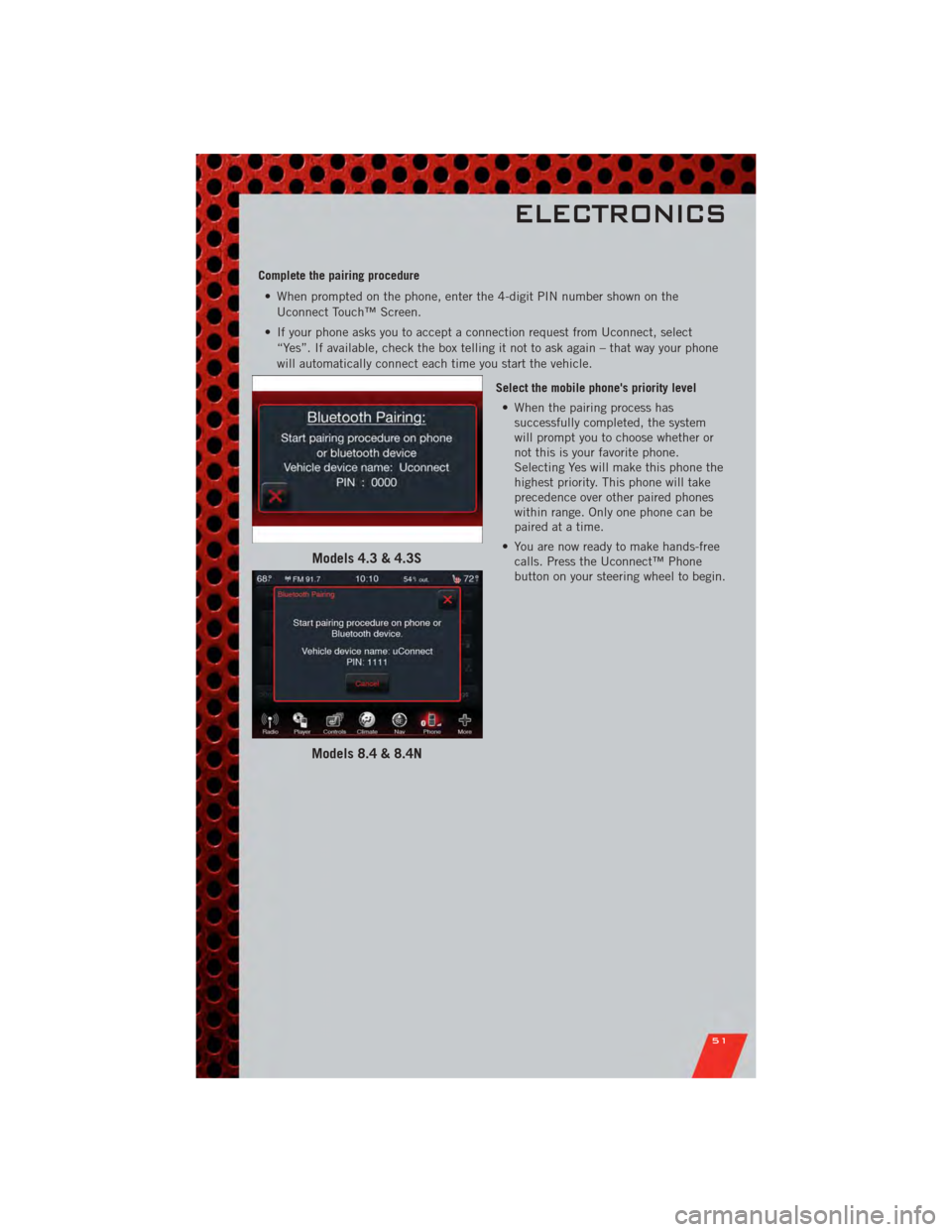
Complete the pairing procedure• When prompted on the phone, enter the 4-digit PIN number shown on the Uconnect Touch™ Screen.
• If your phone asks you to accept a connection request from Uconnect, select “Yes”. If available, check the box telling it not to ask again – that way your phone
will automatically connect each time you start the vehicle.
Select the mobile phone's priority level• When the pairing process has successfully completed, the system
will prompt you to choose whether or
not this is your favorite phone.
Selecting Yes will make this phone the
highest priority. This phone will take
precedence over other paired phones
within range. Only one phone can be
paired at a time.
• You are now ready to make hands-free calls. Press the Uconnect™ Phone
button on your steering wheel to begin.
Models 4.3 & 4.3S
Models 8.4 & 8.4N
ELECTRONICS
51
Page 54 of 104
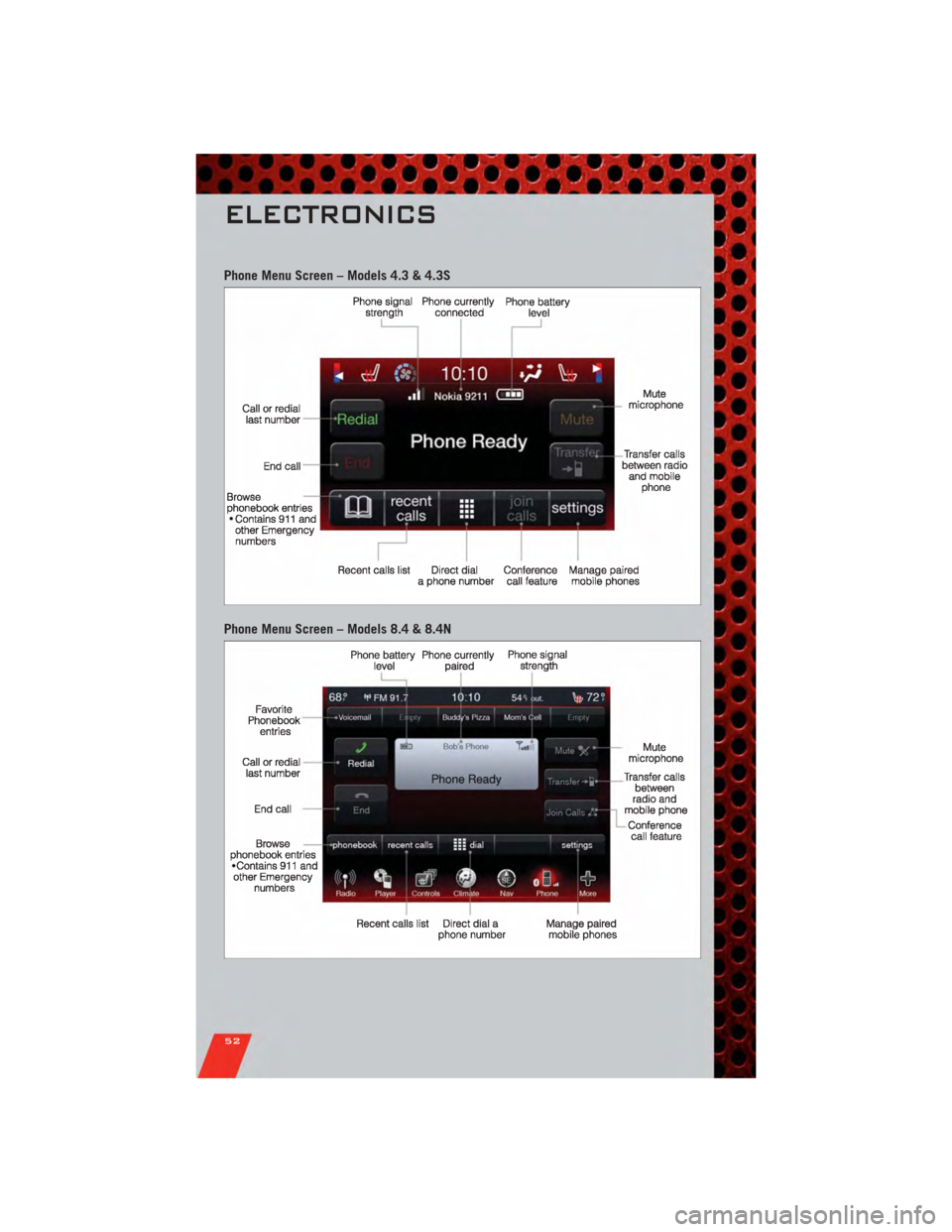
Phone Menu Screen – Models 4.3 & 4.3S
Phone Menu Screen – Models 8.4 & 8.4N
ELECTRONICS
52
Page 55 of 104
Making A Phone Call
• Press the Uconnect™ Phone button.
• (After the BEEP), say “dial” (or “call” to a name).
• (After the BEEP), say number (or name).
NOTE: You can also initiate a call by using the touch-screen on the Phone main screen.
Receiving A Call – Accept (And End)
• When an incoming call rings/is announced on Uconnect™, press the Phone
button
.
• To end a call, press the Phone button
.
Mute (Or Unmute) Microphone During Call
• During a call, touch the mute soft-key on the Phone main screen to mute and unmute the call.
Transfer Ongoing Call Between Handset And Vehicle
• During a call, touch the Transfer soft-key on the Phone main screen to transfer anon going call between handset and vehicle.
Common Phone Commands
Common Phone Commands (Examples)
“Call John Smith”
“Call John Smith mobile”
“Dial 1 248 555 1212”
“Call Emergency”
“Call Towing Assistance”
“Redial”
Phonebook
• Uconnect Touch™ radios will automatically download your phonebook from yourpaired phone, if this feature is supported by your phone. Entries are updated each
time that the phone is paired. If your phone book entries do not appear, check the
settings on your phone. Some phones require you to enable this feature manually.
• Your phone book can be browsed on your radio screen, but editing can only be done on your phone. To browse, touch the Phone soft-key, then the Phonebook
soft-key.
• Favorite phonebook entries can be saved as Favorites for quicker access. Favorites are shown at the top of your main phone screen (8.4 & 8.4N Only).
Voice Recognition Tips
• Use longer names that are less easily mistaken for others. For examples, say “CallJohn Doe” instead of “Call John”.
• You can “chain” commands together for faster results. Say “Call John Doe, mobile”, for example.
ELECTRONICS
53
Page 56 of 104
• You can “barge in” while the system is talking to you, enabling you to enter yourresponse without waiting. Just press the Voice Command button on the steering
wheel to barge in.
Changing The Volume
• Start a dialogue by pressing the Phone button, then say a command for
example - "Help".
• Use the radio ON/OFF VOLUME rotary knob to adjust the volume to a comfortable level while the Uconnect™ system is speaking. Please note the volume setting for
Uconnect™ is different than the audio system.
NOTE: To access help, press the Uconnect™ Phone
button on the steering wheel
and say "help." Touch the display or push either
orbutton and say
"cancel" to cancel the help session.
WARNING!
• Any voice commanded system should be used only in safe driving conditions following local laws and phone use. All attention should be kept on the
roadway ahead. Failure to do so may result in a collision causing you and
others to be severely injured or killed.
• In an emergency, to use Uconnect™ Phone, your mobile phone must be: • turned on,
• paired to Uconnect™ Phone,
• and have network coverage.
Uconnect™ Voice Command (8.4 & 8.4N ONLY)
• If the Uconnect™ Voice Commandbutton exists on your steering wheel,
then you have the Voice Command feature.
• The Voice Command feature lets you keep your hands on the steering wheel, and your eyes on the road.
• When you press the Voice Command button
located on the radio faceplate
or steering wheel, you will hear a beep. The beep is your signal to give a command.
If you do not know what commands to say, you can say "help" and the system will
provide options to you. If you ever wish to interrupt the system while it lists
options, press the Voice Command button
, listen for the BEEP, and say
your command.
• You can “chain” commands together for faster results. Say “Call John Doe, mobile”, for example.
ELECTRONICS
54
Page 57 of 104
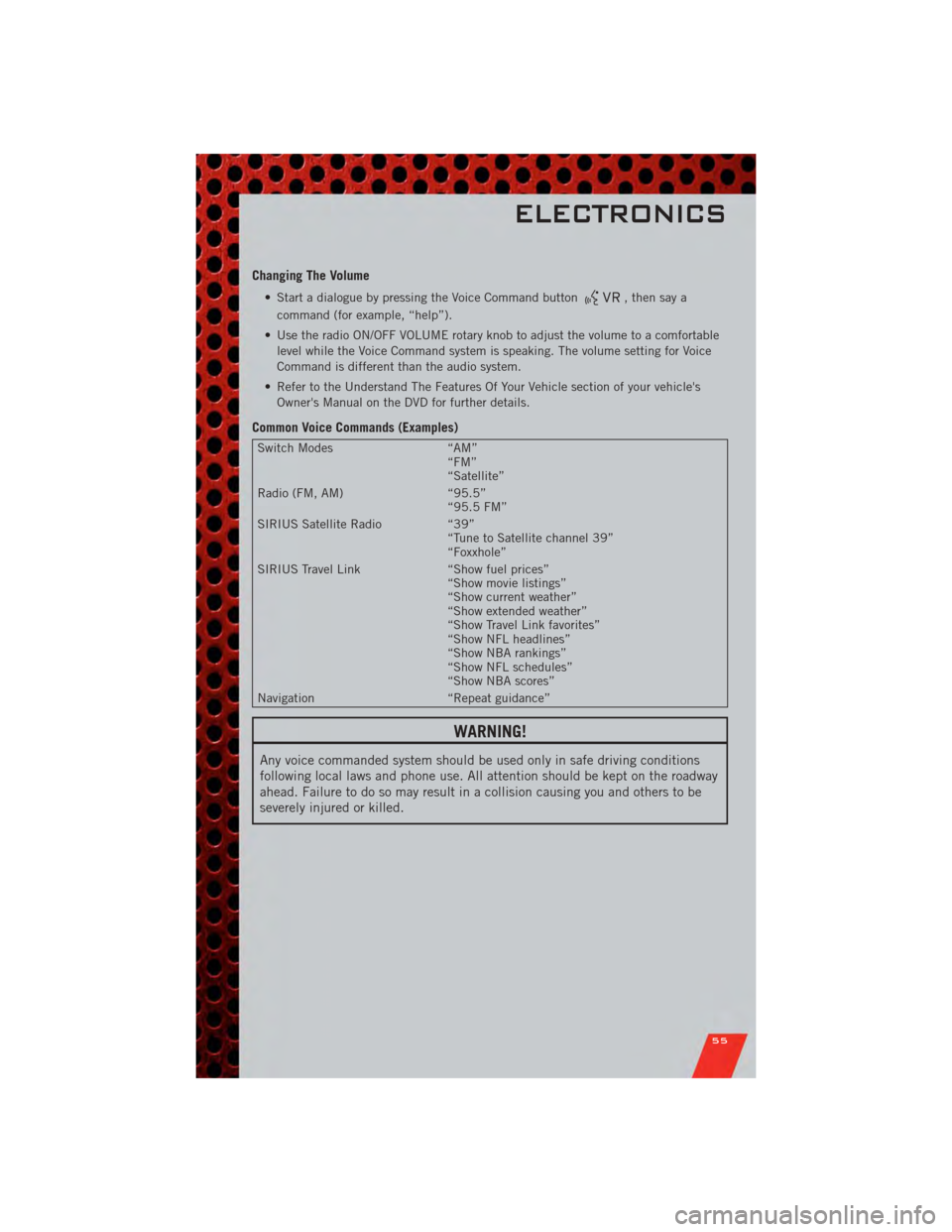
Changing The Volume
• Start a dialogue by pressing the Voice Command button, then say a
command (for example, “help”).
• Use the radio ON/OFF VOLUME rotary knob to adjust the volume to a comfortable level while the Voice Command system is speaking. The volume setting for Voice
Command is different than the audio system.
• Refer to the Understand The Features Of Your Vehicle section of your vehicle's Owner's Manual on the DVD for further details.
Common Voice Commands (Examples)
Switch Modes “AM”
“FM”
“Satellite”
Radio (FM, AM) “95.5”
“95.5 FM”
SIRIUS Satellite Radio “39”
“Tune to Satellite channel 39”
“Foxxhole”
SIRIUS Travel Link “Show fuel prices”
“Show movie listings”
“Show current weather”
“Show extended weather”
“Show Travel Link favorites”
“Show NFL headlines”
“Show NBA rankings”
“Show NFL schedules”
“Show NBA scores”
Navigation “Repeat guidance”
WARNING!
Any voice commanded system should be used only in safe driving conditions
following local laws and phone use. All attention should be kept on the roadway
ahead. Failure to do so may result in a collision causing you and others to be
severely injured or killed.
ELECTRONICS
55