ad blue DODGE CHARGER 2013 7.G User Guide
[x] Cancel search | Manufacturer: DODGE, Model Year: 2013, Model line: CHARGER, Model: DODGE CHARGER 2013 7.GPages: 132, PDF Size: 4.77 MB
Page 3 of 132

INTRODUCTION/WELCOME
WELCOME FROM CHRYSLER GROUP LLC . . . 2
CONTROLS AT A GLANCE
DRIVER COCKPIT................4
INSTRUMENT CLUSTER .............5
GETTING STARTED
KEYFOB .....................8
REMOTE START.................9
KEYLESS ENTER-N-GO™ ............9
THEFT ALARM .................12
SEATBELT ...................13
SUPPLEMENTAL RESTRAINT SYSTEM
(SRS)—AIRBAGS................13
CHILD RESTRAINTS ..............14
FRONT SEATS .................17
REARSEATS ..................19
HEATEDSEATS .................19
HEATED AND COOLED CUPHOLDERS ....20
ADJUSTABLE PEDALS .............21
TILT/TELESCOPING STEERING COLUMN . . . 22
OPERATING YOUR VEHICLE
ENGINE BREAK-IN RECOMMENDATIONS . . . 23
TURN SIGNAL/WIPER/WASHER/HIGH
BEAM LEVER ..................24
HEADLIGHT SWITCH ..............25
SPEED CONTROL ...............26
ELECTRONIC SHIFTER – 3.6L ENGINE ....30
TRANSMISSION MODES/AUTOSTICK® ....32
CLIMATE CONTROLS .............34
POWER SUNROOF ...............36
WIND BUFFETING ................37
ELECTRONICS
YOUR VEHICLE'S SOUND SYSTEM ......38
IDENTIFYING YOUR RADIO ...........40
Uconnect® 4.3 & 4.3S AT A GLANCE .....41
Uconnect® 8.4 & 8.4N AT A GLANCE .....42
RADIO ......................44
SiriusXM SATELLITE RADIO ..........45
iPod®/CD/AUX CONTROLS ..........48
GARMIN® NAVIGATION (8.4N ONLY) ......50
SiriusXM TRAVEL LINK (8.4N ONLY) .....53
PLAYING iPod/USB/MP3 DEVICES ......54
Uconnect® Phone
(Bluetooth® HANDS FREE CALLING) .....56
Uconnect® Voice Command
(8.4&8.4NONLY) ................61
ELECTRONIC VEHICLE INFORMATION
CENTER (EVIC) .................63
PROGRAMMABLE FEATURES .........64
UNIVERSAL GARAGE DOOR OPENER
(HomeLink®) ..................66
POWER OUTLET ................68
UTILITY
TRAILER TOWING WEIGHTS
(MAXIMUM TRAILER WEIGHT RATINGS) . . . 70
RECREATIONAL TOWING
(BEHIND MOTORHOME, ETC.) .........70
SRT8
AUTOSTICK®..................71
ELECTRONIC CONTROL DAMPING SYSTEM . . 72
PERFORMANCE FEATURES ..........73
SUMMER/THREE-SEASON TIRES .......75
WHAT TO DO IN EMERGENCIES
ROADSIDE ASSISTANCE............76
INSTRUMENT CLUSTER WARNING LIGHTS . . 76
IF YOUR ENGINE OVERHEATS .........80
JACKING AND TIRE CHANGING ........81
TIREFIT KIT ..................86
BATTERY LOCATION ..............91
JUMP-STARTING ...............92
SHIFT LEVER OVERRIDE ...........94
TOWING A DISABLED VEHICLE ........96
FREEING A STUCK VEHICLE ..........97
EVENT DATA RECORDER (EDR) ........98
MAINTAINING YOUR VEHICLE
OPENING THE HOOD..............99
FUEL DOOR RELEASE ............100
ENGINE COMPARTMENT ...........102
FLUIDS AND CAPACITIES ..........105
MAINTENANCE SCHEDULE .........108
MAINTENANCE RECORD ...........112
SRT8 – MAINTENANCE CHART .......113
SRT8 – MAINTENANCE RECORD .......114
FUSES .....................115
TIRE PRESSURES ...............119
WHEEL AND WHEEL TRIM CARE .......119
EXTERIOR BULBS ..............120
CONSUMER ASSISTANCE
CHRYSLER GROUP LLC
CUSTOMER CENTER .............121
CHRYSLER CANADA INC.
CUSTOMER CENTER .............121
ASSISTANCE FOR THE HEARING
IMPAIRED ...................121
PUBLICATIONS ORDERING ..........121
REPORTING SAFETY DEFECTS IN
THEUNITEDSTATES .............122
MOPAR ACCESSORIES
AUTHENTIC ACCESSORIES BY MOPAR®...123
INDEX....................124
FAQ (How To?)
FREQUENTLY ASKED QUESTIONS ......127
TABLE OF CONTENTS
Page 50 of 132

iPod®/CD/AUX CONTROLS
Models 4.3 & 4.3S
• The iPod®/CD/AUX controls are accessed by pressing the Player hard-key to enter thePlayer main screen, then touch the source soft-key and choose between Disc, AUX, iPod®
or Bluetooth.
NOTE:
Uconnect® will usually automatically switch
to the appropriate mode when something is
first connected or inserted into the system.
ELECTRONICS
48
Page 51 of 132

Models 8.4 & 8.4N
• The iPod®/USB, CD, Audio Jack, SD Card or Bluetooth® source is accessed by touchingthe Player soft-key to enter the Player main screen, then touch the source soft-key and
choose between Disc, Aux, iPod®, Bluetooth or SD Card.
NOTE:
Uconnect® will usually automatically switch
to the appropriate mode when something is
first connected or inserted into the system.
ELECTRONICS
49
Page 57 of 132
• The iPod® battery charges when plugged into the USB port (if supported by the specificdevice).
• To route the USB/iPod® cable out of the center console, use the access cut out in the front of the console.
NOTE:
• When connecting your iPod® device for the first time, the system may take several minutes to read your music, depending on the number of files. For example, the system
will take approximately 5 minutes for every 1000 songs loaded on the device. Also during
the reading process, the Shuffle and Browse functions will be disabled. This process is
needed to ensure the full use of your iPod® features and only happens the first time it is
connected. After the first time, the reading process of your iPod® will take considerably
less time unless changes are made or new songs are added to the playlist.
• The USB port supports certain Mini, Classic, Nano, Touch, and iPhone® devices. The USB port also supports playing music from compatible external USB Mass Storage Class
memory devices. Some iPod® software versions may not fully support the USB port
features. Please visit Apple’s website for iPod® software updates.
3. SD Card (8.4 & 8.4N Only)
• Play songs stored on an SD card inserted into the SD card slot, located on the radio faceplate.
• Song playback can be controlled using the radio or Steering Wheel Audio Controls to play, skip to the next or previous track, browse, and list the contents.
4. Bluetooth® Streaming Audio
• If equipped with Uconnect® Voice Command, your Bluetooth-equipped iPod® devices, cell phones or other media players, may also be able to stream music to your vehicle's
sound system. Your connected device must be Bluetooth-compatible, and paired with
your Uconnect® system (see Uconnect® Phone for pairing instructions). You can access
the music from your connected Bluetooth® device by touching the Source soft-key while
in Player mode.
ELECTRONICS
55
Page 58 of 132
Uconnect® Phone (Bluetooth® HANDS FREE CALLING)
• If the Uconnect® Phone Buttonexists on your steering wheel, then you have the
Uconnect® Phone features.
• The Uconnect® Phone is a voice-activated, hands-free, in-vehicle communications system with Voice Command Capability (see Voice Command section).
• The Uconnect® Phone allows you to dial a phone number with your mobile phone using simple voice commands or using screen soft-keys.
• Refer to the Understand The Features Of Your Vehicle section of your vehicle's Owner's Manual on the DVD for further details.
NOTE:
The Uconnect® Phone requires a mobile phone equipped with the Bluetooth® Hands-Free
Profile, Version 1.0 or higher. For Uconnect® customer support: U.S. residents - visit
www.UconnectPhone.com or call 1–877–855–8400. Canadian Residents - call 1-800-465–
2001 (English) or 1-800-387-9983 (French).
Pairing a Phone
• To use the Uconnect® Phone feature, you must first pair your Bluetooth® phone with the Uconnect® system.
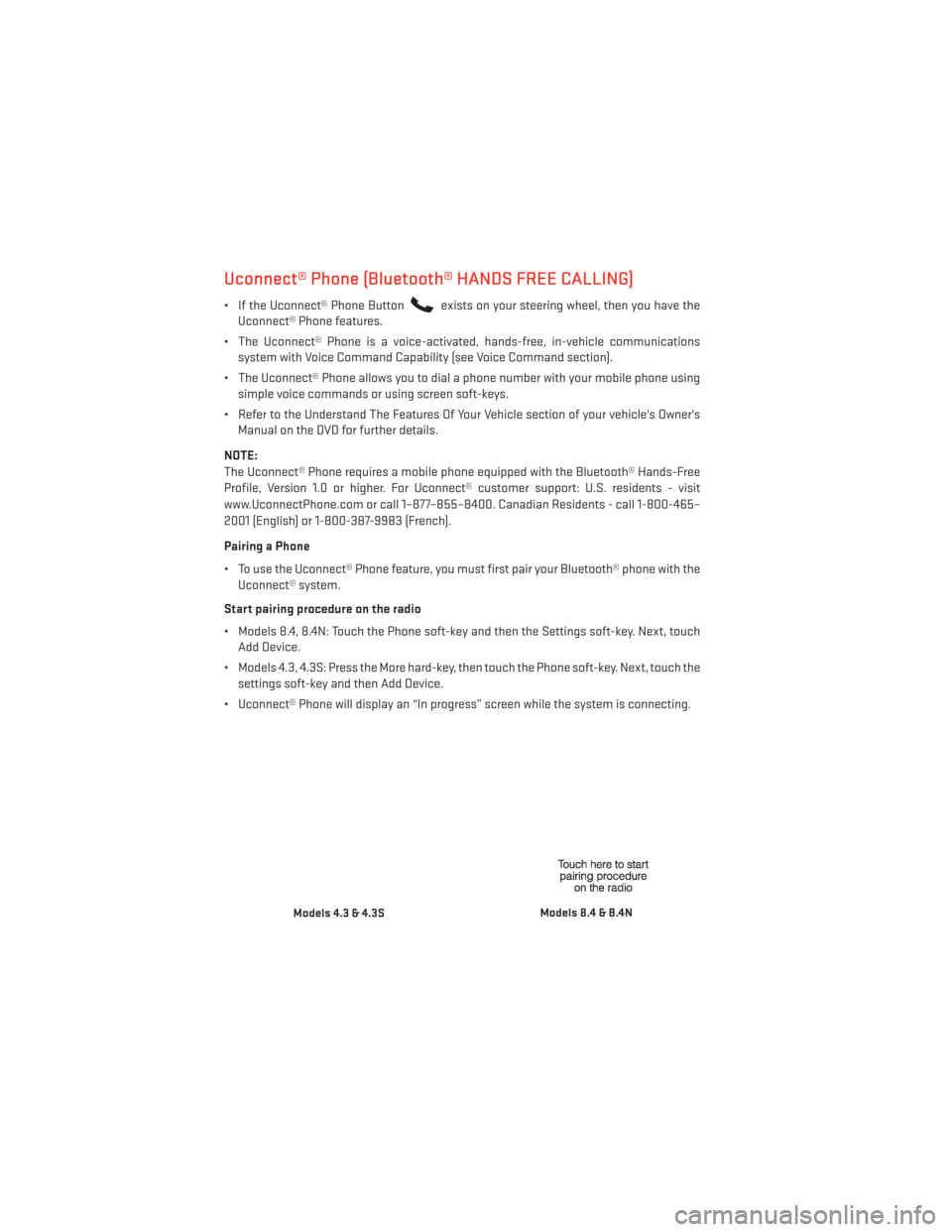
Start pairing procedure on the radio
• Models 8.4, 8.4N: Touch the Phone soft-key and then the Settings soft-key. Next, touch Add Device.
• Models 4.3, 4.3S: Press the More hard-key, then touch the Phone soft-key. Next, touch the settings soft-key and then Add Device.
• Uconnect® Phone will display an “In progress” screen while the system is connecting.
Models 4.3 & 4.3SModels 8.4 & 8.4N
ELECTRONICS
56
Page 59 of 132
Start pairing procedure on mobile phone
•
Search for available devices on your Bluetooth® enabled mobile phone. This is usually within
Settings or Options under “Bluetooth”. See your mobile phone’s manual for details.
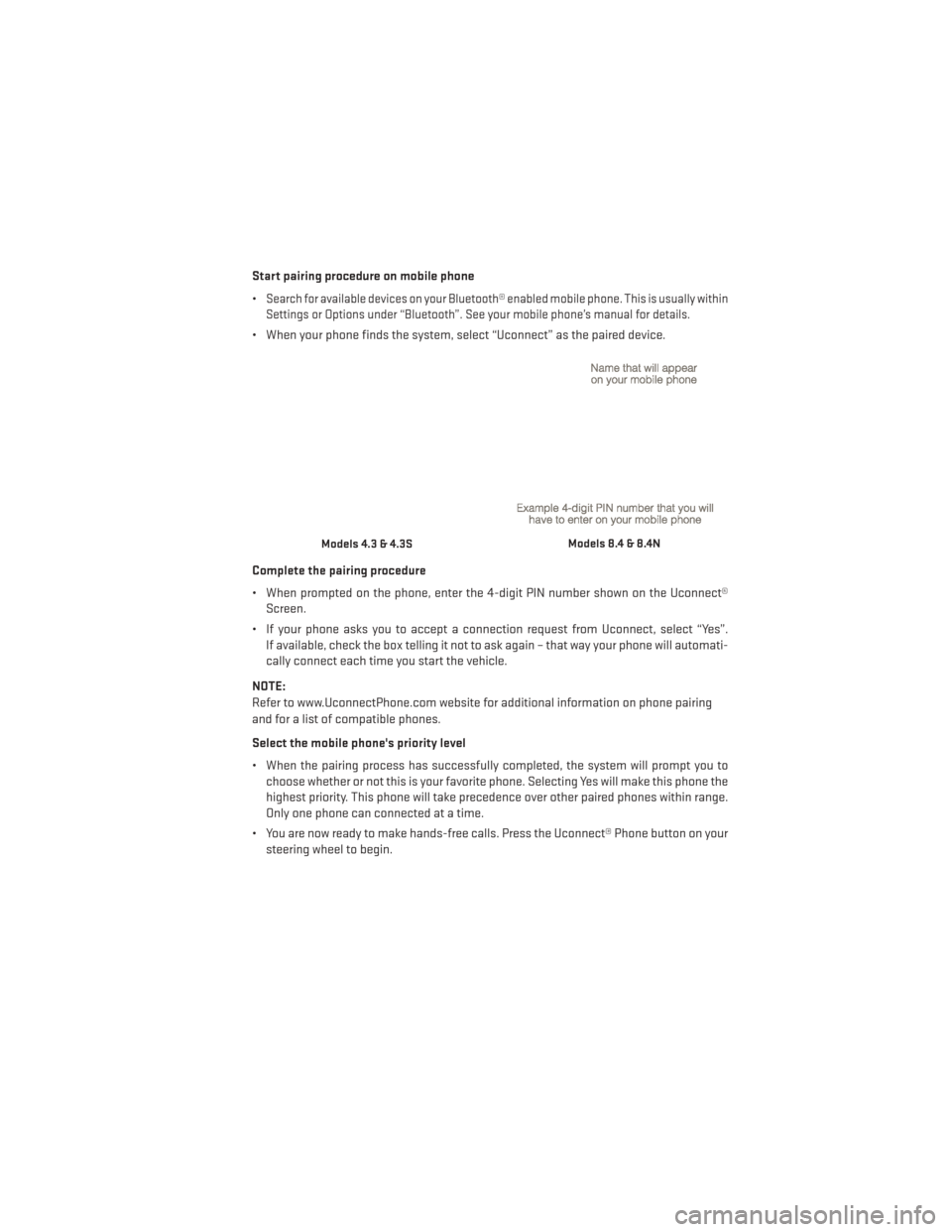
• When your phone finds the system, select “Uconnect” as the paired device.
Complete the pairing procedure
• When prompted on the phone, enter the 4-digit PIN number shown on the Uconnect® Screen.
• If your phone asks you to accept a connection request from Uconnect, select “Yes”. If available, check the box telling it not to ask again – that way your phone will automati-
cally connect each time you start the vehicle.
NOTE:
Refer to www.UconnectPhone.com website for additional information on phone pairing
and for a list of compatible phones.
Select the mobile phone's priority level
• When the pairing process has successfully completed, the system will prompt you to choose whether or not this is your favorite phone. Selecting Yes will make this phone the
highest priority. This phone will take precedence over other paired phones within range.
Only one phone can connected at a time.
• You are now ready to make hands-free calls. Press the Uconnect® Phone button on your steering wheel to begin.
Models 4.3 & 4.3SModels 8.4 & 8.4N
ELECTRONICS
57
Page 62 of 132
Voice Command Tips
•
Using complete names (i.e; Call John Doe vs. Call John) will result in greater system accuracy.
• You can “chain” commands together for faster results. Say “Call John Doe, mobile”, forexample.
• If you are listening to available voice command options, you do not have to listen to the entire list. When you hear the command that you need, press the
button on the
steering wheel, wait for the beep and say your command.
Changing The Volume
• Start a dialogue by pressing the Phone button
, then say a command for example -
"Help".
• Use the radio ON/OFF VOLUME rotary knob to adjust the volume to a comfortable level while the Uconnect® system is speaking. Please note the volume setting for Uconnect®
is different than the audio system.
NOTE:
To access help, press the Uconnect® Phone
button on the steering wheel and say
"help." Touch the display or push either
orbutton and say "cancel" to cancel
the help session.
Voice Text Reply
• Uconnect® Phone can read or send new text messages on your mobile phone.
• Your mobile phone must support Voice Text Reply over Bluetooth® in order to use this feature. If the Uconnect® Phone determines your phone is not compatible with Voice Text
Reply messaging over Bluetooth® the “Messaging” button will be greyed out and the
feature will not be available for use.
NOTE:
• For mobile phone compatibility and pairing instructions, please visit www.UconnectPhone.com
• Uconnect® Phone Voice Text Reply is only available when the vehicle is not moving.
WARNING!
• Any voice commanded system should be used only in safe driving conditions follow- ing applicable laws regarding phone use. Your attention should be focused on safely
operating the vehicle. Failure to do so may result in a collision causing you and others
to be severely injured or killed.
• In an emergency, to use Uconnect® Phone, your mobile phone must be:
• turned on,
• paired to Uconnect® Phone,
• and have network coverage.
ELECTRONICS
60
Page 67 of 132
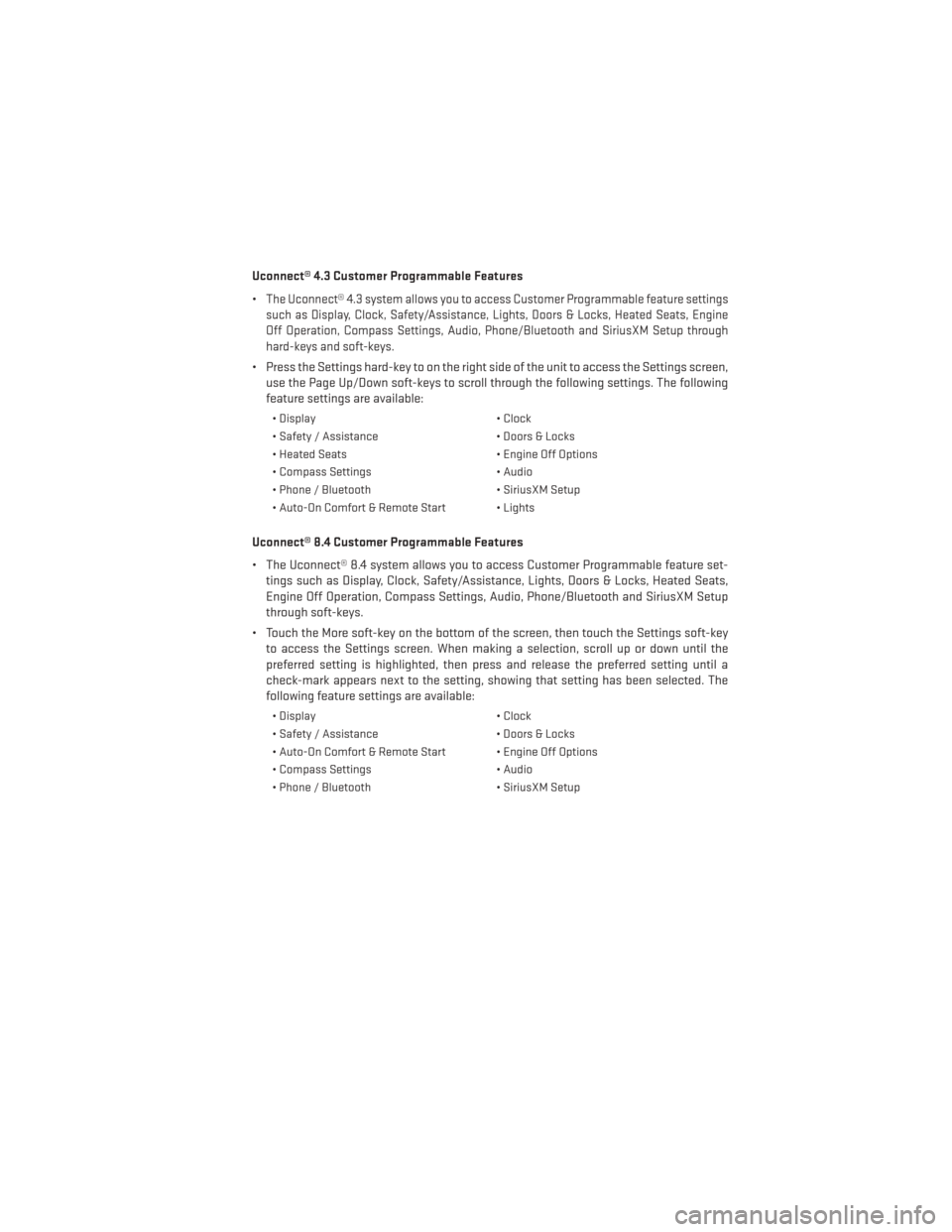
Uconnect® 4.3 Customer Programmable Features
•
The Uconnect® 4.3 system allows you to access Customer Programmable feature settings
such as Display, Clock, Safety/Assistance, Lights, Doors & Locks, Heated Seats, Engine
Off Operation, Compass Settings, Audio, Phone/Bluetooth and SiriusXM Setup through
hard-keys and soft-keys.
• Press the Settings hard-key to on the right side of the unit to access the Settings screen, use the Page Up/Down soft-keys to scroll through the following settings. The following
feature settings are available:
• Display • Clock
• Safety / Assistance • Doors & Locks
• Heated Seats • Engine Off Options
• Compass Settings • Audio
• Phone / Bluetooth • SiriusXM Setup
• Auto-On Comfort & Remote Start • Lights
Uconnect® 8.4 Customer Programmable Features
• The Uconnect® 8.4 system allows you to access Customer Programmable feature set- tings such as Display, Clock, Safety/Assistance, Lights, Doors & Locks, Heated Seats,
Engine Off Operation, Compass Settings, Audio, Phone/Bluetooth and SiriusXM Setup
through soft-keys.
• Touch the More soft-key on the bottom of the screen, then touch the Settings soft-key to access the Settings screen. When making a selection, scroll up or down until the
preferred setting is highlighted, then press and release the preferred setting until a
check-mark appears next to the setting, showing that setting has been selected. The
following feature settings are available:
• Display • Clock
• Safety / Assistance • Doors & Locks
• Auto-On Comfort & Remote Start • Engine Off Options
• Compass Settings • Audio
• Phone / Bluetooth • SiriusXM Setup
ELECTRONICS
65
Page 118 of 132
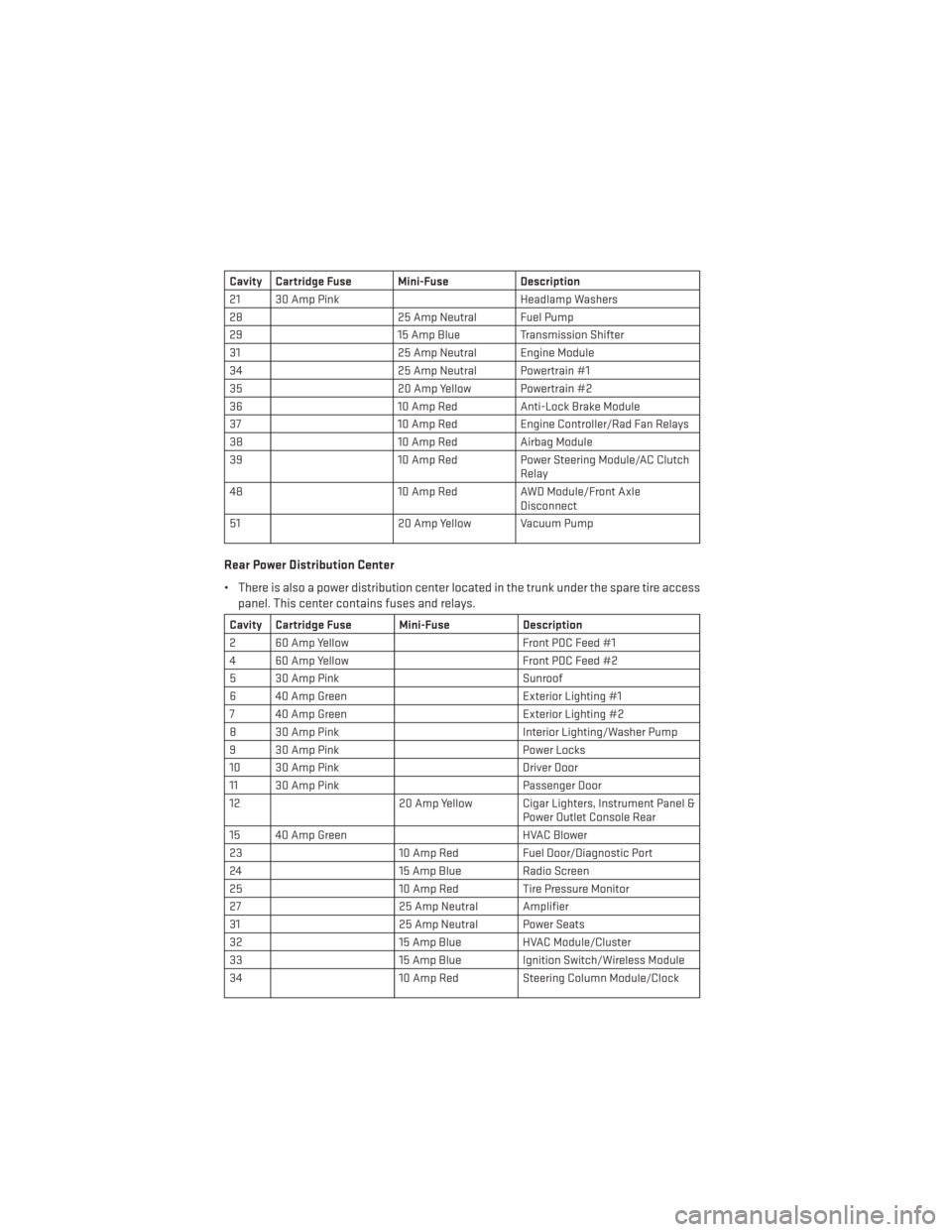
Cavity Cartridge Fuse Mini-FuseDescription
21 30 Amp Pink Headlamp Washers
28 25 Amp Neutral Fuel Pump
29 15 Amp Blue Transmission Shifter
31 25 Amp Neutral Engine Module
34 25 Amp Neutral Powertrain #1
35 20 Amp Yellow Powertrain #2
36 10 Amp RedAnti-Lock Brake Module
37 10 Amp RedEngine Controller/Rad Fan Relays
38 10 Amp RedAirbag Module
39 10 Amp RedPower Steering Module/AC Clutch
Relay
48 10 Amp RedAWD Module/Front Axle
Disconnect
51 20 Amp Yellow Vacuum Pump
Rear Power Distribution Center
• There is also a power distribution center located in the trunk under the spare tire access
panel. This center contains fuses and relays.
Cavity Cartridge Fuse Mini-Fuse Description
2 60 Amp Yellow Front PDC Feed #1
4 60 Amp Yellow Front PDC Feed #2
5 30 Amp Pink Sunroof
6 40 Amp Green Exterior Lighting #1
7 40 Amp Green Exterior Lighting #2
8 30 Amp Pink Interior Lighting/Washer Pump
9 30 Amp Pink Power Locks
10 30 Amp Pink Driver Door
11 30 Amp Pink Passenger Door
12 20 Amp Yellow Cigar Lighters, Instrument Panel &
Power Outlet Console Rear
15 40 Amp Green HVAC Blower
23 10 Amp RedFuel Door/Diagnostic Port
24 15 Amp Blue Radio Screen
25 10 Amp RedTire Pressure Monitor
27 25 Amp Neutral Amplifier
31 25 Amp Neutral Power Seats
32 15 Amp Blue HVAC Module/Cluster
33 15 Amp Blue Ignition Switch/Wireless Module
34 10 Amp RedSteering Column Module/Clock
MAINTAINING YOUR VEHICLE
116
Page 119 of 132

Cavity Cartridge Fuse Mini-FuseDescription
35 10 Amp RedBattery Sensor
37 15 Amp Blue Radio
38 20 Amp Yellow Power Outlet
42 30 Amp Pink Rear Defrost
43 25 Amp Neutral Rear Heated Seats/Steering
Wheel
44 10 Amp RedPark Assist/Blind Spot/Camera
45 15 Amp Blue Cluster/Rearview Mirror/Compass
46 10 Amp RedAdaptive Cruise Control
47 10 Amp RedAdaptive Front Lighting
48 20 Amp Yellow Active Suspension
51 20 Amp Yellow Front Heated Seats
52 10 Amp RedHeated Cupholders/Rear Heated
Seat Switches
53 10 Amp RedHVAC Module/In Car Temperature
Sensor
58 10 Amp RedAirbag Module
64 25 Amp Neutral Rear Windows
65 10 Amp RedAirbag Module
67 15 Amp Blue Run Sense
68 15 Amp Blue Power Outlet Illumination/Rear
Sunshade
MAINTAINING YOUR VEHICLE
117