torque DODGE CHARGER 2015 7.G User Guide
[x] Cancel search | Manufacturer: DODGE, Model Year: 2015, Model line: CHARGER, Model: DODGE CHARGER 2015 7.GPages: 638, PDF Size: 16.56 MB
Page 318 of 638
For further information, refer to “Adaptive Cruise Con-
trol (ACC)” in “Understanding The Features Of Your
Vehicle”.
•Forward Collision Warning (FCW) — Active Braking
The FCW system includes Advanced Brake Assist (ABA).
When this feature is selected, the ABA applies additional
brake pressure when the driver requests insufficient
brake pressure to avoid a potential frontal collision. The
ABA system becomes active at 5 mph (8 km/h). To make
your selection, press the “Forward Collision Warning
Active Braking” button on the touchscreen, until a check-
mark appears next to setting, indicating that the setting
had been selected. Press the back arrow button on the
touchscreen to return to the previous menu. For further
information, refer to “Forward Collision Warning (FCW)
With Mitigation” in “Understanding The Features Of
Your Vehicle.”
•LaneSense Warning — If Equipped
When this feature is selected, it sets the distance at which
the steering wheel will provide feedback for potential
lane departures. The LDW sensitivity can be set to
provide either an “Early,” “Medium,” or “Late” warning
zone start point.
For further information, refer to “LaneSense Warning
(LDW)” in “Understanding The Features Of Your Vehicle”.
•LaneSense Strength — If Equipped
When this feature is selected, it sets the strength of the
steering wheel feedback for potential lane departures.
The amount of directional torque the steering system can
apply to the steering wheel to correct for vehicle lane
departure can be set at “Low,” “Medium” or “High.”
For further information, refer to “Lane Departure Warn-
ing (LDW)” in “Understanding The Features Of Your
Vehicle”.
316 UNDERSTANDING YOUR INSTRUMENT PANEL
Page 341 of 638
•Instantaneous Horsepower/Kilowatts
Shows the instantaneous horsepower.
•Instantaneous Torque
Shows the instantaneous torque.
•Oil Pressure
Shows the actual engine oil pressure.
•Gear (Automatic Transmission Only)
Shows the current (or pending) operating gear of the
vehicle.
Performance Control — If Equipped
Your vehicle is equipped with a Performance Control
feature which allows for coordinating the operation of
various vehicle systems depending upon the type of
driving behavior desired. The Performance Control fea-
ture is controlled through the Uconnect® radio and may
be accessed by performing any of the following:
•Pushing the Super Track Pack button on the instru-
ment panel switch bank.
•Selecting “Performance Control” from the “Apps”
menu.
•Selecting “Performance Control” from within the Per-
formance Pages menu.
You will be able to enable, disable, and customize the
functionality of the Launch Control and Drive Mode
Set-Up features within Performance Control.
Descriptions of these features are provided below. To
access information about the functionality of these fea-
tures through the Uconnect® system, press the “Info”
button on the touchscreen.
4
UNDERSTANDING YOUR INSTRUMENT PANEL 339
Page 413 of 638
WARNING!
Do not downshift for additional engine braking on a
slippery surface. The drive wheels could lose their
grip and the vehicle could skid, causing a collision or
personal injury.
SPORT MODE — WITHOUT PERFORMANCE
CONTROL
Your vehicle is equipped with a Sport Mode feature. This
mode is a configuration set up for typical enthusiast
driving. The engine, transmission, and steering systems
are all set to their SPORT settings. Sport Mode will
provide improved throttle response and modified shift-
ing for an enhanced driving experience, as well the
greatest amount of steering feel. This mode may be
activated and deactivated by pressing the Sport button
on the instrument panel switch bank.
For vehicles equipped with Drive Modes, Refer to “Per-
formance Control — If Equipped” within “Uconnect
Settings” in “Understanding Your Instrument Panel”
chapter for further information.
ALL-WHEEL DRIVE (AWD) — IF EQUIPPED
This vehicle is equipped with an active on-demand
All-Wheel Drive (AWD) system which makes available
optimum traction for a wide variety of road surface and
driving conditions. The system minimizes wheel slip by
automatically redirecting torque to the front and rear
wheels as necessary.
To maximize fuel economy, your AWD vehicle automati-
cally defaults to rear-wheel drive (RWD) when road and
environmental conditions are such that wheel slip is
unlikely to occur. When specific road and environmental
conditions require increased levels of road traction, the
vehicle automatically shifts into AWD mode. Automatic
5
STARTING AND OPERATING 411
Page 425 of 638
WARNING!(Continued)
•The ABS cannot prevent the natural laws of phys-
ics from acting on the vehicle, nor can it increase
braking or steering efficiency beyond that afforded
by the condition of the vehicle brakes and tires or
the traction afforded.
•The ABS cannot prevent collisions, including those
resulting from excessive speed in turns, following
another vehicle too closely, or hydroplaning.
•The capabilities of an ABS equipped vehicle must
never be exploited in a reckless or dangerous
manner that could jeopardize the user’s safety or
the safety of others.
All vehicle wheels and tires must be the same size and
type and tires must be properly inflated to produce
accurate signals for the computer.
Traction Control System (TCS)
This system monitors the amount of wheel spin of each
driven wheel. If wheel spin is detected, brake pressure is
applied to the slipping wheel(s) and engine power is
reduced to provide enhanced acceleration and stability.
A feature of the TCS system, Brake Limited Differential
(BLD), controls the wheel spin across a driven axle. If one
wheel on a driven axle is spinning faster than the other,
the system will apply the brake of the spinning wheel.
This will allow more engine torque to be applied to the
wheel that is not spinning. This feature remains active
even if TCS and ESC are in the “Sport Mode (Partial Off)”
or#Track Mode (Full Off)#mode. Refer to “Electronic
Stability Control (ESC)” in this section for more informa-
tion.
5
STARTING AND OPERATING 423
Page 430 of 638
WARNING!
In the ESC “Full Off” mode, the engine torque
reduction and stability features are disabled. There-
fore, the enhanced vehicle stability offered by ESC is
unavailable. In an emergency evasive maneuver, the
ESC system will not engage to assist in maintaining
stability.%ESC Off%mode is intended for off-highway
or off-road use only.
Hill Start Assist (HSA)
The HSA system is designed to assist the driver when
starting a vehicle from a stop on a hill. HSA will maintain
the level of brake pressure the driver applied for a short
period of time after the driver takes their foot off of the
brake pedal. If the driver does not apply the throttle
during this short period of time, the system will release
brake pressure and the vehicle will roll down the hill. The
system will release brake pressure in proportion to the
amount of throttle applied as the vehicle starts to move in
the intended direction of travel.
HSA Activation Criteria
The following criteria must be met in order for HSA to
activate:
•Vehicle must be stopped.
•Vehicle must be on a 6% (approximate) grade or
greater hill.
•Gear selection matches vehicle uphill direction (i.e.,
vehicle facing uphill is in forward gear; vehicle back-
ing uphill is in REVERSE gear).
HSA will work in REVERSE and all forward gears when
the activation criteria have been met. The system will not
activate if the vehicle is placed in NEUTRAL or PARK.
428 STARTING AND OPERATING
Page 495 of 638
WHAT TO DO IN EMERGENCIES
CONTENTS
!HAZARD WARNING FLASHERS...........495
!IF YOUR ENGINE OVERHEATS............495
!WHEEL AND TIRE TORQUE
SPECIFICATIONS......................496
▫Torque Specifications...................496
!JACKING AND TIRE CHANGING..........498
▫Jack Location/Spare Tire Stowage.........498
▫Preparations For Jacking................500
▫Jacking And Changing A Tire.............501
▫Road Tire Installation...................506
!TIRE SERVICE KIT — IF EQUIPPED.........507
▫Tire Service Kit Storage.................507
▫Tire Service Kit Components And Operation . .508
▫Tire Service Kit Usage Precautions..........509
▫Sealing A Tire With Tire Service Kit.........511
!JUMP-STARTING PROCEDURES...........517
▫Preparations For Jump-Start..............518
▫Jump-Starting Procedure................519
!FREEING A STUCK VEHICLE.............521
6
Page 498 of 638
CAUTION!
Driving with a hot cooling system could damage
your vehicle. If the temperature gauge reads “H,”
pull over and stop the vehicle. Idle the vehicle with
the air conditioner turned off until the pointer drops
back into the normal range. If the pointer remains on
the “H,” turn the engine off immediately and call for
service.
WARNING!
You or others can be badly burned by hot engine
coolant (antifreeze) or steam from your radiator. If
you see or hear steam coming from under the hood,
do not open the hood until the radiator has had time
to cool. Never try to open a cooling system pressure
cap when the radiator or coolant bottle is hot.
WHEEL AND TIRE TORQUE SPECIFICATIONS
Proper lug nut/bolt torque is very important to ensure
that the wheel is properly mounted to the vehicle. Any
time a wheel has been removed and reinstalled on the
vehicle the lug nuts/bolts should be torqued using a
properly calibrated torque wrench.
Torque Specifications
Lug Nut/Bolt Torque **Lug Nut/
Bolt Size
Lug Nut/
Bolt Socket
Size
130 Ft-Lbs (176 N·m) M14 x 1.50 22 mm
**Use only Chrysler recommended lug nuts/bolts and
clean or remove any dirt or oil before tightening.
Inspect the wheel mounting surface prior to mounting
the tire and remove any corrosion or loose particles.
496 WHAT TO DO IN EMERGENCIES
Page 499 of 638
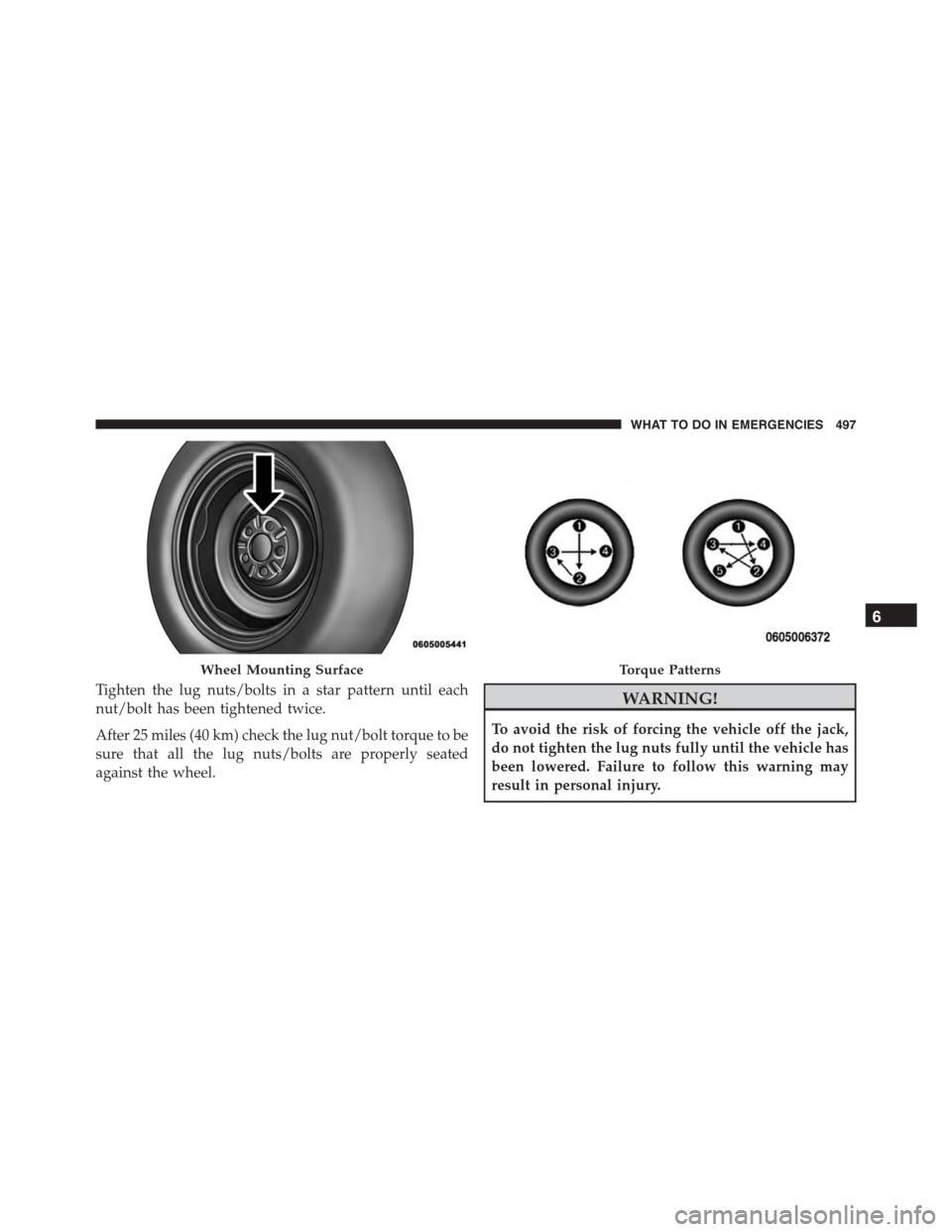
Tighten the lug nuts/bolts in a star pattern until each
nut/bolt has been tightened twice.
After 25 miles (40 km) check the lug nut/bolt torque to be
sure that all the lug nuts/bolts are properly seated
against the wheel.
WARNING!
To avoid the risk of forcing the vehicle off the jack,
do not tighten the lug nuts fully until the vehicle has
been lowered. Failure to follow this warning may
result in personal injury.
Wheel Mounting SurfaceTorque Patterns
6
WHAT TO DO IN EMERGENCIES 497
Page 508 of 638
9. Lower the vehicle to the ground by turning the jack
handle counterclockwise.
10. Refer to Torque Specifications for proper lug nut
torque.
11. Stow the jack, tools and flat tire. Make sure the base
of the jack faces the front of the vehicle before
tightening down the fastener.
WARNING!
A loose tire or jack thrown forward in a collision or
hard stop could endanger the occupants of the ve-
hicle. Always stow the jack parts and the spare tire in
the places provided. Have the deflated (flat) tire
repaired or replaced immediately.
Road Tire Installation
1. Mount the road tire on the axle.
2. Install the remaining lug nuts with the cone shaped
end of the nut toward the wheel. Lightly tighten the
lug nuts.
WARNING!
To avoid the risk of forcing the vehicle off the jack,
do not tighten the lug nuts fully until the vehicle has
been lowered. Failure to follow this warning may
result in personal injury.
3. Lower the vehicle to the ground by turning the jack
handle counterclockwise.
4. Refer to Torque Table for proper lug nut torque.
506 WHAT TO DO IN EMERGENCIES
Page 509 of 638
5. After 25 miles (40 km) check the lug nut torque with a
torque wrench to ensure that all lug nuts are properly
seated against the wheel.
TIRE SERVICE KIT — IF EQUIPPED
Small punctures up to¼” (6 mm) in the tire tread can be
sealed with Tire Service Kit. Foreign objects (e.g., screws
or nails) should not be removed from the tire. Tire Service
Kit can be used in outside temperatures down to approxi-
mately -4°F (-20°C).
This kit will provide a temporary tire seal, allowing you
to drive your vehicle up to 100 miles (160 km) with a
maximum speed of 55 mph (90 km/h).
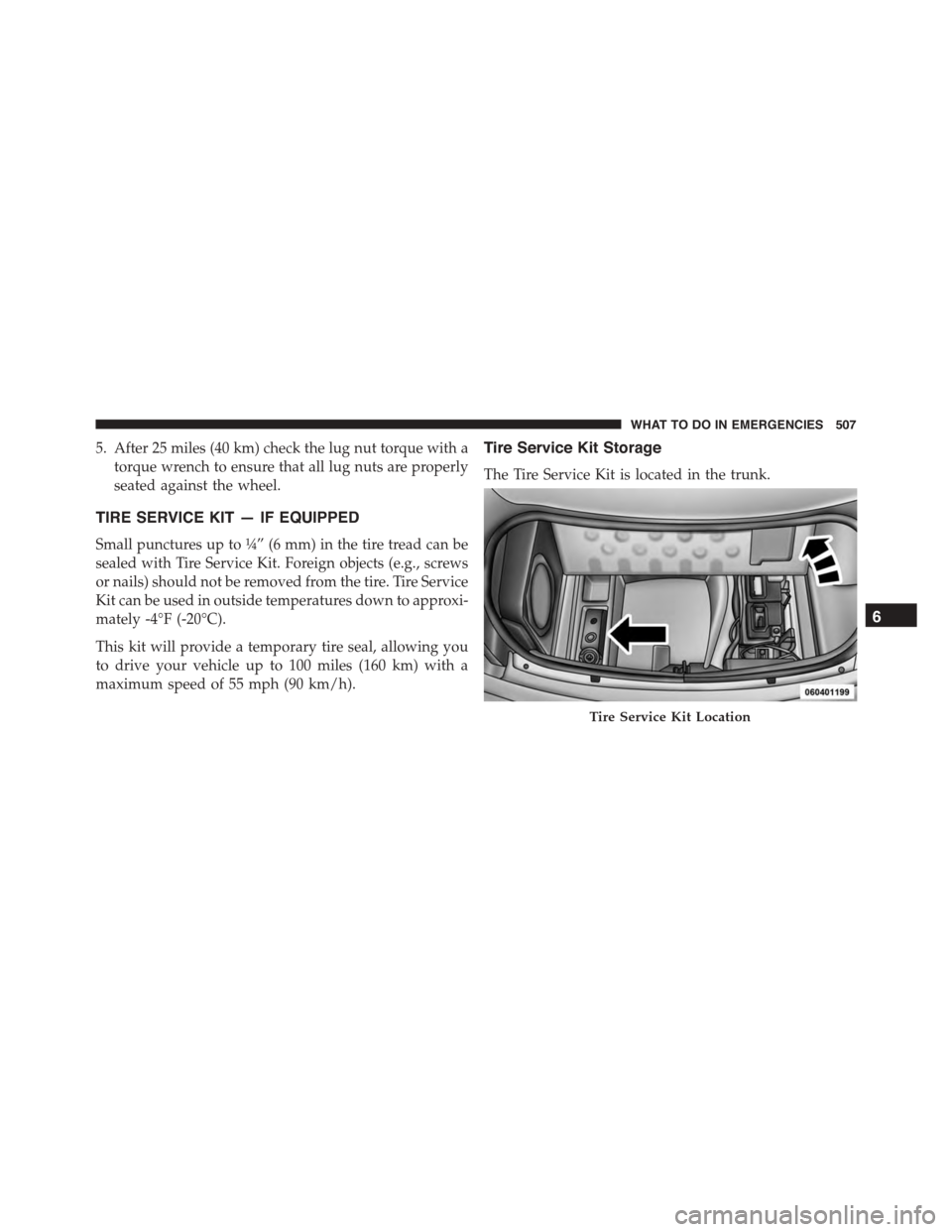
Tire Service Kit Storage
The Tire Service Kit is located in the trunk.
Tire Service Kit Location
6
WHAT TO DO IN EMERGENCIES 507