steering DODGE CHARGER 2015 7.G Workshop Manual
[x] Cancel search | Manufacturer: DODGE, Model Year: 2015, Model line: CHARGER, Model: DODGE CHARGER 2015 7.GPages: 638, PDF Size: 16.56 MB
Page 350 of 638
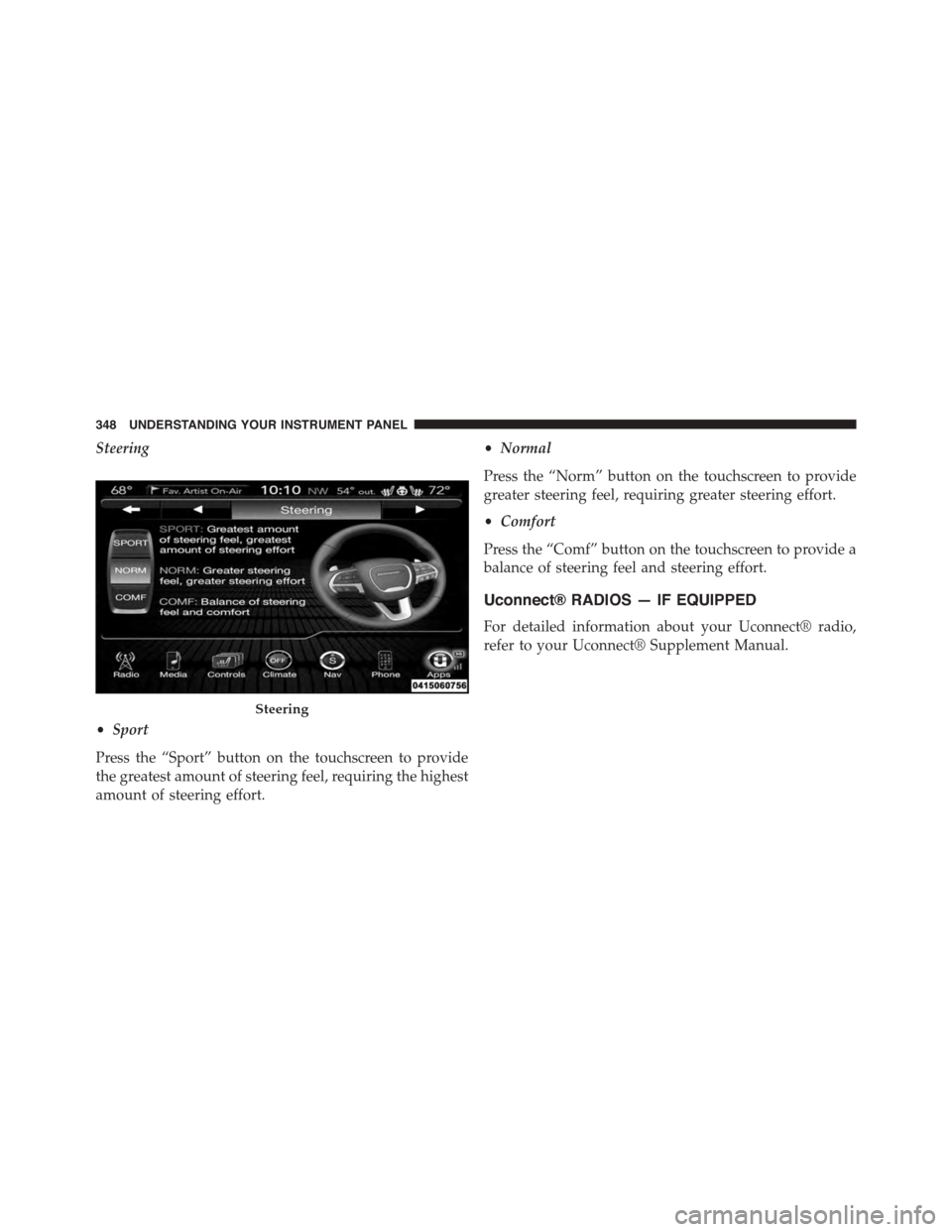
Steering
•Sport
Press the “Sport” button on the touchscreen to provide
the greatest amount of steering feel, requiring the highest
amount of steering effort.
•Normal
Press the “Norm” button on the touchscreen to provide
greater steering feel, requiring greater steering effort.
•Comfort
Press the “Comf” button on the touchscreen to provide a
balance of steering feel and steering effort.
Uconnect® RADIOS — IF EQUIPPED
For detailed information about your Uconnect® radio,
refer to your Uconnect® Supplement Manual.
Steering
348 UNDERSTANDING YOUR INSTRUMENT PANEL
Page 352 of 638
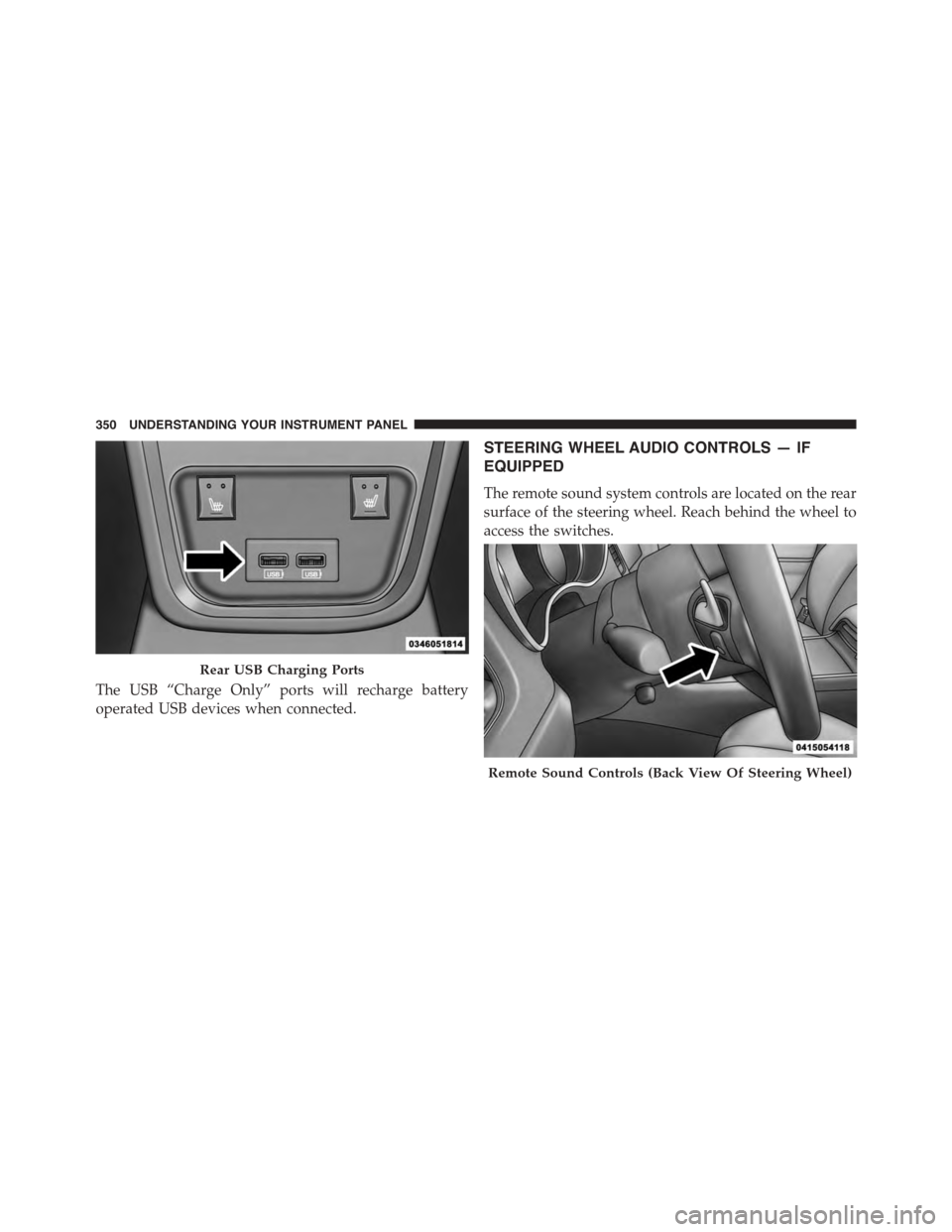
The USB “Charge Only” ports will recharge battery
operated USB devices when connected.
STEERING WHEEL AUDIO CONTROLS — IF
EQUIPPED
The remote sound system controls are located on the rear
surface of the steering wheel. Reach behind the wheel to
access the switches.
Rear USB Charging Ports
Remote Sound Controls (Back View Of Steering Wheel)
350 UNDERSTANDING YOUR INSTRUMENT PANEL
Page 374 of 638
If you see theicon on your touchscreen, you have
the Uconnect® 8.4AN system. If not, you have a
Uconnect® 8.4A system.
Get Started
All you need to control your Uconnect® system with
your voice are the buttons on your steering wheel.
1. VisitUconnectPhone.comto check mobile device and
feature compatibility and to find phone pairing in-
structions.
2. Reduce background noise. Wind and passenger con-
versations are examples of noise that may impact
recognition.
3. Speak clearly at a normal pace and volume while
facing straight ahead. The microphone is positioned
on the rearview mirror and aimed at the driver.
4. Each time you give a Voice Command, you must first
push either the VR or Phone button, wait untilafter
the beep, then say your Voice Command.
5. You can interrupt the help message or system prompts
by pushing the VR or Phone button and saying a Voice
Command from current category.
372 UNDERSTANDING YOUR INSTRUMENT PANEL
Page 382 of 638
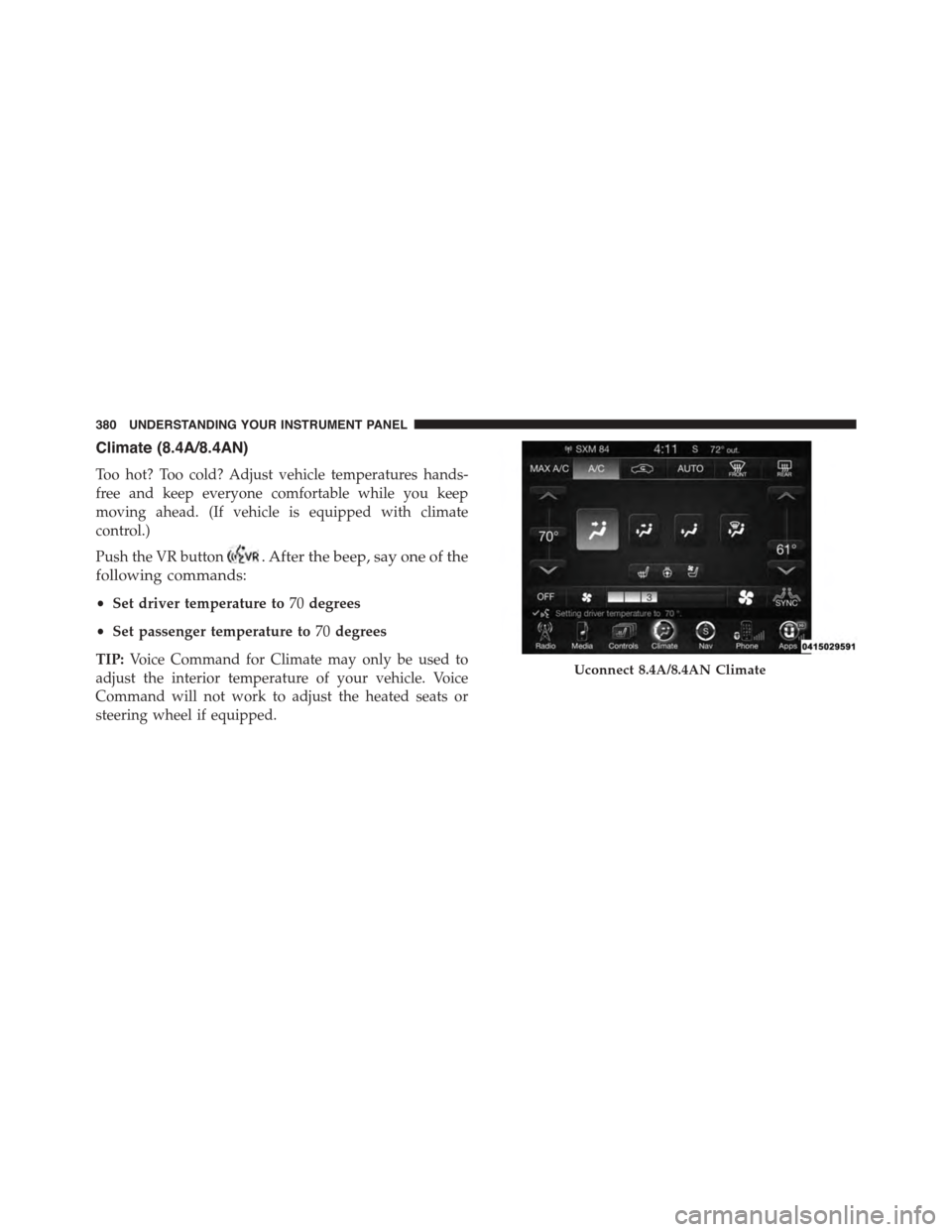
Climate (8.4A/8.4AN)
Too hot? Too cold? Adjust vehicle temperatures hands-
free and keep everyone comfortable while you keep
moving ahead. (If vehicle is equipped with climate
control.)
Push the VR button. After the beep, say one of the
following commands:
•Set driver temperature to70degrees
•Set passenger temperature to70degrees
TIP:Voice Command for Climate may only be used to
adjust the interior temperature of your vehicle. Voice
Command will not work to adjust the heated seats or
steering wheel if equipped.
Uconnect 8.4A/8.4AN Climate
380 UNDERSTANDING YOUR INSTRUMENT PANEL
Page 392 of 638
!DRIVING THROUGH WATER.............414
▫Flowing/Rising Water..................414
▫Shallow Standing Water.................414
!ELECTRIC POWER STEERING.............416
!FUEL SAVER TECHNOLOGY 5.7L ENGINE
ONLY — IF EQUIPPED..................417
!PARKING BRAKE......................418
!BRAKE SYSTEM.......................420
!ELECTRONIC BRAKE CONTROL SYSTEM . . . .421
▫Anti-Lock Brake System (ABS)............421
▫Traction Control System (TCS)............423
▫Brake Assist System (BAS)...............424
▫Electronic Stability Control (ESC)..........425
▫Hill Start Assist (HSA).................428
▫Ready Alert Braking...................430
▫Rain Brake Support....................430
▫ESC Activation/Malfunction Indicator Light And
ESC OFF Indicator Light................431
▫Synchronizing ESC....................432
!TIRE SAFETY INFORMATION.............432
▫Tire Markings........................432
▫Tire Identification Number (TIN)...........436
▫Tire Terminology And Definitions..........437
▫Tire Loading And Tire Pressure...........439
!TIRES — GENERAL INFORMATION........444
▫Tire Pressure........................444
▫Tire Inflation Pressures.................446
▫Tire Pressures For High Speed Operation . . . .447
390 STARTING AND OPERATING
Page 411 of 638
(-) (or tap the (-) shift paddle on the steering wheel, if
equipped) to downshift the transmission to the next
lower gear, or tap the lever rearward (+) (or tap the (+)
shift paddle, if equipped) to command an upshift.
NOTE:Tapping one of the steering wheel-mounted shift
paddles (+/-), if equipped, while the shift lever is in
DRIVE, will activate a temporary AutoStick mode. Tap-
ping (-) to enter AutoStick mode will downshift the
transmission to the next lower gear, while using (+) to
enter AutoStick mode will retain the current gear. The
current gear will be displayed in the instrument cluster,
but the#M#will not be highlighted. The transmission will
revert back to normal operation (if the shift lever remains
in DRIVE) after a period of time, depending on accelera-
tor pedal activity.
In AutoStick mode, the transmission will shift up or
down when (+/-) is manually selected by the driver
(using the shift lever, or the shift paddles [if equipped]),
unless an engine lugging or overspeed condition would
result. It will remain in the selected gear until another
upshift or downshift is chosen, except as described
below.
•In temporary AutoStick mode (shift lever in DRIVE), the
transmission will automatically shift up when maxi-
mum engine speed is reached. If the accelerator is fully
depressed, the transmission will downshift when pos-
sible (based on current vehicle speed and gear, except
6.4L models). Lack of accelerator pedal activity will
cause the transmission to revert to automatic operation.
•If normal AutoStick mode is engaged (shift lever in
MANUAL position), manual gear selection will be
maintained until the shift lever is returned to DRIVE,
or as described below. The transmission will not
upshift automatically at redline in this mode, nor will
downshifts be obtained if the accelerator pedal is
pressed to the floor.
5
STARTING AND OPERATING 409
Page 413 of 638
WARNING!
Do not downshift for additional engine braking on a
slippery surface. The drive wheels could lose their
grip and the vehicle could skid, causing a collision or
personal injury.
SPORT MODE — WITHOUT PERFORMANCE
CONTROL
Your vehicle is equipped with a Sport Mode feature. This
mode is a configuration set up for typical enthusiast
driving. The engine, transmission, and steering systems
are all set to their SPORT settings. Sport Mode will
provide improved throttle response and modified shift-
ing for an enhanced driving experience, as well the
greatest amount of steering feel. This mode may be
activated and deactivated by pressing the Sport button
on the instrument panel switch bank.
For vehicles equipped with Drive Modes, Refer to “Per-
formance Control — If Equipped” within “Uconnect
Settings” in “Understanding Your Instrument Panel”
chapter for further information.
ALL-WHEEL DRIVE (AWD) — IF EQUIPPED
This vehicle is equipped with an active on-demand
All-Wheel Drive (AWD) system which makes available
optimum traction for a wide variety of road surface and
driving conditions. The system minimizes wheel slip by
automatically redirecting torque to the front and rear
wheels as necessary.
To maximize fuel economy, your AWD vehicle automati-
cally defaults to rear-wheel drive (RWD) when road and
environmental conditions are such that wheel slip is
unlikely to occur. When specific road and environmental
conditions require increased levels of road traction, the
vehicle automatically shifts into AWD mode. Automatic
5
STARTING AND OPERATING 411
Page 418 of 638
ELECTRIC POWER STEERING
The electric power steering system will give you good
vehicle response and increased ease of maneuverability
in tight spaces. The system will vary its assist to provide
light efforts while parking and good feel while driving. If
the electric steering system experiences a fault that
prevents it from providing assist, you will still have the
ability to steer the vehicle manually.
Alternate electric power steering efforts can be selected
through the Uconnect® System. Refer to ”Customer
Programmable Features” or “Performance Control — If
Equipped” within “Uconnect Settings” in “Understand-
ing Your Instrument Panel” chapter for further informa-
tion.
WARNING!
Continued operation with reduced assist could pose
a safety risk to yourself and others. Service should be
obtained as soon as possible.
If the Steering icon is displayed and the “SER-
VICE POWER STEERING” or the “POWER
STEERING ASSIST OFF – SERVICE SYSTEM”
message is displayed within the Driver Infor-
mation Display (DID), this indicates the vehicle needs to
be taken to the dealer for service. Refer to “Driver
Information Display (DID)” in “Understanding Your
Instrument Panel” for further information.
416 STARTING AND OPERATING
Page 419 of 638
NOTE:
•Even if the power steering assistance is no longer
operational, it is still possible to steer the vehicle.
Under these conditions there will be a substantial
increase in steering effort, especially at low speeds and
during parking maneuvers.
•If the condition persists, see your authorized dealer for
service.
FUEL SAVER TECHNOLOGY 5.7L ENGINE ONLY —
IF EQUIPPED
This feature offers improved fuel economy by shutting
off four of the engine’s eight cylinders during light load
and cruise conditions. The system is automatic with no
driver inputs or additional driving skills required.
NOTE:This system may take some time to return to full
functionality after a battery disconnect.5
STARTING AND OPERATING 417
Page 425 of 638
WARNING!(Continued)
•The ABS cannot prevent the natural laws of phys-
ics from acting on the vehicle, nor can it increase
braking or steering efficiency beyond that afforded
by the condition of the vehicle brakes and tires or
the traction afforded.
•The ABS cannot prevent collisions, including those
resulting from excessive speed in turns, following
another vehicle too closely, or hydroplaning.
•The capabilities of an ABS equipped vehicle must
never be exploited in a reckless or dangerous
manner that could jeopardize the user’s safety or
the safety of others.
All vehicle wheels and tires must be the same size and
type and tires must be properly inflated to produce
accurate signals for the computer.
Traction Control System (TCS)
This system monitors the amount of wheel spin of each
driven wheel. If wheel spin is detected, brake pressure is
applied to the slipping wheel(s) and engine power is
reduced to provide enhanced acceleration and stability.
A feature of the TCS system, Brake Limited Differential
(BLD), controls the wheel spin across a driven axle. If one
wheel on a driven axle is spinning faster than the other,
the system will apply the brake of the spinning wheel.
This will allow more engine torque to be applied to the
wheel that is not spinning. This feature remains active
even if TCS and ESC are in the “Sport Mode (Partial Off)”
or#Track Mode (Full Off)#mode. Refer to “Electronic
Stability Control (ESC)” in this section for more informa-
tion.
5
STARTING AND OPERATING 423