ad blue DODGE CHARGER 2015 7.G Owner's Manual
[x] Cancel search | Manufacturer: DODGE, Model Year: 2015, Model line: CHARGER, Model: DODGE CHARGER 2015 7.GPages: 236, PDF Size: 35.67 MB
Page 143 of 236
Helpful Tips And Common Questions To Improve Bluetooth® Performance With
Your Uconnect® System
Mobile Phone won’t reconnect to system after pairing:
•Setmobilephonetoauto-connectortrusteddeviceinmobilephoneBluetooth®
settings (Blackberry devices).
•Performafactoryresetonyourmobilephone.Refertoyourmobilephonemanufacturer
or cellular provider for instructions.
•Manymobilephonesdonotautomaticallyreconnectafterbeingrestarted(hard
reboot). Your mobile phone can still be connected manually. Close all applications that
may be operating (refer to mobile phone manufacturer’s instructions), and follow
“Pairing (Wirelessly Connecting) Your Mobile Phone To The Uconnect®System”.
Mobile Phone won’t pair to system:
•Performahardresetinthemobilephonebyremovingthebattery(ifremovable—see
your mobile phone’s owner manual).
•DeletepairinghistoryinmobilephoneandUconnectsystem;usuallyfoundinphone’s
Bluetooth®connection settings.
•Verifyyouareselecting“Uconnect”inthediscoveredBluetooth®devices on your
mobile phone.
•Ifyourvehiclesystemgeneratesapincodethedefaultis0000.
Mobile Phonebook didn’t download:
•Check“Donotaskagain,”thenacceptthe“phonebookdownload”requestonyour
mobile phone.
•Upto5,000contactnameswithfournumberspercontactwilltransfertothe
Uconnect®8.4A/8.4AN system phonebook.
•Upto2,000contactnameswithsixnumberspercontactwilltransfertothe
Uconnect®5.0 system phonebook.
Te x t m e s s a g i n g w o n ’ t w o r k :
•Check“Donotaskagain,”thenacceptthe“connecttoyourmessages”requestonyour
mobile phone.
•VerifythatyourmobilephonehastheBluetooth®feature (Message Access Profile).
Can’t make a conference call:
•CDMA(Code-DivisionMultipleAccess)carriersdonotsupportconferencecalling.
Refer to your mobile phone user’s manual for further information.
Making calls while connected to AUX:
•PlugginginyourmobilephonetoAUXwhileconnectedtoBluetooth®will disable
Hands-Free Calling. Do not make calls while your mobile phone is plugged into the AUX
jack.
ELECTRONICS
141
Page 149 of 236
PROGRAMMABLE FEATURES
Driver Information Display (DID)
The DID can be used to view or change the following settings. Push the UPor DOWN
button to scroll through the main menus, then push the RIGHTbutton to scroll
through the submenus of each menu item. Push theBACKbutton to scroll back to a
previous menu or sub menu.
•Speedometer•Audio
•VehicleInfo•Messages
•DriverAssist—IfEquipped•ScreenSetup
•FuelEconomy•SpeedWarning—IfEquipped
•Trip•Diagnostic—IfEquipped
Uconnect® Customer Programmable Features
The Uconnect®system allows you to access Customer Programmable feature settings
such as Display, Units, Voice, Clock, Safety & Driving Assistance, Lights, Doors & Locks,
Auto-On Comfort, Engine Off Options, Audio, Phone/Bluetooth®,SiriusXMSetup,Restore
Settings, Clear Personal Data, System Information, and Compass Settings (5.0 Radio
Only) through buttons on the touchscreen.
NOTE:
If equipped with the Super Track Pak option please refer to the “Drive Mode Supplement”
within your Owners Information Kit for further descriptions of these modes.
•Pressthe“Controls”buttonlocatednearthebottomofthetouchscreen,thenpressthe
“Settings” button on the touchscreen to access the Settings screen. When making a
selection, scroll up or down until the preferred setting is highlighted, then press and
release the preferred setting until a check-mark appears next to the setting, showing
that setting has been selected. The following feature settings are available:
•Display•EngineOffOptions
•Units•Audio
•Voice•Phone/Bluetooth®
•Clock•SiriusXMSetup
•Safety&DrivingAssistance•RestoreSettings
•Lights•ClearPersonalData
•Doors&Locks•SystemInformation
•Auto-OnComfort•Compass(5.0RadioOnly)
Refer to “Uconnect Settings/Customer Programmable Features” found within “Under-
standing Your Instrument Panel” located in your Owner's Manual on the DVD for further
information.
ELECTRONICS
147
Page 153 of 236
POWER OUTLET
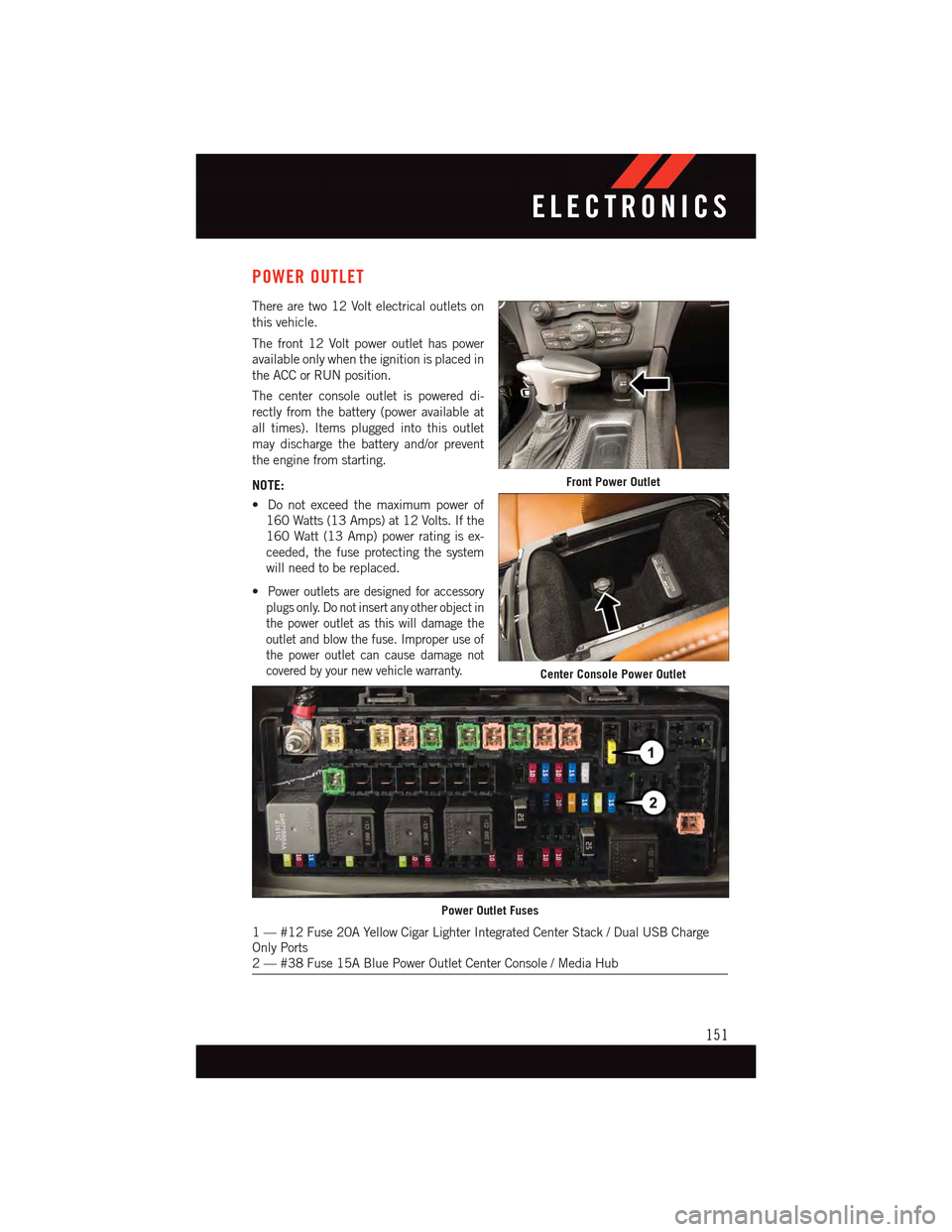
There are two 12 Volt electrical outlets on
this vehicle.
The front 12 Volt power outlet has power
available only when the ignition is placed in
the ACC or RUN position.
The center console outlet is powered di-
rectly from the battery (power available at
all times). Items plugged into this outlet
may discharge the battery and/or prevent
the engine from starting.
NOTE:
•Donotexceedthemaximumpowerof
160 Watts (13 Amps) at 12 Volts. If the
160 Watt (13 Amp) power rating is ex-
ceeded, the fuse protecting the system
will need to be replaced.
•Power outlets are designed for accessory
plugs only. Do not insert any other object in
the power outlet as this will damage the
outlet and blow the fuse. Improper use of
the power outlet can cause damage not
covered by your new vehicle warranty.
Front Power Outlet
Center Console Power Outlet
Power Outlet Fuses
1—#12Fuse20AYellowCigarLighterIntegratedCenterStack/DualUSBChargeOnly Ports2—#38Fuse15ABluePowerOutletCenterConsole/MediaHub
ELECTRONICS
151
Page 210 of 236
FUSES
WARNING!
•When replacing a blown fuse, always use an appropriate replacement fuse with the
same amp rating as the original fuse. Never replace a fuse with another fuse of higher
amp rating. Never replace a blown fuse with metal wires or any other material. Failure
to use proper fuses may result in serious personal injury, fire and/or property damage.
•Beforereplacingafuse,makesurethattheignitionisoffandthatalltheother
services are switched off and/or disengaged.
•Ifthereplacedfuseblowsagain,contactanauthorizeddealer.
•If a general protection fuse for safety systems (air bag system, braking system), power
unit systems (engine system, gearbox system) or steering system blows, contact an
authorized dealer.
Front Power Distribution Center (Fuses)
The Front Power Distribution Center is located in the engine compartment. This module
contains fuses and relays.
CAUTION!
•Wheninstallingthepowerdistributioncentercover,itisimportanttoensurethe
cover is properly positioned and fully latched. Failure to do so may allow water to get
into the power distribution center and possibly result in an electrical system failure.•Whenreplacingablownfuse,itisimportanttouseonlyafusehavingthecorrect
amperage rating. The use of a fuse with a rating other than indicated may result in
adangerouselectricalsystemoverload.Ifaproperlyratedfusecontinuestoblow,
it indicates a problem in the circuit that must be corrected.
Cavity Cartridge Fuse Mini-FuseDescription
1––Fuse – Spare
240AmpGreen –Radiator Fan #1 – If Equipped
350AmpRed –Power Steering #1 / Radiator Fan(6.2L Supercharged) – If Equipped
430AmpPink –Starter
540AmpGreen –Electronic Stability Control
630AmpPink –Electronic Stability Control
7––Fuse – Spare
820AmpBlue –Police Ignition Run / ACC # 2
9–20AmpYellowAll-Wheel Drive Module – If Equipped
10–10AmpRedSecurity–IfEquipped/UnderhoodLamp – Police
11–20AmpYellowHorns
MAINTAINING YOUR VEHICLE
208
Page 211 of 236
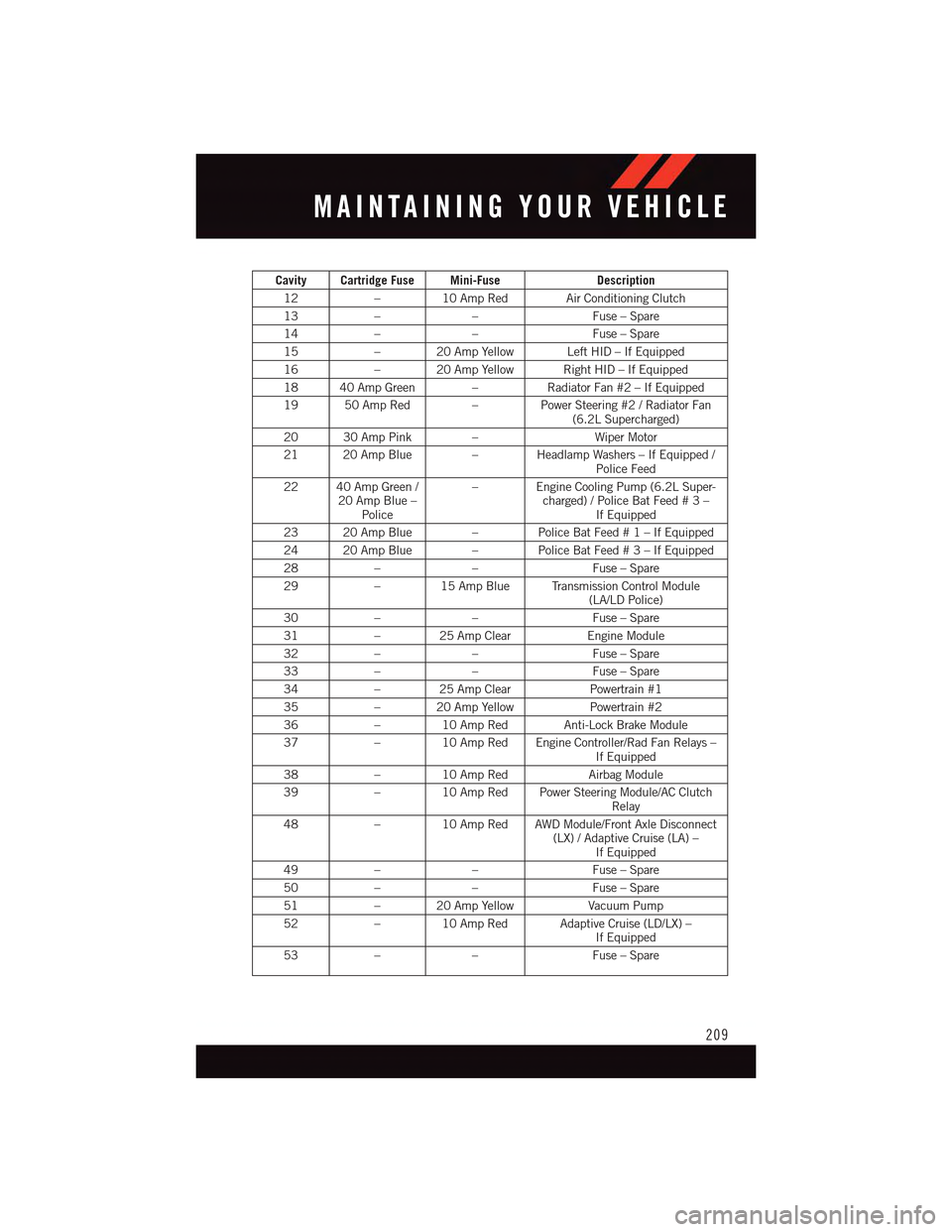
Cavity Cartridge Fuse Mini-FuseDescription
12–10AmpRedAirConditioningClutch
13––Fuse – Spare
14––Fuse – Spare
15–20AmpYellowLeftHID–IfEquipped
16–20AmpYellowRightHID–IfEquipped
18 40 Amp Green –Radiator Fan #2 – If Equipped
19 50 Amp Red –Power Steering #2 / Radiator Fan(6.2L Supercharged)
20 30 Amp Pink –Wiper Motor
21 20 Amp Blue – Headlamp Washers – If Equipped /Police Feed
22 40 Amp Green /20 Amp Blue –Police
–EngineCoolingPump(6.2LSuper-charged) / Police Bat Feed#3–If Equipped
23 20 Amp Blue – Police Bat Feed # 1 – IfEquipped
24 20 Amp Blue – Police Bat Feed # 3 – IfEquipped
28––Fuse – Spare
29–15AmpBlueTransmissionControlModule(LA/LD Police)
30––Fuse – Spare
31–25AmpClearEngine Module
32––Fuse – Spare
33––Fuse – Spare
34–25AmpClearPowertrain #1
35–20AmpYellowPowertrain #2
36–10AmpRedAnti-LockBrakeModule
37–10AmpRedEngineController/RadFanRelays–If Equipped
38–10AmpRedAirbag Module
39–10AmpRedPowerSteeringModule/ACClutchRelay
48–10AmpRedAWDModule/FrontAxleDisconnect(LX) / Adaptive Cruise (LA) –If Equipped
49––Fuse – Spare
50––Fuse – Spare
51–20AmpYellowVacuum Pump
52–10AmpRedAdaptiveCruise(LD/LX)–If Equipped
53––Fuse – Spare
MAINTAINING YOUR VEHICLE
209
Page 212 of 236
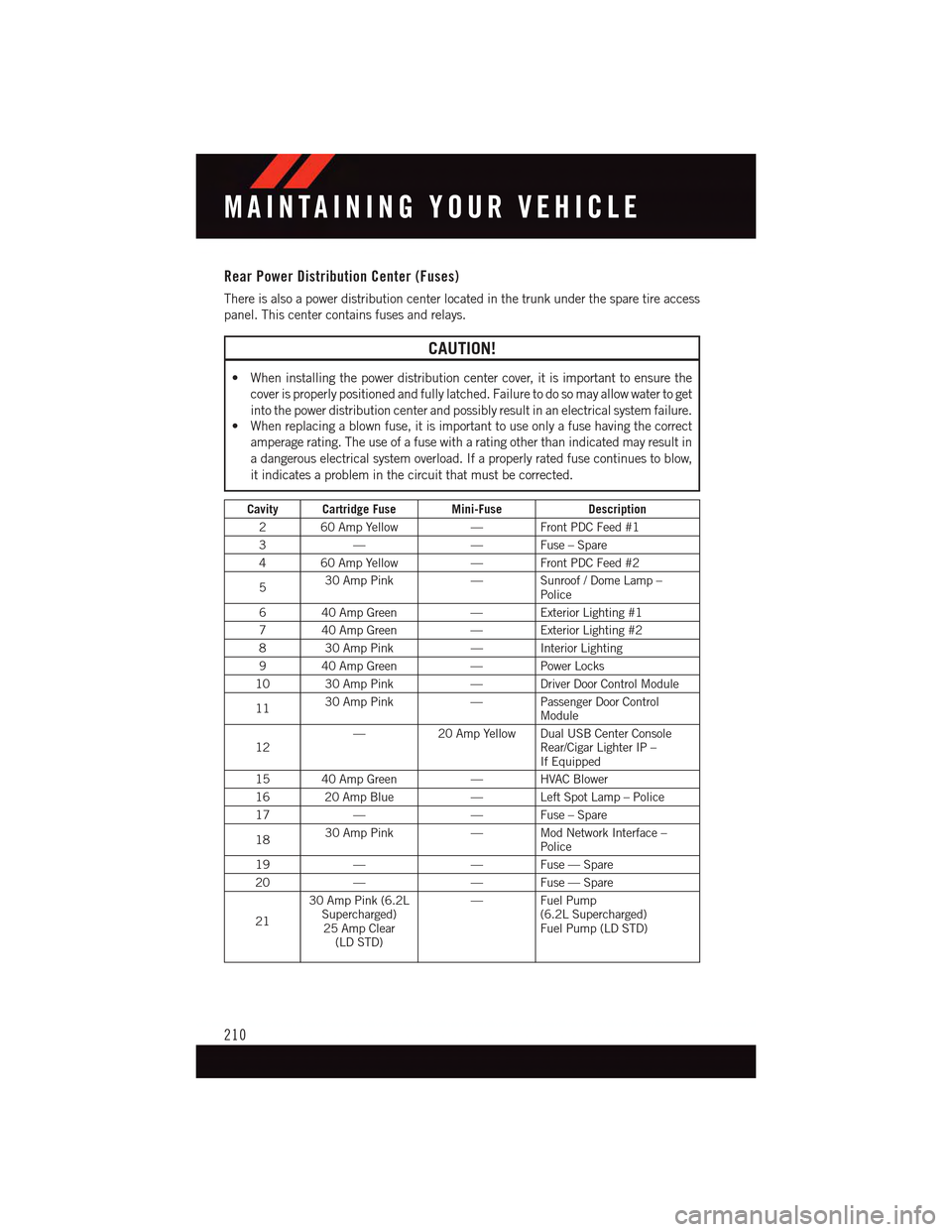
Rear Power Distribution Center (Fuses)
There is also a power distribution center located in the trunk under the spare tire access
panel. This center contains fuses and relays.
CAUTION!
•Wheninstallingthepowerdistributioncentercover,itisimportanttoensurethe
cover is properly positioned and fully latched. Failure to do so may allow water to get
into the power distribution center and possibly result in an electrical system failure.•Whenreplacingablownfuse,itisimportanttouseonlyafusehavingthecorrect
amperage rating. The use of a fuse with a rating other than indicated may result in
adangerouselectricalsystemoverload.Ifaproperlyratedfusecontinuestoblow,
it indicates a problem in the circuit that must be corrected.
Cavity Cartridge Fuse Mini-FuseDescription
260AmpYellow—FrontPDCFeed#1
3——Fuse–Spare
460AmpYellow—FrontPDCFeed#2
530 Amp Pink—Sunroof/DomeLamp–Police
640AmpGreen—ExteriorLighting#1
740AmpGreen—ExteriorLighting#2
830AmpPink—InteriorLighting
940AmpGreen—PowerLocks
10 30 Amp Pink—DriverDoorControlModule
1130 Amp Pink—PassengerDoorControlModule
12—20 Amp Yellow Dual USB Center ConsoleRear/Cigar Lighter IP –If Equipped
15 40 Amp Green—HVACBlower
16 20 Amp Blue—LeftSpotLamp–Police
17——Fuse–Spare
1830 Amp Pink—ModNetworkInterface–Police
19——Fuse—Spare
20——Fuse—Spare
21
30 Amp Pink (6.2LSupercharged)25 Amp Clear(LD STD)
—FuelPump(6.2L Supercharged)Fuel Pump (LD STD)
MAINTAINING YOUR VEHICLE
210
Page 213 of 236
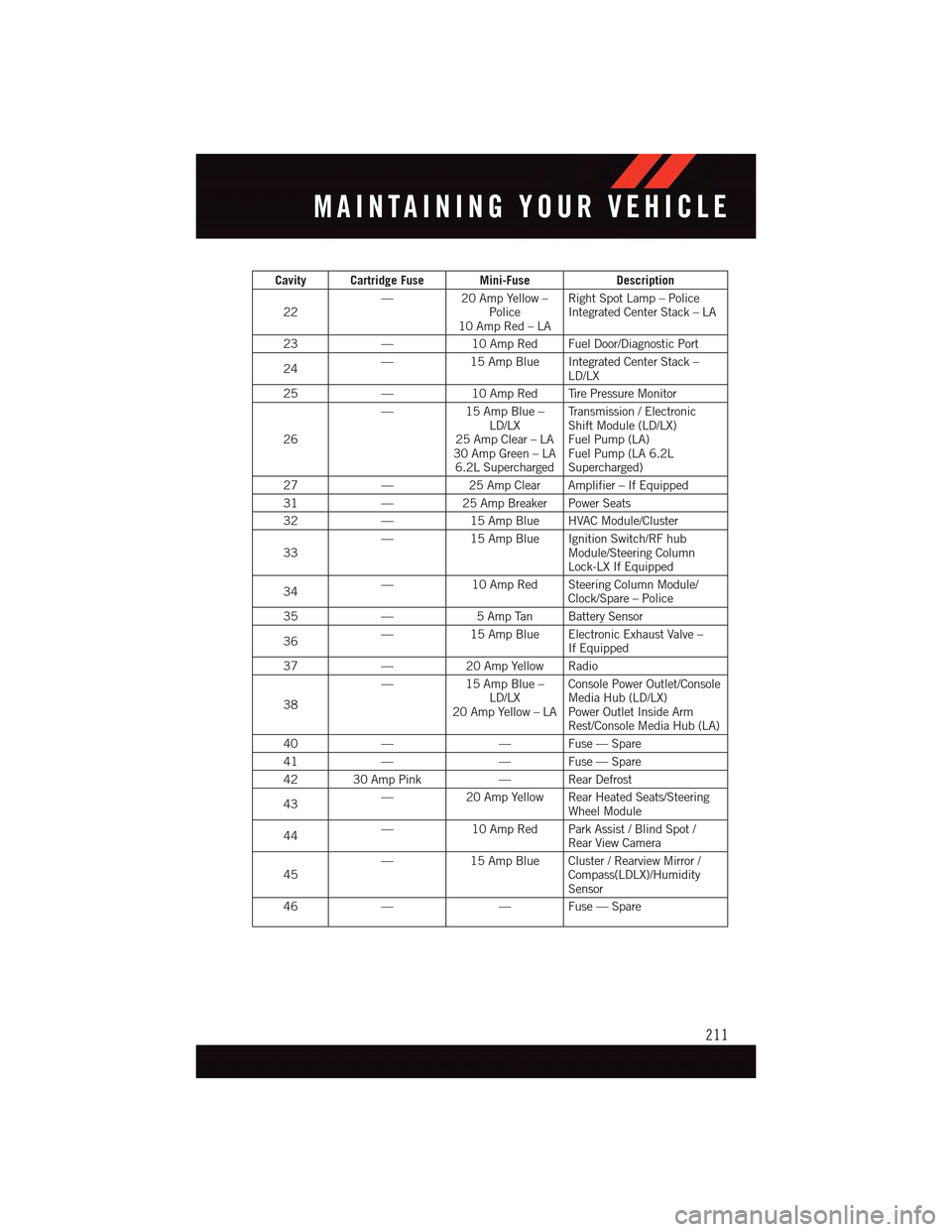
Cavity Cartridge Fuse Mini-FuseDescription
22—20 Amp Yellow –Police10 Amp Red – LA
Right Spot Lamp – PoliceIntegrated Center Stack – LA
23—10 Amp Red Fuel Door/Diagnostic Port
24—15 Amp Blue Integrated Center Stack –LD/LX
25—10 Amp Red Tire Pressure Monitor
26
—15 Amp Blue –LD/LX25 Amp Clear – LA30 Amp Green – LA6.2L Supercharged
Tr a n s m i s s i o n / E l e c t r o n i cShift Module (LD/LX)Fuel Pump (LA)Fuel Pump (LA 6.2LSupercharged)
27—25 Amp Clear Amplifier – If Equipped
31—25 Amp Breaker Power Seats
32—15 Amp Blue HVAC Module/Cluster
33—15 Amp Blue Ignition Switch/RF hubModule/Steering ColumnLock-LX If Equipped
34—10 Amp Red Steering Column Module/Clock/Spare – Police
35—5AmpTan BatterySensor
36—15 Amp Blue Electronic Exhaust Valve –If Equipped
37—20 Amp Yellow Radio
38
—15 Amp Blue –LD/LX20 Amp Yellow – LA
Console Power Outlet/ConsoleMedia Hub (LD/LX)Power Outlet Inside ArmRest/Console Media Hub (LA)
40——Fuse—Spare
41——Fuse—Spare
42 30 Amp Pink—RearDefrost
43—20 Amp Yellow Rear Heated Seats/SteeringWheel Module
44—10 Amp Red Park Assist / Blind Spot /Rear View Camera
45—15 Amp Blue Cluster / Rearview Mirror /Compass(LDLX)/HumiditySensor
46——Fuse—Spare
MAINTAINING YOUR VEHICLE
211
Page 223 of 236
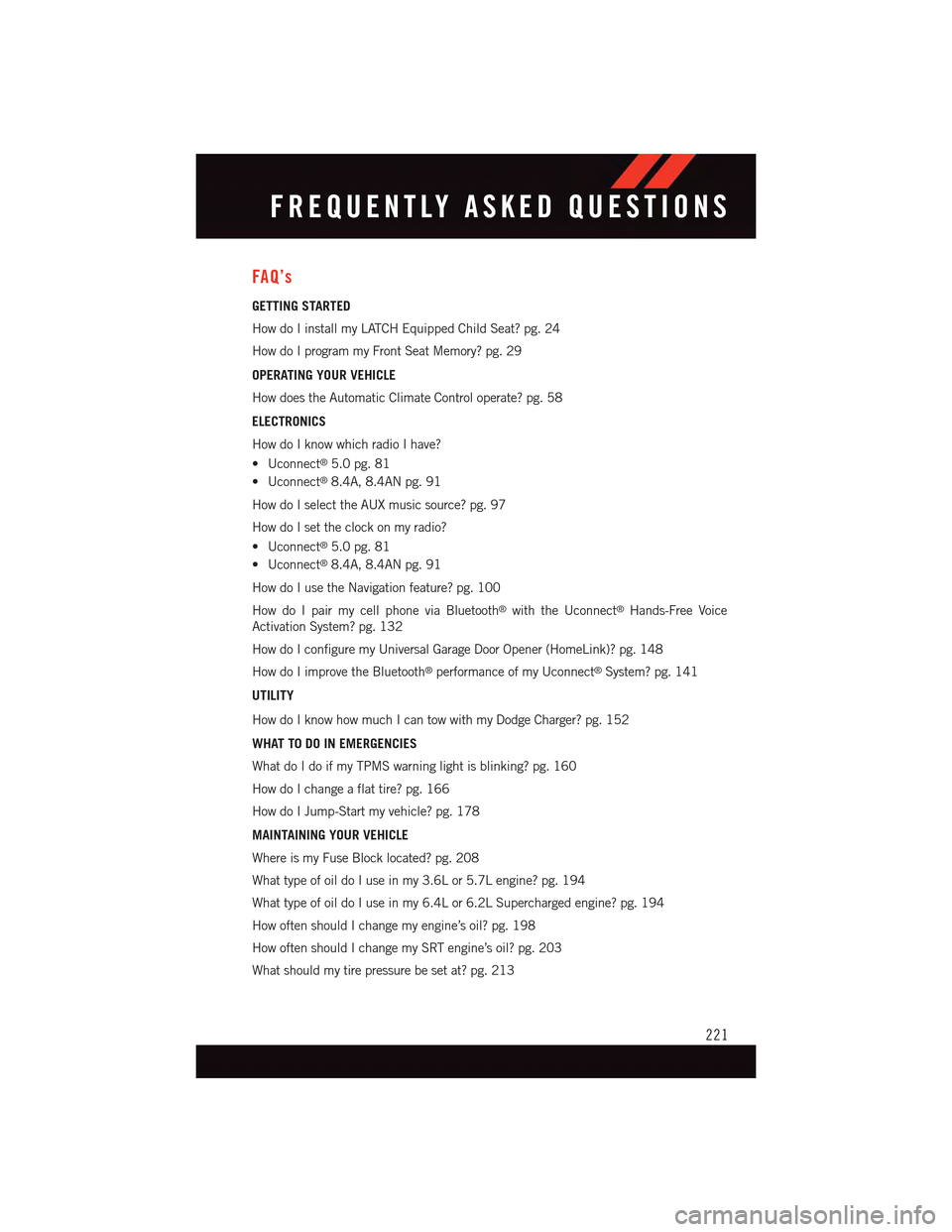
FAQ’s
GETTING STARTED
How do I install my LATCH Equipped Child Seat? pg. 24
How do I program my Front Seat Memory? pg. 29
OPERATING YOUR VEHICLE
How does the Automatic Climate Control operate? pg. 58
ELECTRONICS
How do I know which radio I have?
•Uconnect®5.0 pg. 81
•Uconnect®8.4A, 8.4AN pg. 91
How do I select the AUX music source? pg. 97
How do I set the clock on my radio?
•Uconnect®5.0 pg. 81
•Uconnect®8.4A, 8.4AN pg. 91
How do I use the Navigation feature? pg. 100
How do I pair my cell phone via Bluetooth®with the Uconnect®Hands-Free Voice
Activation System? pg. 132
How do I configure my Universal Garage Door Opener (HomeLink)? pg. 148
How do I improve the Bluetooth®performance of my Uconnect®System? pg. 141
UTILITY
How do I know how much I can tow with my Dodge Charger? pg. 152
WHAT TO DO IN EMERGENCIES
What do I do if my TPMS warning light is blinking? pg. 160
How do I change a flat tire? pg. 166
How do I Jump-Start my vehicle? pg. 178
MAINTAINING YOUR VEHICLE
Where is my Fuse Block located? pg. 208
What type of oil do I use in my 3.6L or 5.7L engine? pg. 194
What type of oil do I use in my 6.4L or 6.2L Supercharged engine? pg. 194
How often should I change my engine’s oil? pg. 198
How often should I change my SRT engine’s oil? pg. 203
What should my tire pressure be set at? pg. 213
FREQUENTLY ASKED QUESTIONS
221
Page 226 of 236
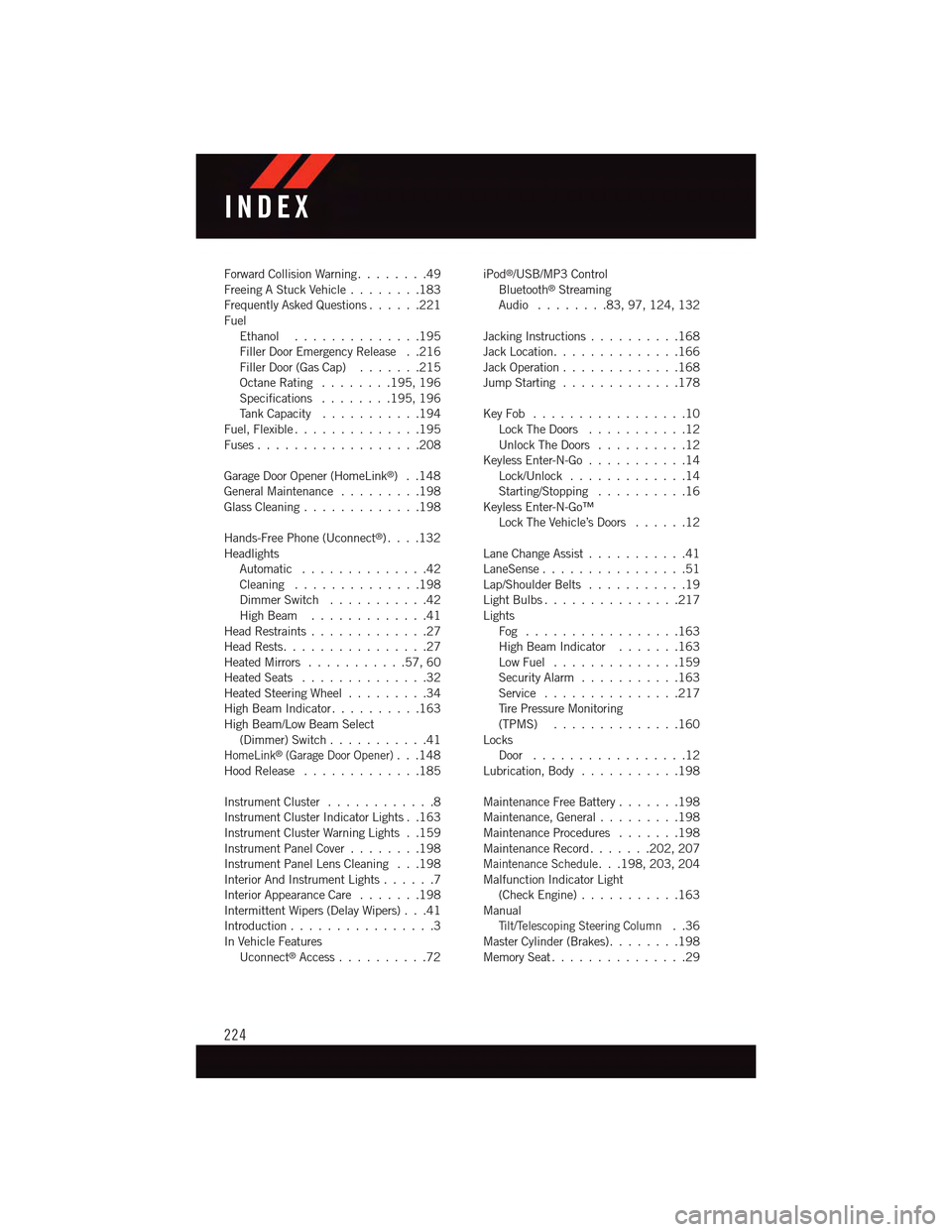
Forward Collision Warning........49Freeing A Stuck Vehicle . . . . . . . .183Frequently Asked Questions......221FuelEthanol..............195Filler Door Emergency Release . .216Filler Door (Gas Cap).......215Octane Rating . . . . . . . .195, 196Specifications........195, 196Ta n k C a p a c i t y...........194Fuel, Flexible..............195Fuses . . . . . . . . . . . . . . . . . .208
Garage Door Opener (HomeLink®)..148General Maintenance.........198Glass Cleaning . . . . . . . . . . . . .198
Hands-Free Phone (Uconnect®). . . .132HeadlightsAutomatic . . . . . . . . . . . . . .42Cleaning..............198Dimmer Switch...........42High Beam . . . . . . . . . . . . .41Head Restraints.............27Head Rests. . . . . . . . . . . . . . . .27Heated Mirrors...........57,60Heated Seats..............32Heated Steering Wheel.........34High Beam Indicator..........163High Beam/Low Beam Select(Dimmer) Switch...........41HomeLink®(Garage Door Opener)...148Hood Release . . . . . . . . . . . . .185
Instrument Cluster............8Instrument Cluster Indicator Lights . .163Instrument Cluster Warning Lights . .159Instrument Panel Cover........198Instrument Panel Lens Cleaning . . .198Interior And Instrument Lights......7Interior Appearance Care.......198Intermittent Wipers (Delay Wipers) . . .41Introduction................3In Vehicle FeaturesUconnect®Access..........72
iPod®/USB/MP3 ControlBluetooth®StreamingAudio........83,97,124, 132
Jacking Instructions..........168Jack Location..............166Jack Operation.............168Jump Starting.............178
Key Fob . . . . . . . . . . . . . . . . .10Lock The Doors...........12Unlock The Doors..........12Keyless Enter-N-Go...........14Lock/Unlock.............14Starting/Stopping..........16Keyless Enter-N-Go™Lock The Vehicle’s Doors......12
Lane Change Assist...........41LaneSense................51Lap/Shoulder Belts...........19Light Bulbs . . . . . . . . . . . . . . .217LightsFog . . . . . . . . . . . . . . . . .163High Beam Indicator.......163Low Fuel..............159Security Alarm...........163Service...............217Ti r e P r e s s u r e M o n i t o r i n g(TPMS)..............160LocksDoor.................12Lubrication, Body...........198
Maintenance Free Battery.......198Maintenance, General.........198Maintenance Procedures.......198Maintenance Record.......202, 207Maintenance Schedule...198,203,204Malfunction Indicator Light(Check Engine)...........163ManualTi l t / Te l e s c o p i n g S t e e r i n g C o l u m n..36Master Cylinder (Brakes)........198Memory Seat...............29
INDEX
224
Page 228 of 236
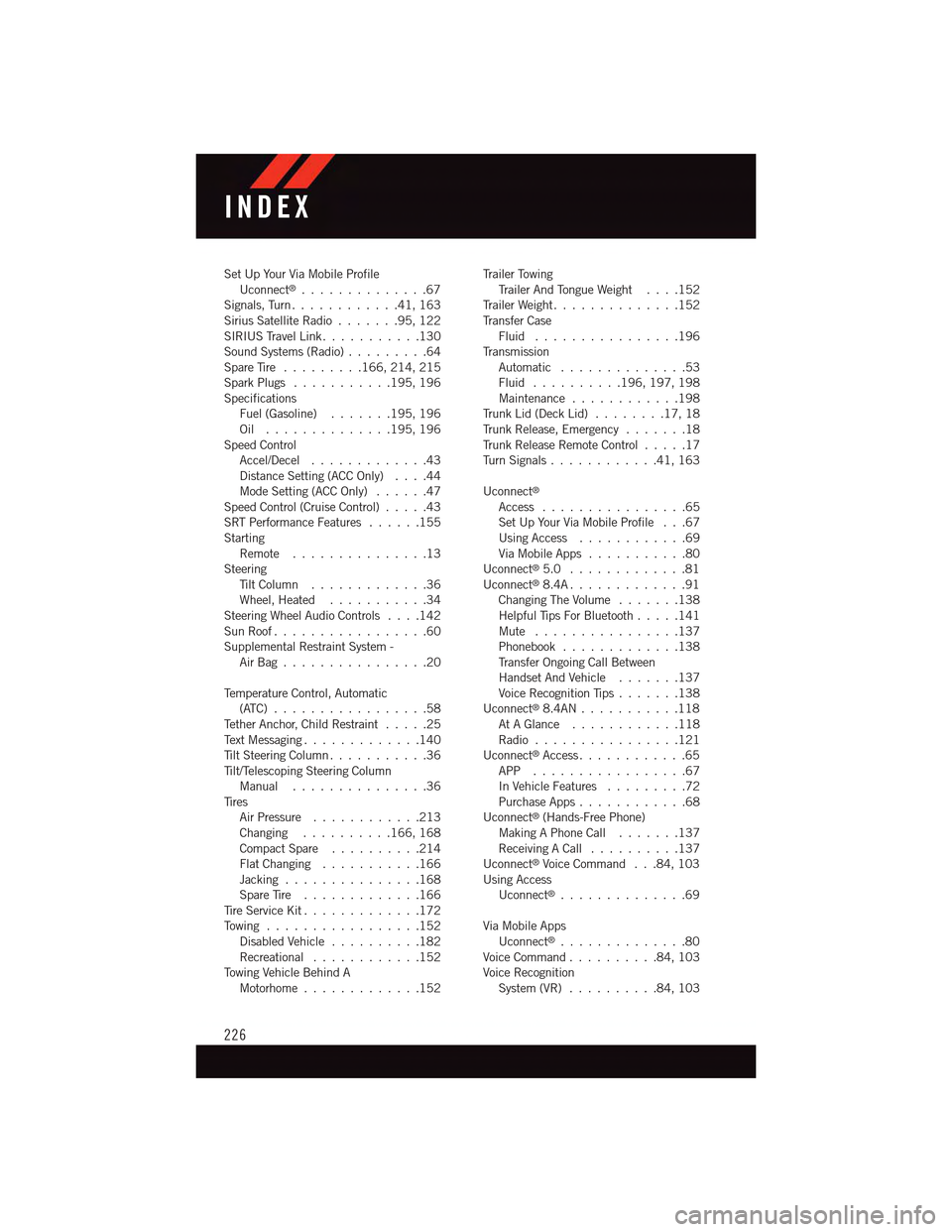
Set Up Your Via Mobile ProfileUconnect®..............67Signals, Turn............41,163Sirius Satellite Radio.......95,122SIRIUS Travel Link . . . . . . . . . . .130Sound Systems (Radio).........64Spare Tire.........166, 214, 215Spark Plugs...........195, 196SpecificationsFuel (Gasoline) . . . . . . .195, 196Oil . . . . . . . . . . . . . .195, 196Speed ControlAccel/Decel.............43Distance Setting (ACC Only)....44Mode Setting (ACC Only)......47Speed Control (Cruise Control).....43SRT Performance Features......155StartingRemote...............13SteeringTi l t C o l u m n . . . . . . . . . . . . . 3 6Wheel, Heated...........34Steering Wheel Audio Controls....142Sun Roof . . . . . . . . . . . . . . . . .60Supplemental Restraint System -Air Bag . . . . . . . . . . . . . . . .20
Te m p e r a t u r e C o n t r o l , A u t o m a t i c(ATC) . . . . . . . . . . . . . . . . .58Te t h e r A n c h o r, C h i l d R e s t r a i n t.....25Te x t M e s s a g i n g.............140Ti l t S t e e r i n g C o l u m n . . . . . . . . . . . 3 6Ti l t / Te l e s c o p i n g S t e e r i n g C o l u m nManual...............36Ti r e sAir Pressure............213Changing..........166, 168Compact Spare..........214Flat Changing . . . . . . . . . . .166Jacking . . . . . . . . . . . . . . .168Spare Tire.............166Ti r e S e r v i c e K i t.............172To w i n g . . . . . . . . . . . . . . . . . 1 5 2Disabled Vehicle..........182Recreational............152To w i n g V e h i c l e B e h i n d AMotorhome.............152
Tr a i l e r To w i n gTr a i l e r A n d To n g u e W e i g h t....152Tr a i l e r W e i g h t . . . . . . . . . . . . . . 1 5 2Tr a n s f e r C a s eFluid . . . . . . . . . . . . . . . .196Tr a n s m i s s i o nAutomatic . . . . . . . . . . . . . .53Fluid . . . . . . . . . .196, 197, 198Maintenance............198Tr u n k L i d ( D e c k L i d )........17,18Tr u n k R e l e a s e , E m e r g e n c y.......18Tr u n k R e l e a s e R e m o t e C o n t r o l.....17Tu r n S i g n a l s............41,163
Uconnect®
Access................65Set Up Your Via Mobile Profile . . .67Using Access............69Via Mobile Apps...........80Uconnect®5.0 . . . . . . . . . . . . .81Uconnect®8.4A . . . . . . . . . . . . .91Changing The Volume.......138Helpful Tips For Bluetooth . . . . .141Mute . . . . . . . . . . . . . . . .137Phonebook.............138Tr a n s f e r O n g o i n g C a l l B e t w e e nHandset And Vehicle.......137Voice Recognition Tips.......138Uconnect®8.4AN . . . . . . . . . . .118At A Glance............118Radio................121Uconnect®Access............65APP . . . . . . . . . . . . . . . . .67In Vehicle Features.........72Purchase Apps............68Uconnect®(Hands-Free Phone)Making A Phone Call.......137Receiving A Call..........137Uconnect®Voice Command . . .84, 103Using AccessUconnect®..............69
Via Mobile AppsUconnect®..............80Voice Command..........84,103Voice RecognitionSystem (VR)..........84,103
INDEX
226