phone DODGE CHARGER 2015 7.G Owner's Manual
[x] Cancel search | Manufacturer: DODGE, Model Year: 2015, Model line: CHARGER, Model: DODGE CHARGER 2015 7.GPages: 236, PDF Size: 35.67 MB
Page 110 of 236
Phone
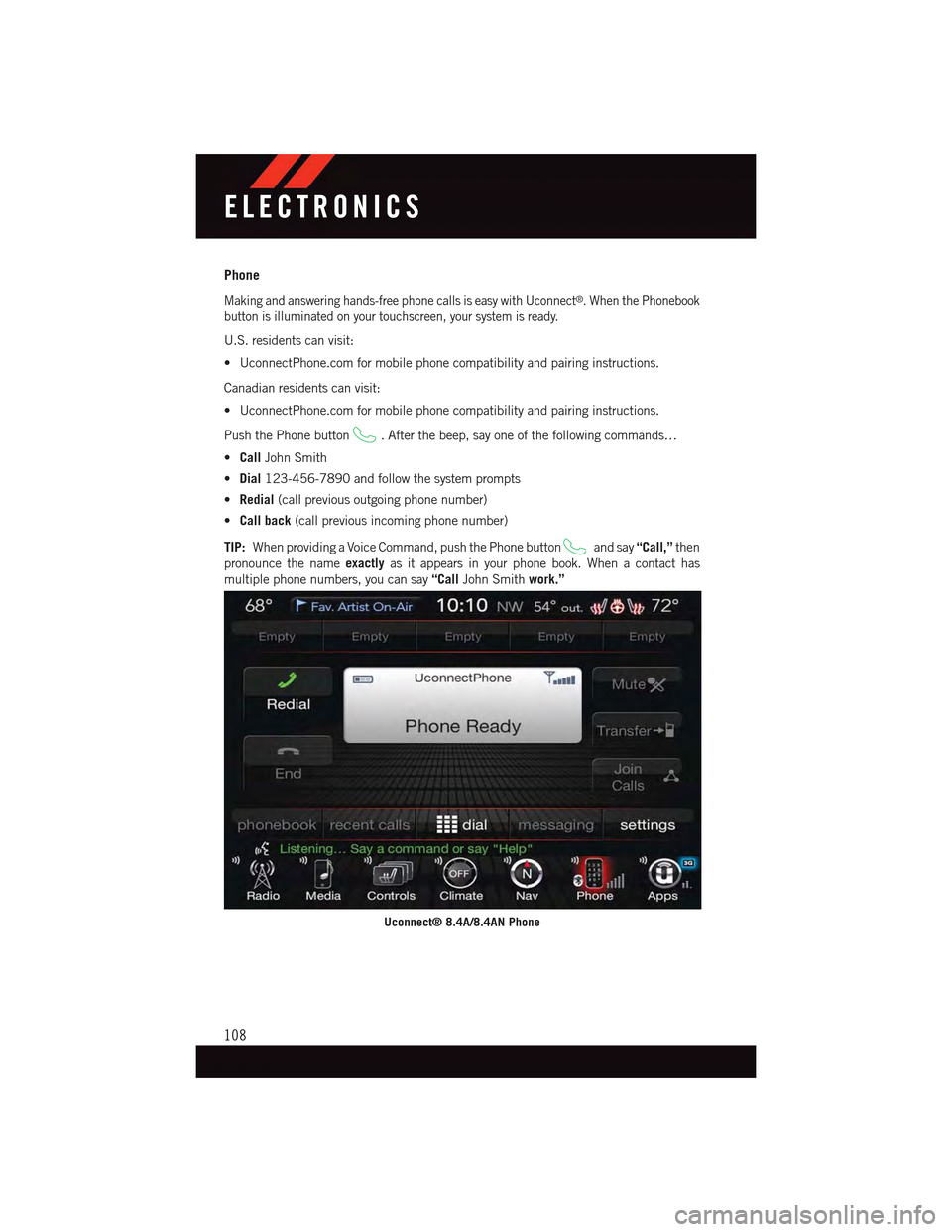
Making and answering hands-free phone calls is easy with Uconnect®.WhenthePhonebook
button is illuminated on your touchscreen, your system is ready.
U.S. residents can visit:
•UconnectPhone.comformobilephonecompatibilityandpairinginstructions.
Canadian residents can visit:
•UconnectPhone.comformobilephonecompatibilityandpairinginstructions.
Push the Phone button.Afterthebeep,sayoneofthefollowingcommands…
•CallJohn Smith
•Dial123-456-7890 and follow the system prompts
•Redial(call previous outgoing phone number)
•Call back(call previous incoming phone number)
TIP:When providing a Voice Command, push the Phone buttonand say“Call,”then
pronounce the nameexactlyas it appears in your phone book. When a contact has
multiple phone numbers, you can say“CallJohn Smithwork.”
Uconnect® 8.4A/8.4AN Phone
ELECTRONICS
108
Page 115 of 236
Mobile App (8.4A/8.4AN)
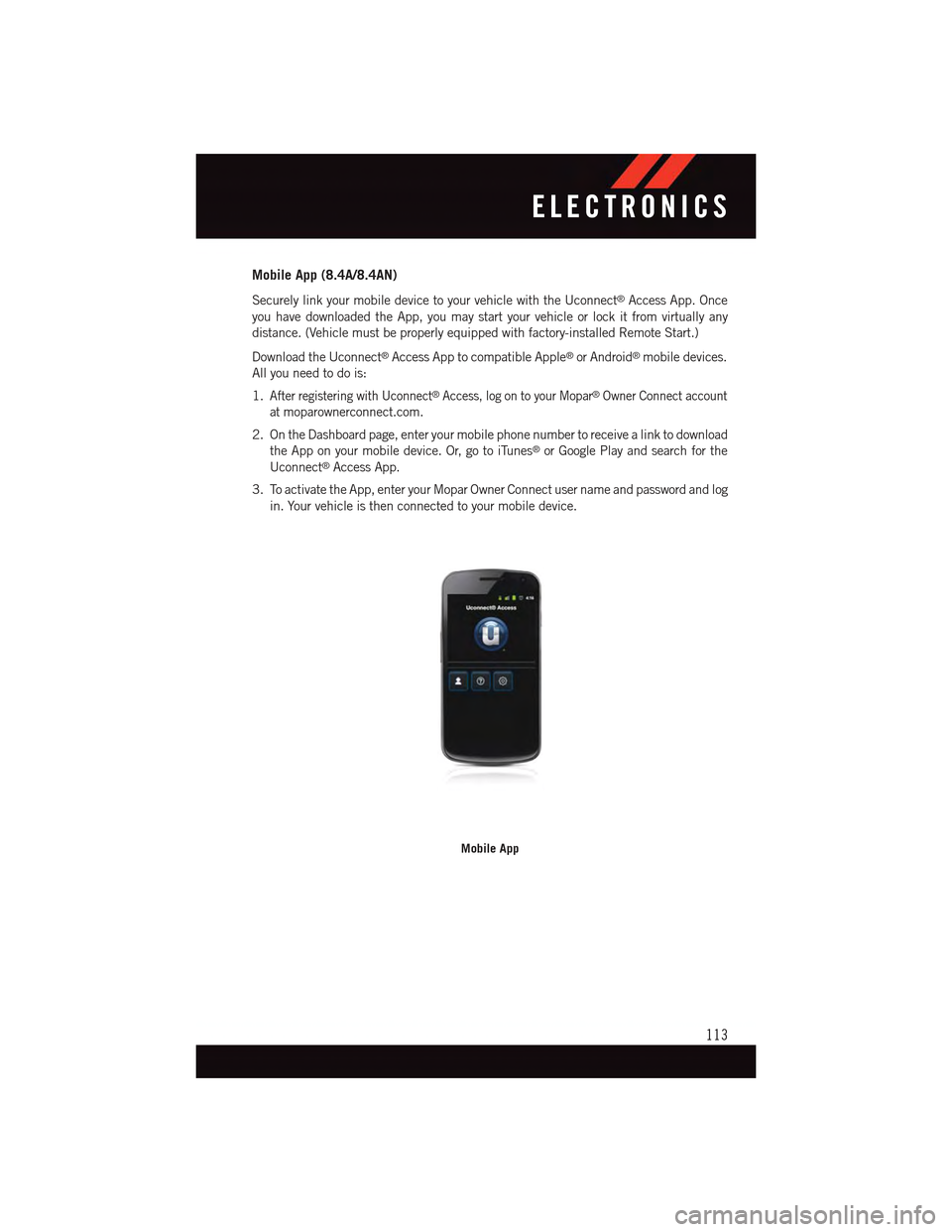
Securely link your mobile device to your vehicle with the Uconnect®Access App. Once
you have downloaded the App, you may start your vehicle or lock it from virtually any
distance. (Vehicle must be properly equipped with factory-installed Remote Start.)
Download the Uconnect®Access App to compatible Apple®or Android®mobile devices.
All you need to do is:
1.After registering with Uconnect®Access, log on to your Mopar®Owner Connect account
atmoparownerconnect.com.
2. On the Dashboard page, enter your mobile phone number to receive a link to download
the App on your mobile device. Or, go to iTunes®or Google Play and search for the
Uconnect®Access App.
3. To activate the App, enter your Mopar Owner Connect user name and password and log
in. Your vehicle is then connected to your mobile device.
Mobile App
ELECTRONICS
113
Page 116 of 236
Voice Texting (8.4A/8.4AN)
Yo u m u s t b e r e g i s t e r e d w i t h U c o n n e c t®Access and have a compatible MAP – enabled
smartphone to use your voice to send a personalized text message. (Not compatible with
iPhone®.)
1. To send a message, push the Phone button.Afterthebeep,say:“Send message
to John Smith.”
2. Listen to the prompt. After the beep, dictate the message you would like to send. Wait
for Uconnect®to process your message.
3. The Uconnect®system will repeat your message and provide a variety of options to add
to, delete, send or hear the message again. After the beep, tell Uconnect®what you’d
like to do. For instance, if you’re happy with your message, after the beep, say“Send.”
TIP:
•Messagesarelimitedto140characters.
•TheMessagingbuttononthetouchscreenmustbeilluminatedtousethefeature.
ELECTRONICS
114
Page 120 of 236
Uconnect® 8.4AN
Uconnect® 8.4AN — If Equipped
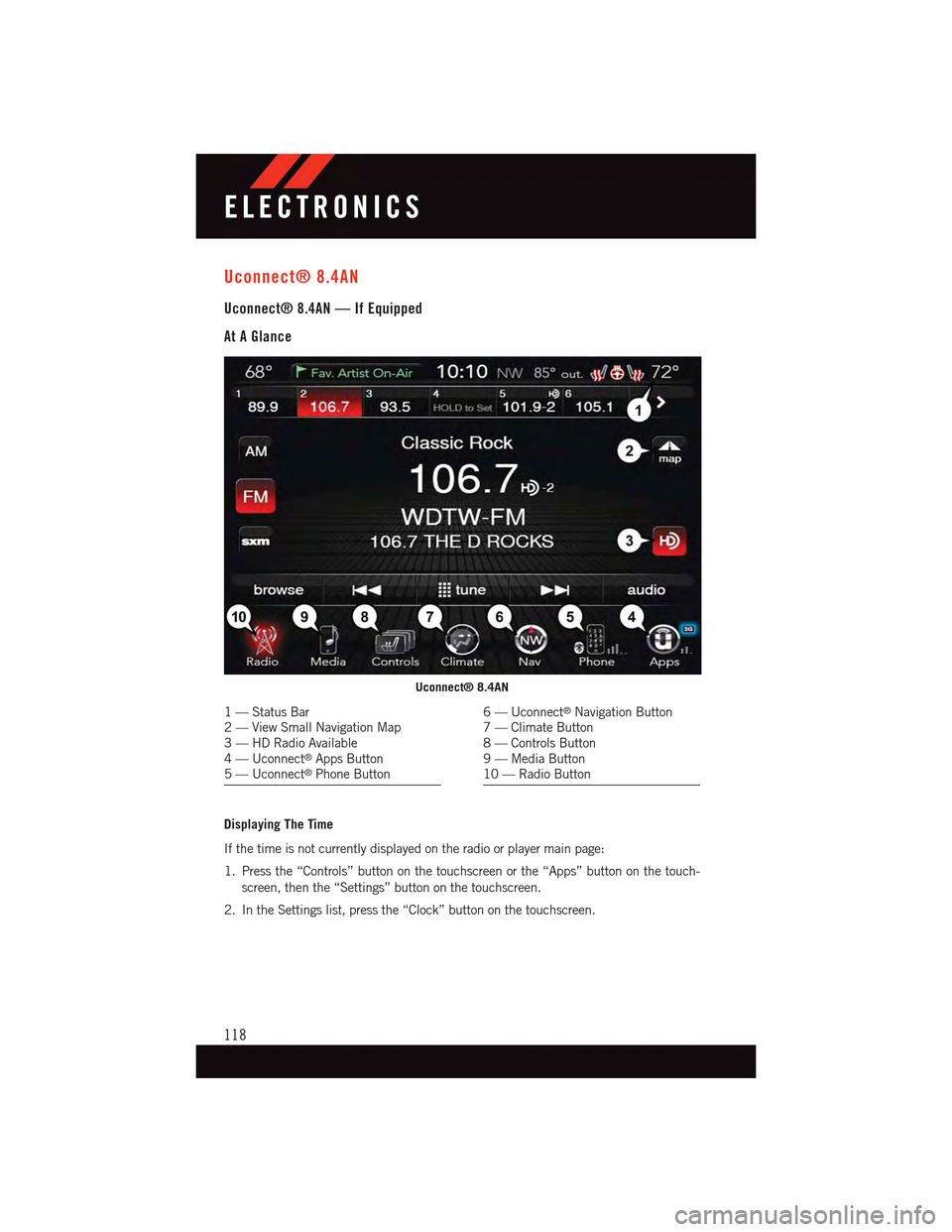
At A Glance
Displaying The Time
If the time is not currently displayed on the radio or player main page:
1. Press the “Controls” button on the touchscreen or the “Apps” button on the touch-
screen, then the “Settings” button on the touchscreen.
2. In the Settings list, press the “Clock” button on the touchscreen.
Uconnect® 8.4AN
1—StatusBar2—ViewSmallNavigationMap3—HDRadioAvailable4—Uconnect®Apps Button5—Uconnect®Phone Button
6—Uconnect®Navigation Button7—ClimateButton8—ControlsButton9—MediaButton10 — Radio Button
ELECTRONICS
118
Page 127 of 236
When connected, the iPod®/compatible USB device can be controlled using the radio or
Steering Wheel Audio Controls to play, skip to the next or previous track, browse, and list
the contents.
The iPod®battery charges when plugged into the USB port (if supported by the specific
device.)
To r o u t e t h e U S B / i P o d®cable out of the center console, use the access cut out.
NOTE:
•WhenconnectingyouriPod®device for the first time, the system may take several
minutes to read your music, depending on the number of files. For example, the system
will take approximately five minutes for every 1,000 songs loaded on the device. Also
during the reading process, the Shuffle and Browse functions will be disabled. This
process is needed to ensure the full use of your iPod®features and only happens the
first time it is connected. After the first time, the reading process of your iPod®will take
considerably less time unless changes are made or new songs are added to the playlist.
•TheUSBportsupportscertainMini,Classic,Nano,Touch,andiPhone®devices. The
USB port also supports playing music from compatible external USB Mass Storage
Class memory devices. Some iPod®software versions may not fully support the USB
port features. Please visit Apple’s website for iPod®software updates.
Audio Jack (AUX)
The AUX allows a portable device, such as an MP3 player or an iPod®,tobepluggedinto
the radio and utilize the vehicle’s sound system, using a 3.5 mm audio cable, to amplify
the source and play through the vehicle speakers.
•Pressingthe“AUX”buttononthetouchscreenwillchangethemodetoauxiliarydevice
if the audio jack is connected, allowing the music from your portable device to be heard
through the vehicle's speakers. In order to activate the AUX, plug in the audio jack.
•Thefunctionsoftheportabledevicearecontrolledusingthedevicebuttons.The
volume may be controlled using the radio or portable device.
•Toroutetheaudiocableoutofthecenterconsole,usetheaccesscutoutinthefront
of the console.
Bluetooth® Streaming Audio
If using a Bluetooth®-equippeddevice,youmayalsobeabletostreammusictoyour
vehicle's sound system. Your connected device must be Bluetooth-compatible, and paired
with your system (see Uconnect®Phone for pairing instructions).
•YoucanaccessthemusicfromyourconnectedBluetooth®device by pressing the
“Bluetooth®”button on the touchscreen while in Media mode.
ELECTRONICS
125
Page 134 of 236
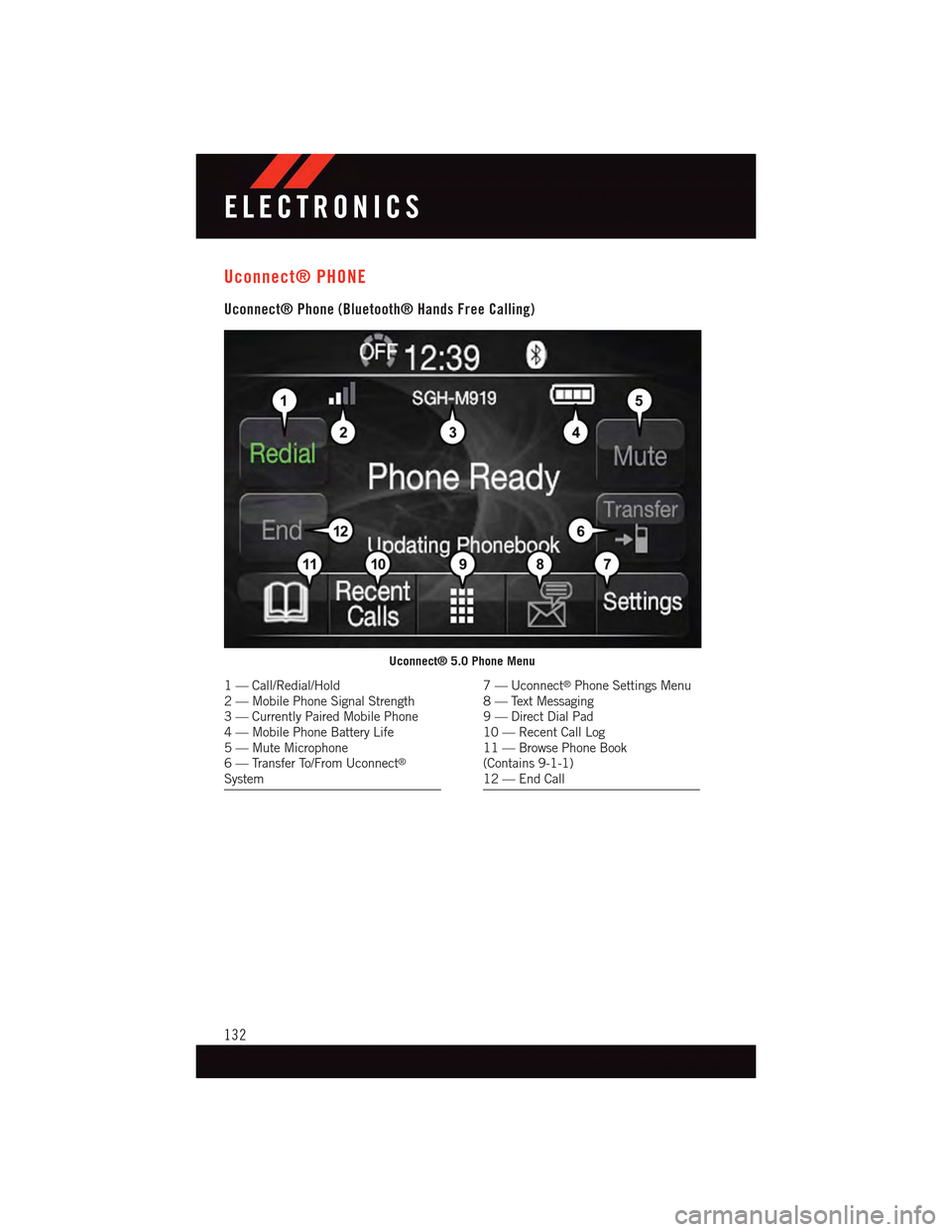
Uconnect® PHONE
Uconnect® Phone (Bluetooth® Hands Free Calling)
Uconnect® 5.0 Phone Menu
1—Call/Redial/Hold2—MobilePhoneSignalStrength3—CurrentlyPairedMobilePhone4—MobilePhoneBatteryLife5—MuteMicrophone6—TransferTo/FromUconnect®
System
7—Uconnect®Phone Settings Menu8—TextMessaging9—DirectDialPad10 — Recent Call Log11 — Browse Phone Book(Contains 9-1-1)12 — End Call
ELECTRONICS
132
Page 135 of 236
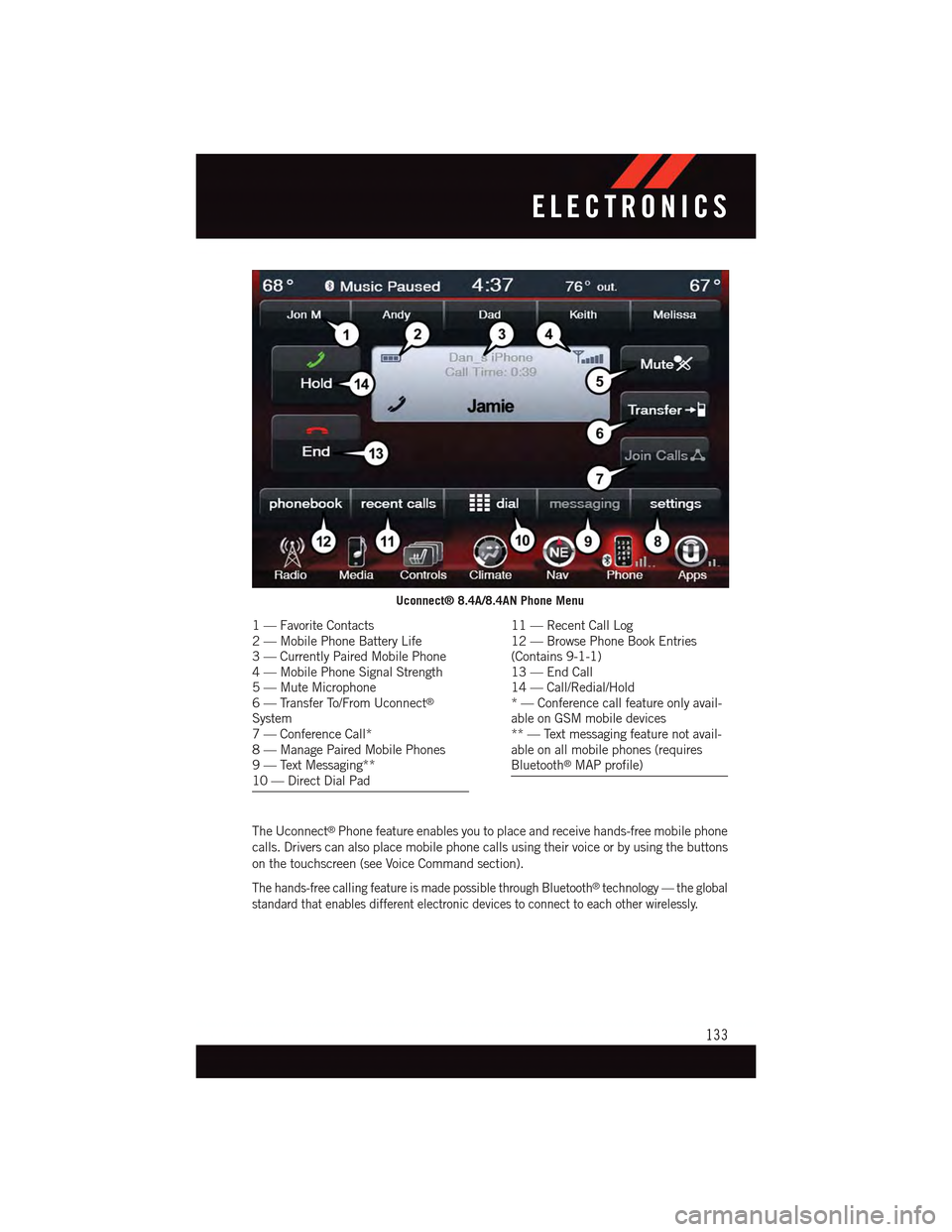
The Uconnect®Phone feature enables you to place and receive hands-free mobile phone
calls. Drivers can also place mobile phone calls using their voice or by using the buttons
on the touchscreen (see Voice Command section).
The hands-free calling feature is made possible through Bluetooth®technology — the global
standard that enables different electronic devices to connect to each other wirelessly.
Uconnect® 8.4A/8.4AN Phone Menu
1—FavoriteContacts2—MobilePhoneBatteryLife3—CurrentlyPairedMobilePhone4—MobilePhoneSignalStrength5—MuteMicrophone6—TransferTo/FromUconnect®
System7—ConferenceCall*8—ManagePairedMobilePhones9—TextMessaging**10 — Direct Dial Pad
11 — Recent Call Log12 — Browse Phone Book Entries(Contains 9-1-1)13 — End Call14 — Call/Redial/Hold*—Conferencecallfeatureonlyavail-able on GSM mobile devices** — Text messaging feature not avail-able on all mobile phones (requiresBluetooth®MAP profile)
ELECTRONICS
133
Page 136 of 236
If the Uconnect®Phone Buttonexists on your steering wheel, you then have the
Uconnect®Phone features.
Refer to theUnderstand The Features Of Your Vehiclesection of your vehicle's Owner's
Manual on the DVD for further details.
NOTE:
•TheUconnect®Phone requires a mobile phone equipped with the Bluetooth®
Hands-Free Profile, Version 1.0 or higher.
•Mostmobilephones/devicesarecompatiblewiththeUconnect®system, however
some mobile phones/devices may not be equipped with all of the required features to
utilize all of the Uconnect®system features.
•ForUconnect®Customer Care:
•U.S.residentsvisitUconnectPhone.comorcall1-877-855-8400.
•CanadianResidentsvisitUconnectPhone.comorcall,1-800-465-2001(English)or
1-800-387-9983 (French).
Pairing (Wirelessly Connecting) Your Mobile Phone To The Uconnect® System
Mobile phone pairing is the process of establishing a wireless connection between a
cellular phone and the Uconnect®system.
NOTE:
•To u s e t h e U c o n n e c t®Phone feature, you first must determine if your mobile phone and
software are compatible with the Uconnect®system. Please visitUconnectPhone.com for
complete mobile phone compatibility information.
•Mobilephonepairingisnotavailablewhilethevehicleisinmotion.
•Amaximumof10mobilephonescanbepairedtotheUconnect®system.
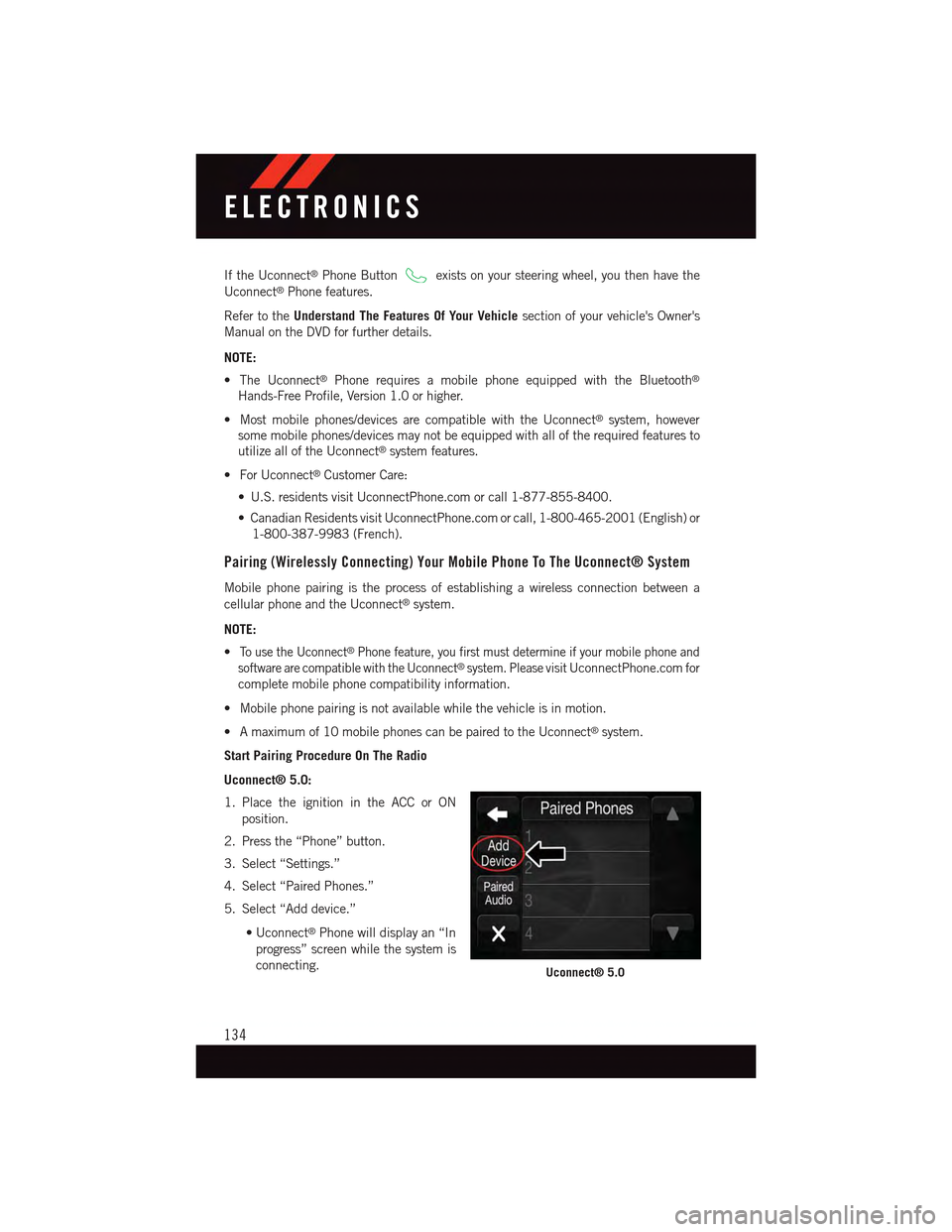
Start Pairing Procedure On The Radio
Uconnect® 5.0:
1. Place the ignition in the ACC or ON
position.
2. Press the “Phone” button.
3. Select “Settings.”
4. Select “Paired Phones.”
5. Select “Add device.”
•Uconnect®Phone will display an “In
progress” screen while the system is
connecting.Uconnect® 5.0
ELECTRONICS
134
Page 137 of 236
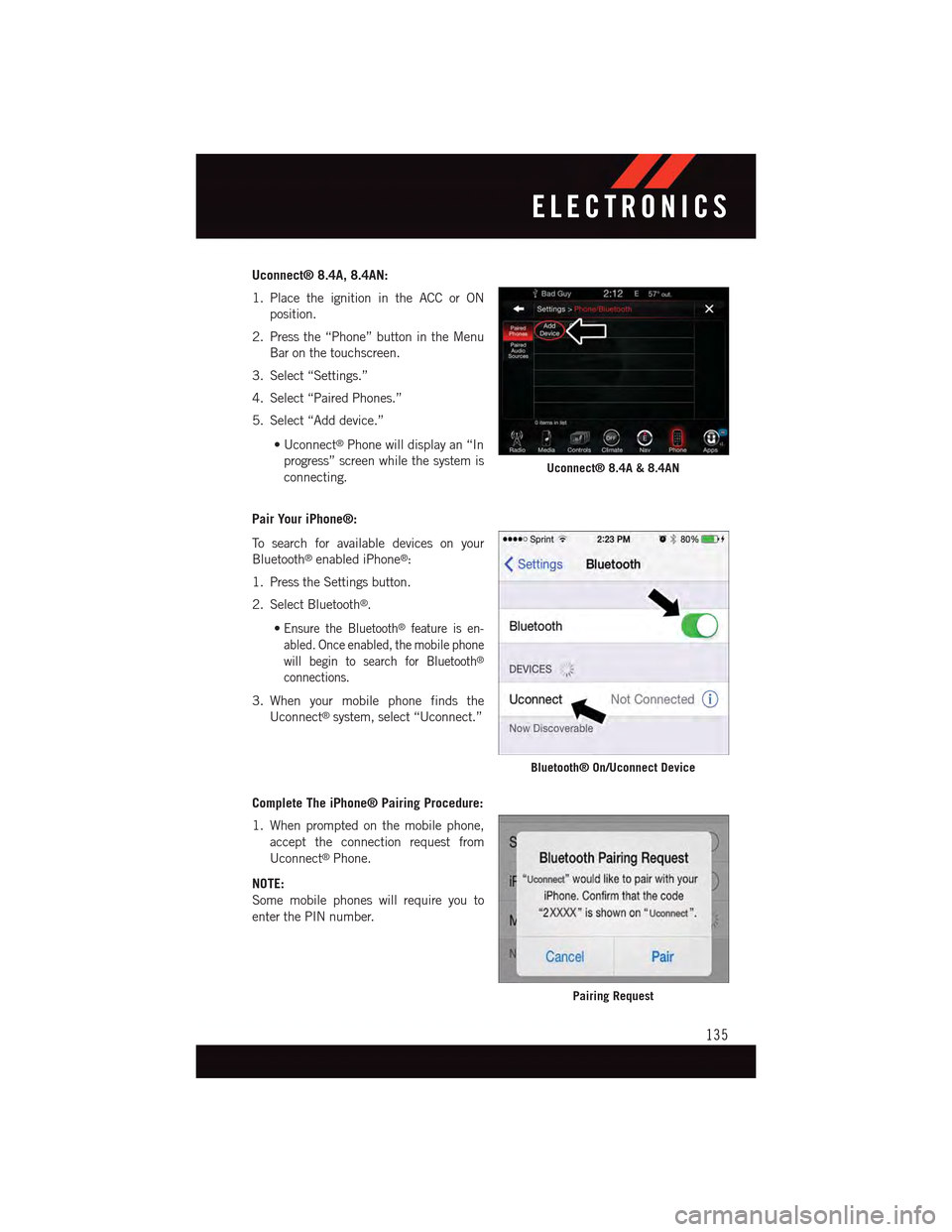
Uconnect® 8.4A, 8.4AN:
1. Place the ignition in the ACC or ON
position.
2. Press the “Phone” button in the Menu
Bar on the touchscreen.
3. Select “Settings.”
4. Select “Paired Phones.”
5. Select “Add device.”
•Uconnect®Phone will display an “In
progress” screen while the system is
connecting.
Pair Your iPhone®:
To s e a r c h f o r a v a i l a b l e d e v i c e s o n y o u r
Bluetooth®enabled iPhone®:
1. Press the Settings button.
2. Select Bluetooth®.
•Ensure the Bluetooth®feature is en-
abled. Once enabled, the mobile phone
will begin to search for Bluetooth®
connections.
3. When your mobile phone finds the
Uconnect®system, select “Uconnect.”
Complete The iPhone® Pairing Procedure:
1. When prompted on the mobile phone,
accept the connection request from
Uconnect®Phone.
NOTE:
Some mobile phones will require you to
enter the PIN number.
Uconnect® 8.4A & 8.4AN
Bluetooth® On/Uconnect Device
Pairing Request
ELECTRONICS
135
Page 138 of 236
Select The iPhone's Priority Level
When the pairing process has successfully completed, the system will prompt you to
choose whether or not this is your favorite mobile phone. Selecting “Yes” will make this
mobile phone the highest priority. This mobile phone will take precedence over other
paired mobile phones within range and will connect to the Uconnect®system automati-
cally when entering the vehicle. Only one mobile phone and/or one Bluetooth®audio
device can be connected to the Uconnect®system at a time. If “No” is selected, simply
select “Uconnect” from the mobile phone/audio device Bluetooth®screen, and the
Uconnect®system will reconnect to the Bluetooth®device.
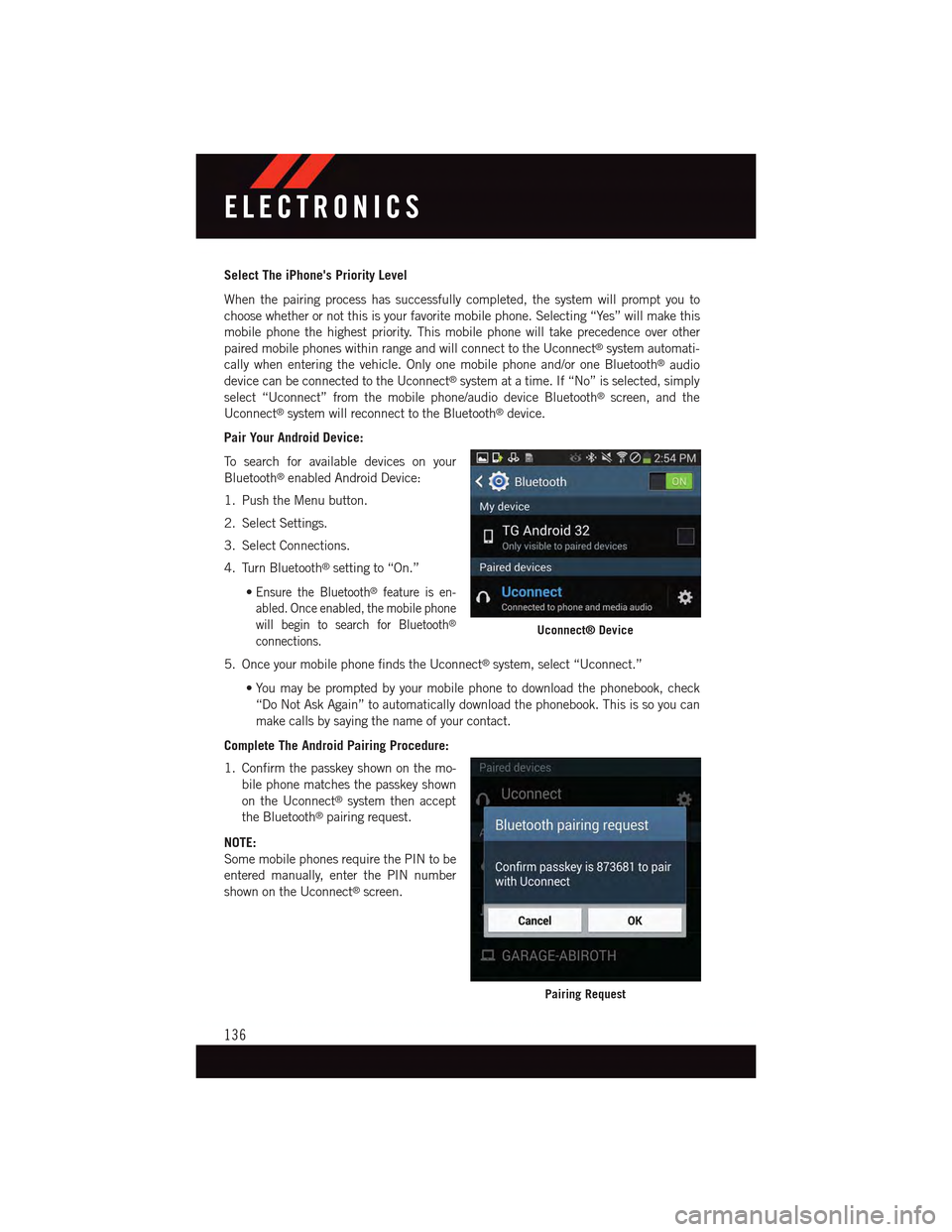
Pair Your Android Device:
To s e a r c h f o r a v a i l a b l e d e v i c e s o n y o u r
Bluetooth®enabled Android Device:
1. Push the Menu button.
2. Select Settings.
3. Select Connections.
4. Turn Bluetooth®setting to “On.”
•Ensure the Bluetooth®feature is en-
abled. Once enabled, the mobile phone
will begin to search for Bluetooth®
connections.
5. Once your mobile phone finds the Uconnect®system, select “Uconnect.”
•You may be prompted by your mobile phone to download the phonebook, check
“Do Not Ask Again” to automatically download the phonebook. This is so you can
make calls by saying the name of your contact.
Complete The Android Pairing Procedure:
1. Confirm the passkey shown on the mo-
bile phone matches the passkey shown
on the Uconnect®system then accept
the Bluetooth®pairing request.
NOTE:
Some mobile phones require the PIN to be
entered manually, enter the PIN number
shown on the Uconnect®screen.
Uconnect® Device
Pairing Request
ELECTRONICS
136