change time DODGE CHARGER 2020 Repair Manual
[x] Cancel search | Manufacturer: DODGE, Model Year: 2020, Model line: CHARGER, Model: DODGE CHARGER 2020Pages: 412, PDF Size: 18.96 MB
Page 388 of 412
386MULTIMEDIA
Each time you give a Voice Command, you
must first push either the Voice Recognition
(VR) or Phone button, wait until after the
beep, then say your Voice Command.
You can interrupt the help message or
system prompts by pushing the VR or Phone
button and saying a Voice Command from
the current category.
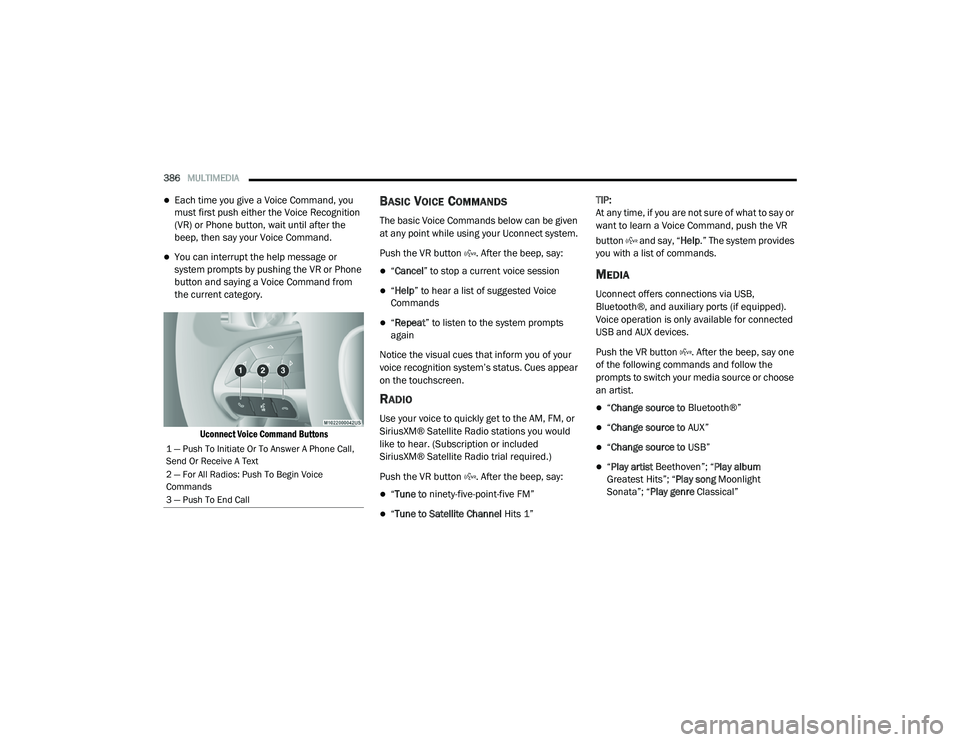
Uconnect Voice Command Buttons
BASIC VOICE COMMANDS
The basic Voice Commands below can be given
at any point while using your Uconnect system.
Push the VR button . After the beep, say:
“Cancel ” to stop a current voice session
“Help ” to hear a list of suggested Voice
Commands
“ Repeat ” to listen to the system prompts
again
Notice the visual cues that inform you of your
voice recognition system’s status. Cues appear
on the touchscreen.
RADIO
Use your voice to quickly get to the AM, FM, or
SiriusXM® Satellite Radio stations you would
like to hear. (Subscription or included
SiriusXM® Satellite Radio trial required.)
Push the VR button . After the beep, say:
“ Tune to ninety-five-point-five FM”
“Tune to Satellite Channel Hits 1”TIP:
At any time, if you are not sure of what to say or
want to learn a Voice Command, push the VR
button and say, “
Help.” The system provides
you with a list of commands.
MEDIA
Uconnect offers connections via USB,
Bluetooth®, and auxiliary ports (if equipped).
Voice operation is only available for connected
USB and AUX devices.
Push the VR button . After the beep, say one
of the following commands and follow the
prompts to switch your media source or choose
an artist.
“ Change source to Bluetooth®”
“Change source to AUX”
“Change source to USB”
“Play artist Beethoven”; “ Play album
Greatest Hits”; “ Play song Moonlight
Sonata”; “ Play genre Classical”
1 — Push To Initiate Or To Answer A Phone Call,
Send Or Receive A Text
2 — For All Radios: Push To Begin Voice
Commands
3 — Push To End Call
20_LD_OM_EN_USC_t.book Page 386
Page 392 of 412
390MULTIMEDIA
NOTE:
Requires compatible iPhone®. See dealer for
phone compatibility. Data plan rates apply.
Vehicle user interface is a product of Apple®.
Apple CarPlay® is a trademark of Apple® Inc.
iPhone® is a trademark of Apple® Inc., regis -
tered in the US and other countries. Apple®
terms of use and privacy statements apply.
GENERAL INFORMATION
The following regulatory statement applies to all
Radio Frequency (RF) devices equipped in this
vehicle:
This device complies with Part 15 of the FCC
Rules and with Innovation, Science and
Economic Development Canada license-exempt
RSS standard(s). Operation is subject to the
following two conditions:
1. This device may not cause harmful interference, and
2. This device must accept any interference received, including interference that may
cause undesired operation. Le présent appareil est conforme aux CNR
d`Innovation, Science and Economic
Development applicables aux appareils radio
exempts de licence. L'exploitation est autorisée
aux deux conditions suivantes:
1. l'appareil ne doit pas produire de
brouillage, et
2. l'utilisateur de l'appareil doit accepter tout brouillage radioélectrique subi, même si le
brouillage est susceptible d'en compro -
mettre le fonctionnement.
La operación de este equipo está sujeta a las
siguientes dos condiciones:
1. es posible que este equipo o dispositivo no cause interferencia perjudicial y
2. este equipo o dispositivo debe aceptar cualquier interferencia, incluyendo la que
pueda causar su operación no deseada.
NOTE:
Changes or modifications not expressly
approved by the party responsible for compli -
ance could void the user’s authority to operate
the equipment. ADDITIONAL
INFORMATION
© 202 1 FCA US LLC. All rights reserved.
Mopar and Uconnect are registered
trademarks and Mopar Owner Connect is a
trademark of FCA US LLC. Android™ is a
trademark of Google Inc. SiriusXM® and all
related marks and logos are trademarks of
SiriusXM® Radio Inc.
Uconnect System Support:US residents visit www.DriveUconnect.com or
call: 1-877-855-8400 (24 hours a day 7 days
a week)
Canadian residents visit www.DriveUcon -
nect.ca or call: 1-800-465-2001 (English) or
1-800-387-9983 (French)
SiriusXM Guardian™ services support:
US residents visitwww.driveuconnect.com/
sirius-xm-guardian or call: 1-844-796-4827
Canadian residents visitwww.siriusxm.ca/
guardian-v1/ or call: 1-877-324-9091
20_LD_OM_EN_USC_t.book Page 390
Page 401 of 412
399
I
Ignition
............................................................ 18Switch......................................................... 18In Vehicle Help Vehicle User Guide...................................... 11Information Center, Vehicle............................. 86Inside Rearview Mirror..................... 41, 42, 212Instrument Cluster............................. 80, 82, 84Descriptions.............................................. 103Display................................................. 85, 88Instrument Panel Lens Cleaning.................... 306Interior Appearance Care............................... 306Interior Lights.................................................. 48Intermittent Wipers (Delay Wipers).................. 51Introduction....................................................... 8iPod/USB/MP3 Control................................. 364
J
Jack Location................................................. 230Jack Operation............................................... 286Jump Starting...................................... 240, 241
K
Key FobArm The System
.......................................... 24Panic Alarm................................................. 15Programming Additional Key Fobs....... 17, 23Unlatch The Trunk....................................... 14
Key Fob Battery Service (Remote
Keyless Entry).................................................... 15
Key Fob Programming (Remote
Keyless Entry).................................................. 17Key-In Reminder.............................................. 19Keyless Enter-N-Go.................................26, 162Enter The Trunk........................................... 14Passive Entry............................................... 26Passive Entry Programming......................... 26Keys................................................................. 12Replacement........................................ 17, 23
L
Lane Change And Turn Signals........................ 48Lane Change Assist......................................... 48LaneSense.................................................... 196Lap/Shoulder Belts....................................... 127Latches......................................................... 158Hood............................................................ 68Lead Free Gasoline....................................... 309Leaks, Fluid.................................................. 158Life Of Tires................................................... 296Light Bulbs........................................... 157, 217Lights............................................................ 157Air Bag...................................... 95, 134, 156Automatic Headlights.................................. 47Brake Assist Warning............................... 111Brake Warning....................................95, 308Bulb Replacement.................................... 217
Cruise.............................................. 102, 103Daytime Running.........................................45Dimmer Switch, Headlight.................... 45, 46Exterior.............................................. 45, 157Fog...............................................................48Hazard Warning Flasher........................... 212Headlight Switch..........................................45Headlights............................................ 45, 47Headlights On With Wipers..........................47High Beam...................................................46High Beam/Low Beam Select......................46Instrument Cluster.......................................45Intensity Control..........................................50Interior.........................................................48License..................................................... 220Lights On Reminder.....................................47Malfunction Indicator (Check Engine)..........98Park................................................... 47, 102Passing........................................................46Reading.......................................................49Seat Belt Reminder.....................................97Security Alarm.............................................98Service...................................................... 217Traction Control........................................ 111Turn Signals....................... 45, 48, 103, 157Vanity Mirror................................................44Warning Instrument Cluster Descriptions.................................. 97, 10311
20_LD_OM_EN_USC_t.book Page 399