mirror DODGE CHARGER 2020 Owners Manual
[x] Cancel search | Manufacturer: DODGE, Model Year: 2020, Model line: CHARGER, Model: DODGE CHARGER 2020Pages: 412, PDF Size: 18.96 MB
Page 4 of 412
2
INTRODUCTION
HOW TO USE THIS MANUAL .................................. 9
Essential Information .................................... 9
Symbols .......................................................... 9
WARNINGS AND CAUTIONS ................................. 9
VEHICLE MODIFICATIONS/ALTERATIONS ........... 9
GETTING TO KNOW YOUR VEHICLE
VEHICLE USER GUIDE — IF EQUIPPED ...............11
KEYS ......................................................................12
Key Fob......................................................... 12
IGNITION SWITCH .................................................18
Keyless Push Button Ignition ...................... 18
Vehicle On Message ................................... 19
REMOTE START — IF EQUIPPED .........................20
How To Use Remote Start —
If Equipped ................................................... 20 Remote Start Abort Message On The
Instrument Cluster Display — If Equipped .. 20 To Enter Remote Start Mode ...................... 21
To Exit Remote Start Mode Without
Driving The Vehicle ..................................... 21 To Exit Remote Start Mode And Drive The
Vehicle .......................................................... 21 Remote Start Comfort Systems —
If Equipped ................................................... 21 General Information .................................... 22 SENTRY KEY.......................................................... 22
Key Programming ....................................... 23
Replacement Keys....................................... 23
General Information .................................... 23
VEHICLE SECURITY ALARM — IF EQUIPPED .... 24
To Arm The System ...................................... 24
To Disarm The System ................................ 24
Rearming Of The System............................. 25
Tamper Alert................................................. 25
DOORS .................................................................. 25
Manual Door Locks...................................... 25
Power Door Locks ....................................... 26
Keyless Enter-N-Go — Passive Entry .......... 26
Automatic Unlock Doors On Exit ................. 29
Automatic Door Locks —
If Equipped ................................................... 30 Child-Protection Door Lock System —
Rear Doors .................................................. 30
DRIVER MEMORY SETTINGS — IF EQUIPPED ... 30
Programming The Memory Feature............ 31
Linking And Unlinking The Key Fob
To Memory ................................................... 31 Memory Position Recall............................... 32
SEATS .................................................................... 32
Manual Adjustment (Front Seats) — If
Equipped ...................................................... 32 Manual Rear Seat Adjustment ................... 33 Power Seats — If Equipped ......................... 34
Heated Seats — If Equipped ....................... 36
Front Ventilated Seats —
If Equipped .................................................. 37
HEAD RESTRAINTS...............................................38
Reactive Head Restraints — Front Seats .. 38
Rear Head Restraints ................................. 39
Front Head Restraint Removal ................... 39
STEERING WHEEL.................................................40
Manual Tilt/Telescoping Steering
Column — If Equipped ................................ 40 Power Tilt/Telescoping Steering
Column — If Equipped ................................ 40 Heated Steering Wheel —
If Equipped .................................................. 41
MIRRORS ..............................................................41
Inside Day/Night Mirror —
If Equipped ................................................... 41 Automatic Dimming Mirror —
If Equipped .................................................. 42 Outside Mirrors ............................................ 43
Driver's Outside Automatic Dimming
Mirror — If Equipped .................................... 43 Outside Mirrors Approach Light —
If Equipped ................................................... 43 Power Mirrors............................................... 43
Heated Mirrors — If Equipped ..................... 44
Tilt Side Mirrors In Reverse — If Equipped ... 44
Illuminated Vanity Mirrors — If Equipped .. 44
20_LD_OM_EN_USC_t.book Page 2
Page 7 of 412
5
PARKSENSE REAR PARK ASSIST —
IF EQUIPPED ....................................................... 191 ParkSense Sensors ...................................192
ParkSense Warning Display ......................192
ParkSense Display ..................................... 192Enabling And Disabling ParkSense ..........194
Service The ParkSense Rear Park
Assist System .............................................195 Cleaning The ParkSense System ..............195
ParkSense System Usage Precautions ....195
LANESENSE — IF EQUIPPED ........................... 196
LaneSense Operation ................................196Turning LaneSense On Or Off ...................196LaneSense Warning Message ..................197
Changing LaneSense Status .....................199
PARKVIEW REAR BACK UP CAMERA ............. 199
REFUELING THE VEHICLE ................................. 200
VEHICLE LOADING ............................................ 202
Vehicle Certification Label ........................ 202Gross Vehicle Weight Rating (GVWR) .......202
Gross Axle Weight Rating (GAWR) ........... 202Overloading ................................................202
Loading ......................................................203
TRAILER TOWING .............................................. 203
Common Towing Definitions .....................203Trailer Hitch Classification ........................ 205Trailer Towing Weights (Maximum Trailer
Weight Ratings) ..........................................205 Trailer And Tongue Weight ....................... 206
Towing Requirements................................ 206
Towing Tips ................................................ 209
RECREATIONAL TOWING (BEHIND MOTORHOME,
ETC.) ....................................................................210
DRIVING TIPS ...................................................... 210
Driving On Slippery Surfaces .................... 210
Driving Through Water .............................. 211
IN CASE OF EMERGENCY
HAZARD WARNING FLASHERS .......................212
ASSIST AND SOS MIRROR — IF EQUIPPED .... 212General Information .................................. 216
BULB REPLACEMENT ........................................ 217
Replacement Bulbs ................................... 217
Replacing Exterior Bulbs ........................... 219
FUSES ..................................................................220
General Information .................................. 220Underhood Fuses ...................................... 221
Rear Interior Fuses .................................... 225
JACKING AND TIRE CHANGING ........................229
Jack Location/Spare Tire Stowage ........... 230
Preparations For Jacking........................... 230
Jacking And Changing A Tire ..................... 231Road Tire Installation ................................ 234 TIRE SERVICE KIT — IF EQUIPPED ................... 234
Tire Service Kit Storage............................. 234
Tire Service Kit Components And
Operation ................................................... 235 Tire Service Kit Usage Precautions .......... 235Sealing A Tire With Tire Service Kit .......... 237
JUMP STARTING ............................................... 240
Preparations For Jump Start ..................... 240
Jump Starting Procedure .......................... 241
IF YOUR ENGINE OVERHEATS ......................... 242
MANUAL PARK RELEASE — 8 – SPEED
TRANSMISSION ................................................. 243
FREEING A STUCK VEHICLE ............................. 244
SRT — TOWING A DISABLED VEHICLE ............ 246
NON SRT — TOWING A DISABLED VEHICLE ... 248 All Wheel Drive (AWD) Models .................. 249Rear-Wheel Drive (RWD) Models ............. 249
ENHANCED ACCIDENT RESPONSE SYSTEM
(EARS) ................................................................ 249
EVENT DATA RECORDER (EDR) ....................... 249
SERVICING AND MAINTENANCE
SCHEDULED SERVICING .................................. 250
3.6L And 5.7L Engines ............................. 250
6.2L Supercharged And 6.4L Engines ..... 254
20_LD_OM_EN_USC_t.book Page 5
Page 16 of 412
14GETTING TO KNOW YOUR VEHICLE
NOTE:
In a situation of a low or fully depleted battery, a
backup method can be used to operate the igni -
tion switch. Put the nose side of the key fob
(side opposite of the emergency key) against
the START/STOP ignition button and push to
operate the ignition switch.
To Unlock The Doors
Push and release the unlock button on the key
fob once to unlock the driver's door or twice
within five seconds to unlock all doors.
The turn signal lights will flash to acknowledge
the unlock signal. The illuminated entry system
will also be activated.
NOTE:
All door unlock settings can be programmed to
your convenience through Uconnect Settings.
Refer to “Uconnect Settings” in “Multimedia”
for further information.
Unlock the driver door on the first push of the
key fob unlock button.
Unlock all doors on the first push of the key
fob unlock button. NOTE:
To unlock doors and trunk with passive entry,
refer to “Keyless Enter-N-Go — Passive Entry” in
“Doors” in this chapter for further information.
NOTE:
When you use the key fob to open any door, the
courtesy lights, overhead lights, and approach
lighting in the outside mirrors (if equipped) will
turn on. Refer to “Interior Lights” in this chapter
for further information.
1st Press Of Key Fob Unlocks
This feature lets you program the system to
unlock either the driver's door or all doors on
the first push of the unlock button on the key
fob.
To change the current setting, refer to
“Uconnect Settings” in “Multimedia” for further
information.
Flash Lights With Lock
This feature will cause the turn signal lights to
flash when the doors are locked with the key
fob. This feature can be turned on or turned off.
To change the current setting, refer to
“Uconnect Settings” in “Multimedia” for further
information.
Headlight Illumination On Approach
This feature activates the headlights for up to
90 seconds when the doors are unlocked with
the key fob. The time for this feature is
programmable, on vehicles equipped, through
Uconnect Settings. To change the current
setting, refer to “Uconnect Settings” in
“Multimedia” for further information.
To Unlatch The Trunk
Push the trunk button on the key fob two times
within five seconds to unlatch the trunk.
If the vehicle is equipped with Passive Entry,
refer to “Keyless Enter-N-Go — Passive Entry” in
“Doors” in this chapter for further information.
To Lock The Doors And Trunk
Push and release the lock button on the key fob
to lock all doors.
The turn signal lights will flash and the horn will
chirp to acknowledge the signal if programmed.
Refer to “Uconnect Settings” in “Multimedia”
for further programmable information.
20_LD_OM_EN_USC_t.book Page 14
Page 32 of 412
30GETTING TO KNOW YOUR VEHICLE
AUTOMATIC DOOR LOCKS —
I
F EQUIPPED
The auto door lock feature default condition is
enabled. When enabled, the door locks will lock
automatically when the vehicle's speed exceeds
15 mph (24 km/h). The auto door lock feature
can be enabled or disabled by an authorized
dealer per written request of the customer.
Please see an authorized dealer for service.
CHILD-PROTECTION DOOR LOCK
S
YSTEM — REAR DOORS
To provide a safer environment for small
children riding in the rear seats, the rear doors
are equipped with Child-Protection Door Lock
system.
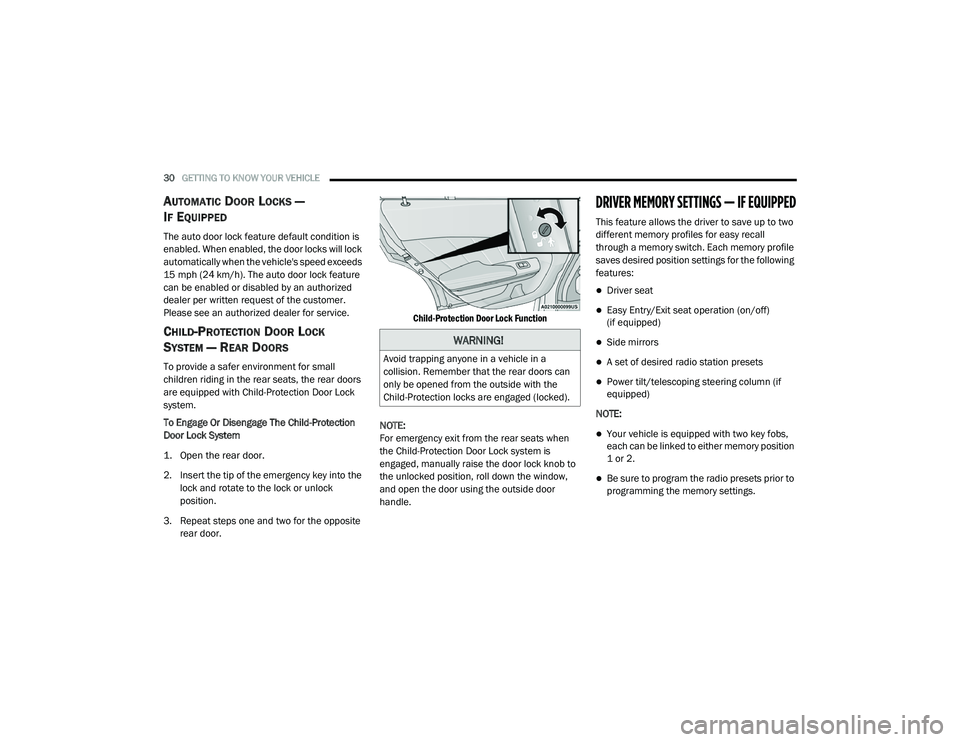
To Engage Or Disengage The Child-Protection
Door Lock System
1. Open the rear door.
2. Insert the tip of the emergency key into the
lock and rotate to the lock or unlock
position.
3. Repeat steps one and two for the opposite rear door.
Child-Protection Door Lock Function
NOTE:
For emergency exit from the rear seats when
the Child-Protection Door Lock system is
engaged, manually raise the door lock knob to
the unlocked position, roll down the window,
and open the door using the outside door
handle.
DRIVER MEMORY SETTINGS — IF EQUIPPED
This feature allows the driver to save up to two
different memory profiles for easy recall
through a memory switch. Each memory profile
saves desired position settings for the following
features:
Driver seat
Easy Entry/Exit seat operation (on/off)
(if equipped)
Side mirrors
A set of desired radio station presets
Power tilt/telescoping steering column (if
equipped)
NOTE:
Your vehicle is equipped with two key fobs,
each can be linked to either memory position
1 or 2.
Be sure to program the radio presets prior to
programming the memory settings.
WARNING!
Avoid trapping anyone in a vehicle in a
collision. Remember that the rear doors can
only be opened from the outside with the
Child-Protection locks are engaged (locked).
20_LD_OM_EN_USC_t.book Page 30
Page 33 of 412
GETTING TO KNOW YOUR VEHICLE31
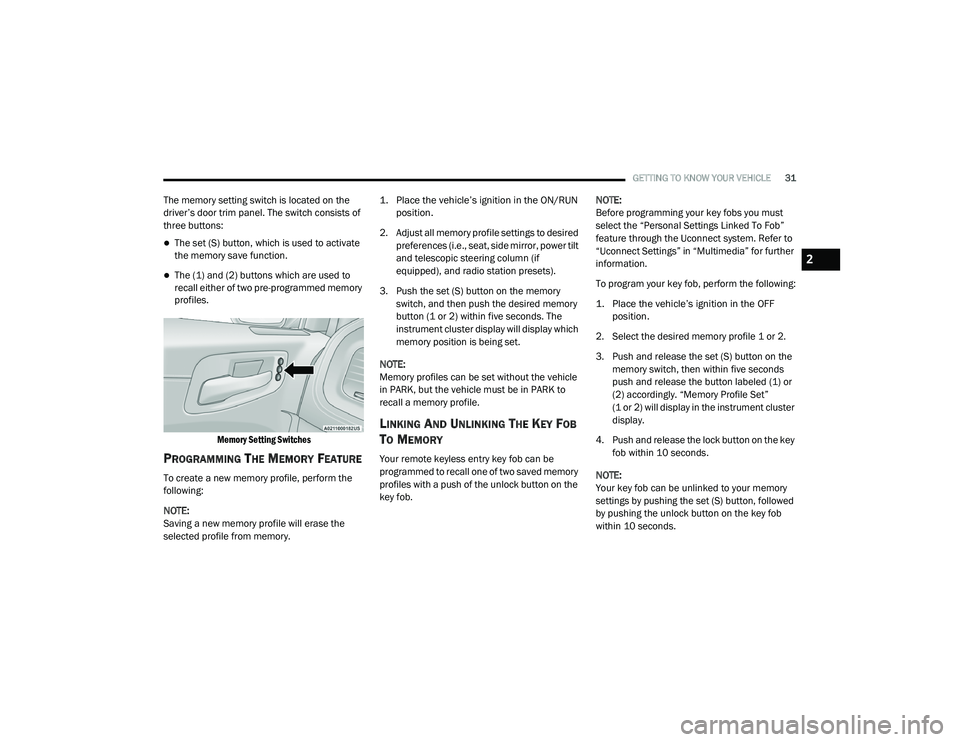
The memory setting switch is located on the
driver’s door trim panel. The switch consists of
three buttons:
The set (S) button, which is used to activate
the memory save function.
The (1) and (2) buttons which are used to
recall either of two pre-programmed memory
profiles.
Memory Setting Switches
PROGRAMMING THE MEMORY FEATURE
To create a new memory profile, perform the
following:
NOTE:
Saving a new memory profile will erase the
selected profile from memory.
1. Place the vehicle’s ignition in the ON/RUN
position.
2. Adjust all memory profile settings to desired preferences (i.e., seat, side mirror, power tilt
and telescopic steering column (if
equipped), and radio station presets).
3. Push the set (S) button on the memory switch, and then push the desired memory
button (1 or 2) within five seconds. The
instrument cluster display will display which
memory position is being set.
NOTE:
Memory profiles can be set without the vehicle
in PARK, but the vehicle must be in PARK to
recall a memory profile.
LINKING AND UNLINKING THE KEY FOB
T
O MEMORY
Your remote keyless entry key fob can be
programmed to recall one of two saved memory
profiles with a push of the unlock button on the
key fob. NOTE:
Before programming your key fobs you must
select the “Personal Settings Linked To Fob”
feature through the Uconnect system. Refer to
“Uconnect Settings” in “Multimedia” for further
information.
To program your key fob, perform the following:
1. Place the vehicle’s ignition in the OFF
position.
2. Select the desired memory profile 1 or 2.
3. Push and release the set (S) button on the memory switch, then within five seconds
push and release the button labeled (1) or
(2) accordingly. “Memory Profile Set”
(1 or 2) will display in the instrument cluster
display.
4. Push and release the lock button on the key fob within 10 seconds.
NOTE:
Your key fob can be unlinked to your memory
settings by pushing the set (S) button, followed
by pushing the unlock button on the key fob
within 10 seconds.
2
20_LD_OM_EN_USC_t.book Page 31
Page 43 of 412
GETTING TO KNOW YOUR VEHICLE41
NOTE:
For vehicles equipped with Driver Memory
Settings, you can use your remote keyless entry
key fob or the memory switch on the driver's
door trim panel to return the tilt/telescopic
steering column to pre-programmed positions.
Refer to “Driver Memory Settings” in this
chapter.
HEATED STEERING WHEEL —
I
F EQUIPPED
The steering wheel contains a heating element
that helps warm your hands in cold weather.
The heated steering wheel has only one
temperature setting. Once the heated steering
wheel has been turned on, it will stay on for an
average of 80 minutes before automatically shutting off. This time will vary based on
environmental temperatures. The heated
steering wheel can shut off early or may not turn
on when the steering wheel is already warm.
The heated steering wheel control button is
located within the Uconnect system. You can
gain access to the control button through the
climate screen or the controls screen.
Press the heated steering wheel button
once to turn the heating element on.
Press the heated steering wheel button a
second time to turn the heating element off.
NOTE:
The engine must be running for the heated
steering wheel to operate.
Vehicles Equipped With Remote Start
On models that are equipped with remote start,
the heated steering wheel can be programmed
to come on during a remote start through the
Uconnect system. Refer to “Uconnect Settings”
in “Multimedia” for further information.
MIRRORS
INSIDE DAY/NIGHT MIRROR —
I
F EQUIPPED
A single ball joint mirror is provided in the
vehicle. It is a twist on mirror that has a fixed
position at the windshield. The mirror installs on
the windshield button with a counterclockwise
rotation and requires no tools for mounting. The
WARNING!
Do not adjust the steering column while
driving. Adjusting the steering column while
driving or driving with the steering column
unlocked, could cause the driver to lose
control of the vehicle. Failure to follow this
warning may result in serious injury or death.
WARNING!
Persons who are unable to feel pain to the
skin because of advanced age, chronic
illness, diabetes, spinal cord injury, medica -
tion, alcohol use, exhaustion, or other phys -
ical conditions must exercise care when
using the steering wheel heater. It may
cause burns even at low temperatures,
especially if used for long periods.
Do not place anything on the steering wheel
that insulates against heat, such as a
blanket or steering wheel covers of any type
and material. This may cause the steering
wheel heater to overheat.
2
20_LD_OM_EN_USC_t.book Page 41
Page 44 of 412
42GETTING TO KNOW YOUR VEHICLE
mirror head can be adjusted up, down, left, and
right for various drivers. The mirror should be
adjusted to center on the view through the rear
window.
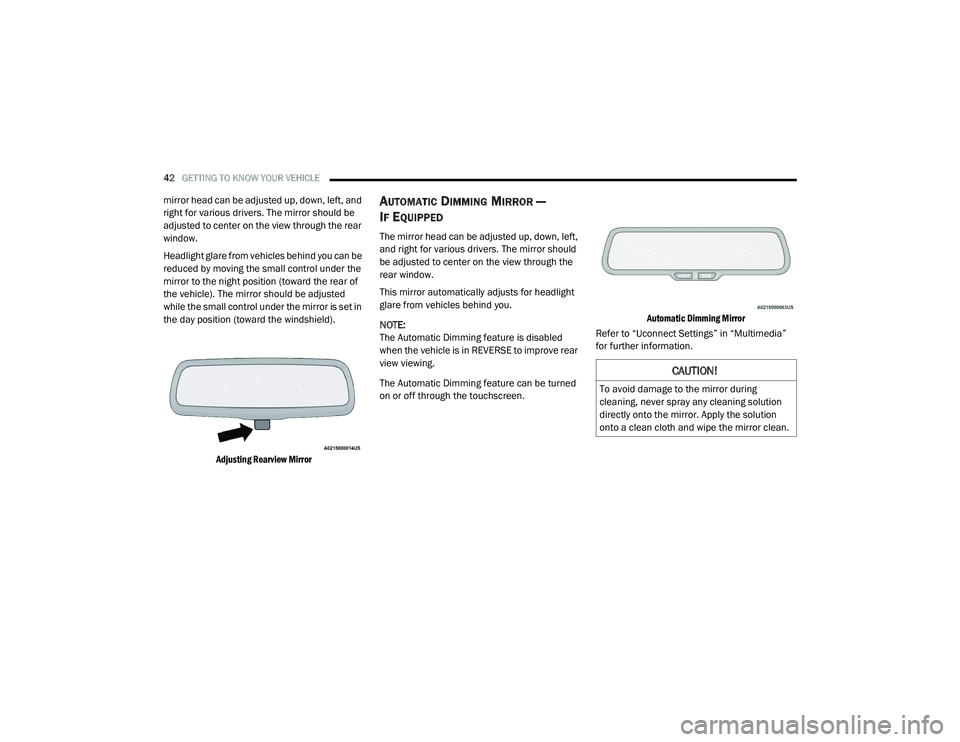
Headlight glare from vehicles behind you can be
reduced by moving the small control under the
mirror to the night position (toward the rear of
the vehicle). The mirror should be adjusted
while the small control under the mirror is set in
the day position (toward the windshield).
Adjusting Rearview Mirror
AUTOMATIC DIMMING MIRROR —
I
F EQUIPPED
The mirror head can be adjusted up, down, left,
and right for various drivers. The mirror should
be adjusted to center on the view through the
rear window.
This mirror automatically adjusts for headlight
glare from vehicles behind you.
NOTE:
The Automatic Dimming feature is disabled
when the vehicle is in REVERSE to improve rear
view viewing.
The Automatic Dimming feature can be turned
on or off through the touchscreen.
Automatic Dimming Mirror
Refer to “Uconnect Settings” in “Multimedia”
for further information.
CAUTION!
To avoid damage to the mirror during
cleaning, never spray any cleaning solution
directly onto the mirror. Apply the solution
onto a clean cloth and wipe the mirror clean.
20_LD_OM_EN_USC_t.book Page 42
Page 45 of 412
GETTING TO KNOW YOUR VEHICLE43
OUTSIDE MIRRORS
To receive maximum benefit, adjust the outside
mirror(s) to center on the adjacent lane of traffic
and a slight overlap of the view obtained from
the inside mirror.
NOTE:
The passenger side outside mirror will give a
much wider view to the rear, and especially of
the lane next to your vehicle.
DRIVER'S OUTSIDE AUTOMATIC
D
IMMING MIRROR — IF EQUIPPED
The driver’s outside mirror will automatically
adjust for glare from vehicles behind you. This
feature is controlled by the inside automatic
dimming mirror and will automatically adjust for
headlight glare when the inside mirror adjusts.
OUTSIDE MIRRORS APPROACH LIGHT —
I
F EQUIPPED
Driver and passenger outside mirrors equipped
with approach lighting contain one LED, which is
located in the upper outboard mirror glass
corner. The approach light supplies illuminated
entry lighting, which turns on in both mirrors
when you use the remote keyless entry key fob
or open any door. This LED shines outward to
illuminate the front and rear door handles. It
also shines downward to illuminate the area in
front of the doors.
POWER MIRRORS
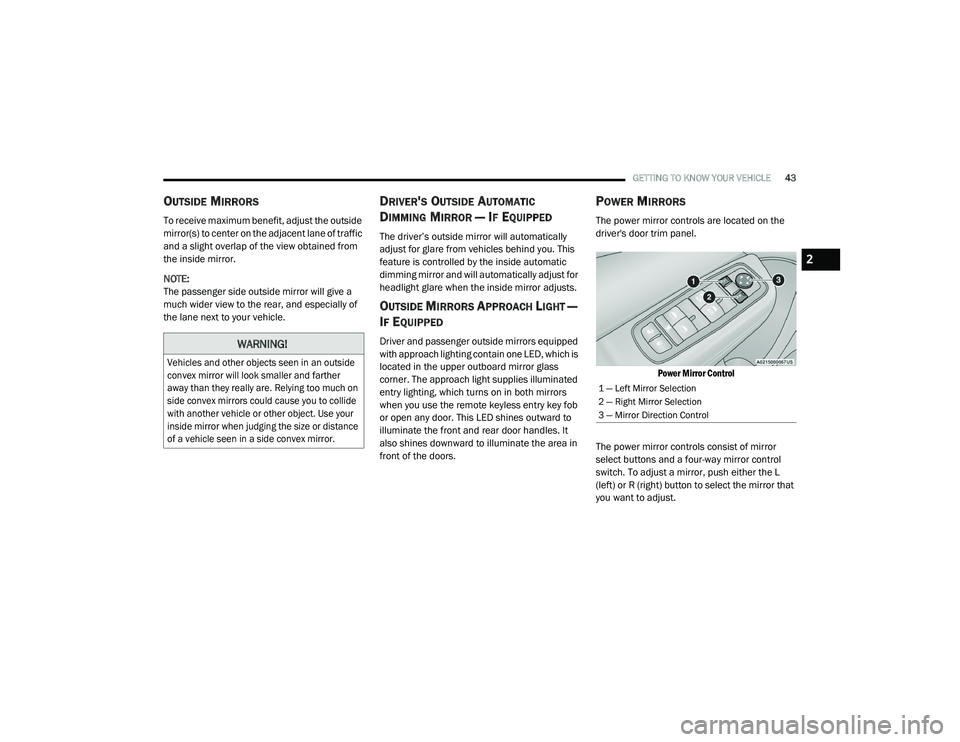
The power mirror controls are located on the
driver's door trim panel.
Power Mirror Control
The power mirror controls consist of mirror
select buttons and a four-way mirror control
switch. To adjust a mirror, push either the L
(left) or R (right) button to select the mirror that
you want to adjust.
WARNING!
Vehicles and other objects seen in an outside
convex mirror will look smaller and farther
away than they really are. Relying too much on
side convex mirrors could cause you to collide
with another vehicle or other object. Use your
inside mirror when judging the size or distance
of a vehicle seen in a side convex mirror.
1 — Left Mirror Selection
2 — Right Mirror Selection
3 — Mirror Direction Control
2
20_LD_OM_EN_USC_t.book Page 43
Page 46 of 412
44GETTING TO KNOW YOUR VEHICLE
NOTE:
A light in the select button will illuminate indi -
cating the mirror is activated and can be
adjusted.
Using the mirror control switch, push on any of
the four arrows for the direction that you want
the mirror to move.
HEATED MIRRORS — IF EQUIPPED
These mirrors are heated to melt frost
or ice. This feature will be activated
whenever you turn on the rear window
defroster (if equipped). Refer to “Climate
Controls” in this chapter for further information.
TILT SIDE MIRRORS IN REVERSE — IF
E
QUIPPED
Tilt Side Mirrors In Reverse provides automatic
outside mirror positioning which will aid the
driver’s view of the ground rearward of the front
doors. The outside mirrors will move slightly
downward from the present position when the
vehicle is shifted into REVERSE. The outside
mirrors will then return to the original position
when the vehicle is shifted out of the REVERSE
position. Each stored memory setting will have an
associated Tilt Side Mirrors In Reverse position.
NOTE:
The Tilt Side Mirrors In Reverse feature is not
turned on when delivered from the factory. The
Tilt Side Mirrors In Reverse feature can be
turned on and off using the Uconnect System.
Refer to “Uconnect Settings” in “Multimedia”
for further information.
ILLUMINATED VANITY MIRRORS — IF
E
QUIPPED
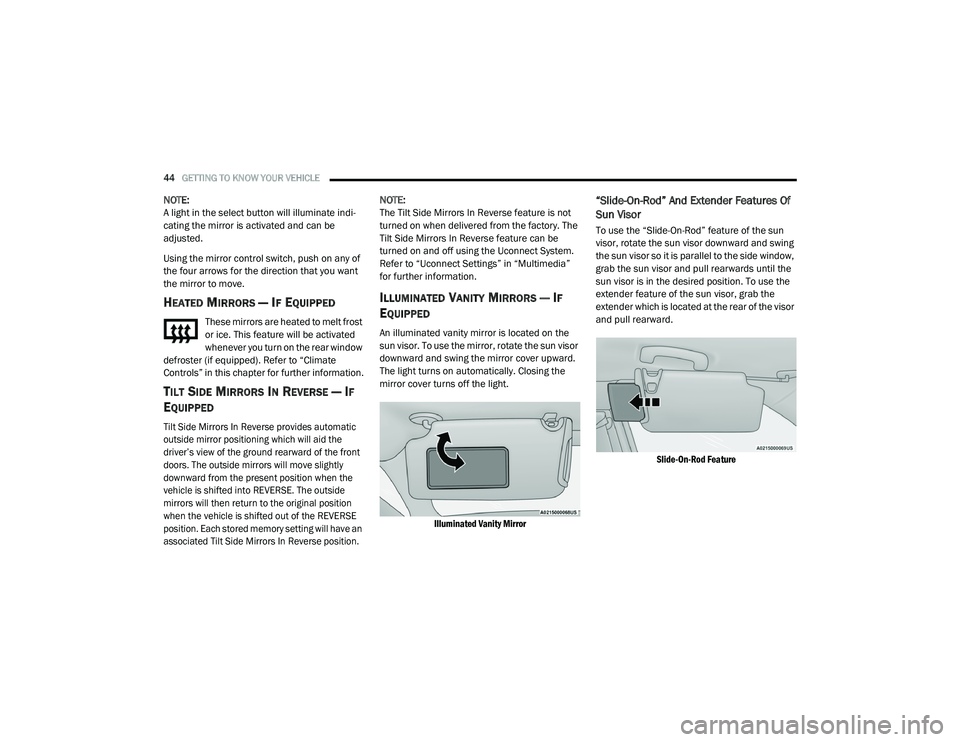
An illuminated vanity mirror is located on the
sun visor. To use the mirror, rotate the sun visor
downward and swing the mirror cover upward.
The light turns on automatically. Closing the
mirror cover turns off the light.
Illuminated Vanity Mirror
“Slide-On-Rod” And Extender Features Of
Sun Visor
To use the “Slide-On-Rod” feature of the sun
visor, rotate the sun visor downward and swing
the sun visor so it is parallel to the side window,
grab the sun visor and pull rearwards until the
sun visor is in the desired position. To use the
extender feature of the sun visor, grab the
extender which is located at the rear of the visor
and pull rearward.
Slide-On-Rod Feature
20_LD_OM_EN_USC_t.book Page 44
Page 56 of 412
54GETTING TO KNOW YOUR VEHICLE
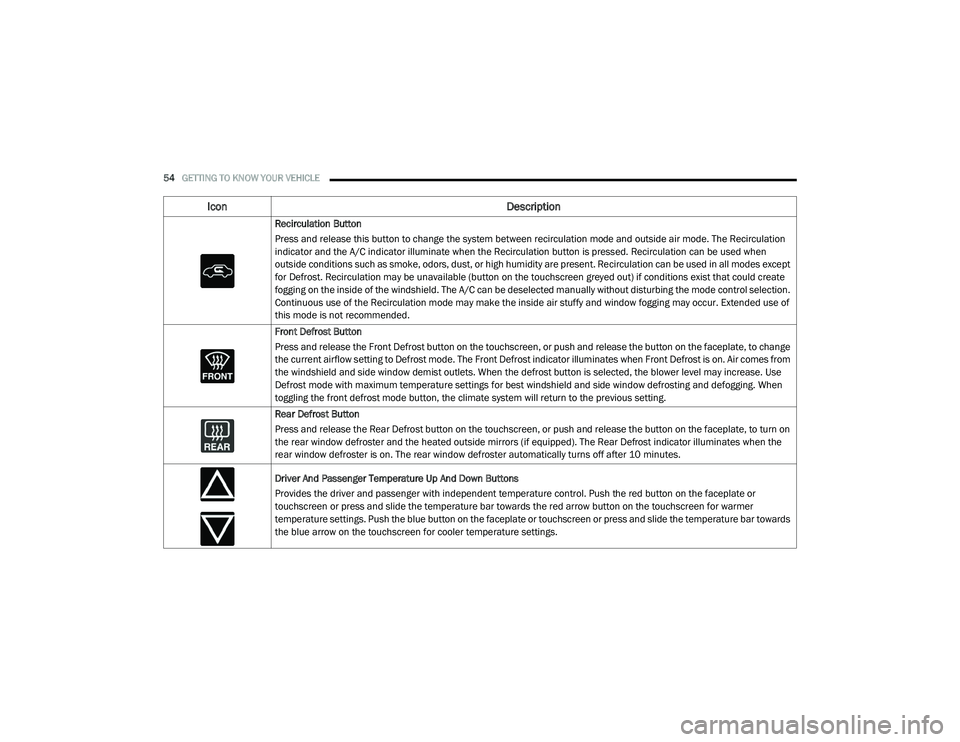
Recirculation Button
Press and release this button to change the system between recirculation mode and outside air mode. The Recirculation
indicator and the A/C indicator illuminate when the Recirculation button is pressed. Recirculation can be used when
outside conditions such as smoke, odors, dust, or high humidity are present. Recirculation can be used in all modes except
for Defrost. Recirculation may be unavailable (button on the touchscreen greyed out) if conditions exist that could create
fogging on the inside of the windshield. The A/C can be deselected manually without disturbing the mode control selection.
Continuous use of the Recirculation mode may make the inside air stuffy and window fogging may occur. Extended use of
this mode is not recommended.
Front Defrost Button
Press and release the Front Defrost button on the touchscreen, or push and release the button on the faceplate, to change
the current airflow setting to Defrost mode. The Front Defrost indicator illuminates when Front Defrost is on. Air comes from
the windshield and side window demist outlets. When the defrost button is selected, the blower level may increase. Use
Defrost mode with maximum temperature settings for best windshield and side window defrosting and defogging. When
toggling the front defrost mode button, the climate system will return to the previous setting.
Rear Defrost Button
Press and release the Rear Defrost button on the touchscreen, or push and release the button on the faceplate, to turn on
the rear window defroster and the heated outside mirrors (if equipped). The Rear Defrost indicator illuminates when the
rear window defroster is on. The rear window defroster automatically turns off after 10 minutes.
Driver And Passenger Temperature Up And Down Buttons
Provides the driver and passenger with independent temperature control. Push the red button on the faceplate or
touchscreen or press and slide the temperature bar towards the red arrow button on the touchscreen for warmer
temperature settings. Push the blue button on the faceplate or touchscreen or press and slide the temperature bar towards
the blue arrow on the touchscreen for cooler temperature settings.
Icon Description
20_LD_OM_EN_USC_t.book Page 54