USB DODGE CHARGER 2021 Owner's Manual
[x] Cancel search | Manufacturer: DODGE, Model Year: 2021, Model line: CHARGER, Model: DODGE CHARGER 2021Pages: 320, PDF Size: 20.61 MB
Page 173 of 320
MULTIMEDIA171
With a USB jump drive installed, press the USB
button to save to the jump drive.
Press the Uconnect button to save the current
timer data to the Owner’s web page.
NOTE:The Uconnect option will be grayed out or missing
if the vehicle does not have a valid Uconnect
account associated with it.
Press the Cancel button to return to the Timers
page.
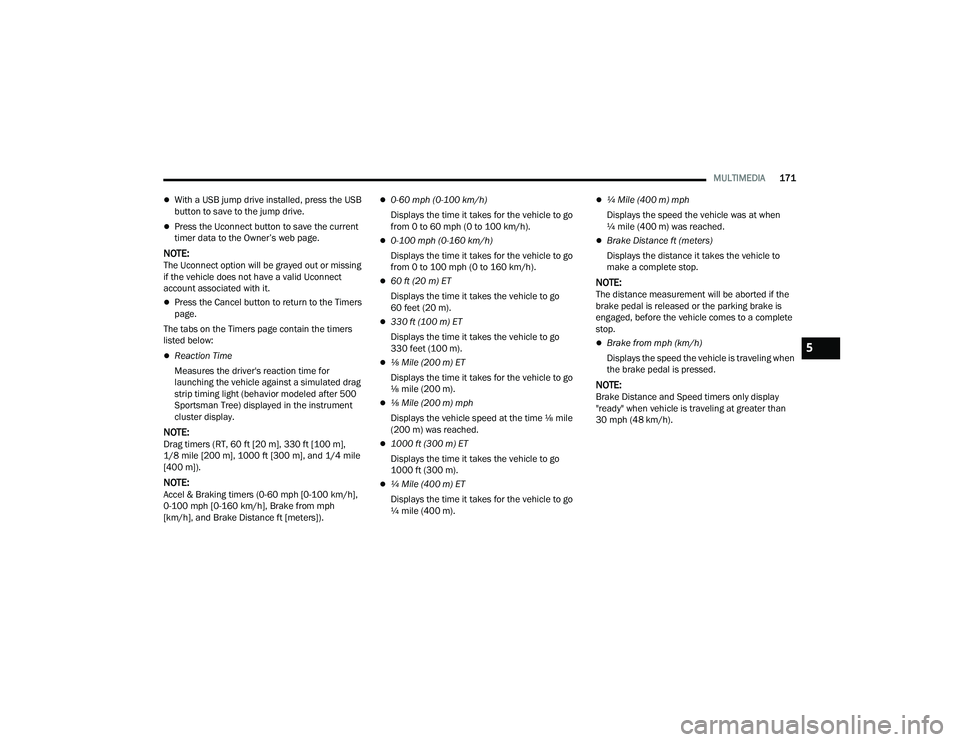
The tabs on the Timers page contain the timers
listed below:
Reaction Time
Measures the driver's reaction time for
launching the vehicle against a simulated drag
strip timing light (behavior modeled after 500
Sportsman Tree) displayed in the instrument
cluster display.
NOTE:Drag timers (RT, 60 ft [20 m], 330 ft [100 m],
1/8 mile [200 m], 1000 ft [300 m], and 1/4 mile
[400 m]).
NOTE:Accel & Braking timers (0-60 mph [0-100 km/h],
0-100 mph [0-160 km/h], Brake from mph
[km/h], and Brake Distance ft [meters]).
0-60 mph (0-100 km/h)
Displays the time it takes for the vehicle to go
from 0 to 60 mph (0 to 100 km/h).
0-100 mph (0-160 km/h)
Displays the time it takes for the vehicle to go
from 0 to 100 mph (0 to 160 km/h).
60 ft (20 m) ET
Displays the time it takes the vehicle to go
60 feet (20 m).
330 ft (100 m) ET
Displays the time it takes the vehicle to go
330 feet (100 m).
⅛ Mile (200 m) ET
Displays the time it takes for the vehicle to go
⅛ mile (200 m).
⅛ Mile (200 m) mph
Displays the vehicle speed at the time ⅛ mile
(200 m) was reached.
1000 ft (300 m) ET
Displays the time it takes the vehicle to go
1000 ft (300 m).
¼ Mile (400 m) ET
Displays the time it takes for the vehicle to go
¼ mile (400 m).
¼ Mile (400 m) mph
Displays the speed the vehicle was at when
¼ mile (400 m) was reached.
Brake Distance ft (meters)
Displays the distance it takes the vehicle to
make a complete stop.
NOTE:The distance measurement will be aborted if the
brake pedal is released or the parking brake is
engaged, before the vehicle comes to a complete
stop.
Brake from mph (km/h)
Displays the speed the vehicle is traveling when
the brake pedal is pressed.
NOTE:Brake Distance and Speed timers only display
"ready" when vehicle is traveling at greater than
30 mph (48 km/h).
5
21_LD_OM_EN_USC_t.book Page 171
Page 269 of 320
SERVICING AND MAINTENANCE267
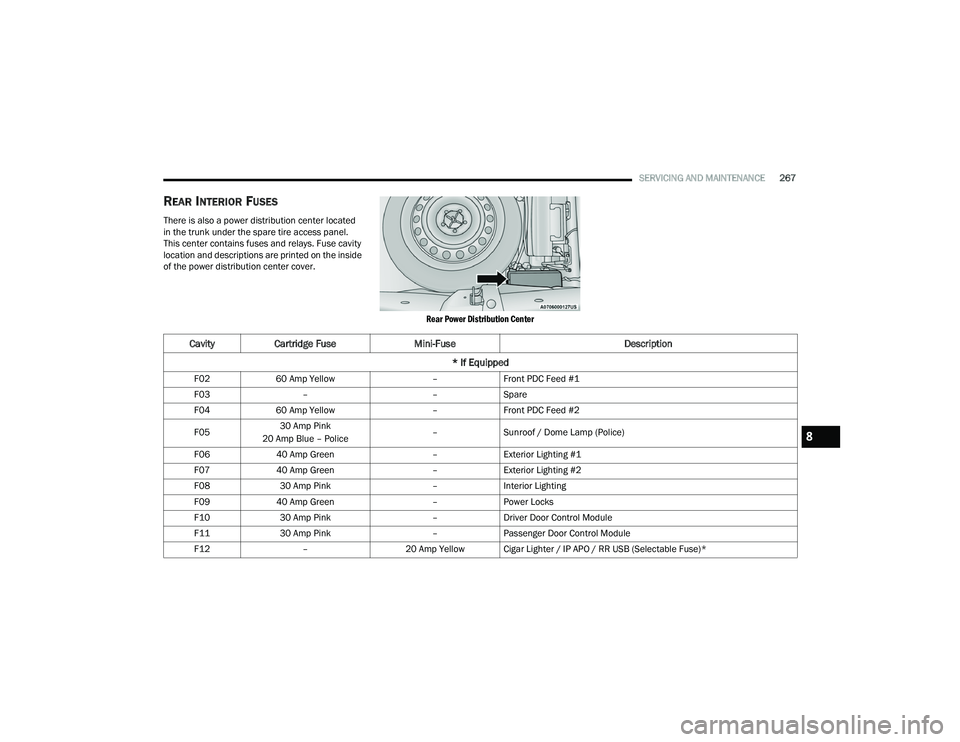
REAR INTERIOR FUSES
There is also a power distribution center located
in the trunk under the spare tire access panel.
This center contains fuses and relays. Fuse cavity
location and descriptions are printed on the inside
of the power distribution center cover.
Rear Power Distribution Center
CavityCartridge Fuse Mini-Fuse Description
* If Equipped
F02 60 Amp Yellow –Front PDC Feed #1
F03 – –Spare
F04 60 Amp Yellow –Front PDC Feed #2
F05 30 Amp Pink
20 Amp Blue – Police –
Sunroof / Dome Lamp (Police)
F06 40 Amp Green –Exterior Lighting #1
F07 40 Amp Green –Exterior Lighting #2
F08 30 Amp Pink –Interior Lighting
F09 40 Amp Green –Power Locks
F10 30 Amp Pink –Driver Door Control Module
F11 30 Amp Pink –Passenger Door Control Module
F12 –20 Amp Yellow Cigar Lighter / IP APO / RR USB (Selectable Fuse)*
8
21_LD_OM_EN_USC_t.book Page 267
Page 272 of 320
270SERVICING AND MAINTENANCE
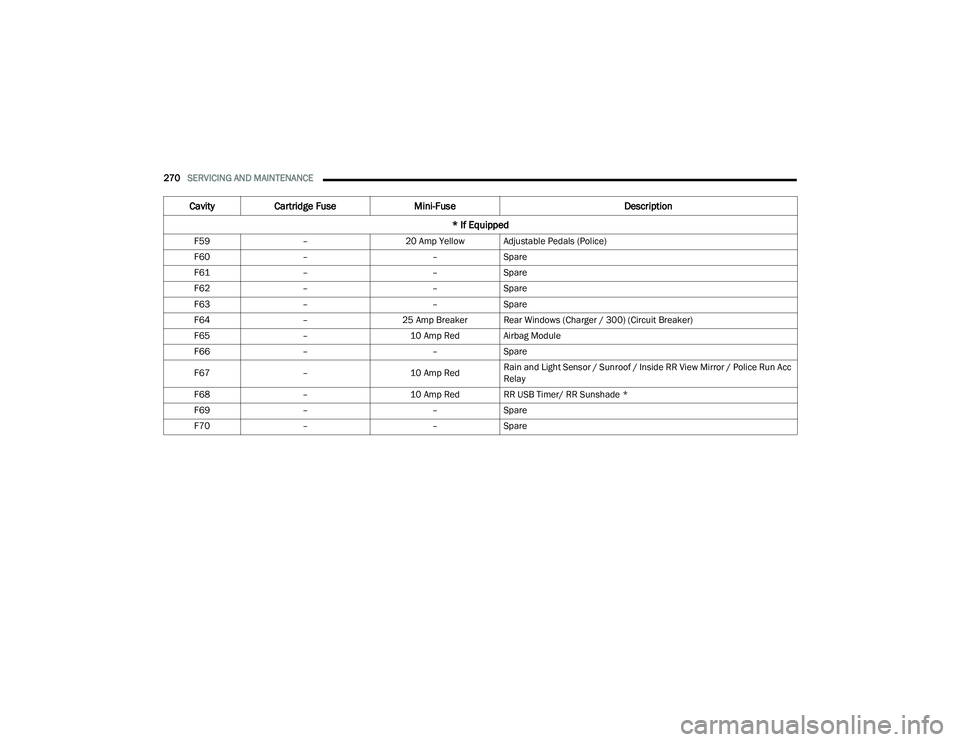
F59 –20 Amp Yellow Adjustable Pedals (Police)
F60 – –Spare
F61 – –Spare
F62 – –Spare
F63 – –Spare
F64 –25 Amp Breaker Rear Windows (Charger / 300) (Circuit Breaker)
F65 –10 Amp Red Airbag Module
F66 – –Spare
F67 –10 Amp RedRain and Light Sensor / Sunroof / Inside RR View Mirror / Police Run Acc
Relay
F68 –10 Amp Red RR USB Timer/ RR Sunshade *
F69 – –Spare
F70 – –Spare
Cavity Cartridge Fuse Mini-Fuse Description
* If Equipped
21_LD_OM_EN_USC_t.book Page 270
Page 317 of 320
315
U
Uconnect Phone Call Features
.................................. 158Things You Should Know About Your Uconnect Phone.................................... 161Uconnect Settings....................................... 19Uconnect Phone......................... 154, 155, 156Answer Or Ignore An Incoming Call — Call Currently In Progress...................... 159Answer Or Ignore An Incoming Call — No Call Currently In Progress................159Bluetooth Communication Link................. 162Call Continuation....................................... 160Call Controls.............................................. 158Call Termination........................................ 160Cancel Command...................................... 154Connecting To A Particular Mobile Phone Or Audio Device After Pairing................156Help Command......................................... 154Join Calls................................................... 160Making A Phone Or Audio Device A Favorite................................................. 157Making A Second Call While Current Call Is In Progress................................. 160Managing Your Favorites........................... 158Natural Speech......................................... 154
Operation................................................. 153Overview................................................... 152Pair (Link) Uconnect Phone To A Mobile Phone................................................... 155Pair A Bluetooth Streaming Audio Device.................................................. 156Phonebook Download.............................. 157Place/Retrieve A Call From Hold.............. 160Power-Up.................................................. 162Recent Calls............................................. 159Redial....................................................... 160To Remove A Favorite............................... 158Toggling Between Calls............................. 160Touch-Tone Number Entry........................ 159Transfer Call To And From Mobile Phone................................................... 161Voice Command....................................... 161Uconnect SettingsCustomer Programmable Features...... 19, 22Passive Entry Programming......................... 22Uconnect System.......................................... 138Uconnect Voice Command............................... 26Uniform Tire Quality Grades.......................... 291Unleaded Gasoline....................................... 297Untwisting Procedure, Seat Belt................... 197USB.................................................................. 56
V
Vanity Mirrors...................................................36Vehicle Certification Label............................ 114Vehicle Identification Number (VIN).............. 296Vehicle Loading........................... 114, 115, 280Vehicle Maintenance.................................... 253Vehicle Modifications/Alterations...................... 9Vehicle Security Alarm.....................................20Vehicle Storage...................................... 54, 292Voice Command................................... 164, 166Voice Recognition System (VR)........................26
W
Warning Flashers, Hazard............................. 223Warning LightsRed..............................................................74Yellow..........................................................77Warning Lights (Instrument Cluster
Descriptions)....................................................77Warning Lights And Messages.........................74Warranty Information.................................... 304WasherAdding Fluid.............................................. 251Washers, Windshield.................................... 251
11
21_LD_OM_EN_USC_t.book Page 315