brake DODGE CHARGER 2021 Owners Manual
[x] Cancel search | Manufacturer: DODGE, Model Year: 2021, Model line: CHARGER, Model: DODGE CHARGER 2021Pages: 320, PDF Size: 20.61 MB
Page 6 of 320
4
STARTING AND OPERATING
STARTING THE ENGINE ........................................ 83
Automatic Transmission .................................83
Normal Starting ...............................................83
AutoPark ...........................................................84
Keyless Enter ‘n Go™ — Ignition......................85
Cold Weather Operation
(Below –22°F Or −30°C) ...............................85
If Engine Fails To Start .....................................85
After Starting.....................................................86
ENGINE BLOCK HEATER — IF EQUIPPED ........... 86
ENGINE BREAK-IN RECOMMENDATIONS —
3.6L & 5.7L ........................................................... 86
PARKING BRAKE ................................................... 87
AUTOMATIC TRANSMISSION................................ 88 Ignition Park Interlock ......................................89
Brake Transmission Shift Interlock (BTSI)
System .............................................................89
8-Speed Automatic Transmission ...................89
SPORT MODE — WITHOUT PERFORMANCE
CONTROL ................................................................ 94
FUEL SAVER TECHNOLOGY 5.7L ONLY—
IF EQUIPPED ........................................................... 94
ELECTRIC POWER STEERING............................... 94
CRUISE CONTROL SYSTEMS — IF EQUIPPED ... 95
Cruise Control ...................................................95
Adaptive Cruise Control (ACC) .........................96 PARKSENSE REAR PARK ASSIST —
IF EQUIPPED ........................................................ 105
ParkSense Sensors ....................................... 105
ParkSense Display ........................................ 105ParkSense Warning Display ......................... 108
Enabling And Disabling ParkSense .............. 108
Service The ParkSense Park Assist System ...108
Cleaning The ParkSense System ................. 108
ParkSense System Usage Precautions........ 108
LANESENSE — IF EQUIPPED ............................. 109
LaneSense Operation ................................... 109Turning LaneSense On Or Off ....................... 110
LaneSense Warning Message ...................... 110Changing LaneSense Status ........................ 112
PARKVIEW REAR BACK UP CAMERA............... 112
REFUELING THE VEHICLE ................................... 113
VEHICLE LOADING ............................................. 114 Vehicle Certification Label ............................ 114
Gross Vehicle Weight Rating (GVWR) .......... 114
Gross Axle Weight Rating (GAWR) ............... 114
Overloading.................................................... 115
Loading ......................................................... 115
TRAILER TOWING ................................................ 115
Common Towing Definitions......................... 115
Trailer Hitch Classification ............................ 117
Trailer Towing Weights (Maximum Trailer
Weight Ratings) ............................................. 117Trailer And Tongue Weight ........................... 118Towing Requirements ................................... 118Towing Tips ................................................... 121 RECREATIONAL TOWING
(BEHIND MOTORHOME) ..................................... 121
DRIVING TIPS ....................................................... 122
Driving On Slippery Surfaces ........................ 122Driving Through Water ................................. 122
MULTIMEDIA
UCONNECT SYSTEMS ......................................... 124
CYBERSECURITY ................................................. 124
UCONNECT SETTINGS ........................................ 125 Customer Programmable Features ............. 125
UCONNECT INTRODUCTION................................ 138
System Overview .......................................... 138Drag & Drop Menu Bar ................................. 140
Safety And General Information................... 140
UCONNECT MODES ............................................. 141
Steering Wheel Audio Controls..................... 141Radio Mode .................................................. 141Media Mode ................................................. 150
Phone Mode ................................................. 152
ANDROID AUTO™ & APPLE CARPLAY® —
IF EQUIPPED ......................................................... 163
Android Auto™ .............................................. 163
Apple CarPlay® ............................................. 165Android Auto™ And Apple CarPlay® Tips And
Tricks.............................................................. 166
21_LD_OM_EN_USC_t.book Page 4
Page 7 of 320
5
PERFORMANCE PAGES ...................................... 167 Home .............................................................. 168
Timers ............................................................ 170
Gauges ........................................................... 172G-Force ........................................................... 173Engine ............................................................ 173
Dynamometer (Dyno) .................................... 174
DODGE DRIVE MODES — IF EQUIPPED............. 174
Performance Control —
If Equipped..................................................... 174
RADIO OPERATION AND MOBILE PHONES...... 179
Regulatory And Safety Information .............. 179
SAFETY
SAFETY FEATURES .............................................. 180 Anti-Lock Brake System (ABS) ..................... 180
Electronic Brake Control (EBC) System ....... 181
AUXILIARY DRIVING SYSTEMS .......................... 185
Blind Spot Monitoring (BSM) —
If Equipped..................................................... 185
Forward Collision Warning (FCW) With
Mitigation Operation ..................................... 188
Tire Pressure Monitoring
System (TPMS) .............................................. 190 OCCUPANT RESTRAINT SYSTEMS ................... 193
Occupant Restraint Systems Features ....... 193
Important Safety Precautions ...................... 193Seat Belt Systems ........................................ 194Supplemental Restraint
Systems (SRS) ............................................... 200
Child Restraints ............................................. 208
SAFETY TIPS ....................................................... 220
Transporting Passengers .............................. 220Transporting Pets ......................................... 220
Safety Checks You Should Make Inside
The Vehicle ................................................... 220
Periodic Safety Checks You Should Make
Outside The Vehicle ...................................... 221
Exhaust Gas................................................... 222
Carbon Monoxide Warnings ......................... 222
IN CASE OF EMERGENCY
HAZARD WARNING FLASHERS ........................ 223
ASSIST AND SOS MIRROR — IF EQUIPPED ..... 223
JACKING AND TIRE CHANGING ......................... 226 Preparations For Jacking .............................. 226Jack Location/Spare Tire Stowage .............. 227Jacking Instructions ...................................... 228 TIRE SERVICE KIT — IF EQUIPPED ..................... 231
Tire Service Kit Storage ................................ 231Tire Service Kit Components And
Operation ....................................................... 231Tire Service Kit Usage Precautions .............. 232
Sealing A Tire With Tire Service Kit .............. 233
JUMP STARTING ................................................. 236
Preparations For Jump Start ........................ 236Jump Starting Procedure .............................. 237
REFUELING IN EMERGENCY .............................. 238
IF YOUR ENGINE OVERHEATS ........................... 239
MANUAL PARK RELEASE —
8-SPEED TRANSMISSION ................................... 240
FREEING A STUCK VEHICLE ............................... 242
TOWING A DISABLED VEHICLE .......................... 243 All Wheel Drive (AWD) Models...................... 244
Rear Wheel Drive (RWD) Models ................ 244
ENHANCED ACCIDENT RESPONSE
SYSTEM (EARS) ................................................... 244
EVENT DATA RECORDER (EDR) ......................... 244
21_LD_OM_EN_USC_t.book Page 5
Page 8 of 320
6
SERVICING AND MAINTENANCE
SCHEDULED SERVICING .................................... 245
3.6L And 5.7L Engines ................................. 245
ENGINE COMPARTMENT .................................... 249
3.6L Engine ................................................... 2495.7L Engine ................................................... 250Checking Oil Level ......................................... 251
Adding Washer Fluid ..................................... 251
Maintenance-Free Battery ........................... 252
Pressure Washing ......................................... 252
VEHICLE MAINTENANCE ..................................... 253
Engine Oil ....................................................... 253
Engine Oil Filter ............................................. 254
Engine Air Cleaner Filter .............................. 254Air Conditioner Maintenance ....................... 254
Accessory Drive Belt Inspection ................... 256
Body Lubrication............................................ 256
Windshield Wiper Blades .............................. 257Exhaust System ............................................. 258
Cooling System ............................................. 259
Brake System ............................................... 262
Automatic Transmission ............................... 263
Rear Axle ........................................................ 263
FUSES .................................................................... 264
General Information ...................................... 264Underhood Fuses .......................................... 264
Rear Interior Fuses........................................ 267 BULB REPLACEMENT ......................................... 271
Replacement Bulbs ....................................... 271
Replacing Exterior Bulbs............................... 273
TIRES..................................................................... 275
Tire Safety Information ................................ 275Tires — General Information ........................ 283
Tire Types....................................................... 286
Spare Tires — If Equipped ............................. 287
Wheel And Wheel Trim Care ........................ 289
Snow Traction Devices ................................. 290
Tire Rotation Recommendations ................. 291
DEPARTMENT OF TRANSPORTATION
UNIFORM TIRE QUALITY GRADES ................... 291
Treadwear ...................................................... 292
Traction Grades ............................................. 292Temperature Grades ..................................... 292
STORING THE VEHICLE ...................................... 292
BODYWORK ......................................................... 293
Protection From Atmospheric Agents .......... 293
Body And Underbody Maintenance.............. 293Preserving The Bodywork ............................. 293
INTERIORS .......................................................... 294
Seats And Fabric Parts ................................. 294
Plastic And Coated Parts .............................. 295Leather Surfaces ........................................... 295Glass Surfaces ............................................. 295
TECHNICAL SPECIFICATIONS
VEHICLE IDENTIFICATION NUMBER (VIN) ........ 296
BRAKE SYSTEM .................................................. 296
WHEEL AND TIRE TORQUE SPECIFICATIONS .. 296
Torque Specifications ................................... 296
FUEL REQUIREMENTS ........................................ 297
3.6L Engine ................................................... 297
5.7L Engine ................................................... 297
Reformulated Gasoline ................................ 297Materials Added To Fuel ............................... 298
Gasoline/Oxygenate Blends ......................... 298
Do Not Use E-85 In Non-Flex Fuel
Vehicles ......................................................... 298
CNG And LP Fuel System Modifications ...... 298Methylcyclopentadienyl Manganese
Tricarbonyl (MMT) In Gasoline ..................... 299
FLUID CAPACITIES ............................................... 299
ENGINE FLUIDS AND LUBRICANTS ................... 300
CHASSIS FLUIDS AND LUBRICANTS ................. 301
21_LD_OM_EN_USC_t.book Page 6
Page 11 of 320
9
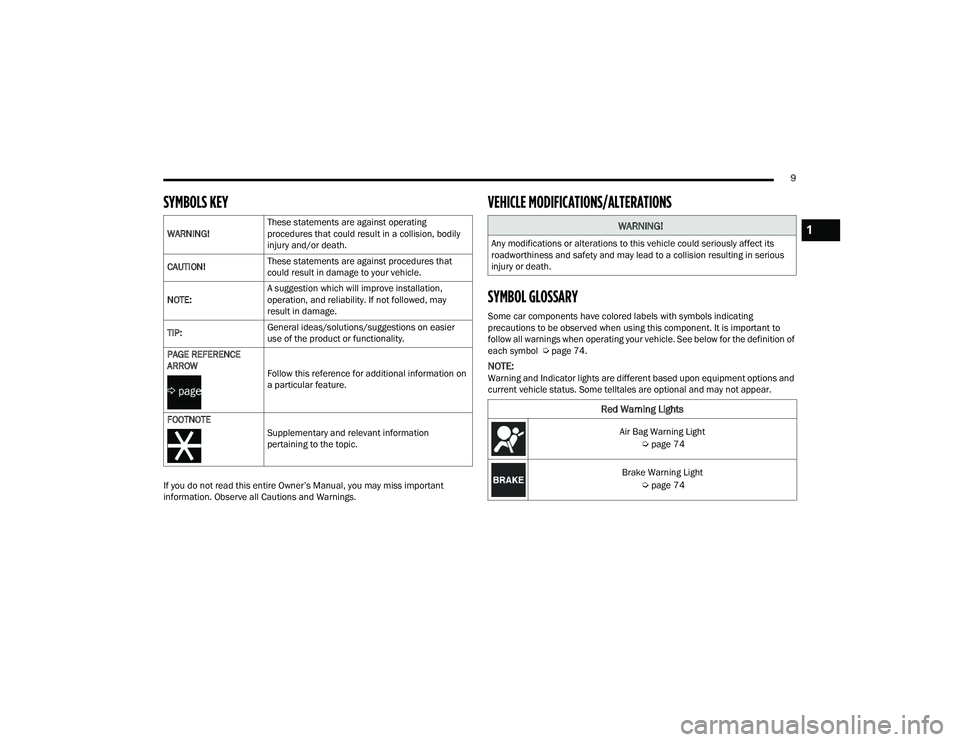
SYMBOLS KEY
If you do not read this entire Owner’s Manual, you may miss important
information. Observe all Cautions and Warnings.
VEHICLE MODIFICATIONS/ALTERATIONS
SYMBOL GLOSSARY
Some car components have colored labels with symbols indicating
precautions to be observed when using this component. It is important to
follow all warnings when operating your vehicle. See below for the definition of
each symbol Úpage 74.
NOTE:Warning and Indicator lights are different based upon equipment options and
current vehicle status. Some telltales are optional and may not appear.
WARNING!
These statements are against operating
procedures that could result in a collision, bodily
injury and/or death.
CAUTION! These statements are against procedures that
could result in damage to your vehicle.
NOTE: A suggestion which will improve installation,
operation, and reliability. If not followed, may
result in damage.
TIP: General ideas/solutions/suggestions on easier
use of the product or functionality.
PAGE REFERENCE
ARROW
Follow this reference for additional information on
a particular feature.
FOOTNOTE Supplementary and relevant information
pertaining to the topic.
WARNING!
Any modifications or alterations to this vehicle could seriously affect its
roadworthiness and safety and may lead to a collision resulting in serious
injury or death.
Red Warning Lights
Air Bag Warning Light Úpage 74
Brake Warning Light Úpage 74
1
21_LD_OM_EN_USC_t.book Page 9
Page 12 of 320
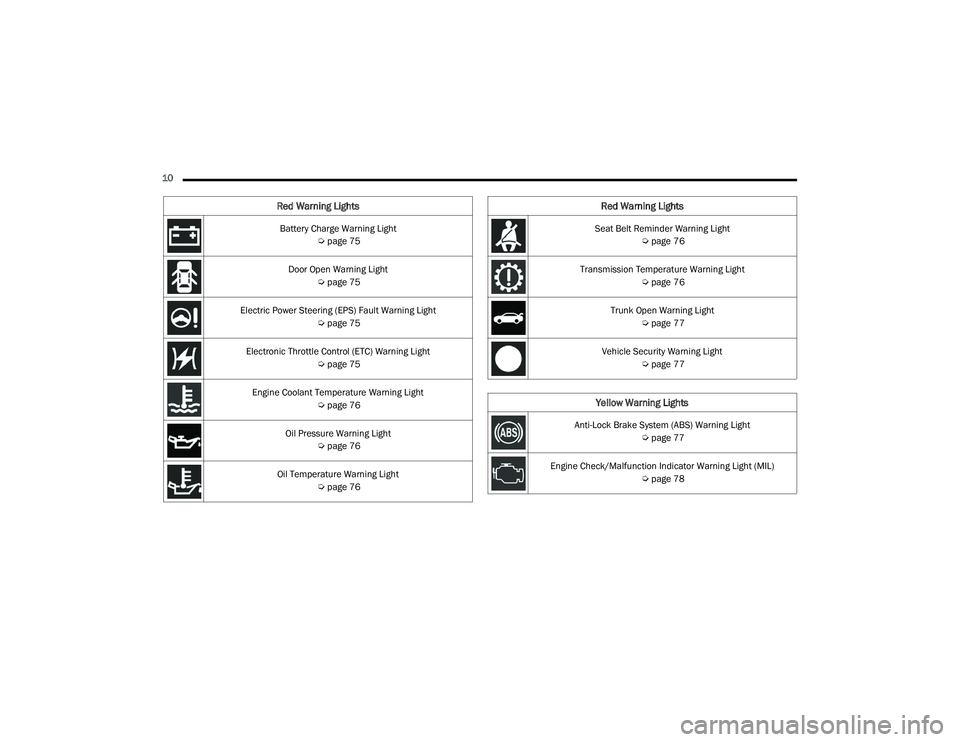
10 Battery Charge Warning Light Úpage 75
Door Open Warning Light Úpage 75
Electric Power Steering (EPS) Fault Warning Light Úpage 75
Electronic Throttle Control (ETC) Warning Light Úpage 75
Engine Coolant Temperature Warning Light Úpage 76
Oil Pressure Warning Light Úpage 76
Oil Temperature Warning Light Úpage 76
Red Warning Lights
Seat Belt Reminder Warning Light
Úpage 76
Transmission Temperature Warning Light Úpage 76
Trunk Open Warning Light Úpage 77
Vehicle Security Warning Light Úpage 77
Yellow Warning Lights
Anti-Lock Brake System (ABS) Warning Light
Úpage 77
Engine Check/Malfunction Indicator Warning Light (MIL) Úpage 78
Red Warning Lights
21_LD_OM_EN_USC_t.book Page 10
Page 18 of 320
16GETTING TO KNOW YOUR VEHICLE
If the Vehicle Security Light turns on during normal
vehicle operation (vehicle running for longer than
10 seconds), it indicates that there is a fault in the
electronics. Should this occur, have the vehicle
serviced as soon as possible by an authorized
dealer.
All of the key fobs provided with your new vehicle
have been programmed to the vehicle electronics
Ú page 305.
IGNITION SWITCH
KEYLESS ENTER ‘N GO™ IGNITION
This feature allows the driver to operate the
ignition switch with the push of a button as long as
the key fob is in the passenger compartment.
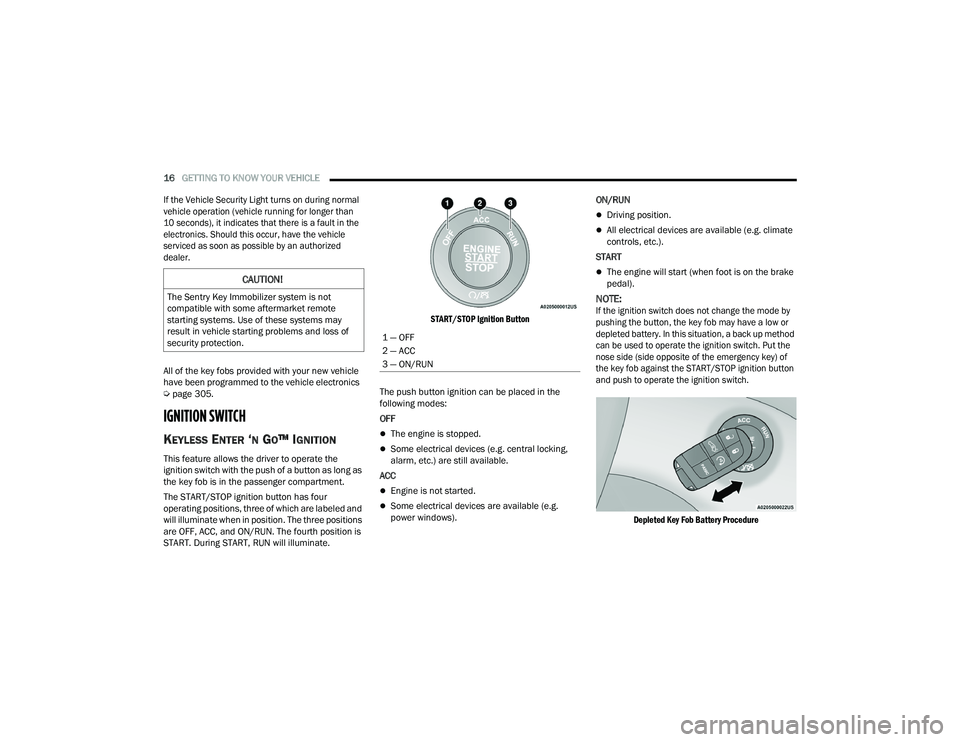
The START/STOP ignition button has four
operating positions, three of which are labeled and
will illuminate when in position. The three positions
are OFF, ACC, and ON/RUN. The fourth position is
START. During START, RUN will illuminate.
START/STOP Ignition Button
The push button ignition can be placed in the
following modes:
OFF
The engine is stopped.
Some electrical devices (e.g. central locking,
alarm, etc.) are still available.
ACC
Engine is not started.
Some electrical devices are available (e.g.
power windows). ON/RUN
Driving position.
All electrical devices are available (e.g. climate
controls, etc.).
START
The engine will start (when foot is on the brake
pedal).
NOTE:
If the ignition switch does not change the mode by
pushing the button, the key fob may have a low or
depleted battery. In this situation, a back up method
can be used to operate the ignition switch. Put the
nose side (side opposite of the emergency key) of
the key fob against the START/STOP ignition button
and push to operate the ignition switch.
Depleted Key Fob Battery Procedure
CAUTION!
The Sentry Key Immobilizer system is not
compatible with some aftermarket remote
starting systems. Use of these systems may
result in vehicle starting problems and loss of
security protection.
1 — OFF
2 — ACC
3 — ON/RUN
21_LD_OM_EN_USC_t.book Page 16
Page 19 of 320
GETTING TO KNOW YOUR VEHICLE17
NOTE:
When opening the driver's door with the ignition
in ON/RUN (engine not running), a chime will
sound to remind you to place the ignition in the
OFF position. In addition to the chime, the
message will display “Ignition Or Accessory On”
in the cluster.
For more information on proper engine starting
procedures, see Úpage 83.
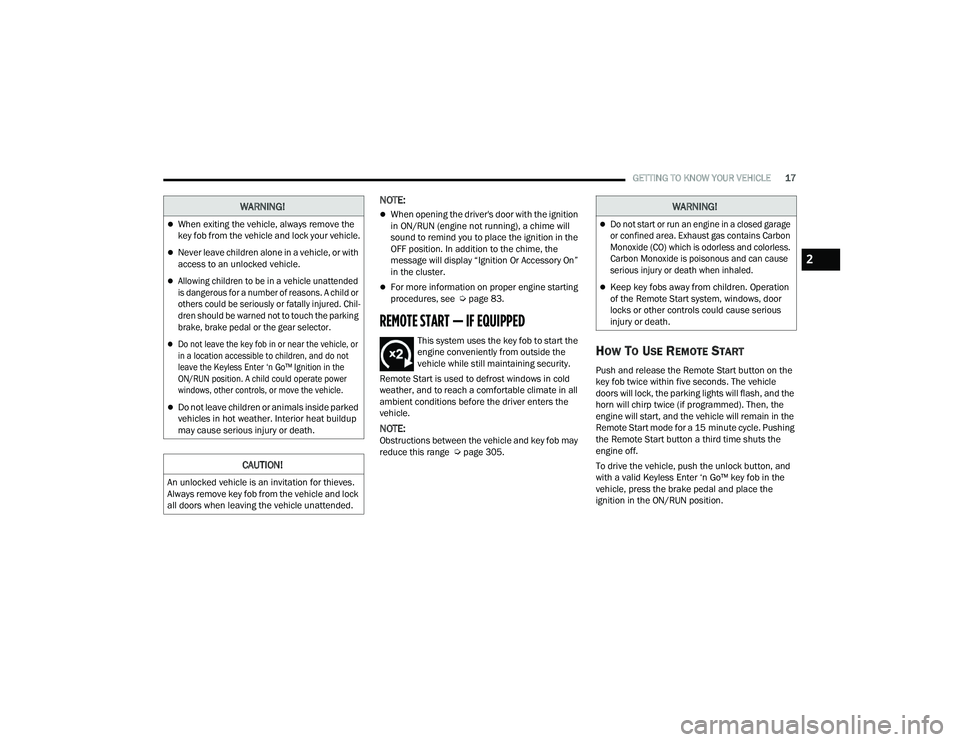
REMOTE START — IF EQUIPPED
This system uses the key fob to start the
engine conveniently from outside the
vehicle while still maintaining security.
Remote Start is used to defrost windows in cold
weather, and to reach a comfortable climate in all
ambient conditions before the driver enters the
vehicle.
NOTE:Obstructions between the vehicle and key fob may
reduce this range Ú page 305.
HOW TO USE REMOTE START
Push and release the Remote Start button on the
key fob twice within five seconds. The vehicle
doors will lock, the parking lights will flash, and the
horn will chirp twice (if programmed). Then, the
engine will start, and the vehicle will remain in the
Remote Start mode for a 15 minute cycle. Pushing
the Remote Start button a third time shuts the
engine off.
To drive the vehicle, push the unlock button, and
with a valid Keyless Enter ‘n Go™ key fob in the
vehicle, press the brake pedal and place the
ignition in the ON/RUN position.
WARNING!
When exiting the vehicle, always remove the
key fob from the vehicle and lock your vehicle.
Never leave children alone in a vehicle, or with
access to an unlocked vehicle.
Allowing children to be in a vehicle unattended
is dangerous for a number of reasons. A child or
others could be seriously or fatally injured. Chil -
dren should be warned not to touch the parking
brake, brake pedal or the gear selector.
Do not leave the key fob in or near the vehicle, or
in a location accessible to children, and do not
leave the Keyless Enter ‘n Go™ Ignition in the
ON/RUN position. A child could operate power
windows, other controls, or move the vehicle.
Do not leave children or animals inside parked
vehicles in hot weather. Interior heat buildup
may cause serious injury or death.
CAUTION!
An unlocked vehicle is an invitation for thieves.
Always remove key fob from the vehicle and lock
all doors when leaving the vehicle unattended.
WARNING!
Do not start or run an engine in a closed garage
or confined area. Exhaust gas contains Carbon
Monoxide (CO) which is odorless and colorless.
Carbon Monoxide is poisonous and can cause
serious injury or death when inhaled.
Keep key fobs away from children. Operation
of the Remote Start system, windows, door
locks or other controls could cause serious
injury or death.
2
21_LD_OM_EN_USC_t.book Page 17
Page 20 of 320
18GETTING TO KNOW YOUR VEHICLE
NOTE:
With Remote Start, the engine will only run for
15 minutes.
Remote Start can only be used twice.
If an engine fault is present or fuel level is low,
the vehicle will start and then shut down in
10 seconds.
The parking lights will turn on and remain on
during Remote Start mode.
For security, power window operation is
disabled when the vehicle is in the Remote Start
mode.
The ignition must be placed in the ON/RUN posi -
tion before the Remote Start sequence can be
repeated for a third cycle.
All of the following conditions must be met before
the engine will remote start:
Gear selector in PARK
Doors closed
Hood closed
Trunk closed
Hazard switch off
Brake switch inactive (brake pedal not pressed)
Battery at an acceptable charge level
Check engine light shall not be present
PANIC button not pushed
System not disabled from previous Remote
Start event
Vehicle Security system indicator flashing
Ignition in the OFF position
Fuel level meets minimum requirement
Vehicle Security system is not signaling an intrusion
Malfunction Indicator Light (MIL) is not illuminated
TO EXIT REMOTE START MODE
To drive the vehicle after starting the Remote Start
system, either push and release the unlock button
on the key fob to unlock the doors, or unlock the
vehicle using Keyless Enter ‘n Go™ — Passive Entry
via the door handles, and disarm the Vehicle
Security system (if equipped). Then, prior to the
end of the 15 minute cycle, push and release the
START/STOP ignition button.
The Remote Start system will turn the engine off if
the Remote Start button is pushed again, or if the
engine is allowed to run for the entire 15 minute
cycle. Once the ignition is placed in the ON/RUN
position, the climate controls will resume
previously set operations (temperature, blower
control, etc.).
NOTE:
To avoid unintentional shutdowns, the system
will disable for two seconds after receiving a
valid Remote Start request.
For vehicles equipped with the Keyless Enter ‘n
Go™ — Passive Entry feature, the message
“Remote Start Active — Push Start Button” will
display in the instrument cluster display until
you push the START/STOP Ignition button.
WARNING!
Do not start or run an engine in a closed
garage or confined area. Exhaust gas contains
Carbon Monoxide (CO) which is odorless and
colorless. Carbon Monoxide is poisonous and
can cause serious injury or death when
inhaled.
Keep key fobs away from children. Operation
of the Remote Start system, windows, door
locks or other controls could cause serious
injury or death.
21_LD_OM_EN_USC_t.book Page 18
Page 23 of 320
GETTING TO KNOW YOUR VEHICLE21
DOORS
MANUAL DOOR LOCKS
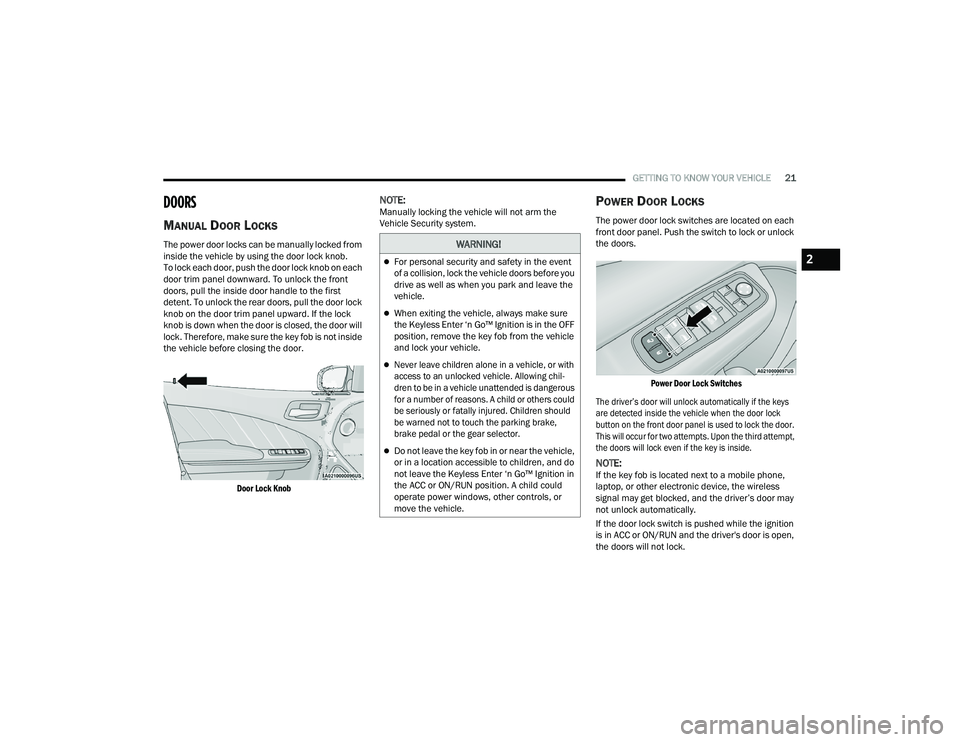
The power door locks can be manually locked from
inside the vehicle by using the door lock knob.
To lock each door, push the door lock knob on each
door trim panel downward. To unlock the front
doors, pull the inside door handle to the first
detent. To unlock the rear doors, pull the door lock
knob on the door trim panel upward. If the lock
knob is down when the door is closed, the door will
lock. Therefore, make sure the key fob is not inside
the vehicle before closing the door.
Door Lock Knob
NOTE:Manually locking the vehicle will not arm the
Vehicle Security system.POWER DOOR LOCKS
The power door lock switches are located on each
front door panel. Push the switch to lock or unlock
the doors.
Power Door Lock Switches
The driver’s door will unlock automatically if the keys
are detected inside the vehicle when the door lock
button on the front door panel is used to lock the door.
This will occur for two attempts. Upon the third attempt,
the doors will lock even if the key is inside.
NOTE:If the key fob is located next to a mobile phone,
laptop, or other electronic device, the wireless
signal may get blocked, and the driver’s door may
not unlock automatically.
If the door lock switch is pushed while the ignition
is in ACC or ON/RUN and the driver's door is open,
the doors will not lock.
WARNING!
For personal security and safety in the event
of a collision, lock the vehicle doors before you
drive as well as when you park and leave the
vehicle.
When exiting the vehicle, always make sure
the Keyless Enter ‘n Go™ Ignition is in the OFF
position, remove the key fob from the vehicle
and lock your vehicle.
Never leave children alone in a vehicle, or with
access to an unlocked vehicle. Allowing chil -
dren to be in a vehicle unattended is dangerous
for a number of reasons. A child or others could
be seriously or fatally injured. Children should
be warned not to touch the parking brake,
brake pedal or the gear selector.
Do not leave the key fob in or near the vehicle,
or in a location accessible to children, and do
not leave the Keyless Enter ‘n Go™ Ignition in
the ACC or ON/RUN position. A child could
operate power windows, other controls, or
move the vehicle.
2
21_LD_OM_EN_USC_t.book Page 21
Page 44 of 320
42GETTING TO KNOW YOUR VEHICLE
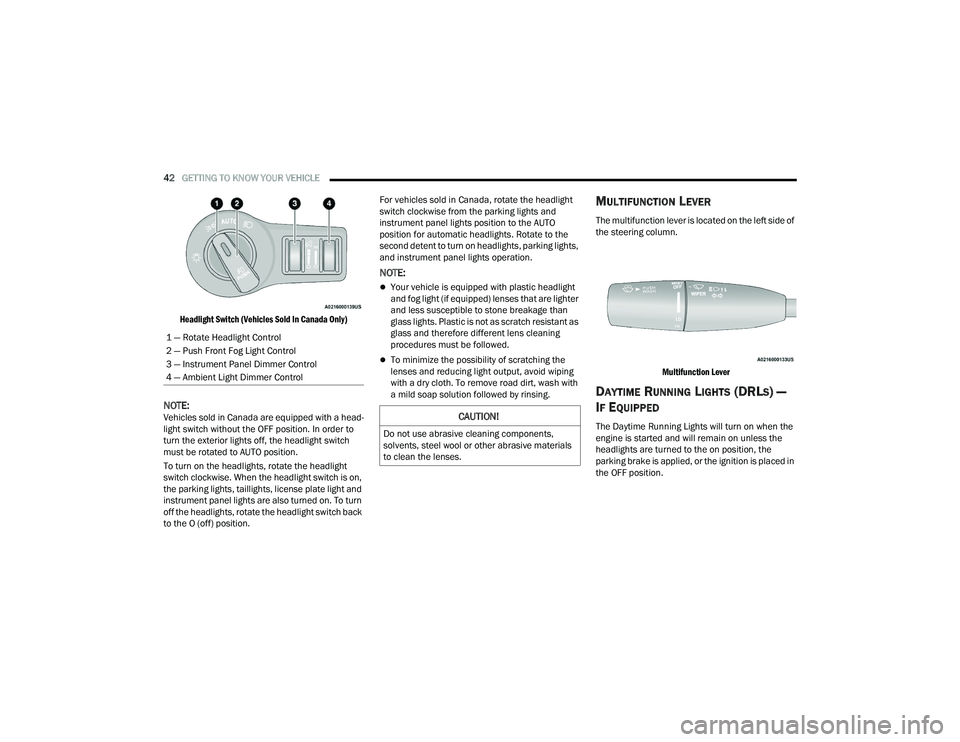
Headlight Switch (Vehicles Sold In Canada Only)
NOTE:Vehicles sold in Canada are equipped with a head -
light switch without the OFF position. In order to
turn the exterior lights off, the headlight switch
must be rotated to AUTO position.
To turn on the headlights, rotate the headlight
switch clockwise. When the headlight switch is on,
the parking lights, taillights, license plate light and
instrument panel lights are also turned on. To turn
off the headlights, rotate the headlight switch back
to the O (off) position. For vehicles sold in Canada, rotate the headlight
switch clockwise from the parking lights and
instrument panel lights position to the AUTO
position for automatic headlights. Rotate to the
second detent to turn on headlights, parking lights,
and instrument panel lights operation.
NOTE:
Your vehicle is equipped with plastic headlight
and fog light (if equipped) lenses that are lighter
and less susceptible to stone breakage than
glass lights. Plastic is not as scratch resistant as
glass and therefore different lens cleaning
procedures must be followed.
To minimize the possibility of scratching the
lenses and reducing light output, avoid wiping
with a dry cloth. To remove road dirt, wash with
a mild soap solution followed by rinsing.
MULTIFUNCTION LEVER
The multifunction lever is located on the left side of
the steering column.
Multifunction Lever
DAYTIME RUNNING LIGHTS (DRLS) —
I
F EQUIPPED
The Daytime Running Lights will turn on when the
engine is started and will remain on unless the
headlights are turned to the on position, the
parking brake is applied, or the ignition is placed in
the OFF position.
1 — Rotate Headlight Control
2 — Push Front Fog Light Control
3 — Instrument Panel Dimmer Control
4 — Ambient Light Dimmer ControlCAUTION!
Do not use abrasive cleaning components,
solvents, steel wool or other abrasive materials
to clean the lenses.
21_LD_OM_EN_USC_t.book Page 42