change key battery DODGE CHARGER 2021 Owners Manual
[x] Cancel search | Manufacturer: DODGE, Model Year: 2021, Model line: CHARGER, Model: DODGE CHARGER 2021Pages: 320, PDF Size: 20.61 MB
Page 15 of 320
13
GETTING TO KNOW YOUR VEHICLE
KEYS
KEY FOB
Your vehicle is equipped with a key fob which
supports Passive Entry, Remote Keyless Entry
(RKE), Keyless Enter ‘n Go™ (if equipped), Remote
Start (if equipped), and remote trunk release.
The key fob allows you to lock or unlock the doors
and trunk from distances up to approximately 66 ft
(20 m). The key fob does not need to be pointed at
the vehicle to activate the system. The key fob also
contains an emergency key, which is stored in the
rear of the key fob.
NOTE:
The key fob’s wireless signal may be blocked if
the key fob is located next to a mobile phone,
laptop, or other electronic device. This may
result in poor performance.
With ignition in the ON position and the vehicle
moving at 2 mph (4 km/h), all RKE commands are disabled.
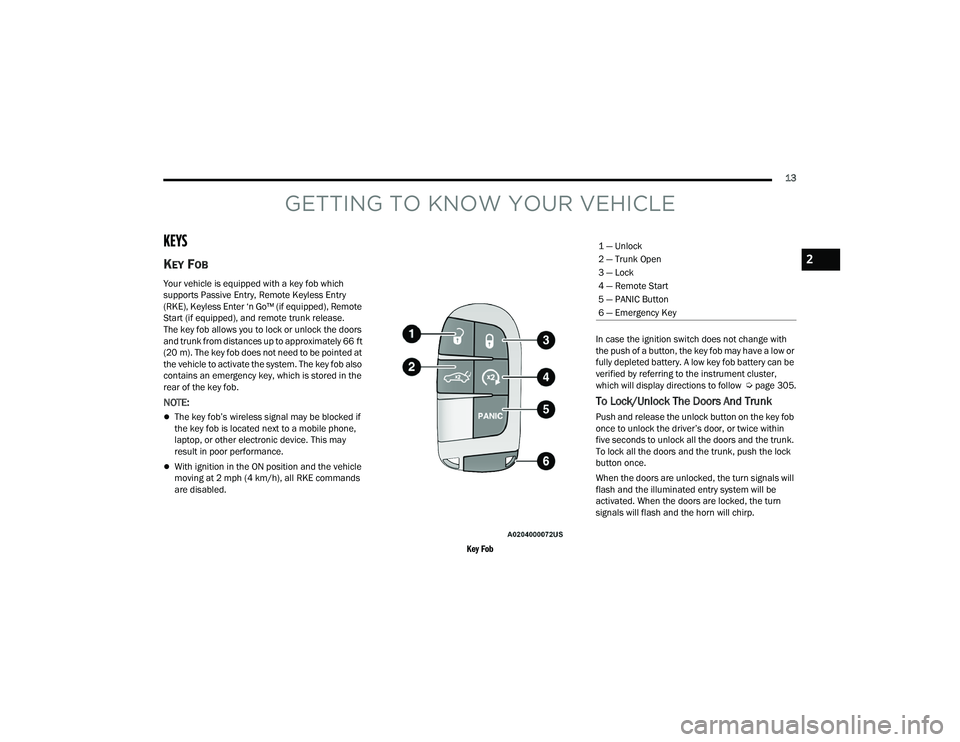
Key Fob
In case the ignition switch does not change with
the push of a button, the key fob may have a low or
fully depleted battery. A low key fob battery can be
verified by referring to the instrument cluster,
which will display directions to follow
Úpage 305.
To Lock/Unlock The Doors And Trunk
Push and release the unlock button on the key fob
once to unlock the driver’s door, or twice within
five seconds to unlock all the doors and the trunk.
To lock all the doors and the trunk, push the lock
button once.
When the doors are unlocked, the turn signals will
flash and the illuminated entry system will be
activated. When the doors are locked, the turn
signals will flash and the horn will chirp.
1 — Unlock
2 — Trunk Open
3 — Lock
4 — Remote Start
5 — PANIC Button
6 — Emergency Key
2
21_LD_OM_EN_USC_t.book Page 13
Page 18 of 320
16GETTING TO KNOW YOUR VEHICLE
If the Vehicle Security Light turns on during normal
vehicle operation (vehicle running for longer than
10 seconds), it indicates that there is a fault in the
electronics. Should this occur, have the vehicle
serviced as soon as possible by an authorized
dealer.
All of the key fobs provided with your new vehicle
have been programmed to the vehicle electronics
Ú page 305.
IGNITION SWITCH
KEYLESS ENTER ‘N GO™ IGNITION
This feature allows the driver to operate the
ignition switch with the push of a button as long as
the key fob is in the passenger compartment.
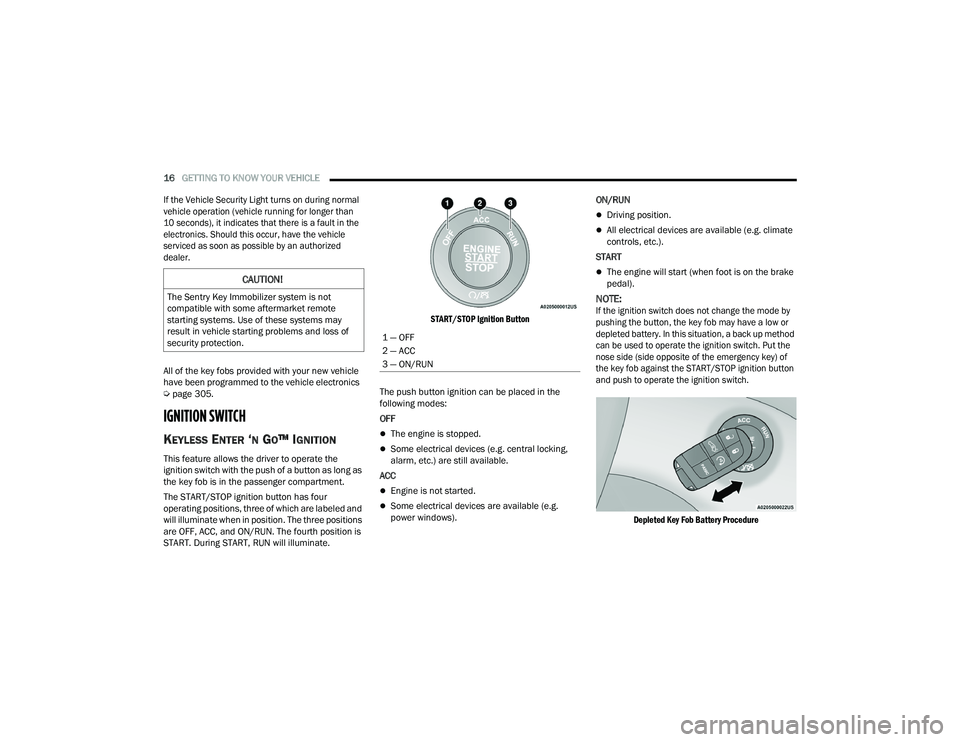
The START/STOP ignition button has four
operating positions, three of which are labeled and
will illuminate when in position. The three positions
are OFF, ACC, and ON/RUN. The fourth position is
START. During START, RUN will illuminate.
START/STOP Ignition Button
The push button ignition can be placed in the
following modes:
OFF
The engine is stopped.
Some electrical devices (e.g. central locking,
alarm, etc.) are still available.
ACC
Engine is not started.
Some electrical devices are available (e.g.
power windows). ON/RUN
Driving position.
All electrical devices are available (e.g. climate
controls, etc.).
START
The engine will start (when foot is on the brake
pedal).
NOTE:
If the ignition switch does not change the mode by
pushing the button, the key fob may have a low or
depleted battery. In this situation, a back up method
can be used to operate the ignition switch. Put the
nose side (side opposite of the emergency key) of
the key fob against the START/STOP ignition button
and push to operate the ignition switch.
Depleted Key Fob Battery Procedure
CAUTION!
The Sentry Key Immobilizer system is not
compatible with some aftermarket remote
starting systems. Use of these systems may
result in vehicle starting problems and loss of
security protection.
1 — OFF
2 — ACC
3 — ON/RUN
21_LD_OM_EN_USC_t.book Page 16
Page 59 of 320
GETTING TO KNOW YOUR VEHICLE57
Light Ring Around Rear Cupholders
POWER OUTLETS
Your vehicle is equipped with 12 Volt (15 Amp)
power outlets that can be used to power cellular
phones, small electronics and other low powered
electrical accessories. The power outlets are
labeled with either a “key” or a “battery” symbol to
indicate how the outlet is powered. Power outlets
labeled with a “key” are powered when the ignition
is in the ON or ACC position, while the outlets
labeled with a “battery” are connected directly to
the battery and powered at all times.
NOTE:All accessories connected to the “battery” powered
outlets should be removed or turned off when the
vehicle is not in use to protect the battery against
discharge. The front power outlet is located inside the storage
area on the center stack of the instrument panel.
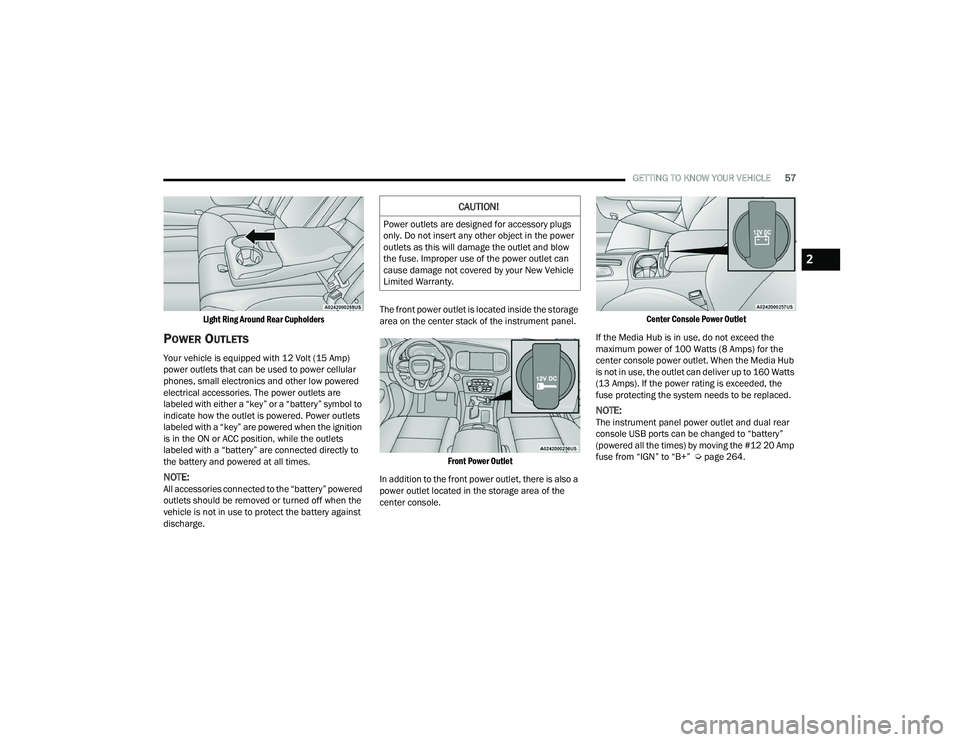
Front Power Outlet
In addition to the front power outlet, there is also a
power outlet located in the storage area of the
center console.
Center Console Power Outlet
If the Media Hub is in use, do not exceed the
maximum power of 100 Watts (8 Amps) for the
center console power outlet. When the Media Hub
is not in use, the outlet can deliver up to 160 Watts
(13 Amps). If the power rating is exceeded, the
fuse protecting the system needs to be replaced.
NOTE:The instrument panel power outlet and dual rear
console USB ports can be changed to “battery”
(powered all the times) by moving the #12 20 Amp
fuse from “IGN” to “B+” Ú page 264.
CAUTION!
Power outlets are designed for accessory plugs
only. Do not insert any other object in the power
outlets as this will damage the outlet and blow
the fuse. Improper use of the power outlet can
cause damage not covered by your New Vehicle
Limited Warranty.
2
21_LD_OM_EN_USC_t.book Page 57
Page 209 of 320
SAFETY207
(Continued)
Enhanced Accident Response System
In the event of an impact, if the communication
network remains intact, and the power remains
intact, depending on the nature of the event, the
Occupant Restraint Controller (ORC) will determine
whether to have the Enhanced Accident Response
System perform the following functions:
Cut off fuel to the engine (if equipped).
Cut off battery power to the electric motor
(if equipped).
Flash hazard lights as long as the battery has
power.
Turn on the interior lights, which remain on as
long as the battery has power or for 15 minutes
from the intervention of the Enhanced Accident
Response System.
Unlock the power door locks.
Your vehicle may also be designed to perform any
of these other functions in response to the
Enhanced Accident Response System:
Turn off the Fuel Filter Heater, Turn off the HVAC
Blower Motor, Close the HVAC Circulation Door
Cut off battery power to the:
Engine
Electric Motor (if equipped)
Electric power steering
Brake booster
Electric park brake
Automatic transmission gear selector
Horn
Front wiper
Headlamp washer pump
NOTE:
After an accident, remember to cycle the ignition to
the STOP (OFF/LOCK) position and remove the key
from the ignition switch to avoid draining the battery.
Carefully check the vehicle for fuel leaks in the
engine compartment and on the ground near the
engine compartment and fuel tank before resetting
the system and starting the engine. If there are no
fuel leaks or damage to the vehicle electrical devices
(e.g. headlights) after an accident, reset the system
by following the procedure described below. If you
have any doubt, contact an authorized dealer.
Enhanced Accident Response System
Reset Procedure
In order to reset the Enhanced Accident Response
System functions after an event, the ignition switch
must be changed from ignition START or ON/RUN to
ignition OFF. Carefully check the vehicle for fuel leaks in
the engine compartment and on the ground near the
engine compartment and fuel tank before resetting the
system and starting the engine. After an accident, if the vehicle will not start after
performing the reset procedure, the vehicle must be
towed to an authorized dealer to be inspected and to
have the Enhanced Accident Response System reset.
Maintaining Your Air Bag System
WARNING!
Modifications to any part of the air bag system
could cause it to fail when you need it. You
could be injured if the air bag system is not
there to protect you. Do not modify the compo
-
nents or wiring, including adding any kind of
badges or stickers to the steering wheel hub
trim cover or the upper passenger side of the
instrument panel. Do not modify the front
fascia/bumper, vehicle body structure, or add
aftermarket side steps or running boards.
It is dangerous to try to repair any part of the
air bag system yourself. Be sure to tell anyone
who works on your vehicle that it has an air
bag system.
6
21_LD_OM_EN_USC_t.book Page 207
Page 312 of 320

310 I
Ignition
............................................................ 16Switch......................................................... 16Indicator Lights Blue............................................................. 81Green.......................................................... 80White........................................................... 80Yellow.......................................................... 79Information Center, Vehicle............................. 68Inside Rearview Mirror............................ 36, 223Instrument Cluster.................................... 65, 67Descriptions................................................ 80Display................................................. 67, 70Instrument Panel Lens Cleaning.................... 295Interior Appearance Care............................... 294Interior Lights.................................................. 45
J
Jack Location................................................. 227Jump Starting...................................... 236, 237
K
Key FobArm The System
.......................................... 20Programming Additional Key Fobs.............. 15Unlatch The Trunk....................................... 14Key Fob Battery Service
(Remote Keyless Entry)................................... 14Key Fob Programming
(Remote Keyless Entry)................................... 15
Keyless Enter 'n Go™................................ 22, 85Enter The Trunk........................................... 14Passive Entry............................................... 22Passive Entry Programming......................... 22Keys................................................................. 13
L
Lane Change And Turn Signals........................ 44Lane Change Assist......................................... 44LaneSense.................................................... 109Lap/Shoulder Belts....................................... 195Latches......................................................... 222Hood............................................................ 62Lead Free Gasoline....................................... 297Leaks, Fluid.................................................. 222Life Of Tires................................................... 285Light Bulbs........................................... 222, 271Lights............................................................ 222Adaptive Cruise Control (ACC) Set With Target Vehicle................................. 80Adaptive Cruise Control (ACC) Set Without Target Vehicle............................ 80Air Bag...................................... 74, 201, 220Automatic Headlights.................................. 43Brake Assist Warning............................... 183Brake Warning....................................74, 296Bulb Replacement.................................... 271Cruise.......................................................... 80Daytime Running......................................... 42
Dimmer Switch, Headlight.................... 42, 43ECO Mode Indicator.....................................80Electric Power Steering Fault.......................75Electronic Stability Control (ESC) Active Warning........................................77Electronic Stability Program(ESP) Indicator..................................................76Exterior.............................................. 41, 222Fog...............................................................44Forward Collision Warning (FCW) OFF Indicator..................................................79Front Fog Indicator......................................80Hazard Warning Flasher........................... 223Headlight Switch..........................................41Headlights............................................ 41, 44Headlights On With Wipers..........................43High Beam...................................................43High Beam Indicator....................................81High Beam/Low Beam Select......................43Instrument Cluster.......................................41Intensity Control..........................................46Interior.........................................................45LaneSense Indicator....................................80License..................................................... 274Lights On Reminder.....................................44Low Fuel......................................................78Low Washer Fluid Warning..........................78Malfunction Indicator (Check Engine)..........78
21_LD_OM_EN_USC_t.book Page 310