lane assist DODGE CHARGER 2021 Owners Manual
[x] Cancel search | Manufacturer: DODGE, Model Year: 2021, Model line: CHARGER, Model: DODGE CHARGER 2021Pages: 320, PDF Size: 20.61 MB
Page 5 of 320
3
EXTERIOR LIGHTS.................................................. 41 Headlight Switch...............................................41
Multifunction Lever ..........................................42
Daytime Running Lights (DRLs) —
If Equipped........................................................42
High/Low Beam Switch....................................43
Automatic High Beam — If Equipped ..............43
Flash-To-Pass....................................................43
Automatic Headlights ......................................43
Parking Lights ..................................................43
Automatic Headlights On With Wipers — If
Equipped ...........................................................43
Headlight Delay ...............................................44
Lights-On Reminder .........................................44
Fog Lights — If Equipped ..................................44
Turn Signals .....................................................44
Lane Change Assist — If Equipped ..................44
Battery Saver ....................................................45
INTERIOR LIGHTS ................................................. 45
Interior Courtesy Lights ....................................45
WINDSHIELD WIPERS AND WASHERS .............. 47
Windshield Wiper Operation ............................47
Rain Sensing Wipers — If Equipped ................48
CLIMATE CONTROLS ............................................ 48
Automatic Climate Control Descriptions And
Functions .........................................................48
Manual Climate Control Descriptions And
Functions .........................................................51
Automatic Temperature
Control (ATC) ....................................................53 Climate Voice Commands................................53
Operating Tips .................................................54
INTERIOR STORAGE AND EQUIPMENT ............... 55
Storage..............................................................55
USB/AUX Control ..............................................56
Illuminated Cupholders —
If Equipped........................................................56
Power Outlets ...................................................57
WINDOWS ..............................................................58
Power Window Controls ...................................58
Automatic Window Features ...........................59
Reset Auto-Up ..................................................59
Window Lockout Switch ...................................60
Wind Buffeting .................................................60
POWER SUNROOF — IF EQUIPPED ...................... 60
Opening And Closing The Sunroof...................61
Pinch Protect Feature ......................................61
Venting Sunroof................................................61
Sunshade Operation ........................................61
Sunroof Maintenance ......................................61
Ignition Off Operation.......................................61
HOOD .......................................................................62
Opening The Hood ...........................................62
Closing The Hood .............................................62
TRUNK......................................................................63
Opening The Trunk ...........................................63
Closing The Trunk.............................................63
Trunk Safety .....................................................63
Cargo Area Features .......................................64
GETTING TO KNOW YOUR
INSTRUMENT PANEL
INSTRUMENT CLUSTER......................................... 65
Instrument Cluster Descriptions ..................... 67
INSTRUMENT CLUSTER DISPLAY ........................ 67
Location And Controls ..................................... 68
Engine Oil Life Reset ........................................ 69
Performance Shift Indicator
(PSI) — If Equipped ........................................... 69
Instrument Cluster Display Selectable
Menu Items ...................................................... 70
Battery Saver On/Battery Saver Mode
Message — Electrical Load Reduction
Actions — If Equipped ..................................... 73
WARNING LIGHTS AND MESSAGES ................... 74
Red Warning Lights ..........................................74
Yellow Warning Lights ...................................... 77
Yellow Indicator Lights ..................................... 79
Green Indicator Lights ..................................... 80
White Indicator Lights ...................................... 80
Blue Indicator Lights ........................................ 81
ONBOARD DIAGNOSTIC SYSTEM — OBD II ....... 81
Onboard Diagnostic System
(OBD II) Cybersecurity ...................................... 81
EMISSIONS INSPECTION AND MAINTENANCE
PROGRAMS ........................................................... 82
21_LD_OM_EN_USC_t.book Page 3
Page 6 of 320
4
STARTING AND OPERATING
STARTING THE ENGINE ........................................ 83
Automatic Transmission .................................83
Normal Starting ...............................................83
AutoPark ...........................................................84
Keyless Enter ‘n Go™ — Ignition......................85
Cold Weather Operation
(Below –22°F Or −30°C) ...............................85
If Engine Fails To Start .....................................85
After Starting.....................................................86
ENGINE BLOCK HEATER — IF EQUIPPED ........... 86
ENGINE BREAK-IN RECOMMENDATIONS —
3.6L & 5.7L ........................................................... 86
PARKING BRAKE ................................................... 87
AUTOMATIC TRANSMISSION................................ 88 Ignition Park Interlock ......................................89
Brake Transmission Shift Interlock (BTSI)
System .............................................................89
8-Speed Automatic Transmission ...................89
SPORT MODE — WITHOUT PERFORMANCE
CONTROL ................................................................ 94
FUEL SAVER TECHNOLOGY 5.7L ONLY—
IF EQUIPPED ........................................................... 94
ELECTRIC POWER STEERING............................... 94
CRUISE CONTROL SYSTEMS — IF EQUIPPED ... 95
Cruise Control ...................................................95
Adaptive Cruise Control (ACC) .........................96 PARKSENSE REAR PARK ASSIST —
IF EQUIPPED ........................................................ 105
ParkSense Sensors ....................................... 105
ParkSense Display ........................................ 105ParkSense Warning Display ......................... 108
Enabling And Disabling ParkSense .............. 108
Service The ParkSense Park Assist System ...108
Cleaning The ParkSense System ................. 108
ParkSense System Usage Precautions........ 108
LANESENSE — IF EQUIPPED ............................. 109
LaneSense Operation ................................... 109Turning LaneSense On Or Off ....................... 110
LaneSense Warning Message ...................... 110Changing LaneSense Status ........................ 112
PARKVIEW REAR BACK UP CAMERA............... 112
REFUELING THE VEHICLE ................................... 113
VEHICLE LOADING ............................................. 114 Vehicle Certification Label ............................ 114
Gross Vehicle Weight Rating (GVWR) .......... 114
Gross Axle Weight Rating (GAWR) ............... 114
Overloading.................................................... 115
Loading ......................................................... 115
TRAILER TOWING ................................................ 115
Common Towing Definitions......................... 115
Trailer Hitch Classification ............................ 117
Trailer Towing Weights (Maximum Trailer
Weight Ratings) ............................................. 117Trailer And Tongue Weight ........................... 118Towing Requirements ................................... 118Towing Tips ................................................... 121 RECREATIONAL TOWING
(BEHIND MOTORHOME) ..................................... 121
DRIVING TIPS ....................................................... 122
Driving On Slippery Surfaces ........................ 122Driving Through Water ................................. 122
MULTIMEDIA
UCONNECT SYSTEMS ......................................... 124
CYBERSECURITY ................................................. 124
UCONNECT SETTINGS ........................................ 125 Customer Programmable Features ............. 125
UCONNECT INTRODUCTION................................ 138
System Overview .......................................... 138Drag & Drop Menu Bar ................................. 140
Safety And General Information................... 140
UCONNECT MODES ............................................. 141
Steering Wheel Audio Controls..................... 141Radio Mode .................................................. 141Media Mode ................................................. 150
Phone Mode ................................................. 152
ANDROID AUTO™ & APPLE CARPLAY® —
IF EQUIPPED ......................................................... 163
Android Auto™ .............................................. 163
Apple CarPlay® ............................................. 165Android Auto™ And Apple CarPlay® Tips And
Tricks.............................................................. 166
21_LD_OM_EN_USC_t.book Page 4
Page 46 of 320
44GETTING TO KNOW YOUR VEHICLE
NOTE:When your headlights come on during the daytime,
the instrument panel lights will automatically dim
to the lower nighttime intensity.
HEADLIGHT DELAY
To aid in your exit, your vehicle is equipped with a
headlight delay that will leave the headlights on for
approximately 90 seconds. This delay is initiated
when the ignition is placed in the OFF position
while the headlight switch is on, and then the
headlight switch is cycled off. Headlight delay can
be canceled by either turning the headlight switch
on then off, or by placing the ignition in the ON
position.
NOTE:The headlight delay time is programmable through
Uconnect Settings Úpage 125.
LIGHTS-ON REMINDER
If the headlights or parking lights are on after the
ignition is placed in the OFF position, the vehicle
will chime when the driver’s door is opened.
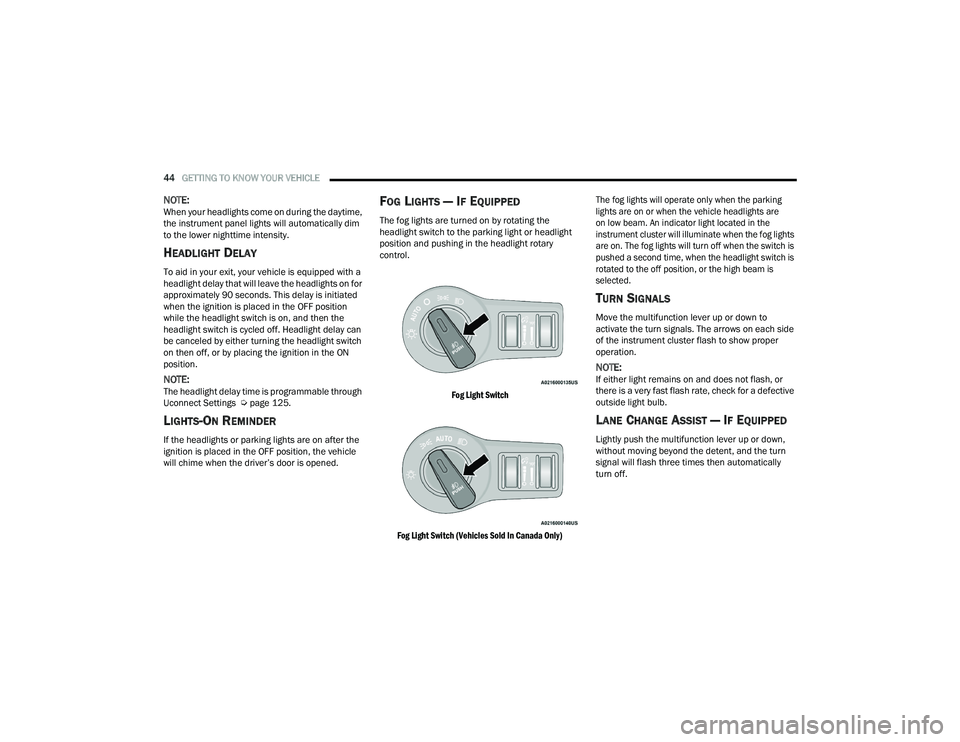
FOG LIGHTS — IF EQUIPPED
The fog lights are turned on by rotating the
headlight switch to the parking light or headlight
position and pushing in the headlight rotary
control.
Fog Light Switch
Fog Light Switch (Vehicles Sold In Canada Only) The fog lights will operate only when the parking
lights are on or when the vehicle headlights are
on low beam. An indicator light located in the
instrument cluster will illuminate when the fog lights
are on. The fog lights will turn off when the switch is
pushed a second time, when the headlight switch is
rotated to the off position, or the high beam is
selected.
TURN SIGNALS
Move the multifunction lever up or down to
activate the turn signals. The arrows on each side
of the instrument cluster flash to show proper
operation.
NOTE:If either light remains on and does not flash, or
there is a very fast flash rate, check for a defective
outside light bulb.
LANE CHANGE ASSIST — IF EQUIPPED
Lightly push the multifunction lever up or down,
without moving beyond the detent, and the turn
signal will flash three times then automatically
turn off.
21_LD_OM_EN_USC_t.book Page 44
Page 72 of 320
70GETTING TO KNOW YOUR INSTRUMENT PANEL
INSTRUMENT CLUSTER DISPLAY
S
ELECTABLE MENU ITEMS
Push and release the up or down arrow
button until the desired Selectable Menu item is
displayed in the instrument cluster display.
Follow the Menu or submenu prompts as desired.
Speedometer
Push and release the up or down arrow
button until the speedometer menu is displayed in
the instrument cluster display. Push and release
the OK button to toggle units (km/h or mph) of the
speedometer.
Vehicle Info
Push and release the up or down arrow
button until the “Vehicle Info” menu is displayed in
the instrument cluster display. Push and release
the right or left arrow button to scroll
through the submenus items of “Vehicle Info.”
Follow the directional prompts to access or reset
any of the following “Vehicle Info” submenu items:
Tire Pressure Monitor
Coolant Temperature
Trans Temperature
Oil Temperature
Oil Pressure
Oil Life
Battery Voltage
AWD Status — If Equipped
Intake Air Temperature — If Equipped
Engine Torque — If Equipped
Engine Power — If Equipped
Air-Fuel Ratio — If Equipped
Driver Assist — If Equipped
The Driver Assist menu displays the status of the
ACC and LaneSense systems.
Push and release the up or down arrow
button until the Driver Assist menu is displayed in
the instrument cluster display.
Adaptive Cruise Control (ACC) Feature
The instrument cluster displays the current ACC
system settings. The information displayed
depends on ACC system status.
Push the ACC on/off button (located on the
steering wheel) until one of the following displays
in the instrument cluster display:
Adaptive Cruise Control Off
When ACC is deactivated, the display will read
“Adaptive Cruise Control Off.” Adaptive Cruise Control Ready
When ACC is activated but the vehicle speed
setting has not been selected, the display will read
“Adaptive Cruise Control Ready.”
Push the SET + or the SET- button (located on the
steering wheel) and the following will display in the
instrument cluster display:
ACC SET
When ACC is set, the set speed will display in the
instrument cluster.
The ACC screen may display once again if any ACC
activity occurs, which may include any of the
following:
Distance Setting Change
System Cancel
Driver Override
System Off
ACC Proximity Warning
ACC Unavailable Warning
The instrument cluster display will return to the last
display selected after five seconds of no ACC
display activity Ú page 96.
21_LD_OM_EN_USC_t.book Page 70
Page 107 of 320
STARTING AND OPERATING105
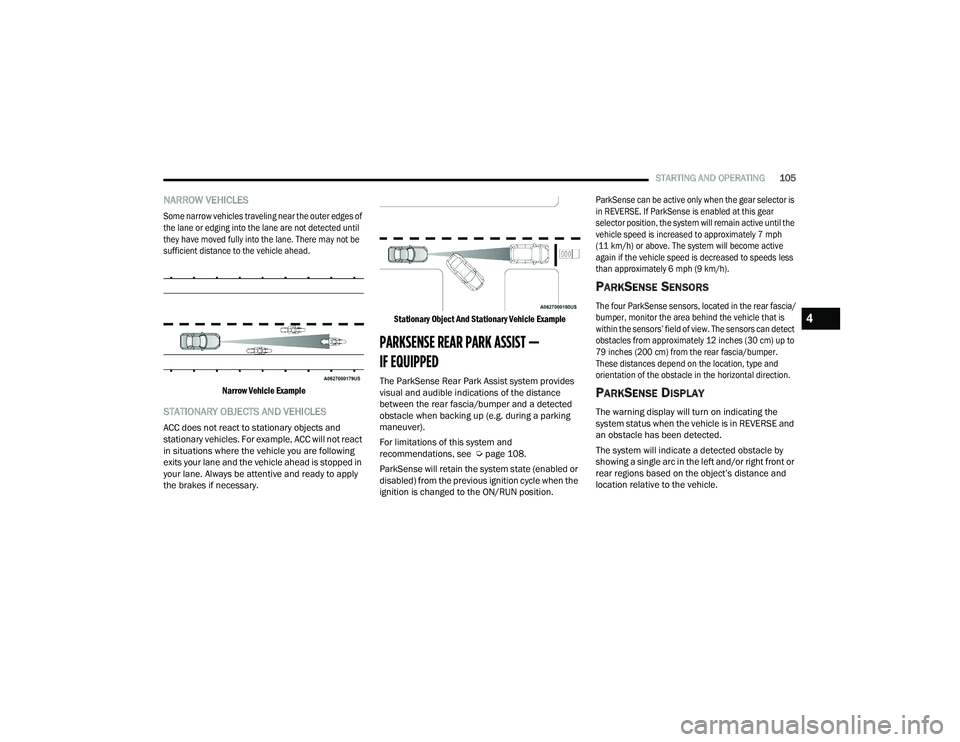
NARROW VEHICLES
Some narrow vehicles traveling near the outer edges of
the lane or edging into the lane are not detected until
they have moved fully into the lane. There may not be
sufficient distance to the vehicle ahead.
Narrow Vehicle Example
STATIONARY OBJECTS AND VEHICLES
ACC does not react to stationary objects and
stationary vehicles. For example, ACC will not react
in situations where the vehicle you are following
exits your lane and the vehicle ahead is stopped in
your lane. Always be attentive and ready to apply
the brakes if necessary.
Stationary Object And Stationary Vehicle Example
PARKSENSE REAR PARK ASSIST —
IF EQUIPPED
The ParkSense Rear Park Assist system provides
visual and audible indications of the distance
between the rear fascia/bumper and a detected
obstacle when backing up (e.g. during a parking
maneuver).
For limitations of this system and
recommendations, see Ú
page 108.
ParkSense will retain the system state (enabled or
disabled) from the previous ignition cycle when the
ignition is changed to the ON/RUN position.
ParkSense can be active only when the gear selector is
in REVERSE. If ParkSense is enabled at this gear
selector position, the system will remain active until the
vehicle speed is increased to approximately 7 mph
(11 km/h) or above. The system will become active
again if the vehicle speed is decreased to speeds less
than approximately 6 mph (9 km/h).
PARKSENSE SENSORS
The four ParkSense sensors, located in the rear fascia/
bumper, monitor the area behind the vehicle that is
within the sensors’ field of view. The sensors can detect
obstacles from approximately 12 inches (30 cm) up to
79 inches (200 cm) from the rear fascia/bumper.
These distances depend on the location, type and
orientation of the obstacle in the horizontal direction.
PARKSENSE DISPLAY
The warning display will turn on indicating the
system status when the vehicle is in REVERSE and
an obstacle has been detected.
The system will indicate a detected obstacle by
showing a single arc in the left and/or right front or
rear regions based on the object’s distance and
location relative to the vehicle.
4
21_LD_OM_EN_USC_t.book Page 105
Page 271 of 320
SERVICING AND MAINTENANCE269
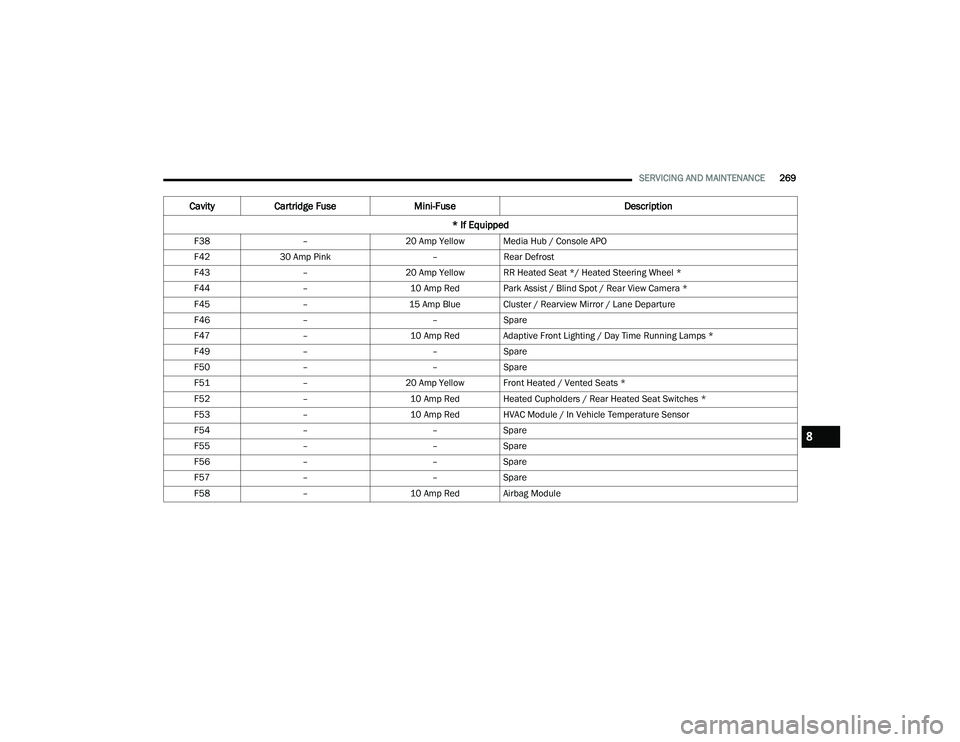
F38 –20 Amp Yellow Media Hub / Console APO
F42 30 Amp Pink –Rear Defrost
F43 –20 Amp Yellow RR Heated Seat */ Heated Steering Wheel *
F44 –10 Amp Red Park Assist / Blind Spot / Rear View Camera *
F45 –15 Amp Blue Cluster / Rearview Mirror / Lane Departure
F46 – –Spare
F47 –10 Amp Red Adaptive Front Lighting / Day Time Running Lamps *
F49 – –Spare
F50 – –Spare
F51 –20 Amp Yellow Front Heated / Vented Seats *
F52 –10 Amp Red Heated Cupholders / Rear Heated Seat Switches *
F53 –10 Amp Red HVAC Module / In Vehicle Temperature Sensor
F54 – –Spare
F55 – –Spare
F56 – –Spare
F57 – –Spare
F58 –10 Amp Red Airbag Module
CavityCartridge Fuse Mini-Fuse Description
* If Equipped
8
21_LD_OM_EN_USC_t.book Page 269
Page 312 of 320

310 I
Ignition
............................................................ 16Switch......................................................... 16Indicator Lights Blue............................................................. 81Green.......................................................... 80White........................................................... 80Yellow.......................................................... 79Information Center, Vehicle............................. 68Inside Rearview Mirror............................ 36, 223Instrument Cluster.................................... 65, 67Descriptions................................................ 80Display................................................. 67, 70Instrument Panel Lens Cleaning.................... 295Interior Appearance Care............................... 294Interior Lights.................................................. 45
J
Jack Location................................................. 227Jump Starting...................................... 236, 237
K
Key FobArm The System
.......................................... 20Programming Additional Key Fobs.............. 15Unlatch The Trunk....................................... 14Key Fob Battery Service
(Remote Keyless Entry)................................... 14Key Fob Programming
(Remote Keyless Entry)................................... 15
Keyless Enter 'n Go™................................ 22, 85Enter The Trunk........................................... 14Passive Entry............................................... 22Passive Entry Programming......................... 22Keys................................................................. 13
L
Lane Change And Turn Signals........................ 44Lane Change Assist......................................... 44LaneSense.................................................... 109Lap/Shoulder Belts....................................... 195Latches......................................................... 222Hood............................................................ 62Lead Free Gasoline....................................... 297Leaks, Fluid.................................................. 222Life Of Tires................................................... 285Light Bulbs........................................... 222, 271Lights............................................................ 222Adaptive Cruise Control (ACC) Set With Target Vehicle................................. 80Adaptive Cruise Control (ACC) Set Without Target Vehicle............................ 80Air Bag...................................... 74, 201, 220Automatic Headlights.................................. 43Brake Assist Warning............................... 183Brake Warning....................................74, 296Bulb Replacement.................................... 271Cruise.......................................................... 80Daytime Running......................................... 42
Dimmer Switch, Headlight.................... 42, 43ECO Mode Indicator.....................................80Electric Power Steering Fault.......................75Electronic Stability Control (ESC) Active Warning........................................77Electronic Stability Program(ESP) Indicator..................................................76Exterior.............................................. 41, 222Fog...............................................................44Forward Collision Warning (FCW) OFF Indicator..................................................79Front Fog Indicator......................................80Hazard Warning Flasher........................... 223Headlight Switch..........................................41Headlights............................................ 41, 44Headlights On With Wipers..........................43High Beam...................................................43High Beam Indicator....................................81High Beam/Low Beam Select......................43Instrument Cluster.......................................41Intensity Control..........................................46Interior.........................................................45LaneSense Indicator....................................80License..................................................... 274Lights On Reminder.....................................44Low Fuel......................................................78Low Washer Fluid Warning..........................78Malfunction Indicator (Check Engine)..........78
21_LD_OM_EN_USC_t.book Page 310