lane assist DODGE CHARGER 2022 Owners Manual
[x] Cancel search | Manufacturer: DODGE, Model Year: 2022, Model line: CHARGER, Model: DODGE CHARGER 2022Pages: 312, PDF Size: 18.99 MB
Page 5 of 312
3
UNIVERSAL GARAGE DOOR OPENER
(HOMELINK®) ....................................................... 40
Before You Begin Programming HomeLink® ... 40
Erasing All The HomeLink® Channels ............41
Identifying Whether You Have A Rolling Code
Or Non-Rolling Code Device.............................41
Programming HomeLink® To A Garage Door
Opener ..............................................................41
Programming HomeLink® To A Miscellaneous
Device ...............................................................42
Reprogramming A Single HomeLink® Button .. 42
Canadian/Gate Operator Programming .........42
Security .............................................................43
Troubleshooting Tips ........................................43
EXTERIOR LIGHTS.................................................. 44
Headlight Switch...............................................44
Multifunction Lever ..........................................45
Daytime Running Lights (DRLs) —
If Equipped........................................................45
High/Low Beam Switch....................................45
Automatic High Beam — If Equipped ..............45
Flash-To-Pass....................................................46
Automatic Headlights .......................................46 Parking Lights ..................................................46
Automatic Headlights On With Wipers —
If Equipped........................................................46
Headlight Delay ...............................................46
Lights-On Reminder ........................................46
Fog Lights — If Equipped..................................46
Turn Signals .....................................................47
Lane Change Assist — If Equipped ..................47
Battery Saver ....................................................47
INTERIOR LIGHTS ..................................................47
Interior Courtesy Lights ....................................48
WINDSHIELD WIPERS AND WASHERS............... 49
Windshield Wiper Operation ............................49
Rain Sensing Wipers — If Equipped ................50
CLIMATE CONTROLS .............................................51
Automatic Climate Control Descriptions And
Functions .........................................................51
Manual Climate Control Descriptions And
Functions .........................................................53
Automatic Temperature Control (ATC) ...........56
Climate Voice Commands................................56
Operating Tips .................................................56 INTERIOR STORAGE AND EQUIPMENT ............... 57
Storage ............................................................. 57
USB/AUX Control .............................................. 59
Illuminated Cupholders —If Equipped............. 59
Power Outlets ................................................... 60
WINDOWS ............................................................. 61
Power Window Controls ................................... 61
Automatic Window Features ........................... 62
Reset Auto-Up .................................................. 62
Window Lockout Switch ................................... 63
Wind Buffeting .................................................63
POWER SUNROOF — IF EQUIPPED ..................... 63
Opening And Closing The Sunroof .................. 64
Pinch Protect Feature ...................................... 64
Sunshade Operation ........................................ 64
Sunroof Maintenance ...................................... 64
Ignition Off Operation....................................... 64
HOOD....................................................................... 65
Opening The Hood ..........................................65
Closing The Hood ............................................. 65
TRUNK ..................................................................... 65
Opening The Trunk ........................................... 65
Closing The Trunk............................................. 66
Trunk Safety ..................................................... 66
22_LD_OM_EN_USC_t.book Page 3
Page 6 of 312
4
GETTING TO KNOW YOUR
INSTRUMENT PANEL
INSTRUMENT CLUSTER......................................... 67
Instrument Cluster Descriptions .....................69
INSTRUMENT CLUSTER DISPLAY ........................ 69
Location And Controls .....................................70
Engine Oil Life Reset ........................................71
Performance Shift Indicator (PSI) —
If Equipped........................................................71
Instrument Cluster Display Selectable Menu
Items .................................................................72
Battery Saver On/Battery Saver Mode
Message — Electrical Load Reduction Actions —
If Equipped .......................................................74
WARNING LIGHTS AND MESSAGES ................... 75
Red Warning Lights ..........................................76
Yellow Warning Lights ......................................78
Yellow Indicator Lights .....................................81
Green Indicator Lights......................................81
White Indicator Lights ......................................82
Blue Indicator Lights ........................................82
ONBOARD DIAGNOSTIC SYSTEM — OBD II ....... 82
Onboard Diagnostic System
(OBD II) Cybersecurity ......................................82
EMISSIONS INSPECTION AND MAINTENANCE
PROGRAMS ........................................................... 83
STARTING AND OPERATING
STARTING THE ENGINE .........................................84
Automatic Transmission .................................84
Normal Starting ...............................................84
AutoPark ...........................................................85
Keyless Enter ‘n Go™ — Ignition......................86
Extended Park Starting ....................................86
If Engine Fails To Start .....................................87
Cold Weather Operation
(Below –22°F Or −30°C) ...............................87
After Starting ....................................................87
ENGINE BREAK-IN RECOMMENDATIONS — 3.6L
& 5.7L .....................................................................87
PARKING BRAKE ....................................................88
AUTOMATIC TRANSMISSION ................................89
Ignition Park Interlock ......................................90
Brake Transmission Shift Interlock (BTSI)
System .............................................................90
8-Speed Automatic Transmission ...................90
SPORT MODE — WITHOUT PERFORMANCE
CONTROL................................................................. 94
FUEL SAVER TECHNOLOGY 5.7L ONLY —
IF EQUIPPED ...........................................................94
ELECTRIC POWER STEERING ...............................94
CRUISE CONTROL SYSTEMS — IF EQUIPPED ....95
Cruise Control ...................................................95
Adaptive Cruise Control (ACC) .........................96 PARKSENSE REAR PARK ASSIST —
IF EQUIPPED ......................................................... 105
ParkSense Sensors ....................................... 105
ParkSense Display ........................................ 105
ParkSense Warning Display ......................... 108
Enabling And Disabling ParkSense.............. 108
Service The ParkSense Park Assist System ...108
Cleaning The ParkSense System ................. 108
ParkSense System Usage Precautions........ 108
LANESENSE — IF EQUIPPED ............................. 109
LaneSense Operation ................................... 109
Turning LaneSense On Or Off....................... 110
LaneSense Warning Message...................... 110
Changing LaneSense Status ........................ 112
PARKVIEW REAR BACK UP CAMERA ............... 112
REFUELING THE VEHICLE ................................... 113
VEHICLE LOADING .............................................. 114 Vehicle Certification Label ........................... 114
Gross Vehicle Weight Rating (GVWR) .......... 114
Gross Axle Weight Rating (GAWR) ............... 114
Overloading ................................................... 114
Loading ......................................................... 115
22_LD_OM_EN_USC_t.book Page 4
Page 49 of 312
GETTING TO KNOW YOUR VEHICLE47
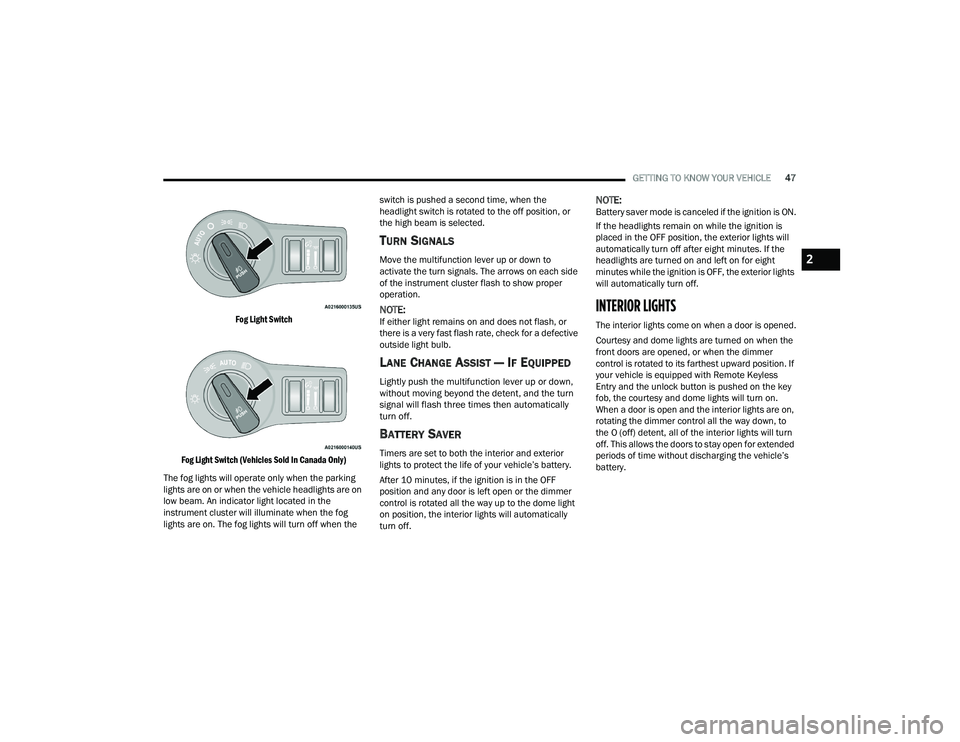
Fog Light Switch
Fog Light Switch (Vehicles Sold In Canada Only)
The fog lights will operate only when the parking
lights are on or when the vehicle headlights are on
low beam. An indicator light located in the
instrument cluster will illuminate when the fog
lights are on. The fog lights will turn off when the switch is pushed a second time, when the
headlight switch is rotated to the off position, or
the high beam is selected.
TURN SIGNALS
Move the multifunction lever up or down to
activate the turn signals. The arrows on each side
of the instrument cluster flash to show proper
operation.
NOTE:If either light remains on and does not flash, or
there is a very fast flash rate, check for a defective
outside light bulb.
LANE CHANGE ASSIST — IF EQUIPPED
Lightly push the multifunction lever up or down,
without moving beyond the detent, and the turn
signal will flash three times then automatically
turn off.
BATTERY SAVER
Timers are set to both the interior and exterior
lights to protect the life of your vehicle’s battery.
After 10 minutes, if the ignition is in the OFF
position and any door is left open or the dimmer
control is rotated all the way up to the dome light
on position, the interior lights will automatically
turn off.
NOTE:Battery saver mode is canceled if the ignition is ON.
If the headlights remain on while the ignition is
placed in the OFF position, the exterior lights will
automatically turn off after eight minutes. If the
headlights are turned on and left on for eight
minutes while the ignition is OFF, the exterior lights
will automatically turn off.
INTERIOR LIGHTS
The interior lights come on when a door is opened.
Courtesy and dome lights are turned on when the
front doors are opened, or when the dimmer
control is rotated to its farthest upward position. If
your vehicle is equipped with Remote Keyless
Entry and the unlock button is pushed on the key
fob, the courtesy and dome lights will turn on.
When a door is open and the interior lights are on,
rotating the dimmer control all the way down, to
the O (off) detent, all of the interior lights will turn
off. This allows the doors to stay open for extended
periods of time without discharging the vehicle’s
battery.
2
22_LD_OM_EN_USC_t.book Page 47
Page 74 of 312
72GETTING TO KNOW YOUR INSTRUMENT PANEL
INSTRUMENT CLUSTER DISPLAY
S
ELECTABLE MENU ITEMS
Push and release the up or down arrow
button until the desired Selectable Menu item is
displayed in the instrument cluster display.
Follow the Menu or submenu prompts as desired.
Speedometer
Push and release the up or down arrow
button until the speedometer menu is displayed in
the instrument cluster display. Push and release
the OK button to toggle units (km/h or mph) of the
speedometer.
Vehicle Info
Push and release the up or down arrow
button until the “Vehicle Info” menu is displayed in
the instrument cluster display. Push and release
the right or left arrow button to scroll
through the submenus items of “Vehicle Info.”
Follow the directional prompts to access or reset
any of the following “Vehicle Info” submenu items:
Tire Pressure Monitor
Coolant Temperature
Trans Temperature
Oil Temperature
Oil Pressure
Oil Life
Battery Voltage
Intake Air Temperature — If Equipped
Engine Torque — If Equipped
Engine Power — If Equipped
Air-Fuel Ratio — If Equipped
Driver Assist — If Equipped
The Driver Assist menu displays the status of the
ACC and LaneSense systems.
Push and release the up or down arrow
button until the Driver Assist menu is displayed in
the instrument cluster display.
Adaptive Cruise Control (ACC) Feature
The instrument cluster displays the current ACC
system settings. The information displayed
depends on ACC system status.
Push the ACC on/off button (located on the
steering wheel) until one of the following displays
in the instrument cluster display:
Adaptive Cruise Control Off
When ACC is deactivated, the display will read
“Adaptive Cruise Control Off.”
Adaptive Cruise Control Ready
When ACC is activated but the vehicle speed
setting has not been selected, the display will read
“Adaptive Cruise Control Ready.” Push the SET + or the SET- button (located on the
steering wheel) and the following will display in the
instrument cluster display:
ACC SET
When ACC is set, the set speed will display in the
instrument cluster.
The ACC screen may display once again if any ACC
activity occurs, which may include any of the
following:Distance Setting Change
System Cancel
Driver Override
System Off
ACC Proximity Warning
ACC Unavailable Warning
The instrument cluster display will return to the last
display selected after five seconds of no ACC
display activity Ú page 96.
LaneSense — If Equipped
The instrument cluster displays the current
LaneSense system settings. The information
displayed depends on LaneSense system status
and the conditions that need to be met
Ú page 109.
22_LD_OM_EN_USC_t.book Page 72
Page 84 of 312
82GETTING TO KNOW YOUR INSTRUMENT PANEL
NOTE:
A continuous chime will sound if the vehicle is
driven more than 1 mile (1.6 km) with either
turn signal on.
Check for an inoperative outside light bulb if
either indicator flashes at a rapid rate.
WHITE INDICATOR LIGHTS
Adaptive Cruise Control (ACC) Ready
Indicator Light — If Equipped
This light will turn on when ACC has been
turned on, but is not set Úpage 96.
Cruise Control Ready Indicator Light
This indicator light will illuminate when
the cruise control is ready, but not set
Úpage 95.
LaneSense Indicator Light — If Equipped
When the LaneSense system is on, but
not armed, the LaneSense indicator light
illuminates solid white. This occurs when
only left, right, or neither lane line has
been detected. If a single lane line is detected, the
system is ready to provide only visual warnings if
an unintentional lane departure occurs on the
detected lane line Ú page 109.
BLUE INDICATOR LIGHTS
High Beam Indicator Light
This indicator light will illuminate to
indicate that the high beam headlights
are on. With the low beams activated,
push the multifunction lever forward
(toward the front of the vehicle) to turn on the high
beams. Pull the multifunction lever rearward
(toward the rear of the vehicle) to turn off the high
beams. If the high beams are off, pull the lever
toward you for a temporary high beam on, "flash to
pass" scenario.
ONBOARD DIAGNOSTIC SYSTEM — OBD II
Your vehicle is equipped with a sophisticated
Onboard Diagnostic system called OBD II. This
system monitors the performance of the
emissions, engine, and transmission control
systems. When these systems are operating
properly, your vehicle will provide excellent
performance and fuel economy, as well as engine
emissions well within current government
regulations.
If any of these systems require service, the OBD II
system will turn on the Malfunction Indicator Light
(MIL). It will also store diagnostic codes and other
information to assist your service technician in making repairs. Although your vehicle will usually
be drivable and not need towing, see an authorized
dealer for service as soon as possible.ONBOARD DIAGNOSTIC SYSTEM
(OBD II) C
YBERSECURITY
Your vehicle is required to have OBD II and a
connection port to allow access to information
related to the performance of your emissions
controls. Authorized service technicians may need
to access this information to assist with the
diagnosis and service of your vehicle and
emissions system Ú page 123.
CAUTION!
Prolonged driving with the MIL on could cause
further damage to the emission control
system. It could also affect fuel economy and
driveability. The vehicle must be serviced
before any emissions tests can be performed.
If the MIL is flashing while the vehicle is
running, severe catalytic converter damage
and power loss will soon occur. Immediate
service is required.
22_LD_OM_EN_USC_t.book Page 82
Page 103 of 312
STARTING AND OPERATING101
uphill or descending downhill. This is normal
operation and necessary to maintain set speed.
When driving uphill and downhill, the ACC
system will cancel if the braking temperature
exceeds normal range (overheated).
Setting The Following Distance In ACC
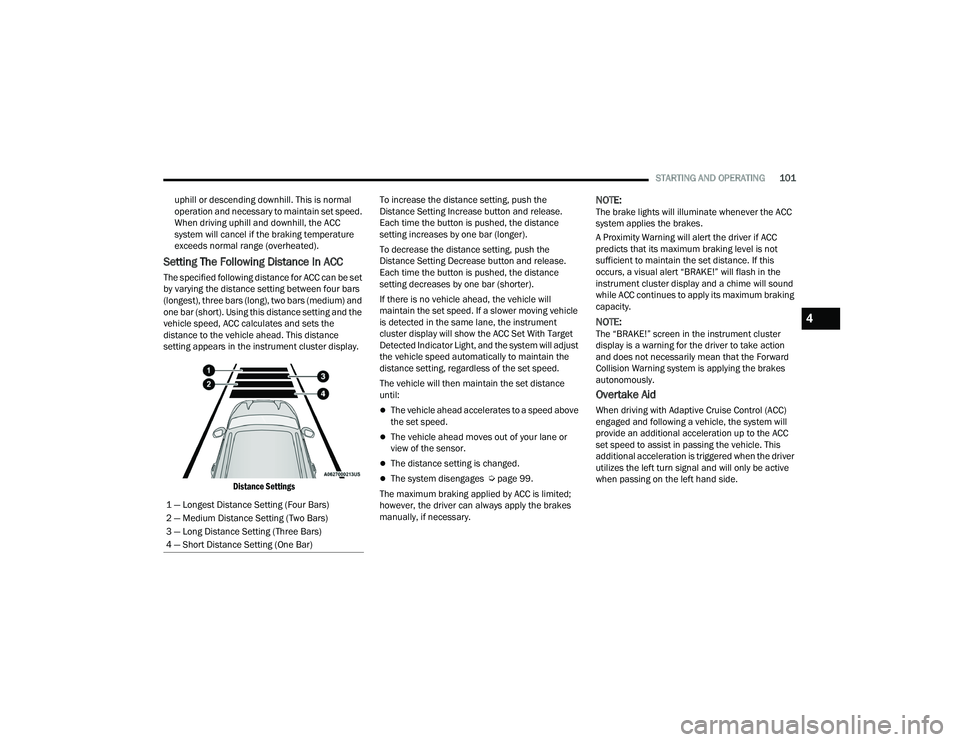
The specified following distance for ACC can be set
by varying the distance setting between four bars
(longest), three bars (long), two bars (medium) and
one bar (short). Using this distance setting and the
vehicle speed, ACC calculates and sets the
distance to the vehicle ahead. This distance
setting appears in the instrument cluster display.
Distance Settings
To increase the distance setting, push the
Distance Setting Increase button and release.
Each time the button is pushed, the distance
setting increases by one bar (longer).
To decrease the distance setting, push the
Distance Setting Decrease button and release.
Each time the button is pushed, the distance
setting decreases by one bar (shorter).
If there is no vehicle ahead, the vehicle will
maintain the set speed. If a slower moving vehicle
is detected in the same lane, the instrument
cluster display will show the ACC Set With Target
Detected Indicator Light, and the system will adjust
the vehicle speed automatically to maintain the
distance setting, regardless of the set speed.
The vehicle will then maintain the set distance
until:
The vehicle ahead accelerates to a speed above
the set speed.
The vehicle ahead moves out of your lane or
view of the sensor.
The distance setting is changed.
The system disengages Ú
page 99.
The maximum braking applied by ACC is limited;
however, the driver can always apply the brakes
manually, if necessary.
NOTE:The brake lights will illuminate whenever the ACC
system applies the brakes.
A Proximity Warning will alert the driver if ACC
predicts that its maximum braking level is not
sufficient to maintain the set distance. If this
occurs, a visual alert “BRAKE!” will flash in the
instrument cluster display and a chime will sound
while ACC continues to apply its maximum braking
capacity.
NOTE:The “BRAKE!” screen in the instrument cluster
display is a warning for the driver to take action
and does not necessarily mean that the Forward
Collision Warning system is applying the brakes
autonomously.
Overtake Aid
When driving with Adaptive Cruise Control (ACC)
engaged and following a vehicle, the system will
provide an additional acceleration up to the ACC
set speed to assist in passing the vehicle. This
additional acceleration is triggered when the driver
utilizes the left turn signal and will only be active
when passing on the left hand side.
1 — Longest Distance Setting (Four Bars)
2 — Medium Distance Setting (Two Bars)
3 — Long Distance Setting (Three Bars)
4 — Short Distance Setting (One Bar)
4
22_LD_OM_EN_USC_t.book Page 101
Page 107 of 312
STARTING AND OPERATING105
STATIONARY OBJECTS AND VEHICLES
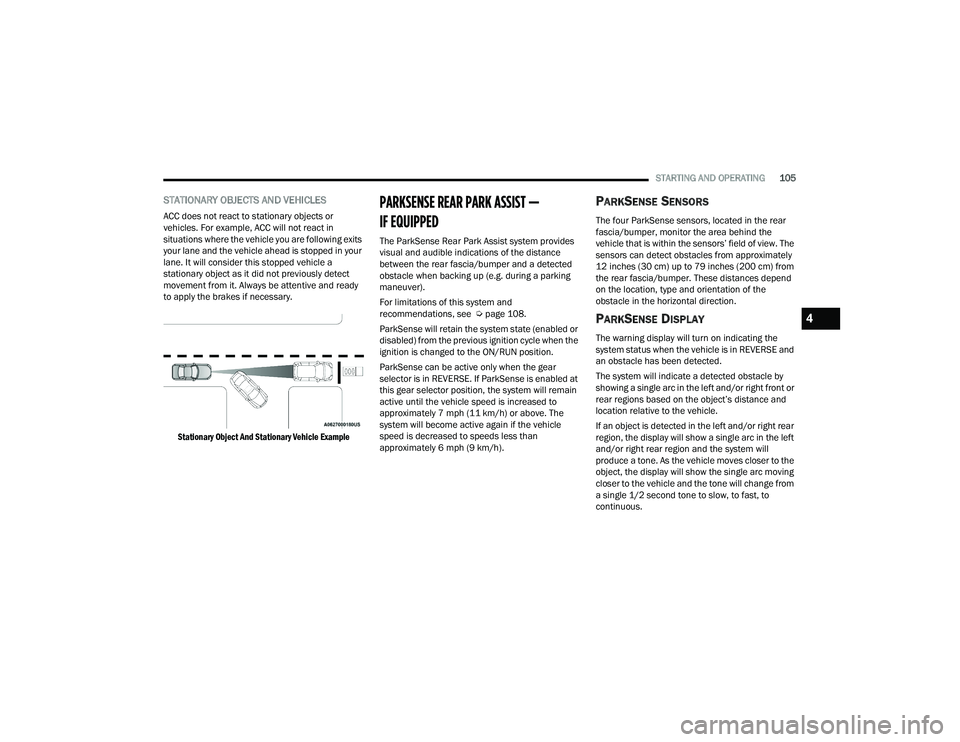
ACC does not react to stationary objects or
vehicles. For example, ACC will not react in
situations where the vehicle you are following exits
your lane and the vehicle ahead is stopped in your
lane. It will consider this stopped vehicle a
stationary object as it did not previously detect
movement from it. Always be attentive and ready
to apply the brakes if necessary.
Stationary Object And Stationary Vehicle Example
PARKSENSE REAR PARK ASSIST —
IF EQUIPPED
The ParkSense Rear Park Assist system provides
visual and audible indications of the distance
between the rear fascia/bumper and a detected
obstacle when backing up (e.g. during a parking
maneuver).
For limitations of this system and
recommendations, see Ú page 108.
ParkSense will retain the system state (enabled or
disabled) from the previous ignition cycle when the
ignition is changed to the ON/RUN position.
ParkSense can be active only when the gear
selector is in REVERSE. If ParkSense is enabled at
this gear selector position, the system will remain
active until the vehicle speed is increased to
approximately 7 mph (11 km/h) or above. The
system will become active again if the vehicle
speed is decreased to speeds less than
approximately 6 mph (9 km/h).
PARKSENSE SENSORS
The four ParkSense sensors, located in the rear
fascia/bumper, monitor the area behind the
vehicle that is within the sensors’ field of view. The
sensors can detect obstacles from approximately
12 inches (30 cm) up to 79 inches (200 cm) from
the rear fascia/bumper. These distances depend
on the location, type and orientation of the
obstacle in the horizontal direction.
PARKSENSE DISPLAY
The warning display will turn on indicating the
system status when the vehicle is in REVERSE and
an obstacle has been detected.
The system will indicate a detected obstacle by
showing a single arc in the left and/or right front or
rear regions based on the object’s distance and
location relative to the vehicle.
If an object is detected in the left and/or right rear
region, the display will show a single arc in the left
and/or right rear region and the system will
produce a tone. As the vehicle moves closer to the
object, the display will show the single arc moving
closer to the vehicle and the tone will change from
a single 1/2 second tone to slow, to fast, to
continuous.
4
22_LD_OM_EN_USC_t.book Page 105
Page 261 of 312
SERVICING AND MAINTENANCE259
F25 –10 Amp RedTire Pressure Monitor System
F26 –15 Amp BlueTrans Mod (Charger / 300)
F27 –25 Amp ClearAmplifier *
F31 –25 Amp BreakerPower Seats *
F32 –15 Amp BlueHVAC Module / Cluster
F33 –15 Amp BlueIGN SW / Wireless Mod / Steer Clmn
Lock Mod / Remote Start *
F34 –10 Amp RedSteering Column Module / Clock
(300)
F35 –5 Amp TanBattery Sensor
F36 –15 Amp BlueActive Exhaust Valve *
F37 –20 Amp YellowRadio
F38 –20 Amp YellowMedia Hub / Console APO
F42 30 Amp Pink –Rear Defrost
F43 –20 Amp YellowRear Heated Seats * / Heated
Steering Wheel *
F44 –10 Amp RedPark Assist */ Blind Spot */ Rear
View Camera *
F45 –15 Amp BlueCluster / Rearview Mirror / Lane
Departure *
F46 ––Spare
Cavity Cartridge Fuse Mini-FuseDescription
* If Equipped
8
22_LD_OM_EN_USC_t.book Page 259
Page 303 of 312
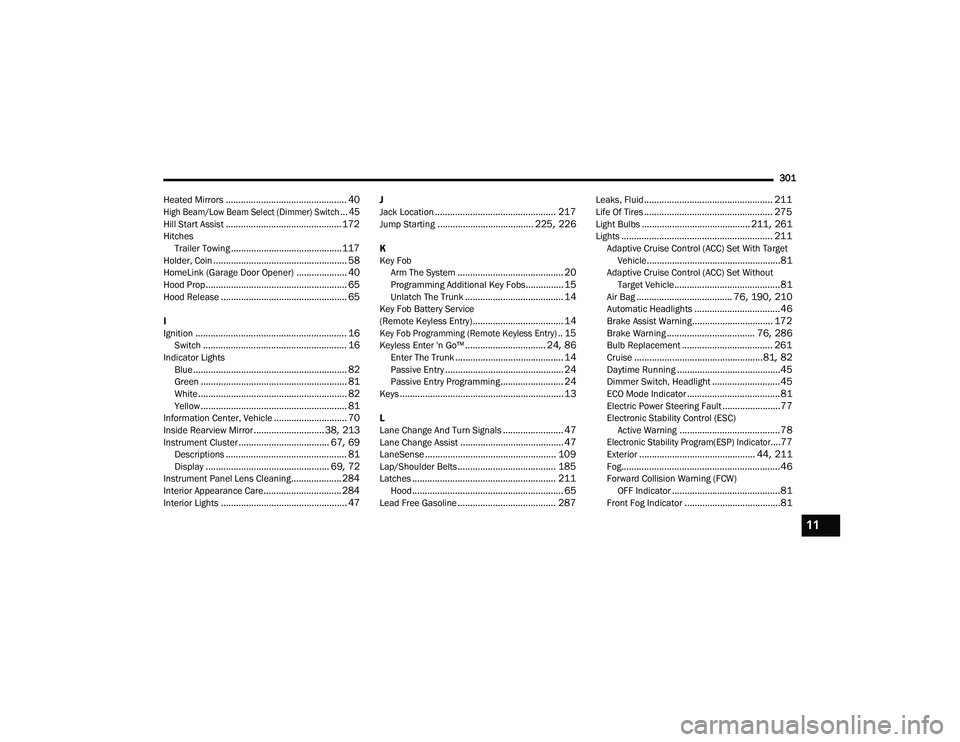
301
Heated Mirrors
................................................ 40
High Beam/Low Beam Select (Dimmer) Switch... 45
Hill Start Assist.............................................. 172Hitches Trailer Towing............................................ 117Holder, Coin..................................................... 58HomeLink (Garage Door Opener).................... 40Hood Prop........................................................ 65Hood Release.................................................. 65
I
Ignition............................................................ 16Switch......................................................... 16Indicator LightsBlue............................................................. 82Green.......................................................... 81White........................................................... 82Yellow.......................................................... 81Information Center, Vehicle............................. 70Inside Rearview Mirror............................ 38, 213Instrument Cluster.................................... 67, 69Descriptions................................................ 81Display................................................. 69, 72Instrument Panel Lens Cleaning.................... 284Interior Appearance Care............................... 284Interior Lights.................................................. 47
J
Jack Location................................................ 217Jump Starting...................................... 225, 226
K
Key FobArm The System
.......................................... 20Programming Additional Key Fobs............... 15Unlatch The Trunk....................................... 14Key Fob Battery Service
(Remote Keyless Entry).................................... 14
Key Fob Programming (Remote Keyless Entry).. 15
Keyless Enter 'n Go™................................ 24, 86Enter The Trunk........................................... 14Passive Entry............................................... 24Passive Entry Programming......................... 24Keys................................................................. 13
L
Lane Change And Turn Signals........................ 47Lane Change Assist......................................... 47LaneSense.................................................... 109Lap/Shoulder Belts....................................... 185Latches......................................................... 211Hood............................................................ 65Lead Free Gasoline....................................... 287
Leaks, Fluid................................................... 211Life Of Tires................................................... 275Light Bulbs........................................... 211, 261Lights............................................................ 211Adaptive Cruise Control (ACC) Set With Target Vehicle.....................................................81Adaptive Cruise Control (ACC) Set WithoutTarget Vehicle..........................................81Air Bag...................................... 76, 190, 210Automatic Headlights..................................46Brake Assist Warning................................ 172Brake Warning................................... 76, 286Bulb Replacement.................................... 261Cruise...................................................81, 82Daytime Running.........................................45Dimmer Switch, Headlight...........................45ECO Mode Indicator.....................................81Electric Power Steering Fault.......................77Electronic Stability Control (ESC)Active Warning........................................78
Electronic Stability Program(ESP) Indicator....77
Exterior.............................................. 44, 211Fog...............................................................46Forward Collision Warning (FCW) OFF Indicator...........................................81Front Fog Indicator......................................81
11
22_LD_OM_EN_USC_t.book Page 301