warning lights DODGE CHARGER 2022 Owners Manual
[x] Cancel search | Manufacturer: DODGE, Model Year: 2022, Model line: CHARGER, Model: DODGE CHARGER 2022Pages: 312, PDF Size: 18.99 MB
Page 6 of 312
4
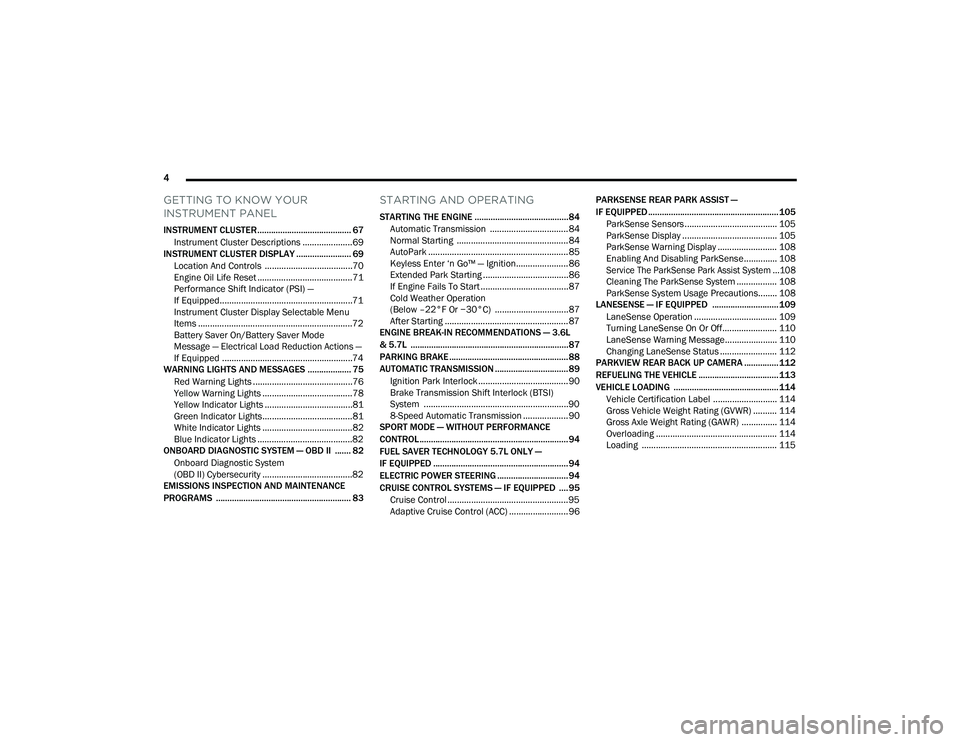
GETTING TO KNOW YOUR
INSTRUMENT PANEL
INSTRUMENT CLUSTER......................................... 67
Instrument Cluster Descriptions .....................69
INSTRUMENT CLUSTER DISPLAY ........................ 69
Location And Controls .....................................70
Engine Oil Life Reset ........................................71
Performance Shift Indicator (PSI) —
If Equipped........................................................71
Instrument Cluster Display Selectable Menu
Items .................................................................72
Battery Saver On/Battery Saver Mode
Message — Electrical Load Reduction Actions —
If Equipped .......................................................74
WARNING LIGHTS AND MESSAGES ................... 75
Red Warning Lights ..........................................76
Yellow Warning Lights ......................................78
Yellow Indicator Lights .....................................81
Green Indicator Lights......................................81
White Indicator Lights ......................................82
Blue Indicator Lights ........................................82
ONBOARD DIAGNOSTIC SYSTEM — OBD II ....... 82
Onboard Diagnostic System
(OBD II) Cybersecurity ......................................82
EMISSIONS INSPECTION AND MAINTENANCE
PROGRAMS ........................................................... 83
STARTING AND OPERATING
STARTING THE ENGINE .........................................84
Automatic Transmission .................................84
Normal Starting ...............................................84
AutoPark ...........................................................85
Keyless Enter ‘n Go™ — Ignition......................86
Extended Park Starting ....................................86
If Engine Fails To Start .....................................87
Cold Weather Operation
(Below –22°F Or −30°C) ...............................87
After Starting ....................................................87
ENGINE BREAK-IN RECOMMENDATIONS — 3.6L
& 5.7L .....................................................................87
PARKING BRAKE ....................................................88
AUTOMATIC TRANSMISSION ................................89
Ignition Park Interlock ......................................90
Brake Transmission Shift Interlock (BTSI)
System .............................................................90
8-Speed Automatic Transmission ...................90
SPORT MODE — WITHOUT PERFORMANCE
CONTROL................................................................. 94
FUEL SAVER TECHNOLOGY 5.7L ONLY —
IF EQUIPPED ...........................................................94
ELECTRIC POWER STEERING ...............................94
CRUISE CONTROL SYSTEMS — IF EQUIPPED ....95
Cruise Control ...................................................95
Adaptive Cruise Control (ACC) .........................96 PARKSENSE REAR PARK ASSIST —
IF EQUIPPED ......................................................... 105
ParkSense Sensors ....................................... 105
ParkSense Display ........................................ 105
ParkSense Warning Display ......................... 108
Enabling And Disabling ParkSense.............. 108
Service The ParkSense Park Assist System ...108
Cleaning The ParkSense System ................. 108
ParkSense System Usage Precautions........ 108
LANESENSE — IF EQUIPPED ............................. 109
LaneSense Operation ................................... 109
Turning LaneSense On Or Off....................... 110
LaneSense Warning Message...................... 110
Changing LaneSense Status ........................ 112
PARKVIEW REAR BACK UP CAMERA ............... 112
REFUELING THE VEHICLE ................................... 113
VEHICLE LOADING .............................................. 114 Vehicle Certification Label ........................... 114
Gross Vehicle Weight Rating (GVWR) .......... 114
Gross Axle Weight Rating (GAWR) ............... 114
Overloading ................................................... 114
Loading ......................................................... 115
22_LD_OM_EN_USC_t.book Page 4
Page 11 of 312
9
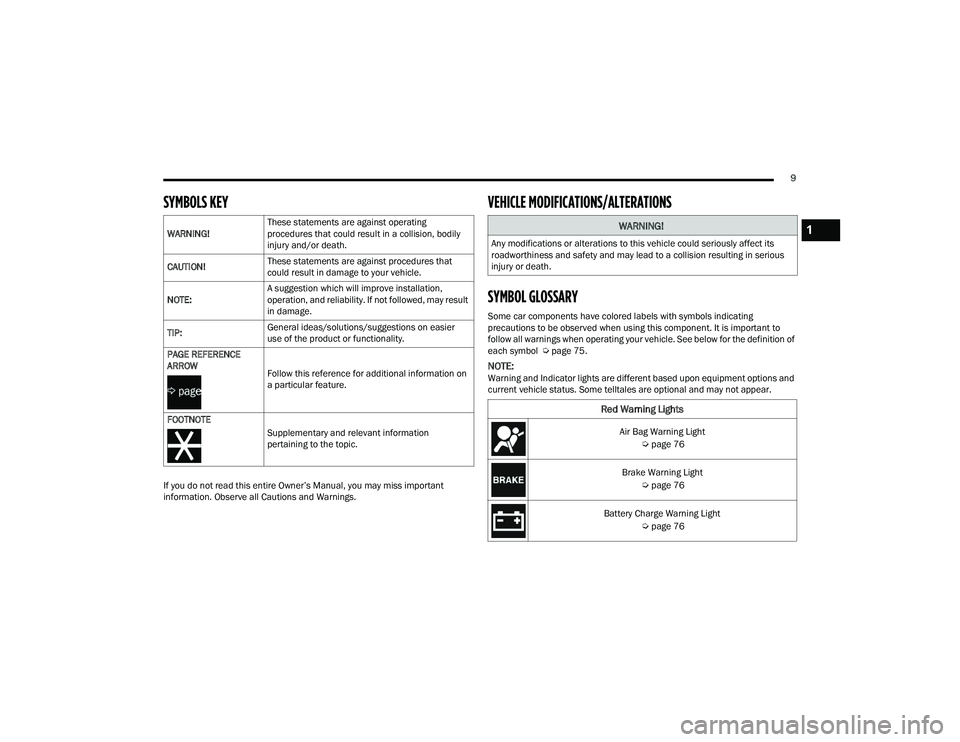
SYMBOLS KEY
If you do not read this entire Owner’s Manual, you may miss important
information. Observe all Cautions and Warnings.
VEHICLE MODIFICATIONS/ALTERATIONS
SYMBOL GLOSSARY
Some car components have colored labels with symbols indicating
precautions to be observed when using this component. It is important to
follow all warnings when operating your vehicle. See below for the definition of
each symbol Úpage 75.
NOTE:Warning and Indicator lights are different based upon equipment options and
current vehicle status. Some telltales are optional and may not appear.
WARNING!
These statements are against operating
procedures that could result in a collision, bodily
injury and/or death.
CAUTION! These statements are against procedures that
could result in damage to your vehicle.
NOTE: A suggestion which will improve installation,
operation, and reliability. If not followed, may result
in damage.
TIP: General ideas/solutions/suggestions on easier
use of the product or functionality.
PAGE REFERENCE
ARROW Follow this reference for additional information on
a particular feature.
FOOTNOTE Supplementary and relevant information
pertaining to the topic.
WARNING!
Any modifications or alterations to this vehicle could seriously affect its
roadworthiness and safety and may lead to a collision resulting in serious
injury or death.
Red Warning Lights
Air Bag Warning Light Úpage 76
Brake Warning Light Úpage 76
Battery Charge Warning Light Úpage 76
1
22_LD_OM_EN_USC_t.book Page 9
Page 12 of 312
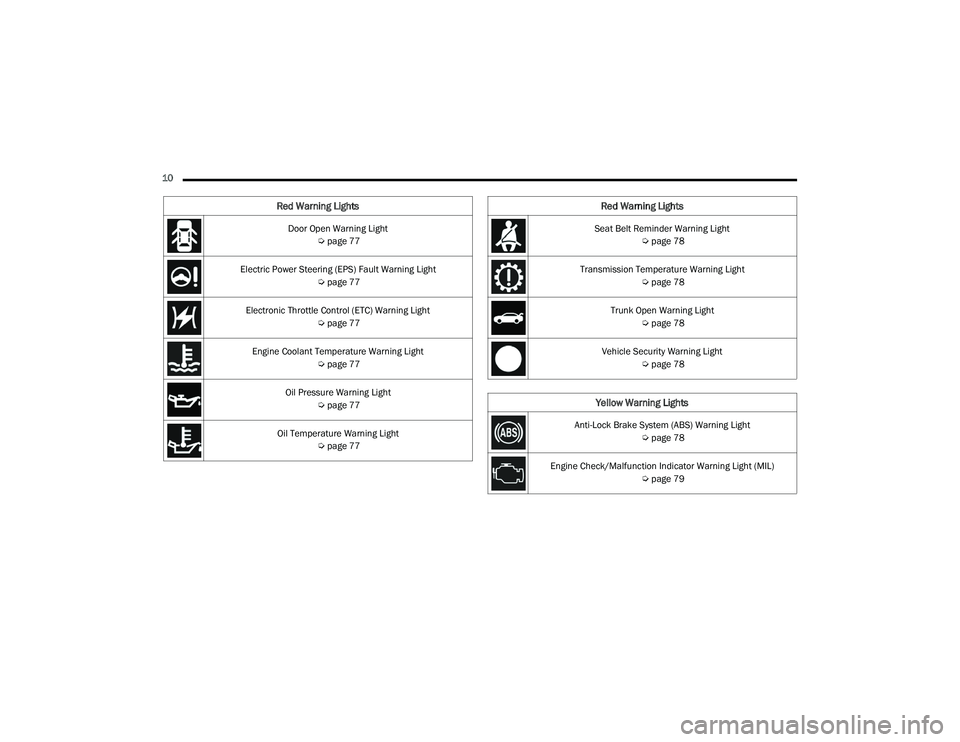
10 Door Open Warning Light Úpage 77
Electric Power Steering (EPS) Fault Warning Light Úpage 77
Electronic Throttle Control (ETC) Warning Light Úpage 77
Engine Coolant Temperature Warning Light Úpage 77
Oil Pressure Warning Light Úpage 77
Oil Temperature Warning Light Úpage 77
Red Warning Lights
Seat Belt Reminder Warning Light
Úpage 78
Transmission Temperature Warning Light Úpage 78
Trunk Open Warning Light Úpage 78
Vehicle Security Warning Light Úpage 78
Yellow Warning Lights
Anti-Lock Brake System (ABS) Warning Light
Úpage 78
Engine Check/Malfunction Indicator Warning Light (MIL) Úpage 79
Red Warning Lights
22_LD_OM_EN_USC_t.book Page 10
Page 13 of 312
11
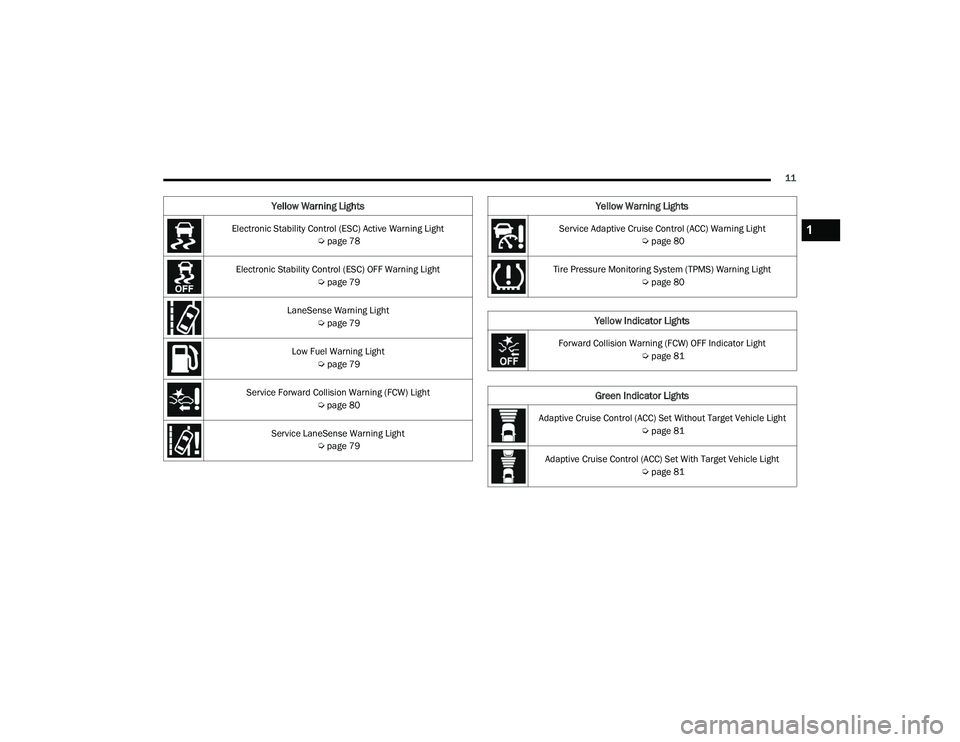
Electronic Stability Control (ESC) Active Warning Light Úpage 78
Electronic Stability Control (ESC) OFF Warning Light Úpage 79
LaneSense Warning Light Úpage 79
Low Fuel Warning Light Úpage 79
Service Forward Collision Warning (FCW) Light Úpage 80
Service LaneSense Warning Light Úpage 79
Yellow Warning Lights
Service Adaptive Cruise Control (ACC) Warning Light
Úpage 80
Tire Pressure Monitoring System (TPMS) Warning Light Úpage 80
Yellow Indicator Lights
Forward Collision Warning (FCW) OFF Indicator Light
Úpage 81
Green Indicator Lights
Adaptive Cruise Control (ACC) Set Without Target Vehicle Light
Úpage 81
Adaptive Cruise Control (ACC) Set With Target Vehicle Light Úpage 81
Yellow Warning Lights
1
22_LD_OM_EN_USC_t.book Page 11
Page 20 of 312
18GETTING TO KNOW YOUR VEHICLE
HOW TO USE REMOTE START
Push and release the Remote Start button on the
key fob twice within five seconds. The vehicle
doors will lock, the parking lights will flash, and the
horn will chirp twice (if programmed). Then, the
engine will start, and the vehicle will remain in the
Remote Start mode for a 15 minute cycle. Pushing
the Remote Start button a third time shuts the
engine off.
To drive the vehicle, push the unlock button, and
with a valid Keyless Enter ‘n Go™ key fob in the
vehicle, press the brake pedal and place the
ignition in the ON/RUN position.
NOTE:
With Remote Start, the engine will only run for
15 minutes.
Remote Start can only be used twice.
If an engine fault is present or fuel level is low,
the vehicle will start and then shut down in 10
seconds.
The parking lights will turn on and remain on
during Remote Start mode.
For security, power window operation is
disabled when the vehicle is in the Remote Start
mode.
The ignition must be placed in the ON/RUN posi -
tion before the Remote Start sequence can be
repeated for a third cycle.
All of the following conditions must be met before
the engine will remote start:
Gear selector in PARK
Doors closed
Hood closed
Trunk closed
Hazard switch off
Brake switch inactive (brake pedal not pressed)
Battery at an acceptable charge level
Check engine light shall not be present
PANIC button not pushed
System not disabled from previous Remote
Start event
Vehicle Security system indicator flashing
Ignition in the OFF position
Fuel level meets minimum requirement
Vehicle Security system is not signaling an intrusion
Malfunction Indicator Light (MIL) is not illumi -
nated
TO EXIT REMOTE START MODE
To drive the vehicle after starting the Remote Start
system, either push and release the unlock button
on the key fob to unlock the doors, or unlock the
vehicle using Keyless Enter ‘n Go™ — Passive Entry
via the door handles, and disarm the Vehicle
WARNING!
Do not start or run an engine in a closed
garage or confined area. Exhaust gas contains
Carbon Monoxide (CO) which is odorless and
colorless. Carbon Monoxide is poisonous and
can cause serious injury or death when
inhaled.
Keep key fobs away from children. Operation
of the Remote Start system, windows, door
locks or other controls could cause serious
injury or death.
WARNING!
Do not start or run an engine in a closed
garage or confined area. Exhaust gas contains
Carbon Monoxide (CO) which is odorless and
colorless. Carbon Monoxide is poisonous and
can cause serious injury or death when
inhaled.
Keep key fobs away from children. Operation
of the Remote Start system, windows, door
locks or other controls could cause serious
injury or death.
22_LD_OM_EN_USC_t.book Page 18
Page 37 of 312
GETTING TO KNOW YOUR VEHICLE35
Front Heated Seats
The front heated seats control buttons
are located within the Uconnect system.
You can gain access to the control
buttons through the climate screen and
the controls screen.
You can choose from HI, LO, or OFF heat settings.
The indicator arrows in the touchscreen buttons
indicate the level of heat in use. Two indicator
arrows will illuminate for HI, and one for LO.
Turning the heating elements off will return the
user to the radio screen.
Press the heated seat button once to turn the HI
setting on.
Press the heated seat button a second time to
turn the LO setting on.
Press the heated seat button a third time to turn
the heating elements off. If the HI-level setting is selected, the system will
automatically switch to LO-level after
approximately 60 minutes of continuous
operation. At that time, the display will change
from HI to LO, indicating the change. The LO-level
setting will turn off automatically after
approximately 45 minutes.
NOTE:
Once a heat setting is selected, heat will be felt
within two to five minutes.
The engine must be running for the heated
seats to operate.
For information on use with the Remote Start
system, see Ú page 19.
Rear Heated Seats
On some models, the two rear outboard
seats may be equipped with heated
seats. There are two heated seat
switches that allow the rear passengers
to operate the seats independently. The heated
seat switches for each heater are located on the
rear of the center console.
You can choose from HI, LO, or OFF heat settings.
The indicator lights in each switch indicate the
level of heat in use. Two indicator lights will
illuminate for HI, one for LO, and none for off.
Push the switch once to turn the HI setting on.
Push the switch a second time to turn the LO
setting on.
Push the switch a third time to turn the heating
elements off.
If the HI-level setting is selected, the system will
automatically switch to LO-level after
approximately 60 minutes of continuous
operation. At that time, the number of illuminated
LEDs changes from two to one, indicating the
change. The LO-level setting will turn off
automatically after approximately 45 minutes.
Do not place anything on the seat or seatback
that insulates against heat, such as a blanket
or cushion. This may cause the seat heater to
overheat. Sitting in a seat that has been over -
heated could cause serious burns due to the
increased surface temperature of the seat.
WARNING!
WARNING!
Persons who are unable to feel pain to the skin
because of advanced age, chronic illness,
diabetes, spinal cord injury, medication, alcohol
use, exhaustion or other physical condition
must exercise care when using the seat heater.
It may cause burns even at low temperatures,
especially if used for long periods of time.
Do not place anything on the seat or seatback
that insulates against heat, such as a blanket
or cushion. This may cause the seat heater to
overheat. Sitting in a seat that has been over -
heated could cause serious burns due to the
increased surface temperature of the seat.
2
22_LD_OM_EN_USC_t.book Page 35
Page 46 of 312
44GETTING TO KNOW YOUR VEHICLE
EXTERIOR LIGHTS
HEADLIGHT SWITCH
The headlight switch is located on the left side of
the instrument panel. This switch controls the
operation of the headlights, parking lights,
instrument panel lights, and fog lights (if
equipped).
Headlight Switch
Headlight Switch (Vehicles Sold In Canada Only)
NOTE:Vehicles sold in Canada are equipped with a head -
light switch with an AUTO and ON detent but
without an OFF detent. Headlights will be deacti -
vated when the headlight switch is placed in the
parking lights position. However, the Daytime
Running Lights (DRLs) will be activated along with
the front and rear marker lights. The DRLs may be
deactivated when the parking brake is engaged.
Your motorized door or gate will open and
close while you are programming the universal
transmitter. Do not program the transmitter if
people, pets or other objects are in the path of
the door or gate. Only use this transmitter with
a garage door opener that has a “stop and
reverse” feature as required by Federal safety
standards. This includes most garage door
opener models manufactured after 1982. Do
not use a garage door opener without these
safety features.
WARNING!
1 — Rotate Headlight Control
2 — Push Front Fog Light Control
3 — Instrument Panel Dimmer Control
4 — Ambient Light Dimmer Control1 — Rotate Headlight Control
2 — Push Front Fog Light Control
3 — Instrument Panel Dimmer Control
4 — Ambient Light Dimmer Control
22_LD_OM_EN_USC_t.book Page 44
Page 47 of 312
GETTING TO KNOW YOUR VEHICLE45
To turn on the headlights, rotate the headlight
switch clockwise. When the headlight switch is on,
the parking lights, taillights, license plate light and
instrument panel lights are also turned on. To turn
off the headlights, rotate the headlight switch back
to the O (off) position.
For vehicles sold in Canada, rotate the headlight
switch clockwise from the parking lights and
instrument panel lights position to the AUTO
position for automatic headlights. Rotate to the
second detent to turn on headlights, parking lights,
and instrument panel lights operation.
NOTE:
Your vehicle is equipped with plastic headlight
and fog light (if equipped) lenses that are lighter
and less susceptible to stone breakage than
glass lights. Plastic is not as scratch resistant as
glass and therefore different lens cleaning
procedures must be followed.
To minimize the possibility of scratching the
lenses and reducing light output, avoid wiping
with a dry cloth. To remove road dirt, wash with
a mild soap solution followed by rinsing.
MULTIFUNCTION LEVER
The multifunction lever is located on the left side of
the steering column.
Multifunction Lever
DAYTIME RUNNING LIGHTS (DRLS) —
I
F EQUIPPED
The Daytime Running Lights will turn on when the
engine is started and will remain on unless the
headlights are turned to the on position, the
parking brake is applied, or the ignition is placed in
the OFF position.
NOTE:
For vehicles sold in Canada, the Daytime
Running Lights will automatically deactivate
when the front fog lights are turned on.
If allowed by law in the country in which the
vehicle was purchased, the Daytime Running
Lights can be turned on and off using the
Uconnect system Ú page 123.
On some vehicles, the Daytime Running Lights
may deactivate, or reduce intensity, on one side
of the vehicle (when a turn signal is activated on
that side), or on both sides of the vehicle (when
the hazard warning lights are activated).
HIGH/LOW BEAM SWITCH
Push the multifunction lever toward the instrument
panel to switch the headlights to high beams.
Pulling the multifunction lever back will turn the
low beams on.
AUTOMATIC HIGH BEAM — IF EQUIPPED
The Automatic High Beam Headlamp Control
system provides increased forward lighting at night
by automating high beam control through the use
of a digital camera mounted on the inside rearview
mirror. This camera detects vehicle specific light
and automatically switches from high beams to low
beams until the approaching vehicle is out of view.
NOTE:
The Automatic High Beam Headlamp Control
can be turned on or off by selecting or dese -
lecting “Auto High Beam” within Uconnect
Settings Ú page 123, as well as turning the
headlight switch to the AUTO position.
CAUTION!
Do not use abrasive cleaning components,
solvents, steel wool or other abrasive materials
to clean the lenses.
2
22_LD_OM_EN_USC_t.book Page 45
Page 63 of 312
GETTING TO KNOW YOUR VEHICLE61
(Continued)
WINDOWS
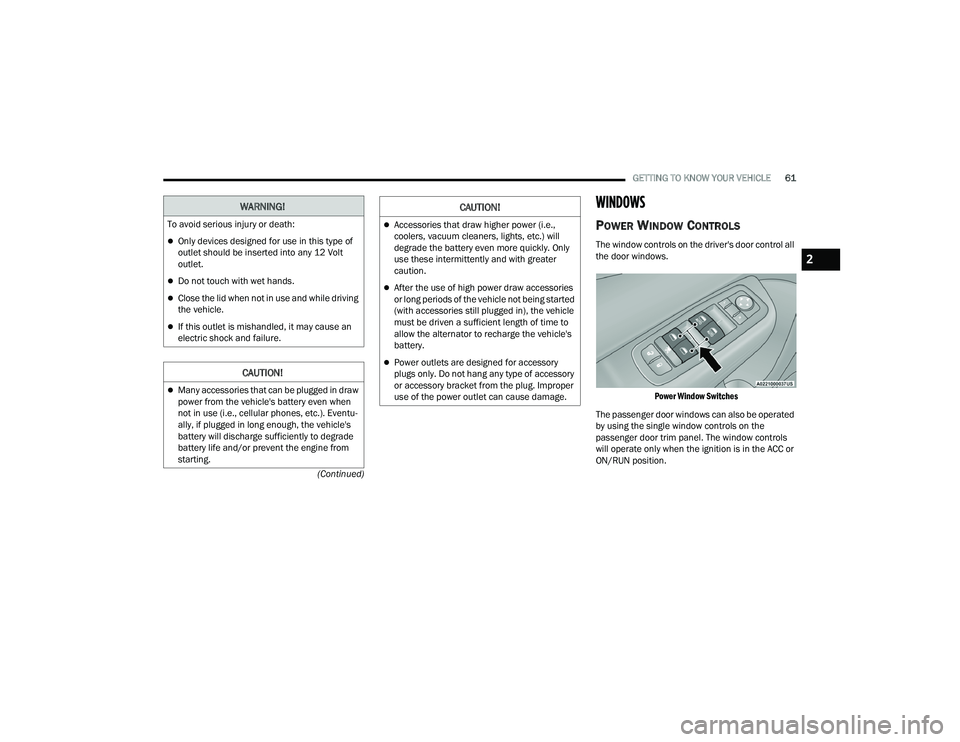
POWER WINDOW CONTROLS
The window controls on the driver's door control all
the door windows.
Power Window Switches
The passenger door windows can also be operated
by using the single window controls on the
passenger door trim panel. The window controls
will operate only when the ignition is in the ACC or
ON/RUN position.
WARNING!
To avoid serious injury or death:
Only devices designed for use in this type of
outlet should be inserted into any 12 Volt
outlet.
Do not touch with wet hands.
Close the lid when not in use and while driving
the vehicle.
If this outlet is mishandled, it may cause an
electric shock and failure.
CAUTION!
Many accessories that can be plugged in draw
power from the vehicle's battery even when
not in use (i.e., cellular phones, etc.). Eventu -
ally, if plugged in long enough, the vehicle's
battery will discharge sufficiently to degrade
battery life and/or prevent the engine from
starting.
Accessories that draw higher power (i.e.,
coolers, vacuum cleaners, lights, etc.) will
degrade the battery even more quickly. Only
use these intermittently and with greater
caution.
After the use of high power draw accessories
or long periods of the vehicle not being started
(with accessories still plugged in), the vehicle
must be driven a sufficient length of time to
allow the alternator to recharge the vehicle's
battery.
Power outlets are designed for accessory
plugs only. Do not hang any type of accessory
or accessory bracket from the plug. Improper
use of the power outlet can cause damage.
CAUTION!
2
22_LD_OM_EN_USC_t.book Page 61
Page 77 of 312
GETTING TO KNOW YOUR INSTRUMENT PANEL75
The electrical loads that may be switched off (if
equipped), and vehicle functions which can be
affected by load reduction:
Heated Seat/Vented Seats/Heated Wheel
Heated/Cooled Cup Holders — If Equipped
Rear Defroster And Heated Mirrors
HVAC System
115 Volts AC Power Inverter System
Audio and Telematics System
Loss of the battery charge may indicate one or
more of the following conditions:
The charging system cannot deliver enough
electrical power to the vehicle system because
the electrical loads are larger than the capability
of the charging system. The charging system is
still functioning properly.
Turning on all possible vehicle electrical loads (e.g.
HVAC to max settings, exterior and interior lights,
overloaded power outlets +12 Volts, 115 Volts AC,
USB ports) during certain driving conditions (city
driving, towing, frequent stopping).
Installing options like additional lights, upfitter
electrical accessories, audio systems, alarms
and similar devices.
Unusual driving cycles (short trips separated by
long parking periods).
The vehicle was parked for an extended period
of time (weeks, months).
The battery was recently replaced and was not
charged completely.
The battery was discharged by an electrical load
left on when the vehicle was parked.
The battery was used for an extended period
with the engine not running to supply radio,
lights, chargers, +12 Volts portable appliances
like vacuum cleaners, game consoles and
similar devices.
What to do when an electrical load reduction
action message is present (“Battery Saver On” or
“Battery Saver Mode”)
During a trip:
Reduce power to unnecessary loads if possible:
Turn off redundant lights (interior or exte -
rior)
Check what may be plugged in to power
outlets +12 Volts, 115 Volts AC, USB ports
Check HVAC settings (blower, temperature)
Check the audio settings (volume) After a trip:
Check if any aftermarket equipment was
installed (additional lights, upfitter electrical
accessories, audio systems, alarms) and review
specifications if any (load and Ignition Off Draw
currents).
Evaluate the latest driving cycles (distance,
driving time and parking time).
The vehicle should have service performed if
the message is still present during consecutive
trips and the evaluation of the vehicle and
driving pattern did not help to identify the cause.
WARNING LIGHTS AND MESSAGES
The warning/indicator lights will illuminate in the
instrument panel together with a dedicated
message and/or acoustic signal when applicable.
These indications are indicative and precautionary
and as such must not be considered as exhaustive.
Always refer to the information in this chapter in
the event of a failure indication. All active telltales
will display first if applicable. The system check
menu may appear different based upon
equipment options and current vehicle status.
Some telltales are optional and may not appear.
3
22_LD_OM_EN_USC_t.book Page 75