fog light DODGE CHARGER 2023 Owners Manual
[x] Cancel search | Manufacturer: DODGE, Model Year: 2023, Model line: CHARGER, Model: DODGE CHARGER 2023Pages: 292, PDF Size: 13.05 MB
Page 5 of 292
3
Parking Lights ............................................................. 42
Automatic Headlights On With Wipers —
If Equipped .................................................................. 42
Headlight Delay .......................................................... 42
Lights-On Reminder .................................................... 42
Fog Lights — If Equipped ............................................ 42
Turn Signals ................................................................ 43
Lane Change Assist — If Equipped............................. 43
Battery Saver ............................................................... 43
INTERIOR LIGHTS ...............................................................43 Interior Courtesy Lights............................................... 43
WINDSHIELD WIPERS AND WASHERS ........................... 45 Windshield Wiper Operation....................................... 45
Rain Sensing Wipers — If Equipped ........................... 46
CLIMATE CONTROLS .........................................................46 Automatic Climate Control Descriptions
And Functions ............................................................. 47
Manual Climate Control Descriptions
And Functions ............................................................. 49
Automatic Temperature Control (ATC) ...................... 51
Climate Voice Commands .......................................... 51
Operating Tips ............................................................ 51
INTERIOR STORAGE AND EQUIPMENT ............................52 Storage ........................................................................ 52
USB/AUX Control ..................................................... 54
Illuminated Cupholders — If Equipped....................... 54
Power Outlets ............................................................. 55
WINDOWS ...........................................................................56 Power Window Controls .............................................. 56
Automatic Window Features ...................................... 56
Reset Auto-Up.............................................................. 57
Window Lockout Switch.............................................. 57
Wind Buffeting ............................................................ 57 POWER SUNROOF — IF EQUIPPED................................... 57
Opening And Closing The Sunroof ..............................58
Pinch Protect Feature.................................................. 58
Sunshade Operation.................................................... 58
Sunroof Maintenance.................................................. 58
Ignition Off Operation .................................................. 58
HOOD.................................................................................... 59 Opening The Hood ......................................................59
Closing The Hood ......................................................... 59
TRUNK .................................................................................. 59 Opening The Trunk ......................................................59
Closing The Trunk ........................................................ 60
Trunk Safety ................................................................. 60
Cargo Area Features ................................................... 60
GETTING TO KNOW YOUR
INSTRUMENT PANEL
INSTRUMENT CLUSTER...................................................... 61 Instrument Cluster Descriptions ................................. 63
INSTRUMENT CLUSTER DISPLAY ..................................... 63 Location And Controls ................................................. 64
Engine Oil Life Reset .................................................. 65
Performance Shift Indicator (PSI) — If Equipped ....... 65
Instrument Cluster Display Selectable
Menu Items .................................................................. 65
Battery Saver On/Battery Saver Mode
Message — Electrical Load Reduction Actions —
If Equipped ................................................................... 67 WARNING LIGHTS AND MESSAGES ................................ 68
Red Warning Lights ..................................................... 68
Yellow Warning Lights ................................................. 71
Yellow Indicator Lights ................................................ 73
Green Indicator Lights................................................. 73
White Indicator Lights ................................................. 74
Blue Indicator Lights ................................................... 74
ONBOARD DIAGNOSTIC SYSTEM — OBD II ..................... 74 Onboard Diagnostic System
(OBD II) Cybersecurity ................................................. 75
EMISSIONS INSPECTION AND MAINTENANCE
PROGRAMS ...................................................................... 75
STARTING AND OPERATING
STARTING THE ENGINE...................................................... 76 Automatic Transmission ............................................ 76
Normal Starting ........................................................ 76
AutoPark ...................................................................... 77
Keyless Enter ‘n Go™ — Ignition ................................. 78
Extended Park Starting ............................................... 78
If Engine Fails To Start ............................................... 78
Cold Weather Operation
(Below –22°F Or −30°C) .......................................... 78
After Starting................................................................ 78
ENGINE BREAK-IN RECOMMENDATIONS —
3.6L & 5.7L ........................................................................ 79
PARKING BRAKE ............................................................... 79
AUTOMATIC TRANSMISSION ............................................ 80 Ignition Park Interlock ................................................. 81
Brake Transmission Shift Interlock
(BTSI) System ............................................................. 81
8-Speed Automatic Transmission .............................. 81
23_LD_OM_EN_USC_t.book Page 3
Page 12 of 292
10
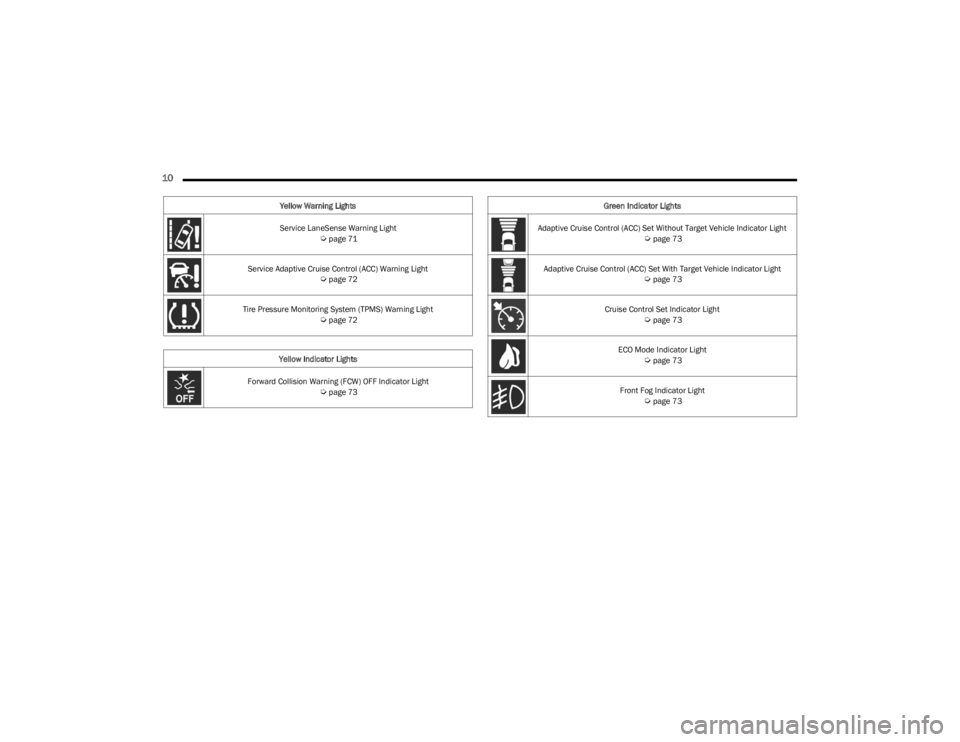
Service LaneSense Warning Light Úpage 71
Service Adaptive Cruise Control (ACC) Warning Light
Úpage 72
Tire Pressure Monitoring System (TPMS) Warning Light
Úpage 72
Yellow Indicator Lights
Forward Collision Warning (FCW) OFF Indicator Light
Úpage 73
Yellow Warning Lights
Green Indicator Lights
Adaptive Cruise Control (ACC) Set Without Target Vehicle Indicator Light
Úpage 73
Adaptive Cruise Control (ACC) Set With Target Vehicle Indicator Light
Úpage 73
Cruise Control Set Indicator Light
Úpage 73
ECO Mode Indicator Light
Úpage 73
Front Fog Indicator Light
Úpage 73
23_LD_OM_EN_USC_t.book Page 10
Page 42 of 292
40GETTING TO KNOW YOUR VEHICLE
TROUBLESHOOTING TIPS
If you are having trouble programming HomeLink®, here
are some of the most common solutions:
Replace the battery in the garage door opener
hand-held transmitter.
Push the LEARN button on the garage door opener to
complete the training for a rolling code.
Did you unplug the device for programming and
remember to plug it back in?
If you have any problems, or require assistance, please
call toll-free 1-800-355-3515 or on the Internet at
HomeLink.com for information or assistance.
EXTERIOR LIGHTS
HEADLIGHT SWITCH
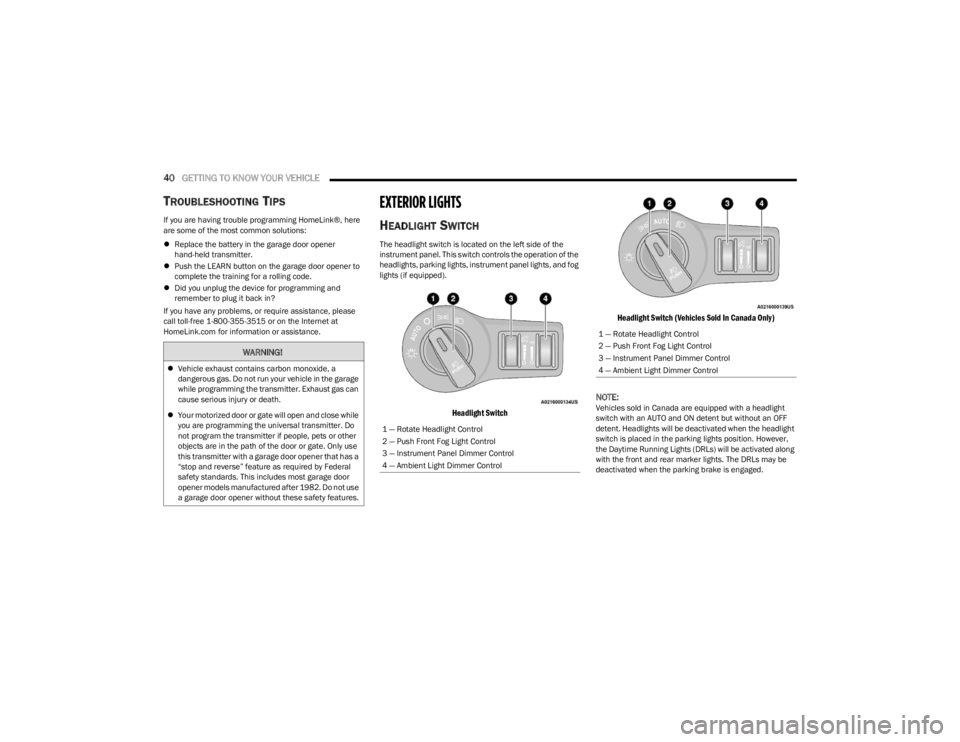
The headlight switch is located on the left side of the
instrument panel. This switch controls the operation of the
headlights, parking lights, instrument panel lights, and fog
lights (if equipped).
Headlight Switch Headlight Switch (Vehicles Sold In Canada Only)
NOTE:Vehicles sold in Canada are equipped with a headlight
switch with an AUTO and ON detent but without an OFF
detent. Headlights will be deactivated when the headlight
switch is placed in the parking lights position. However,
the Daytime Running Lights (DRLs) will be activated along
with the front and rear marker lights. The DRLs may be
deactivated when the parking brake is engaged.
WARNING!
Vehicle exhaust contains carbon monoxide, a
dangerous gas. Do not run your vehicle in the garage
while programming the transmitter. Exhaust gas can
cause serious injury or death.
Your motorized door or gate will open and close while
you are programming the universal transmitter. Do
not program the transmitter if people, pets or other
objects are in the path of the door or gate. Only use
this transmitter with a garage door opener that has a
“stop and reverse” feature as required by Federal
safety standards. This includes most garage door
opener models manufactured after 1982. Do not use
a garage door opener without these safety features.
1 — Rotate Headlight Control
2 — Push Front Fog Light Control
3 — Instrument Panel Dimmer Control
4 — Ambient Light Dimmer Control
1 — Rotate Headlight Control
2 — Push Front Fog Light Control
3 — Instrument Panel Dimmer Control
4 — Ambient Light Dimmer Control
23_LD_OM_EN_USC_t.book Page 40
Page 43 of 292
GETTING TO KNOW YOUR VEHICLE41
To turn on the headlights, rotate the headlight switch
clockwise. When the headlight switch is on, the parking
lights, taillights, license plate light and instrument panel
lights are also turned on. To turn off the headlights, rotate
the headlight switch back to the O (off) position.
For vehicles sold in Canada, rotate the headlight switch
clockwise from the parking lights and instrument panel
lights position to the AUTO position for automatic
headlights. Rotate to the second detent to turn on
headlights, parking lights, and instrument panel lights
operation.
NOTE:
Your vehicle is equipped with plastic headlight and fog
light (if equipped) lenses that are lighter and less
susceptible to stone breakage than glass lights. Plastic
is not as scratch resistant as glass and therefore
different lens cleaning procedures must be followed.
To minimize the possibility of scratching the lenses and
reducing light output, avoid wiping with a dry cloth. To
remove road dirt, wash with a mild soap solution
followed by rinsing.
MULTIFUNCTION LEVER
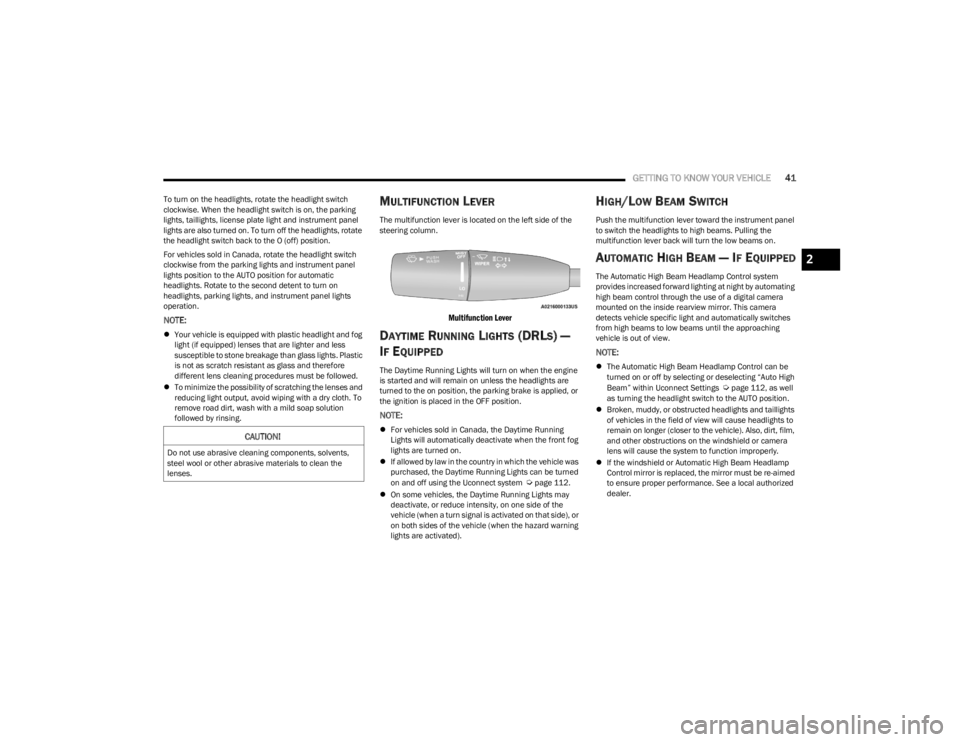
The multifunction lever is located on the left side of the
steering column.
Multifunction Lever
DAYTIME RUNNING LIGHTS (DRLS) —
I
F EQUIPPED
The Daytime Running Lights will turn on when the engine
is started and will remain on unless the headlights are
turned to the on position, the parking brake is applied, or
the ignition is placed in the OFF position.
NOTE:
For vehicles sold in Canada, the Daytime Running
Lights will automatically deactivate when the front fog
lights are turned on.
If allowed by law in the country in which the vehicle was
purchased, the Daytime Running Lights can be turned
on and off using the Uconnect system
Úpage 112.
On some vehicles, the Daytime Running Lights may
deactivate, or reduce intensity, on one side of the
vehicle (when a turn signal is activated on that side), or
on both sides of the vehicle (when the hazard warning
lights are activated).
HIGH/LOW BEAM SWITCH
Push the multifunction lever toward the instrument panel
to switch the headlights to high beams. Pulling the
multifunction lever back will turn the low beams on.
AUTOMATIC HIGH BEAM — IF EQUIPPED
The Automatic High Beam Headlamp Control system
provides increased forward lighting at night by automating
high beam control through the use of a digital camera
mounted on the inside rearview mirror. This camera
detects vehicle specific light and automatically switches
from high beams to low beams until the approaching
vehicle is out of view.
NOTE:
The Automatic High Beam Headlamp Control can be
turned on or off by selecting or deselecting “Auto High
Beam” within Uconnect Settings
Úpage 112, as well
as turning the headlight switch to the AUTO position.
Broken, muddy, or obstructed headlights and taillights
of vehicles in the field of view will cause headlights to
remain on longer (closer to the vehicle). Also, dirt, film,
and other obstructions on the windshield or camera
lens will cause the system to function improperly.
If the windshield or Automatic High Beam Headlamp
Control mirror is replaced, the mirror must be re-aimed
to ensure proper performance. See a local authorized
dealer.
CAUTION!
Do not use abrasive cleaning components, solvents,
steel wool or other abrasive materials to clean the
lenses.
2
23_LD_OM_EN_USC_t.book Page 41
Page 44 of 292
42GETTING TO KNOW YOUR VEHICLE
FLASH-TO-PASS
You can signal another vehicle with your headlights by
lightly pulling the multifunction lever toward you. This will
cause the high beam headlights to turn on, and remain on,
until the lever is released.
AUTOMATIC HEADLIGHTS
This system automatically turns the headlights on or off
according to ambient light levels. To turn the system on,
rotate the headlight switch counterclockwise to the AUTO
position. When the system is on, the headlight time delay
feature is also on. This means the headlights will stay on
for up to 90 seconds after placing the ignition in the OFF
position. The headlight time delay can be programmed
0/30/60/90 seconds within Uconnect Settings
Úpage 112.
To turn the automatic system off, move the headlight
switch out of the AUTO position.
NOTE:The engine must be running before the headlights will
come on in the automatic mode.
PARKING LIGHTS
To turn on the parking lights and instrument panel lights,
rotate the headlight switch clockwise. To turn off the
parking lights, rotate the headlight switch back to the O
(off) position.
NOTE:Vehicles sold in Canada are equipped with a headlight
switch with an AUTO and ON detent but without an OFF
detent. Headlights will be deactivated when the headlight
switch is placed in the parking lights position.
However, the Daytime Running Lights (DRLs) will be
activated along with the front and rear marker lights.
The DRLs may be deactivated when the parking brake is
engaged.
AUTOMATIC HEADLIGHTS ON WITH
W
IPERS — IF EQUIPPED
If your vehicle is equipped with Automatic Headlights, it
also has this customer-programmable feature. When your
headlights are in the automatic mode and the engine is
running, they will automatically turn on when the wiper
system is on. This feature is programmable through the
Uconnect system
Úpage 112.
NOTE:When your headlights come on during the daytime, the
instrument panel lights will automatically dim to the lower
nighttime intensity.
HEADLIGHT DELAY
To aid in your exit, your vehicle is equipped with a
headlight delay that will leave the headlights on for
approximately 90 seconds. This delay is initiated when the
ignition is placed in the OFF position while the headlight
switch is on, and then the headlight switch is cycled off.
Headlight delay can be canceled by either turning the
headlight switch on then off, or by placing the ignition in
the ON position.
NOTE:The headlight delay time is programmable through
Uconnect Settings Úpage 112.
LIGHTS-ON REMINDER
If the headlights or parking lights are on after the ignition
is placed in the OFF position, the vehicle will chime when
the driver’s door is opened.
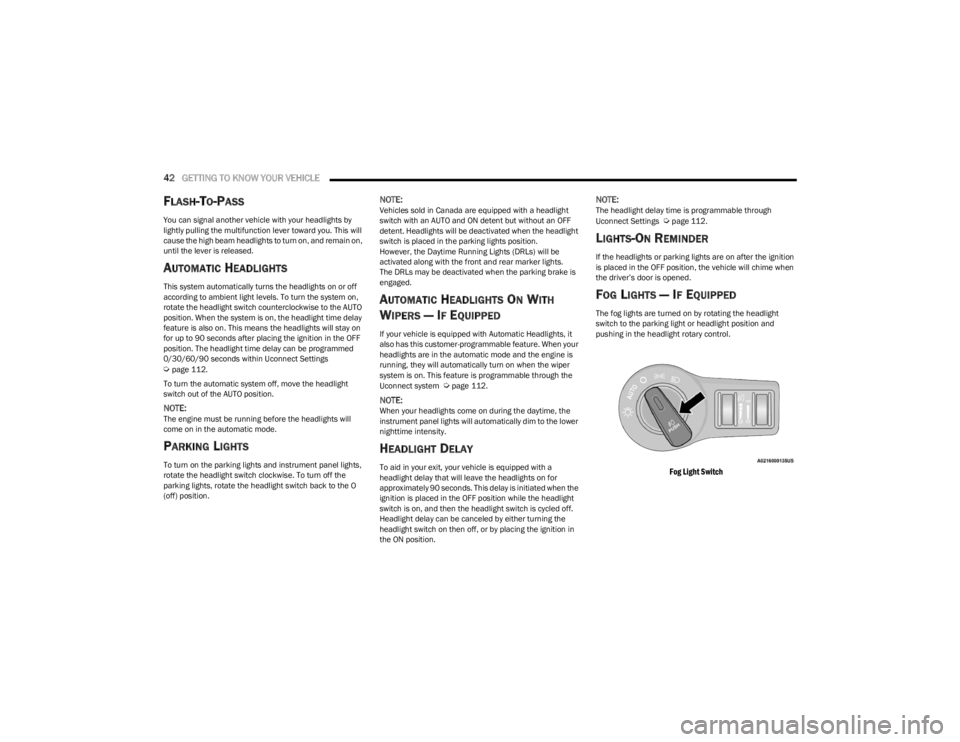
FOG LIGHTS — IF EQUIPPED
The fog lights are turned on by rotating the headlight
switch to the parking light or headlight position and
pushing in the headlight rotary control.
Fog Light Switch
23_LD_OM_EN_USC_t.book Page 42
Page 45 of 292
GETTING TO KNOW YOUR VEHICLE43
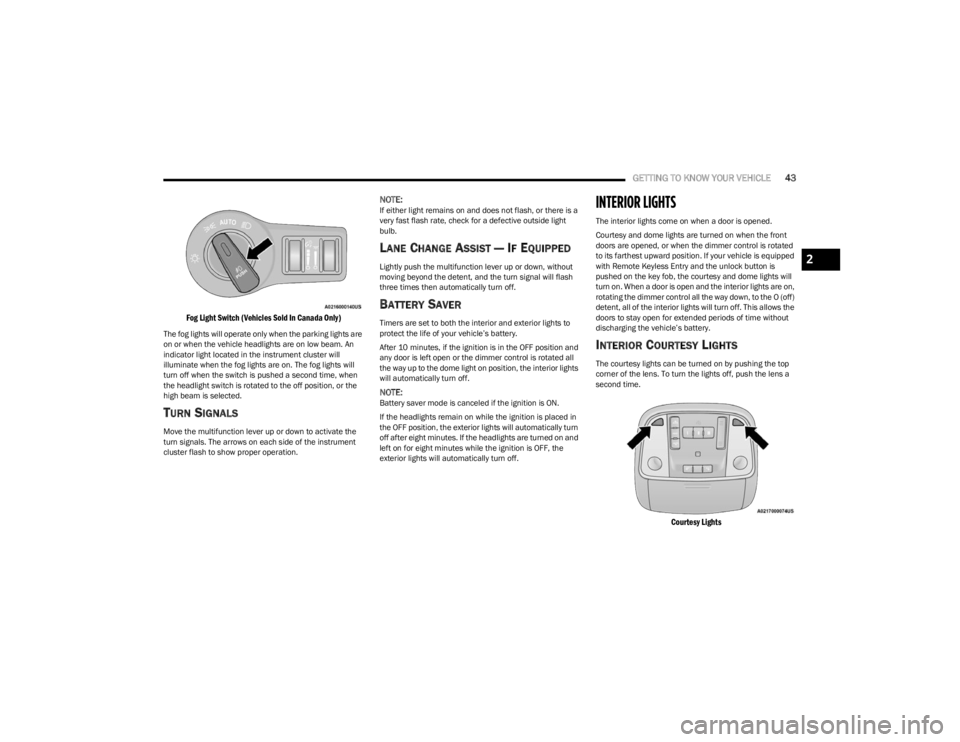
Fog Light Switch (Vehicles Sold In Canada Only)
The fog lights will operate only when the parking lights are
on or when the vehicle headlights are on low beam. An
indicator light located in the instrument cluster will
illuminate when the fog lights are on. The fog lights will
turn off when the switch is pushed a second time, when
the headlight switch is rotated to the off position, or the
high beam is selected.
TURN SIGNALS
Move the multifunction lever up or down to activate the
turn signals. The arrows on each side of the instrument
cluster flash to show proper operation.
NOTE:If either light remains on and does not flash, or there is a
very fast flash rate, check for a defective outside light
bulb.
LANE CHANGE ASSIST — IF EQUIPPED
Lightly push the multifunction lever up or down, without
moving beyond the detent, and the turn signal will flash
three times then automatically turn off.
BATTERY SAVER
Timers are set to both the interior and exterior lights to
protect the life of your vehicle’s battery.
After 10 minutes, if the ignition is in the OFF position and
any door is left open or the dimmer control is rotated all
the way up to the dome light on position, the interior lights
will automatically turn off.
NOTE:Battery saver mode is canceled if the ignition is ON.
If the headlights remain on while the ignition is placed in
the OFF position, the exterior lights will automatically turn
off after eight minutes. If the headlights are turned on and
left on for eight minutes while the ignition is OFF, the
exterior lights will automatically turn off.
INTERIOR LIGHTS
The interior lights come on when a door is opened.
Courtesy and dome lights are turned on when the front
doors are opened, or when the dimmer control is rotated
to its farthest upward position. If your vehicle is equipped
with Remote Keyless Entry and the unlock button is
pushed on the key fob, the courtesy and dome lights will
turn on. When a door is open and the interior lights are on,
rotating the dimmer control all the way down, to the O (off)
detent, all of the interior lights will turn off. This allows the
doors to stay open for extended periods of time without
discharging the vehicle’s battery.
INTERIOR COURTESY LIGHTS
The courtesy lights can be turned on by pushing the top
corner of the lens. To turn the lights off, push the lens a
second time.
Courtesy Lights
2
23_LD_OM_EN_USC_t.book Page 43
Page 51 of 292

GETTING TO KNOW YOUR VEHICLE49
Bi-Level Mode
Air comes from the instrument panel outlets
and floor outlets. A slight amount of air is
directed through the defrost and side window
demister outlets.
NOTE:Bi-Level mode is designed under comfort conditions to
provide cooler air out of the panel outlets and warmer air
from the floor outlets.
Floor Mode
Air comes from the floor outlets. A slight
amount of air is directed through the defrost
and side window demister outlets.
Mix Mode
Air is directed through the floor, defrost, and
side window demister outlets. This setting
works best in cold or snowy conditions that
require extra heat to the windshield. This
setting is good for maintaining comfort while reducing
moisture on the windshield.
Climate Control OFF Button
Press and release the OFF button on the
touchscreen, or push the OFF button on the
faceplate to turn the Climate Control ON/OFF.
MANUAL CLIMATE CONTROL
D
ESCRIPTIONS AND FUNCTIONS
Uconnect 4 With 7-inch Display Manual Climate Controls
Uconnect 4C/4C NAV With 8.4-inch Display Manual Climate Controls
MAX A/C Button
Press and release the MAX A/C button on the
touchscreen to change the current setting to
the coldest output of air. The MAX A/C indicator
illuminates when MAX A/C is on. Pressing the
button again will cause the MAX A/C operation to exit.
NOTE:The MAX A/C button is only available on the touchscreen.
A/C Button
Press and release this button on the
touchscreen, or push the button on the
faceplate to change the current setting.
The A/C indicator illuminates when A/C is on.
Recirculation Button
Press and release this button to change the
system between recirculation mode and
outside air mode. The Recirculation indicator
and the A/C indicator illuminate when the
Recirculation button is pressed. Recirculation can be used
when outside conditions such as smoke, odors, dust, or
high humidity are present. Recirculation can be used in all
modes except for Defrost. Recirculation may be
unavailable (button on the touchscreen grayed out) if
conditions exist that could create fogging on the inside of
the windshield. The A/C can be deselected manually
without disturbing the mode control selection. Continuous
use of the Recirculation mode may make the inside air
stuffy and window fogging may occur. Extended use of this
mode is not recommended. Recirculation mode may
automatically adjust to optimize customer experience for
warming, cooling, dehumidification, etc.
2
23_LD_OM_EN_USC_t.book Page 49
Page 75 of 292
GETTING TO KNOW YOUR INSTRUMENT PANEL73
This sequence will continue upon subsequent vehicle
start-ups as long as the malfunction exists. When the
malfunction indicator is illuminated, the system may not
be able to detect or signal low tire pressure as intended.
TPMS malfunctions may occur for a variety of reasons,
including the installation of replacement or alternate tires
or wheels on the vehicle that prevent the TPMS from
functioning properly. Always check the TPMS malfunction
telltale after replacing one or more tires or wheels on your
vehicle to ensure that the replacement or alternate tires
and wheels allow the TPMS to continue to function
properly.YELLOW INDICATOR LIGHTS
Forward Collision Warning (FCW) OFF
Indicator Light — If Equipped
This indicator light illuminates to indicate that
Forward Collision Warning is off Úpage 172.
GREEN INDICATOR LIGHTS
Adaptive Cruise Control (ACC) Set Without
Target Vehicle Indicator Light —
If Equipped
This will display the distance setting for the ACC
system when the system is engaged
Úpage 87.
Adaptive Cruise Control (ACC) Set With
Target Vehicle Indicator Light —
If Equipped
This will display when the ACC is set and a
vehicle in front is detected Úpage 87.
ECO Mode Indicator Light — If Equipped
This light will turn on when ECO mode is active.
Refer to the Drive Modes Supplement for
further information.
Cruise Control Set Indicator Light —
If Equipped
This indicator light will illuminate when the
cruise control is set to the desired speed
Úpage 85.
Front Fog Indicator Light — If Equipped
This indicator light will illuminate when the
front fog lights are on Úpage 40.
LaneSense Indicator Light — If Equipped
The LaneSense indicator light illuminates solid
green when both lane markings have been
detected and the system is “armed” and ready
to provide visual and torque warnings if an
unintentional lane departure occurs
Úpage 98.
Parking/Headlights On Indicator Light
This indicator light will illuminate when the
parking lights or headlights are turned on
Úpage 40.
CAUTION!
The TPMS has been optimized for the original
equipment tires and wheels. TPMS pressures and
warning have been established for the tire size
equipped on your vehicle. Undesirable system
operation or sensor damage may result when using
replacement equipment that is not of the same size,
type, and/or style. Aftermarket wheels can cause
sensor damage. Using aftermarket tire sealants may
cause the Tire Pressure Monitoring System (TPMS)
sensor to become inoperable. After using an
aftermarket tire sealant it is recommended that you
take your vehicle to an authorized dealer to have your
sensor function checked.
3
23_LD_OM_EN_USC_t.book Page 73
Page 89 of 292

STARTING AND OPERATING87
(Continued)
ADAPTIVE CRUISE CONTROL (ACC)
Adaptive Cruise Control (ACC) increases the driving
convenience provided by Cruise Control while traveling on
highways and major roadways. However, it is not a safety
system and not designed to prevent collisions. The Cruise
Control function performs differently
Úpage 85.
ACC will allow you to keep Cruise Control engaged in light
to moderate traffic conditions without the constant need
to reset your Cruise Control. ACC utilizes a radar sensor
and a forward facing camera designed to detect a vehicle
directly ahead of you.
NOTE:
If the ACC sensor detects a vehicle ahead, ACC will
apply limited braking or acceleration (not to exceed the
original set speed) automatically to maintain a preset
following distance, while matching the speed of the
vehicle ahead.
Any chassis/suspension or tire size modifications to
the vehicle will affect the performance of the Adaptive
Cruise Control and Forward Collision Warning systems.
Fixed Speed Cruise Control (ACC not enabled) will not
detect vehicles directly ahead of you. Always be aware
of the feature selected
Úpage 277.
WARNING!
Adaptive Cruise Control (ACC) is a convenience
system. It is not a substitute for active driver involve -
ment. It is always the driver’s responsibility to be
attentive of road, traffic, and weather conditions,
vehicle speed, distance to the vehicle ahead and,
most importantly, brake operation to ensure safe
operation of the vehicle under all road conditions.
Your complete attention is always required while
driving to maintain safe control of your vehicle.
Failure to follow these warnings can result in a colli -
sion and death or serious personal injury.
The ACC system:
Does not react to pedestrians, oncoming vehi -
cles, and stationary objects (e.g., a stopped
vehicle in a traffic jam or a disabled vehicle).
Cannot take street, traffic, and weather condi -
tions into account, and may be limited upon
adverse sight distance conditions.
Does not always fully recognize complex driving
conditions, which can result in wrong or missing
distance warnings.Will bring the vehicle to a complete stop while
following a vehicle ahead and hold the vehicle
for two seconds in the stop position. If the
vehicle ahead does not start moving within two
seconds, the ACC system will display a message
that the system will release the brakes and that
the brakes must be applied manually. An
audible chime will sound when the brakes are
released.
You should switch off the ACC system:
When driving in fog, heavy rain, heavy snow, sleet,
heavy traffic, and complex driving situations (i.e., in
highway construction zones).
When entering a turn lane or highway off-ramp; when
driving on roads that are winding, icy, snow-covered,
slippery, or have steep uphill or downhill slopes.
When towing a trailer up or down steep slopes.
When circumstances do not allow safe driving at a
constant speed.
WARNING!
4
23_LD_OM_EN_USC_t.book Page 87
Page 267 of 292

SERVICING AND MAINTENANCE265
Outside parking, which exposes your vehicle to airborne
contaminants, road surfaces on which the vehicle is
operated, extreme hot or cold weather and other extreme
conditions will have an adverse effect on paint, metal trim,
and underbody protection.
The following maintenance recommendations will enable
you to obtain maximum benefit from the corrosion
resistance built into your vehicle.
What Causes Corrosion?
Corrosion is the result of deterioration or removal of paint
and protective coatings from your vehicle.
The most common causes are:
Road salt, dirt and moisture accumulation.
Stone and gravel impact.
Insects, tree sap and tar.
Salt in the air near seacoast localities.
Atmospheric fallout/industrial pollutants.
BODY AND UNDERBODY MAINTENANCE
Cleaning Headlights
Your vehicle is equipped with plastic headlights and fog
lights that are lighter and less susceptible to stone
breakage than glass headlights.
Plastic is not as scratch resistant as glass and therefore
different lens cleaning procedures must be followed.
To minimize the possibility of scratching the lenses and
reducing light output, avoid wiping with a dry cloth. To
remove road dirt, wash with a mild soap solution followed
by rinsing. Do not use abrasive cleaning components, solvents, steel
wool or other aggressive material to clean the lenses.
PRESERVING THE BODYWORK
Washing
Wash your vehicle regularly. Always wash your vehicle
in the shade using Mopar® Car Wash, or a mild car
wash soap, and rinse the panels completely with water.
If insects, tar, or other similar deposits have accumu -
lated on your vehicle, use Mopar® Super Kleen Bug
and Tar Remover to remove.
Use a high quality cleaner wax, such as Mopar®
Cleaner Wax to remove road film, stains and to protect
your paint finish. Use precautions to not scratch the
paint.
Avoid using abrasive compounds and power buffing
that may diminish the gloss or thin out the paint finish.
Special Care
If you drive on salted or dusty roads or if you drive near
the ocean, hose off the undercarriage at least once a
month.
It is important that the drain holes in the lower edges of
the doors, rocker panels, and trunk be kept clear and
open.
If you detect any stone chips or scratches in the paint,
touch them up immediately.
If your vehicle is damaged due to a collision or similar
cause that destroys the paint and protective coating,
have your vehicle repaired as soon as possible.
If you carry special cargo such as chemicals, fertilizers,
de-icer salt, etc., be sure that such materials are well
packaged and sealed.
If a lot of driving is done on gravel roads, consider mud
or stone shields behind each wheel.
Use Mopar® Touch Up Paint on scratches as soon as
possible. An authorized dealer has touch up paint to
match the color of your vehicle.
INTERIORS
SEATS AND FABRIC PARTS
Use Mopar® Total Clean to clean fabric upholstery and
carpeting.
CAUTION!
Do not use abrasive or strong cleaning materials
such as steel wool or scouring powder that will
scratch metal and painted surfaces.
Use of power washers exceeding 1,200 psi
(8,274 kPa) can result in damage or removal of paint
and decals.
WARNING!
Do not use volatile solvents for cleaning purposes.
Many are potentially flammable, and if used in closed
areas they may cause respiratory harm.
8
23_LD_OM_EN_USC_t.book Page 265