stop start DODGE CHARGER SRT 2015 7.G User Guide
[x] Cancel search | Manufacturer: DODGE, Model Year: 2015, Model line: CHARGER SRT, Model: DODGE CHARGER SRT 2015 7.GPages: 595, PDF Size: 16.43 MB
Page 185 of 595
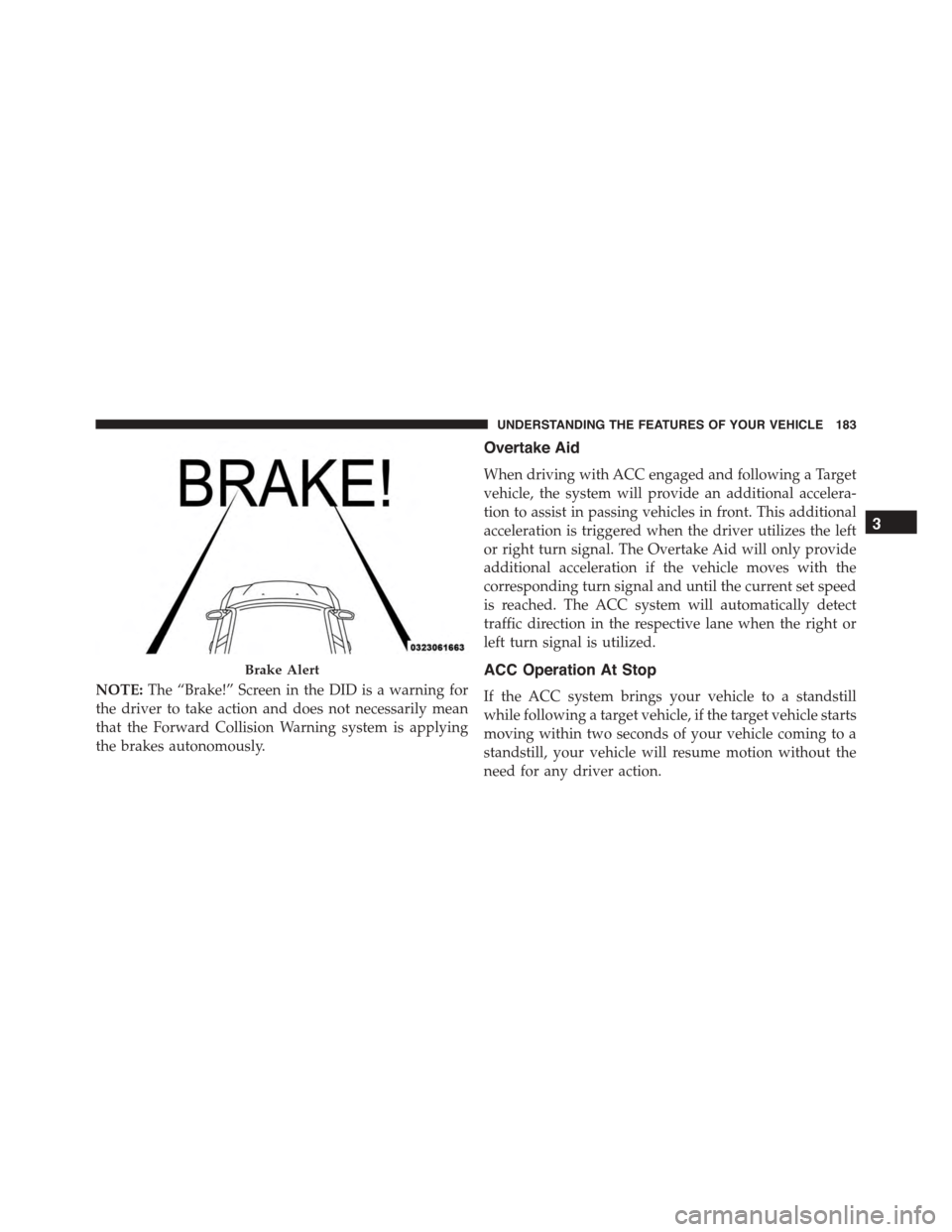
NOTE:The “Brake!” Screen in the DID is a warning for
the driver to take action and does not necessarily mean
that the Forward Collision Warning system is applying
the brakes autonomously.
Overtake Aid
When driving with ACC engaged and following a Target
vehicle, the system will provide an additional accelera-
tion to assist in passing vehicles in front. This additional
acceleration is triggered when the driver utilizes the left
or right turn signal. The Overtake Aid will only provide
additional acceleration if the vehicle moves with the
corresponding turn signal and until the current set speed
is reached. The ACC system will automatically detect
traffic direction in the respective lane when the right or
left turn signal is utilized.
ACC Operation At Stop
If the ACC system brings your vehicle to a standstill
while following a target vehicle, if the target vehicle starts
moving within two seconds of your vehicle coming to a
standstill, your vehicle will resume motion without the
need for any driver action.
Brake Alert
3
UNDERSTANDING THE FEATURES OF YOUR VEHICLE 183
Page 186 of 595
If the target vehicle does not start moving within two
seconds of your vehicle coming to a standstill, the ACC with
Stop system will cancel and the brakes will release. A cancel
message will display on the DID and produce a warning
chime. Driver intervention will be required at this moment.
While ACC with Stop is holding your vehicle at a
standstill, if the driver seatbelt is unbuckled or the driver
door is opened, the ACC with Stop system will cancel
and the brakes will release. A cancel message will display
on the DID and produce a warning chime. Driver inter-
vention will be required at this moment.
WARNING!
When the ACC system is resumed, the driver must
ensure that there are no pedestrians, vehicles or
objects in the path of the vehicle. Failure to follow
these warnings can result in a collision and death or
serious personal injury.
Adaptive Cruise Control (ACC) Menu
The DID displays the current ACC system settings. The
DID is located in the center of the instrument cluster. The
information it displays depends on ACC system status.
Push the ADAPTIVE CRUISE CONTROL (ACC) ON/
OFF button (located on the steering wheel) until one of
the following displays in the DID:
Adaptive Cruise Control Off
When ACC is deactivated, the display will read “Adap-
tive Cruise Control Off.”
Adaptive Cruise Control Ready
When ACC is activated but the vehicle speed setting has
not been selected, the display will read “Adaptive Cruise
Control Ready.”
184 UNDERSTANDING THE FEATURES OF YOUR VEHICLE
Page 250 of 595
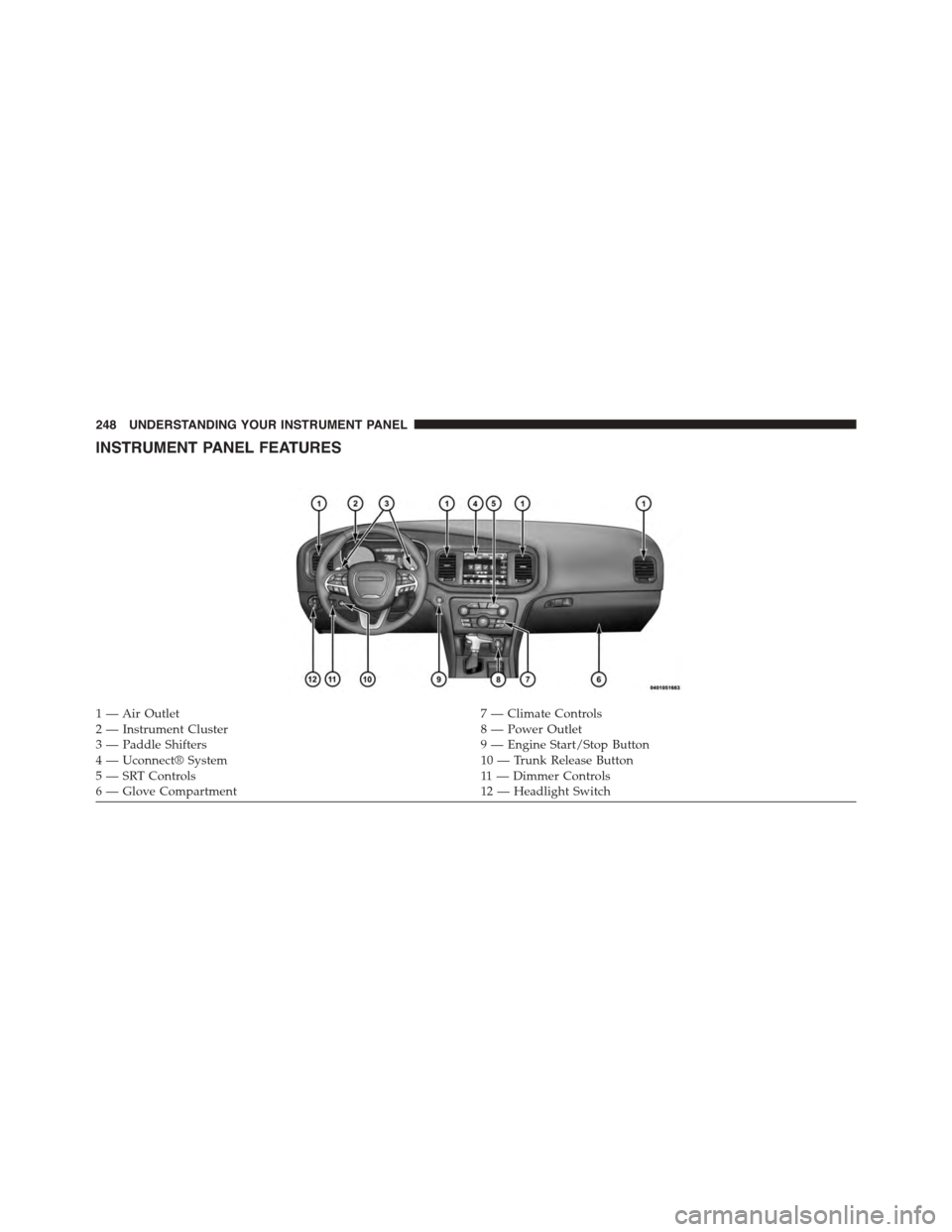
INSTRUMENT PANEL FEATURES
1 — Air Outlet7 — Climate Controls2 — Instrument Cluster8 — Power Outlet3—PaddleShifters9—EngineStart/StopButton4 — Uconnect® System10 — Trunk Release Button5—SRTControls11 — D i m m e r C o n t ro l s6—GloveCompartment12 — Headlight Switch
248 UNDERSTANDING YOUR INSTRUMENT PANEL
Page 260 of 595
The gauge pointer will likely indicate a higher tempera-
ture when driving in hot weather, up mountain grades,
or when towing a trailer. It should not be allowed to
exceed the upper limits of the normal operating range.
CAUTION!
Driving with a hot engine cooling system could
damage your vehicle. If the temperature gauge reads
“H,” pull over and stop the vehicle. Idle the vehicle
with the air conditioner turned off until the pointer
drops back into the normal range. If the pointer
remains on the “H,” and you hear a chime, turn the
engine OFF immediately and call for service.
WARNING!
A hot engine cooling system is dangerous. You or
others could be badly burned by steam or boiling
coolant. You may want to call a service center if your
vehicle overheats. If you decide to look under the
hood yourself, refer to “Maintaining Your Vehicle”
and follow the warnings under the Cooling System
Pressure Cap paragraph.
16. Seat Belt Reminder Light
This light will turn on for four to eight seconds as
a bulb check when the ignition is first placed in
ON/RUN position. A chime will sound if the
driver’s seat belt is unbuckled during the bulb check. The
Seat Belt Warning Light will flash or remain on continu-
ously if the driver’s seat belt remains unbuckled after the
bulb check or when driving. Refer to “Occupant Re-
straints” in “Things To Know Before Starting Your Ve-
hicle” for further information.
258 UNDERSTANDING YOUR INSTRUMENT PANEL
Page 265 of 595
•Pushing the left arrow button will exit each submenu
layer and return to the main menu.
For the Trip and Fuel Economy menus (and new Perfor-
mance Timers):
•Information is reset by pushing and holding the OK
button.
Engine Oil Life Reset
Oil Change Required
Your vehicle is equipped with an engine oil change
indicator system. The “Oil Change Required” message
will display in the DID for five seconds after a single
chime has sounded, to indicate the next scheduled oil
change interval. The engine oil change indicator system
is duty cycle based, which means the engine oil change
interval may fluctuate, dependent upon your personal
driving style.
Unless reset, this message will continue to display each
time you place the ignition in the ON/RUN position. To
turn off the message temporarily, push and release the
OK button. To reset the oil change indicator system (after
performing the scheduled maintenance), refer to the
following procedure.
Vehicles Equipped With Keyless Enter-N-Go™
1. Without pushing the brake pedal, push the ENGINE
START/STOP button and place the ignition to the
ON/RUN position (do not start the engine).
2. Fully push the accelerator pedal, slowly, three times
within 10 seconds.
3. Without pushing the brake pedal, push the ENGINE
START/STOP button once to return the ignition to the
OFF/LOCK position.
4
UNDERSTANDING YOUR INSTRUMENT PANEL 263
Page 269 of 595
•Decklid Ajar
This light will turn on to indicate the decklid
may be ajar.
•Oil Pressure Warning Light
This light indicates low engine oil pressure. The
light should turn on momentarily when the engine is
started. If the light turns on while driving, stop the
vehicle and shut off the engine as soon as possible. A
chime will sound for four minutes when this light turns
on.
Do not operate the vehicle until the cause is corrected.
This light does not show how much oil is in the engine.
The engine oil level must be checked under the hood.
•Charging System Light
This light shows the status of the electrical charg-
ing system. If the light stays on or comes on while
driving, turn off some of the vehicle’s non-essential
electrical devices or increase engine speed (if at idle). If
the charging system light remains on, it means that the
vehicle is experiencing a problem with the charging
system. OBTAIN SERVICE IMMEDIATELY. See an au-
thorized dealer.
If jump starting is required, refer to “Jump Starting
Procedures” in “What To Do In Emergencies.”
4
UNDERSTANDING YOUR INSTRUMENT PANEL 267
Page 270 of 595
•Electronic Throttle Control (ETC) Light
This light informs you of a problem with the
Electronic Throttle Control (ETC) system. The
light will come on when the ignition is first
turned ON and remain on briefly as a bulb
check. If the light does not come on during starting, have
the system checked by an authorized dealer.
If a problem is detected, the light will come on while the
engine is running. Cycle the ignition key when the
vehicle has completely stopped and the shift lever is
placed in the PARK position. The light should turn off.
If the light remains lit with the engine running, your
vehicle will usually be drivable. However, see an autho-
rized dealer for service as soon as possible. If the light is
flashing when the engine is running, immediate service is
required. You may experience reduced performance, an
elevated/rough idle or engine stall, and your vehicle
may require towing.
•Oil Temperature Warning Light
This telltale indicates engine oil temperature is
high. If the light turns on while driving, stop
the vehicle and shut off the engine as soon as
possible.
•Air Bag Warning Light
This light will turn on for four to eight seconds
as a bulb check when the ignition switch is first
turned to the ON/RUN position. If the light is
either not on during starting, stays on, or turns
on while driving, have the system inspected at an autho-
rized dealer as soon as possible. Refer to “Occupant
Restraints” in “Things To Know Before Starting Your
Vehicle” for further information.
268 UNDERSTANDING YOUR INSTRUMENT PANEL
Page 277 of 595
Lap Timer
When selected, the Lap Timer page will show the timer
always at 0:00.00 with the previous Best and Last time
data (unless the driver has cleared it via hold to Reset).
•PushingOKwill start “current” timer from 0:00.0.
•WhenOKis pushed, the times are updated accord-
ingly.
•As soon as the driver exits the Lap Timer pages, the
“current” timer will stop and the time will be reset to
0:00.00.
•If the driver stays on the Lap Timer pages, the “cur-
rent” timer will reset to 0:00.0 when ignition is placed
in the off position, or ignition placed in the ON
position (or will roll over at 59:59.99 if ever possible).
•Each time the driver pushesOKfor a Lap that current
time populates, the Last time and also populates the
1st (top) space on the Timer History page the current
time resets to 0:00.0 at every push of theOKbutton.
•The timer will stop when the driver navigates away
from this page.
Lap History
When selected, this screen displays the Lap History, and
will color highlight the time that is the best time from the
Timer Page.
•Each time the driver presses the OK button (while on
the Lap Timer page) the current Lap Time populates
the 1st spot and the rest of the data shifts down.
•Color will indicate the time that is the best time from
the Timer Page.
•Holding theOKbutton only resets the page you are
on.
•Lap History page is a static display of lap times only.
4
UNDERSTANDING YOUR INSTRUMENT PANEL 275
Page 372 of 595
CAUTION!
Damage to the transmission may occur if the follow-
ing precautions are not observed:
•Do not shift from REVERSE, PARK, or NEUTRAL
into any forward gear when the engine is above
idle speed.
•Shift into PARK only after the vehicle has come to
a complete stop.
•Shift into or out of REVERSE only after the vehicle
has come to a complete stop and the engine is at
idle speed.
•Before shifting into any gear, make sure your foot
is firmly on the brake pedal.
Keyless Enter-N-Go™
This feature allows the driver to oper-
ate the ignition switch with the push
of a button, as long as the Remote
Start/Keyless Enter-N-Go™ Key Fob
is in the passenger compartment.
Normal Starting
Using The ENGINE START/STOP Button
1. The transmission must be in PARK or NEUTRAL.
2. Press and hold the brake pedal while pushing the
ENGINE START/STOP button once.
3. The system takes over and attempts to start the
vehicle. If the vehicle fails to start, the starter will
disengage automatically after 10 seconds.
370 STARTING AND OPERATING
Page 373 of 595
4. If you wish to stop the cranking of the engine prior to
the engine starting, push the button again.
NOTE:Normal starting of either a cold or a warm engine
is obtained without pumping or pressing the accelerator
pedal.
To Turn Off The Engine Using ENGINE
START/STOP Button
1. Place the shift lever/gear selector in PARK, then press
and release the ENGINE START/STOP button.
2. The ignition switch will return to the OFF position.
3. If the shift lever/gear selector is not in PARK, the
ENGINE START/STOP button must be held for two
seconds or three short presses in a row with the
vehicle speed above 5 mph (8 km/h) before the engine
will shut off. The ignition switch position will remain
in the ACC position until the shift lever/gear selector
is in PARK and the button is pressed twice to the OFF
position. If the shift lever/gear selector is not in PARK
and the ENGINE START/STOP button is pressed
once, the DID will display a “Vehicle Not In Park”
message and the engine will remain running. Never
leave a vehicle out of the PARK position, or it could
roll.
NOTE:If the ignition switch is left in the ACC or RUN
(engine not running) position and the transmission is in
PARK, the system will automatically time out after 30
minutes of inactivity and the ignition will switch to the
OFF position.
5
STARTING AND OPERATING 371