radio DODGE CHARGER SRT 2015 7.G Owner's Guide
[x] Cancel search | Manufacturer: DODGE, Model Year: 2015, Model line: CHARGER SRT, Model: DODGE CHARGER SRT 2015 7.GPages: 595, PDF Size: 16.43 MB
Page 356 of 595
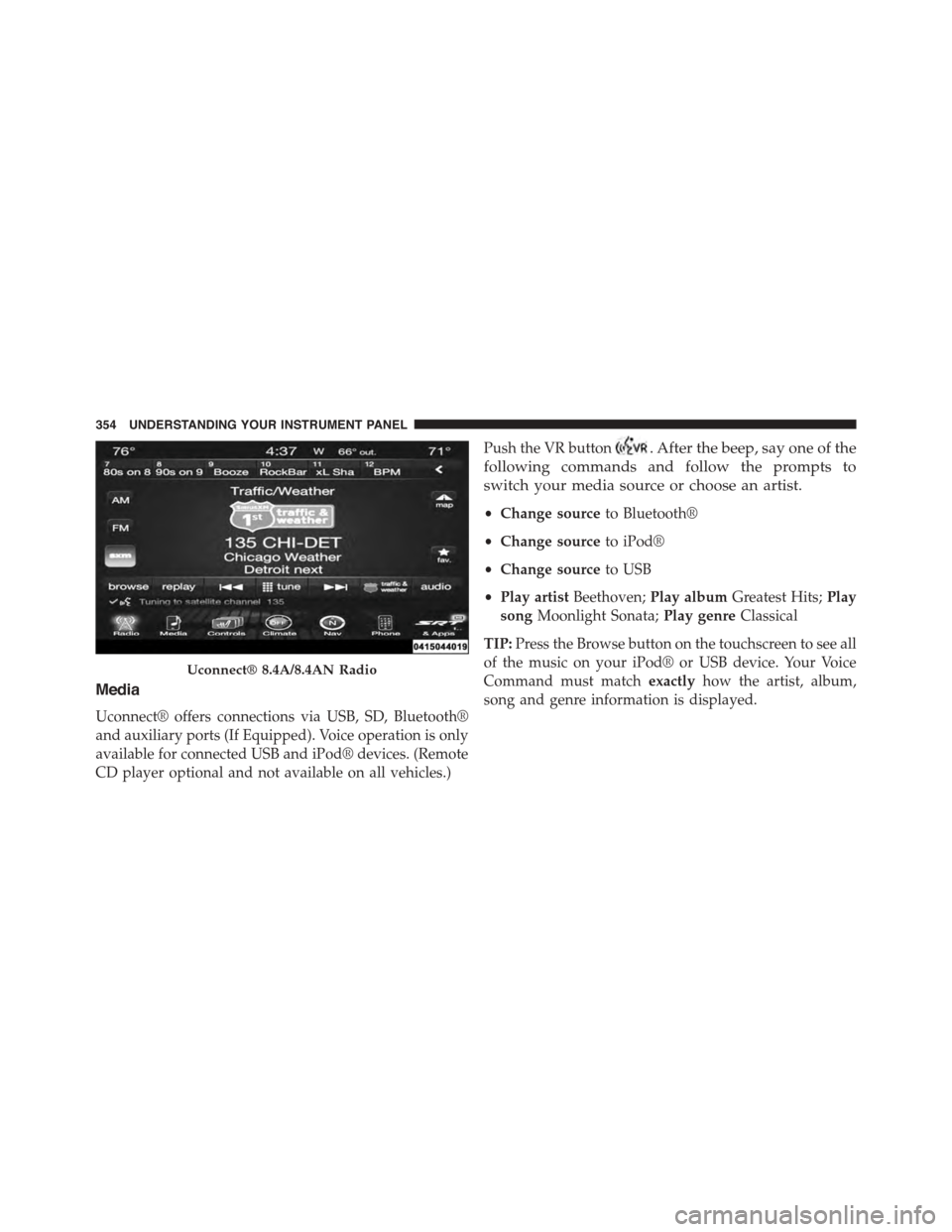
Media
Uconnect® offers connections via USB, SD, Bluetooth®
and auxiliary ports (If Equipped). Voice operation is only
available for connected USB and iPod® devices. (Remote
CD player optional and not available on all vehicles.)
Push the VR button. After the beep, say one of the
following commands and follow the prompts to
switch your media source or choose an artist.
•Change sourceto Bluetooth®
•Change sourceto iPod®
•Change sourceto USB
•Play artistBeethoven;Play albumGreatest Hits;Play
songMoonlight Sonata;Play genreClassical
TIP:Press the Browse button on the touchscreen to see all
of the music on your iPod® or USB device. Your Voice
Command must matchexactlyhow the artist, album,
song and genre information is displayed.
Uconnect® 8.4A/8.4AN Radio
354 UNDERSTANDING YOUR INSTRUMENT PANEL
Page 366 of 595
related marks and logos are trademarks of SiriusXM
Radio Inc. Yelp, Yelp logo, Yelp burst and related marks
are registered trademarks of Yelp.
Uconnect® System Support:
•U.S. residents call 1-877-855-8400 or visit
DriveUconnect.com
•Canadian residents call 1-800-465-2001 (English) or
1-800-387-9983 (French) or visit DriveUconnect.ca
Mon. – Fri., 7:00 am – 12:00 am, ET
Sat., 8:00 am – 10:00 pm, ET
Sun., 9:00 am – 5:00 pm, ET
Uconnect® Access Services Support 1-855-792-4241.
Please have your Uconnect® Security PIN ready when
you call.
364 UNDERSTANDING YOUR INSTRUMENT PANEL
Page 409 of 595
ABS is activated during braking under certain road or
stopping conditions. ABS-inducing conditions can in-
clude ice, snow, gravel, bumps, railroad tracks, loose
debris, or panic stops.
You also may experience the following when the brake
system goes into anti-lock:
•The ABS motor running (it may continue to run for a
short time after the stop).
•The clicking sound of solenoid valves.
•Brake pedal pulsations.
•A slight drop or fall away of the brake pedal at the end
of the stop.
These are all normal characteristics of ABS.
WARNING!
•The ABS contains sophisticated electronic equip-
ment that may be susceptible to interference
caused by improperly installed or high output
radio transmitting equipment. This interference
can cause possible loss of anti-lock braking capa-
bility. Installation of such equipment should be
performed by qualified professionals.
•Pumping of the Anti-Lock Brakes will diminish
their effectiveness and may lead to a collision.
Pumping makes the stopping distance longer. Just
press firmly on your brake pedal when you need to
slow down or stop.
(Continued)
5
STARTING AND OPERATING 407
Page 414 of 595
Track Mode
Track Mode is intended to be used when driving on a
track. This raises the threshold for ESC activation further
than Sport and also has track tuned TCS to improve
vehicle performance while on a road course type track.
NOTE:
•To enter Sport ESC mode momentarily press the#ESC
Off#switch, or use the buttons on the Drive modes
pages in the radio. Pressing the#ESC off#switch again
with cycle through to Track ESC mode. Pressing the
#ESC off#button a third time will bring ESC back to
Street Mode.
•To improve the vehicle’s traction when driving with
snow chains, or when starting off in deep snow, sand,
or gravel, it may be desirable to switch to the “Sport
Mode” by momentarily pressing the “ESC Off” switch.
Once the situation requiring “Sport Mode” is over-
come, turn the ESC ON again by momentarily pressing
the “ESC Off” switch. This may be done while the
vehicle is in motion.
WARNING!
When in “Sport/Track” mode, the TCS portion of
ESC, except for the limited wheel spin feature de-
scribed in the TCS section, has been disabled and the
“ESC Off Indicator Light” will be illuminated. When
in “Sport/Track” mode, the enhanced vehicle stabil-
ity offered by the ESC system is reduced.
412 STARTING AND OPERATING
Page 450 of 595
original color, and the “TPM Telltale Light” will turn off.
The vehicle may need to be driven for up to 20 minutes
above 15 mph (24 km/h) in order for the TPMS to receive
this information.
Service TPMS Warning
If a system fault is detected, the “TPM Telltale Light” will
flash on and off for 75 seconds and then remain on solid.
The system fault will also sound a chime. In addition, the
DID will display a#SERVICE TPM SYSTEM#message for
a minimum of five seconds and then display dashes (- -)
in place of the pressure value to indicate which sensor is
not being received.
If the ignition switch is cycled, this sequence will repeat,
providing the system fault still exists. If the system fault
no longer exists, the “TPM Telltale Light” will no longer
flash, and the#SERVICE TPM SYSTEM#message will no
longer display, and a pressure value will display in place
of the dashes. A system fault can occur due to any of the
following:
1. Signal interference due to electronic devices or driving
next to facilities emitting the same radio frequencies as
the TPM sensors.
2. Installing aftermarket window tinting that contains
materials that may block radio wave signals.
3. Accumulation of snow or ice around the wheels or
wheel housings.
4. Using tire chains on the vehicle.
5. Using wheels/tires not equipped with TPM sensors.
The DID will also display a#SERVICE TPM SYSTEM#
message for a minimum of five seconds when a system
fault related to an incorrect sensor location fault is
detected. In this case, the#SERVICE TPM SYSTEM#
448 STARTING AND OPERATING
Page 466 of 595
HAZARD WARNING FLASHERS
The Hazard Warning flasher switch is located on the
instrument panel, below the radio.
Push the switch to turn on the Hazard Warning
flasher. When the switch is activated, all direc-
tional turn signals will flash on and off to warn oncoming
traffic of an emergency. Push the switch a second time to
turn off the Hazard Warning flashers.
This is an emergency warning system and it should not
be used when the vehicle is in motion. Use it when your
vehicle is disabled and it is creating a safety hazard for
other motorists.
When you must leave the vehicle to seek assistance, the
Hazard Warning flashers will continue to operate even
though the ignition is placed in the OFF position.
NOTE:With extended use the Hazard Warning flashers
may wear down your battery.
IF YOUR ENGINE OVERHEATS
In any of the following situations, you can reduce the
potential for overheating by taking the appropriate action.
•On the highways — slow down.
•In city traffic — while stopped, place the transmission
in NEUTRAL, but do not increase the engine idle
speed.
NOTE:There are steps that you can take to slow down
an impending overheat condition:
•If your air conditioner (A/C) is on, turn it off. The A/C
system adds heat to the engine cooling system and
turning the A/C off can help remove this heat.
•You can also turn the temperature control to maximum
heat, the mode control to floor and the blower control
to high. This allows the heater core to act as a
supplement to the radiator and aids in removing heat
from the engine cooling system.
464 WHAT TO DO IN EMERGENCIES
Page 481 of 595
WARNING!
•Take care to avoid the radiator cooling fan when-
ever the hood is raised. It can start anytime the
ignition switch is ON. You can be injured by
moving fan blades.
•Remove any metal jewelry such as watch bands or
bracelets that might make an inadvertent electrical
contact. You could be seriously injured.
•Batteries contain sulfuric acid that can burn your
skin or eyes and generate hydrogen gas which is
flammable and explosive. Keep open flames or
sparks away from the battery.
1. Set the parking brake, shift the automatic transmission
into PARK and place the ignition in the OFF position.
2. Turn off the heater, radio, and all unnecessary electri-
cal accessories.
Remote Battery Post Locations
1 — Remote Positive(+)Post2—RemoteNegative(-)Post
6
WHAT TO DO IN EMERGENCIES 479
Page 528 of 595
CAUTION!
Do not use Alcohol and Alcohol-based and/or Keton
based cleaning products to clean leather seats, as
damage to the seat may result.
Cleaning Headlights
Your vehicle is equipped with plastic headlights and fog
lights that are lighter and less susceptible to stone break-
age than glass headlights.
Plastic is not as scratch resistant as glass and therefore
different lens cleaning procedures must be followed.
To minimize the possibility of scratching the lenses and
reducing light output, avoid wiping with a dry cloth. To
remove road dirt, wash with a mild soap solution fol-
lowed by rinsing.
Do not use abrasive cleaning components, solvents, steel
wool or other aggressive material to clean the lenses.
Glass Surfaces
All glass surfaces should be cleaned on a regular basis
with MOPAR® Glass Cleaner, or any commercial
household-type glass cleaner. Never use an abrasive type
cleaner. Use caution when cleaning the inside rear win-
dow equipped with electric defrosters or windows
equipped with radio antennas. Do not use scrapers or
other sharp instrument that may scratch the elements.
When cleaning the rear view mirror, spray cleaner on the
towel or rag that you are using. Do not spray cleaner
directly on the mirror.
Cleaning Plastic Instrument Cluster Lenses
The lenses in front of the instruments in this vehicle are
molded in clear plastic. When cleaning the lenses, care
must be taken to avoid scratching the plastic.
526 MAINTAINING YOUR VEHICLE
Page 540 of 595
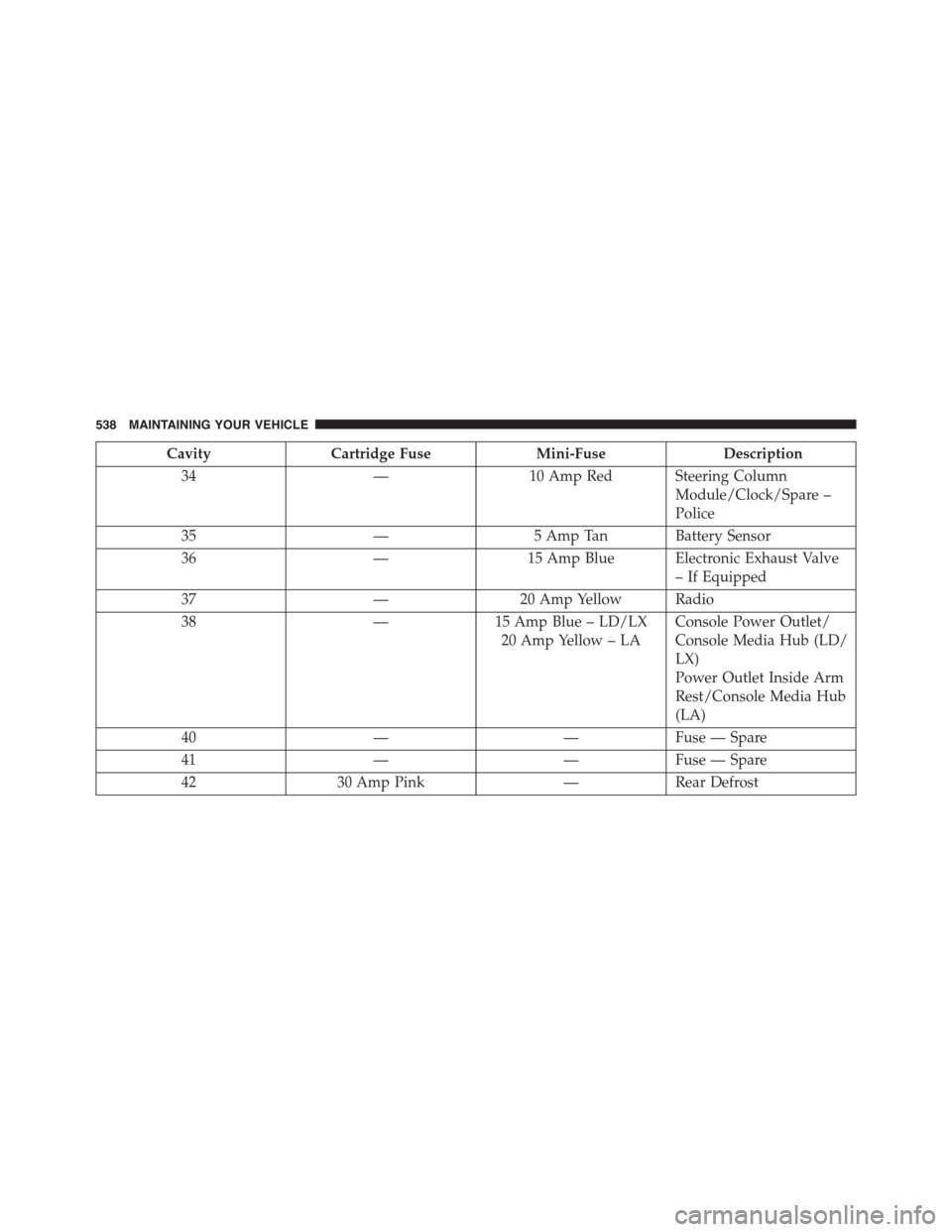
CavityCartridge FuseMini-FuseDescription
34—10 Amp Red Steering Column
Module/Clock/Spare –
Police
35—5 Amp Tan Battery Sensor
36—15 Amp Blue Electronic Exhaust Valve
– If Equipped
37—20 Amp Yellow Radio
38—15 Amp Blue – LD/LX
20 Amp Yellow – LA
Console Power Outlet/
Console Media Hub (LD/
LX)
Power Outlet Inside Arm
Rest/Console Media Hub
(LA)
40——Fuse — Spare
41——Fuse — Spare
4230 Amp Pink—Rear Defrost
538 MAINTAINING YOUR VEHICLE
Page 584 of 595
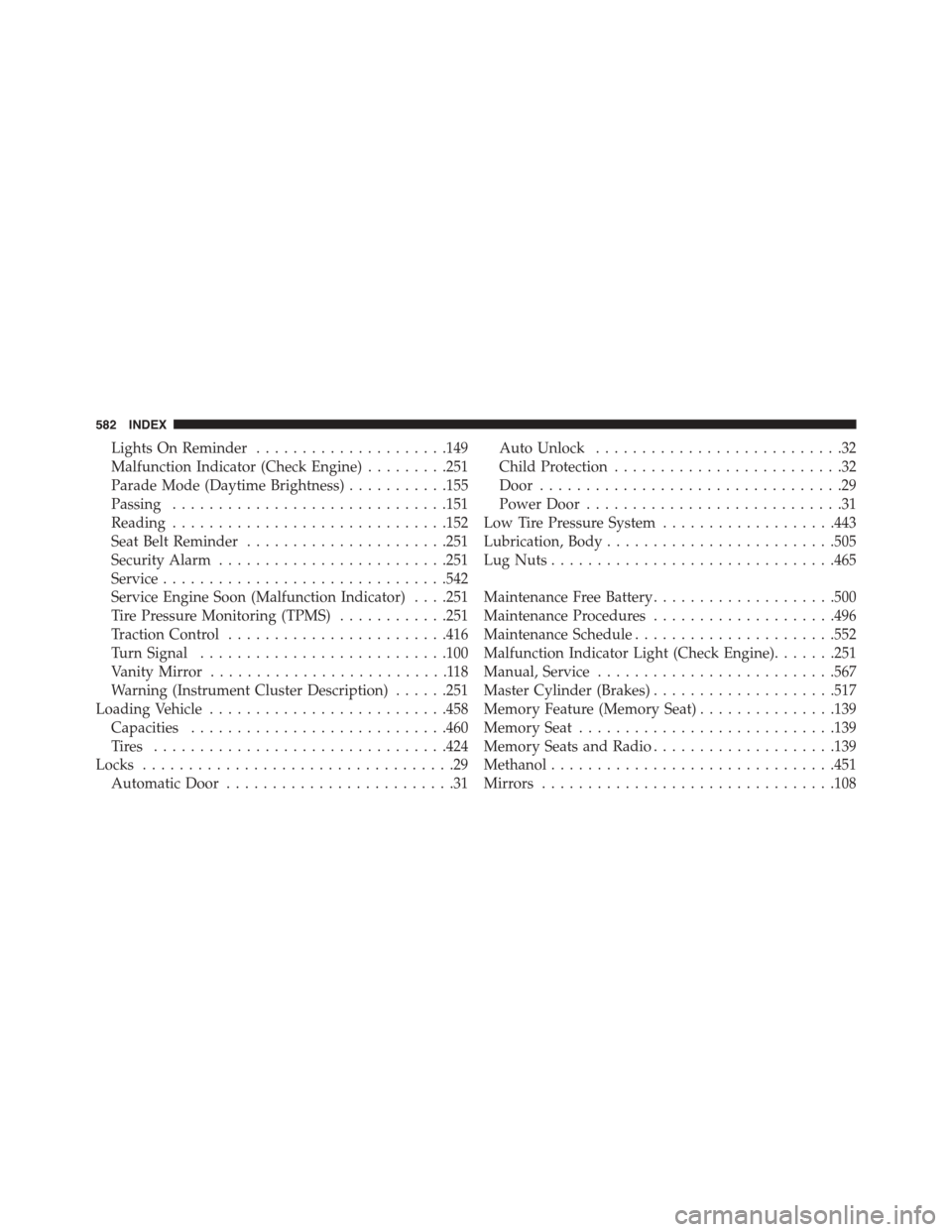
Lights On Reminder.....................149
Malfunction Indicator (Check Engine).........251
Parade Mode (Daytime Brightness)...........155
Passing..............................151
Reading..............................152
Seat Belt Reminder......................251
Security Alarm.........................251
Service...............................542
Service Engine Soon (Malfunction Indicator) . . . .251
Tire Pressure Monitoring (TPMS)............251
Traction Control........................416
Turn Signal...........................100
Vanity Mirror..........................118
Warning (Instrument Cluster Description)......251
Loading Vehicle..........................458
Capacities............................460
Ti re s . . . . . . . . . . . . . . . . . . . . . . . . . . . . . . ..424
Locks..................................29
Automatic Door.........................31
Auto Unlock...........................32
Child Protection.........................32
Door.................................29
Power Door............................31
Low Tire Pressure System...................443
Lubrication, Body.........................505
Lug Nuts...............................465
Maintenance Free Battery....................500
Maintenance Procedures....................496
Maintenance Schedule......................552
Malfunction Indicator Light (Check Engine).......251
Manual, Service..........................567
Master Cylinder (Brakes)....................517
Memory Feature (Memory Seat)...............139
Memory Seat............................139
Memory Seats and Radio....................139
Methanol...............................451
Mirrors................................108
582 INDEX