radio DODGE CHARGER SRT 2015 7.G Uconnect 5
[x] Cancel search | Manufacturer: DODGE, Model Year: 2015, Model line: CHARGER SRT, Model: DODGE CHARGER SRT 2015 7.GPages: 56, PDF Size: 1.09 MB
Page 34 of 56
Get Started
1. VisitUconnectPhone.comto check mobile device and
feature compatibility and to find phone pairing in-
structions.
2. Reduce background noise. Wind and passenger con-
versations are examples of noise that may impact
recognition.
3. Speak clearly at a normal pace and volume while
facing straight ahead. The microphone is positioned
on the rearview mirror and aimed at the driver.
4. Each time you give a Voice Command, you must first
push either the VR or PHONE button, wait untilafter
the beep, then say your Voice Command.
5. You can interrupt the help message or system prompts
by pushing the VR or PHONE button and saying a
Voice Command from current category.
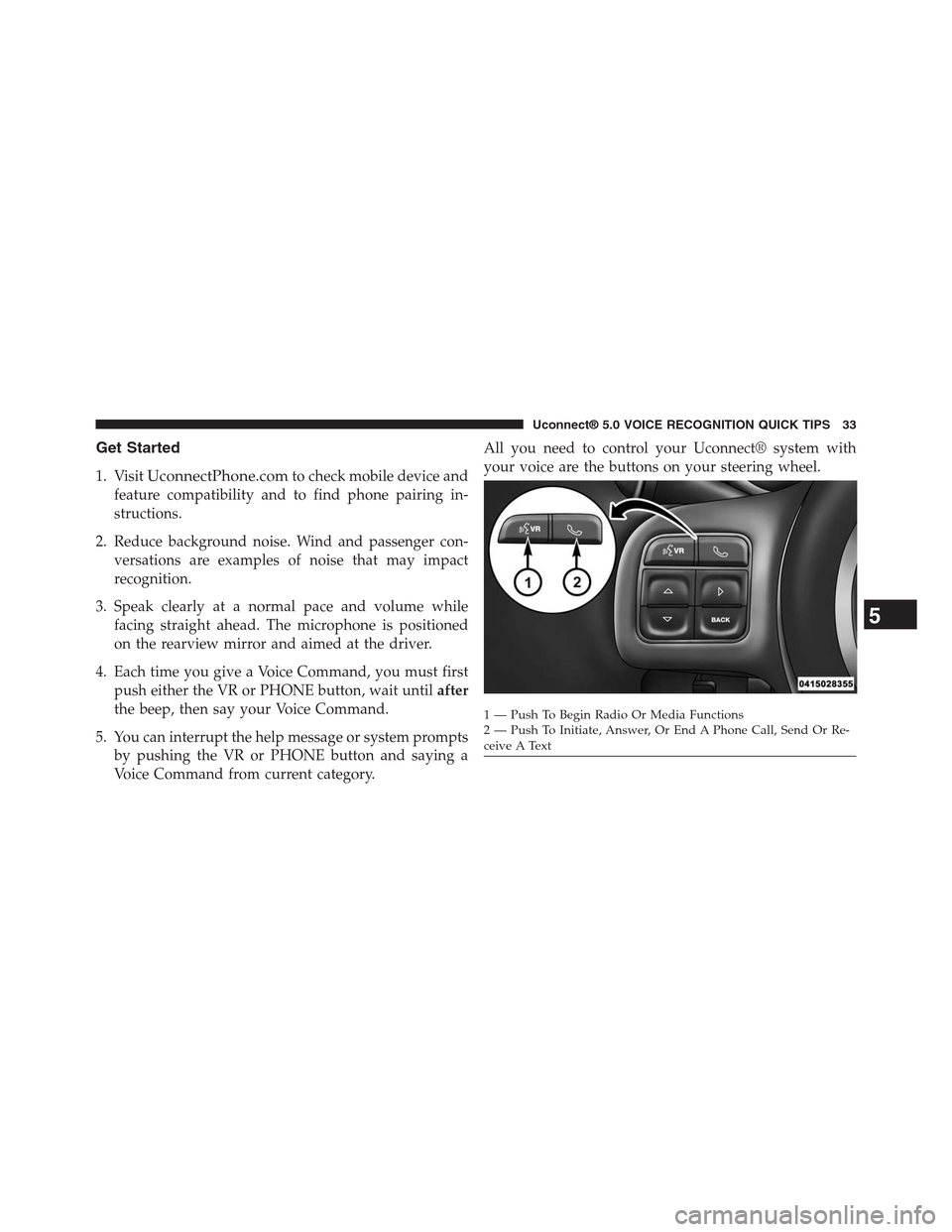
All you need to control your Uconnect® system with
your voice are the buttons on your steering wheel.
1—PushToBeginRadioOrMediaFunctions2 — Push To Initiate, Answer, Or End A Phone Call, Send Or Re-ceive A Text
5
Uconnect® 5.0 VOICE RECOGNITION QUICK TIPS 33
Page 35 of 56
Basic Voice Commands
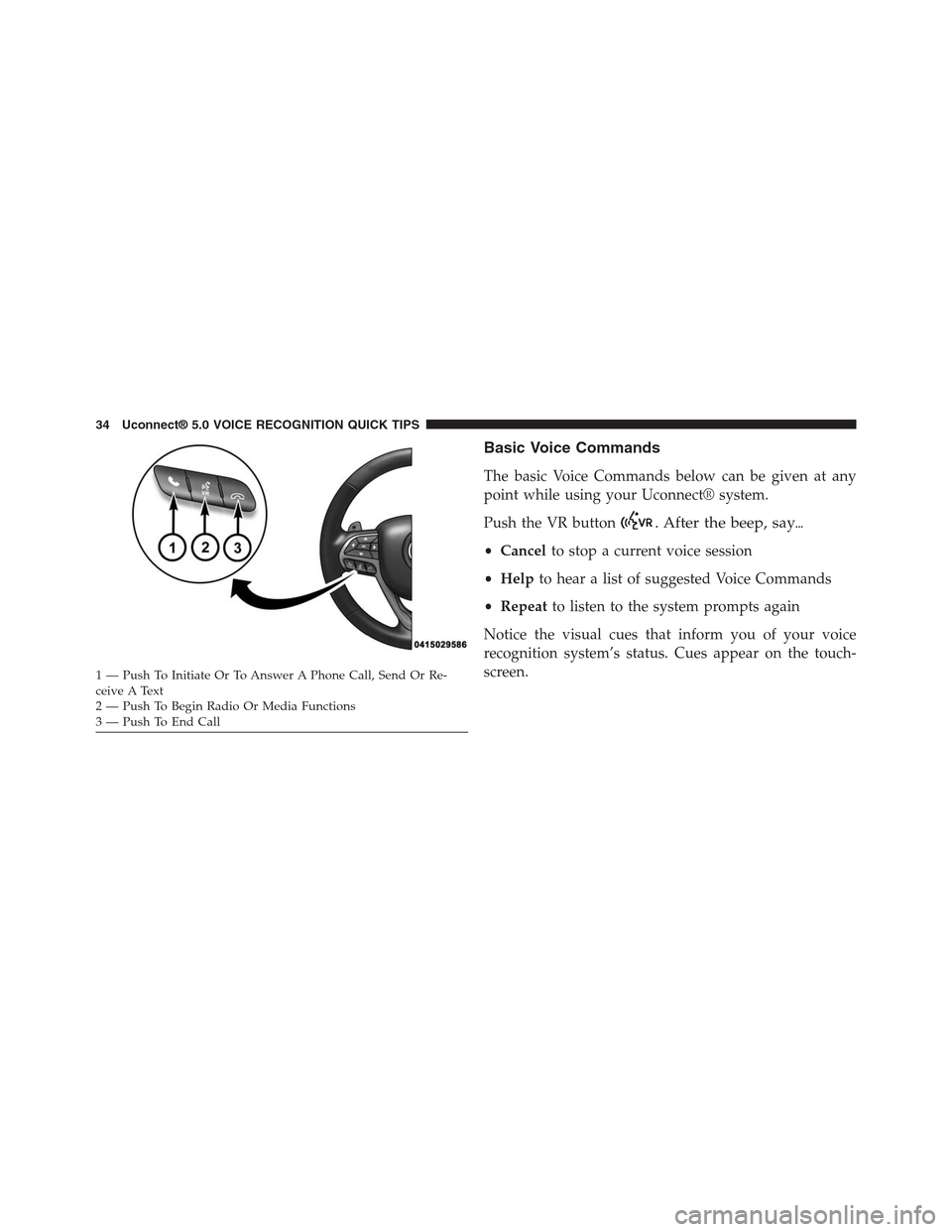
The basic Voice Commands below can be given at any
point while using your Uconnect® system.
Push the VR button. After the beep, say#
•Cancelto stop a current voice session
•Helpto hear a list of suggested Voice Commands
•Repeatto listen to the system prompts again
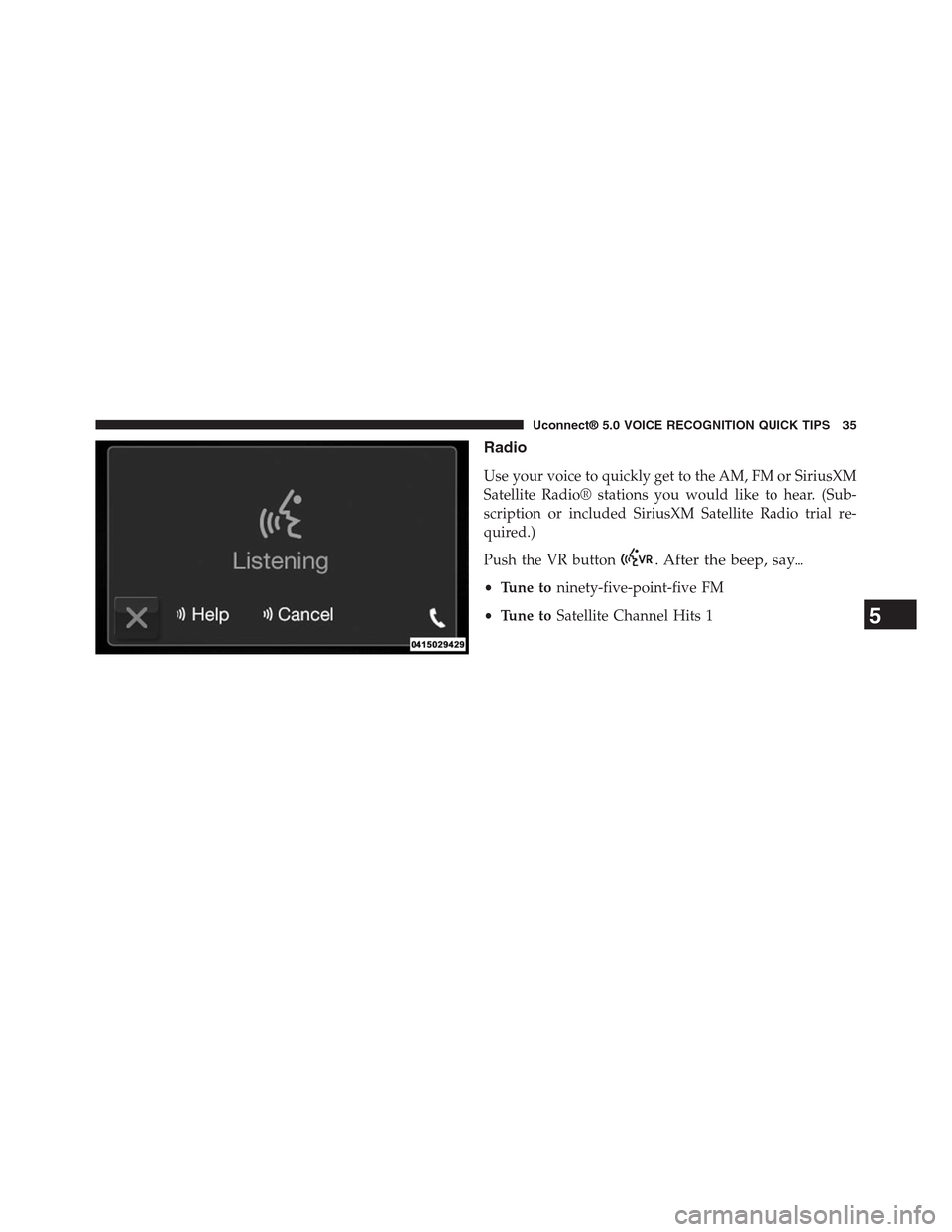
Notice the visual cues that inform you of your voice
recognition system’s status. Cues appear on the touch-
screen.1 — Push To Initiate Or To Answer A Phone Call, Send Or Re-ceive A Text2—PushToBeginRadioOrMediaFunctions3—PushToEndCall
34 Uconnect® 5.0 VOICE RECOGNITION QUICK TIPS
Page 36 of 56
Radio
Use your voice to quickly get to the AM, FM or SiriusXM
Satellite Radio® stations you would like to hear. (Sub-
scription or included SiriusXM Satellite Radio trial re-
quired.)
Push the VR button. After the beep, say#
•Tune toninety-five-point-five FM
•Tune toSatellite Channel Hits 15
Uconnect® 5.0 VOICE RECOGNITION QUICK TIPS 35
Page 40 of 56
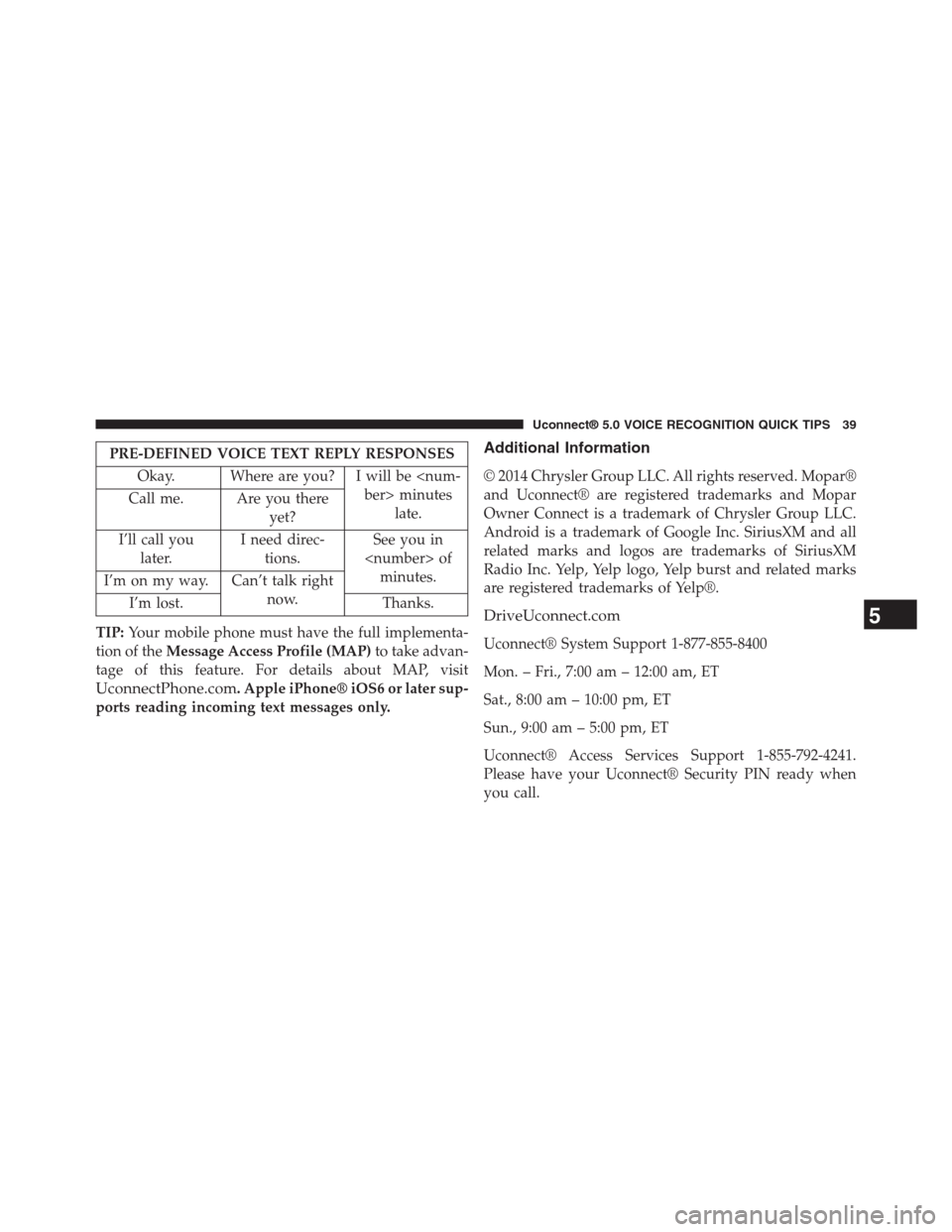
PRE-DEFINED VOICE TEXT REPLY RESPONSES
Okay. Where are you? I will be
late.Call me. Are you there
yet?
I’ll call you
later.
I need direc-
tions.
See you in
minutes.I’m on my way. Can’t talk right
now.I’m lost. Thanks.
TIP:Your mobile phone must have the full implementa-
tion of theMessage Access Profile (MAP)to take advan-
tage of this feature. For details about MAP, visit
UconnectPhone.com. Apple iPhone® iOS6 or later sup-
ports reading incoming text messages only.
Additional Information
© 2014 Chrysler Group LLC. All rights reserved. Mopar®
and Uconnect® are registered trademarks and Mopar
Owner Connect is a trademark of Chrysler Group LLC.
Android is a trademark of Google Inc. SiriusXM and all
related marks and logos are trademarks of SiriusXM
Radio Inc. Yelp, Yelp logo, Yelp burst and related marks
are registered trademarks of Yelp®.
DriveUconnect.com
Uconnect® System Support 1-877-855-8400
Mon. – Fri., 7:00 am – 12:00 am, ET
Sat., 8:00 am – 10:00 pm, ET
Sun., 9:00 am – 5:00 pm, ET
Uconnect® Access Services Support 1-855-792-4241.
Please have your Uconnect® Security PIN ready when
you call.
5
Uconnect® 5.0 VOICE RECOGNITION QUICK TIPS 39
Page 44 of 56
Touchscreen Beep
When in this display, you may turn on or shut off the
sound heard when a touchscreen button is pressed. Press
the “Touchscreen Beep” button on the touchscreen and
select either On or Off. Press the “Back Arrow” button on
the touchscreen to return to the previous menu.
Voice — If Equipped
When in this display, you may change the Voice Re-
sponse Length settings. To change the Voice Response
Length, press the “Brief” or “Detailed” button on the
touchscreen. Press the “Back Arrow” button on the
touchscreen to return to the previous menu.
Clock & Date
Refer to the “Radio” section for details.
Safety/Assistance — If Equipped
Refer to “Understanding Your Instrument
Panel/Uconnect® System” section in your vehicle Own-
er ’s Manual for details.
Lights
When this feature is selected, it allows the adjustment of
the amount of time the headlights remain on after the
engine is shut off. To change the Headlights Off Delay
setting, press the “Headlights Off Delay” button on the
touchscreen, and choose either 0 sec, 30 sec, 60 sec or 90
seconds. Press the “Back Arrow” button on the touch-
screen to return to the previous menu.
6
SETTINGS MAIN MENU 43
Page 47 of 56
Compass Calibration
Press the “Compass Calibration” button on the touch-
screen to change this setting. This compass is self-
calibrating, which eliminates the need to manually reset
the compass. When the vehicle is new, the compass may
appear erratic and it may need to be calibrated. You may
also calibrate the compass by pressing the “Yes” button
on the touchscreen popup and completing one or more
360-degree turns (in an area free from large metal or
metallic objects) until the CAL indicator displayed in the
EVIC turns off. The compass will now function normally.
Audio
Refer to the “Operating Instructions/Radio” section in
this manual for details.
Phone/Bluetooth®
Refer to the “Uconnect® Phone” section in this manual
for details.
SiriusXM Setup
Refer to the “Radio” section in this manual for details.
46 SETTINGS MAIN MENU
Page 49 of 56
+ MORE MAIN MENU
Push the + MORE button located on the faceplate to
display the + MORE Main Menu. The + MORE Main
Menu may contain the following options:
Clock
Refer to the “Uconnect® 5.0/Radio Mode” section in this
manual for details.
48 + MORE MAIN MENU
Page 53 of 56
Disc Drive
•Do not insert any damaged, warped, scratched or dirty
Discs into the Disc Player.
•Discs that have been modified with an adhesive label
should not be used in the Disc Player.
•Do not insert more than one Disc at a time into the
drive slot.
FCC Declaration
This device complies with Part 15 of the FCC Rules and
with Industry Canada license-exempt RSS standard(s).
Operation is subject to the following two conditions:
1. This device may not cause harmful interference.
2. This device must accept any interference received,
including interference that may cause undesired op-
eration.
NOTE:This equipment has been tested and found to
comply with the limits for a Class B digital device,
pursuant to Part 15 of the FCC Rules. These limits are
designed to provide reasonable protection against harm-
ful interference in a residential installation. This equip-
ment generates, uses and can radiate radio frequency
energy and, if not installed and used in accordance with
the instructions, may cause harmful interference to radio
communications. However, there is no guarantee that
interference will not occur in a particular installation.
52 SAFETY GUIDELINES
Page 54 of 56
If this equipment does cause harmful interference to
radio or television reception, which can be determined by
turning the equipment off and on, the user is encouraged
to try to correct the interference by one or more of the
following measures:
•Increase the separation between the equipment and
receiver.
•Consult the dealer or an experienced radio technician
for help.
Safety Information
Exposure To Radio Frequency Radiation
The radiated output power of the this internal wireless
radio is far below the FCC radio frequency exposure
limits. Nevertheless, the wireless radio shall be used in
such a manner that the radio is 20 cm (200 mm) or further
from the human body.
The internal wireless radio operates within guidelines
found in radio frequency safety standards and recom-
mendations, which reflect the consensus of the scientific
community.
8
SAFETY GUIDELINES 53
Page 55 of 56
The radio manufacturer believes the internal wireless
radio is safe for use by consumers. The level of energy
emitted is far less than the electromagnetic energy emit-
ted by wireless devices such as mobile phones. However,
the use of wireless radios may be restricted in some
situations or environments, such as aboard airplanes. If
you are unsure of restrictions, you are encouraged to ask
for authorization before turning on the wireless radio.
54 SAFETY GUIDELINES