audio DODGE CHARGER SRT 2015 7.G Uconnect 8.4A
[x] Cancel search | Manufacturer: DODGE, Model Year: 2015, Model line: CHARGER SRT, Model: DODGE CHARGER SRT 2015 7.GPages: 429, PDF Size: 4.01 MB
Page 155 of 429
12.How do I know how much data is being used?
Uconnect® Access Via Mobile uses your smart-
phone’s existing data plan to stream content. Data
usage varies by phone/device, content (e.g. videos),
high quality audio and several other factors. Please
refer to your device carrier for specific details.
MAINTAIN MY Uconnect® ACCESS ACCOUNT
Reinstalling An App
From the in-vehicle touchscreen do the following:
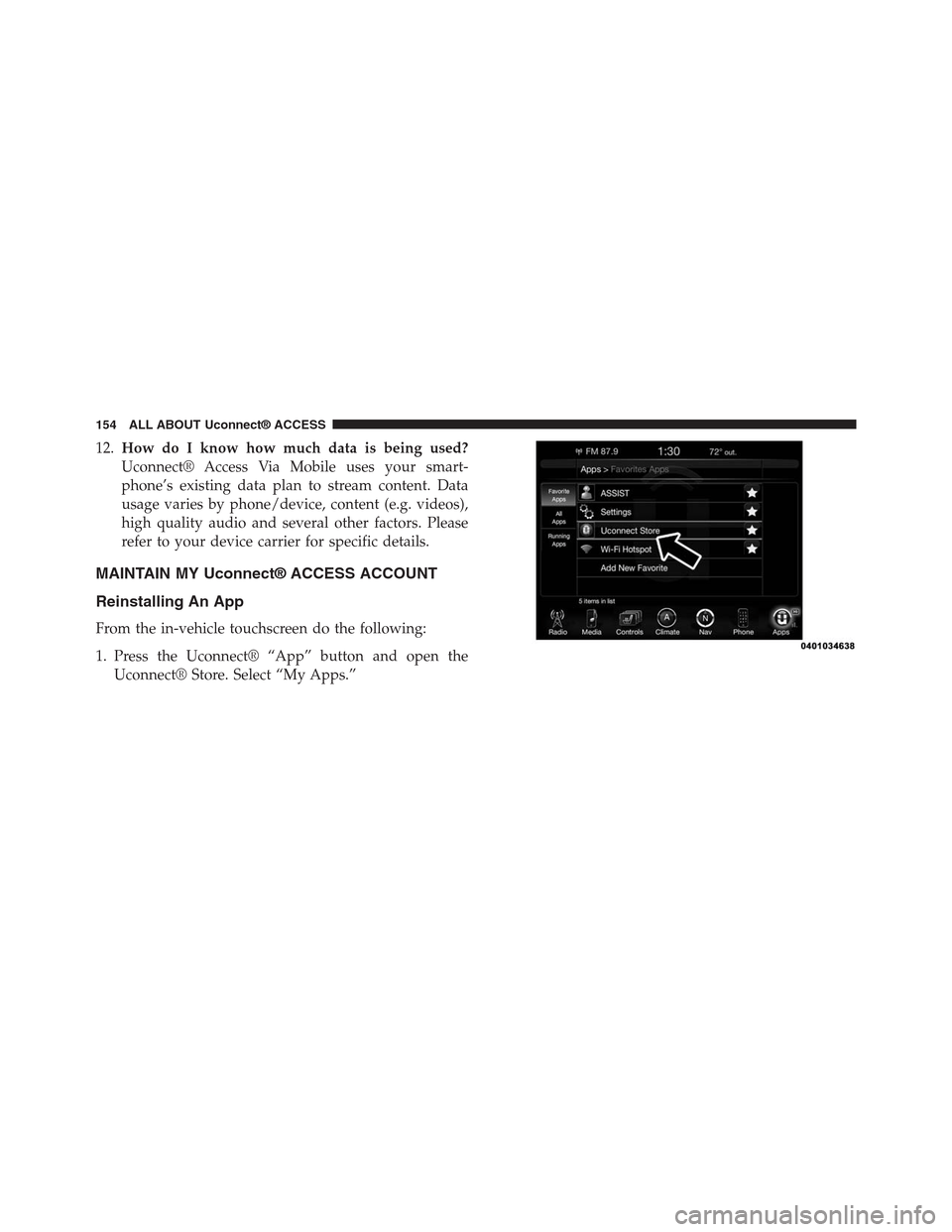
1. Press the Uconnect® “App” button and open the
Uconnect® Store. Select “My Apps.”
154 ALL ABOUT Uconnect® ACCESS
Page 170 of 429
The internal wireless radio operates within guidelines
found in radio frequency safety standards and recom-
mendations, which reflect the consensus of the scientific
community. The radio manufacturer believes the internal
wireless radio is safe for use by consumers. The level of
energy emitted is far less than the electromagnetic energy
emitted by wireless devices such as mobile phones.
DEVICE CONNECTION AND AUDIO TIPS WITH
Uconnect®
•More than one phone or device can be paired to your
vehicle. The connected device with the highest priority
will be used. To transition between devices, Select
Phone > Settings, then press the desired device.
•Multiple devices may be connected at one time. For
example, a phone can be paired and connected for
hands-free calling and texting, while a USB media
source is connected for audio. However, only one
Bluetooth® connection can be used at a time.
•Phone calls will always have the highest priority
regardless of which connection is active (only the 9-1-1
Call and Assist will have a higher priority than the
phone). For example, if an App is launched and the
user receives a call, the user will be exited out of the
App and returned to the App when the call ends.
•After all devices are connected/paired, when switch-
ing to a different audio source, audio will auto-play
from the new source.
2
ALL ABOUT Uconnect® ACCESS 169
Page 171 of 429
•Current audio (AM/FM/SXM/AUX) will continue to
play when switching to a non-media type App.
•Current audio (AM/FM/SXM/AUX) is muted during
Assist and 9-1-1 Call.
•Phone calls will mute all audio except for NAV
prompts if guidance is currently active (audio will
resume after phone call is ended).
•All secondary incoming phone calls will be treated
similar to “call waiting” (except 9-1-1 Call).
•When connecting a second device via USB, that device
will have priority and auto play accordingly. A phone
that is already paired/connected will still be available
for hands-free calling and texting.
•Incoming calls received while entering a nav destina-
tion (before pressing “Go”) will cancel the nav entry.
The user is required to start over when the phone call
has ended.
170 ALL ABOUT Uconnect® ACCESS
Page 172 of 429
Uconnect® 8.4A — If Equipped
CONTENTS
!Uconnect® 8.4A SYSTEM.................173
!RADIO MODE.........................174
▫Setting Presets........................177
▫SiriusXM Satellite Radio Mode — If Equipped . .178
▫Audio..............................185
!MEDIA MODE.........................187
▫Disc Mode — If Equipped...............187
▫USB/iPod® Mode.....................189
▫AUX Mode..........................190
▫SD Card Mode — If Equipped............191
▫Bluetooth® Mode.....................193
!Uconnect® PHONE.....................195
▫Overview...........................195
▫Operation...........................198
▫Phone Call Features...................208
▫Uconnect® Phone Features..............213
▫Advanced Phone Connectivity............217
▫Things You Should Know About Your Uconnect®
Phone.............................217
▫General Information...................224
3
Page 176 of 429
VOLUME/MUTE Control
Push the VOLUME/MUTE control knob to mute the
radio. Push the VOLUME/MUTE control knob a second
time to unmute the radio.
The electronic volume control turns continuously (360
degrees) in either direction, without stopping. Turning
the Volume control knob clockwise increases the volume,
and counter-clockwise decreases it.
TUNE/SCROLL Control
When the audio system is turned on, the sound will be
set at the same volume level as last played.
Turn the rotary TUNE/SCROLL control knob clockwise
to increase or counterclockwise to decrease the radio
station frequency. Press the ENTER/BROWSE button to
choose a selection.
Screen Close
The “X” button on touchscreen, located at the top right,
provides a means to close the Direct Tune Screen. The
Direct Tune Screen also auto closes if no activity occurs
within 10 seconds.
Seek And Direct Tune Functions
The Seek Up and Down functions are activated by
pressing the “double arrow”buttons on the
touchscreen to the right and left of the radio station
display, or by pushing the left “Steering Wheel Audio
Control” (if equipped) up or down.
Seek Up
Press and release the “Seek Up”button on the
touchscreen to tune the radio to the next listenable
station or channel. During a Seek Up function, if the
3
Uconnect® 8.4A — If Equipped 175
Page 181 of 429
Acquiring SiriusXM Subscription
To activate the SiriusXM Satellite Radio subscription, call
1-800-643-2112 for U.S. residents and 1-877-438-9677 for
Canadian residents. You will need to provide the Sirius
ID (RID) located at the bottom of the Channel 0 screen.
The Satellite Mode is activated by a press of the “SXM”
button on the touchscreen.
When in Satellite mode:
•The SXM button on the touchscreen is highlighted.
•The SiriusXM Presets are displayed at the top of the
screen.
•The Genre is displayed below the Presets Bar.
•The SiriusXM Channel Number is displayed in the
center.
•The Program Information is displayed at the bottom of
the Channel Number.
•The SiriusXM function buttons on the touchscreens are
displayed below the Program Information.
Tuning is done by operating the TUNE/SCROLL knob or
by Direct Tune, similar to other Radio Bands, see Presets,
Browse, TUNE/SCROLL knob and Direct Tune.
In addition to the tuning Operation functions common to
all Radio modes, the replay, Traffic/Weather Jump, and
fav button functions are available in SiriusXM Mode.
Replay
The replay function provides a means to store and replay
up to 22 minutes of music audio and 48 minutes of talk
radio. Once the channel is switched, content in replay
memory is lost.
Press the “Replay” button on the touchscreen. The play/
pause, rewind/forward and live buttons will display at
the top of the screen, along with the replay time.
180 Uconnect® 8.4A — If Equipped
Page 186 of 429
Alert Settings
Press the “Alert Setting” tab at the top of the screen. The
Alert Settings menu allows you to choose from “Alert me
to on-air games upon start” or “Alert upon score update”
or both when one or more of your selections is airing on
any of the SiriusXM channels.
Audio
Press of the “Audio” button on the touchscreen to
activate the Audio settings screen to adjust
Balance\Fade, Equalizer, and Speed Adjusted Volume.
You can return to the Radio screen by pressing the “X”
located at the top right.
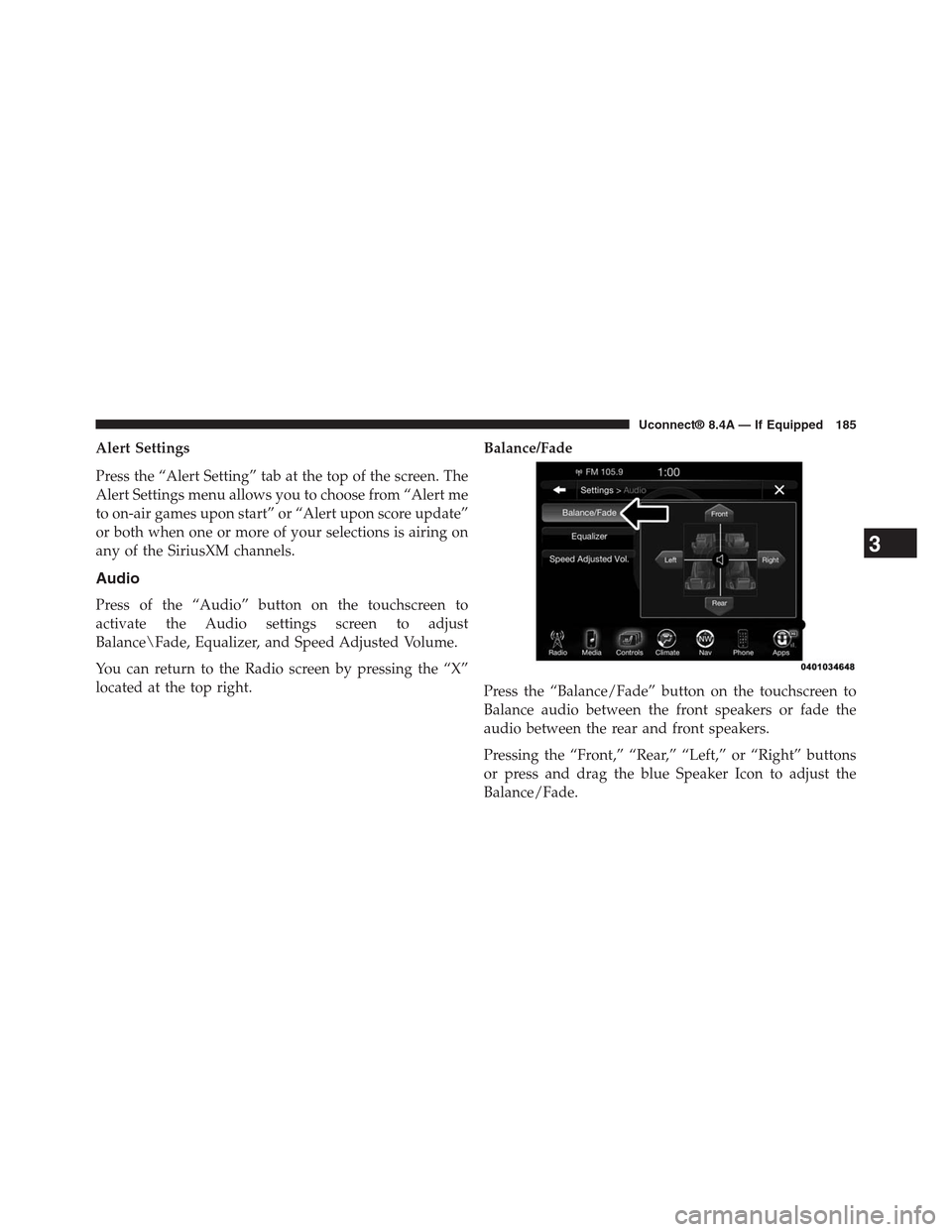
Balance/Fade
Press the “Balance/Fade” button on the touchscreen to
Balance audio between the front speakers or fade the
audio between the rear and front speakers.
Pressing the “Front,” “Rear,” “Left,” or “Right” buttons
or press and drag the blue Speaker Icon to adjust the
Balance/Fade.
3
Uconnect® 8.4A — If Equipped 185
Page 188 of 429
the audio volume with variation to vehicle speed. Vol-
ume increases automatically as speed increase to com-
pensate for normal road noise.
Surround Sound (If Equipped)
Press the “On” button on the touchscreen to activate
Surround Sound. Press “Off” to deactivate this feature.
When Surround Sound is On, you can hear audio coming
from every direction as in a movie theatre or home
theatre system.
MEDIA MODE
Disc Mode — If Equipped
Overview
Disc Mode is entered by either inserting a Disc or
pressing the “Disc” button on the left side of the display.
Once in Media Mode, press the “Source” button on the
touchscreen and select “Disc.”
A “Insert Disc” message will be displayed on the screen
in the Disc mode when a Disc is not present in the Radio.
Seek Up/Seek Down
Press and release the Seek Upbutton on the touch-
screen for the next selection on the Disc. Press and
release the Seek Downbutton on the touchscreen to
return to the beginning of the current selection, or to
return to the beginning of the previous selection if the
Disc is within the first three seconds of the current
selection.
Browse
Press the “Browse” button on the touchscreen to display
the browse window. The left side of the browse window
displays a list of ways you can browse through the
contents of the Disc. If supported by the device, you can
browse by Folders, Artists, Playlists, Albums, Songs, etc.
Press the desired button on the touchscreen on the left
side of the screen. The center of the browse window
3
Uconnect® 8.4A — If Equipped 187
Page 189 of 429
shows items and it’s sub-functions, which can be scrolled
by pressing the “Up” and “Down” buttons to the right.
The TUNE/SCROLL knob can also be used to scroll.
Media Mode
Press the “Media” button on the touchscreen to select the
desired audio source: Disc.
Repeat
Press the “Repeat” button on the touchscreen to toggle
the repeat functionality. The Repeat button on the touch-
screen is highlighted when active. The Radio will con-
tinue to play the current track, repeatedly, as long as the
repeat is active.
Shuffle
Press the “Shuffle” button on the touchscreen to play the
selections on the compact disc in random order to
provide an interesting change of pace. Press the button
on the touchscreen a second time to turn this feature off.
Info
Press the “Info” button on the touchscreen to display the
current track information. Press the “Info” button on the
touchscreen a second time to cancel this feature.
Tracks
Press the “trks” button on the touchscreen to display a
pop up with the Song List. The currently playing song is
indicated by an arrow and lines above and below the
song title. When in the Tracks List screen you can rotate
the TUNE/SCROLL knob to highlight a track (indicated
by the line above and below the track name) and then
push the ENTER/BROWSE knob to start playing that
track.
Pressing the “trks” button on the touchscreen while the
pop up is displayed will close the pop up.
188 Uconnect® 8.4A — If Equipped
Page 190 of 429
USB/iPod® Mode
Overview
USB/iPod® Mode is entered by either inserting a USB
device or iPod® and cable into the USB Port or press the
“iPod®” button on the left side of the display.
Seek Up/Seek Down
Press and release the Seek Upbutton on the touch-
screen for the next selection on the USB device/iPod®.
Press and release the Seek Downbutton on the
touchscreen to return to the beginning of the current
selection, or to return to the beginning of the previous
selection if the USB device/iPod® is within the first
three seconds of the current selection.
Browse
Press the “Browse” button on the touchscreen to display
the browse window. The left side of the browse window
displays a list of ways you can browse through the
contents of the USB device/iPod®. If supported by the
device, you can browse by Folders, Artists, Playlists,
Albums, Songs, etc. Press the desired button on the left
side of the screen. The center of the browse window
shows items and it’s sub-functions, which can be scrolled
by pressing the “Up” and “Down” buttons to the right.
The TUNE/SCROLL knob can also be used to scroll.
Media Mode
Press the “Media” button on the touchscreen to select the
desired audio source: USB.
Repeat
Press the “Repeat” button on the touchscreen to toggle
the repeat functionality. The Repeat button on the touch-
screen is highlighted when active. The Radio will con-
tinue to play the current track, repeatedly, as long as the
repeat is active.
3
Uconnect® 8.4A — If Equipped 189