mirror DODGE CHARGER SRT 2015 7.G Uconnect 8.4A
[x] Cancel search | Manufacturer: DODGE, Model Year: 2015, Model line: CHARGER SRT, Model: DODGE CHARGER SRT 2015 7.GPages: 429, PDF Size: 4.01 MB
Page 283 of 429
costs, you are responsible for them. If Roadside Assis-
tance is provided to your vehicle, you agree to be
responsible for any additional roadside assistance service
costs that you may incur.
To provide Uconnect® Services to you, we may record
and monitor your conversations with Roadside Assis-
tance, Uconnect® Care or Vehicle Care, whether such
conversations are initiated through the Uconnect® Ser-
vices in your vehicle, or via a landline or mobile tele-
phone, and may share information obtained through
such recording and monitoring in accordance with regu-
latory requirements. You acknowledge, agree and con-
sent to any recording, monitoring or sharing of informa-
tion obtained through any such call recordings.
9-1-1 Call — If Equipped
The 9-1-1 Call system is an embedded phone system that
allows you to connect to a 9-1-1 operator in an emer-
gency. You can choose to press the “9-1-1 Call” button on
the Rearview Mirror to contact a 9-1-1 operator.
9–1–1 Call Operating Instructions
1. Push the “9-1-1 Call” button on the Rearview Mirror;
NOTE:In case the 9-1-1 Call button is pushed in error,
there will be a 10 second delay before the 9-1-1 Call
system initiates a call to a 9-1-1 operator. To cancel the
9-1-1 Call connection, push the “9-1-1 Call” button on the
Rearview Mirror or press the “cancellation” button on
the Phone Screen. Termination of the 9-1-1 Call will turn
the green LED light on the Rearview Mirror off.
282 Uconnect® 8.4A — If Equipped
Page 284 of 429
2. The LED light on the Rearview Mirror will turn green
once a connection to a 9-1-1 operator has been made;
3. Once a connection between the vehicle and a 9-1-1
operator is made, the 9-1-1 Call system may transmit
the following important vehicle information to a 9-1-1
operator:
•indication that the occupant placed a 9-1-1 Call
•the vehicle brand; and
•the last known GPS coordinates of the vehicle
4. You should be able to speak with the 9-1-1 operator
through the vehicle audio system to determine if
additional help is needed.
NOTE:Once a connection is made between the vehicle’s
9-1-1 Call system and the 9-1-1 operator, the 9-1-1 opera-
tor may be able to open a voice connection with the
vehicle to determine if additional help is needed. Once
the 9-1-1 operator opens a voice connection with the
vehicle’s 9-1-1 Call system, the operator should be able to
speak with you or other vehicle occupants and hear
sounds occurring in the vehicle. The vehicle’s 9-1-1 Call
system will attempt to remain connected with the 9-1-1
operator until the 9-1-1 operator terminates the connec-
tion.
5. The 9-1-1 operator may attempt to contact appropriate
emergency responders and provide them with impor-
tant vehicle information and GPS coordinates.
3
Uconnect® 8.4A — If Equipped 283
Page 286 of 429
9-1-1 Call System Limitations
Vehicles sold in Canada and Mexico DO NOT have 9-1-1
Call system capabilities.
9-1-1 or other emergency line operators in Canada and
Mexico may not answer or respond to 9-1-1 system calls.
If the 9-1-1 Call system detects a malfunction, any of the
following may occur at the time the malfunction is
detected, and at the beginning of each ignition cycle:
•The Rearview Mirror light will continuously be illu-
minated red.
•The Phone Screen will display the following message
“Vehicle phone requires service. Please contact your
dealer.”
•An In-Vehicle Audio message will state “Vehicle phone
requires service. Please contact your dealer.”
WARNING!
•Ignoring the Rearview Mirror light could mean you
may not have 9-1-1 Call capability if needed. If the
Rearview Mirror light is illuminated, have an au-
thorized dealer service the 9-1-1 Call system imme-
diately.
•The Occupant Restraint Controller (ORC) turns on
the Air Bag Warning Light on the instrument panel
if a malfunction is detected in any part of the air
bag system. If the Air Bag Warning Light is illumi-
nated, the air bag system may not be working
properly and the 9-1-1 system may not be able to
send a signal to a 9-1-1 operator. If the Air Bag
Warning Light is illuminated, have an authorized
dealer service your vehicle immediately.
3
Uconnect® 8.4A — If Equipped 285
Page 292 of 429
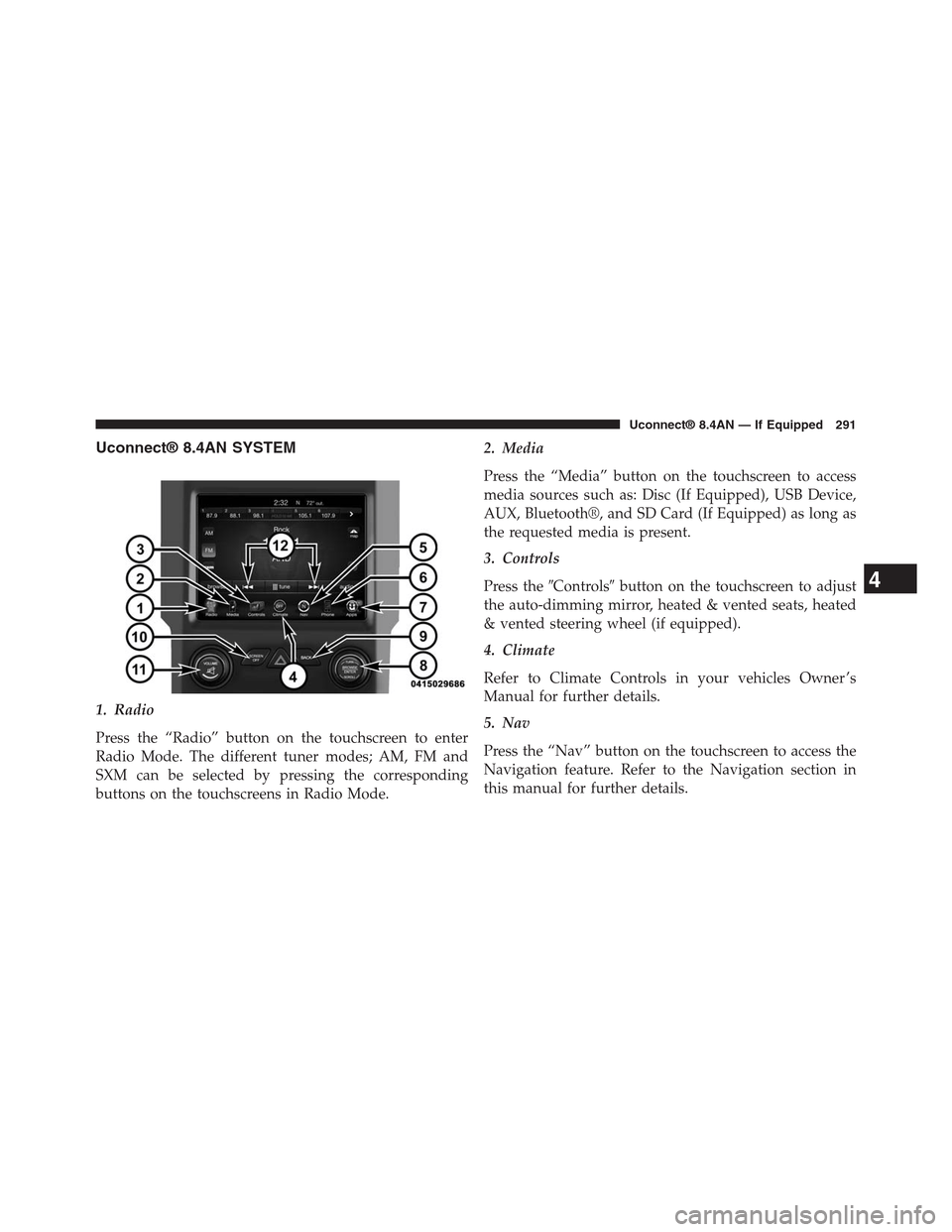
Uconnect® 8.4AN SYSTEM
1. Radio
Press the “Radio” button on the touchscreen to enter
Radio Mode. The different tuner modes; AM, FM and
SXM can be selected by pressing the corresponding
buttons on the touchscreens in Radio Mode.
2. Media
Press the “Media” button on the touchscreen to access
media sources such as: Disc (If Equipped), USB Device,
AUX, Bluetooth®, and SD Card (If Equipped) as long as
the requested media is present.
3. Controls
Press the#Controls#button on the touchscreen to adjust
the auto-dimming mirror, heated & vented seats, heated
& vented steering wheel (if equipped).
4. Climate
Refer to Climate Controls in your vehicles Owner ’s
Manual for further details.
5. Nav
Press the “Nav” button on the touchscreen to access the
Navigation feature. Refer to the Navigation section in
this manual for further details.
4
Uconnect® 8.4AN — If Equipped 291
Page 334 of 429
Things You Should Know About Your Uconnect®
Phone
Voice Command
For the best performance:
•Adjust the rearview mirror to provide at least½inch
(1 cm) gap between the overhead console (if equipped)
and the mirror.
•Always wait for the beep before speaking.
•Speak normally, without pausing, just as you would
speak to a person sitting a few feet/meters away from
you.
•Ensure that no one other than you is speaking during
a voice command period.
Performance is maximized under:
•Low-To-Medium Blower Setting
•Low-To-Medium Vehicle Speed
•Low Road Noise
•Smooth Road Surface
•Fully Closed Windows
•Dry Weather Condition
Even though the system is designed for many languages
and accents, the system may not always work for some.
When navigating through an automated system such as
voice mail, or when sending a page, before speaking the
digit string, make sure to say “Send.”
NOTE:It is recommended that you do not store names in
your favorites phonebook while the vehicle is in motion.
Phonebook (Mobile and Favorites) name recognition rate
is optimized when the entries are not similar. You can say
“O” (letter “O”) for “0” (zero).
4
Uconnect® 8.4AN — If Equipped 333
Page 401 of 429
SECURITY FEATURES
The following Security Related options are available:
•9–1–1 Call
•Roadside Assistance Call
Roadside Assistance — If Equipped
If your vehicle is equipped with this feature and within
cellular range, you may be able to connect to Roadside
Assistance, Uconnect® Care and Vehicle Care by pressing
the “Assist” button on the Rearview Mirror of your
vehicle. To the extent any such calls incur additional
costs, you are responsible for them. If Roadside Assis-
tance is provided to your vehicle, you agree to be
responsible for any additional roadside assistance service
costs that you may incur.
To provide Uconnect® Services to you, we may record
and monitor your conversations with Roadside Assis-
tance, Uconnect® Care or Vehicle Care, whether such
conversations are initiated through the Uconnect® Ser-
vices in your vehicle, or via a landline or mobile tele-
phone, and may share information obtained through
such recording and monitoring in accordance with regu-
latory requirements. You acknowledge, agree and con-
sent to any recording, monitoring or sharing of informa-
tion obtained through any such call recordings.
9-1-1 Call — If Equipped
The 9-1-1 Call system is an embedded phone system that
allows you to connect to a 9-1-1 operator in an emer-
gency. You can choose to press the “9-1-1 Call” button on
the Rearview Mirror to contact a 9-1-1 operator.
400 Uconnect® 8.4AN — If Equipped
Page 402 of 429
9–1–1 Call Operating Instructions
1. Push the “9-1-1 Call” button on the Rearview Mirror;
NOTE:In case the 9-1-1 Call button is pushed in error,
there will be a 10 second delay before the 9-1-1 Call
system initiates a call to a 9-1-1 operator. To cancel the
9-1-1 Call connection, push the “9-1-1 Call” button on the
Rearview Mirror or press the “cancellation” button on
the Phone Screen. Termination of the 9-1-1 Call will turn
the green LED light on the Rearview Mirror off.
2. The LED light on the Rearview Mirror will turn green
once a connection to a 9-1-1 operator has been made;
3. Once a connection between the vehicle and a 9-1-1
operator is made, the 9-1-1 Call system may transmit
the following important vehicle information to a 9-1-1
operator:
•indication that the occupant placed a 9-1-1 Call
•the vehicle brand; and
•the last known GPS coordinates of the vehicle
4. You should be able to speak with the 9-1-1 operator
through the vehicle audio system to determine if
additional help is needed.
4
Uconnect® 8.4AN — If Equipped 401
Page 404 of 429
WARNING!
If anyone in the vehicle could be in danger (e.g.,
fire or smoke is visible, dangerous road conditions
or location), do not wait for voice contact from a
9-1-1 operator. All occupants should exit the ve-
hicle immediately and move to a safe location.
WARNING!
Do not add any aftermarket electrical equipment to
the vehicle’s electrical system. This may prevent your
vehicle from sending a signal to initiate an emer-
gency call. To avoid interference that can cause the
9-1-1 Call system to fail, never add aftermarket
equipment (e.g., two way mobile radio, CB radio,
data recorder, etc.) to your vehicle’s electrical system
or modify the antennas on your vehicle.
9-1-1 Call System Limitations
Vehicles sold in Canada and Mexico DO NOT have 9-1-1
Call system capabilities.
9-1-1 or other emergency line operators in Canada and
Mexico may not answer or respond to 9-1-1 system calls.
If the 9-1-1 Call system detects a malfunction, any of the
following may occur at the time the malfunction is
detected, and at the beginning of each ignition cycle:
•The Rearview Mirror light will continuously be illu-
minated red.
•The Phone Screen will display the following message
“Vehicle phone requires service. Please contact your
dealer.”
•An In-Vehicle Audio message will state “Vehicle phone
requires service. Please contact your dealer.”
4
Uconnect® 8.4AN — If Equipped 403
Page 405 of 429
WARNING!
•Ignoring the Rearview Mirror light could mean you
may not have 9-1-1 Call capability if needed. If the
Rearview Mirror light is illuminated, have an au-
thorized dealer service the 9-1-1 Call system imme-
diately.
•The Occupant Restraint Controller (ORC) turns on
the Air Bag Warning Light on the instrument panel
if a malfunction is detected in any part of the air
bag system. If the Air Bag Warning Light is illumi-
nated, the air bag system may not be working
properly and the 9-1-1 system may not be able to
send a signal to a 9-1-1 operator. If the Air Bag
Warning Light is illuminated, have an authorized
dealer service your vehicle immediately.
Even if the 9-1-1 Call system is fully functional, factors
beyond Chrysler Group LLC’s control may prevent or
stop 9-1-1 Call system operation. These include, but are
not limited to, the following factors:
•The ignition key has been removed from the ignition
and the delayed accessories mode is active.
•The ignition key is in OFF position.
•The vehicle’s electrical systems are not intact.
•The 9-1-1 Call system software and/or hardware are
damaged during a crash.
•The vehicle battery loses power or becomes discon-
nected during a vehicle crash.
•Wireless and/or Global Positioning Satellite signals
are unavailable or obstructed.
•Equipment malfunction at the 9-1-1 operator facility.
404 Uconnect® 8.4AN — If Equipped
Page 410 of 429
3. Speak clearly at a normal pace and volume while
facing straight ahead. The microphone is positioned
on the rearview mirror and aimed at the driver.
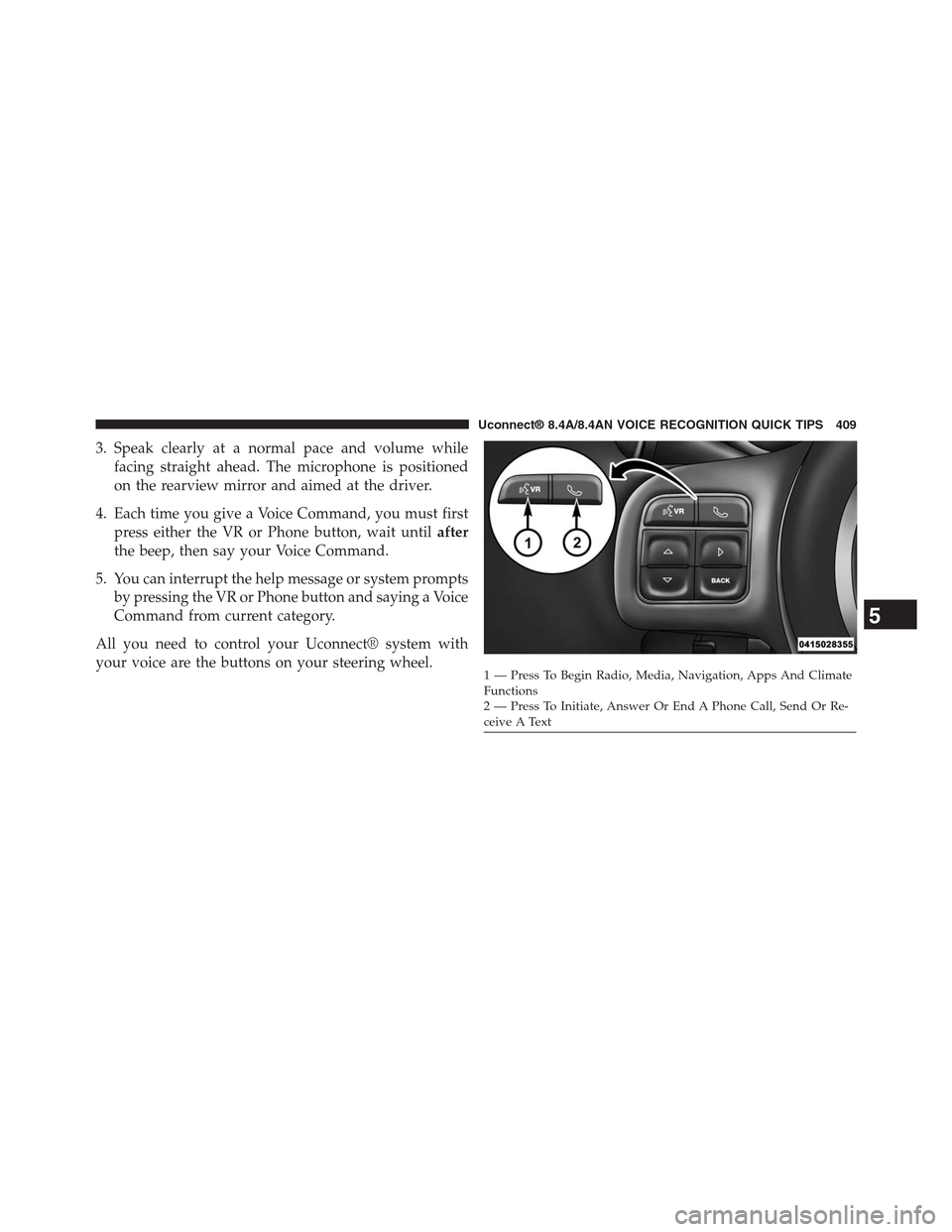
4. Each time you give a Voice Command, you must first
press either the VR or Phone button, wait untilafter
the beep, then say your Voice Command.
5. You can interrupt the help message or system prompts
by pressing the VR or Phone button and saying a Voice
Command from current category.
All you need to control your Uconnect® system with
your voice are the buttons on your steering wheel.1—PressToBeginRadio,Media,Navigation,AppsAndClimateFunctions2—PressToInitiate,AnswerOrEndAPhoneCall,SendOrRe-ceive A Text
5
Uconnect® 8.4A/8.4AN VOICE RECOGNITION QUICK TIPS 409