radio DODGE CHARGER SRT 2015 7.G Uconnect 8.4A
[x] Cancel search | Manufacturer: DODGE, Model Year: 2015, Model line: CHARGER SRT, Model: DODGE CHARGER SRT 2015 7.GPages: 429, PDF Size: 4.01 MB
Page 81 of 429
SRT Performance Pages/SRT Performance Pages
Plus
Save And Share Your Best Performance Results With
The SRT Performance Pages App. (Available Only On
SRT Performance Vehicles.)
Description
The SRT Performance Pages App gives SRT vehicle
drivers the tools to become familiar with their vehicle’s
performance. The App provides access to real-time ve-
hicle performance information* including timers (such as
0 to 60 mph elapsed time), G-force, gauges, and engine
performance. This data can be downloaded to a USB stick
or SD card, allowing for easy sharing of your driving
performance. With SRT Performance Pages Plus, drivers
can also download the data to the web.
*Some information will only be available when vehicle is
not in motion.
How It Works
From the Radio touchscreen
1. Press the “SRT & Apps” button at the bottom of the
screen.
2. Select the “Information Apps” button on left side of
screen.
3. Select Performance Pages line item.
4. The Performance Pages App home page will display
with a vehicle graphic and menu item button on the
touchscreen on the left.
80 ALL ABOUT Uconnect® ACCESS
Page 86 of 429
Downloading Timers Data
Choosing the “Save” button on the touchscreen allows
you to save your run ticket. Data saved will include date,
time stamp, timer data, brake distance and brake speed.
If you want to download the Timers information, a
message on the ticket on the radio touchscreen will give
you three options on where you want to download data:
USB, SD Card or Website.
NOTE:You will only have the option to download to the
Web if you have SRT Performance Pages Plus.
You can also select the “Cancel” button to return to the
previous screen.
USB— If you choose “USB,” plug the USB stick into the
USB port, press the “USB” button on the touchscreen,
and follow the instructions to download the timer.
SD Card— If you choose “SD Card,” insert the SD Card
into the slot, press the “SD Card” button on the faceplate,
and follow the instructions to download the timer.
Web— If you choose “Website,” the embedded cellular
connection will automatically save the file to the Mopar
Owner Connect website (moparownerconnect.com).
You will need to logon to this URL and download the
ticket as needed.
NOTE:Files will download in HTML format.
2
ALL ABOUT Uconnect® ACCESS 85
Page 90 of 429
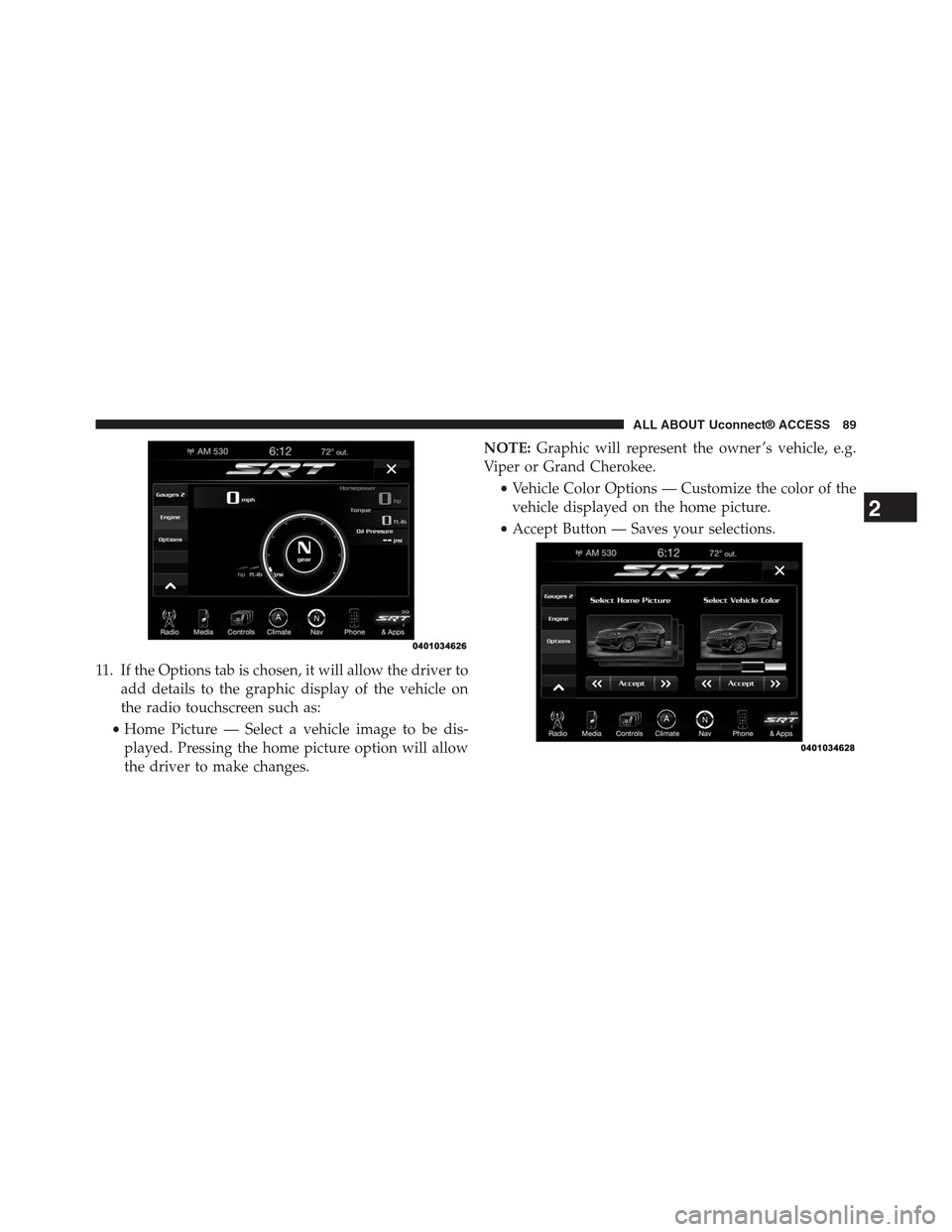
11. If the Options tab is chosen, it will allow the driver to
add details to the graphic display of the vehicle on
the radio touchscreen such as:
•Home Picture — Select a vehicle image to be dis-
played. Pressing the home picture option will allow
the driver to make changes.
NOTE:Graphic will represent the owner ’s vehicle, e.g.
Viper or Grand Cherokee.
•Vehicle Color Options — Customize the color of the
vehicle displayed on the home picture.
•Accept Button — Saves your selections.
2
ALL ABOUT Uconnect® ACCESS 89
Page 91 of 429
Give It A Try!
1. Bring the vehicle to a complete stop, but leave vehicle
ON for the instrument gauges to be active.
2. Select the “Apps” button at bottom of radio touch-
screen.
3. Select the “Information Apps” button on left side of
radio.
4. Select the “SRT Performance Pages.”
5. Select the “Timers” tab from left side of screen.
The Timer will present data from your current drive
cycle until the vehicle reaches a Timer milestone or a
Timer constraint is broken.
NOTE:If the vehicle does not reach a Timer milestone or
a Timer constraint is broken, the data will show only
dashes “- - “ as the result.
6. Bring the vehicle to a complete stop after reaching the
target speed or distance.
7. You can view the Timer performance data on the radio
from the drive cycle by selecting the “Apps” button on
the faceplate, then the Information Apps button, then
SRT Performance pages tab:
•Select Ticket displays.
•Select “Current,” “Last,” or “Best” ticket displays.
•Press the “Save” button on the faceplate to save
results.
Requirements
•Vehicle must be a SRT performance vehicle properly
equipped with the Uconnect® Access System.
•Vehicle must be in range of a usable and authorized 3G
cellular signal.
90 ALL ABOUT Uconnect® ACCESS
Page 94 of 429
9.What are “Timer Constraints” or criteria that needs
to be met to show performance data?
•0-60 MPH or 0-100 kph ET reached within 10 seconds
•Distance of 1/4 mile and 1/8 mile
•Brake timer when traveling > 30 MPH
•A braking event goes beyond 30 seconds
10.How many Timers are stored on the radio and for
how long?Performance timers are maintained as
long as you drive the vehicle. You can save the
statistics at any time.
11.Do all Timer measurements give a “Best”, “Last”
and Current” value?They all do except for Braking
which will not provide a “Best” measurement.
Voice Texting
Add Free-Form Voice Texts To Your Voice Text Reply Feature
Description
This Voice Texting enhances the Voice Text Reply feature
built into your Uconnect® Access 8.4A and 8.4AN radio.
While Voice Text Reply provides 18 pre-defined messages
you can send, Voice Texting lets you create and send
nearly any message you want. Just speak your message
as if you were talking to the recipient, and the Uconnect®
Access voice-texting technology will convert your voice
into a text message.
Voice Texting and Voice Text Reply features are compatible
with many newer Android and Blackberry phones. Before
using, determine if your phone has been tested to support
Bluetooth® “Message Access Profile (MAP)” at
UconnectPhone.com. iPhone® and some other smart-
phones do not currently support Bluetooth® MAP. En-
sure MAP is ON and incoming message notification is
enabled.
2
ALL ABOUT Uconnect® ACCESS 93
Page 95 of 429
How It Works
Set Up Your Phone To Work With Voice Texting
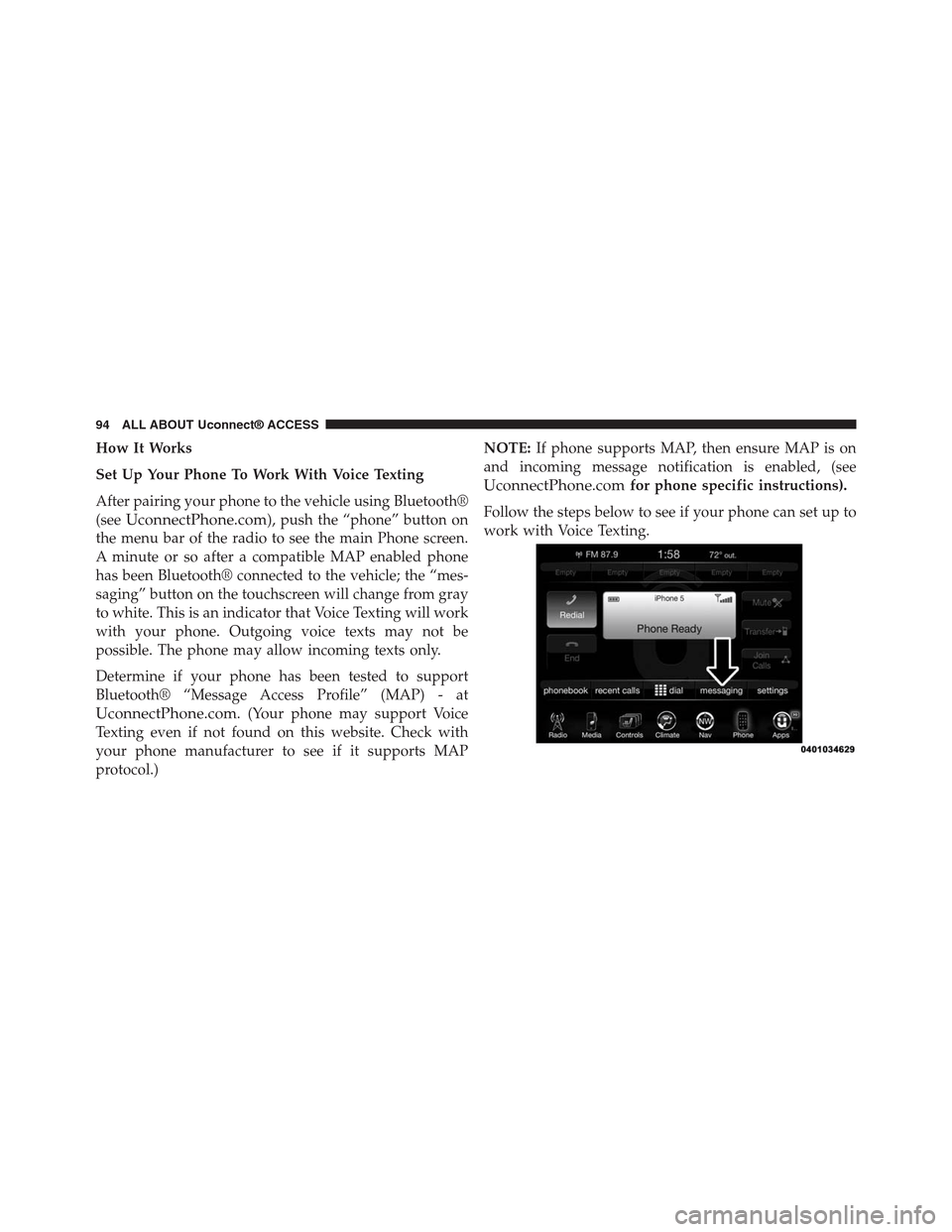
After pairing your phone to the vehicle using Bluetooth®
(seeUconnectPhone.com), push the “phone” button on
the menu bar of the radio to see the main Phone screen.
A minute or so after a compatible MAP enabled phone
has been Bluetooth® connected to the vehicle; the “mes-
saging” button on the touchscreen will change from gray
to white. This is an indicator that Voice Texting will work
with your phone. Outgoing voice texts may not be
possible. The phone may allow incoming texts only.
Determine if your phone has been tested to support
Bluetooth® “Message Access Profile” (MAP) - at
UconnectPhone.com. (Your phone may support Voice
Texting even if not found on this website. Check with
your phone manufacturer to see if it supports MAP
protocol.)
NOTE:If phone supports MAP, then ensure MAP is on
and incoming message notification is enabled, (see
UconnectPhone.comfor phone specific instructions).
Follow the steps below to see if your phone can set up to
work with Voice Texting.
94 ALL ABOUT Uconnect® ACCESS
Page 96 of 429
Generic Phone Setup Instructions (your phone’s setup
process may be similar):
1. On phone select “Settings” (or the equivalent on your
phone)
2. Select Wireless/Bluetooth® settings
3. Ensure Bluetooth® is on (box checked)
4. Select Bluetooth® settings
5. Select Advanced setting
6. Ensure Message Access service is on (box checked)
7. Select Message Access settings
8. Check the box for SMS
9. Press the back button twice to return to the Bluetooth®
settings screen
10. Check the box for Discoverable
If a Bluetooth® authorization window appears showing
your phone requesting permissions, check the box for
Always and press Accept.
Sending A New Text Message From Radio
1. Pushon the steering wheel.
2. Say“Send text message.”
3. The system will respond “Say the phone number or
the full name and the phone type of the contact that
you want to send a message to.”
4. Dictate message (“I will be home at eight.”)
5. When finished dictating, wait for prompt and say
“Send.”
2
ALL ABOUT Uconnect® ACCESS 95
Page 97 of 429
Dictate A Free-Form Reply To A Message From Radio
(Voice Text Reply)
1. Say“Reply to message n”
n = the number of the message
OR
Press “Reply” after viewing message
OR
Push the phone button and say“Reply.”
2. The system will say “Please say the message you want
to send.” (“I will be home at eight.”)
3. Say the message you want to send up to 160 characters
of text.
4. The system will repeat the message you dictated and
state available commands. If your message was too
long, the system will respond with “Your message was
too long. Your message was truncated.” Say “Send,” or
“Start Over” or “Continue.”
5. Say“Continue”
OR
Say“Start over”
OR
Say“Repeat”
OR
Say“Send”
OR
Say“Cancel.”
96 ALL ABOUT Uconnect® ACCESS
Page 98 of 429
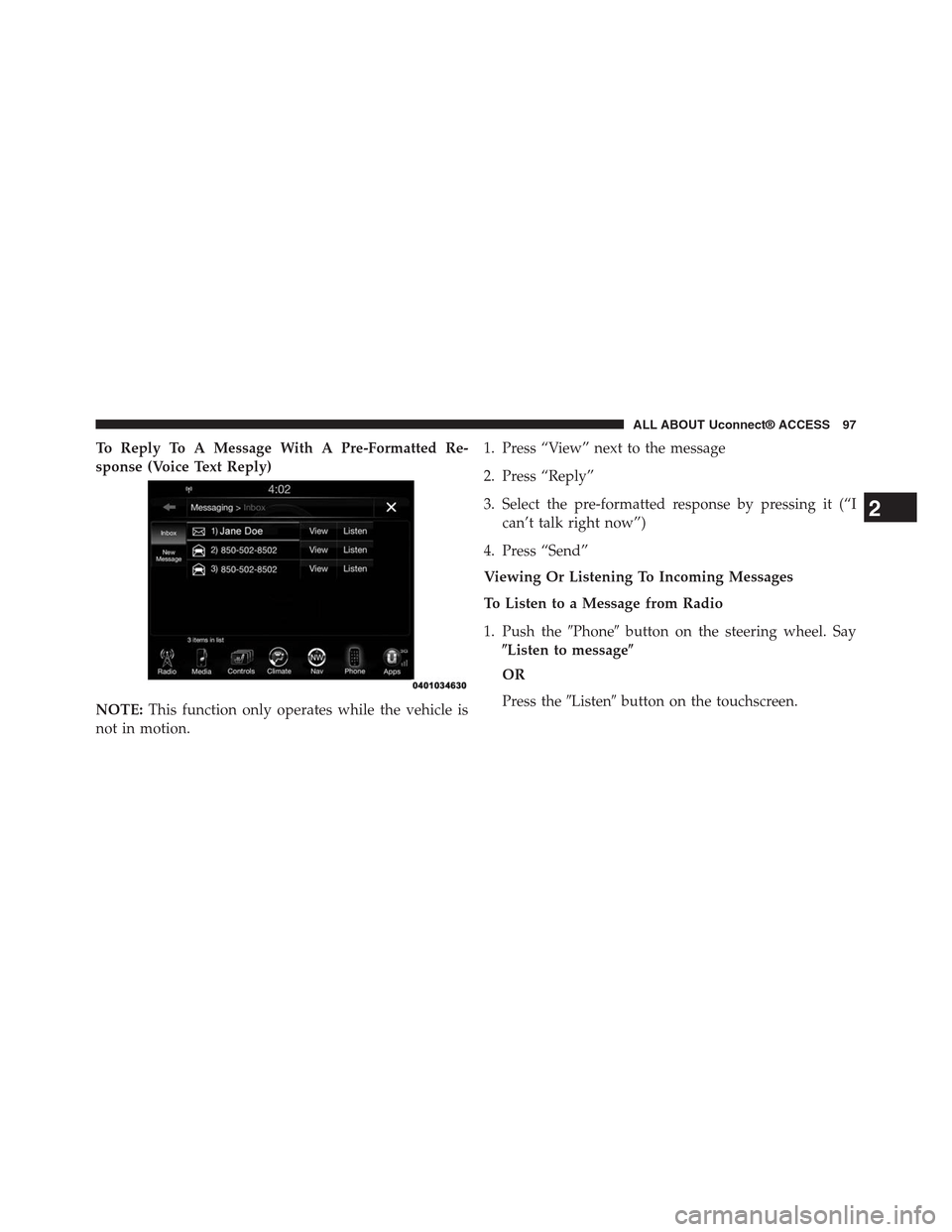
To Reply To A Message With A Pre-Formatted Re-
sponse (Voice Text Reply)
NOTE:This function only operates while the vehicle is
not in motion.
1. Press “View” next to the message
2. Press “Reply”
3. Select the pre-formatted response by pressing it (“I
can’t talk right now”)
4. Press “Send”
Viewing Or Listening To Incoming Messages
To Listen to a Message from Radio
1. Push the#Phone#button on the steering wheel. Say
$Listen to message$
OR
Press the#Listen#button on the touchscreen.
2
ALL ABOUT Uconnect® ACCESS 97
Page 101 of 429
user can press#Listen#on touchscreen or push the
#Phone#button on the steering wheel and say#Listen.#
Requirements
•(MAP may not be compatible with Apple iPhones®
(pre iOS 6). Apple iOS 6 supports receiving text
messages, but does not support sending text mes-
sages).
•Available on vehicles sold in the United States with a
Uconnect® 8.4A (sales code RA3) or Uconnect® 8.4AN
(sales code RA4) radio equipped with Uconnect®
Access.
•Vehicle must be registered with an active Uconnect®
Access Advantage trial or paid subscription for free
form text response to work.
•Vehicle and phone must be in range of the cellular
network.
•Customer must have a properly paired and connected
cellular device with Bluetooth® Message Access Pro-
file (MAP) enabled. Voice Texting is compatible with
many newer BlackBerry and Android mobile devices.
Apple iOS 5 and earlier does not support MAP so
iPhones will not send free form text messages. Apple
iOS 6 supports receiving, not sending text messages.
To check if your device has been tested to be compat-
ible please visitUconnectPhone.com.
Disclaimers
•Not all Voice Texting features may be available on your
phone.
•Your MAP supported phone must be paired and
connected to a compatible Uconnect® radio.
•You must have an active cellular connection and be
within cellular range to voice text.
100 ALL ABOUT Uconnect® ACCESS