service DODGE CHARGER SRT 2015 7.G Uconnect 8.4A
[x] Cancel search | Manufacturer: DODGE, Model Year: 2015, Model line: CHARGER SRT, Model: DODGE CHARGER SRT 2015 7.GPages: 429, PDF Size: 4.01 MB
Page 328 of 429
3. From the Phone main screen, select phonebook. From
the phonebook screen, select the “Favorites” button on
the touchscreen and then select the#Settings#button
on the touchscreen located to the right of the phone-
book record.
4. Select an empty entry and press the#Settings#button
on that selected entry. When the Options pop-up
appears, press “Add from Mobile.” You will then be
asked which contact and number to choose from your
mobile phonebook. When complete the new favorite
will be shown.
To Remove A Favorite
1. To remove a Favorite, select “phonebook” from the
Phone main screen.
2. Next select “Favorites” on the left side of the screen
and then press the#Settings#button on the touch-
screen.
3. Press the#Settings#button next to the Favorite you
would like to remove.
4. The Options pop-up will display, press “Remove from
Favs.”
Phone Call Features
The following features can be accessed through the
Uconnect® Phone if the feature(s) are available and
supported by Bluetooth® on your mobile service plan.
For example, if your mobile service plan provides three-
way calling, this feature can be accessed through the
Uconnect® Phone. Check with your mobile service pro-
vider for the features that you have.
4
Uconnect® 8.4AN — If Equipped 327
Page 337 of 429
Voice Texting (Must Be Registered With Uconnect®
Access And Have A Current Subscription, U.S.
Residents Only)
WARNING!
ALWAYS drive safely and obey all applicable
laws. You should only use Uconnect® features
when it is safe to do so. Failure to do so may result
in an accident involving serious injury or death.
Want to dictate a personal message? Register with
Uconnect® Access to take advantage of a new, cloud-
based Voice Texting service, an enhancement to Voice
Text Reply.
Voice Texting allows you to compose a new text or reply
to an incoming text message. Before you attempt to use
the Voice Texting feature, check to ensure you have the
following:
1. A Paired, Bluetooth® enabled phone with the Message
Access Profile (MAP). Not all Bluetooth® enabled
phones support MAP. VisitUconnectPhone.comfor
system and device compatibility information.
2. An active Uconnect® Access trial or paid subscription.
Press the “Apps” button on the lower right hand
corner of the touchscreen to begin the registration
process.
3. Accept the Allow MAP profile request on your smart
phone. (Please refer to device manufacturer instruc-
tions for details).
336 Uconnect® 8.4AN — If Equipped
Page 399 of 429
2. Or, visitDriveUconnect.comand follow these steps:
•Under the “Help & Support” tab, select your vehicle
brand. Click “NAVTEQ NAVIGATION UPDATES.”
Simply enter your information and place your order.
3. Or, if you wish, you can also visit your dealer or place
a phone call to request your Map Update. US/CAN
General Consumer Support (888-628-6277), Chrysler
Dealer Garmin Support (877-628-4480), or Chrysler
Consumer FreshMaps (866-422-8171).
SiriusXM TRAFFIC — U.S. MARKET ONLY
(AVAILABLE ON 8.4AN — IF EQUIPPED)
Don’t drive through traffic. Drive around it.
Avoid congestion before you reach it. By enhancing your
vehicle’s navigation system with the ability to see de-
tailed traffic information, you can pinpoint traffic inci-
dents, determine average traffic speed and estimate
travel time along your route. Since the service is inte-
grated with a vehicle’s navigation system, SiriusXM
Traffic can help drivers pick the fastest route based on
traffic conditions.
1. Detailed information on traffic speed, accidents, con-
struction, and road closings.
2. Traffic information from multiple sources, including
police and emergency services, cameras and road
sensors.
3. Coast-to-coast delivery of traffic information.
4. View conditions for points along your route and
beyond.
398 Uconnect® 8.4AN — If Equipped
Page 400 of 429
SiriusXM TRAVEL LINK — U.S. MARKET ONLY
(AVAILABLE ON 8.4AN — IF EQUIPPED)
In addition to delivering over 160 channels of the best
sports, entertainment, talk, and commercial-free music,
SiriusXM offers premium data services that work in
conjunction with compatible navigation systems. Siri-
usXM Travel Link brings a wealth of useful information
into your vehicle and right to your fingertips.
•Weather — Check variety of local and national
weather information from radar maps to current and
five day forecast.
•Fuel Prices — Check local gas and diesel prices in your
area and route to the station of your choice.
•Sports Scores — In-game and final scores as well as
weekly schedules.
•Movie Listings — Check local movie theatres and
listings in your area and route to the theater of your
choice.
SiriusXM Travel Link feature is completely integrated
into your vehicle. A few minutes after you start your
vehicle, Travel Link information arrives and updates in
the background. You can access the information when-
ever you like, with no waiting.
•To access SiriusXM Travel Link, press the Apps button
on the touchscreen, then the SiriusXM Travel Link
button on the touchscreen.
NOTE:
•SiriusXM Travel Link requires a subscription, sold
separately after the five year trial subscription in-
cluded with your vehicle purchase.
•SiriusXM Travel Link is only available in the continen-
tal United States.
4
Uconnect® 8.4AN — If Equipped 399
Page 401 of 429
SECURITY FEATURES
The following Security Related options are available:
•9–1–1 Call
•Roadside Assistance Call
Roadside Assistance — If Equipped
If your vehicle is equipped with this feature and within
cellular range, you may be able to connect to Roadside
Assistance, Uconnect® Care and Vehicle Care by pressing
the “Assist” button on the Rearview Mirror of your
vehicle. To the extent any such calls incur additional
costs, you are responsible for them. If Roadside Assis-
tance is provided to your vehicle, you agree to be
responsible for any additional roadside assistance service
costs that you may incur.
To provide Uconnect® Services to you, we may record
and monitor your conversations with Roadside Assis-
tance, Uconnect® Care or Vehicle Care, whether such
conversations are initiated through the Uconnect® Ser-
vices in your vehicle, or via a landline or mobile tele-
phone, and may share information obtained through
such recording and monitoring in accordance with regu-
latory requirements. You acknowledge, agree and con-
sent to any recording, monitoring or sharing of informa-
tion obtained through any such call recordings.
9-1-1 Call — If Equipped
The 9-1-1 Call system is an embedded phone system that
allows you to connect to a 9-1-1 operator in an emer-
gency. You can choose to press the “9-1-1 Call” button on
the Rearview Mirror to contact a 9-1-1 operator.
400 Uconnect® 8.4AN — If Equipped
Page 404 of 429
WARNING!
If anyone in the vehicle could be in danger (e.g.,
fire or smoke is visible, dangerous road conditions
or location), do not wait for voice contact from a
9-1-1 operator. All occupants should exit the ve-
hicle immediately and move to a safe location.
WARNING!
Do not add any aftermarket electrical equipment to
the vehicle’s electrical system. This may prevent your
vehicle from sending a signal to initiate an emer-
gency call. To avoid interference that can cause the
9-1-1 Call system to fail, never add aftermarket
equipment (e.g., two way mobile radio, CB radio,
data recorder, etc.) to your vehicle’s electrical system
or modify the antennas on your vehicle.
9-1-1 Call System Limitations
Vehicles sold in Canada and Mexico DO NOT have 9-1-1
Call system capabilities.
9-1-1 or other emergency line operators in Canada and
Mexico may not answer or respond to 9-1-1 system calls.
If the 9-1-1 Call system detects a malfunction, any of the
following may occur at the time the malfunction is
detected, and at the beginning of each ignition cycle:
•The Rearview Mirror light will continuously be illu-
minated red.
•The Phone Screen will display the following message
“Vehicle phone requires service. Please contact your
dealer.”
•An In-Vehicle Audio message will state “Vehicle phone
requires service. Please contact your dealer.”
4
Uconnect® 8.4AN — If Equipped 403
Page 405 of 429
WARNING!
•Ignoring the Rearview Mirror light could mean you
may not have 9-1-1 Call capability if needed. If the
Rearview Mirror light is illuminated, have an au-
thorized dealer service the 9-1-1 Call system imme-
diately.
•The Occupant Restraint Controller (ORC) turns on
the Air Bag Warning Light on the instrument panel
if a malfunction is detected in any part of the air
bag system. If the Air Bag Warning Light is illumi-
nated, the air bag system may not be working
properly and the 9-1-1 system may not be able to
send a signal to a 9-1-1 operator. If the Air Bag
Warning Light is illuminated, have an authorized
dealer service your vehicle immediately.
Even if the 9-1-1 Call system is fully functional, factors
beyond Chrysler Group LLC’s control may prevent or
stop 9-1-1 Call system operation. These include, but are
not limited to, the following factors:
•The ignition key has been removed from the ignition
and the delayed accessories mode is active.
•The ignition key is in OFF position.
•The vehicle’s electrical systems are not intact.
•The 9-1-1 Call system software and/or hardware are
damaged during a crash.
•The vehicle battery loses power or becomes discon-
nected during a vehicle crash.
•Wireless and/or Global Positioning Satellite signals
are unavailable or obstructed.
•Equipment malfunction at the 9-1-1 operator facility.
404 Uconnect® 8.4AN — If Equipped
Page 406 of 429
•Operator error by the 9-1-1 operator.
•Wireless network congestion.
•Weather.
•Buildings, structures, geographic terrain, or tunnels.
WARNING!
Never place anything on or near the vehicle’s
wireless and GPS antennas. You could prevent
wireless and GPS signal reception, which can
prevent your vehicle from placing an emergency
call. Wireless and GPS signal reception is required
for the 9-1-1 Call system to function properly.
WARNING!
Failure to perform scheduled maintenance and
regularly inspect your vehicle may result in ve-
hicle damage and/or serious injury.
General Information
This device complies with Part 15 of the FCC Rules.
Operation is subject to the following two conditions: (1)
This device may not cause harmful interference, and (2)
this device must accept any interference received, includ-
ing interference that may cause undesired operation.
REMOTE SERVICE FEATURES
If your vehicle is equipped with Remote Service Features,
for more information, refer tomoparownerconnect.com
or call 855-792-4241 for U.S. residents and 855-209-8317
for Canadian residents.
4
Uconnect® 8.4AN — If Equipped 405
Page 418 of 429
Uconnect® Access*
An included trial and/or subscription is required to take
advantage of the Uconnect® Access services in the next
section of this guide. To register with Uconnect® Access,
press the + MORE button on the 6.5-inch touchscreen to
get started. Detailed registration instructions can be
found on the next page.
*Uconnect® Access is available only on equipped ve-
hicles purchased within the continental United States and
Alaska. Services can only be used where coverage is
available; see coverage map for details.
9-1-1 Call
Theft Alarm Notification
Remote Door Lock/Unlock
Stolen Vehicle Assistance
Remote Vehicle Start**
Remote Horn and Lights
Yelp® Search
Voice Texting
Roadside Assistance Call
Wi-Fi Hotspot***
**If vehicle is equipped.
***Extra charges apply.
5
Uconnect® 8.4A/8.4AN VOICE RECOGNITION QUICK TIPS 417
Page 422 of 429
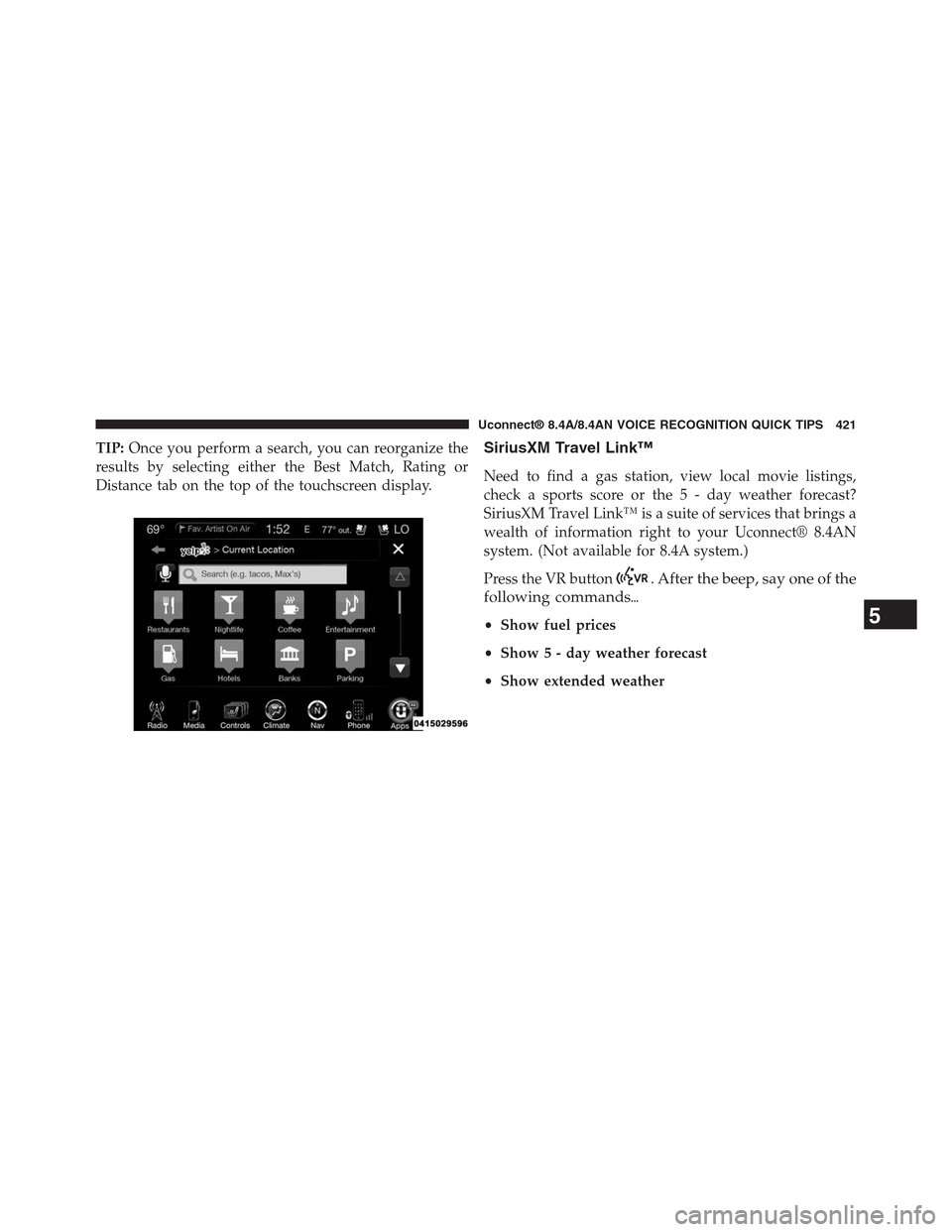
TIP:Once you perform a search, you can reorganize the
results by selecting either the Best Match, Rating or
Distance tab on the top of the touchscreen display.
SiriusXM Travel Link™
Need to find a gas station, view local movie listings,
check a sports score or the 5 - day weather forecast?
SiriusXM Travel Link™ is a suite of services that brings a
wealth of information right to your Uconnect® 8.4AN
system. (Not available for 8.4A system.)
Press the VR button. After the beep, say one of the
following commands%
•Show fuel prices
•Show 5 - day weather forecast
•Show extended weather
5
Uconnect® 8.4A/8.4AN VOICE RECOGNITION QUICK TIPS 421