mirror DODGE CHARGER SRT 2016 7.G Owner's Manual
[x] Cancel search | Manufacturer: DODGE, Model Year: 2016, Model line: CHARGER SRT, Model: DODGE CHARGER SRT 2016 7.GPages: 634, PDF Size: 4.6 MB
Page 317 of 634
•Blind Spot Alert — If Equipped
When this feature is selected, the Blind Spot Alert feature
Provides alerts, visual and/or audible, to indicate objects
in your blind spot. The Blind Spot Alert feature can be
activated in “Lights” mode. When this mode is selected,
the Blind Spot Monitor (BSM) system is activated and
will only show a visual alert in the exterior mirrors.
When “Lights & Chime” mode is activated, the Blind
Spot Monitor (BSM) will show a visual alert in the
exterior mirrors as well as an audible alert when the turn
signal is on. When “Off” is selected, the Blind Spot
Monitor (BSM) system is deactivated. To change the
Blind Spot Alert status, press the “Off,” “Lights” or
“Lights & Chime” button on the touchscreen. NOTE:
If your vehicle has experienced any damage in
the area where the sensor is located, even if the fascia is
not damaged, the sensor may have become misaligned.
Take your vehicle to an authorized dealer to verify sensor
alignment. Having a sensor that is misaligned will result
in the BSM not operating to specification.
• ParkView Backup Camera Active Guidelines
Your vehicle may be equipped with the ParkView Rear
Back Up Camera Active Guidelines that allows you to see
active guidelines over the ParkView Back up camera
display whenever the shift lever is put into REVERSE.
The image will be displayed on the radio touchscreen
display along with a caution note to “check entire sur-
roundings” across the top of the screen. After five sec-
onds, this note will disappear. To make your selection,
press the “ParkView Backup Camera Active Guidelines”
4
UNDERSTANDING YOUR INSTRUMENT PANEL 315
Page 322 of 634
once the driver door is opened, the interior door lock/
unlock switch can be used to unlock all doors (or use
RKE transmitter).
•Passive Entry — If Equipped
This feature allows you to lock and unlock the vehicles
door(s) without having to push the Remote Keyless Entry
(RKE) transmitter LOCK or UNLOCK buttons. To make
your selection, press the “Passive Entry” button on the
touchscreen, until a check-mark appears next to the
setting, showing that the setting has been selected. Refer
to “Keyless Enter-N-Go” in “Things To Know Before
Starting Your Vehicle”.
• Personal Settings Linked to Key Fob — If Equipped
This feature provides automatic recall of all settings
stored to a memory location (driver ’s seat, exterior
mirrors, steering column position and radio station pre-
sets) to enhance driver mobility when entering and
exiting the vehicle. To make your selection, press the “Personal Settings Linked to Key Fob” button on the
touchscreen, until a check-mark appears next to the
setting, showing that the setting has been selected.
NOTE:
The seat will return to the memorized seat
location (if Personal Settings Linked to Key Fob is set to
ON) when the Remote Keyless Entry (RKE) transmitter is
used to unlock the door. Refer to “Driver Memory Seat”
in “Understanding The Features Of Your Vehicle” for
further information.
Auto Comfort Systems — If Equipped
After pressing the “Auto-On Comfort” button on the
touchscreen the following settings will be available:
• Auto-On Driver Heated/Ventilated Seat & Steering
Wheel With Vehicle Start — If Equipped
When this feature is selected the driver’s heated seat and
heated steering wheel will automatically turn ON when
320 UNDERSTANDING YOUR INSTRUMENT PANEL
Page 366 of 634
this function again will cause the MAX A/C operation to
switch into manual mode and the MAX A/C indicator
will turn off.
2. A/C Button
Press and release to change the current setting, the
indicator illuminates when A/C is ON. Performing this
function again will cause the A/C operation to switch
into manual mode and the A/C indicator will turn off.
3. Recirculation Button
Press and release to change the current setting, the
indicator illuminates when ON.
4. AUTO Operation Button
Automatically controls the interior cabin temperature by
adjusting airflow distribution and amount. Performing
this function will cause the system to switch between
manual mode and automatic modes. Refer to “Automatic
Operation” for more information.5. Front Defrost Button
Press and release to change the current airflow setting to
Defrost mode. The indicator illuminates when this fea-
ture is ON. Air comes from the windshield and side
window demist outlets. When the defrost button is
selected, the blower level will increase. Use Defrost mode
with maximum temperature settings for best windshield
and side window defrosting and defogging. Performing
this function will cause the ATC to switch into manual
mode. If the front defrost mode is turned off the climate
system will return the previous setting.
6. Rear Defrost Button
Press and release this button to turn on the rear window
defroster and the heated outside mirrors (if equipped).
An indicator will illuminate when the rear window
defroster is on. The rear window defroster automatically
turns off after 10 minutes.
364 UNDERSTANDING YOUR INSTRUMENT PANEL
Page 377 of 634
If you see theicon on your touchscreen, you have
the Uconnect 8.4AN system. If not, you have a
Uconnect 8.4A system. Get Started
All you need to control your Uconnect system with your
voice are the buttons on your steering wheel.
1. Visit
UconnectPhone.com to check mobile device and
feature compatibility and to find phone pairing
instructions.
2. Reduce background noise. Wind and passenger con- versations are examples of noise that may impact
recognition.
3. Speak clearly at a normal pace and volume while facing straight ahead. The microphone is positioned
on the rearview mirror and aimed at the driver.
4. Each time you give a Voice Command, you must first push either the VR or Phone button, wait until after
the beep, then say your Voice Command.
Uconnect 8.4AN
4
UNDERSTANDING YOUR INSTRUMENT PANEL 375
Page 388 of 634
Vehicle Health Alert
Your vehicle will send you an email alert if it senses a
problem under the hood with one of your vehicles key
systems. For further information go to the Mopar Owner
Connect website moparownerconnect.com.
Register (8.4A/8.4AN)
To unlock the full potential of Uconnect Access in your
vehicle, you first need to register with Uconnect Access.
1. Push the ASSIST button on your rearview mirror.2. Press the “Uconnect Care” button on the touchscreen.
3. A helpful Uconnect Care Agent will register yourvehicle and handle all of the details.
Assist Button
386 UNDERSTANDING YOUR INSTRUMENT PANEL
Page 401 of 634
STARTING PROCEDURES
Before starting your vehicle, adjust your seat, adjust the
inside and outside mirrors, fasten your seat belt, and if
present, instruct all other occupants to buckle their seat
belts.
WARNING!
•Never use the PARK position as a substitute for the
parking brake. Always apply the parking brake
fully when parked to guard against vehicle move-
ment and possible injury or damage.
• When leaving the vehicle, always make sure the
keyless ignition node is in “OFF” mode, remove
the Key Fob from the vehicle and lock the vehicle.
• Never leave children alone in a vehicle, or with
access to an unlocked vehicle. Leaving children in
a vehicle unattended is dangerous for a number of
(Continued)
WARNING! (Continued)
reasons. A child or others could be seriously or
fatally injured. Children should be warned not to
touch the parking brake, brake pedal or the trans-
mission gear selector.
• Do not leave the Key Fob in or near the vehicle (or
in a location accessible to children), and do not
leave the ignition (of a vehicle equipped with
Keyless Enter-N-Go) in the ACC or ON/RUN
mode. A child could operate power windows, other
controls, or move the vehicle.
• Do not leave children or animals inside parked
vehicles in hot weather. Interior heat build-up may
cause serious injury or death.
5
STARTING AND OPERATING 399
Page 562 of 634
cleaner. Use caution when cleaning the inside rear win-
dow equipped with electric defrosters or windows
equipped with radio antennas. Do not use scrapers or
other sharp instrument that may scratch the elements.
When cleaning the rear view mirror, spray cleaner on the
towel or cloth that you are using. Do not spray cleaner
directly on the mirror.
Cleaning Plastic Instrument Cluster Lenses
The lenses in front of the instruments in this vehicle are
molded in clear plastic. When cleaning the lenses, care
must be taken to avoid scratching the plastic.
1. Clean with a wet soft cloth. A mild soap solution maybe used, but do not use high alcohol content or
abrasive cleaners. If soap is used, wipe clean with a
clean damp cloth.
2. Dry with a soft cloth.
Seat Belt Maintenance
Do not bleach, dye, or clean the belts with chemical
solvents or abrasive cleaners. This will weaken the fabric.
Sun damage can also weaken the fabric.
If the belts need cleaning, use MOPAR Total Clean, a mild
soap solution, or lukewarm water. Do not remove the
belts from the vehicle to wash them. Dry with a soft cloth.
Replace the belts if they appear frayed or worn or if the
buckles do not work properly.
WARNING!
A frayed or torn belt could rip apart in a collision and
leave you with no protection. Inspect the belt system
periodically, checking for cuts, frays, or loose parts.
Damaged parts must be replaced immediately. Do
not disassemble or modify the system. Seat belt
(Continued)
560 MAINTAINING YOUR VEHICLE
Page 577 of 634
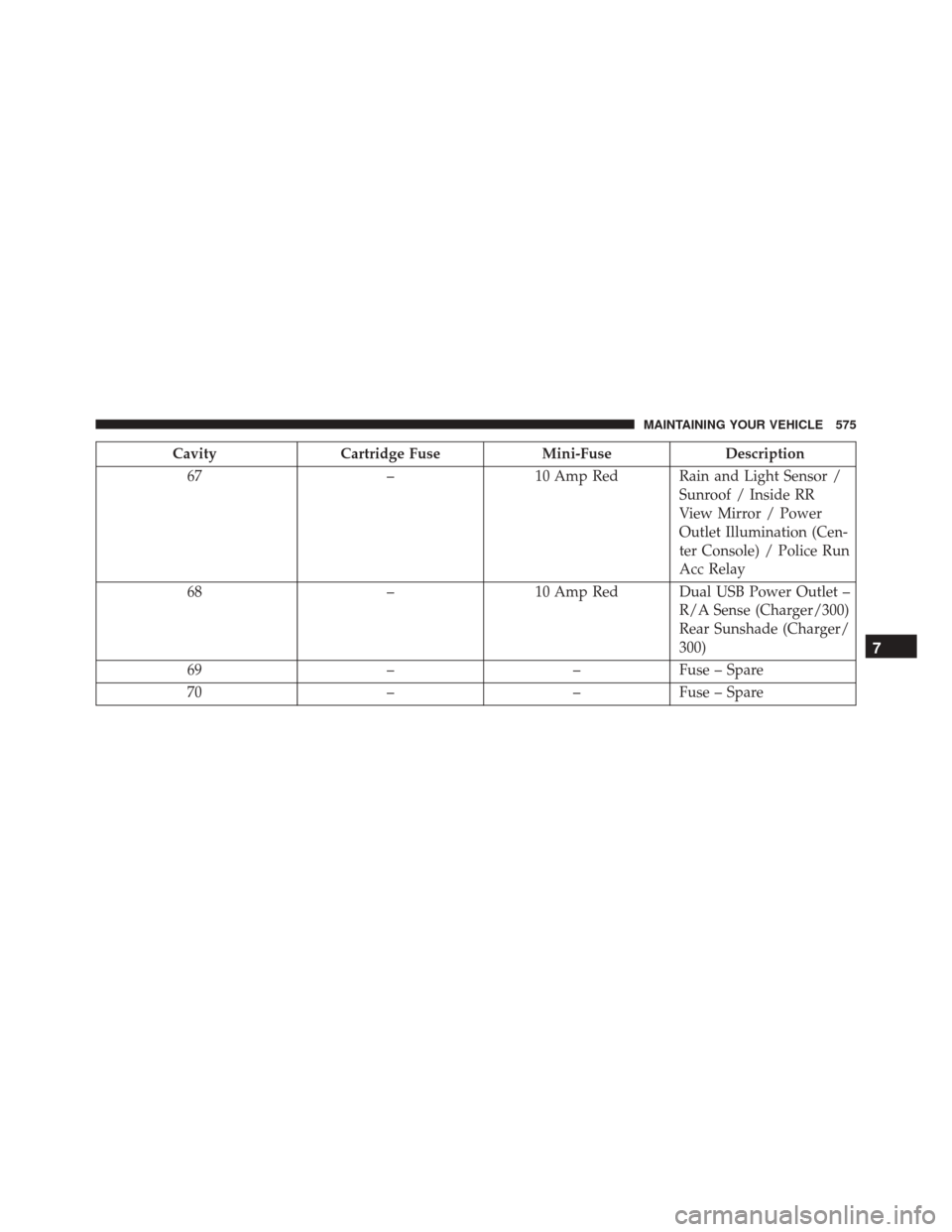
CavityCartridge Fuse Mini-FuseDescription
67 –10 Amp Red Rain and Light Sensor /
Sunroof / Inside RR
View Mirror / Power
Outlet Illumination (Cen-
ter Console) / Police Run
Acc Relay
68 –10 Amp Red Dual USB Power Outlet –
R/A Sense (Charger/300)
Rear Sunshade (Charger/
300)
69 ––Fuse – Spare
70 ––Fuse – Spare
7
MAINTAINING YOUR VEHICLE 575
Page 617 of 634
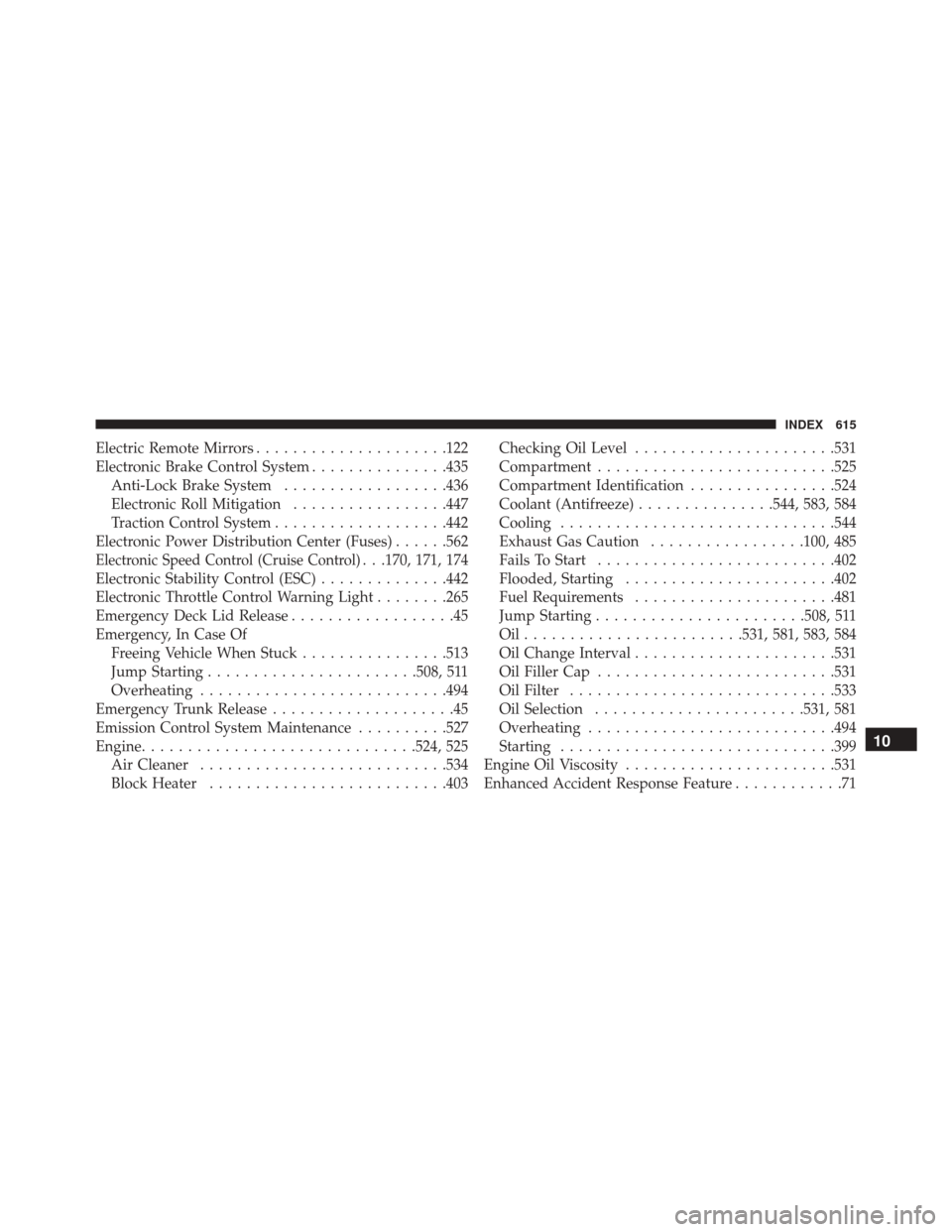
Electric Remote Mirrors.....................122
Electronic Brake Control System ...............435
Anti-Lock Brake System ..................436
Electronic Roll Mitigation .................447
Traction Control System ...................442
Electronic Power Distribution Center (Fuses) ......562
Electronic Speed Control (Cruise Control). . .170, 171, 174
Electronic Stability Control (ESC) ..............442
Electronic Throttle Control Warning Light ........265
Emergency Deck Lid Release ..................45
Emergency, In Case Of Freeing Vehicle When Stuck ................513
Jump Starting ...................... .508, 511
Overheating .......................... .494
Emergency Trunk Release ....................45
Emission Control System Maintenance ..........527
Engine ............................. .524, 525
Air Cleaner .......................... .534
Block Heater ......................... .403Checking Oil Level
..................... .531
Compartment ......................... .525
Compartment Identification ................524
Coolant (Antifreeze) ...............544, 583, 584
Cooling ............................. .544
Exhaust Gas Caution .................100, 485
Fails To Start ......................... .402
Flooded, Starting ...................... .402
Fuel Requirements ..................... .481
Jump Starting ...................... .508, 511
Oil....................... .531, 581, 583, 584
Oil Change Interval ..................... .531
Oil Filler Cap ......................... .531
Oil Filter ............................ .533
Oil Selection ...................... .531, 581
Overheating .......................... .494
Starting ............................. .399
Engine Oil Viscosity ...................... .531
Enhanced Accident Response Feature ............71
10
INDEX 615
Page 618 of 634
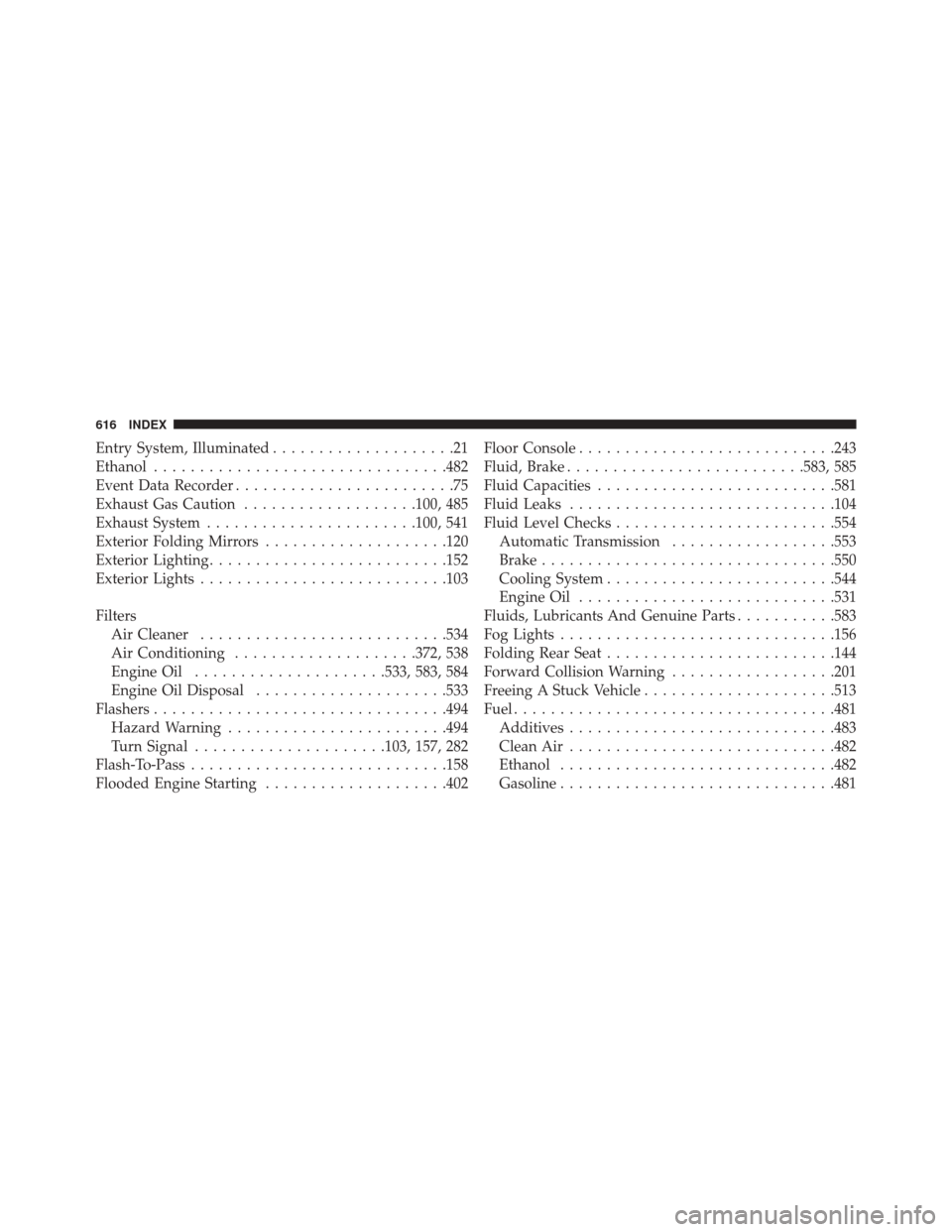
Entry System, Illuminated....................21
Ethanol ............................... .482
Event Data Recorder ........................75
Exhaust Gas Caution ...................100, 485
Exhaust System ...................... .100, 541
Exterior Folding Mirrors ....................120
Exterior Lighting ......................... .152
Exterior Lights .......................... .103
Filters Air Cleaner .......................... .534
Air Conditioning ....................372, 538
Engine Oil .....................533, 583, 584
Engine Oil Disposal .....................533
Flashers ............................... .494
Hazard Warning ....................... .494
Turn Signal .....................103, 157, 282
Flash-To-Pass ........................... .158
Flooded Engine Starting ....................402 Floor Console
........................... .243
Fluid, Brake ......................... .583, 585
Fluid Capacities ......................... .581
Fluid Leaks ............................ .104
Fluid Level Checks ....................... .554
Automatic Transmission ..................553
Brake ............................... .550
Cooling System ........................ .544
Engine Oil ........................... .531
Fluids, Lubricants And Genuine Parts ...........583
Fog Lights ............................. .156
Folding Rear Seat ........................ .144
Forward Collision Warning ..................201
Freeing A Stuck Vehicle .....................513
Fuel .................................. .481
Additives ............................ .483
Clean Air ............................ .482
Ethanol ............................. .482
Gasoline ............................. .481
616 INDEX