ECO mode DODGE CHARGER SRT 2018 Service Manual
[x] Cancel search | Manufacturer: DODGE, Model Year: 2018, Model line: CHARGER SRT, Model: DODGE CHARGER SRT 2018Pages: 490, PDF Size: 5.08 MB
Page 216 of 490
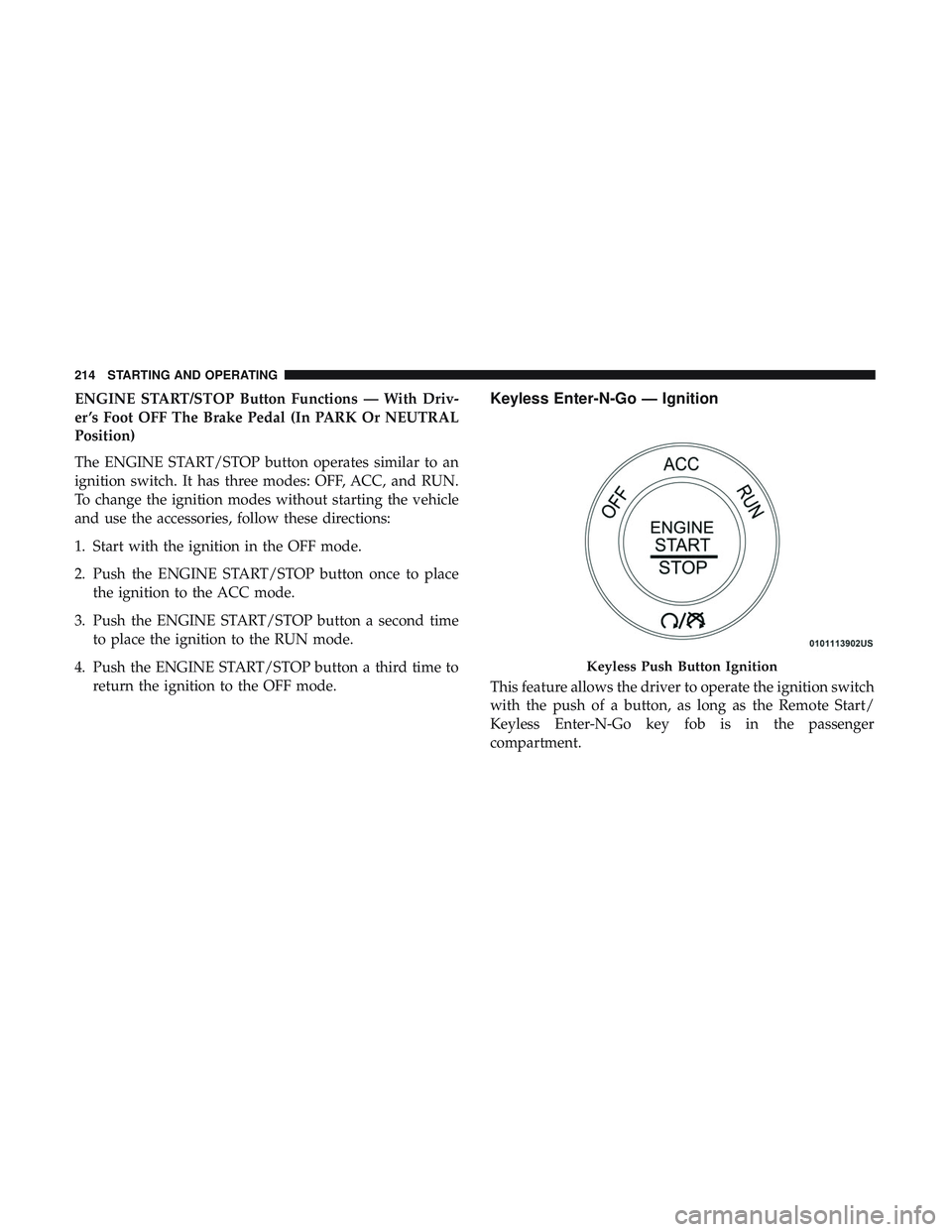
ENGINE START/STOP Button Functions — With Driv-
er ’s Foot OFF The Brake Pedal (In PARK Or NEUTRAL
Position)
The ENGINE START/STOP button operates similar to an
ignition switch. It has three modes: OFF, ACC, and RUN.
To change the ignition modes without starting the vehicle
and use the accessories, follow these directions:
1. Start with the ignition in the OFF mode.
2. Push the ENGINE START/STOP button once to placethe ignition to the ACC mode.
3. Push the ENGINE START/STOP button a second time to place the ignition to the RUN mode.
4. Push the ENGINE START/STOP button a third time to return the ignition to the OFF mode.Keyless Enter-N-Go — Ignition
This feature allows the driver to operate the ignition switch
with the push of a button, as long as the Remote Start/
Keyless Enter-N-Go key fob is in the passenger
compartment.
Keyless Push Button Ignition
214 STARTING AND OPERATING
Page 218 of 490
ENGINE BREAK-IN RECOMMENDATIONS
The following tips will be helpful in obtaining optimum
performance and maximum durability for your new SRT
vehicle.
Despite modern technology and World Class manufactur-
ing methods, the moving parts of the vehicle must still
wear in with each other. This wearing in occurs mainly
during the first 500 miles (805 km) and continues through
the first oil change interval.
It is recommended for the operator to observe the follow-
ing driving behaviors during the new vehicle break-in
period:
0 to 100 miles (0 to 161 km):
•Do not allow the engine to operate at idle for an
extended period of time.
• Depress the accelerator pedal slowly and not more than
halfway to avoid rapid acceleration.
• Avoid aggressive braking.
• Drive with the engine speed less than 3,500 RPM.
• Maintain vehicle speed below 55 mph (88 km/h) and
observe local speed limits. 100 to 300 miles (161 to 483 km):
•
Depress the accelerator pedal slowly and not more than
halfway to avoid rapid acceleration in lower gears (1st to
3rd gears).
• Avoid aggressive braking.
• Drive with the engine speed less than 5,000 RPM.
• Maintain vehicle speed below 70 mph (112 km/h) and
observe local speed limits.
300 to 500 miles (483 to 805 km):
• Exercise the full engine rpm range, shifting manually at
higher rpms when possible.
• Do not perform sustained operation with the accelerator
pedal at wide open throttle.
• Maintain vehicle speed below 85 mph (136 km/h) and
observe local speed limits.
For the first 1500 miles (2414 km):
• Do not participate in track events, sport driving schools,
or similar activities during the first 1500 miles (2414 km).
216 STARTING AND OPERATING
Page 227 of 490
WARNING!
Do not coast in NEUTRAL and never turn off the
ignition to coast down a hill. These are unsafe practices
that limit your response to changing traffic or road
conditions. You might lose control of the vehicle and
have a collision.
CAUTION!
Towing the vehicle, coasting, or driving for any other
reason with the transmission in NEUTRAL can cause
severe transmission damage.
Refer to “Recreational Towing” in “Starting And Op-
erating” and “Towing A Disabled Vehicle” in “In Case
Of Emergency” for further information.
DRIVE (D)
This range should be used for most city and highway
driving. It provides the smoothest upshifts and downshifts,
and the best fuel economy. The transmission automatically
upshifts through all forward gears. The DRIVE position
provides optimum driving characteristics under all normal
operating conditions. When frequent transmission shifting occurs (such as when
operating the vehicle under heavy loading conditions, in
hilly terrain, or traveling into strong head winds), use the
AutoStick shift control (refer to “AutoStick” in this section
for further information) to select a lower gear. Under these
conditions, using a lower gear will improve performance
and extend transmission life by reducing excessive shifting
and heat buildup.
During extremely cold temperatures (-22°F [-30°C] or be-
low), transmission operation may be modified depending
on engine and transmission temperature as well as vehicle
speed. Normal operation will resume once the transmis-
sion temperature has risen to a suitable level.
MANUAL (M)
The MANUAL (M, +/-) position (beside the DRIVE posi-
tion) enables full manual control of transmission shifting
(also known as AutoStick mode; refer to “AutoStick” in this
section for further information). Toggling the gear selector
forward (-) or rearward (+) while in the MANUAL
(AutoStick) position will manually select the transmission
gear, and will display the current gear in the instrument
cluster as M1, M2, M3, etc.
6
STARTING AND OPERATING 225
Page 228 of 490
Transmission Limp Home Mode
Transmission function is monitored electronically for ab-
normal conditions. If a condition is detected that could
result in transmission damage, Transmission Limp Home
Mode is activated. In this mode, the transmission may
operate only in certain gears, or may not shift at all. Vehicle
performance may be severely degraded and the engine
may stall. In some situations, the transmission may not
re-engage if the engine is turned off and restarted. The
Malfunction Indicator Light (MIL) may be illuminated. A
message in the instrument cluster will inform the driver of
the more serious conditions, and indicate what actions may
be necessary.
In the event of a momentary problem, the transmission can
be reset to regain all forward gears by performing the
following steps:
NOTE:In cases where the instrument cluster message
indicates the transmission may not re-engage after engine
shutdown, perform this procedure only in a desired loca-
tion (preferably, at an authorized dealer).
1. Stop the vehicle. 2. Shift the transmission into PARK, if possible. If not, shift
the transmission to NEUTRAL.
3. Push and hold the ignition switch until the engine turns OFF.
4. Wait approximately 30 seconds.
5. Restart the engine.
6. Shift into the desired gear range. If the problem is no longer detected, the transmission will return to normal
operation.
NOTE: Even if the transmission can be reset, we recom-
mend that you visit an authorized dealer at your earliest
possible convenience. An authorized dealer has diagnostic
equipment to assess the condition of your transmission.
If the transmission cannot be reset, authorized dealer
service is required.
AutoStick
AutoStick is a driver-interactive transmission feature pro-
viding manual shift control, giving you more control of the
vehicle. AutoStick allows you to maximize engine braking,
eliminate undesirable upshifts and downshifts, and im-
prove overall vehicle performance.
226 STARTING AND OPERATING
Page 230 of 490
gear selector, or the shift paddles), unless an engine lug-
ging or overspeed condition would result. It will remain in
the selected gear until another upshift or downshift is
chosen, except as described below.
•In temporary AutoStick mode (gear selector in DRIVE),
the transmission will automatically shift up when maxi-
mum engine speed is reached. Lack of accelerator pedal
activity will cause the transmission to revert to auto-
matic operation.
• If normal AutoStick mode is engaged (gear selector in
MANUAL position), manual gear selection will be main-
tained until the gear selector is returned to DRIVE, or as
described below. The transmission will not upshift au-
tomatically at redline in this mode, nor will downshifts
be obtained if the accelerator pedal is pressed to the
floor.
• The transmission will automatically downshift as the
vehicle slows (to prevent engine lugging) and will
display the current gear.
• The transmission will automatically downshift to first
gear when coming to a stop. After a stop, the driver
should manually upshift (+) the transmission as the
vehicle is accelerated. •
You can start out, from a stop, in first or second gear.
Tapping (+) (at a stop) will allow starting in second gear.
Starting out in second gear can be helpful in snowy or
icy conditions.
• If a requested downshift would cause the engine to
over-speed, that shift will not occur.
• The system will ignore attempts to upshift at too low of
a vehicle speed.
• Holding the (-) paddle depressed, or holding the gear
selector in the (-) position, will downshift the transmis-
sion to the lowest gear possible at the current speed.
• Transmission shifting will be more noticeable when
AutoStick is engaged.
• The system may revert to automatic shift mode if a fault
or overheat condition is detected.
To disengage AutoStick mode, return the gear selector to
the DRIVE position, or press and hold the (+) shift paddle
(if the gear selector is already in DRIVE) until “D” is once
again indicated in the instrument cluster. You can shift in or
out of the AutoStick mode at any time without taking your
foot off the accelerator pedal.
228 STARTING AND OPERATING
Page 231 of 490
WARNING!
Do not downshift for additional engine braking on a
slippery surface. The drive wheels could lose their grip
and the vehicle could skid, causing a collision or
personal injury.
DRIVE MODES
Your SRT vehicle is equipped with a SRT Drive Mode
feature. This feature gives the driver control over the
systems in the vehicle which affect its performance, en-
abling the driver to tune it for desired driving scenarios.
NOTE:Refer to “SRT Drive Modes” in “Multimedia” for
further descriptions of these modes.
Launch Control — If Equipped
This vehicle is equipped with a Launch Control system that
is designed to allow the driver to achieve maximum
vehicle acceleration in a straight line. Launch Control is a
form of traction control that manages tire slip while
launching the vehicle. This feature is intended for use
during race events on a closed course where consistent
quarter mile (400m) and 0 to 60 (100km/h) times are
desired. The system is not intended to compensate for lack of driver experience or familiarity with the race track. Use
of this feature in low traction (cold, wet, gravel, etc.)
conditions may results in excess wheel slip outside this
systems control resulting in an aborted launch.
NOTE:
Launch control is not available within the first 500
miles (804 km) of engine break-in.
Preconditions:
• Launch control should not be used on public roads.
Always check track conditions and the surrounding
area.
• Launch Control should only be used when the engine
and transmission are at operating temperature.
• Launch Control is intended to be used on dry, paved
road surfaces only. Use on slippery or loose surfaces
may cause damage to vehicle components and is not
recommended.
Launch Control is available when the following proce-
dure is followed:
1. Push the LAUNCH button on the center stack switch bank.
6
STARTING AND OPERATING 229
Page 233 of 490
CAUTION!
Do not attempt to shift when the drive wheels are
spinning and do not have traction. Damage to the
transmission may occur.
Guidelines For Track Use
NOTE:Because of the extreme conditions encountered
during track use, any damage or wear associated with
track use may not be covered by warranty.
• If your SRT vehicle is equipped with Drive Modes, they
will alter the vehicle’s performance in various driving
situations. It is recommended that your vehicle operates
in SPORT or TRACK modes during the track event.
• Prior to each track event/day, verify all fluids are at the
correct levels. Refer to “Fluid Capacities” in “Technical
Specifications” for further information.
• Prior to each track event, verify the front and rear brake
pads have more than ½ pad thickness remaining. If the
brake pads require changing, please burnish prior to
track outing at full pace.
NOTE: Use of DOT 4 brake fluid is suggested for extended
track usage due to increased thermal capacity. •
At the conclusion of each track event, it is recommended
that a brake bleed procedure is performed to maintain
the pedal feel and stopping capability of your Brembo
High Performance brake system.
• It is recommended that each track outing should end
with a minimum of one cool down lap using minimal
braking.
• If equipped with a removable lower front fascia grille, it
is recommended to remove it for track use during
warm/hot weather to improve cooling airflow to critical
powertrain and cooling system components.
• All SRT vehicles are track tested for 24 hours of endur-
ance. However, it is recommended that suspension
system, brake system, prop shaft, and ½ shaft boots
should be checked for wear or damage after every track
event.
• Track usage results in increased operating temperatures
of the engine, transmission, clutch – if equipped, drive-
line and brake system. This may affect noise (NVH)
countermeasures designed into your vehicle. New com-
ponents may need to be installed to return the system to
the original NVH performance.
6
STARTING AND OPERATING 231
Page 236 of 490
Power Steering Fluid Check
Checking the power steering fluid level at a defined service
interval is not required. The fluid should be checked at
every oil change if a leak is suspected, abnormal noises are
apparent, and/or the system is not functioning as antici-
pated. Coordinate inspection efforts through an authorized
dealer.
WARNING!
Fluid level should be checked on a level surface and
with the engine off to prevent injury from moving
parts and to ensure accurate fluid level reading. Do not
overfill. Use only manufacturer’s recommended power
steering fluid.
CAUTION!
Do not use chemical flushes in your power steering
system as the chemicals can damage your power steer-
ing components. Such damage is not covered by the
New Vehicle Limited Warranty.If necessary, add fluid to restore to the proper indicated
level. With a clean cloth, wipe any spilled fluid from all
surfaces. Refer to “Fluids And Lubricants” in “Technical
Specifications” for further information.
ELECTRIC POWER STEERING — IF EQUIPPED
The electric power steering system will give you good
vehicle response and increased ease of maneuverability in
tight spaces. The system will vary its assist to provide light
efforts while parking and good feel while driving. If the
electric steering system experiences a fault that prevents it
from providing assist, you will still have the ability to steer
the vehicle manually.
Alternate electric power steering efforts can be selected
through the Uconnect System. Refer to “Drive Modes” in
this section for further information.
234 STARTING AND OPERATING
Page 241 of 490
The Cruise Control system has two control modes:
•Adaptive Cruise Control mode for maintaining an ap-
propriate distance between vehicles.
• Normal (Fixed Speed) Cruise Control mode for cruising
at a constant preset speed. For additional information,
refer to “Normal (Fixed Speed) Cruise Control Mode” in
this section.
NOTE:
Normal (Fixed Speed) Cruise Control will not react
to preceding vehicles. Always be aware of the mode selected.
You can change the mode by using the Cruise Control
buttons. The two control modes function differently. Al-
ways confirm which mode is selected.
WARNING!
• Adaptive Cruise Control (ACC) is a convenience
system. It is not a substitute for active driving
involvement. It is always the driver ’s responsibility
to be attentive of road, traffic, and weather condi-
tions, vehicle speed, distance to the vehicle ahead;
and, most importantly, brake operation to ensure safe
operation of the vehicle under all road conditions.
(Continued)
WARNING! (Continued)
Your complete attention is always required while
driving to maintain safe control of your vehicle.
Failure to follow these warnings can result in a
collision and death or serious personal injury.
• The ACC system:
• Does not react to pedestrians, oncoming vehicles,
and stationary objects (e.g., a stopped vehicle in a
traffic jam or a disabled vehicle).
• Cannot take street, traffic, and weather conditions
into account, and may be limited upon adverse
sight distance conditions.
• Does not always fully recognize complex driving
conditions, which can result in wrong or missing
distance warnings.
• Will bring the vehicle to a complete stop while
following a target vehicle and hold the vehicle for
2 seconds in the stop position. If the target vehicle
does not start moving within two seconds the ACC
system will display a message that the system will
release the brakes and that the brakes must be
applied manually. An audible chime will sound
when the brakes are released.
(Continued)
6
STARTING AND OPERATING 239
Page 245 of 490
To Cancel
The following conditions cancel the system:
•The brake pedal is applied.
• The CANC button is pushed.
• An Anti-Lock Brake System (ABS) event occurs.
• The gear selector is removed from the DRIVE position.
• The braking temperature exceeds normal range (over-
heated).
• The Electronic Stability Control/Traction Control Sys-
tem (ESC/TCS) activates.
• The vehicle parking brake is applied.
• Driver seatbelt is unbuckled at low speeds.
• Driver door is opened at low speeds.
• The driver switches ESC to full-off mode.
NOTE: If your vehicle stays at standstill for longer than
two seconds, then the system will cancel and the brake
force will be ramped-out. The driver will have to apply the
brakes to keep the vehicle at a standstill.
To Turn Off
The system will turn off and clear the set speed in memory
if:
• The Adaptive Cruise Control (ACC) on/off button is
pushed.
• The Normal (Fixed Speed) Cruise Control on/off button
is pushed.
• The ignition is turned OFF.
To Resume
If there is a set speed in memory push the RES (resume)
button and then remove your foot from the accelerator
pedal. The instrument cluster display will display the last
set speed.
NOTE: ACC cannot be resumed if there is a stationary
vehicle in-front of your vehicle in close proximity.
WARNING!
The Resume function should only be used if traffic
and road conditions permit. Resuming a set speed that
is too high or too low for prevailing traffic and road
(Continued)
6
STARTING AND OPERATING 243