MPG DODGE CHARGER SRT 2018 Owners Manual
[x] Cancel search | Manufacturer: DODGE, Model Year: 2018, Model line: CHARGER SRT, Model: DODGE CHARGER SRT 2018Pages: 490, PDF Size: 5.08 MB
Page 117 of 490
Push the SET + or the SET- button (located on the steering
wheel) and the following will display in the instrument
cluster display:
ACC SET
When ACC is set, the set speed will display in the
instrument cluster.
The ACC screen may display once again if any ACC
activity occurs, which may include any of the following:
•Distance Setting Change
• System Cancel
• Driver Override
• System Off
• ACC Proximity Warning
• ACC Unavailable Warning
For further information, refer to “Adaptive Cruise Control
(ACC) — If Equipped” in “Starting And Operating.”
LaneSense — If Equipped
The instrument cluster display displays the current Lane-
Sense system settings. The information displayed depends on LaneSense system status and the conditions that need to
be met. For further information, refer to “LaneSense — If
Equipped” in “Starting And Operating.”
Fuel Economy
Two submenu pages; one with Current Value (instanta-
neous calculation of the fuel economy) displayed and one
without the Current Value displayed (toggle the
leftor
right arrow button to select one):
• Current Fuel Economy (MPG, L/100 km, or km/L).
• Range To Empty (miles or km).
• Average Fuel Economy (MPG, L/100 km, or km/L).
• The Max and Min values will correspond to the particu-
lar engine requirements.
• Lower end of gauge will be displayed in an amber color
and turn green as Fuel Economy improves.
• Hold the OKbutton to reset average fuel economy
information.
Trip Info
Push and release the upordown arrow button until the
Trip Menu item is displayed in the instrument cluster
4
GETTING TO KNOW YOUR INSTRUMENT PANEL 115
Page 118 of 490
display. Toggle theleftorright arrow button to select Trip
A or Trip B. The Trip information will display the follow-
ing:
• Distance – Shows the total distance (mi or km) traveled
for Trip A or Trip B since the last reset.
• Average Fuel Economy – Shows the average fuel
economy (MPG, L/100km or km/L) of Trip A or Trip B
since the last reset.
• Elapsed Time – Shows the total elapsed time of travel
since the last reset.
Hold the OKbutton to reset feature information.
Audio
This menu displays the Audio information of the currently
playing audio source (e.g. FM radio).
Messages
This feature shows the number of stored warning mes-
sages, if any. Pushing the rightorleft arrow button will
allow you to scroll through the stored messages.
Screen Setup
Push and release the upordown arrow button until the
Screen Setup Menu displays in the instrument cluster display. Push and release the
OKbutton to enter the
submenus. The Screen Setup feature allows you to change
what information is displayed in the instrument cluster as
well as the location that information is displayed.
1. Upper Left
•Compass (default)
• Outside Temp.
• Time
• Range to Empty (default)
• Average (MPG, L/100 km, or km/L)
• Current (MPG, L/100 km, or km/L)
• Trip A Distance
• Trip B Distance
• None
2. Upper Right •Compass
• Outside Temp (default)
• Time
• Range to Empty
• Average (MPG, L/100 km, or km/L)
• Current (MPG, L/100 km, or km/L)
• Trip A Distance
116 GETTING TO KNOW YOUR INSTRUMENT PANEL
Page 119 of 490
•Trip B Distance
• None
3. Center •Menu Title (default)
• Compass
• Outside Temp.
• Time
• Range to Empty
• Average (MPG, L/100 km, or km/L)
• Current (MPG, L/100 km, or km/L)
• Trip A Distance
• Trip B Distance
• Audio Information
• Digital Speed
• None
4. Current Gear •On
• Off (default)
5. Odometer •Show (default)
• Hide 6. Gear Display
•Full (default)
• Single
7. Restore Defaults •Ok
• Cancel
Speed Warning
Push and release the upordown arrow button until the
Speed Warning Menu icon/title is displayed in the instru-
ment cluster display. Push and release OKto enter speed
warning. Use the upordown arrow button to select a
desired speed, then push and release OKto set the speed.
The white passive speed limiter telltale will light up with a
notification text message (speed warning set to xx, fol-
lowed by the selected unit). When the set speed is just
exceeded, an audible chime will sound for up to 10 seconds
or until the speed is no longer exceeded.
NOTE: You can turn the Speed Warning off by using the
up/down arrows to scroll through speed list and select
OFF at the bottom of the list.
4
GETTING TO KNOW YOUR INSTRUMENT PANEL 117
Page 399 of 490
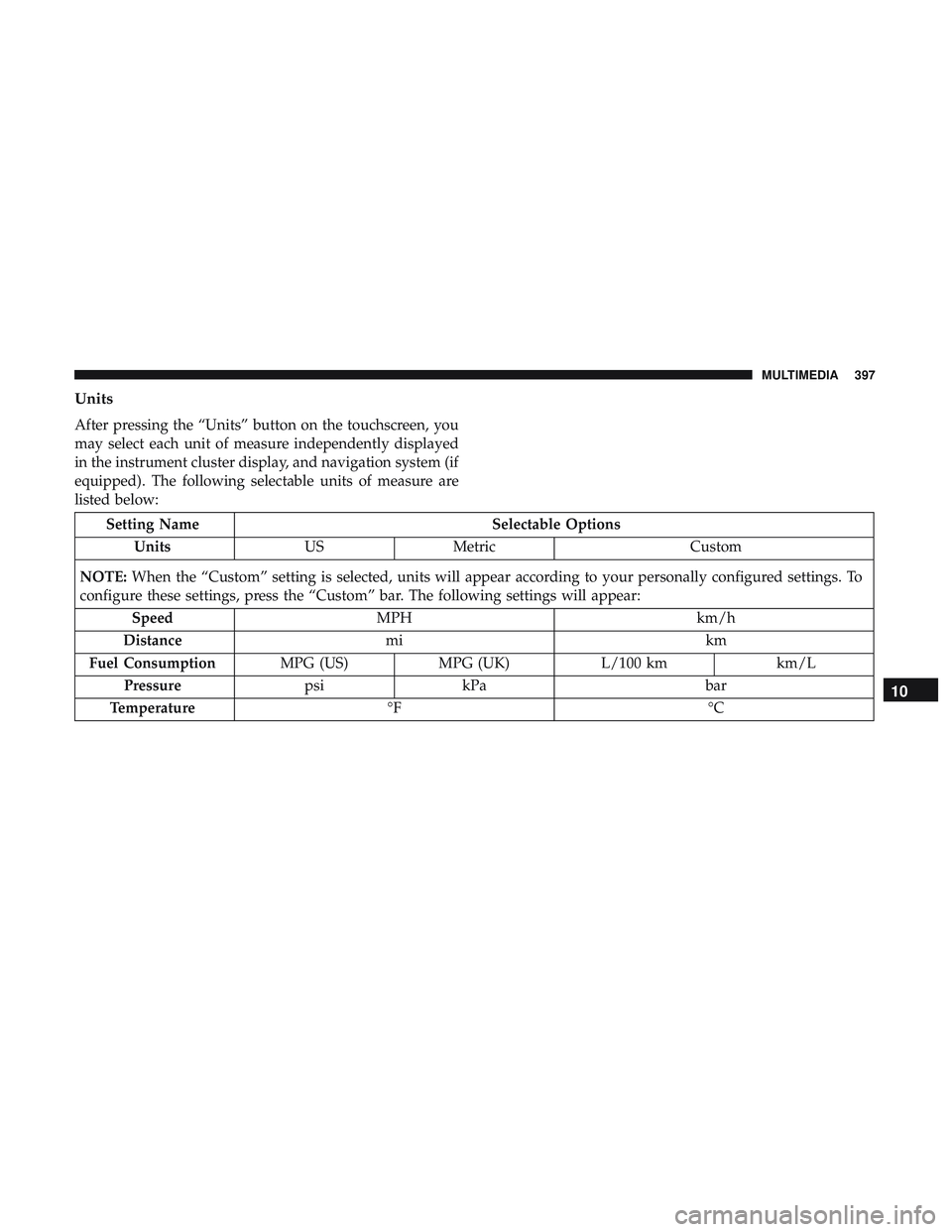
Units
After pressing the “Units” button on the touchscreen, you
may select each unit of measure independently displayed
in the instrument cluster display, and navigation system (if
equipped). The following selectable units of measure are
listed below:
Setting NameSelectable Options
Units USMetric Custom
NOTE: When the “Custom” setting is selected, units will appear according to your personally configured settings. To
configure these settings, press the “Custom” bar. The following settings will appear:
Speed MPH km/h
Distance mi km
Fuel Consumption MPG (US)MPG (UK) L/100 km km/L
Pressure psikPa bar
Temperature °F °C
10
MULTIMEDIA 397