ignition DODGE DAKOTA 2004 3.G Owner's Manual
[x] Cancel search | Manufacturer: DODGE, Model Year: 2004, Model line: DAKOTA, Model: DODGE DAKOTA 2004 3.GPages: 300, PDF Size: 5.23 MB
Page 69 of 300

Your vehicle is equipped with plastic headlight lenses
that are lighter and less susceptible to stone breakage
than glass headlights.
Plastic is not as scratch resistant as glass and therefore
different lens cleaning procedures must be followed.
To minimize the possibility of scratching the lenses and
reducing light output, avoid wiping with a dry cloth. To
remove road dirt, wash with a mild soap solution fol-
lowed by rinsing.Do not use abrasive cleaning components, solvents, steel
wool or other abrasive materials to clean the lenses.
Daytime Running Lights (Canada Only)
The headlights on your vehicle will illuminate when the
engine is started. This provides a constant9Lights ON9
condition until the ignition is turned OFF. The lights
illuminate at less than 50% of normal intensity. If the
parking brake is applied the Daytime Running Lights
will turn off.
Lights-on Reminder
If the headlights, parking lights, courtesy lights or cargo
lights are left on, after the ignition is turned off, a chime
will sound when the driver's door is opened.
Fog Lights Ð If Equipped
The foglights are turned ON by placing the headlight
rotary control in the parking light or headlight position
and pulling out the headlight rotary control. The fog
lights will operate only when the parking lights are ON
or when the vehicle headlights are ON low beam. An
indicator light located left of the switch will illuminate
when the fog lights are on. The fog lights will turn off
UNDERSTANDING THE FEATURES OF YOUR VEHICLE 69
3
Page 74 of 300
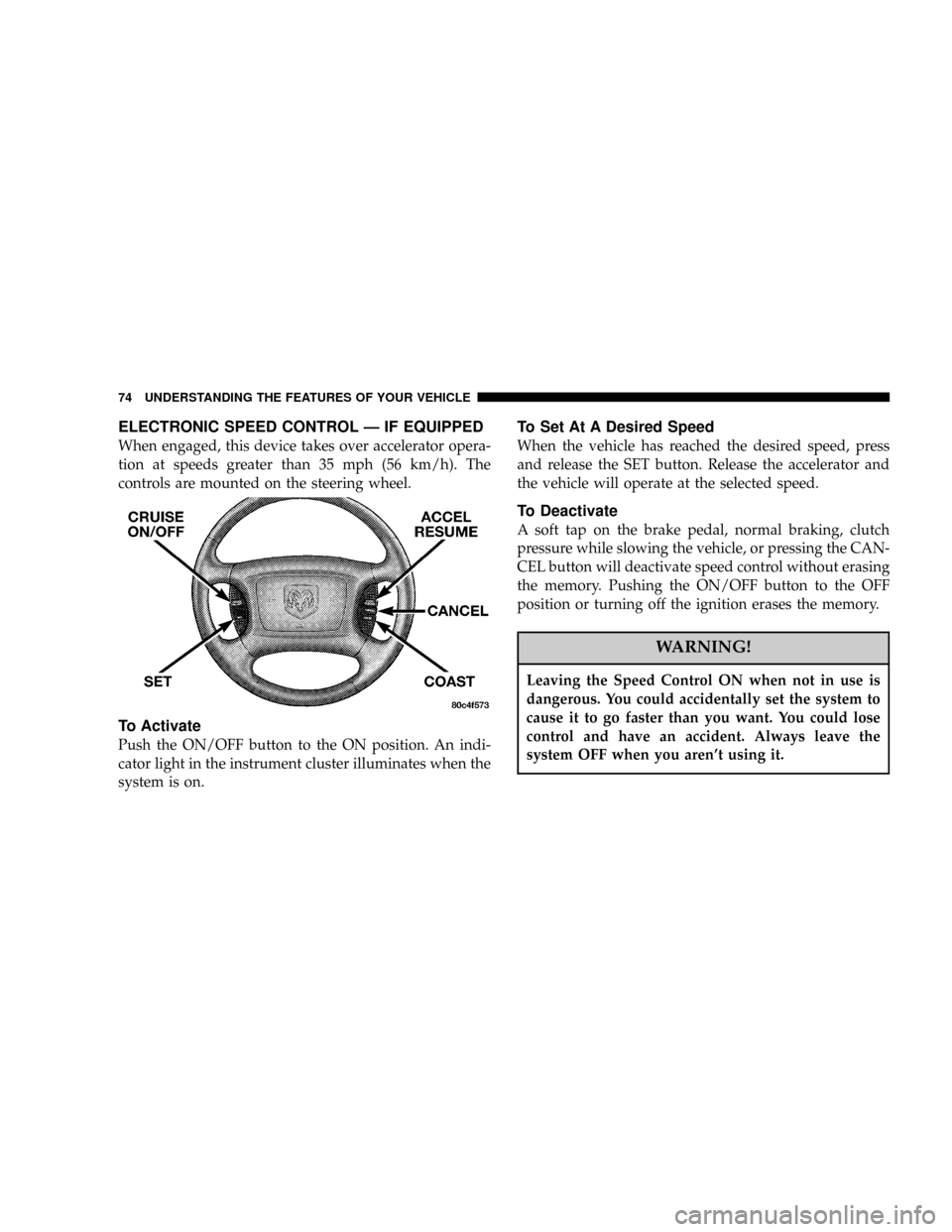
ELECTRONIC SPEED CONTROL Ð IF EQUIPPED
When engaged, this device takes over accelerator opera-
tion at speeds greater than 35 mph (56 km/h). The
controls are mounted on the steering wheel.
To Activate
Push the ON/OFF button to the ON position. An indi-
cator light in the instrument cluster illuminates when the
system is on.
To Set At A Desired Speed
When the vehicle has reached the desired speed, press
and release the SET button. Release the accelerator and
the vehicle will operate at the selected speed.
To Deactivate
A soft tap on the brake pedal, normal braking, clutch
pressure while slowing the vehicle, or pressing the CAN-
CEL button will deactivate speed control without erasing
the memory. Pushing the ON/OFF button to the OFF
position or turning off the ignition erases the memory.
WARNING!
Leaving the Speed Control ON when not in use is
dangerous. You could accidentally set the system to
cause it to go faster than you want. You could lose
control and have an accident. Always leave the
system OFF when you aren't using it.
74 UNDERSTANDING THE FEATURES OF YOUR VEHICLE
Page 78 of 300

Step Button
Use this button to choose or cycle through the four trip
conditions.
Average Fuel Economy (AVG ECO)
This display shows the average fuel economy since the
last reset.
Distance To Empty (DTE)
This display shows the estimated distance that can be
traveled with the fuel remaining in the tank. The distance
is calculated by multiplying the amount of fuel remain-
ing by the projected fuel economy. The distance predicted
will change every few seconds to a higher or lower
number as these factors change. The DTE will read zero
when the fuel gauge reads ªE.º
This display cannot be reset.
Trip Odometer (ODO)
This display shows the distance traveled since the last
reset.
Elapsed Time (ET)
This display shows the accumulated ignition ON time
since the last reset.
78 UNDERSTANDING THE FEATURES OF YOUR VEHICLE
Page 80 of 300

Manual Compass Calibration
If the compass appears erratic and the CAL light does not
appear, you must calibrate the compass. Find an open
area away from large metal objects. With the ignition ON
and the compass/temperature displayed, press and hold
the RESET button until the CAL symbol appears (about
10 seconds). Drive slowly, about 5 mph (8 km/h), in 3
complete 360É circles. The CAL light will turn off and the
compass will be calibrated.
Variance is the difference between magnetic North and
geographic North. For proper compass function, the
correct variance zone must be set. Refer to the variance
map for the correct variance zone. To check the variance
zone, the ignition must be on and the compass/
temperature displayed. Press and hold the RESET button
for about 5 seconds until VAR appears in the display. The
number displayed is the variance zone used by the
compass. To change the zone, press the STEP button to
scroll through numbers 1 through 15. Press the RESET
button after selecting the proper zone to return to the
normal compass/temperature display.
80 UNDERSTANDING THE FEATURES OF YOUR VEHICLE
Page 86 of 300

This device complies with part 15 of FCC rules and with
RSS-210 of Industry Canada. Operation is subject to the
following conditions:
²This device may not cause harmful interference.
²This device must accept any interference that may be
received including interference that may cause undes-
ired operation.
NOTE:Changes or modifications not expressly ap-
proved by the party responsible for compliance could
void the user's authority to operate the equipment.
HomeLinktis a trademark owned by Johnson Controls,
Inc.
ELECTRICAL POWER OUTLETS Ð IF EQUIPPED
The optional auxiliary power outlet can provide up to 15
Amps of current for accessories designed for use with the
standard power outlet adapter. The outlet is located in
the lower portion of the instrument panel. It is covered by
a snap on a plastic cap when not in use. As a safety
precaution, this outlet only operates with the ignition
switch ON. When the optional Cigar Lighter heating
element is used, it heats when pushed in and pops out
86 UNDERSTANDING THE FEATURES OF YOUR VEHICLE
Page 100 of 300

direction of the turn. These indicators also indicate
proper operation of the front and rear turn signal lights.
If either indicator flashes at a faster rate than normal,
check for a defective bulb. If either indicator fails to light
up when the lever is moved, check for a defective fuse or
turn signal bulb. A continuous low chime is activated
when the left/right turn signal is left on with the engine
RPM vehicle speed greater than 15 mph (24 km/h) for
more than 1 mi. (1.6 km)
6. High Beam Indicator
This light indicates that headlights are on high
beam.
7. Speedometer
This gage shows vehicle speed in miles per hour and
kilometers per hour.
8. Oil Pressure Gage ± If Equipped
This gage indicates engine oil pressure. Any
reading within the normal range indicates that
the engine oil system is operating satisfactorily. A
continuous high or low reading under normal operat-
ing conditions may indicate a lubrication system mal-
function. Immediate service should be obtained. Theoil gage does not indicate the amount of oil in the
engine. See section 7 for the oil level checking proce-
dure.
9. Fuel Gage
This gage shows the level of fuel in tank when
the ignition switch is in the ON position.
10. Gear Selector
The electronic gear selector display is self-contained
within the instrument cluster. It displays the position of
the automatic transmission shift lever, and the relation of
each position to all other positions. For a good signal the
display will place a box around the selected transmission
range (PRND21). If the PRNDL displays only the char-
acters PRND21 (no boxes) or PRND21 with all boxes on,
have the system checked by an authorized dealer.
11. O/D (Overdrive) OFF Indicator (Automatic
Transmissions Only
This light will illuminate when the overdrive off button
has been selected.
100 INSTRUMENT PANEL AND CONTROLS
Page 101 of 300

12. Seat Belt Reminder Light
This light comes on for several seconds after the
ignition is turned ON as a reminder to ªbuckle
up.º This light will remain on as long as the seat
belt remains unbuckled. If this light flashes, it indi-
cates a fault in the airbag system. Have the system
checked by an authorized dealer.
13. Low Washer Fluid Indicator
This light comes on when the washer fluid level falls
below approximately 1/4 full. The light will remain on
until fluid is added and ignition switch is cycled.
14. Brake System Warning Light
This light will light when the ignition key is turned to the
ON position and will remain on for a few seconds. If the
light stays on, it may be an indication that the parking
brake has not been released, or there is a low brake fluid
level. If the light remains on when the parking brake has
been disengaged, and the fluid level is at the full mark on
the master cylinder reservoir, it indicates a possible brake
hydraulic system malfunction. In this case, the light will
remain on until the cause is corrected. If the parking
brake is applied, the light will flash when the gearposition is out of park for automatic transmissions, or the
engine RPM is greater than 0 for manual transmissions.
If brake failure is indicated, immediate repair is neces-
sary.Operating the vehicle in this condition is danger-
ous!
15. SERVICE 4WD Indicator
This light monitors the electric shift 4WD
system. This light will come on when the
ignition key is turned to the ON position and
will stay on for 2 seconds. If the light stays
on or comes on during driving, it means that the 4WD
system is not functioning properly and that service is
required.
16. Check Gages
This light illuminates when the Voltmeter, En-
gine Oil Pressure or Engine Coolant Tempera-
ture gages indicate a reading either too high or too
low. Examine the gages carefully, and follow the
instructions above for each indicated problem.
NOTE:
When the ignition switch is turned to OFF, the
Fuel Gage, Voltmeter, Oil Pressure and Engine Coolant
INSTRUMENT PANEL AND CONTROLS 101
4
Page 102 of 300

Temperature gages may not show accurate readings.
When the engine is not running, turn the ignition switch
to ON to obtain accurate readings.
17. Airbag Indicator
The indicator lights and remains lit for 6 to 8
seconds when the ignition is first turned ON. If
the light does not come on when the ignition is first
turned on, or the light stays on or comes on while
driving, have the airbag system checked by an autho-
rized dealer.
18. Low Fuel Warning Light
This indicator lights when the fuel gauge reads
1/8 of a tank or less.
19. ABS Warning Light
This light monitors the Anti-Lock Brake Sys-
tem which is described elsewhere in this
manual. This light will come on when the
ignition key is turned to the ON position and
may stay on for 5 seconds. If this light remains on or
comes on during driving, it indicates that the anti-lockportion of the brake system is not functioning and that
service is required. See your authorized dealer imme-
diately.
20. Transmission Oil Temperature Warning Light
This light indicates that there is excessive
transmission fluid temperature that might
occur with severe usage such as trailer tow-
ing. If this light comes on, stop the vehicle
and run the engine at idle or faster, with the transmis-
sion in NEUTRAL until the light goes off.
21. Security
The light will flash rapidly for approximately 15 seconds
when the vehicle theft alarm is arming. The light will
flash at a slower rate after the alarm is set. The security
light will also come on for about three seconds when the
ignition is first turned ON.
22. Cargo Lamp
The Cargo Lamp light will illuminate when the Cargo
Lamp is activated from the Head Lamp switch.
102 INSTRUMENT PANEL AND CONTROLS
Page 103 of 300
23. Malfunction Indicator Light
This light is part of an onboard diagnostic
system which monitors the emissions and en-
gine control system. If the vehicle is ready for
emissions testing the light will come on when the
ignition is first turned on and remain on, as a bulb
check, until the engine is started. If the vehicle is not
ready for emissions testing the light will come on
when the ignition is first turned on and remain on for
15 seconds, then blink for 5 seconds, and remain on
until the vehicle is started. If the bulb does not come
on during starting, have the condition investigated
promptly.
If this light comes on and remains on while driving, it
suggests a potential engine control problem and the need
for system service.
Although your vehicle will usually be drivable and not
need towing, see your dealer for service as soon as
possible.
CAUTION!
Prolonged driving with the MIL on could cause
damage to the engine control system. It also could
affect fuel economy and driveability.
If the MIL is flashing, severe catalytic converter
damage and power loss will soon occur. Immediate
service is required.
24. Door Ajar
The Door Ajar light will illuminate when the
ignition is ON and either one of the passen-
ger doors is opened.
25. Odometer/Trip Odometer Button
Press this button to toggle between the odometer and the
trip odometer display. Holding the button in resets the
trip odometer reading.
26. Odometer/Trip Odometer
The odometer shows the total distance the vehicle has
been driven.
INSTRUMENT PANEL AND CONTROLS 103
4
Page 104 of 300
U.S. federal regulations require that upon transfer of
vehicle ownership, the seller certify to the purchaser the
correct mileage that the vehicle has been driven. There-
fore, if the odometer reading is changed during repair or
replacement, be sure to keep a record of the reading
before and after the service so that the correct mileage can
be determined.
The trip odometer shows individual trip mileage. To
toggle between the odometer and the trip odometer,
press the Odometer/Trip Odometer Button.
27. Cruise Light
This indicator lights when the electronic speed control
system is turned on.
28. Coolant Temperature Light (Clusters Without A
Gauge)
This light warns of an overheated engine con-
dition. For a bulb check, this light will come on
momentarily when the ignition is turned On. If
the light turns on while driving, stop the vehicle and
shut off the engine as soon as possible.
CAUTION!
Driving with a hot engine cooling system could
damage your vehicle. If the temperature light is on,
pull over and stop the vehicle. Idle the vehicle with
the air conditioner turned off until the light turns
off. If the if the light remains on, turn the engine off
immediately, and call for service.
WARNING!
A hot engine cooling system is dangerous. You or
others could be badly burned by steam or boiling
coolant. You may want to call a service center if your
vehicle overheats. If you decide to look under the
hood yourself, see Section 7 of this manual. Follow
the warnings under the Cooling System Pressure
Cap paragraph.
104 INSTRUMENT PANEL AND CONTROLS