radio DODGE DAKOTA 2004 3.G Owners Manual
[x] Cancel search | Manufacturer: DODGE, Model Year: 2004, Model line: DAKOTA, Model: DODGE DAKOTA 2004 3.GPages: 300, PDF Size: 5.23 MB
Page 17 of 300
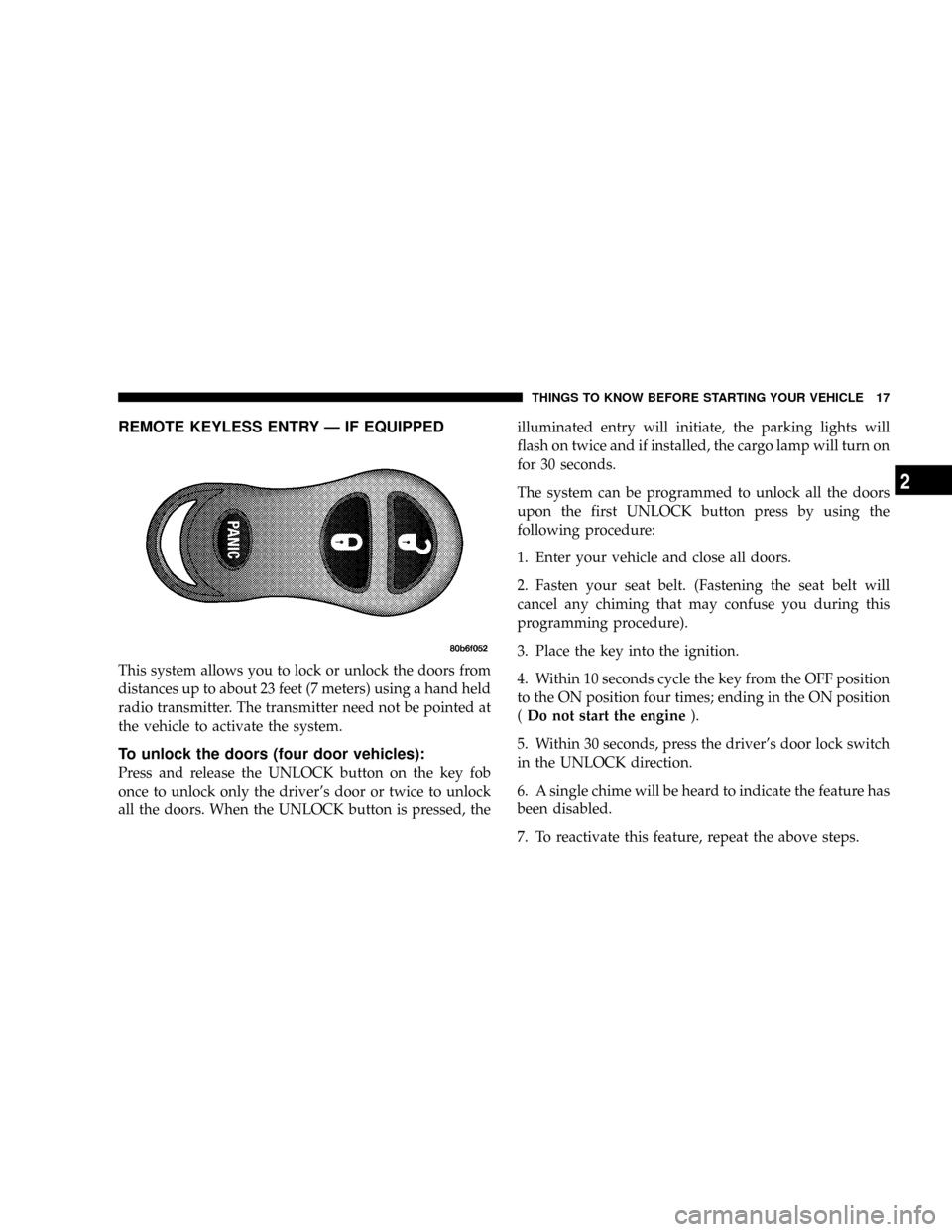
REMOTE KEYLESS ENTRY Ð IF EQUIPPED
This system allows you to lock or unlock the doors from
distances up to about 23 feet (7 meters) using a hand held
radio transmitter. The transmitter need not be pointed at
the vehicle to activate the system.
To unlock the doors (four door vehicles):
Press and release the UNLOCK button on the key fob
once to unlock only the driver's door or twice to unlock
all the doors. When the UNLOCK button is pressed, theilluminated entry will initiate, the parking lights will
flash on twice and if installed, the cargo lamp will turn on
for 30 seconds.
The system can be programmed to unlock all the doors
upon the first UNLOCK button press by using the
following procedure:
1. Enter your vehicle and close all doors.
2. Fasten your seat belt. (Fastening the seat belt will
cancel any chiming that may confuse you during this
programming procedure).
3. Place the key into the ignition.
4. Within 10 seconds cycle the key from the OFF position
to the ON position four times; ending in the ON position
(Do not start the engine).
5. Within 30 seconds, press the driver's door lock switch
in the UNLOCK direction.
6. A single chime will be heard to indicate the feature has
been disabled.
7. To reactivate this feature, repeat the above steps.
THINGS TO KNOW BEFORE STARTING YOUR VEHICLE 17
2
Page 20 of 300

8. Using the fob to be programmed, press and release
both the LOCK and UNLOCK buttons, simultaneously.
9. A single chime will be heard.
10. Within four seconds of hearing the chime, press and
release either the LOCK or UNLOCK button on the fob.
11. Repeat steps 8 through 10 to program up to two
additional fobs.
12. Your vehicle will remain in program mode up to 30
seconds from when the original chime was heard. After
30 seconds, all programmed fobs function normally.
NOTE:If you do not have a programmed transmitter,
contact your dealer for details.
General Information
This device complies with part 15 of FCC rules and with
RS-210 of Industry Canada. Operation is subject to the
following conditions:
1. This device may not cause harmful interference.
2. This device must accept any interference that may be
received including interference that may cause undesired
operation.
NOTE:Changes or modifications not expressly ap-
proved by the party responsible for compliance could
void the user's authority to operate the equipment.
If your Keyless Entry Transmitter fails to operate from a
normal distance, check for these two conditions.
1. Weak batteries in transmitter. The expected life of the
batteries is from one to two years.
2. Closeness to a radio transmitter such as a radio station
tower, airport transmitter, and some mobile or CB radios.
20 THINGS TO KNOW BEFORE STARTING YOUR VEHICLE
Page 68 of 300

also known as the9Party9mode because it allows the
doors to stay open for extended periods of time without
discharging the vehicle's battery.
The brightness of the instrument panel lighting can be
regulated by rotating the dimmer control up (brighter) or
down (dimmer). When the headlights are ON you can
supplement the brightness of the odometer, trip odom-
eter, radio and overhead console by rotating the control
up until you hear a click. This feature is termed the
ªParadeº mode and is useful when headlights are re-
quired during the day.
Club Cab/Quad Cab models may have an optional
switched dome lamp that may be operated by pressing
the lens.
Battery Saver
To protect the life of your vehicle's battery, Load Shed-
ding is provided for both the interior and exterior lights.
If the ignition is off and any door is left ajar for 15
minutes or the dimmer control is rotated upwards for 15
minutes, the interior lights will automatically turn off.If the headlamps remain on while the ignition is cycled
off, the exterior lights will automatically turn off after 5
minutes. If the headlamps are turned on and left on for 15
minutes while the ignition is off, the exterior lights will
automatically turn off.
NOTE:Battery Saver mode is cancelled if the ignition is
ON.
Headlamp Delay
To aid in your exit, your vehicle is equipped with a
headlamp delay that will leave the headlamps on for 60
seconds. This delay is initiated when the ignition is
turned OFF while the headlamp switch is on, and then
the headlamp switch is cycled off. The headlamps will
remain on for 60 seconds. Headlamp delay can be
cancelled by either turning the headlamp switch ON then
OFF or by turning the ignition ON.
Headlights, Parking Lights, Panel Lights
When the headlight switch is rotated to the first
position, the parking lights, taillights, side marker
lights, license plate light and instrument panel
lights are all turned on. The headlights will turn ON
when the switch is rotated to the second position.
68 UNDERSTANDING THE FEATURES OF YOUR VEHICLE
Page 82 of 300
WARNING!
A moving garage door can cause injury to people and
pets in the path of the door. People or pets could be
seriously or fatally injured. Only use this transceiver
with a garage door opener that has a ªstop and
reverseº feature as required by federal safety stan-
dards. This includes most garage door opener mod-
els manufactured after 1982. Do not use a garage
door opener without these safety features it could
cause injury or death. Call toll-free 1±800±355±3515
or, on the Internet at www.homelink.com for safety
information or assistance.
Programming HomeLink
NOTE:
When programming a garage door opener, it is
advised to park outside the garage. It is also recom-
mended that a new battery be placed in the hand-held
transmitter of the device being programmed to
HomeLink for quicker training and accurate transmis-
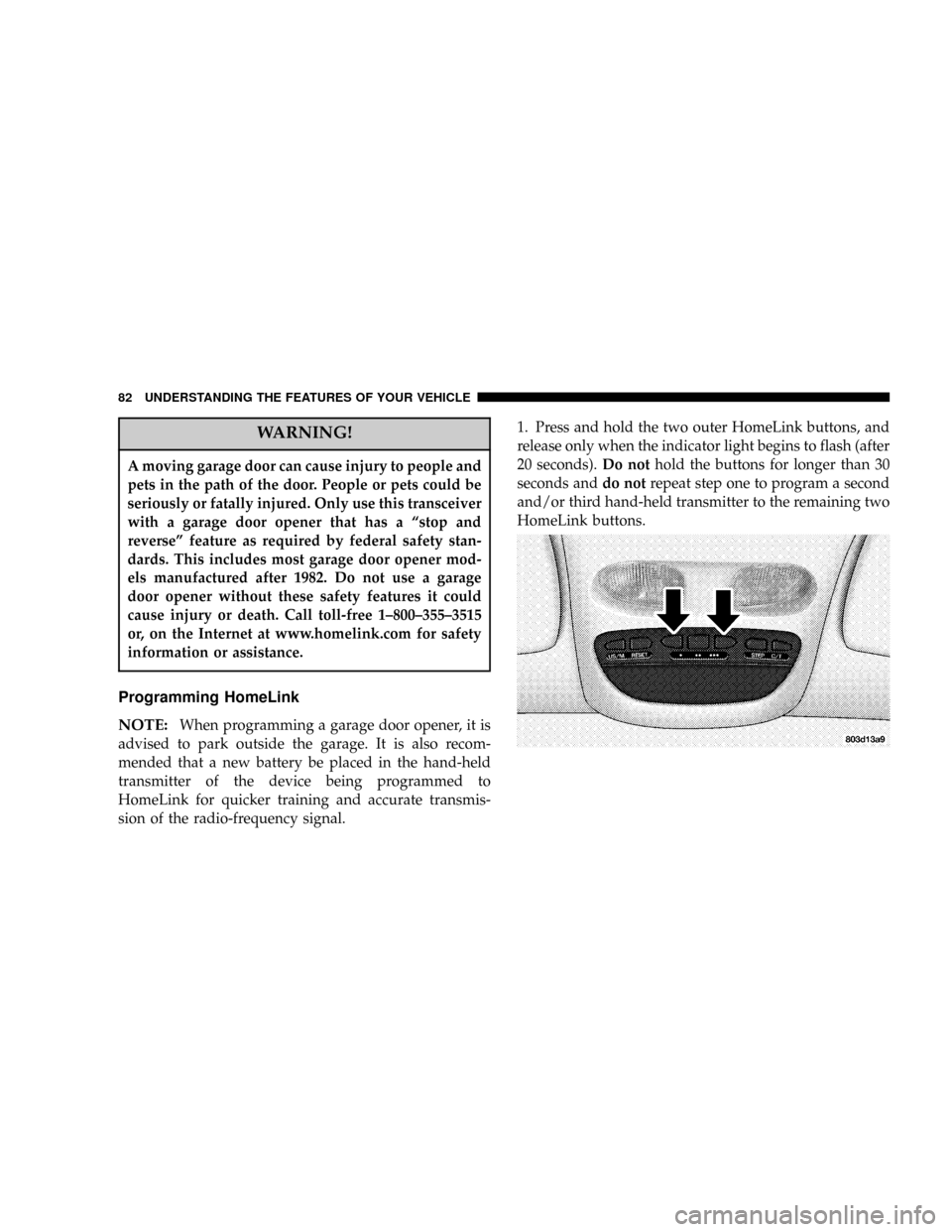
sion of the radio-frequency signal.1. Press and hold the two outer HomeLink buttons, and
release only when the indicator light begins to flash (after
20 seconds).Do nothold the buttons for longer than 30
seconds anddo notrepeat step one to program a second
and/or third hand-held transmitter to the remaining two
HomeLink buttons.
82 UNDERSTANDING THE FEATURES OF YOUR VEHICLE
Page 84 of 300

If the indicator light blinksrapidly for two seconds and
then turns to a constant light, continue with(Program-
ming(steps 6-8to complete the programming of a rolling
code equipped device (most commonly a garage door
opener).
6. At the garage door opener receiver (motor-head unit)
in the garage, locate the9learn9or9smart9button. This
can usually be found where the hanging antenna wire is
attached to the motor-head unit.
7. Firmly press and release the9learn9or9smart9button.
(The name and color of the button may vary by manu-
facturer.)
NOTE:There are 30 seconds in which to initiate step
eight.
8. Return to the vehicle and firmlypress, hold for two
seconds and releasethe programmed HomeLink button.
Repeat the(press/hold/release(sequence a second time,
and, depending on the brand of the garage door opener
(or other rolling code equipped device), repeat this
sequence a third time to complete the programming.HomeLink should now activate your rolling code
equipped device.
NOTE:To program the remaining two HomeLink but-
tons, begin with9Programming9step two. Do not repeat
step one. For questions or comments, please contact
HomeLink atwww.homelink.com or 1-800-355-3515.
Canadian Programming/Gate Programming
Canadian radio-frequency laws require transmitter sig-
nals to9time-out9(or quit) after several seconds of
transmission which may not be long enough for
HomeLink to pick up the signal during programming.
Similar to this Canadian law, some U.S. gate operators are
designed to9time-out9in the same manner.
If you live in Canada or you are having difficulties
programming a gate operator by using the9Program-
ming9procedures (regardless of where you live),replace
(Programming HomeLink(step 3with the following:
NOTE:If programming a garage door opener or gate
operator, it is advised to unplug the device during the
9cycling9process to prevent possible overheating.
84 UNDERSTANDING THE FEATURES OF YOUR VEHICLE
Page 93 of 300

INSTRUMENT PANEL AND CONTROLS
CONTENTS
mInstruments And Controls.................96
mFour Gauge Instrument Cluster.............97
mSix Gauge Instrument Cluster..............98
mInstrument Cluster Description.............99
mElectronic Digital Clock.................105
NClock Setting Procedure.................105
mSales Code RAZÐAM/ FM Stereo Radio With
Cassette Tape Player, CD Player And CD
Changer Controls Ð If Equipped
..........106
NOperating Instructions Ð Radio...........106
NPower Switch, Volume Control............106
NSeek Button (Radio Mode)...............106NTuning.............................106
NPTY (Program Type) Button..............106
NBalance............................108
NFade..............................108
NTone Control........................108
NAM/FM Selection.....................108
NScan Button.........................108
NTo Set The Radio Push-Button Memory......108
NTo Change From Clock To Radio Mode......109
NOperating Instructions Ð Tape Player.......109
NSeek Button.........................109
4
Page 94 of 300

NFast Forward (FF).....................109
NRewind (RW)........................109
NTape Eject...........................110
NScan Button.........................110
NChanging Tape Direction................110
NMetal Tape Selection...................110
NPinch Roller Release...................110
NNoise Reduction......................110
NOperating Instructions Ð CD Player........110
NInserting The Compact Disc..............111
NSeek Button.........................111
NEJT CD (Eject) Button..................111
NFF/Tune/RW........................112
NProgram Button 4 (Random Play)..........112
NMode..............................112
NTape CD Button......................112NTime Button.........................112
NScan Button.........................112
NCD Changer Control Capability Ð If
Equipped...........................113
mSales Code RBKÐAM/ FM Stereo Radio
With CD Player And CD Changer Controls
...114
NRadio Operation......................114
NCD Player Operation...................116
NCD Changer Control Capability Ð If
Equipped...........................117
NRadio Display Messages................119
mSales Code RBBÐAM/FM Stereo Radio With
Cassette Tape Player And CD Changer
Capability
...........................119
NOperating Instructions..................119
NPower Button........................120
NElectronic Volume Control...............120
94 INSTRUMENT PANEL AND CONTROLS
Page 95 of 300

NSeek..............................120
NTune ..............................120
NTo Set The Push-Button Memory..........120
NBalance............................121
NFade..............................121
NBass And Treble Tone Control............121
NAM/FM Selection.....................121
NMode Button........................121
NCassette Player Features................121
NCD Changer Control Capability Ð If
Equipped...........................122
NRadio Display Messages................124
mSales Code RBQÐAM/FM Stereo Radio
With 6 - Disc CD Changer
...............124
NRadio Operation......................124
NCD Player Operation...................126
mRemote Sound System Controls Ð If
Equipped
............................130
NRadio Operation......................130
NTape Player.........................131
NCD Player..........................131
mCassette Tape And Player Maintenance......131
mCompact Disc Maintenance...............132
mRadio Operation And Cellular Phones.......132
mClimate Controls......................133
NHeater Only.........................133
NAir Conditioning.....................134
NOperating Tips.......................137
NOperation Tips Chart...................139
mRear Window Defroster ± Quad-Cab Only....140
INSTRUMENT PANEL AND CONTROLS 95
4
Page 105 of 300

29. Engine Oil Pressure Indicator Light (Clusters
Without A Gauge)
This light indicates that the engine oil pressure
has become too low. For a bulb check, this light
will come on momentarily when the ignition is turned
On. If the light turns on while driving, stop the vehicle
and shut off the engine as soon as possible. Immediate
service should be obtained.
30. Voltage Light (Clusters Without A Gauge)
This light monitors the electrical system volt-
age. The light should turn on momentarily as
the engine is started. If the light stays on or turns on
while driving, it indicates a problem with the charging
system. Immediate service should be obtained.ELECTRONIC DIGITAL CLOCK
The clock and radio each use the display panel built into
the radio. A digital readout shows the time in hours and
minutes whenever the ignition switch is in the ªONº or
ªACCº position.
When the ignition switch is in the ªOFFº position, or
when the radio frequency is being displayed, time keep-
ing is accurately maintained.
Clock Setting Procedure
1. Turn the ignition switch to the ªONº or ªACCº
position. Using the point of a ballpoint pen or similar
object, press either the ªHº (Hour) or ªMº (Minute)
buttons on the radio. The display will show the time.
2. Press the ªHº button to set hours or the ªMº button to
set minutes. The time setting will increase each time you
press a button.
INSTRUMENT PANEL AND CONTROLS 105
4
Page 106 of 300

SALES CODE RAZÐAM/ FM STEREO RADIO
WITH CASSETTE TAPE PLAYER, CD PLAYER
AND CD CHANGER CONTROLS Ð IF EQUIPPED
Operating Instructions Ð Radio
NOTE:
Power to operate the radio is controlled by the
ignition switch. It must be in the ON or ACC position to
operate the radio.
Power Switch, Volume Control
Press the ON/VOL control to turn the radio on. Turn the
volume control clockwise to increase the volume. The
volume will be displayed and continuously updated
while the button is pressed.
Seek Button (Radio Mode)
Press and release the Seek button to search for the next
station in either the AM or FM mode. Press the top of the
button to seek up and the bottom to seek down. Holding
the button will by pass stations until you release the
button.
Tuning
Press the TUNE control up or down to increase or
decrease the frequency. If you press and hold the button,
the radio will continue to tune until you release the
button. The frequency will be displayed and continu-
ously updated while the button is pressed.
PTY (Program Type) Button
Pressing this button once will turn on the PTY mode for
5 seconds. If no action is taken during the 5 second time
out the PTY icon will turn off. Pressing the PTY button
within 5 seconds will allow the program format type to
be selected. Many radio stations do not currently broad-
cast PTY information.
106 INSTRUMENT PANEL AND CONTROLS