steering DODGE DAKOTA 2008 3.G User Guide
[x] Cancel search | Manufacturer: DODGE, Model Year: 2008, Model line: DAKOTA, Model: DODGE DAKOTA 2008 3.GPages: 426, PDF Size: 6.39 MB
Page 117 of 426

Multifunction Control Lever
The multifunction control lever is located on the left side
of the steering column.
Turn Signals
Move the lever up or down to signal a right-hand or
left-hand turn.The arrow on either side of the instrument cluster flashes
to indicate the direction of the turn, and proper operation
of the front and rear turn signal lights. If an indicator fails
to light when the lever is moved, it would suggest that
the switch or indicator lamp is defective.
If a defective bulb or wiring circuit is detected for the
turn signal system, the arrow indicators will flash at a
faster rate.
You can signal a lane change by moving the lever
partially up or down.
NOTE:If a turn signal has been left on for at least a mile
duration, a continuous chime will sound.
Turn Signal Auto-Mode
Tap the multi-function control lever once and the turn
signal (left or right) will flash 3 times, and automatically
turn off.
UNDERSTANDING THE FEATURES OF YOUR VEHICLE 117
3
Page 118 of 426

Passing Light
You can signal another vehicle with your headlights by
partially pulling the multifunction lever toward the steer-
ing wheel. This will cause the high beam headlights to
turn on until the lever is released.
High Beam / Low Beam Select Switch
Pull the multifunction control lever fully toward the
steering wheel to switch the headlights from HIGH or
LOW beam.
WINDSHIELD WIPERS AND WASHERS
The multifunction control lever is located on the left side
of the steering column.
118 UNDERSTANDING THE FEATURES OF YOUR VEHICLE
Page 120 of 426

NOTE:If the front wiper is operating when the ignition
is turned off, the wiper will automatically return to the
9Park9position. When the vehicle is restarted, the wipers
will resume operation.
Windshield Washers
To use the washer, push in on the washer knob on the end
of the multifunction control lever and hold while spray is
desired. If the washer knob is depressed while in the
delay range, the wiper will operate for several seconds
after the washer knob is released. It will then resume the
intermittent interval previously selected. If the washer
knob is pushed, for a period greater than 1 second, while
in the OFF position, the wiper will wipe approximately
three wipes, after the wash knob is released.To prevent freeze-up of your windshield washer system
in cold weather, select a solution or mixture that meets or
exceeds the temperature range of your climate. This
rating information can be found on most washer fluid
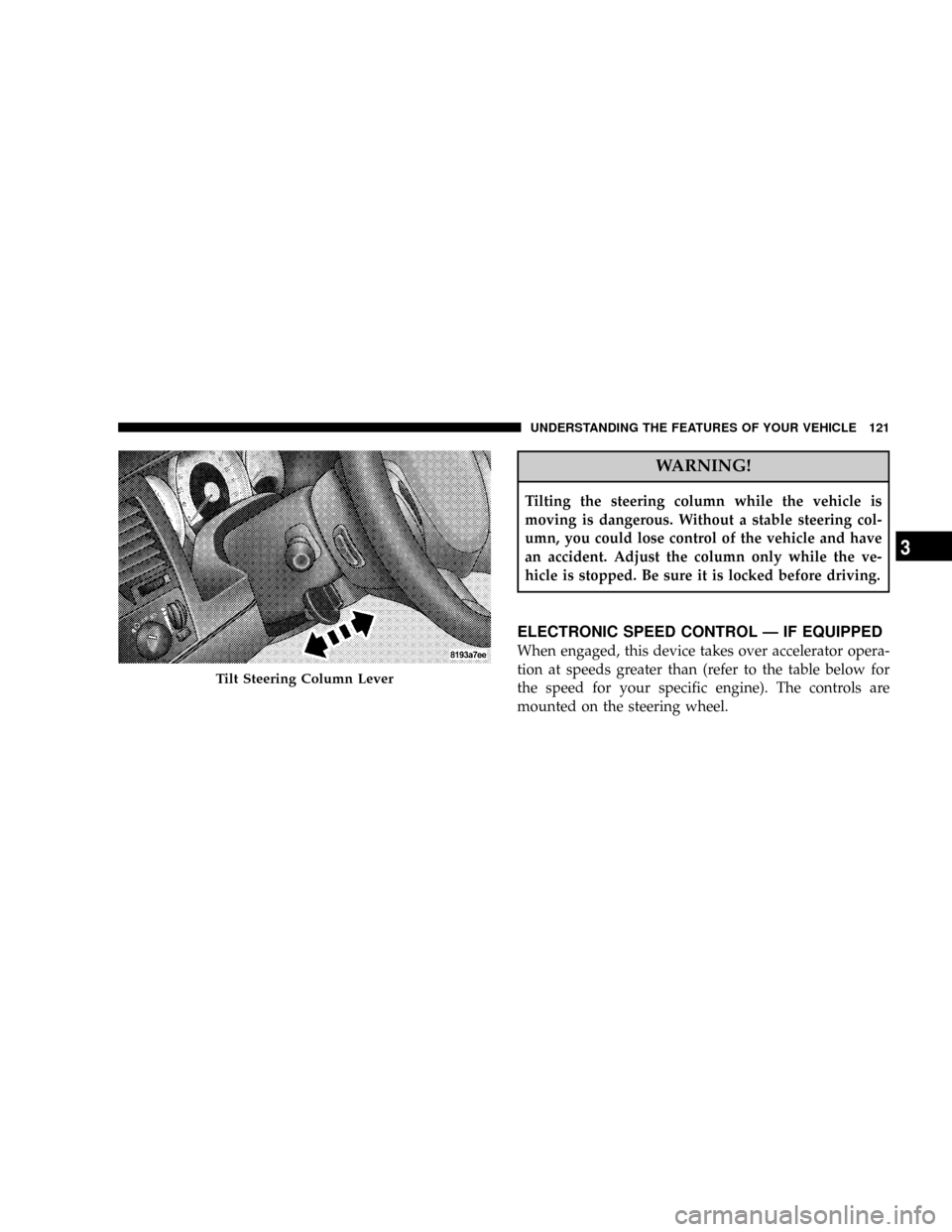
containers.TILT STEERING COLUMN
To tilt the column, pull rearward on the lever below the
turn signal control and move the wheel up or down, as
desired. Push the lever forward to lock the column firmly
in place.
120 UNDERSTANDING THE FEATURES OF YOUR VEHICLE
Page 121 of 426
WARNING!
Tilting the steering column while the vehicle is
moving is dangerous. Without a stable steering col-
umn, you could lose control of the vehicle and have
an accident. Adjust the column only while the ve-
hicle is stopped. Be sure it is locked before driving.
ELECTRONIC SPEED CONTROL Ð IF EQUIPPED
When engaged, this device takes over accelerator opera-
tion at speeds greater than (refer to the table below for
the speed for your specific engine). The controls are
mounted on the steering wheel.
Tilt Steering Column Lever
UNDERSTANDING THE FEATURES OF YOUR VEHICLE 121
3
Page 169 of 426

Two Types of Signals
There are two basic types of radio signals... AM or
Amplitude Modulation, in which the transmitted sound
causes the amplitude, or height, of the radio waves to
vary... and FM or Frequency Modulation, in which the
frequency of the wave is varied to carry the sound.
Electrical Disturbances
Radio waves may pick up electrical disturbances during
transmission. They mainly affect the wave amplitude,
and thus remain a part of the AM reception. They
interfere very little with the frequency variations that
carry the FM signal.
AM Reception
AM sound is based on wave amplitude, so AM reception
can be disrupted by such things as lightning, power lines
and neon signs.
FM Reception
Because FM transmission is based on frequency varia-
tions, interference that consists of amplitude variations
can be filtered out, leaving the reception relatively clear,
which is the major feature of FM radio.
NOTE:The radio, steering wheel radio controls (if
equipped), and 6 disc CD/DVD changer (if equipped)
will remain active for up to 10 minutes after the ignition
switch has been turned off. Opening a vehicle front door
will cancel this feature.
INSTRUMENT PANEL AND CONTROLS 169
4
Page 205 of 426

Select the button (1-6) you wish to lock onto this channel
and press and release that button. If a button is not
selected within 5 seconds after pressing the SET button,
the channel will continue to play but will not be stored
into push-button memory.
You may add a second channel to each push-button by
repeating the above procedure with this exception: Press
the SET button twice and SET 2 will show in the display
window. Each button can be set for SET 1 and SET 2. This
allows a total of 12 Satellite channels to be stored into
push-button memory. The channels stored in SET 2
memory can be selected by pressing the push-button
twice.
Every time a preset button is used, a corresponding
button number will display.
Buttons1-6
These buttons tune the radio to the channels that you
commit to push-button memory {12 Satellite stations}.
Operating Instructions - Hands Free Phone (If
Equipped)
Refer to ªHands-Free Communication (UConnectŸ)º in
Section 3 of this manual.
Operating Instructions - Video Entertainment
System (VESŸ) (If Equipped)
Refer to separate ªVideo Entertainment System (VESŸ)
Guide.º
REMOTE SOUND SYSTEM CONTROLS Ð IF
EQUIPPED
The remote sound system controls are located on the rear
surface of the steering wheel. Reach behind the wheel to
access the switches.
INSTRUMENT PANEL AND CONTROLS 205
4
Page 218 of 426

NNV 244 Generation II Transfer Case Operating
Information / Precautions...............239
NShifting Procedure - NV 244 Generation II
Transfer Case........................243
mLimited-Slip Rear Axle Differential Ð If
Equipped............................244
mDriving On Slippery Surfaces..............245
mDriving Through Water..................245
NFlowing/Rising Water..................246
NShallow Standing Water.................246
mParking Brake.........................247
mBrake System..........................249
NRear Wheel Anti-Lock Brake System ± If
Equipped...........................249NFour-Wheel Anti-Lock Brake System........250
mPower Steering........................251
mTire Safety Information...................253
NTire Markings........................253
NTire Identification Number (TIN)..........256
NTire Loading And Tire Pressure...........257
mTires Ð General Information...............261
NTire Pressure.........................261
NTire Inflation Pressures.................262
NRadial-Ply Tires......................264
NCompact Spare Tire Ð If Equipped.........265
NLimited Use Spare Ð If Equipped.........265
NTire Spinning........................266
218 STARTING AND OPERATING
Page 225 of 426
WARNING!
It is dangerous to shift the selector lever out of ªPº or
ªNº if the engine speed is higher than idle speed. If
your foot is not firmly on the brake pedal, the vehicle
could accelerate quickly forward or in reverse. You
could lose control of the vehicle and hit someone or
something. Only shift into gear when the engine is
idling normally and when your right foot is firmly on
the brake pedal.
Brake/Transmission Interlock System
This system prevents you from moving the gear shift out
of Park and into any gear unless the brake pedal is
pressed. This system is active only while the ignition
switch is in the ON position. Always depress thebrake
pedal first,before moving the gear selector out of PARK.
Automatic Transmission
The electronic PRNDL on the instrument cluster indicates
the transmission gear selected. The selector lever is
mounted on the right side of the steering column. To
drive, move the selector lever from Park or Neutral to the
desired drive position. Pull selector lever toward you
when shifting into Reverse, Second, First or Park, or
when shifting out of Park.
Gear Ranges
DO NOT race the engine when shifting from Park or
Neutral position into another gear range.
ªPº Park
Supplements parking brake by locking the transmission.
Engine can be started in this range. Never use Park while
vehicle is in motion. Apply parking brake when leaving
vehicle in this range. Always apply parking brake first,
then place selector in Park position.
STARTING AND OPERATING 225
5
Page 251 of 426
WARNING!
²Anti-lock Brake Systems (ABS) cannot prevent the
natural laws of physics from acting on the vehicle,
nor can it increase braking or steering efficiency
beyond that afforded by the condition of the
vehicle brakes and tires or the traction afforded.
²The ABS cannot prevent accidents, including
those resulting from excessive speed in turns,
following another vehicle too closely, or hydro-
planing. Only a safe, attentive, and skillful driver
can prevent accidents.
²The capabilities of an ABS equipped vehicle must
never be exploited in a reckless or dangerous
manner which could jeopardize the user's safety
or the safety of others.
When you are in a severe braking condition involving use
of the Anti-lock Brake System, you will experience some
pedal drop as the vehicle comes to a stop. This is the result
of the system reverting to the base brake system.
Engagement of the Anti-lock Brake System may be
accompanied by a pulsing sensation. You may also hear a
clicking noise. These occurrences are normal, and indi-
cate that the system is functioning properly.
POWER STEERING
The standard power steering system will give you good
vehicle response and increased ease of maneuverability
in tight spaces. The system will provide mechanical
steering capability if power assist is lost.
STARTING AND OPERATING 251
5
Page 252 of 426
If for some reason, the power assist is interrupted, it will
still be possible to steer your vehicle. Under these condi-
tions you will observe a substantial increase in steering
effort, especially at very low vehicle speeds and during
parking maneuvers.
NOTE:Increased noise levels at the end of the steering
wheel travel are considered normal and does not indicate
that there is a problem with the power steering system.
Upon initial start-up in cold weather, the power steering
pump may make noise for a short period of time. This is
due to the cold, thick fluid in the steering system. This
noise should be considered normal, and does not in any
way damage the steering system.WARNING!
Continued operation with reduced power steering
assist could pose a safety risk to yourself and others.
Service should be obtained as soon as possible.
CAUTION!
Prolonged operation of the steering system at the end
of the steering wheel travel will increase the steering
fluid temperature and should be avoided when pos-
sible. Damage to the power steering pump may occur.
252 STARTING AND OPERATING