battery DODGE DAKOTA 2009 3.G User Guide
[x] Cancel search | Manufacturer: DODGE, Model Year: 2009, Model line: DAKOTA, Model: DODGE DAKOTA 2009 3.GPages: 449, PDF Size: 10.96 MB
Page 126 of 449
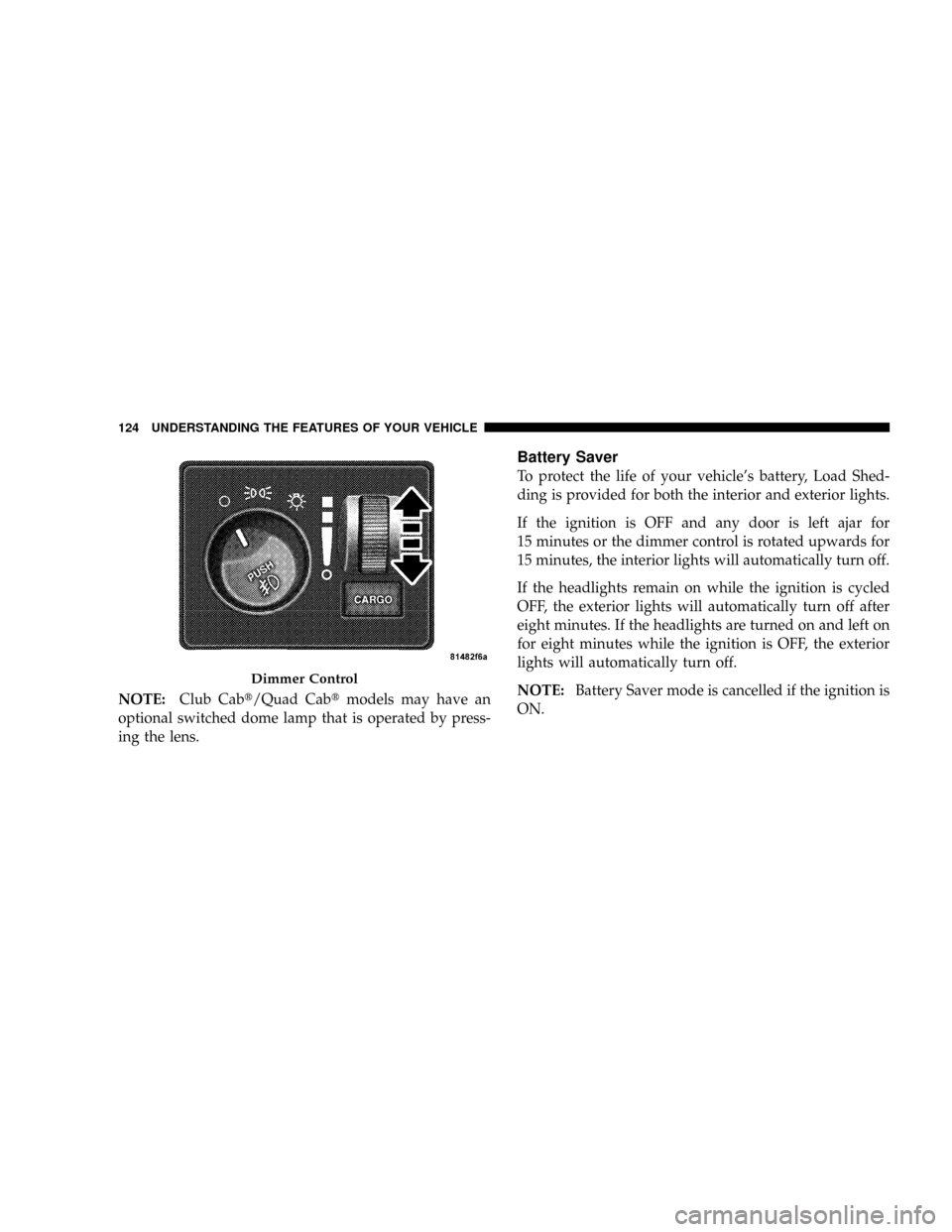
NOTE:Club Cabt/Quad Cabtmodels may have an
optional switched dome lamp that is operated by press-
ing the lens.
Battery Saver
To protect the life of your vehicle's battery, Load Shed-
ding is provided for both the interior and exterior lights.
If the ignition is OFF and any door is left ajar for
15 minutes or the dimmer control is rotated upwards for
15 minutes, the interior lights will automatically turn off.
If the headlights remain on while the ignition is cycled
OFF, the exterior lights will automatically turn off after
eight minutes. If the headlights are turned on and left on
for eight minutes while the ignition is OFF, the exterior
lights will automatically turn off.
NOTE:Battery Saver mode is cancelled if the ignition is
ON.
Dimmer Control
124 UNDERSTANDING THE FEATURES OF YOUR VEHICLE
Page 144 of 449
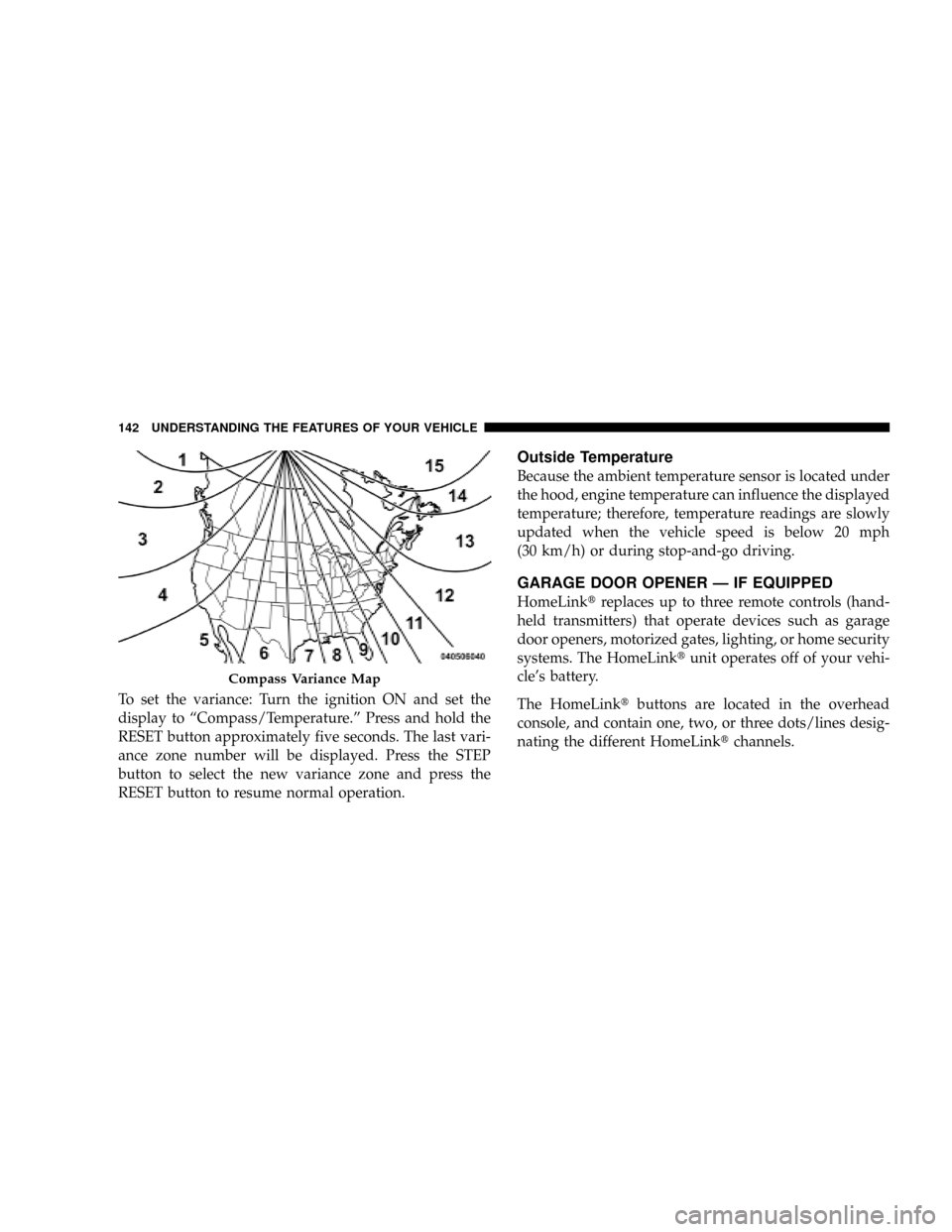
To set the variance: Turn the ignition ON and set the
display to ªCompass/Temperature.º Press and hold the
RESET button approximately five seconds. The last vari-
ance zone number will be displayed. Press the STEP
button to select the new variance zone and press the
RESET button to resume normal operation.
Outside Temperature
Because the ambient temperature sensor is located under
the hood, engine temperature can influence the displayed
temperature; therefore, temperature readings are slowly
updated when the vehicle speed is below 20 mph
(30 km/h) or during stop-and-go driving.
GARAGE DOOR OPENER Ð IF EQUIPPED
HomeLinktreplaces up to three remote controls (hand-
held transmitters) that operate devices such as garage
door openers, motorized gates, lighting, or home security
systems. The HomeLinktunit operates off of your vehi-
cle's battery.
The HomeLinktbuttons are located in the overhead
console, and contain one, two, or three dots/lines desig-
nating the different HomeLinktchannels.
Compass Variance Map
142 UNDERSTANDING THE FEATURES OF YOUR VEHICLE
Page 146 of 449
WARNING!
Vehicle exhaust contains carbon monoxide, a danger-
ous gas. Do not run your vehicle in the garage while
training the transceiver. Exhaust gas can cause seri-
ous injury or death.
Programming HomeLinkT
Before You Begin
The Compass Mini-Trip Computer (CMTC) illuminates
the HomeLinktsymbol (a house with an arrow inside it)
along with 1, 2 or 3 indicators under it, when a
HomeLinktbutton is pressed.
Pay attention to the indicator(s), as they will flash at
different rates, or remain solid during training.
If you have not trained any of the HomeLinktbuttons,
erase all channels before you begin training.To do this, press and hold the two outside buttons for
20 seconds. Release the buttons when the indicators start
to flash.
It is recommended that anew batterybe placed in the
hand-held transmitter of the device being programmed
to HomeLinkt, for more efficient training and accurate
transmission of the radio-frequency signal.
Your vehicle should be parked outside of the garage
while training.
1. Turn the ignition switch to the ON/RUN position.
2. Place the hand-held transmitter 1 to 3 inches (3 to
8 cm) from the HomeLinktbuttons, while keeping the
HomeLinktdisplay in view.
For optimal training, point the battery end of the hand-
held transmitter away from the HomeLinkt.
144 UNDERSTANDING THE FEATURES OF YOUR VEHICLE
Page 147 of 449
3. Simultaneously, press and hold both the chosen
HomeLinktbutton and the hand-held transmitter button
until the indicator(s) change from a slow to a rapid flash
rate.
Then release both the HomeLinktand hand-held trans-
mitter buttons.
It may take up to 30 seconds, or longer in rare cases. The
garage door may open & close while you train.
If the signal is too weak to train, replace the battery in the
original hand-held transmitter.
NOTE:Some gate operators and garage door openers
may require you to replace Step #3 with procedures
noted in the ªGate Operator/Canadian Programmingº
section.4. Press and hold the just-trained HomeLinktbutton. If
the indicator(s) blink rapidly for two seconds and then
remains constant, continue with the next section: Pro-
gramming A Rolling Code System.
NOTE:After training a HomeLinktchannel, if the
garage door does not operate with HomeLinktand the
garage door opener was manufactured after 1995, the
garage door opener may have rolling code. If so, proceed
to the heading, ªProgramming A Rolling Code System.º
5. PROGRAMMING A ROLLING CODE SYSTEM
At the garage door opener motor (in the garage), locate
the ªlearnº or ªtrainingº button.
This can usually be found where the hanging antenna
wire is attached to the garage door opener motor (it is
NOT the button normally used to open & close the door).
UNDERSTANDING THE FEATURES OF YOUR VEHICLE 145
3
Page 150 of 449
1. Turn the ignition switch to the ON/RUN position.
2. Press and hold the desired HomeLinktbutton, for
20 seconds, until the indicator(s) starts to flash.Do not
release the button.
3.Without releasing the button,proceed with PRO-
GRAMMING HOMELINKt, Step #2, and follow all
remaining steps.
Security
It is advised to erase all channels before you sell or turn
in your vehicle.
To do this, press and hold the two outside buttons, for
20 seconds, until the indicators begin to flash. Note that
all channels will be erased. Individual channels cannot be
erased.
The HomeLinktUniversal Transceiver is disabled when
the Vehicle Theft Alarm is active.
Troubleshooting Tips
If you are having trouble programming HomeLinkt, here
are some of the most common solutions:
²Replace the battery in the original transmitter.
²Press the ªLearnº button on the Garage Door Opener
to complete the training for Rolling Code.
²Did you unplug the device for training, and remember
to plug it back in?
If you have any problems, or require assistance, please
call toll-free 1±800±355±3515 or, on the Internet at
www.HomeLink.com, for information or assistance.
General Information
This device complies with FCC rules part 15 and Industry
Canada RSS-210. Operation is subject to the following
two conditions:
1. This device may not cause harmful interference
148 UNDERSTANDING THE FEATURES OF YOUR VEHICLE
Page 151 of 449
2. This device must accept any interference that may be
received including interference that may cause undesired
operation
NOTE:The transmitter has been tested and it complies
with FCC and IC rules. Changes or modifications not
expressly approved by the party responsible for compli-
ance could void the user 's authority to operate the
device.
The term ªICº before the certification/registration num-
ber only signifies that Industry Canada technical specifi-
cations were met.
ELECTRICAL POWER OUTLETS
This vehicle has two 12-Volt auxiliary power outlets that
can provide up to 20-Amps of current for accessories
designed for use with standard power outlet adapters.
The outlets are located in the instrument panel (below the
temperature control setting knob) and inside the full -
size center console. When the optional Cigar Lighterheating element is used, it heats when pushed in and
pops out automatically when ready for use.To preserve
the heating element, do not hold the lighter in the
heating position.
The instrument panel outlet can be reconfigured by the
customer to operate only when the ignition is ON (switch
battery fed) or with the ignition switch ON/OFF (battery
fed) to allow for cellular phone charging and/or opera-
tion while the ignition is OFF. This can be done by
moving the power outlet (switchable) fuse (fuse #22)
from the inboard position to the outboard position.
NOTE:All accessories connected to these outlets should
be removed or turned OFF when the vehicle is not in use,
to protect the battery against discharge (unless the cus-
tomer has reconfigured the fuse block to switched battery
feed).
UNDERSTANDING THE FEATURES OF YOUR VEHICLE 149
3
Page 152 of 449
Electrical Outlet Use With Engine OFF (Battery
Fed Configuration)
CAUTION!
²Many accessories that can be plugged in, draw
power from the vehicle's battery, even when not in
use (i.e., cellular phones, etc.). Eventually, if
plugged in long enough, the vehicle's battery will
discharge sufficiently to degrade battery life
and/or prevent engine starting.
²Accessories that draw higher power (i.e., coolers,
vacuum cleaners, lights, etc.), will discharge the
battery even more quickly. Use these only inter-
mittently and with greater caution.
(Continued)
CAUTION! (Continued)
²After the use of high power draw accessories, or
long periods of the vehicle not being started (with
accessories still plugged in), the vehicle must be
driven a sufficient length of time to allow the
generator to recharge the vehicle's battery.
CUPHOLDERS
If your vehicle has bucket seats with a center console,
there are three cupholders located on the console.
150 UNDERSTANDING THE FEATURES OF YOUR VEHICLE
Page 159 of 449
prior to the time-out. The Rear Window Defroster will
turn off automatically after 15 minutes from the first
activation, and 10 minutes after the second activation, all
within the same ignition cycle. To prevent excessive
battery drain, use the rear defroster only when the engine
is running.
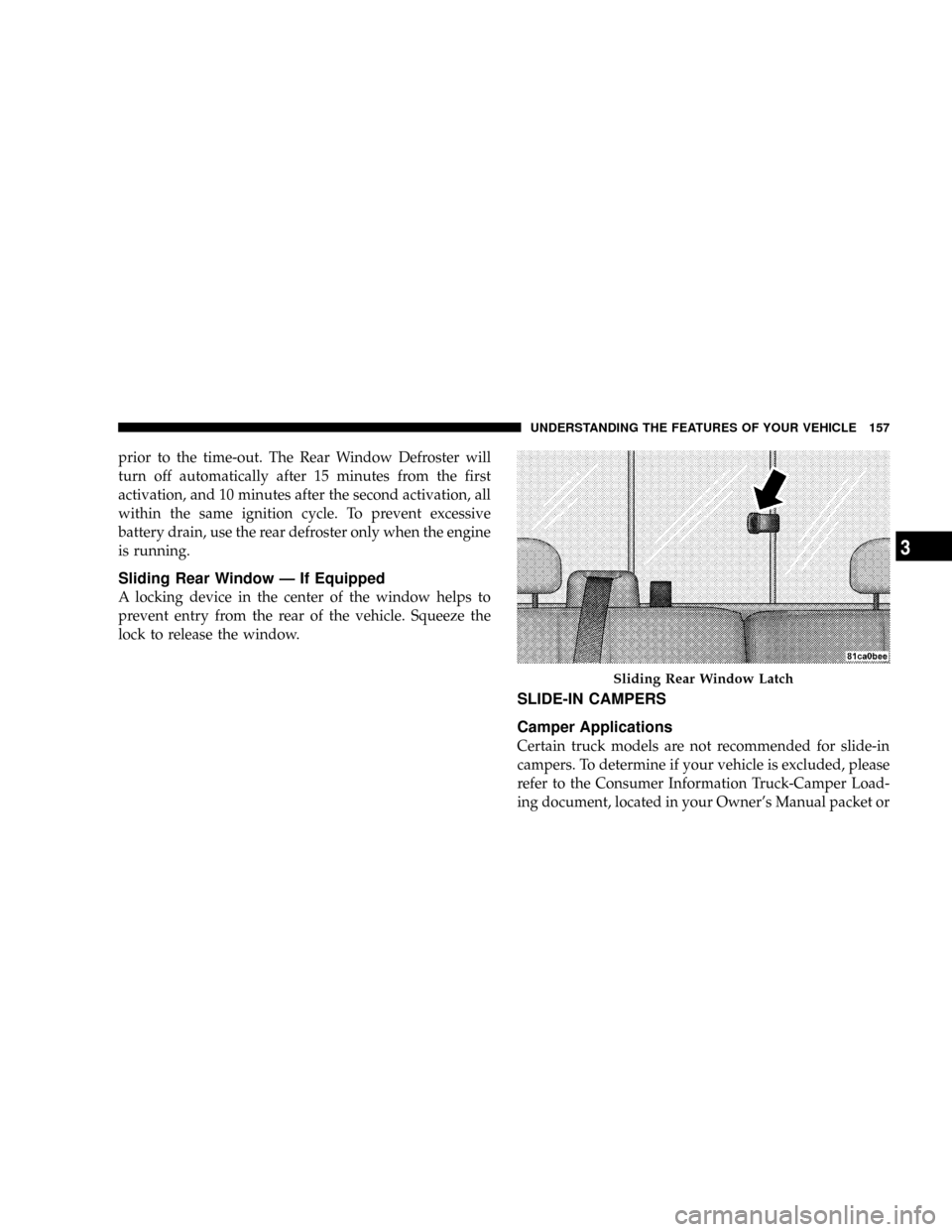
Sliding Rear Window Ð If Equipped
A locking device in the center of the window helps to
prevent entry from the rear of the vehicle. Squeeze the
lock to release the window.
SLIDE-IN CAMPERS
Camper Applications
Certain truck models are not recommended for slide-in
campers. To determine if your vehicle is excluded, please
refer to the Consumer Information Truck-Camper Load-
ing document, located in your Owner's Manual packet or
Sliding Rear Window Latch
UNDERSTANDING THE FEATURES OF YOUR VEHICLE 157
3
Page 242 of 449
Normal Starting
NOTE:Normal starting of either a warm or cold engine
is obtained without pumping or depressing the accelera-
tor pedal.
Turn the ignition switch to the START position and
release when the engine starts. If the engine fails to start
within 10 seconds, turn the key to the OFF position, wait
5 seconds, then repeat the starting procedure.
Extreme Cold Weather (below ±20ÉF or ±29ÉC)
To insure reliable starting at these temperatures, use of an
externally powered electric engine block heater (available
from your dealer) is recommended.
If Engine Fails To Start
WARNING!
²Never pour fuel or other flammable liquids into
the throttle body air inlet opening in an attempt to
start the vehicle. This could result in a flash fire
causing serious personal injury.
²Do not attempt to push or tow your vehicle to get
it started. Vehicles equipped with an automatic
transmission cannot be started this way. Unburned
fuel could enter the catalytic converter and once
the engine has started, ignite and damage the
converter and vehicle. If the vehicle has a dis-
charged battery, booster cables may be used to
obtain a start from a booster battery or the battery
in another vehicle. This type of start can be dan-
gerous if done improperly. Refer to ªJump-
Startingº in Section 6 and follow them carefully.
240 STARTING AND OPERATING
Page 301 of 449
CAUTION!
DO NOT use gasoline containing Methanol or E85
Ethanol. Use of these blends may result in starting
and drivability problems and may damage critical
fuel system components.
Problems that result from using methanol/gasoline or
E85 Ethanol blends are not the responsibility of the
manufacturer. While MTBE is an oxygenate made from
Methanol, it does not have the negative effects of
Methanol.
E-85 Usage In Non-Flex Fuel Vehicles
Non-FFV vehicles are compatible with gasoline contain-
ing 10% ethanol (E10). Gasoline with higher ethanol
content may void the vehicle's warranty.
If a Non-FFV vehicle is inadvertently fueled with E-85
fuel, the engine will have some or all of these symptoms:
²operate in a lean mode
²OBD II ªMalfunction Indicator Lightº on
²poor engine performance
²poor cold start and cold drivability
²increased risk for fuel system component corrosion
To fix a Non-FFV vehicle inadvertently fueled once with
E-85 perform the following:
²drain the fuel tank (see your authorized dealer)
²change the engine oil and oil filter
²disconnect and reconnect the battery to reset the
engine controller memory
More extensive repairs will be required for prolonged
exposure to E-85 fuel.
STARTING AND OPERATING 299
5