ignition DODGE DAKOTA 2009 3.G Owner's Manual
[x] Cancel search | Manufacturer: DODGE, Model Year: 2009, Model line: DAKOTA, Model: DODGE DAKOTA 2009 3.GPages: 449, PDF Size: 10.96 MB
Page 36 of 449
WINDOWS
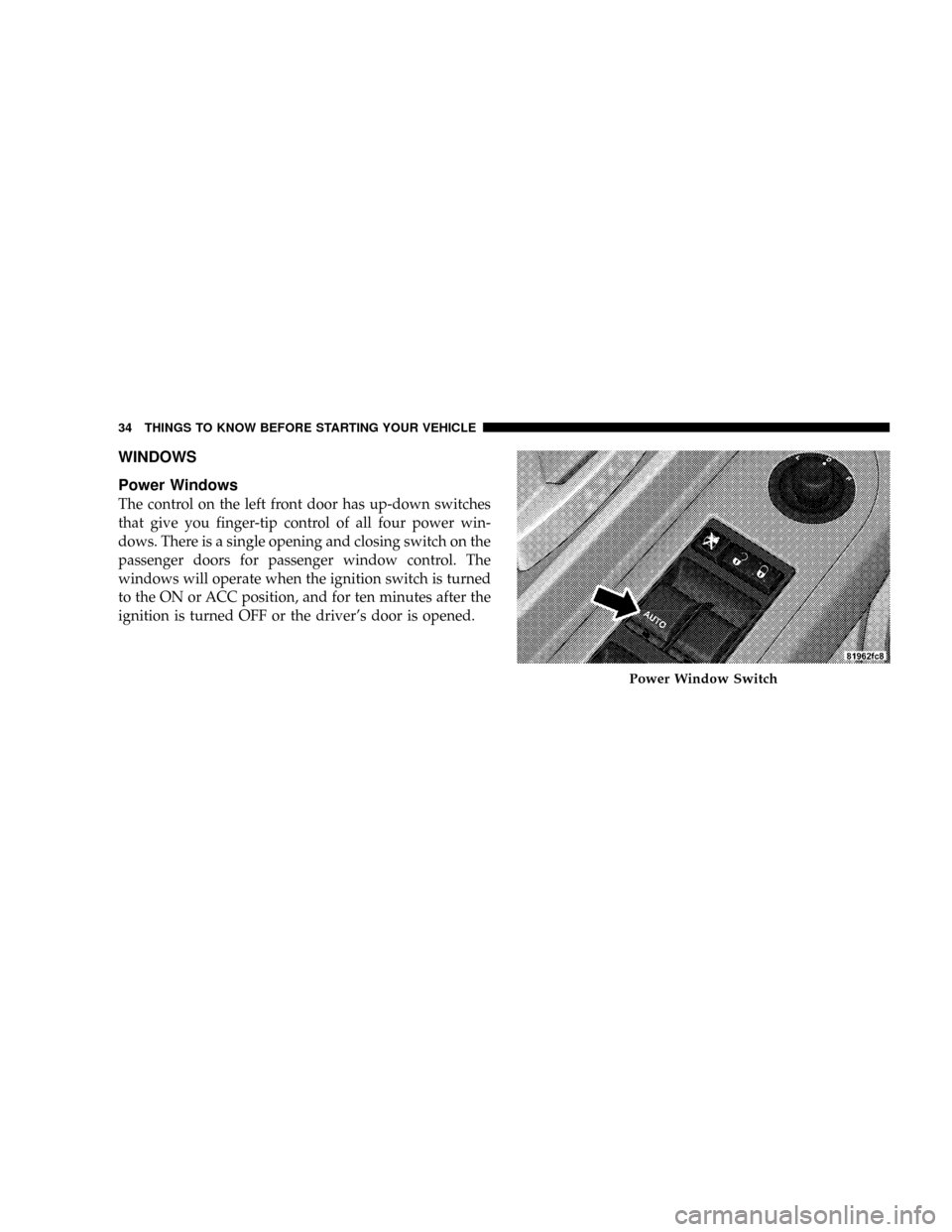
Power Windows
The control on the left front door has up-down switches
that give you finger-tip control of all four power win-
dows. There is a single opening and closing switch on the
passenger doors for passenger window control. The
windows will operate when the ignition switch is turned
to the ON or ACC position, and for ten minutes after the
ignition is turned OFF or the driver's door is opened.
Power Window Switch
34 THINGS TO KNOW BEFORE STARTING YOUR VEHICLE
Page 37 of 449
WARNING!
Never leave children alone in a vehicle. Leaving
unattended children in a vehicle is dangerous for a
number of reasons. A child or others could be seri-
ously or fatally injured. Don't leave the key in the
ignition. A child could operate power windows,
other controls, or move the vehicle.
Auto Down (Driver's Side Only)
The driver's window switch has an Auto Down feature.
Push the window switch past the first detent, release, and
the window will go down automatically. To cancel the
Auto Down movement, operate the switch in either the
up or down direction and release the switch.
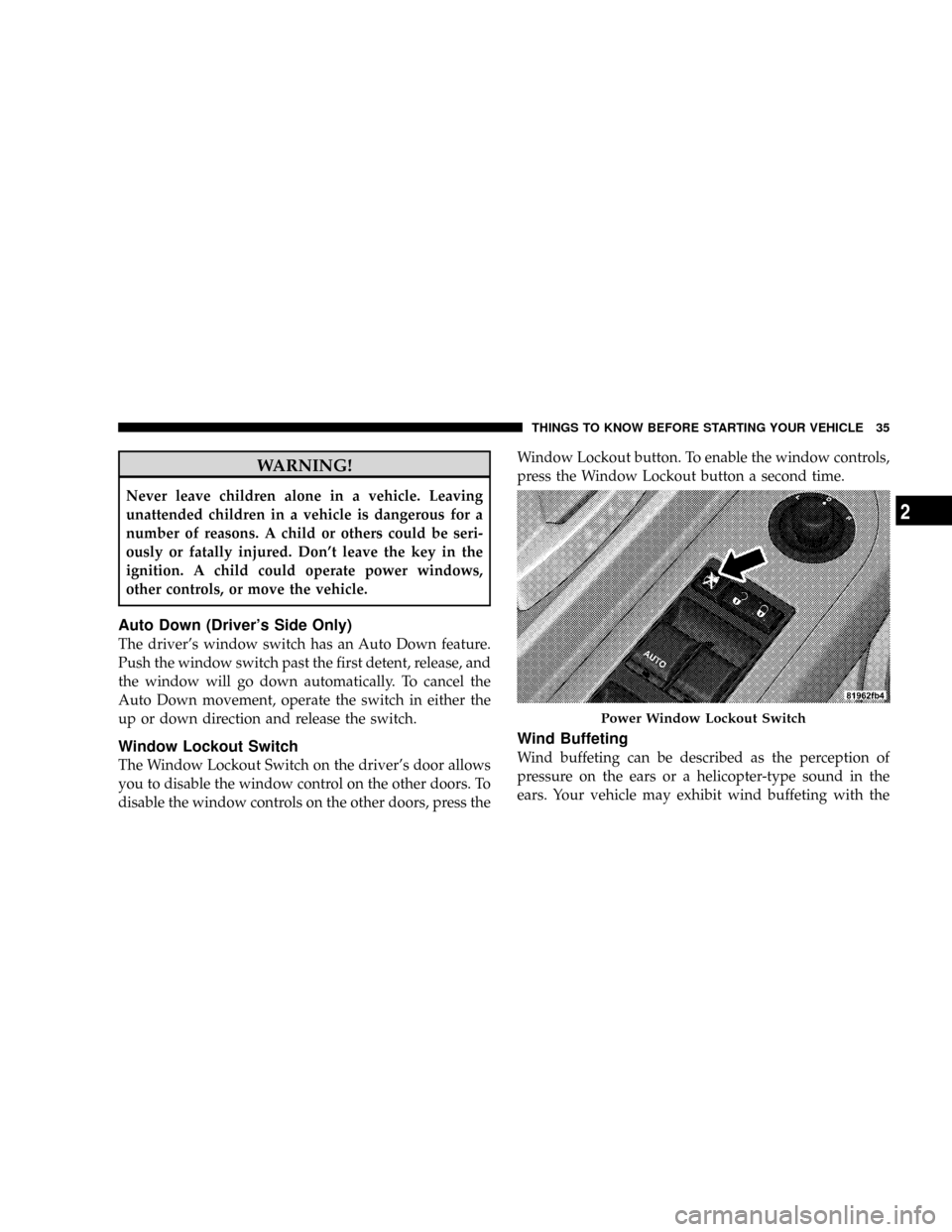
Window Lockout Switch
The Window Lockout Switch on the driver's door allows
you to disable the window control on the other doors. To
disable the window controls on the other doors, press theWindow Lockout button. To enable the window controls,
press the Window Lockout button a second time.
Wind Buffeting
Wind buffeting can be described as the perception of
pressure on the ears or a helicopter-type sound in the
ears. Your vehicle may exhibit wind buffeting with the
Power Window Lockout Switch
THINGS TO KNOW BEFORE STARTING YOUR VEHICLE 35
2
Page 47 of 449
NOTE:The following steps must occur within the first
60 seconds of the ignition switch being turned to the ON
or START position. Chrylser LLC does not recommend
deactivating BeltAlertt.
1. Turn the ignition switch to the OFF position and
buckle the driver's seat belt.
2. Turn the ignition switch to the ON position and wait
for the Seat Belt Warning Light to turn off.
3. Within 60 seconds of starting the vehicle, unbuckle
and then re-buckle the driver's seat belt at least three
times within 10 seconds, ending with the seat belt
buckled.
4. Turn off the engine. A single chime will sound to
signify that you have successfully completed the
programming.
BeltAlerttcan be reactivated by repeating this procedure.NOTE:Although the BeltAlertthas been deactivated,
the Seat Belt Warning Light will continue to illuminate
while the driver's seat belt remains unbuckled.
Seat Belts And Pregnant Women
We recommend that pregnant women use seat belts
throughout their pregnancies. Keeping the mother safe is
the best way to keep the baby safe.
Pregnant women should wear the lap part of the belt
across the thighs and as snug against the hips as possible.
Keep the belt low so that it does not come across the
abdomen. That way the strong bones of the hips will take
the force if there is a collision.
Seat Belt Extender
If a seat belt is too short, even when fully extended, your
authorized dealer can provide you with a seat belt
extender. This extender should be used only if the
existing belt is not long enough. When it is not required,
remove the extender and store it.
THINGS TO KNOW BEFORE STARTING YOUR VEHICLE 45
2
Page 52 of 449
WARNING! (Continued)
²If the vehicle has window bags, they also need
room to inflate. Do not lean against the door or
window. Sit upright in the center of the seat.
Airbag System Components
The airbag system consists of the following:
²Occupant Restraint Controller
²Side Remote Acceleration Sensors ± if equipped
²Airbag Warning Light
²Driver Airbag
²Passenger Airbag
²Window Bags above side windows ± if equipped
²Steering Wheel and Column
²Instrument Panel
²Interconnecting Wiring
²Knee Impact Bolsters
²Front Acceleration Sensors
²Driver and Front Passenger Seat Belt Pretensioners
How the Airbag System Works
²
TheOccupant Restraint Controller (ORC)determines
if a frontal collision is severe enough to require the
airbags to inflate. The front airbag inflators are de-
signed to provide different rates of airbag inflation
from direction provided by the ORC. The ORC will not
detect rollover.
The ORC also monitors the readiness of the electronic
parts of the system whenever the ignition switch is in
the START or RUN position. These include all of the
items listed above, except the steering wheel and
column, and knee bolsters. If the key is in the OFF
50 THINGS TO KNOW BEFORE STARTING YOUR VEHICLE
Page 53 of 449
position, in the ACC position, or not in the ignition,
the airbags are not on and will not inflate.
During a moderate-to-severe rear impact, the ORC may
only deploy the seat belt pretensioners.
²Also, the ORC turns on the AIRBAG warn-
ing light in the instrument cluster for six to
eight seconds for a self-check when the
ignition is first turned on. After the self-
check, the AIRBAG warning light will turn off. If the
ORC detects a malfunction in any part of the system, it
turns on the AIRBAG warning light either momen-
tarily or continuously. A single chime will sound if the
light comes on again after initial start up.
WARNING!
Ignoring the AIRBAG warning light in your instru-
ment panel could mean you won't have the airbags to
protect you in a collision. If the light does not come
on, stays on after you start the vehicle, or if it comes
on as you drive, have the airbag system checked right
away.
NOTE:Children 12 years and younger should always
ride buckled up in a rear seat, in an appropriate child
restraint.
²TheDriver and Passenger Airbag/Inflator Unitsare
located in the center of the steering wheel and the right
side of the instrument panel. When the ORC detects a
collision requiring the airbags, it signals the inflator
units. A large quantity of nontoxic gas is generated to
inflate the front airbags. Different airbag inflation rates
THINGS TO KNOW BEFORE STARTING YOUR VEHICLE 51
2
Page 57 of 449
WARNING! (Continued)
²It is dangerous to try to repair any part of the airbag
system yourself. Be sure to tell anyone who works
on your vehicle that it has an airbag system.
NOTE:Perchlorate Material ± special handling may apply.
See www.dtsc.ca.gov/hazardouswaste/perchlorate.
Enhanced Accident Response System
If the airbags deploy after an impact and the electrical
system remains functional, vehicles equipped with
power door locks will unlock automatically. In addition,
approximately five seconds after the vehicle has stopped
moving, the interior lights will light until the ignition
switch is turned off.
Airbag Warning Light
You will want to have the airbags ready to
inflate for your protection in an impact. While
the airbag system is designed to be mainte-
nance free, if any of the following occurs, have
an authorized dealer service the system promptly:
²The Airbag Warning Light does not come on or flickers
during the six to eight seconds when the ignition
switch is first turned on.
²The light remains on or flickers after the six to eight
second interval.
²The light flickers or comes on and remains on while
driving.
NOTE:If the speedometer, tachometer or any engine
related gauges are not working, the Occupant Restraint
Controller (ORC) may also be disabled. The airbags may
not be ready to inflate for your protection. Promptly
THINGS TO KNOW BEFORE STARTING YOUR VEHICLE 55
2
Page 59 of 449
court with legal jurisdiction (i.e., pursuant to a warrant).
A copy of the data will be provided to the custodial entity
upon request. General data, that does not identify par-
ticular vehicles or crashes, may be released for incorpo-
ration in aggregate crash databases, such as those main-
tained by the U.S. government and various states. Data of
a potentially sensitive nature, such as would identify a
particular driver, vehicle, or crash, will be treated confi-
dentially. Confidential data will not be disclosed by
Chrylser LLC to any third party, except when:
1. Used for research purposes, such as to match data
with a particular crash record in an aggregate database,
provided confidentiality of personal data is thereafter
preserved
2. Used in defense of litigation involving a Chrylser LLC
product
3. Requested by police under a legal warrant4. Otherwise required by law.
Data Parameters that May Be Recorded:
²Diagnostic trouble code(s) and warning lamp status
for electronically-controlled safety systems, including
the airbag system
²9Time9of airbag deployment (in terms of ignition
cycles and vehicle mileage)
²Airbag deployment level (if applicable)
²Impact acceleration and angle
²Seat belt status
²Brake status (service and parking brakes)
²Accelerator status (including vehicle speed)
²Engine control status (including engine speed)
²Transmission gear selection
THINGS TO KNOW BEFORE STARTING YOUR VEHICLE 57
2
Page 74 of 449
compartment. In addition, inspect the exhaust system
each time the vehicle is raised for lubrication or oil
change. Replace or adjust as required.
Safety Checks You Should Make Inside The
Vehicle
Heater Defroster Ducts
Inspect the heater defroster ducts for proper operation.
Check for proper airflow through all defroster ducts. If
there is any question regarding the operation of your
heater defroster ducts, have the system checked by an
authorized dealer
Seat Belts
Inspect the seat belt system periodically, checking for
cuts, frays and loose parts. Damaged parts must be
replaced immediately. Do not disassemble or modify the
system.Seat belt assemblies must be replaced after an accident if
they have been damaged (bent retractor, torn webbing,
etc.) or if the front airbags have deployed. If there is any
question regarding seat belt or retractor condition, re-
place the seat belt.
Airbag Warning Light
The airbag warning light should come on, and remain on,
for six to eight seconds as a bulb check when the ignition
switch is first turned ON. If the light is not lit during
starting, see your authorized dealer. If the light stays on,
flickers or comes on while driving, have the system
checked by an authorized dealer. If there is a problem
with the airbag warning light, the seat belt light will
flash.
72 THINGS TO KNOW BEFORE STARTING YOUR VEHICLE
Page 96 of 449
has established, press and hold the PHONE button until
you hear a double beep, indicating that the two calls have
been joined into one conference call.
Call Termination
To end a call in progress, momentarily press the PHONE
button. Only the active call(s) will be terminated and if
there is a call on hold, it will become the new active call.
If the active call is terminated by the far end, a call on
hold may not become active automatically. This is cell
phone-dependent. To bring the call back from hold, press
and hold the PHONE button until you hear a single beep.
Redial
²
Press the PHONE button to begin.
²After the9Ready9prompt and the following beep, say
9Redial.9
²The UConnecttsystem will call the last number that
was dialed from your cellular phone.NOTE:This may not be the last number dialed from the
UConnecttsystem.
Call Continuation
Call continuation is the progression of a phone call on the
UConnecttsystem after the vehicle ignition key has been
switched to OFF. Call continuation functionality avail-
able on the vehicle can be any one of three types:
²After the ignition key is switched to OFF, a call can
continue on the UConnecttsystem either until the call
ends, or until the vehicle battery condition dictates
cessation of the call on the UConnecttsystem and
transfer of the call to the mobile phone.
²After the ignition key is switched to OFF, a call can
continue on the UConnecttsystem for a certain dura-
tion, after which the call is automatically transferred
from the UConnecttsystem to the mobile phone.
94 UNDERSTANDING THE FEATURES OF YOUR VEHICLE
Page 97 of 449
²An active call is automatically transferred to the
mobile phone after the ignition key is switched to OFF.
UConnectTSystem Features
Language Selection
To change the language that the UConnecttsystem is
using:
²Press the PHONE button to begin.
²After the9Ready9prompt and the following beep, say
the name of the language you wish to switch to
English, Espanol, or Francais.
²Continue to follow the system prompts to complete
language selection.
After selecting one of the languages, all prompts and
voice commands will be in that language.NOTE:After every UConnecttlanguage change opera-
tion, only the language-specific 32-name phonebook is
usable. The paired phone name is not language-specific
and usable across all languages.
Emergency Assistance
If you are in an emergency and the mobile phone is
reachable:
²Pick up the phone and manually dial the emergency
number for your area.
If the phone is not reachable and the UConnecttsystem
is operational, you may reach the emergency number as
follows:
²Press the PHONE button to begin.
²After the9Ready9prompt and the following beep, say
9Emergency9and the UConnecttsystem will instruct
UNDERSTANDING THE FEATURES OF YOUR VEHICLE 95
3