ECO mode DODGE DAKOTA 2009 3.G Service Manual
[x] Cancel search | Manufacturer: DODGE, Model Year: 2009, Model line: DAKOTA, Model: DODGE DAKOTA 2009 3.GPages: 449, PDF Size: 10.96 MB
Page 226 of 449
additional three seconds will make the radio display the
Song Title all of the time (press and hold again to return
to normal display).
INFO Button Ð REU Radio
Pressing the INFO button will display information about
Artist, Song Title, and Composer (if available). Pressing
the INFO button again will close the INFO screen.
RW/FF
Pressing the RW (Rewind) or FF (Fast Forward) buttons
causes the tuner to search for the next channel in the
direction of the arrows.
TUNE Control (Rotary)
Turn the rotary Tune/Scroll control knob clockwise to
increase or counterclockwise to decrease the channel.
MUSIC TYPE Button Ð Except REU Radio
Pressing this button once will turn on the Music Type
mode for five seconds. Pressing the MUSIC TYPE buttonor turning the Tune/Scroll control knob within five
seconds will allow the program format type to be se-
lected.
Toggle the MUSIC TYPE button again to select the music
type.
By pressing the SEEK button when the Music Type
function is active, the radio will be tuned to the next
channel with the same selected Music Type name.
If a preset button is activated while in the Music Type
(Program Type) mode, the Music Type mode will be
exited and the radio will tune to the preset channel.
MUSIC TYPE Button Ð REU Radio
Pressing this button provides a MUSIC TYPES list from
which you can make a selection. Once a selection is
made, you can seek up, or down, or scan the channels
and the radio will tune to the next station matching the
selected format. There is no time-out for this screen.
224 UNDERSTANDING YOUR INSTRUMENT PANEL
Page 229 of 449
The left hand control is a rocker type switch with a push
button in the center. The function of the left hand control
is different depending on which mode you are in.
The following describes the left hand control operation in
each mode.
Radio Operation
Pressing the top of the switch will SEEK up for the next
listenable station and pressing the bottom of the switch
will SEEK down for the next listenable station.
The button located in the center of the left hand control
will tune to the next pre-set station that you have
programmed in the radio pre-set push-buttons.
CD Player
Pressing the top of the switch once will go to the next
track on the CD. Pressing the bottom of the switch oncewill go to the beginning of the current track or to the
beginning of the previous track if it is within one second
after the current track begins to play.
If you press the switch up or down twice it plays the
second track, three times, it will play the third, etc.
The button in the center of the left hand switch changes
CD's on the 6±Disc in-dash CD changer radio. This
button does not function for all other radios.
CD/DVD MAINTENANCE
To keep a CD/DVD in good condition, take the following
precautions:
1. Handle the disc by its edge; avoid touching the
surface.
2. If the disc is stained, clean the surface with a soft cloth,
wiping from center to edge.
UNDERSTANDING YOUR INSTRUMENT PANEL 227
4
Page 231 of 449
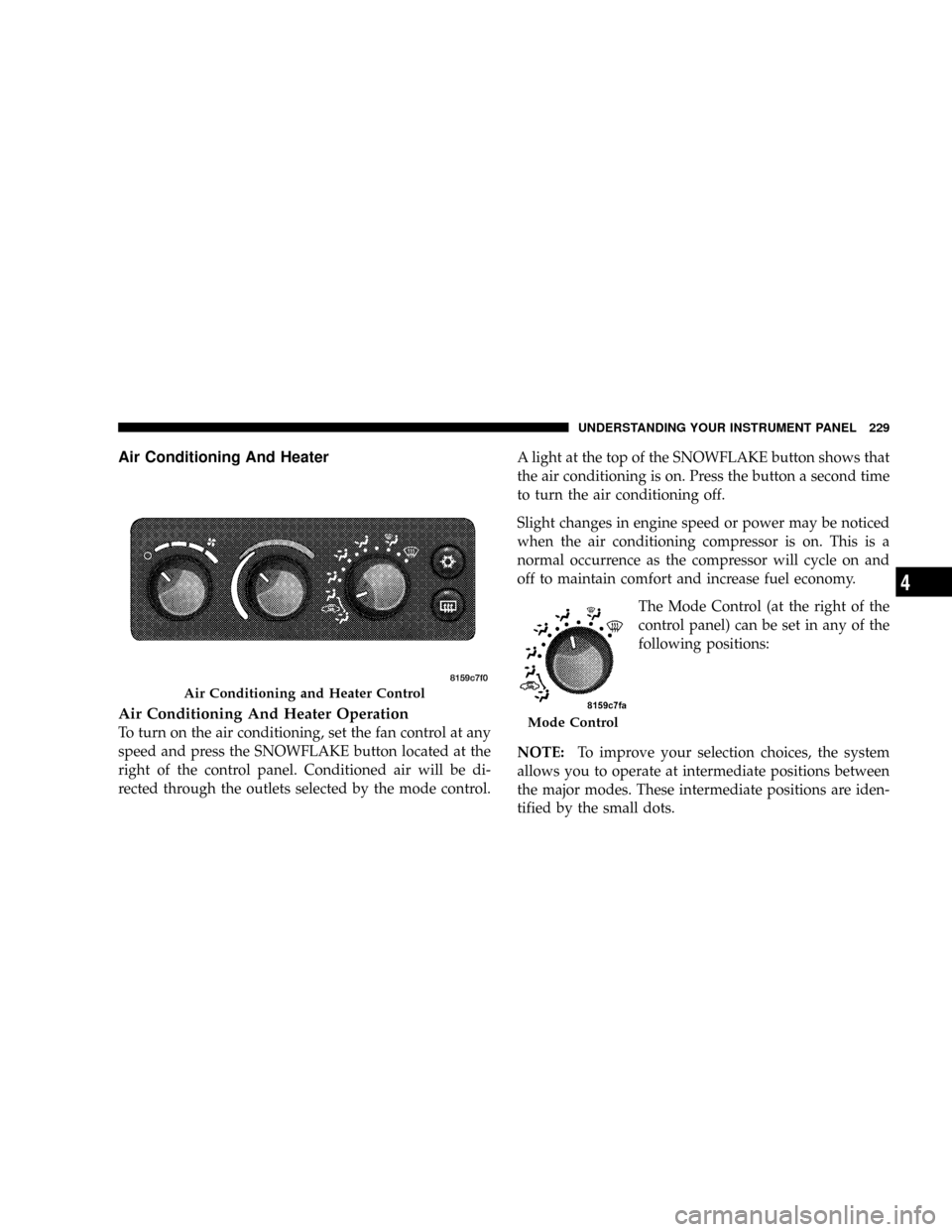
Air Conditioning And Heater
Air Conditioning And Heater Operation
To turn on the air conditioning, set the fan control at any
speed and press the SNOWFLAKE button located at the
right of the control panel. Conditioned air will be di-
rected through the outlets selected by the mode control.A light at the top of the SNOWFLAKE button shows that
the air conditioning is on. Press the button a second time
to turn the air conditioning off.
Slight changes in engine speed or power may be noticed
when the air conditioning compressor is on. This is a
normal occurrence as the compressor will cycle on and
off to maintain comfort and increase fuel economy.
The Mode Control (at the right of the
control panel) can be set in any of the
following positions:
NOTE:To improve your selection choices, the system
allows you to operate at intermediate positions between
the major modes. These intermediate positions are iden-
tified by the small dots.
Air Conditioning and Heater Control
Mode Control
UNDERSTANDING YOUR INSTRUMENT PANEL 229
4
Page 235 of 449
As the temperature gets colder it may be necessary to
direct air onto the windshield by using MIX Mode
position on the control. Adjust the temperature control
and blower speed to maintain comfort. High blower
speeds will reduce fogging. Interior fogging on the
windshield can be quickly removed by selecting the
defrost mode.
Regular cleaning of the inside of the windows with a
non-filming cleaning solution (vinegar and water works
very well) will help prevent contaminates (cigarette
smoke, perfumes, etc.) from sticking to the windows.
Contaminates on the inside of windows can increase the
rate of window fogging.
Summer Operation
Air conditioned vehicles must be protected with a high
quality antifreeze coolant during summer, to provide
proper corrosion protection and to raise the boiling point
of the coolant for protection against overheating. A 50%concentration of engine coolant to distilled water is
recommended. Refer to ªCooling Systemº under ªMain-
tenance Proceduresº in Section 7.
When using the air conditioner in extremely heavy
traffic, in hot weather, especially when towing a trailer,
additional engine cooling may be required. If this situa-
tion is encountered, operate the transmission in a lower
gear and set the air conditioner to recirculation mode.
Operating the air conditioner in recirculation mode pro-
vides the maximum performance from your air condi-
tioning. When stopped in heavy traffic, it may be neces-
sary to shift into NEUTRAL and depress the accelerator
slightly for fast idle operation.
Winter Operation
When operating the system during the winter months,
make sure the air intake, located directly in front of the
windshield, is free of ice, slush, snow, or other obstruc-
tions. This will help prevent snow going into the ducts.
UNDERSTANDING YOUR INSTRUMENT PANEL 233
4
Page 249 of 449
the parking brake when leaving the vehicle in this range.
Always apply the parking brake first, then place the shift
lever into the PARK position.
WARNING!
²Never use PARK position on an automatic trans-
mission as a substitute for the parking brake.
Always apply the parking brake fully, when
parked, to guard against vehicle movement and
possible injury or damage.
²It is dangerous to move the shift lever out of PARK
or NEUTRAL if the engine speed is higher than
idle speed. If your foot is not firmly on the brake
pedal, the vehicle could accelerate quickly forward
or in reverse. You could lose control of the vehicle
and hit someone or something. Only shift into
gear when the engine is idling normally and when
your right foot is firmly on the brake pedal.REVERSE
Use the REVERSE range only after the vehicle has come
to a complete stop.
NEUTRAL
Shift to NEUTRAL when vehicle is standing for pro-
longed periods with engine running. Engine may be
started in this range. Set the parking brake if you must
leave the vehicle.
DRIVE
Use DRIVE for most city and highway driving.
2 (Second)
For driving slowly in heavy city traffic or on mountain
roads where more precise speed control is desirable, use
2nd gear. Use it also when climbing long grades, and for
engine braking when descending moderately steep
grades. To prevent excessive engine speed, do not exceed
45 mph (72 km/h) in this range.
STARTING AND OPERATING 247
5
Page 251 of 449
If the transmission temperature gets extremely hot, the
transmission will automatically select the most desirable
gear for operation at this temperature. If the transmission
temperature becomes hot enough, the ªTrans Tempº light
may illuminate and the transmission may downshift out
of Overdrive until the transmission cools down. After
cooldown, the transmission will resume normal
operation.
The transmission will downshift from Overdrive to
DRIVE if the accelerator pedal is fully depressed at
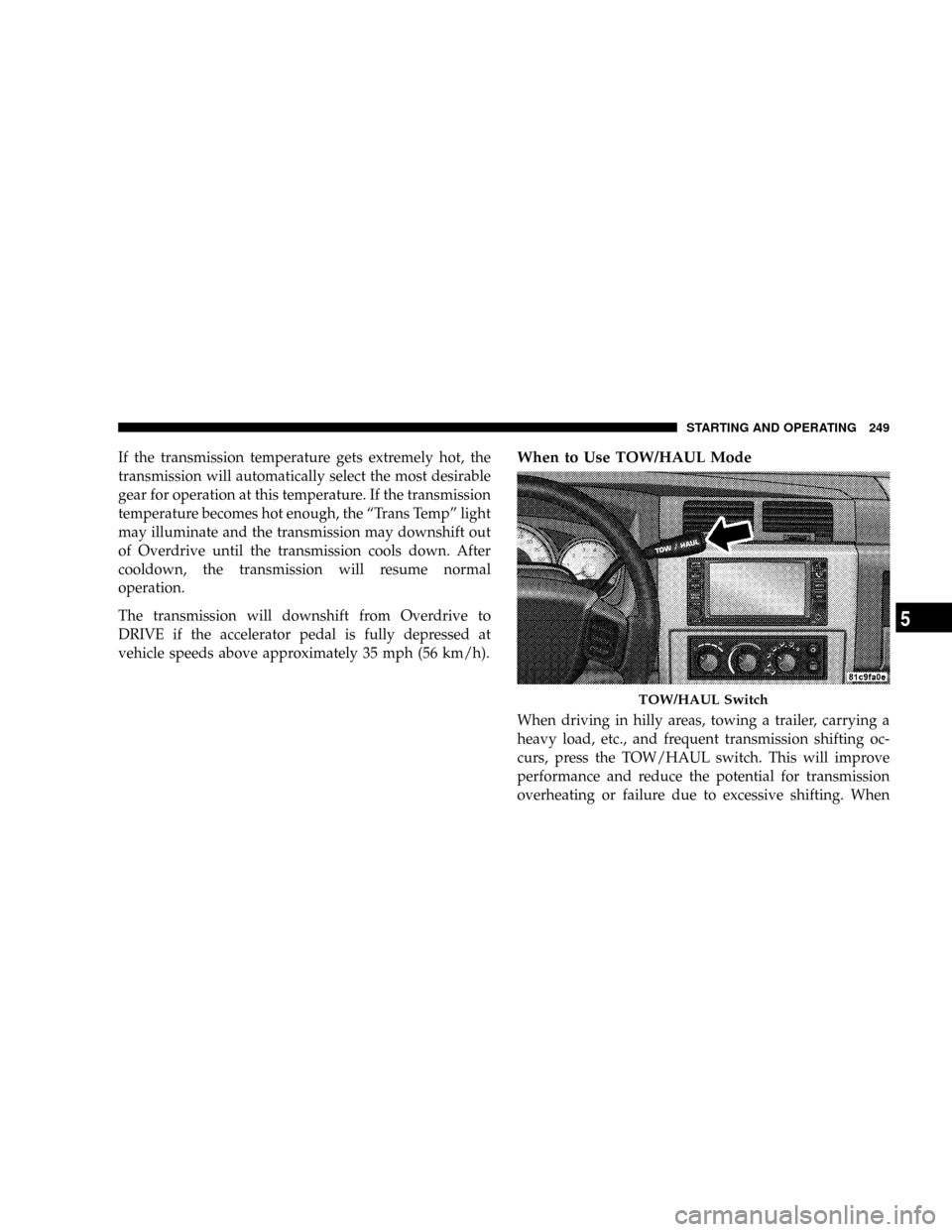
vehicle speeds above approximately 35 mph (56 km/h).When to Use TOW/HAUL Mode
When driving in hilly areas, towing a trailer, carrying a
heavy load, etc., and frequent transmission shifting oc-
curs, press the TOW/HAUL switch. This will improve
performance and reduce the potential for transmission
overheating or failure due to excessive shifting. When
TOW/HAUL Switch
STARTING AND OPERATING 249
5
Page 252 of 449
operating in TOW/HAUL mode, 5th gear (if equipped) is
disabled and 2-3 and 3-4 shift patterns are modified.
Shifts into Overdrive (4th gear) are allowed during
steady cruise (for improved fuel economy), and auto-
matic closed-throttle downshifts to 3rd gear (for im-
proved braking) will occur during steady braking.
The TOW/HAUL light will illuminate in the instrument
cluster to indicate when the switch has been activated.
Pressing the switch a second time restores normal opera-
tion. If the TOW/HAUL mode is desired, the switch must
be pressed each time the engine is started.
Torque Converter Clutch
A feature designed to improve fuel economy is included
in all automatic transmissions. A clutch, within the
torque converter, engages automatically at a calibrated
speed at light throttle. It engages at higher speeds under
heavier acceleration. This may result in a slightly differ-
ent feeling or response during normal operation in highgear. When the vehicle speed drops below a calibrated
speed, or during acceleration, the clutch automatically
and smoothly disengages. The feature is operational in
Overdrive and in Drive.
NOTE:The torque converter clutch will not engage
until the transmission fluid and engine coolant are warm
(usually after 1-3 miles [1.6 - 4.8 km] of driving). Because
the engine speed is higher when the torque converter
clutch is not engaged, it may seem as if the transmission
is not shifting into Overdrive when cold. This is normal.
Pressing the TOW/HAUL switch, when the transmission
is sufficiently warm, will demonstrate that the transmis-
sion is able to shift into, and out of, Overdrive.
NOTE:If the vehicle has not been driven in several
days, the first few seconds of operation after shifting the
transmission into gear may seem sluggish. This is due to
the fluid partially draining from the torque converter into
the transmission. This condition is normal and will not
250 STARTING AND OPERATING
Page 253 of 449
cause damage to the transmission. The torque converter
will refill within five seconds of shifting from PARK into
any other gear position.
FOUR-WHEEL DRIVE OPERATION
NV233/243 GII Transfer Case Operating
Information/Precautions
The NV233/243 is an electric-shift transfer case and is
operated by the 4WD Control Switch (Transfer Case
Switch), which is located on the instrument panel.
The NV233/243 transfer case provides four mode posi-
tions: 2 (rear) wheel drive high range, 4 wheel drive high
range, 4 wheel drive low range, and NEUTRAL.
The NV233/243 transfer case is designed to be driven in
the 2-wheel drive position (2WD) for normal street and
highway conditions (dry hard-surfaced roads).
When additional traction is required, the transfer case
4WD LOCK and 4WD LOW positions can be used to lockthe front and rear driveshafts together and force the front
and rear wheels to rotate at the same speed. This is
accomplished by rotating the 4WD Control Switch to the
desired position - Refer to ªShifting Procedureº in this
section. The 4WD LOCK and 4WD LOW positions are
designed for loose or slippery road surfaces only. Driving
in the 4WD LOCK and 4WD LOW positions on dry
hard-surfaced roads may cause increased tire wear and
damage to the driveline components.
The transfer case NEUTRAL position is selected by
depressing the recessed button located on the lower
left-hand corner of the 4WD Control Switch.
NOTE:The transfer case NEUTRAL position is to be
used for recreational towing only. Refer to ªRecreational
Towingº in Section 5 for specific procedures on shifting
into and out of NEUTRAL.
STARTING AND OPERATING 251
5
Page 259 of 449
4. After the desired position indicator light is ON (not
flashing), shift transmission back into gear (release clutch
on manual transmissions).
NOTE:If steps 1 or 2, of either the Preferred or Alternate
Procedure, are not satisfied prior to attempting the shift,
or if they no longer are being met while the shift attempt
is in process, then the indicator light will flash and the
current transfer case position will be maintained. To retry
the selection, turn the control knob back to the current
position, wait five seconds, and retry shift.
NOTE:The ignition key must be ON for a shift to take
place and for the position indicator lights to be operable.
If the key is not ON then the shift will not take place and
no position indicator lights will be on or flashing.NV 244 Generation II Transfer Case Operating
Information / Precautions
The NV 244 Generation II is an electric-shift transfer case
and is operated by the 4WD Control Switch, which is
located on the instrument panel.
The NV 244 Generation II transfer case provides four
mode positions - Normal four-wheel drive (4WD) high
range, 4-wheel-drive lock (4WD LOCK), 4-wheel drive
low (4WD LOW) range, and NEUTRAL.
This transfer case is equipped with an inter-axle differ-
ential that allows driving the vehicle in the normal
all-wheel drive position (4WD) at all times on any given
road surface, including dry, hard-surfaced roads. The
4WD mode allows the front and rear wheels to rotate at
different speeds. This eliminates driveline binding and
component wear normally associated with driving the
vehicle in the 4WD LOCK position on dry, hard-surfaced
STARTING AND OPERATING 257
5
Page 301 of 449
CAUTION!
DO NOT use gasoline containing Methanol or E85
Ethanol. Use of these blends may result in starting
and drivability problems and may damage critical
fuel system components.
Problems that result from using methanol/gasoline or
E85 Ethanol blends are not the responsibility of the
manufacturer. While MTBE is an oxygenate made from
Methanol, it does not have the negative effects of
Methanol.
E-85 Usage In Non-Flex Fuel Vehicles
Non-FFV vehicles are compatible with gasoline contain-
ing 10% ethanol (E10). Gasoline with higher ethanol
content may void the vehicle's warranty.
If a Non-FFV vehicle is inadvertently fueled with E-85
fuel, the engine will have some or all of these symptoms:
²operate in a lean mode
²OBD II ªMalfunction Indicator Lightº on
²poor engine performance
²poor cold start and cold drivability
²increased risk for fuel system component corrosion
To fix a Non-FFV vehicle inadvertently fueled once with
E-85 perform the following:
²drain the fuel tank (see your authorized dealer)
²change the engine oil and oil filter
²disconnect and reconnect the battery to reset the
engine controller memory
More extensive repairs will be required for prolonged
exposure to E-85 fuel.
STARTING AND OPERATING 299
5